Solved Weird blue border around my themes?

ProbleMatic

New member
Member
VIP
Local time
12:25 AM
Messages
129
Location
Rhode Island
So I just learned how to install 3rd party windows themes, and when I installed this new theme and then restarted and apply the new style.. the themes i install keep giving me these weird blue borders around the windows, any idea why this is happening? All the other elements of the window show just fine, just the window border for some reason.
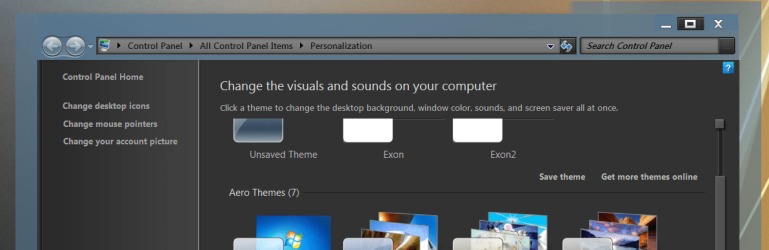
Weird Borders.PNG
 

My Computer My Computer

Computer type
PC/Desktop
Computer Manufacturer/Model Number
Custom
OS
Windows 7 Home Premium 64bit
CPU
Intel Core 2 Quad Q9550 @ 2.83GHz
Motherboard
Gigabyte Technology Co., Ltd. EP45-UD3L
Memory
8.0GB Dual-Channel DDR2 @ 333MHz (5-5-5-15)
Graphics Card(s)
NVIDIA GeForce GTX 660
Sound Card
C-Media PCI Audio Device
Monitor(s) Displays
2 - DELL 24 LED Monitor & Samsung SyncMaster 2233
Screen Resolution
1920x1080
Hard Drives
313GB Western Digital WDC WD3200AAJS-00L7A0 ATA Device (SATA)

977GB Western Digital WDC WD10EADS-00M2B0 ATA Device (SATA)
Keyboard
Logitech G105 Gaming Keyboard
Mouse
ENHANCE GX-M1 High Precision 6-Button Optical Gaming Mouse
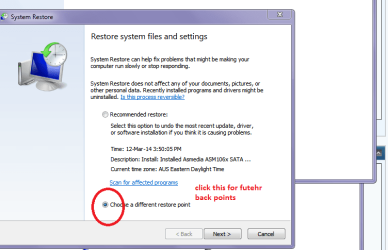
Do you mean that very outside one?? If so do a system restore and try again:)

Go Back up and restore in the Control panel and choose see my pic if yo want points further back
 

Attachments

  • RESTORE.PNG
    RESTORE.PNG
    20 KB · Views: 3

My Computer My Computer

Computer type
PC/Desktop
Computer Manufacturer/Model Number
Own build (new) Desk1 / Asus ROG Win 7 / Desk2 1st build
OS
Desk1 7 Home Prem / Desk2 10 Pro / Main lap Asus ROG 10 Pro 2 laptop Toshiba 7 Pro Asus P2520 7 & 10
CPU
Desk1 i5 3750K / Laptop i7 GTX 860M / Desk2 i5 2500
Motherboard
Desk1 Asus P877-V / Desk2 Gigabyte H67 UD3H / Laptop ?
Memory
Desk1 8GB (1866) / Desk2 16GB (1333) / Laptop 8Gb DDR3
Graphics Card(s)
Desk 1& 2NVidia GTX 650 & Laptops on board Intel
Sound Card
Desk 1 & 2 -XONAR DG Realtek High Def audio Laptop
Monitor(s) Displays
Desk 1 Benq HD 2450 / Desk2 Philips 24" / Laptop 17.5"
Screen Resolution
1920x1080 D1 & D2 & Laptop 1
Hard Drives
Desk1 Samsung 120GB 830 SSD
Asus ROG 256GB 850 Pro SSD
Desk2 Samsung 840 256 SSD
Toshiba 120GB EVO
PSU
Desk 1 Corsair HX 1050/ Laptop ? / Desk 2 Corsair HX 650
Case
Desk 1 Cooler HAF XM ? Toshiba laptop / Desk2 Coolermaster
Cooling
Fans on all Desk1 -2 Desk2 - all Coolermasters 5 Laptop ?
Keyboard
Desk 1 MS Sidewinder X6 Desk 2 MS Sidewinder X 4
Mouse
Desk 1&2 - Gigabyte MS 900 gamer - laptop - Logitec wireless
Internet Speed
ADSL2+
Other Info
One other Desktop (tester) and spare Toshba laptop both with SSD's
Running Kaspersky 2016 ISS on all machines config'd identically
Logitec audio stereo systems on each machine (x3)
Canon MG5250MFC
Router/modem TP-Link running WPA2SK
Post a link to the theme and I will look at it.

Jerry
 

My Computer My Computer

Computer type
Laptop
Computer Manufacturer/Model Number
Sager NP9170
OS
Win 7 Pro x64 / Win 10 Pro
CPU
Intel(R) Core(TM) i7-3630QM CPU @ 2.40GHz
Motherboard
CLEVO P170EM
Memory
12 GB
Graphics Card(s)
(1) Intel(R) HD Graphics 4000 (2) NVIDIA GeForce GTX 675M
Sound Card
(1) Realtek High Definition Audio (2) Intel(R) Display Aud
Monitor(s) Displays
17.3
Screen Resolution
1920x1080
Hard Drives
(1) Samsung 860 EVO 500GB(OS) (1) Samsung 860 EVO 500GB(Data)
Keyboard
Backlite
Antivirus
MSE, Malwarebytes Pro
Browser
Firefox
Other Info
DESKTOP: Custom-built.
OS: Win 10 Pro x64.
CASE: Rosewill R5.
CPU: Intel I5 4670K CPU @ 3.40GHz.
CPU COOLER: Cool Master Hyper 212 EVO.
MOTHERBOARD: Asus Z87-A.
MEMORY: Kingston HyperX 2x4 GB.
GPU: Nvidia Geforce 650 TI.
PSU: Corsair TX750.
DRIVES: (1) Samsung 840 120 GB SSD (2) Western Digital blue 500 GB 7200 RPM.

My Computer My Computer

Computer type
PC/Desktop
Computer Manufacturer/Model Number
Custom
OS
Windows 7 Home Premium 64bit
CPU
Intel Core 2 Quad Q9550 @ 2.83GHz
Motherboard
Gigabyte Technology Co., Ltd. EP45-UD3L
Memory
8.0GB Dual-Channel DDR2 @ 333MHz (5-5-5-15)
Graphics Card(s)
NVIDIA GeForce GTX 660
Sound Card
C-Media PCI Audio Device
Monitor(s) Displays
2 - DELL 24 LED Monitor & Samsung SyncMaster 2233
Screen Resolution
1920x1080
Hard Drives
313GB Western Digital WDC WD3200AAJS-00L7A0 ATA Device (SATA)

977GB Western Digital WDC WD10EADS-00M2B0 ATA Device (SATA)
Keyboard
Logitech G105 Gaming Keyboard
Mouse
ENHANCE GX-M1 High Precision 6-Button Optical Gaming Mouse

My Computer My Computer

Computer type
Laptop
Computer Manufacturer/Model Number
Sager NP9170
OS
Win 7 Pro x64 / Win 10 Pro
CPU
Intel(R) Core(TM) i7-3630QM CPU @ 2.40GHz
Motherboard
CLEVO P170EM
Memory
12 GB
Graphics Card(s)
(1) Intel(R) HD Graphics 4000 (2) NVIDIA GeForce GTX 675M
Sound Card
(1) Realtek High Definition Audio (2) Intel(R) Display Aud
Monitor(s) Displays
17.3
Screen Resolution
1920x1080
Hard Drives
(1) Samsung 860 EVO 500GB(OS) (1) Samsung 860 EVO 500GB(Data)
Keyboard
Backlite
Antivirus
MSE, Malwarebytes Pro
Browser
Firefox
Other Info
DESKTOP: Custom-built.
OS: Win 10 Pro x64.
CASE: Rosewill R5.
CPU: Intel I5 4670K CPU @ 3.40GHz.
CPU COOLER: Cool Master Hyper 212 EVO.
MOTHERBOARD: Asus Z87-A.
MEMORY: Kingston HyperX 2x4 GB.
GPU: Nvidia Geforce 650 TI.
PSU: Corsair TX750.
DRIVES: (1) Samsung 840 120 GB SSD (2) Western Digital blue 500 GB 7200 RPM.
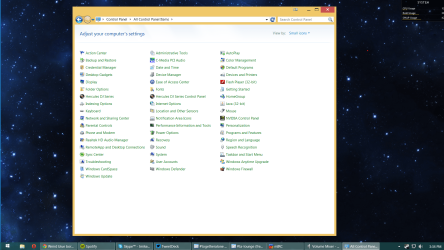
This is what its set at right now:

DPI.PNG

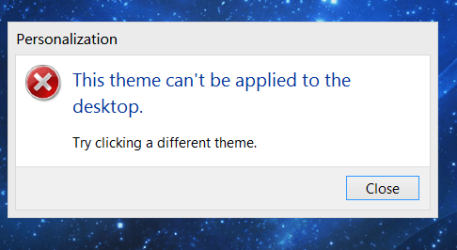
Also with some themes, I can't apply them, it tells me that I cannot apply that theme and to choose another, even though I did use the universal theme patcher and patched all 3 files.

ThemeCan'tBeApplied.PNG

and this is the theme file that I double clicked on:

AdobeTheme.PNG

I'm actually using a skin pack off of http://skinpacks.com right now.

http://skinpacks.com/download/windows-7/win8-1-skinpack/ is the one that I currently have "installed". I know that sounds crazy, but it actually works and everything looks the way it should if I go that route.

Here is the proof:

SkinProof.PNG

The only gripe I have about it is that I cannot change the window color, so I'm stuck with just that yellow window look. Other than that its completely functional.

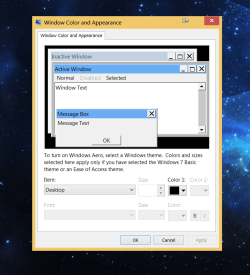
Another thing, I'll go into the themes folder in my system themes folder, double click the theme and this window pops up instead of it saying "please wait" like it should:

Window.PNG


Soooo as you can see, this is quite a headache haha.
 

My Computer My Computer

Computer type
PC/Desktop
Computer Manufacturer/Model Number
Custom
OS
Windows 7 Home Premium 64bit
CPU
Intel Core 2 Quad Q9550 @ 2.83GHz
Motherboard
Gigabyte Technology Co., Ltd. EP45-UD3L
Memory
8.0GB Dual-Channel DDR2 @ 333MHz (5-5-5-15)
Graphics Card(s)
NVIDIA GeForce GTX 660
Sound Card
C-Media PCI Audio Device
Monitor(s) Displays
2 - DELL 24 LED Monitor & Samsung SyncMaster 2233
Screen Resolution
1920x1080
Hard Drives
313GB Western Digital WDC WD3200AAJS-00L7A0 ATA Device (SATA)

977GB Western Digital WDC WD10EADS-00M2B0 ATA Device (SATA)
Keyboard
Logitech G105 Gaming Keyboard
Mouse
ENHANCE GX-M1 High Precision 6-Button Optical Gaming Mouse
Try setting it at 100% to test the Placebo themes out(I could tell by the close,min,max buttons the theme is built for 100%).

Jerry
 

My Computer My Computer

Computer type
Laptop
Computer Manufacturer/Model Number
Sager NP9170
OS
Win 7 Pro x64 / Win 10 Pro
CPU
Intel(R) Core(TM) i7-3630QM CPU @ 2.40GHz
Motherboard
CLEVO P170EM
Memory
12 GB
Graphics Card(s)
(1) Intel(R) HD Graphics 4000 (2) NVIDIA GeForce GTX 675M
Sound Card
(1) Realtek High Definition Audio (2) Intel(R) Display Aud
Monitor(s) Displays
17.3
Screen Resolution
1920x1080
Hard Drives
(1) Samsung 860 EVO 500GB(OS) (1) Samsung 860 EVO 500GB(Data)
Keyboard
Backlite
Antivirus
MSE, Malwarebytes Pro
Browser
Firefox
Other Info
DESKTOP: Custom-built.
OS: Win 10 Pro x64.
CASE: Rosewill R5.
CPU: Intel I5 4670K CPU @ 3.40GHz.
CPU COOLER: Cool Master Hyper 212 EVO.
MOTHERBOARD: Asus Z87-A.
MEMORY: Kingston HyperX 2x4 GB.
GPU: Nvidia Geforce 650 TI.
PSU: Corsair TX750.
DRIVES: (1) Samsung 840 120 GB SSD (2) Western Digital blue 500 GB 7200 RPM.
You were correct, now it looks good! :D

Are there themes I can install with a DPI of larger than 100%? I kinda hate the tinyness of everything. Then again, the tinier size isn't a bad thing either, my desktop has more room for stuff.

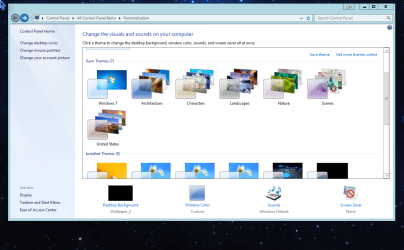
My theme:

Theme.PNG

Also, thanks @ICit2lol. I would have considered those options had the DPI setting not worked for me.
 

My Computer My Computer

Computer type
PC/Desktop
Computer Manufacturer/Model Number
Custom
OS
Windows 7 Home Premium 64bit
CPU
Intel Core 2 Quad Q9550 @ 2.83GHz
Motherboard
Gigabyte Technology Co., Ltd. EP45-UD3L
Memory
8.0GB Dual-Channel DDR2 @ 333MHz (5-5-5-15)
Graphics Card(s)
NVIDIA GeForce GTX 660
Sound Card
C-Media PCI Audio Device
Monitor(s) Displays
2 - DELL 24 LED Monitor & Samsung SyncMaster 2233
Screen Resolution
1920x1080
Hard Drives
313GB Western Digital WDC WD3200AAJS-00L7A0 ATA Device (SATA)

977GB Western Digital WDC WD10EADS-00M2B0 ATA Device (SATA)
Keyboard
Logitech G105 Gaming Keyboard
Mouse
ENHANCE GX-M1 High Precision 6-Button Optical Gaming Mouse
Ok, now I don't understand why I get that error message, and I don't get why the "window color and appearance" (see above post for anyone new to this thread) screen would pop up when applying a theme, do you have any ideas for me there?
 

My Computer My Computer

Computer type
PC/Desktop
Computer Manufacturer/Model Number
Custom
OS
Windows 7 Home Premium 64bit
CPU
Intel Core 2 Quad Q9550 @ 2.83GHz
Motherboard
Gigabyte Technology Co., Ltd. EP45-UD3L
Memory
8.0GB Dual-Channel DDR2 @ 333MHz (5-5-5-15)
Graphics Card(s)
NVIDIA GeForce GTX 660
Sound Card
C-Media PCI Audio Device
Monitor(s) Displays
2 - DELL 24 LED Monitor & Samsung SyncMaster 2233
Screen Resolution
1920x1080
Hard Drives
313GB Western Digital WDC WD3200AAJS-00L7A0 ATA Device (SATA)

977GB Western Digital WDC WD10EADS-00M2B0 ATA Device (SATA)
Keyboard
Logitech G105 Gaming Keyboard
Mouse
ENHANCE GX-M1 High Precision 6-Button Optical Gaming Mouse
Nevermind, I'm set now. Many thanks!
 

My Computer My Computer

Computer type
PC/Desktop
Computer Manufacturer/Model Number
Custom
OS
Windows 7 Home Premium 64bit
CPU
Intel Core 2 Quad Q9550 @ 2.83GHz
Motherboard
Gigabyte Technology Co., Ltd. EP45-UD3L
Memory
8.0GB Dual-Channel DDR2 @ 333MHz (5-5-5-15)
Graphics Card(s)
NVIDIA GeForce GTX 660
Sound Card
C-Media PCI Audio Device
Monitor(s) Displays
2 - DELL 24 LED Monitor & Samsung SyncMaster 2233
Screen Resolution
1920x1080
Hard Drives
313GB Western Digital WDC WD3200AAJS-00L7A0 ATA Device (SATA)

977GB Western Digital WDC WD10EADS-00M2B0 ATA Device (SATA)
Keyboard
Logitech G105 Gaming Keyboard
Mouse
ENHANCE GX-M1 High Precision 6-Button Optical Gaming Mouse
Good to hear you got it figured out.

It's up to the theme maker on how far they go on the DPI Most only do 100%

Jerry
 

My Computer My Computer

Computer type
Laptop
Computer Manufacturer/Model Number
Sager NP9170
OS
Win 7 Pro x64 / Win 10 Pro
CPU
Intel(R) Core(TM) i7-3630QM CPU @ 2.40GHz
Motherboard
CLEVO P170EM
Memory
12 GB
Graphics Card(s)
(1) Intel(R) HD Graphics 4000 (2) NVIDIA GeForce GTX 675M
Sound Card
(1) Realtek High Definition Audio (2) Intel(R) Display Aud
Monitor(s) Displays
17.3
Screen Resolution
1920x1080
Hard Drives
(1) Samsung 860 EVO 500GB(OS) (1) Samsung 860 EVO 500GB(Data)
Keyboard
Backlite
Antivirus
MSE, Malwarebytes Pro
Browser
Firefox
Other Info
DESKTOP: Custom-built.
OS: Win 10 Pro x64.
CASE: Rosewill R5.
CPU: Intel I5 4670K CPU @ 3.40GHz.
CPU COOLER: Cool Master Hyper 212 EVO.
MOTHERBOARD: Asus Z87-A.
MEMORY: Kingston HyperX 2x4 GB.
GPU: Nvidia Geforce 650 TI.
PSU: Corsair TX750.
DRIVES: (1) Samsung 840 120 GB SSD (2) Western Digital blue 500 GB 7200 RPM.
Back
Top