- Local time
- 4:54 PM
- Messages
- 568
I had couple of weird experiences with IE10, nothing major, just things that don't make much sense.
Generally speaking, file downloads are initiated by the browsers and scanned by AV software prior to the end user accessing the file. Emphasis being on generally...
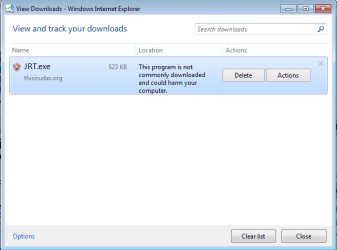
Initiated the download of the junkware removal tool, jre.exe here:
Junkware Removal Tool Download
When the download finished, IE10 gives the option of opening the folder, and doing so results in this error message:
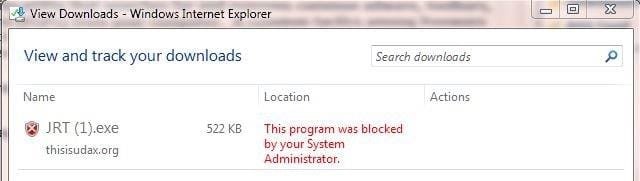
Disabling MSE real-time protection doesn't help, it is still the same error message. Download the same file via Firefox, run the executable with MSE real-time protection enabled, and presto, the program runs just fine. Neither Windows 7, nor MSE blocked executing this program.
At times, IE10 might be detected as IE6, which I don't even remember when I used last. For example, opening this page at Palo Alto website:
https://live.paloaltonetworks.com
Gives me this error:

While this could be on Palo Alto's server side detection engine and/or IE10's settings, nonetheless, it's weird.
Again, this is more of "weird" issue than problem from my perspective and can easily be remediated by using the other three browsers installed on my Windows 7 PC.
Maybe we should have a weird experiences with IE10 thread...
Generally speaking, file downloads are initiated by the browsers and scanned by AV software prior to the end user accessing the file. Emphasis being on generally...
Initiated the download of the junkware removal tool, jre.exe here:
Junkware Removal Tool Download
When the download finished, IE10 gives the option of opening the folder, and doing so results in this error message:
Disabling MSE real-time protection doesn't help, it is still the same error message. Download the same file via Firefox, run the executable with MSE real-time protection enabled, and presto, the program runs just fine. Neither Windows 7, nor MSE blocked executing this program.
At times, IE10 might be detected as IE6, which I don't even remember when I used last. For example, opening this page at Palo Alto website:
https://live.paloaltonetworks.com
Gives me this error:
While this could be on Palo Alto's server side detection engine and/or IE10's settings, nonetheless, it's weird.
Again, this is more of "weird" issue than problem from my perspective and can easily be remediated by using the other three browsers installed on my Windows 7 PC.
Maybe we should have a weird experiences with IE10 thread...
My Computer
- Computer type
- PC/Desktop
- Computer Manufacturer/Model Number
- Custom built at Home
- OS
- Windows 7 64-bit, Windows 8.1 64-bit, OSX El Capitan, Windows 10 (VMware)
- CPU
- Intel i5-3350P 3.1 GHz
- Motherboard
- Gigabyte GA-Z77X-UP5 TH
- Memory
- 16 GBs GSkill Sniper
- Graphics Card(s)
- Radeon HD 7850
- Sound Card
- VIA HD Audio
- Monitor(s) Displays
- Dell U2410 24"
- Screen Resolution
- 1920x1200
- Hard Drives
- 1 x Intel 520 240 GBs
1 x Seagate 1TBs SATA 2.0,
1 x Seagate 1TBs eSATA 2.0
- PSU
- Thermaltake 850W
- Case
- Antec P183
- Cooling
- Noctua NH-D14 Heatsink 2 x 120mm fans, 4 x 120mm case fans
- Keyboard
- Dell Multimedia keyboard
- Mouse
- Logitech Trackball
- Internet Speed
- 28.5 Mb/s