Weird files in Roaming - Example:7c1f506b

Danielzxzx

New member
Member
VIP
Local time
9:16 PM
Messages
233
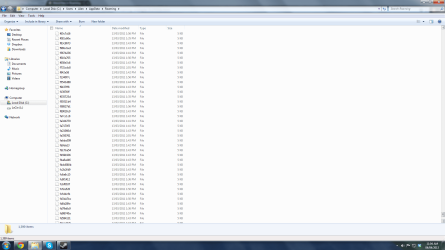
I have all these weird files in my roaming. I have a total of 1299 of these weird files. They are all 4.52KB and all have random letters and numbers. The type for each one is file. All these files have been added on the same day: 13/03/2011. So these files are old.

what are these files?
 

My Computer

OS
Windows 7
Are you, or have you experienced any any problems since that day?
 

My Computer

Computer type
PC/Desktop
Computer Manufacturer/Model Number
Bruce ... somewhere in his 40's
OS
Windows 7 Ultimate 32bit SP1
CPU
Intel(R) Core(TM)2 Quad CPU @ 2.40GHz, 2400 MHz
Motherboard
INTEL/D975XBX2
Memory
4 GB
Graphics Card(s)
ATI Radeon HD 2600 Pro
Monitor(s) Displays
Samsung SyncMaster 914v
Screen Resolution
1280 x 1024
Hard Drives
2/500GB each ... ST3500630AS ATA Device.
One is not connected
PSU
Rocketfish 700 W
Case
G.Skill Gigabyte Chassis
Keyboard
Standard PS/2 Keyboard
Mouse
Microsoft PS/2 Mouse
Internet Speed
DSL
Antivirus
Avira Internet Security
Browser
IE 11
Other Info
ATI HDMI Audio
I have had no problems but I just wanted to know what these files are. Are they safe to remove? They are making my roaming folder really messy.
 

My Computer

OS
Windows 7
I'm bringing back this old topic because I still would like an answer. I have never had any issues with these files except it looks really messy and I don't like a messy computer.

I also have uploaded a screenshot.

Can someone tell if it is safe to remove these files?
 

Attachments

  • Random Files.png
    Random Files.png
    90.6 KB · Views: 14

My Computer

OS
Windows 7
roaming

Hi there,
You could right click on one of them select properties might give you a little more info
 

My Computer

Computer type
PC/Desktop
Computer Manufacturer/Model Number
medionl/Aspire 6930G/acer x55a
OS
W7 home premium 32bit/W7HP 64bit/w10 tp insider ring
CPU
E5300 dual core
Motherboard
medion MS7366
Memory
3gb
Graphics Card(s)
Nvidia Geforce 7100 Nforce 630i
Monitor(s) Displays
avixc
Internet Speed
n (isp resticted to 72)
Antivirus
mse/pands
Browser
palemoon
Other Info
Belkin Fd7050 n USB using Railink RT2870 drivers, more upto date
Ok I have to leave for school like right now so when I get back I'll give the info.
 

My Computer

OS
Windows 7
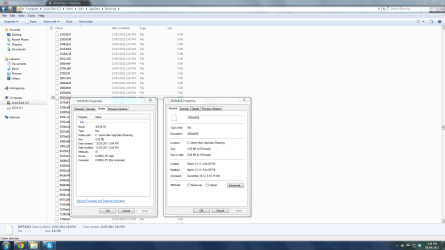
Ok I have uploaded an image with info on these files. Hopefully this helps.
 

Attachments

  • More Info.png
    More Info.png
    106.4 KB · Views: 14

My Computer

OS
Windows 7
Origin: I would compare the date of these files with WindowsUpdate transactions. A second choice would be program installation dates that match. These are likely temporary files created during installation.

Stability: Move these files into a folder outside of Users folder. After a week or so of regular use, if nothing unexplainable happens, then the folder can be deleted.
 

My Computer

OS
Windows 7 Home Premium x64
  • Like
Reactions: whs
Origin: I would compare the date of these files with WindowsUpdate transactions. A second choice would be program installation dates that match. These are likely temporary files created during installation.

Stability: Move these files into a folder outside of Users folder. After a week or so of regular use, if nothing unexplainable happens, then the folder can be deleted.
+1, I think you are right. I just wanted to suggest the same.
 

My Computer

Computer Manufacturer/Model Number
HP, Dell, Gateway, Toshiba - 4 laptops and 2 desktops
OS
Vista, Windows7, Mint Mate, Zorin, Windows 8
CPU
from 1.6GHz Duo to i7
Monitor(s) Displays
2x HP w2207
Hard Drives
5x HDD, 7x SSD, 12x Externals
Keyboard
with trackball - no mices
Mouse
Trackball mice
Internet Speed
DSL 6000
Ok thanks! I moved everything to a new folder. Hopefully nothing bad happens.

Also there is one more are area on my computer that has messy stuff. This should be easier to figure out since the files actually have a proper name.

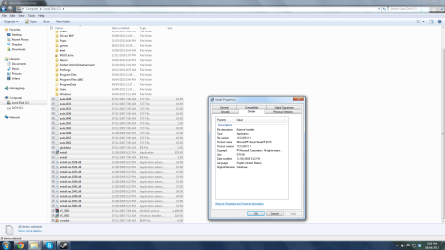
I have a Microsoft Visual Basics 2010 setup file as well as a bunch of other files directly on the C drive. I have uploaded screenshots. Are these files safe to remove?
 

Attachments

  • More Random Files.png
    More Random Files.png
    110.7 KB · Views: 4
  • More More Info.png
    More More Info.png
    126.3 KB · Views: 4

My Computer

OS
Windows 7

My Computer

Computer Manufacturer/Model Number
HP, Dell, Gateway, Toshiba - 4 laptops and 2 desktops
OS
Vista, Windows7, Mint Mate, Zorin, Windows 8
CPU
from 1.6GHz Duo to i7
Monitor(s) Displays
2x HP w2207
Hard Drives
5x HDD, 7x SSD, 12x Externals
Keyboard
with trackball - no mices
Mouse
Trackball mice
Internet Speed
DSL 6000
The eula files are End User Licence Agreement so basically a text file saying you have read the rules etc and relate to installation, this would tie in with the install files. That's all I can help you with I'm afraid.

Andy
 

My Computer

Computer type
PC/Desktop
Computer Manufacturer/Model Number
Titan 8900i Plasma MK II built by Overclockersuk
OS
Windows 7 Home Premium 64bit
CPU
Intel Core i5 3570K @ 3.40GHz
Motherboard
Gigabyte Z77-D3H (Intel Core i5-3570K CPU @ 3.40ghz
Memory
16.0 GB Dual-Channel DDR3 @ 762MHz (11-11-11-28)
Graphics Card(s)
NVIDIA GeForce GTX 670
Sound Card
ASUS Xonar DG
Monitor(s) Displays
Acer P246H
Screen Resolution
1920x1080@60Hz
Hard Drives
112GB INTEL SSDSC2CT120A3 ATA Device (SSD)
932GB Seagate ST1000DM003-1CH162 ATA Device (SATA)
1TB Seagate external HDD.
PSU
Corsair GS 600w PSU
Case
Antec 302 Three Hundred Two Ultimate Gaming Case
Cooling
Alpenfohn K2 Mount Doom CPU Cooler
Keyboard
Microsoft Sidewinder X4
Mouse
Anker 8000dpi gaming mouse
Internet Speed
12mb
Antivirus
Bitdefender Internet Security 2014
Browser
Chrome and IE11
Other Info
Malwarebytes, ADWCleaner, CCleaner, SUPERAntispyware Pro, Revo Uninstaller Pro

Adobe Photoshop CS6/Lightroom 5.3/NIK Software/Keyword Perfect
Back
Top