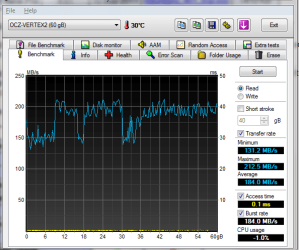
Weird HDtune bench on Vertex 2

stonebear

New member
Member
VIP
Local time
8:25 PM
Messages
161
Is it normal for it to vary so much? It seems excessive!

I was hoping for more of a straight line with some variation but not that much.
 

Attachments

  • hd tune.PNG
    hd tune.PNG
    20.8 KB · Views: 15

My Computer My Computer

At a glance

Windows 7 Ultimate x64Phenom II x4 9654gbAsus GTX 460 768mb
Computer Manufacturer/Model Number
self-built
OS
Windows 7 Ultimate x64
CPU
Phenom II x4 965
Motherboard
GA-MA785GT-UD3H
Memory
4gb
Graphics Card(s)
Asus GTX 460 768mb
Sound Card
Asus Xonar DX
Monitor(s) Displays
BenQ G2222HDL
Hard Drives
OCZ Vertex 2E 60gb

WD 1TB Caviar Green
PSU
Antec True Power New 650w
Case
CM 690 II
Cooling
Hyper 212+
atto.PNG

crystaldisk.PNG

properties.PNG
 

My Computer My Computer

At a glance

Windows 7 Ultimate x64Phenom II x4 9654gbAsus GTX 460 768mb
Computer Manufacturer/Model Number
self-built
OS
Windows 7 Ultimate x64
CPU
Phenom II x4 965
Motherboard
GA-MA785GT-UD3H
Memory
4gb
Graphics Card(s)
Asus GTX 460 768mb
Sound Card
Asus Xonar DX
Monitor(s) Displays
BenQ G2222HDL
Hard Drives
OCZ Vertex 2E 60gb

WD 1TB Caviar Green
PSU
Antec True Power New 650w
Case
CM 690 II
Cooling
Hyper 212+
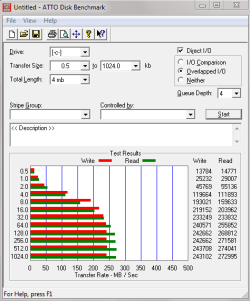
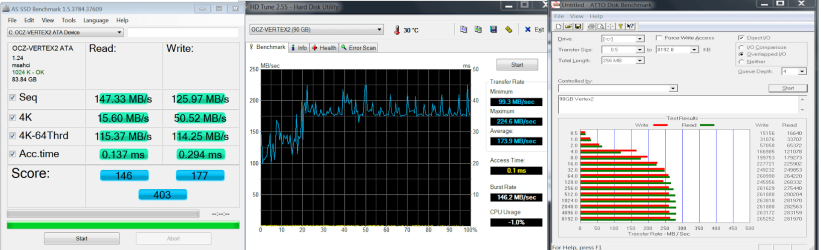
The numbers look about right. Download AS SSD Just open it but don't run thr test. Look in the top left hans corner, it will tell you your alignment and the AHCI driver. If the alignment is wrong it will tell you. With Vertex and most SSDs, running too many tests will degrade the performance. You should start from a cold boot and let it idle on the login page for 2 hours each week. It does its 'garbage collection' that way and will keep performance up. If it helps, here are some tests on my 90GB vertex2
Vertex2 3 Tests.png
 

My Computers My Computers

  • At a glance

    Windows 11 ProRyzen 9 5900X32GB G Skill DDR4-3600EVGA RTX 3080 FTW 3 Ultra
    Computer type
    PC/Desktop
    Computer Manufacturer/Model Number
    ALWAYS UNDER CONSTRUCTION
    OS
    Windows 11 Pro
    CPU
    Ryzen 9 5900X
    Motherboard
    Asus X570 Crosshair Viii Hero
    Memory
    32GB G Skill DDR4-3600
    Graphics Card(s)
    EVGA RTX 3080 FTW 3 Ultra
    Sound Card
    On Board/Sennheiser PC37X Headset
    Monitor(s) Displays
    3 X Asus 27"
    Screen Resolution
    2560x1440
    Hard Drives
    2 X 1 TB NVME drives
    PSU
    EVGA 850
    Case
    Phanteks Eclipse P400A
    Cooling
    EVGA 280 AIO
    Keyboard
    Logitech G510s/ Logitech G13
    Mouse
    Logitech G502
    Internet Speed
    24/1
    Antivirus
    ESET/MBAM Pro/SAS Pro
    Browser
    Chrome/ Firefox/ Edge
  • At a glance

    Windows 11 ProIntel Ultra 9 288V32 GB LPDDR5X 8533
    Computer type
    Laptop
    System Manufacturer/Model Number
    Dell 16 Plus
    OS
    Windows 11 Pro
    CPU
    Intel Ultra 9 288V
    Memory
    32 GB LPDDR5X 8533
    Monitor(s) Displays
    16" Mini-LED HDR600 Touch 90 Hz
    Screen Resolution
    2560X1600
    Hard Drives
    1 TB NVME
Thanks essenbe. :)

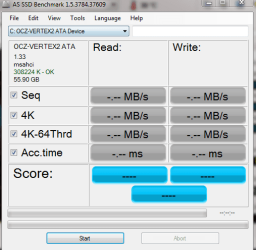
Here is the snip.
 

Attachments

  • asssd.PNG
    asssd.PNG
    15.6 KB · Views: 2

My Computer My Computer

At a glance

Windows 7 Ultimate x64Phenom II x4 9654gbAsus GTX 460 768mb
Computer Manufacturer/Model Number
self-built
OS
Windows 7 Ultimate x64
CPU
Phenom II x4 965
Motherboard
GA-MA785GT-UD3H
Memory
4gb
Graphics Card(s)
Asus GTX 460 768mb
Sound Card
Asus Xonar DX
Monitor(s) Displays
BenQ G2222HDL
Hard Drives
OCZ Vertex 2E 60gb

WD 1TB Caviar Green
PSU
Antec True Power New 650w
Case
CM 690 II
Cooling
Hyper 212+
What is 308224k?

I have a terrible feeling that it should be 1024k......:o
 

My Computer My Computer

At a glance

Windows 7 Ultimate x64Phenom II x4 9654gbAsus GTX 460 768mb
Computer Manufacturer/Model Number
self-built
OS
Windows 7 Ultimate x64
CPU
Phenom II x4 965
Motherboard
GA-MA785GT-UD3H
Memory
4gb
Graphics Card(s)
Asus GTX 460 768mb
Sound Card
Asus Xonar DX
Monitor(s) Displays
BenQ G2222HDL
Hard Drives
OCZ Vertex 2E 60gb

WD 1TB Caviar Green
PSU
Antec True Power New 650w
Case
CM 690 II
Cooling
Hyper 212+
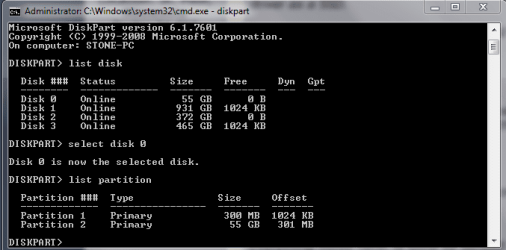
Oh boy, it is formatted to 310mb and not 1024 kb - how did that happen? I secure erased and then let Windows installer do it's thing -apart from, I extended the System reserved to 300mb.

I should have just done what you advised! :(

I don't suppose I can reformat it using diskpart and then restore the image I took with Macrium?

Will Macrium be "expecting" a 301mb formatted disk? lol
 

Attachments

  • diskpart.PNG
    diskpart.PNG
    11.8 KB · Views: 9

My Computer My Computer

At a glance

Windows 7 Ultimate x64Phenom II x4 9654gbAsus GTX 460 768mb
Computer Manufacturer/Model Number
self-built
OS
Windows 7 Ultimate x64
CPU
Phenom II x4 965
Motherboard
GA-MA785GT-UD3H
Memory
4gb
Graphics Card(s)
Asus GTX 460 768mb
Sound Card
Asus Xonar DX
Monitor(s) Displays
BenQ G2222HDL
Hard Drives
OCZ Vertex 2E 60gb

WD 1TB Caviar Green
PSU
Antec True Power New 650w
Case
CM 690 II
Cooling
Hyper 212+
You obviously have the 100MB partition. But, anything divisable by 4 is OK, and that number is.

Use diskpart
type diskpart
list disk
select disk 1(or whichever disk # is your SSD)
list partition
(if you have more than 1 select each partition - select partition 1, then select partition 2)
On each one you will get a page listing size and offset. The offset is the alignment.
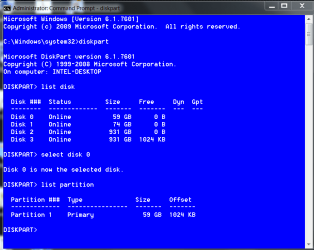
I have only 1 partition. it should look similar to this. with the 100MB partition the 100MB should be 1024 the C partition is usually a weird number.

diskpart.PNG
 

My Computers My Computers

  • At a glance

    Windows 11 ProRyzen 9 5900X32GB G Skill DDR4-3600EVGA RTX 3080 FTW 3 Ultra
    Computer type
    PC/Desktop
    Computer Manufacturer/Model Number
    ALWAYS UNDER CONSTRUCTION
    OS
    Windows 11 Pro
    CPU
    Ryzen 9 5900X
    Motherboard
    Asus X570 Crosshair Viii Hero
    Memory
    32GB G Skill DDR4-3600
    Graphics Card(s)
    EVGA RTX 3080 FTW 3 Ultra
    Sound Card
    On Board/Sennheiser PC37X Headset
    Monitor(s) Displays
    3 X Asus 27"
    Screen Resolution
    2560x1440
    Hard Drives
    2 X 1 TB NVME drives
    PSU
    EVGA 850
    Case
    Phanteks Eclipse P400A
    Cooling
    EVGA 280 AIO
    Keyboard
    Logitech G510s/ Logitech G13
    Mouse
    Logitech G502
    Internet Speed
    24/1
    Antivirus
    ESET/MBAM Pro/SAS Pro
    Browser
    Chrome/ Firefox/ Edge
  • At a glance

    Windows 11 ProIntel Ultra 9 288V32 GB LPDDR5X 8533
    Computer type
    Laptop
    System Manufacturer/Model Number
    Dell 16 Plus
    OS
    Windows 11 Pro
    CPU
    Intel Ultra 9 288V
    Memory
    32 GB LPDDR5X 8533
    Monitor(s) Displays
    16" Mini-LED HDR600 Touch 90 Hz
    Screen Resolution
    2560X1600
    Hard Drives
    1 TB NVME
Oh boy, it is formatted to 310mb and not 1024 kb - how did that happen? I secure erased and then let Windows installer do it's thing -apart from, I extended the System reserved to 300mb.

I should have just done what you advised! :(

No, that is the typical install when windows issues the 100MB partition. On As SSD, you notise it is in green meaning the alignment is OK.
 

My Computers My Computers

  • At a glance

    Windows 11 ProRyzen 9 5900X32GB G Skill DDR4-3600EVGA RTX 3080 FTW 3 Ultra
    Computer type
    PC/Desktop
    Computer Manufacturer/Model Number
    ALWAYS UNDER CONSTRUCTION
    OS
    Windows 11 Pro
    CPU
    Ryzen 9 5900X
    Motherboard
    Asus X570 Crosshair Viii Hero
    Memory
    32GB G Skill DDR4-3600
    Graphics Card(s)
    EVGA RTX 3080 FTW 3 Ultra
    Sound Card
    On Board/Sennheiser PC37X Headset
    Monitor(s) Displays
    3 X Asus 27"
    Screen Resolution
    2560x1440
    Hard Drives
    2 X 1 TB NVME drives
    PSU
    EVGA 850
    Case
    Phanteks Eclipse P400A
    Cooling
    EVGA 280 AIO
    Keyboard
    Logitech G510s/ Logitech G13
    Mouse
    Logitech G502
    Internet Speed
    24/1
    Antivirus
    ESET/MBAM Pro/SAS Pro
    Browser
    Chrome/ Firefox/ Edge
  • At a glance

    Windows 11 ProIntel Ultra 9 288V32 GB LPDDR5X 8533
    Computer type
    Laptop
    System Manufacturer/Model Number
    Dell 16 Plus
    OS
    Windows 11 Pro
    CPU
    Intel Ultra 9 288V
    Memory
    32 GB LPDDR5X 8533
    Monitor(s) Displays
    16" Mini-LED HDR600 Touch 90 Hz
    Screen Resolution
    2560X1600
    Hard Drives
    1 TB NVME
Oh boy, it is formatted to 310mb and not 1024 kb - how did that happen? I secure erased and then let Windows installer do it's thing -apart from, I extended the System reserved to 300mb.

I should have just done what you advised! :(

No, that is the typical install when windows issues the 100MB partition. On As SSD, you notise it is in green meaning the alignment is OK.

Another panic avoided, lol.

Thanks :)
 

My Computer My Computer

At a glance

Windows 7 Ultimate x64Phenom II x4 9654gbAsus GTX 460 768mb
Computer Manufacturer/Model Number
self-built
OS
Windows 7 Ultimate x64
CPU
Phenom II x4 965
Motherboard
GA-MA785GT-UD3H
Memory
4gb
Graphics Card(s)
Asus GTX 460 768mb
Sound Card
Asus Xonar DX
Monitor(s) Displays
BenQ G2222HDL
Hard Drives
OCZ Vertex 2E 60gb

WD 1TB Caviar Green
PSU
Antec True Power New 650w
Case
CM 690 II
Cooling
Hyper 212+
So, how would one know if the SSD is aligned without AS SSD? Would the format number be something not divisible by 4?
 

My Computer My Computer

At a glance

Windows 7 Ultimate x64Phenom II x4 9654gbAsus GTX 460 768mb
Computer Manufacturer/Model Number
self-built
OS
Windows 7 Ultimate x64
CPU
Phenom II x4 965
Motherboard
GA-MA785GT-UD3H
Memory
4gb
Graphics Card(s)
Asus GTX 460 768mb
Sound Card
Asus Xonar DX
Monitor(s) Displays
BenQ G2222HDL
Hard Drives
OCZ Vertex 2E 60gb

WD 1TB Caviar Green
PSU
Antec True Power New 650w
Case
CM 690 II
Cooling
Hyper 212+
Diskpart will tell the alignment. the offset is the alignment.
 

My Computers My Computers

  • At a glance

    Windows 11 ProRyzen 9 5900X32GB G Skill DDR4-3600EVGA RTX 3080 FTW 3 Ultra
    Computer type
    PC/Desktop
    Computer Manufacturer/Model Number
    ALWAYS UNDER CONSTRUCTION
    OS
    Windows 11 Pro
    CPU
    Ryzen 9 5900X
    Motherboard
    Asus X570 Crosshair Viii Hero
    Memory
    32GB G Skill DDR4-3600
    Graphics Card(s)
    EVGA RTX 3080 FTW 3 Ultra
    Sound Card
    On Board/Sennheiser PC37X Headset
    Monitor(s) Displays
    3 X Asus 27"
    Screen Resolution
    2560x1440
    Hard Drives
    2 X 1 TB NVME drives
    PSU
    EVGA 850
    Case
    Phanteks Eclipse P400A
    Cooling
    EVGA 280 AIO
    Keyboard
    Logitech G510s/ Logitech G13
    Mouse
    Logitech G502
    Internet Speed
    24/1
    Antivirus
    ESET/MBAM Pro/SAS Pro
    Browser
    Chrome/ Firefox/ Edge
  • At a glance

    Windows 11 ProIntel Ultra 9 288V32 GB LPDDR5X 8533
    Computer type
    Laptop
    System Manufacturer/Model Number
    Dell 16 Plus
    OS
    Windows 11 Pro
    CPU
    Intel Ultra 9 288V
    Memory
    32 GB LPDDR5X 8533
    Monitor(s) Displays
    16" Mini-LED HDR600 Touch 90 Hz
    Screen Resolution
    2560X1600
    Hard Drives
    1 TB NVME
Diskpart will tell the alignment. the offset is the alignment.

But how I could I tell if it was aligned or not? What would the offset say if it was not aligned?
 

My Computer My Computer

At a glance

Windows 7 Ultimate x64Phenom II x4 9654gbAsus GTX 460 768mb
Computer Manufacturer/Model Number
self-built
OS
Windows 7 Ultimate x64
CPU
Phenom II x4 965
Motherboard
GA-MA785GT-UD3H
Memory
4gb
Graphics Card(s)
Asus GTX 460 768mb
Sound Card
Asus Xonar DX
Monitor(s) Displays
BenQ G2222HDL
Hard Drives
OCZ Vertex 2E 60gb

WD 1TB Caviar Green
PSU
Antec True Power New 650w
Case
CM 690 II
Cooling
Hyper 212+
Have a look here:
SSD Alignment Calculator | techPowerUp

Its odd for sure, but as already mentioned it is divisible by 4 and so should be OK.


Still, I think Id set it up with just the 100MB system reserved as it does by default.
 

My Computer My Computer

At a glance

Windows 7 Home Premium 64bitIntel Core i7 2700k8GB Mushkin Redline Ridgebacks @1866EVGA GTX570 SC
Computer Manufacturer/Model Number
Custom (Self Build)
OS
Windows 7 Home Premium 64bit
CPU
Intel Core i7 2700k
Motherboard
eVGA P67 SLI
Memory
8GB Mushkin Redline Ridgebacks @1866
Graphics Card(s)
EVGA GTX570 SC
Sound Card
XiFi Titanium HD
Monitor(s) Displays
LG W2453V
Screen Resolution
1920x1080
Hard Drives
Intel 320 80GB -- Intel X25-V 40GB --WD Black 1TB x2 -- WD Blue 640GB
PSU
Seasonic x750
Case
Corsair 600T SE White
Cooling
eVGA Superclocked CPU Cooler
Keyboard
Saitek Cyborg
Antivirus
Kaspersky
Browser
IE
Other Info
LG BD/DVD
Have a look here:
SSD Alignment Calculator | techPowerUp

Its odd for sure, but as already mentioned it is divisible by 4 and so should be OK.


Still, I think Id set it up with just the 100MB system reserved as it does by default.


Thanks for the link. :)

Next time I will do this http://www.sevenforums.com/tutorials/113967-ssd-alignment.html and either have no system reserved or create one bigger than 100mb, the 100mb system reserved has caused me problems previously.
 

My Computer My Computer

At a glance

Windows 7 Ultimate x64Phenom II x4 9654gbAsus GTX 460 768mb
Computer Manufacturer/Model Number
self-built
OS
Windows 7 Ultimate x64
CPU
Phenom II x4 965
Motherboard
GA-MA785GT-UD3H
Memory
4gb
Graphics Card(s)
Asus GTX 460 768mb
Sound Card
Asus Xonar DX
Monitor(s) Displays
BenQ G2222HDL
Hard Drives
OCZ Vertex 2E 60gb

WD 1TB Caviar Green
PSU
Antec True Power New 650w
Case
CM 690 II
Cooling
Hyper 212+
Back
Top