Solved Weird network connection problem.

tedman

New member
Local time
9:13 PM
Messages
12
Location
Netherlands
Hello all,
i have a strange problem with my network adapter. Every time Windows is booted up, i see a yellow triangle in the taskbar, with the message it's connected to an "unidentified network". I thought it was my computer, so i looked at another computer. This PC didn't have the problem. When this problem drove me mad, i decided it must have been Windows 7, so i wiped it, and reinstalled it. After a few reboots, the problem just was there again. This is what I've done so far:

  • Checked network cables
  • Updated all drivers
  • Replaced the router
  • Re-installed Windows 7
  • Searched for the solution.
My configuration is:

  • Asus P5B Premium mainboard (2 NIC's, 1 disabled in BIOS)
  • Windows 7 Ultimate x64
  • Eminent EM4450 Router
Any help is very much appreciated.
 

My Computer

Computer Manufacturer/Model Number
Self build
OS
Windows 7 Ultimate x64
CPU
Intel Core2Quad Q8200
Motherboard
Asus P5B Premium
Memory
GeiL 2x2GB
Graphics Card(s)
Nvidia GeForce 9800GT
Sound Card
Soundmax (Asus onboard)
Monitor(s) Displays
LG W2241S 22"
Hard Drives
2x Western Digital WD2500YS-01SHB1 (Raid0)
Western Digital WD10EARS-22Y5B1 (1TB)
PSU
Kóning 450W
Case
Coolermaster
Cooling
Zalman
Keyboard
Logitech G15 (Orange)
Mouse
A4 Tech X-750F Laser Mouse
Internet Speed
D: 22Mb/s U:4Mb/s
Does the problem go away after a few minutes, after you reboot? Do you have internet access regardless of the warning sysmbol? If so, I wouldn't worry to much about it.

By any chance, do you have any sidebar gadgets that access the internet? I had a similar situation. I had a weather gadget and it seemed to slow down the connection to the internet. After a few minutes, I would connect to the internet w/o any issues.
 

My Computer

Computer Manufacturer/Model Number
HP Pavilion a1540n
OS
Windows 7 Ultimate 64bit
CPU
AMD X2 64bit
Memory
2GB
Graphics Card(s)
ATI 4350
Monitor(s) Displays
Samsung SyncMaster T260HD
The problem persists, unless i do a reset of the adapter (disable/enable in the network center). And i don't have a working internet connection when this symbol is there. Also when the adapter is reset, the symbol goes away. I don't have any sidebar gadgets turned on at moment.
 

My Computer

Computer Manufacturer/Model Number
Self build
OS
Windows 7 Ultimate x64
CPU
Intel Core2Quad Q8200
Motherboard
Asus P5B Premium
Memory
GeiL 2x2GB
Graphics Card(s)
Nvidia GeForce 9800GT
Sound Card
Soundmax (Asus onboard)
Monitor(s) Displays
LG W2241S 22"
Hard Drives
2x Western Digital WD2500YS-01SHB1 (Raid0)
Western Digital WD10EARS-22Y5B1 (1TB)
PSU
Kóning 450W
Case
Coolermaster
Cooling
Zalman
Keyboard
Logitech G15 (Orange)
Mouse
A4 Tech X-750F Laser Mouse
Internet Speed
D: 22Mb/s U:4Mb/s
Hello all,
i have a strange problem with my network adapter. Every time Windows is booted up, i see a yellow triangle in the taskbar, with the message it's connected to an "unidentified network". I thought it was my computer, so i looked at another computer. This PC didn't have the problem. When this problem drove me mad, i decided it must have been Windows 7, so i wiped it, and reinstalled it. After a few reboots, the problem just was there again. This is what I've done so far:

  • Checked network cables
  • Updated all drivers
  • Replaced the router
  • Re-installed Windows 7
  • Searched for the solution.
My configuration is:

  • Asus P5B Premium mainboard (2 NIC's, 1 disabled in BIOS)
  • Windows 7 Ultimate x64
  • Eminent EM4450 Router
Any help is very much appreciated.

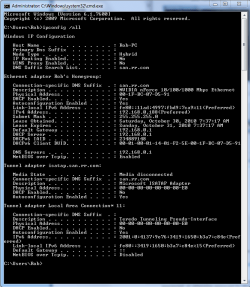
If you can post your ipconfig /all when it says "unidentified network" it would be helpful, example below. I use the built in snipping tool for this. This is usually a router or driver problem, the ipconfig will tell me more.
 

Attachments

  • My ipconfig all.PNG
    My ipconfig all.PNG
    85.7 KB · Views: 32

My Computer

Computer type
PC/Desktop
Computer Manufacturer/Model Number
Home built
OS
Windows 7 Ult, Windows 8.1 Pro,
CPU
Q9650-4.275GHz, E8600 4.5GHz, E6750-3.8GHz
Motherboard
Evga 780i FTW
Memory
G.Skill PC2 9600 1200Mhz 5 5 5 15 2T
Graphics Card(s)
GTX480
Sound Card
Asus Xonar D2
Monitor(s) Displays
HannsG
Screen Resolution
1680X1050
Hard Drives
GSkill Phoenix Pro 120GB SSD
PSU
ThermalTake Toughpower 1000Watt modular
Case
ThermalTake XaserV
Cooling
Xigmatek S1283
Keyboard
Logitech G15
Mouse
Logitech G9
Internet Speed
T1
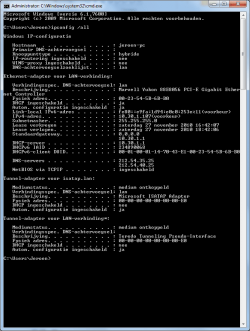
Yes i have my IPconfig, weird thing is that i have two gateways? :eek:
 

Attachments

  • screenshot.png
    screenshot.png
    73.5 KB · Views: 35

My Computer

Computer Manufacturer/Model Number
Self build
OS
Windows 7 Ultimate x64
CPU
Intel Core2Quad Q8200
Motherboard
Asus P5B Premium
Memory
GeiL 2x2GB
Graphics Card(s)
Nvidia GeForce 9800GT
Sound Card
Soundmax (Asus onboard)
Monitor(s) Displays
LG W2241S 22"
Hard Drives
2x Western Digital WD2500YS-01SHB1 (Raid0)
Western Digital WD10EARS-22Y5B1 (1TB)
PSU
Kóning 450W
Case
Coolermaster
Cooling
Zalman
Keyboard
Logitech G15 (Orange)
Mouse
A4 Tech X-750F Laser Mouse
Internet Speed
D: 22Mb/s U:4Mb/s
Yes i have my IPconfig, weird thing is that i have two gateways? :eek:

Yes you have the dreaded 0.0.0.0 default gateway problem although your default gateway shows up below that which is a little different than normal.

This usually means that your router needs a firmware update to work with Windows 7. If you can find more recent firmware for your router you should update the firmware.

You can sometimes get around the problem by typing in the proper default gateway manually. The link below shows you how to do this.

Windows 7 Unidentified Network, Limited Access, No Internet Connection Problem Resolved
 

My Computer

Computer type
PC/Desktop
Computer Manufacturer/Model Number
Home built
OS
Windows 7 Ult, Windows 8.1 Pro,
CPU
Q9650-4.275GHz, E8600 4.5GHz, E6750-3.8GHz
Motherboard
Evga 780i FTW
Memory
G.Skill PC2 9600 1200Mhz 5 5 5 15 2T
Graphics Card(s)
GTX480
Sound Card
Asus Xonar D2
Monitor(s) Displays
HannsG
Screen Resolution
1680X1050
Hard Drives
GSkill Phoenix Pro 120GB SSD
PSU
ThermalTake Toughpower 1000Watt modular
Case
ThermalTake XaserV
Cooling
Xigmatek S1283
Keyboard
Logitech G15
Mouse
Logitech G9
Internet Speed
T1
Thanks for your reaction,
after i applied the solution of entering the gateway manually, the problem was gone. Thanks for that!
Also i searched for an update on the net for my router which is an Eminent EM4450. But the last firmware available is 3.5.1 Build 081107 Rel.42330n, which was already installed by default on my router.
Also to be sure i checked the network cables including the RJ45 connectors, though the connectors were in good shape, the cable was not. i discovered that 1 of the internal wires of the cable was snapped, which may have caused this problem. So i'm going to cut a piece of, and rewire the part, and see if it fixes the problem. I will post the result.
 

My Computer

Computer Manufacturer/Model Number
Self build
OS
Windows 7 Ultimate x64
CPU
Intel Core2Quad Q8200
Motherboard
Asus P5B Premium
Memory
GeiL 2x2GB
Graphics Card(s)
Nvidia GeForce 9800GT
Sound Card
Soundmax (Asus onboard)
Monitor(s) Displays
LG W2241S 22"
Hard Drives
2x Western Digital WD2500YS-01SHB1 (Raid0)
Western Digital WD10EARS-22Y5B1 (1TB)
PSU
Kóning 450W
Case
Coolermaster
Cooling
Zalman
Keyboard
Logitech G15 (Orange)
Mouse
A4 Tech X-750F Laser Mouse
Internet Speed
D: 22Mb/s U:4Mb/s
Thanks for your reaction,
after i applied the solution of entering the gateway manually, the problem was gone. Thanks for that!
Also i searched for an update on the net for my router which is an Eminent EM4450. But the last firmware available is 3.5.1 Build 081107 Rel.42330n, which was already installed by default on my router.
Also to be sure i checked the network cables including the RJ45 connectors, though the connectors were in good shape, the cable was not. i discovered that 1 of the internal wires of the cable was snapped, which may have caused this problem. So i'm going to cut a piece of, and rewire the part, and see if it fixes the problem. I will post the result.

Yes, entering the gateway manually goes around DHCP problems with the router but I suppose a broken wire might also cause problems but I'm not sure if it will make the default gateway do strange things or not.

Anyway I'm glad the manual default gateway entry helped, let me know if fixing the wire changes anything. :)
 

My Computer

Computer type
PC/Desktop
Computer Manufacturer/Model Number
Home built
OS
Windows 7 Ult, Windows 8.1 Pro,
CPU
Q9650-4.275GHz, E8600 4.5GHz, E6750-3.8GHz
Motherboard
Evga 780i FTW
Memory
G.Skill PC2 9600 1200Mhz 5 5 5 15 2T
Graphics Card(s)
GTX480
Sound Card
Asus Xonar D2
Monitor(s) Displays
HannsG
Screen Resolution
1680X1050
Hard Drives
GSkill Phoenix Pro 120GB SSD
PSU
ThermalTake Toughpower 1000Watt modular
Case
ThermalTake XaserV
Cooling
Xigmatek S1283
Keyboard
Logitech G15
Mouse
Logitech G9
Internet Speed
T1
Back
Top