Welcome to the Windows 7 Forums Tutorial Section

How to Register to Post
   Note
You do not need to be a registered member of Windows Seven Forums to view or download from the tutorials. You will only need to register to be able to reply to or post a tutorial. The registration is free and easy. No personal information is displayed to the public except for what you decide to post or reveal. We welcome any contructive tutorial comments or ideas. Please see the FAQ page for additional help and questions not covered here.


See Windows Seven Forums Homepage
Register.jpg
Windows Seven Forums Registration Page -- Forum Rules


How to Use Tutorial Toolbar Options
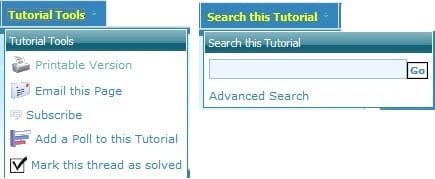
Toolbar.jpg

  • Tutorial Tools - To select one of these options in a opened tutorial.
  • Search this Tutorial - To search for a word or phrase in a opened tutorial.
How to Search for a Tutorial
   Note
You can use the methods below to help search for a tutorial easier.
Search_for_Tutorials.jpg

  • Alphabet Toolbar - This is the top row of letters in the screenshot above. You can click on a letter to be taken to the page(s) of tutorials that titles start with that letter.
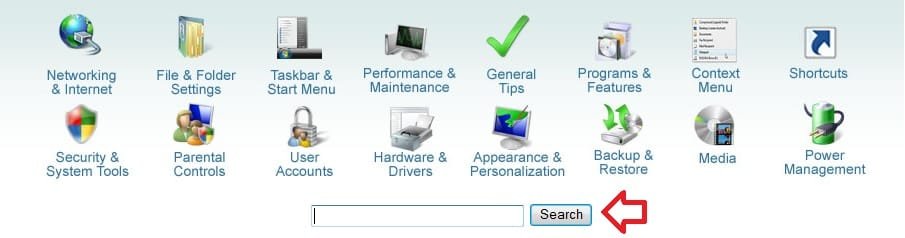
  • Category Icons - These are the category icons in the middle of the screenshot above. You can click on a icon to be taken to the page(s) of tutorials for that category.
  • Tutorial Index - This is a complete list of every tutorial in the tutorial section arranged in alphabetical order by subject with the title of the tutorial.
  • Page Number Bar - This is the Page 1 of ## bar at the bottom right of the screenshot above. It is at the top and bottom right of each tutorial page. You can click on a page number or option to go to that page of all of the tutorials.
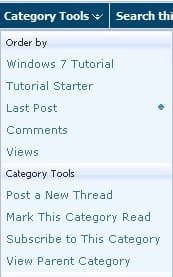
  • Category Tools - You can use Category Tools (See screenshot below) at the top of the tutorial page on the toolbar to select how you want the tutorial pages to be sorted.
Category_Tools.jpg

  • Google Search - At the top of the tutorial homepage, you can type what you want to search for in the search box under the "Category Icons", then click on the Search button to see the search results of tutorials matching it from within Seven Forums. (See screenshot below)
Google_Search.jpg
How to Post a Reply to a Tutorial
   Note
When you click on a listed tutorial from the Tutorial Homepage to open it, you will have these options to post a reply or question inside the tutorial about that specific tutorial.


Post_Reply.jpg
Post Reply is located in the upper and bottom left corner of the tutorial page, and in the bottom right of the posted tutorial. You would click this to post a reply to the tutorial without a quote.

QUOTE.jpg
NOTE: These are located at the bottom right corner of each post in the tutorial. These are pretty much the same as in the main forum.
  • QUOTE - Allows you to post a reply with a quote of that post.
  • Multi - Allows you to post a reply with multiple quotes from posts that you select withing the tutorial. Use this by clicking on the Multi button in the post(s) you want to quote to turn the Multi button yellow as selected. When done click on the Quote button in the last post that you want quoted in your reply post.
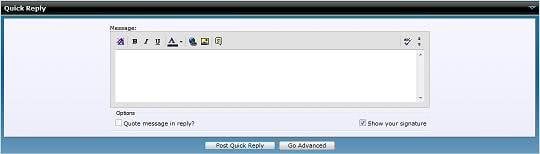
  • Quick - This will take you to the Quick Reply box at the bottom of the tutorial page. It will allow you to make only a quick reply in the tutorial without quoting another post in the tutorial.
Quick_Reply.jpg


How to Create a New Tutorial
   Note
Creating a tutorial is for posting a tip or trick about Windows 7 to share with others to help them. Please do not create a tutorial to ask a question about a problem. The Windows Seven Forums is used for separate questions instead. Please only post a reply or question about a tutorial inside that tutorial instead.
   Warning

Only members that have earned a Power User badge and above are able to create a tutorial.


New_Tutorial.jpg
1. New Tutorial - This is located at the upper and bottom left corners of the Tutorial section, but not while you have a tutorial open. Click on the New Tutorial button to open a create a new tutorial window.

2. Options - To type in a Title and Byline for your tutorial. Type in a desciption of your tutorial in the synopsis section to have it display as a quick description for your tutorial listed in on the Tutorial Homepage. At the bottom select a Category Icon that you want the tutorial to be displayed and sorted under.Options.jpg
3. Post New Tutorial or Edit Post - This is just like posting in the Windows Seven Forums sections. Type in your tutorial here. You can use this link for BB codes to help allow you to add special formatting to your tutorial such as the yellow TIP, blue NOTE, and red WARNING boxes. When done, click on the Submit New Tutorial button at the bottom to post your new or edited tutorial.Post_New_Tutorial.jpg
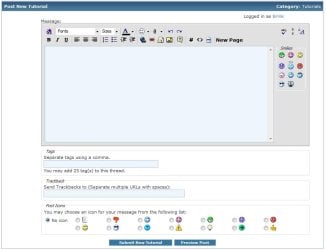
4. To Upload, Attach, and Remove Images - While editing the tutorial/post click on the paperclip icon on the toolbar (see screenshot above).A) Upload - If this is the first time you are uploading images, then it will take you directly to the Manage Attachments window below. If you are uploading additional images, then click on Manage Attachments after clicking on the paper click icon. You will now click on one of the Browse buttons (see screenshot below step 3), browse to where you have the image saved at on your computer and select it. Repeat this until you have added all of the images that you want to upload. When done, click on the Upload button and close the Manage Attachments window.

B) Attach - After uploading your image(s), move your cursor to where you want the image attached to in the tutorial/post. Click on the paperclip icon again (see screenshot below step 3), and select the image that you want to attach.

C) Remove - Click on the paperclip icon (see screenshot below step 3), then click on Manage Attachments. Under the bottom Current attachments section, click on the Remove button for the uploaded image that you want to remove.
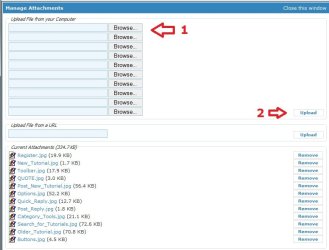
Manage_Attachments.jpg
 

Attachments

  • Buttons.jpg
    Buttons.jpg
    4.5 KB · Views: 5,827
Last edited:
Where is the "Thread Solved" button

I posted a thread concerning a problem I was having with Windows 7 and the problem was solved. It was suggested I indicate the problem was solved by using the "Solved" button but I can't find it!

toglenn
 

My Computer

Computer Manufacturer/Model Number
Homebrew
OS
win 7 Pro - 64 bit
CPU
Intel i7 920 oc'd to 3.6G
Motherboard
ASARock Extreme
Memory
6G
Graphics Card(s)
4770
Sound Card
NA
Monitor(s) Displays
HP2475
Screen Resolution
1920 X 1200
Hard Drives
Intel 80G SSD
Hitachi Enterprise 750G
WD 640G
2TB External Storage
PSU
Corsair 750w
Case
atcs840
Cooling
Noctua U12p
Hello Toglenn,

The tutorial section does not use the "Solved" check mark in it. However in the other forums, you can click on the red triangle icon with the exclamation in it, at the top right corner in the post, to report that the thread was solved. We will then be happy to mark it as so. :)
 

My Computer

Computer type
PC/Desktop
Computer Manufacturer/Model Number
Self built custom
OS
64-bit Windows 11 Pro for Workstations
CPU
Intel i7-8700K OC'd to 5 GHz
Motherboard
ASUS ROG Maximus XI Formula Z390
Memory
64 GB (4x16GB) G.SKILL TridentZ RGB DDR4 3600 MHz
Graphics Card(s)
ASUS ROG-STRIX-GTX1080TI-O11G-GAMING
Sound Card
Integrated
Monitor(s) Displays
2 x Samsung Odyssey G7 27"
Screen Resolution
2560x1440
Hard Drives
1TB Samsung 990 PRO M.2,
4TB Samsung 990 PRO PRO M.2,
TerraMaster F8 SSD Plus NAS
PSU
Seasonic Prime Titanium 850W
Case
Thermaltake Core P3
Cooling
Corsair Hydro H115i
Keyboard
Logitech wireless K800
Mouse
Logitech MX Master 4
Internet Speed
2 Gb/s Download and 100 Mb/s Upload
Antivirus
Malwarebyte Anti-Malware Premium
Browser
Google Chrome
Other Info
Logitech Z625 speaker system,
Logitech BRIO 4K Pro webcam,
HP Color LaserJet Pro MFP M477fdn,
APC SMART-UPS RT 1000 XL - SURT1000XLI,
Galaxy S23 Plus phone
Oh Brother ! So this is the Windows7 Forum Center !
I have just registered and started to feel my way around the maze of links before using it. I am impressed !
Acquired a new PC with Win7 only a few weeks ago and enjoying the exxperience after previous OSs
I have a few Qs up my sleeve so I think Ill find my way around when I'm ready to post.
EdmundoF
Problem. Can't see the SEND button, but here goes..
 

My Computer

Computer Manufacturer/Model Number
DELL 560 Inspiron
OS
Windows7 Home Premium
CPU
Pentium(R)Dual Core CPU E5400
Memory
4.00 GB
Graphics Card(s)
Intel G45/G43 Express Chipset
Sound Card
?
Monitor(s) Displays
Viewsonic A70
Hard Drives
500GB ATA Hard Drive
PSU
?
Case
?
Cooling
?
Oh Brother ! So this is the Windows7 Forum Center !
I have just registered and started to feel my way around the maze of links before using it. I am impressed !
Acquired a new PC with Win7 only a few weeks ago and enjoying the exxperience after previous OSs
I have a few Qs up my sleeve so I think Ill find my way around when I'm ready to post.
EdmundoF
Problem. Can't see the SEND button, but here goes..
Welcome to SF!

If you need anything, you can use the search feature near the top of the page. If you still can't find a tutorial you want, send me or someone else a message, and we'll get it for you.
 

My Computer

Computer Manufacturer/Model Number
Custom
OS
Windows 7 Professional x64
CPU
Intel i7 2600K OC'd @ 4620 MHz
Motherboard
Asus P8Z68-V Pro
Memory
16GB GSkill Sniper 2133 Mhz (4x4GB)
Graphics Card(s)
EVGA GeForce GTX 480 SuperClocked+
Sound Card
Realtek High Definition Audio
Monitor(s) Displays
2x Acer S273HLbmii 27"
Screen Resolution
2 x 1920x1080
Hard Drives
64GB Crucial M4 SSD

Storage: Hitachi 1TB 5400RPM, Samsung 1.5TB 5400RPM
PSU
Corsair HW Series 750w (modular)
Case
Cooler Master HAF 932 Advanced Blue Edition
Cooling
CM Hyper 212+ CPU cooler, 3x 230mm + 1x 140mm case fans
Keyboard
Logitech MK320 (wireless)
Mouse
Logitech MK320 (wireless)
Internet Speed
30 Mb/s : 2 Mb/s
how to create spoiler?
cry.gif
 

My Computer

Computer type
PC/Desktop
OS
windows 7 ultimate x86
CPU
core 2 duo e7500 @3.22Ghz (OC)
Motherboard
asus p5kpl-am se
Memory
4GB DDR2 @ 800MHz
Graphics Card(s)
HD 5570
Sound Card
onboard
Screen Resolution
1024*768
Case
power logic modena gtx2500
Keyboard
komic SR-K8860
Mouse
logitech
Internet Speed
400Kbps

My Computer

Computer type
PC/Desktop
OS
windows 7 ultimate x86
CPU
core 2 duo e7500 @3.22Ghz (OC)
Motherboard
asus p5kpl-am se
Memory
4GB DDR2 @ 800MHz
Graphics Card(s)
HD 5570
Sound Card
onboard
Screen Resolution
1024*768
Case
power logic modena gtx2500
Keyboard
komic SR-K8860
Mouse
logitech
Internet Speed
400Kbps
ok, you're the bos:thumbsup:
 

My Computer

Computer type
PC/Desktop
OS
windows 7 ultimate x86
CPU
core 2 duo e7500 @3.22Ghz (OC)
Motherboard
asus p5kpl-am se
Memory
4GB DDR2 @ 800MHz
Graphics Card(s)
HD 5570
Sound Card
onboard
Screen Resolution
1024*768
Case
power logic modena gtx2500
Keyboard
komic SR-K8860
Mouse
logitech
Internet Speed
400Kbps
Not needed because of the Attachment Manager

WTF are you talking about?
spoiler like in kaskus.us
so we are not bothered by a large size image :o

I don't know if anyone answered your question about SPOILER tags.
You don't need them because of the Attachment Manager.Click on the picture to see the animation.
Upload Pictures 03.gif

It automatically creates a smaller sized preview.

Nope, I have no idea what you're talking about.

Some other sites don't have an Attachment Manager (like the one on this site). :geek:

Those sites normally ask/demand that large images be hidden using SPOILER tags.
This reduces the amount of scrolling required, when viewing threads.
 
Last edited:

My Computer

Computer type
PC/Desktop
Computer Manufacturer/Model Number
n/a
OS
W7 Ultimate SP1, LM19.2 MATE, W10 Home 1703, W10 Pro 1703 VM, #All 64 bit
CPU
AMD Phenom II x6 1100T, 3.3 GHz
Motherboard
ASUS M4A88T-M/USB3 (AM3)
Memory
12GB DDR3 1333 G-Skill (4GB x 2), G-Skill (2GB x 2)
Graphics Card(s)
NVIDIA GeForce GTX 660
Sound Card
Realtek?
Monitor(s) Displays
Samsung S23B350
Screen Resolution
1920x1080
Hard Drives
WD Green 2TB (SATA), WD Green 3TB (SATA), WD Blue 4TB (SATA), WD Blue 6TB (SATA)
PSU
Cooler Master
Case
Antec GX300 Tower
Cooling
3x Antec TRICOOL 120mm Fans
Mouse
Wired Optical
Internet Speed
DSL
Antivirus
Avast
Browser
Pale Moon (64 bit)
Other Info
2018-12-27 Upgraded HDDs
2015-12-10 Upgraded case, graphics card, storage
2015-08-15 Upgraded motherboard & RAM
2015-07-15 Upgraded LM17.1 to LM17.2
I think he means when you type something like

Hi

it will be hidden unless you click the Show button beside it. So you can save image&text space and not have the page full.

So until I click show you can't see I typed Hi.
 

My Computer

Computer type
PC/Desktop
Computer Manufacturer/Model Number
Novatech iRush Pro
OS
Windows 7 Ultimate SP1 - 64 Bit
CPU
Intel Core i5 2500k
Motherboard
Foxconn H67M-S/H67M-V/H67
Memory
2x4GB DDR3 1333Hz
Graphics Card(s)
Ati Radeon 6770
Sound Card
None
Monitor(s) Displays
Samsung S22B150
Screen Resolution
1920x1080
Hard Drives
2x500GB
PSU
500W
Cooling
Fan
Keyboard
HP KU0316
Mouse
Wireless Logitech M185
Internet Speed
20MB/s
Antivirus
Avast Free
Browser
Google Chrome
Other Info
Logitech M185 Mouse
KU-M316 Keyboard
HELP! HOW DO I START OR POST A NEW THREAD/ASK QUESTION?

PLEASE DISREGARD THIS REPLY. REASON BEING, I FOUND NEW THREAD BUTTON ON ANOTHER PAGE.
Although I'm replying to this thread, my purpose is to ask a question because I don't know how or where to post/submit a new question. I'm probably staring right a it, but I don't see a link or button to start a new thread/post a question. I am registered and I am logged in. Please help. Thank you in advance.

Xeno Morph
 

My Computer

Computer type
PC/Desktop
Computer Manufacturer/Model Number
CUSTOM BUILD
OS
Windows 7 Pro x64
CPU
AMD FX-8350 8-Core Black Edition, 4gHz, 125W
Motherboard
ASUS M5A99X EVO, AMD 990X/SB950 Chipset, UEFI BIOS, USB 3.0
Memory
CORSAIR: Vengence (2X8 GB) 16GB DDR3 1866mHz
Graphics Card(s)
NVIDIA: GeForce GTX 750 Ti, 1GB DDR5
Sound Card
Creative: Sound Blaster X-Fi Titanium
Monitor(s) Displays
NIXEUS 27"
Screen Resolution
2560 X 1440
Hard Drives
Seagate: SATA 2TB (internal)
Seagate: SATA 4TB (external)
PSU
NZXT HALE82 750W semi-modular
Case
NZXT PHANTOM, FANS 3x 200mm, 4x 120mm
Cooling
CORSAIR Hydro Series H80i High Performance Liquid CPU Cooler
Keyboard
AZIO (backlit keyboard)
Mouse
SENTEY Luminata Pro
Internet Speed
CABLE 100Mbps
Antivirus
ESET Smart Security
Browser
Firefox
Other Info
NZXT: APERTURE Card Reader w 2x USB 3,
NZXT: Custom Premium Cables
Brink I Just want to thank you, this website is a valuable source of information,has helped me out severel times.many thanks to you and all involved here ,,,just tossing out random comments here as I dont know where I may put this.feel free to move it wherever,sometimes one just needs to say thanks!
 

My Computer

Computer Manufacturer/Model Number
Dell Inspiron 570
OS
Windows 7 Professional 64 Bit Service Pk 1
CPU
AMD Athlon II X3 435 processor 2.90 GHz
Motherboard
Dell Inc ( Cant find any information other then this)
Memory
6.00 GB Type DDR3
Graphics Card(s)
Integrated ATI Radeon HD4200 Graphics
Sound Card
Realtek High Definition Audio
Monitor(s) Displays
Samsung SyncMaster on ATI Radeon HD 4200
Screen Resolution
1920x1032 pixels
Hard Drives
1TB Serial ATA 2 Hard Drive 7200RPM
Keyboard
Deck
Mouse
Logitech
You're most welcome Vagablonde. I'm happy to hear that they and everyone was able to help. :)
 

My Computer

Computer type
PC/Desktop
Computer Manufacturer/Model Number
Self built custom
OS
64-bit Windows 11 Pro for Workstations
CPU
Intel i7-8700K OC'd to 5 GHz
Motherboard
ASUS ROG Maximus XI Formula Z390
Memory
64 GB (4x16GB) G.SKILL TridentZ RGB DDR4 3600 MHz
Graphics Card(s)
ASUS ROG-STRIX-GTX1080TI-O11G-GAMING
Sound Card
Integrated
Monitor(s) Displays
2 x Samsung Odyssey G7 27"
Screen Resolution
2560x1440
Hard Drives
1TB Samsung 990 PRO M.2,
4TB Samsung 990 PRO PRO M.2,
TerraMaster F8 SSD Plus NAS
PSU
Seasonic Prime Titanium 850W
Case
Thermaltake Core P3
Cooling
Corsair Hydro H115i
Keyboard
Logitech wireless K800
Mouse
Logitech MX Master 4
Internet Speed
2 Gb/s Download and 100 Mb/s Upload
Antivirus
Malwarebyte Anti-Malware Premium
Browser
Google Chrome
Other Info
Logitech Z625 speaker system,
Logitech BRIO 4K Pro webcam,
HP Color LaserJet Pro MFP M477fdn,
APC SMART-UPS RT 1000 XL - SURT1000XLI,
Galaxy S23 Plus phone
Nice write up Brink!
 

My Computer

Computer type
PC/Desktop
Computer Manufacturer/Model Number
Custom Build
OS
Windows 7 Ultimate 64-bit
CPU
Intel G3420 3.2GHZ Dual Core
Motherboard
Gigabyte H87-HD3
Memory
Kingson 8GB 1600mhz
Graphics Card(s)
MSI R7970 TF 3GD5/OC BE
Monitor(s) Displays
21" LG & "19 Vertical Samsung
Hard Drives
120GB SSD - Boot
1TB WD
350GB External
2TB External (Wireless)
PSU
Corsair CX 500 modular
Case
Zalman Z11 Plus (modified)
Cooling
Corsair H55, 2x 120mm SP Corsair, 1x 140 Coolermaster
Keyboard
Corsair K50
Mouse
CSL Gaming
Internet Speed
164Mbps
Antivirus
Avast, Malwarebytes
Browser
Google Chrome, IE, Firefox
I can't believe I missed this :o
I finally know how to multi quote lol :D
Deleted my test which worked :shock:
Thanks Brink ;)
 

My Computer

Computer type
PC/Desktop
Computer Manufacturer/Model Number
Custom assembled by me :}
OS
Win-7-Pro64bit 7-H-Prem-64bit
CPU
i7-5930K 2nd i9-9940x both water blocked VRM's too
Motherboard
ASUS SABERTOOTH X99 2nd ASUS x299 Apex
Memory
Trident-z 3200C14 2nd Trident-z 3600C16
Graphics Card(s)
EVGA 1080ti ftw3 2nd Titan Xp both water blocked
Sound Card
Built-in Realtek
Monitor(s) Displays
1-AOC G2460PG 24"G-Sync 144Hz/ 2nd 1-ASUS VG248QE 24" 144Hz
Screen Resolution
1920 x 1080 144Hz
Hard Drives
2-Samsung M.2 Evo & Evo Plus
2-Samsung 850 EVO 500GB SSD's/ 3-2.5 W.D. Black 1tb-&3-1tb/3-3.5 WD Black 1tb hdd's
PSU
EVGA SuperNOVA 1000-P2 2nd 1200-P2
Case
2-Corsair Obsidian Series 450D Black ATX Mid Tower
Cooling
Custom water loops
Keyboard
Logitech G710+/ 2nd Logitech G910
Mouse
2-RedDragon M901 Perdition 16400 dpi Gaming mouse = wired
Internet Speed
Comcast Ping 19ms 89.31mbps download speed 6.12mbps upload
Antivirus
Malwarebytes Pro/ Superantispyware Pro
Browser
FireFox & Pale moon
Other Info
2nd ASUS X299 Apex/Intel i9-9940x with Custom water loop/7H-Prem-x64/Corsair 450D case/Ram Trident-z 3600C16 4x8gb / Samsung970Evo plus 500gb SSD/Dual ssd EZ swap evo/PSU EVGA SuperNova 1200w-P2 80+Platinum/GPU Titan Xp /8-ML-140 on push-pull on 2-280GTX rads
Need further explanation

OK so i was trying to make a tutorial and i found this page
warnsmall.png
Warning
Only members that have earned a Power User badge and above are able to create a tutorial.
Apparently i do not have the rights to make a tutorial :shock:

So, i have to get rep to make a tutorial, but why would someone give me some, if my posts are only asking for help and not providing any? Can you give rep to someone on the reply? I only found that you can give only to the creator of the thread in the top right. I'm probably missing something :confused:, so can someone post a whole screenshot?

By the way i have a nice idea for tutorial, since i am not power user yet should i send it to YOU so you can post it?
 

My Computer

Computer type
PC/Desktop
Computer Manufacturer/Model Number
Custom Build
OS
Windows 7 Ultimate x64
CPU
Amd FX 8350-8 Core @ 4GHz
Motherboard
Gigabyte GA-970A DS3P
Memory
2x8Gb kingston @ 1600 MHz
Graphics Card(s)
1xGeforce GTX 660 3Gb
Sound Card
Nvidia HD Audio (on GPU)
Monitor(s) Displays
Samsung T24D390 24 inch TV over HDMI
Screen Resolution
1920x1080p @ 60 Hz
Hard Drives
2x1000GB WD Black@7200 RPM
1x500GB WD Blue@5400 RPM
PSU
600 Watt PSU
Case
Shaugen Case
Cooling
default case/cpu/gpu fans
Keyboard
Logitech G510s wired gaming keyboard
Mouse
Logitech G700s wired/wireless gaming mouse
Internet Speed
4 Mbit per second
Antivirus
Wut? No thanks ! I scan daily for malware.
Browser
Mozilla Firefox (Configured)
Back
Top