wermgr.exe causing high cpu usage

mikt

New member
Local time
5:54 PM
Messages
3
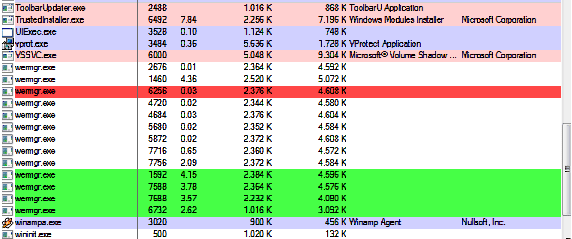
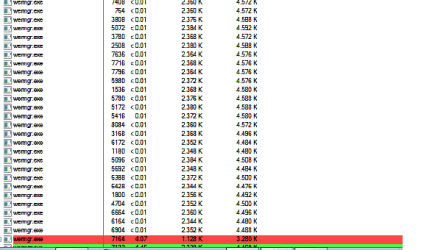
I am not shore if this is wright place for this thread, I apologise if it is not. My CPU usage is mostly normal (3-10%), but sometimes it goes up to 80-93%, it last for 10-15 minutes and than go back to normal work. I checked computer for viruses with AVG 2012, Emsisoft Anti-malware, and Mbam( Malwarebytesantimalware), and there is no viruses found. I also checked it with Spybot-Search and destroy and found nothing. I use wise registry and disk cleaner and smart defrag every 20 day. Every time when my CPU usage is above normal Process Explorer show there is multiple wermgr.exe runing - 5 to above 20. When I look up properties of wermgr.exe I get:
parrent:
<Non-existent Process>(6952)
or
<Non-existent Process>(8124)

User:
<access denied>

path
non existen

when I try to kill process it says acces denied

I atched two Process explorer screen shots. What to do?
 

Attachments
  • Bez naslova.png
    Bez naslova.png
    22.1 KB · Views: 73
  • slika.png
    slika.png
    24.1 KB · Views: 69

My Computer

OS
Windows 7 Starter 32bit
Welcome to Seven Forums mikt. wermgr.exe is associated with the Error Reporting Process. It's possible you have multiple errors queued for sending to Microsoft.

Try this:

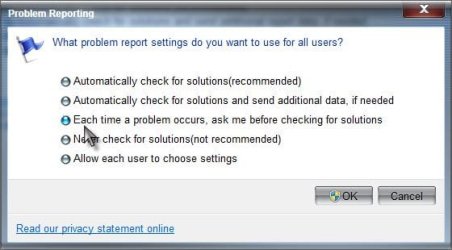
Start> In search box type Action center> Enter> Click on the arrow next to Maintenance to expand> Under Check for solutions to problem reports, click on Settings> Click on Change report settings for all users> Check the radio button next to Each time a problem occurs, ask me before checking for solution> OK your way out

Problem Reporting.jpg

Now you should be prompted if you have an error that wants to send a report. Let us know what error(s) you get so we can look at the root problem.

A Guy
 

My Computer

Computer type
PC/Desktop
OS
Windows 10 Home x64
CPU
INTEL Core i5-750 Quad-Core 3.37GHz
Motherboard
ASUS P7P55D
Memory
HyperX Fury Black Series 8GB (2 x 4GB) 1866Mhz
Graphics Card(s)
EVGA GeForce GTX 750 Superclocked 1GB 128-Bit GDDR5
Monitor(s) Displays
LG 32MA68HY 32" IPS
Screen Resolution
1920 x 1080
Hard Drives
Samsung 840 Evo 120GB, SEAGATE 500GB Barracuda® 7200.12, SATA 3 Gb/s, 7200 RPM, 16MB cache
PSU
ANTEC TruePower New TP-550, 80 PLUS, 550W
Case
ANTEC Three Hundred Illusion
Cooling
COOLER MASTER Hyper 212 Plus, 4 x 120mm 1 x 140mm Noctua's
Internet Speed
85 + Mbps
Antivirus
Avast
Browser
Vivaldi
Thank you for answer.
I tried it but I didnt get any errors.
While I was instaling Windows updates I get Windows Update error 80070003. I checked it and found that my computer instaled same uptades for over a month, but never actualy instaled them. I run Microsoft Fixit and it managed to instal 2 of updates, and show it instaled another 5, but next time I started computer it show that I need to instal same 5 updates again. When I checked Installed updates in Control Panel it shows "No updates installed". Maybe this is conected to my wermgr.exe problem?
 

My Computer

OS
Windows 7 Starter 32bit
I noticed there was simillar problem in this thread:

Hello everyone.

I have two updates that are being installed each time I boot windows 7, KB2633171 and KB2679255. I browsed windows\SystemDistribution\ReportingEvents.log and updates are successful but, weird thing, they are not listed in the installed updates when looking in Control Panel.

I tried following instructions in these SevenForums threads:

- Windows update reset (History and Components)
- Fix a Repeatedly Offered Update (For a Repeatedly Succeeding Update)
- Reset CLFS transaction logs (safe boot and WinRE)

I also tried stopping Windows Update service, renaming SystemDistribution directory and resetting the machine so services starts again and recreates the directory and files but nothing changes. Windows boots and, after a while,Windows Update icon shows up in the traybar. I have downloaded the two updates from the Microsoft site and installed them manually.... guess what happened.... :(

this is my windowsupdate.log

I have no other ideas. Can you help me ? Thanks !
Updates that wont install on my computer are:
Windows 7 update KB2679255
Windows 7 update KB2633171
(same two as that guy)
+
Windows 7 update KB977165

Windows 7 update KB2676562
Windows 7 update KB2393802
 

My Computer

OS
Windows 7 Starter 32bit
Back
Top