
Western Digital Ext. HDD 1TB, causing programs to stop responding.

VISHWAS123

New member
Local time
6:07 AM
Messages
18
Hi
I have a WD Ext. HDD 1 TB that has stopped working following a virus.
I plugged it into my PC the day I got the virus and formatted the drive. The format took so long that I stopped the format once and I reformatted it multiple times. (There were only movies in it so I am not worried about file recovery).

Windows occasionally recognizes it as a Local disk with no capacity displayed at the bottom.
I ran chkdsk on it a couple of times but it hung on 37 percent or somewhere there.
It causes all my apps to stop responding, so I can't even access the drive.
However, I have noticed that the activity light of the drive just keeps on flashing endlessly, with no sign of stopping.

I also have a linux desktop so when i plugged it in, performance becomes sloppy and it displays an error saying that the drive cannot be mounted.

I can not run any checking apps as it freezes up my pc.
What do you suggest I do?

Thanks

Vishwas
 

My Computer

Computer type
Laptop
Computer Manufacturer/Model Number
E-machines E-510
OS
Windows 7 Professional 32 bit. & Linux Mint 17 32 bit
CPU
Intel Celeron @ 2.13 GHz
Motherboard
SIS
Memory
2.00 GB
Graphics Card(s)
Motherboard Graphics 128 MB
Sound Card
built in motherboard sound
Monitor(s) Displays
Generic PnP Monitor (Mounted)--- 15.6 inches.
Screen Resolution
1280x800
Hard Drives
WDC internal hard disk 120 gb
PSU
battery and the usual power brick
Cooling
just a single cpu fan
Keyboard
E-Nature external Keyboard
Mouse
E-Nature external Mouse
Internet Speed
approx. 45 Kb/s download (actual use) (yes, kilobytes/sec)
Antivirus
Avast Free Antivirus, MalwareBytes Anti-Malware
Browser
Google Chrome, Mozilla Firefox, Internet Explorer 11, Torch
Hi there VISHWAS123!

I am sorry this has happened to you!

If the information on that drive is really not that valuable to you, you could use the WD Data Lifeguard software to fully write zeros to the disk. This would fully erase every bit of the drive, it's partitions and format, so that you could have the closest to a new hard drive. Then by using a new USB 3.0 cable (or just one that you are positive is working) plug it in to a PC clean from any malware or viruses. Format the drive in NTFS.

This way, if this works, you'll know that the problem is fixed and you have a fully cleaned, newly formatted external drive with an undamaged cable.

If the problem still hangs, then the drive is probably too corrupted to be fixed.

WD Data Lifeguard:
WD Support / Downloads / Other Products / Data Lifeguard Diagnostic for Windows

I hope this helps!
Best of luck!

CK_WD
 

My Computer

Computer type
PC/Desktop
OS
Windows 7 Home Premium x64
I would fully agree with CkWD, that you should check your drive with Datalifeguard Diagnostics and then write zeros with it.

Since your system was infected - and we still do not know whether it has been cleaned perfectly to get rid of the infection - I would suggest that you run Datalifeguard Dignostic for DOS from a bootable DOS pendrive.

How to:

1. Download Rufus Rufus - Create bootable USB drives the easy way

2. Backup any data on a pen drive to another location, plug in your pendrive and run Rufus.

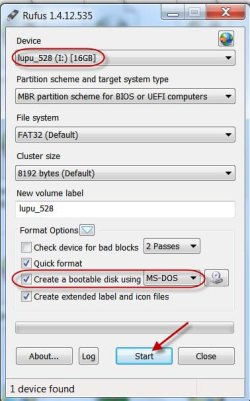
3. Check the correct pendrive is chosen in Rufus,select MSDOS from the dropdown arrow in "Create a bootable disk using" and click on Start. ( All existing data on your pendrive will be lost when Rufus formats the drive and that is why you should backup all data on it to another location as aforesaid)

01-12-2014 19-54-40.jpg

4. On completion close Rufus and your bootable DOS drive is ready.

Now,

1. Download Datalifeguard Diagnostic for DOS - WD Support / Downloads / SATA & SAS / WD Blue / SE / SE16 (SATA II) ( Please read the instructions on this page too)

2. Unzip the zip file to a folder and copy the dlgdiag5.exe file to the pendrive.

3. Using the onetime boot menu of your PC, boot into DOS on the pendrive.

4. Against the command prompt type dlgdiag5.exe and press enter.

Now you should be running the diagnostic tool.

Write zeros to the drive.
 
Last edited:

My Computer

OS
Windows 7 Home Premium 32 bit
hi guys,

Thanks so much for the prompt replies. I will first of all try the lifeguard program for windows before the one for DOS. Hopefully I will be able to fix this problem.
I will get back when i run the program on the drive.

Thanks again
Vishwas
 

My Computer

Computer type
Laptop
Computer Manufacturer/Model Number
E-machines E-510
OS
Windows 7 Professional 32 bit. & Linux Mint 17 32 bit
CPU
Intel Celeron @ 2.13 GHz
Motherboard
SIS
Memory
2.00 GB
Graphics Card(s)
Motherboard Graphics 128 MB
Sound Card
built in motherboard sound
Monitor(s) Displays
Generic PnP Monitor (Mounted)--- 15.6 inches.
Screen Resolution
1280x800
Hard Drives
WDC internal hard disk 120 gb
PSU
battery and the usual power brick
Cooling
just a single cpu fan
Keyboard
E-Nature external Keyboard
Mouse
E-Nature external Mouse
Internet Speed
approx. 45 Kb/s download (actual use) (yes, kilobytes/sec)
Antivirus
Avast Free Antivirus, MalwareBytes Anti-Malware
Browser
Google Chrome, Mozilla Firefox, Internet Explorer 11, Torch
hi

Um... guys is this normal???????
4000+ hours?
 

Attachments

  • Untitled.jpg
    Untitled.jpg
    109.6 KB · Views: 1

My Computer

Computer type
Laptop
Computer Manufacturer/Model Number
E-machines E-510
OS
Windows 7 Professional 32 bit. & Linux Mint 17 32 bit
CPU
Intel Celeron @ 2.13 GHz
Motherboard
SIS
Memory
2.00 GB
Graphics Card(s)
Motherboard Graphics 128 MB
Sound Card
built in motherboard sound
Monitor(s) Displays
Generic PnP Monitor (Mounted)--- 15.6 inches.
Screen Resolution
1280x800
Hard Drives
WDC internal hard disk 120 gb
PSU
battery and the usual power brick
Cooling
just a single cpu fan
Keyboard
E-Nature external Keyboard
Mouse
E-Nature external Mouse
Internet Speed
approx. 45 Kb/s download (actual use) (yes, kilobytes/sec)
Antivirus
Avast Free Antivirus, MalwareBytes Anti-Malware
Browser
Google Chrome, Mozilla Firefox, Internet Explorer 11, Torch
hi again

I aborted the mission and i decided to scan the drive first....
This is what happened.....
 

Attachments

  • Untitled1.jpg
    Untitled1.jpg
    103.5 KB · Views: 1

My Computer

Computer type
Laptop
Computer Manufacturer/Model Number
E-machines E-510
OS
Windows 7 Professional 32 bit. & Linux Mint 17 32 bit
CPU
Intel Celeron @ 2.13 GHz
Motherboard
SIS
Memory
2.00 GB
Graphics Card(s)
Motherboard Graphics 128 MB
Sound Card
built in motherboard sound
Monitor(s) Displays
Generic PnP Monitor (Mounted)--- 15.6 inches.
Screen Resolution
1280x800
Hard Drives
WDC internal hard disk 120 gb
PSU
battery and the usual power brick
Cooling
just a single cpu fan
Keyboard
E-Nature external Keyboard
Mouse
E-Nature external Mouse
Internet Speed
approx. 45 Kb/s download (actual use) (yes, kilobytes/sec)
Antivirus
Avast Free Antivirus, MalwareBytes Anti-Malware
Browser
Google Chrome, Mozilla Firefox, Internet Explorer 11, Torch
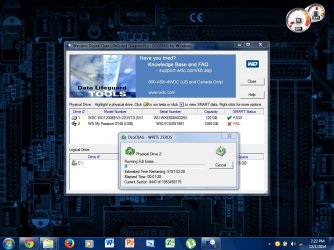
Well, this is definitely not a good sign.
An unknown element has failed during the test making it overall incomplete. It probably won't be able to continue or do the test fully, and as I see it, doubtfully writing zeros, which could've helped a lot. I would suggest running @Jumanji's suggestion and see if you can get a kick from there.
If not, I don't think there'd be anything you could do so see if you could RMA the disk through the warranty check here:
WD Support / Warranty Services / Warranty Check for End User

Good luck!
CK_WD
 
Last edited:

My Computer

Computer type
PC/Desktop
OS
Windows 7 Home Premium x64
Hi

Thank you for the reply.
I will try @Jumangi's method also. But I don't have any memory sticks available, so can I use a CD+r instead?
Thank you for the link. I will check it out.

EDIT: I checked up my hard disk on the link you suggested and my drive is out of region as I bought it in India.
What do you suggest I do?
I will be going to India soon so can I return it then?
I bought the drive about a year ago and it has 3 years of warranty.

BIGGER PROBLEM: I read the instructions about the diagnostics tool for DOS, but my device is a My passport device meaning its serial number starts with WX....... but the tool is only meant for devices with codes starting with WD....
what should I do now?

Thanks again
Vishwas
 
Last edited:

My Computer

Computer type
Laptop
Computer Manufacturer/Model Number
E-machines E-510
OS
Windows 7 Professional 32 bit. & Linux Mint 17 32 bit
CPU
Intel Celeron @ 2.13 GHz
Motherboard
SIS
Memory
2.00 GB
Graphics Card(s)
Motherboard Graphics 128 MB
Sound Card
built in motherboard sound
Monitor(s) Displays
Generic PnP Monitor (Mounted)--- 15.6 inches.
Screen Resolution
1280x800
Hard Drives
WDC internal hard disk 120 gb
PSU
battery and the usual power brick
Cooling
just a single cpu fan
Keyboard
E-Nature external Keyboard
Mouse
E-Nature external Mouse
Internet Speed
approx. 45 Kb/s download (actual use) (yes, kilobytes/sec)
Antivirus
Avast Free Antivirus, MalwareBytes Anti-Malware
Browser
Google Chrome, Mozilla Firefox, Internet Explorer 11, Torch
Hi again, VISHWAS123!

This is a quote from WD's “Worldwide Warranty Policy and Limitations”:

“No warranty service is provided unless the Product is returned to an authorized return center in the region (warranty regions are identified as Canada, U.S.A., Latin America, Europe, Middle East, Africa, Asia Pacific, India and Thailand) where the Product was first shipped by WD, which may have regional specific warranty implications."

This is the whole article that would be useful to you, you would basically be needing proof of purchase, to prove through your serial number that the device is still in warranty and to package it as described:
WD Support / Warranty Services / End User / Worldwide Warranty Policy and Limitations

Here you could contact WD customer service to tell you further instructions and make it easier for you, I suggest you do that first:
WD Support

Best of luck!

CK_WD
 

My Computer

Computer type
PC/Desktop
OS
Windows 7 Home Premium x64
Hi again.

I have looked at the links you have listed. I will contact WD soon. I was still wondering about using a CD- R for the DOS version of the datalifeguard tool and also it is meant for serial codes starting with WD.... but mine starts with WX....
Will the tool still work or is there another version for it?

Thanks.
Vishwas
 

My Computer

Computer type
Laptop
Computer Manufacturer/Model Number
E-machines E-510
OS
Windows 7 Professional 32 bit. & Linux Mint 17 32 bit
CPU
Intel Celeron @ 2.13 GHz
Motherboard
SIS
Memory
2.00 GB
Graphics Card(s)
Motherboard Graphics 128 MB
Sound Card
built in motherboard sound
Monitor(s) Displays
Generic PnP Monitor (Mounted)--- 15.6 inches.
Screen Resolution
1280x800
Hard Drives
WDC internal hard disk 120 gb
PSU
battery and the usual power brick
Cooling
just a single cpu fan
Keyboard
E-Nature external Keyboard
Mouse
E-Nature external Mouse
Internet Speed
approx. 45 Kb/s download (actual use) (yes, kilobytes/sec)
Antivirus
Avast Free Antivirus, MalwareBytes Anti-Malware
Browser
Google Chrome, Mozilla Firefox, Internet Explorer 11, Torch
Hey VISHWAS123.

This is a quote from the Support page on the official WD site, about WD Data Lifeguard diagnostics for DOS:
WD Support / Downloads / SATA & SAS / WD Blue / SE / SE16 (SATA II)

“Data LifeGuard Diagnostics is designed to test the physical condition of your hard drive. This utility is designed for drivers larger than 8.4 GB with model numbers starting with WDxxx. This program is designed to work only in a DOS booted environment.”

This is about the model number, which is written as P/N, while the serial number is written as S/N. For WD My Passports it's common the serial number to start with WXxxx, but the model number, which you need for the WD DLG for DOS should start with WDxxx.

Meaning, you should be able to use the DOS software.

Good luck! :)

CK_WD
 

My Computer

Computer type
PC/Desktop
OS
Windows 7 Home Premium x64
Hi

By any chance, will this dos version of data lifeguard work if it is placed in a CD Recordable instead of the usb memory stick.
Unfortunately, I do not have an available usb memory stick, so can i use the cd instead?

Thanks
 

My Computer

Computer type
Laptop
Computer Manufacturer/Model Number
E-machines E-510
OS
Windows 7 Professional 32 bit. & Linux Mint 17 32 bit
CPU
Intel Celeron @ 2.13 GHz
Motherboard
SIS
Memory
2.00 GB
Graphics Card(s)
Motherboard Graphics 128 MB
Sound Card
built in motherboard sound
Monitor(s) Displays
Generic PnP Monitor (Mounted)--- 15.6 inches.
Screen Resolution
1280x800
Hard Drives
WDC internal hard disk 120 gb
PSU
battery and the usual power brick
Cooling
just a single cpu fan
Keyboard
E-Nature external Keyboard
Mouse
E-Nature external Mouse
Internet Speed
approx. 45 Kb/s download (actual use) (yes, kilobytes/sec)
Antivirus
Avast Free Antivirus, MalwareBytes Anti-Malware
Browser
Google Chrome, Mozilla Firefox, Internet Explorer 11, Torch
I understand that both Ultimate Boot CD and Hiren's boot CD have Datalifeguard Diagnostics for DOS and you can run it from there. ( I had never used either and so can't say anything more about it.)
A 1GB/4GB flash drive shouldn't cost much.
 

My Computer

OS
Windows 7 Home Premium 32 bit
Hi

Thank you for your reply Jumanji. I will look into it as soon as possible and return here with the results.

thanks
Vishwas
 

My Computer

Computer type
Laptop
Computer Manufacturer/Model Number
E-machines E-510
OS
Windows 7 Professional 32 bit. & Linux Mint 17 32 bit
CPU
Intel Celeron @ 2.13 GHz
Motherboard
SIS
Memory
2.00 GB
Graphics Card(s)
Motherboard Graphics 128 MB
Sound Card
built in motherboard sound
Monitor(s) Displays
Generic PnP Monitor (Mounted)--- 15.6 inches.
Screen Resolution
1280x800
Hard Drives
WDC internal hard disk 120 gb
PSU
battery and the usual power brick
Cooling
just a single cpu fan
Keyboard
E-Nature external Keyboard
Mouse
E-Nature external Mouse
Internet Speed
approx. 45 Kb/s download (actual use) (yes, kilobytes/sec)
Antivirus
Avast Free Antivirus, MalwareBytes Anti-Malware
Browser
Google Chrome, Mozilla Firefox, Internet Explorer 11, Torch
Hi guys,

With some awesome miracle, I was somehow able to reformat the drive using gparted in linux. The drive is working so and so now.

However a scan using crystal disk info showed that the smart status of the drive is bad, the only bad thing being the number of reallocated sectors, which is around 133.

Also when I tried transferring a movie file to the drive i got a speed of 37 kb/s, which is ridiculous as I get about 4 mb/s when transferring to my memory sticks. And i used to get about 10 to 20 mb/s when the drive was working before.

Can this problem be fixed or is this permanent damage to the drive?
If it can be fixed, please let me know how.

PS: I think the drive was opened when i first sent it for repair after the virus, so warranty is void.

thanks
Vishwas
 

My Computer

Computer type
Laptop
Computer Manufacturer/Model Number
E-machines E-510
OS
Windows 7 Professional 32 bit. & Linux Mint 17 32 bit
CPU
Intel Celeron @ 2.13 GHz
Motherboard
SIS
Memory
2.00 GB
Graphics Card(s)
Motherboard Graphics 128 MB
Sound Card
built in motherboard sound
Monitor(s) Displays
Generic PnP Monitor (Mounted)--- 15.6 inches.
Screen Resolution
1280x800
Hard Drives
WDC internal hard disk 120 gb
PSU
battery and the usual power brick
Cooling
just a single cpu fan
Keyboard
E-Nature external Keyboard
Mouse
E-Nature external Mouse
Internet Speed
approx. 45 Kb/s download (actual use) (yes, kilobytes/sec)
Antivirus
Avast Free Antivirus, MalwareBytes Anti-Malware
Browser
Google Chrome, Mozilla Firefox, Internet Explorer 11, Torch
I believe drives will fail smart scans when the reallocated count goes above 100
This is a sign that the drive is failing or at the very least having problems, if you continue to use i would not store valuable data on there just in case it deteriorates further
 

My Computer

Computer type
PC/Desktop
Computer Manufacturer/Model Number
Pauly Special
OS
Win7 Ultimate X64
CPU
Intel i5 3570K
Motherboard
Gigabyte Z77X-DS3H
Memory
8GB DDR3 1600
Graphics Card(s)
Onboard
Sound Card
Onboard
Screen Resolution
1280x1024
Hard Drives
Samsung 840 Evo SSD (OS)
1TB Spinner (Data)
PSU
800W Arctic
Case
Cooler Master
Cooling
3x120mm Fans
Keyboard
MS Wireless
Mouse
MS Wireless
Internet Speed
20M
Once a drive reallocates sectors, they would continue to get corrupted/damaged and the process would continue until the hard drive finally dies. And unfortunately, you do have a lot of these reallocated sectors.
The hard drive will most likely fail soon beyond fixing. And if you keep information there, you'll most likely lose it.

CK_WD
 

My Computer

Computer type
PC/Desktop
OS
Windows 7 Home Premium x64
Hi

Thanks for your prompt replies. The drive has not undergone any physical damage so is it possible to use windows chkdsk tool check and repair this drive?

Yes, this disk has been empty for almost half a year now, i wasnt able to access it for the past 3 months.

But is there any hope of success with chkdsk?

Thanks
Vishwas
 

My Computer

Computer type
Laptop
Computer Manufacturer/Model Number
E-machines E-510
OS
Windows 7 Professional 32 bit. & Linux Mint 17 32 bit
CPU
Intel Celeron @ 2.13 GHz
Motherboard
SIS
Memory
2.00 GB
Graphics Card(s)
Motherboard Graphics 128 MB
Sound Card
built in motherboard sound
Monitor(s) Displays
Generic PnP Monitor (Mounted)--- 15.6 inches.
Screen Resolution
1280x800
Hard Drives
WDC internal hard disk 120 gb
PSU
battery and the usual power brick
Cooling
just a single cpu fan
Keyboard
E-Nature external Keyboard
Mouse
E-Nature external Mouse
Internet Speed
approx. 45 Kb/s download (actual use) (yes, kilobytes/sec)
Antivirus
Avast Free Antivirus, MalwareBytes Anti-Malware
Browser
Google Chrome, Mozilla Firefox, Internet Explorer 11, Torch
It could be possible. You'll need to type the command: chkdsk X: /f, where X: is the letter of your drive.
But you need to know that the fix won't last long. The drive will become completely unusable soon!

CK_WD
 

My Computer

Computer type
PC/Desktop
OS
Windows 7 Home Premium x64
Thanks for the reply CKWD. The drive should be out of warranty so.... i will take my chances with this drive.
Lets see what happens.

Thanks.
 

My Computer

Computer type
Laptop
Computer Manufacturer/Model Number
E-machines E-510
OS
Windows 7 Professional 32 bit. & Linux Mint 17 32 bit
CPU
Intel Celeron @ 2.13 GHz
Motherboard
SIS
Memory
2.00 GB
Graphics Card(s)
Motherboard Graphics 128 MB
Sound Card
built in motherboard sound
Monitor(s) Displays
Generic PnP Monitor (Mounted)--- 15.6 inches.
Screen Resolution
1280x800
Hard Drives
WDC internal hard disk 120 gb
PSU
battery and the usual power brick
Cooling
just a single cpu fan
Keyboard
E-Nature external Keyboard
Mouse
E-Nature external Mouse
Internet Speed
approx. 45 Kb/s download (actual use) (yes, kilobytes/sec)
Antivirus
Avast Free Antivirus, MalwareBytes Anti-Malware
Browser
Google Chrome, Mozilla Firefox, Internet Explorer 11, Torch
Back
Top