WFP2208 Webcam and W7 - 64 Bit?

MLSLK

New member
Local time
1:50 PM
Messages
8
So far, everything Win has been fantastic for me...

Except for my Dell SP2208WFP monitor, with built in mic/webcam.

I'm running 64 bit W7, and I tried using the dell drivers, which include a vista 64 bit driver. W7 doesn't see the driver in the folder, and trying to select to install manually, I get an error stating that it isn't a 64 bit version.

Anyone have any luck getting this going?
 

My Computer My Computer

OS
Windows 7
Install manually like this, exactly.

Right click on it in device manager. Update driver software. Browse. Let me pick. Have disk. Browse. Navigate to where the .inf is and double click on it. Hit ok.
 

My Computer My Computer

Computer Manufacturer/Model Number
self built
OS
7600.20510 x86
CPU
P4 550 3.4 GHz HT running at 3.5 GHz
Motherboard
MSI PM8M3-V (MS-7211 v1.x) Micro-ATX mainboard
Memory
OCZ 2 GB(2x1GB) DDR400mHz running @ 414 mHz
Graphics Card(s)
HIS Radeon HD 3850 IceQ 3 Turbo HDMI Dual DL-DVI AGP
Sound Card
MOTU Traveler firewire studio interface 192 kHz 24 bit
Monitor(s) Displays
22" widescreen Acer X223W LCD, 17" Compaq P75 CRT
Screen Resolution
1680x1050 and 1280x1024
Hard Drives
SATA I x2 WD, 400 GB and 120 GB, SATA 2 WD Caviar Black 1 TB
PSU
350W generic
Case
Cybertronpc, it glows blue
Cooling
stock cpu fan, Ice-Q 3 gpu and system, many case fans
Keyboard
Logitch Classical Keyboard 200
Mouse
Logitech Mediaplay cordless
Internet Speed
1792/448 kbits/sec
Other Info
SATA II PCI fake RAID adapter, 1 GB Readyboost, original ATI Remote Wonder (even works with WMC perfectly), Logitech Rumblepad 2 game controller x2
Did that, this is when I get the error as it being a 32bit driver and not a 64 bit driver, even though it is.
 

My Computer My Computer

OS
Windows 7
Can you post a link of the driver so I can look at some of the files?
 

My Computer My Computer

Computer Manufacturer/Model Number
self built
OS
7600.20510 x86
CPU
P4 550 3.4 GHz HT running at 3.5 GHz
Motherboard
MSI PM8M3-V (MS-7211 v1.x) Micro-ATX mainboard
Memory
OCZ 2 GB(2x1GB) DDR400mHz running @ 414 mHz
Graphics Card(s)
HIS Radeon HD 3850 IceQ 3 Turbo HDMI Dual DL-DVI AGP
Sound Card
MOTU Traveler firewire studio interface 192 kHz 24 bit
Monitor(s) Displays
22" widescreen Acer X223W LCD, 17" Compaq P75 CRT
Screen Resolution
1680x1050 and 1280x1024
Hard Drives
SATA I x2 WD, 400 GB and 120 GB, SATA 2 WD Caviar Black 1 TB
PSU
350W generic
Case
Cybertronpc, it glows blue
Cooling
stock cpu fan, Ice-Q 3 gpu and system, many case fans
Keyboard
Logitch Classical Keyboard 200
Mouse
Logitech Mediaplay cordless
Internet Speed
1792/448 kbits/sec
Other Info
SATA II PCI fake RAID adapter, 1 GB Readyboost, original ATI Remote Wonder (even works with WMC perfectly), Logitech Rumblepad 2 game controller x2
I have the exact same monitor and it installed perfectly, both webcam and microphone working fine on x64.

Try Windows update. There is a Dell/Creative driver on there that works.
 

My Computers My Computers

System One System Two

  • Computer type
    Laptop
    Computer Manufacturer/Model Number
    Custom
    OS
    Windows 10 Professional 64-Bit
    CPU
    Intel Core i7 8700K
    Motherboard
    Asus Maximus X Code
    Memory
    G.Skill TridentZ RGB DDR4 4000 F4-4000C18D-16GTZR
    Graphics Card(s)
    Zotac GeForce GTX-1660 Ti AMP 6GB
    Sound Card
    ROG SupremeFX S1220 (Onboard)
    Monitor(s) Displays
    Dell UP2716D
    Screen Resolution
    2560x1440
    Hard Drives
    Samsung 980 Pro PCIe NVMe 500GB
    Samsung 970 Evo PCIe NVMe 250GB
    Samsung 860 Evo SATA III 2TB
    WD Black WD2003FZEX 2TB x 3
    ODD - GH24NSC0
    PSU
    Coolermaster V1000
    Case
    Corsair Obsidian 450D
    Cooling
    Corsair H115i - Corsair SP140 Red x 2
    Keyboard
    Logitech G213
    Mouse
    Logitech G102
    Internet Speed
    100 Mbps (Supposedly) - Asianet India FTTH
    Antivirus
    Avast Free!
    Browser
    Maxthon Cloud Browser 5.xx
    Other Info
    Asus FX-553VD (960 Evo, 860 Evo, 16GB)
    Samsung Galaxy C9 Pro
    Canon EOS 70D
  • Computer type
    Laptop
    System Manufacturer/Model Number
    Asus FX503VD
    OS
    Windows 10 Pro x64
    CPU
    Intel Core i7 7700HQ
    Memory
    2 x 8GB Samsung DDR4 2400
    Graphics Card(s)
    GTX 1050
    Screen Resolution
    1920 x 1080
    Hard Drives
    Samsung 960 Evo PCIe NVMe 250GB Boot
    Samsung 840 Pro Series 256 GB SSD (MZ-7PD256BW);
Alright, could you possibly show me a screenshot of the error?

Because looking at the .inf, it should work for x64. Sometimes I can see why it isn't working based on screenshots much better than an explanation.

Code:
[DELL.NTAMD64]
%SP2208WFP_Analog%=SP2208WFP_Analog.Install, Monitor\DEL4038
%SP2208WFP_Digital%=SP2208WFP_Digital.Install, Monitor\DEL4039
%SP2208WFP_HDMI%=SP2208WFP_HDMI.Install, Monitor\DEL403A
Edit - hey wait a minute...this looks like only for monitors. No webcam?? There's your problem.
 

My Computer My Computer

Computer Manufacturer/Model Number
self built
OS
7600.20510 x86
CPU
P4 550 3.4 GHz HT running at 3.5 GHz
Motherboard
MSI PM8M3-V (MS-7211 v1.x) Micro-ATX mainboard
Memory
OCZ 2 GB(2x1GB) DDR400mHz running @ 414 mHz
Graphics Card(s)
HIS Radeon HD 3850 IceQ 3 Turbo HDMI Dual DL-DVI AGP
Sound Card
MOTU Traveler firewire studio interface 192 kHz 24 bit
Monitor(s) Displays
22" widescreen Acer X223W LCD, 17" Compaq P75 CRT
Screen Resolution
1680x1050 and 1280x1024
Hard Drives
SATA I x2 WD, 400 GB and 120 GB, SATA 2 WD Caviar Black 1 TB
PSU
350W generic
Case
Cybertronpc, it glows blue
Cooling
stock cpu fan, Ice-Q 3 gpu and system, many case fans
Keyboard
Logitch Classical Keyboard 200
Mouse
Logitech Mediaplay cordless
Internet Speed
1792/448 kbits/sec
Other Info
SATA II PCI fake RAID adapter, 1 GB Readyboost, original ATI Remote Wonder (even works with WMC perfectly), Logitech Rumblepad 2 game controller x2
Edit - hey wait a minute...this looks like only for monitors. No webcam?? There's your problem.

Sonuva....

Ok, I'll have to try this with the 143mb crap pack, and manually install the driver.... or delete the entries and try windows update again to see if that works (its not working for the webcam/mic currently).

I'll pop back in later (I'm at work) either way
 

My Computer My Computer

OS
Windows 7
IT should show as an optional update. The webcam drivers are from Creative.
 

My Computers My Computers

System One System Two

  • Computer type
    Laptop
    Computer Manufacturer/Model Number
    Custom
    OS
    Windows 10 Professional 64-Bit
    CPU
    Intel Core i7 8700K
    Motherboard
    Asus Maximus X Code
    Memory
    G.Skill TridentZ RGB DDR4 4000 F4-4000C18D-16GTZR
    Graphics Card(s)
    Zotac GeForce GTX-1660 Ti AMP 6GB
    Sound Card
    ROG SupremeFX S1220 (Onboard)
    Monitor(s) Displays
    Dell UP2716D
    Screen Resolution
    2560x1440
    Hard Drives
    Samsung 980 Pro PCIe NVMe 500GB
    Samsung 970 Evo PCIe NVMe 250GB
    Samsung 860 Evo SATA III 2TB
    WD Black WD2003FZEX 2TB x 3
    ODD - GH24NSC0
    PSU
    Coolermaster V1000
    Case
    Corsair Obsidian 450D
    Cooling
    Corsair H115i - Corsair SP140 Red x 2
    Keyboard
    Logitech G213
    Mouse
    Logitech G102
    Internet Speed
    100 Mbps (Supposedly) - Asianet India FTTH
    Antivirus
    Avast Free!
    Browser
    Maxthon Cloud Browser 5.xx
    Other Info
    Asus FX-553VD (960 Evo, 860 Evo, 16GB)
    Samsung Galaxy C9 Pro
    Canon EOS 70D
  • Computer type
    Laptop
    System Manufacturer/Model Number
    Asus FX503VD
    OS
    Windows 10 Pro x64
    CPU
    Intel Core i7 7700HQ
    Memory
    2 x 8GB Samsung DDR4 2400
    Graphics Card(s)
    GTX 1050
    Screen Resolution
    1920 x 1080
    Hard Drives
    Samsung 960 Evo PCIe NVMe 250GB Boot
    Samsung 840 Pro Series 256 GB SSD (MZ-7PD256BW);
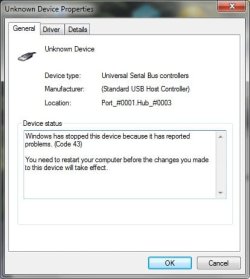
Ok, got the drivers in, still theres a problem...

Monitor Webcam is shown under devices, but with the troubleshooting icon - going into that.... unknown device causing the problem, seems to be a usb host controller.

Color me confused about this one. I tried using online update via dev manager, nothing, no driver found. Any ideas? :confused:
 

Attachments

  • UnknownDevice.jpg
    UnknownDevice.jpg
    24.5 KB · Views: 56

My Computer My Computer

OS
Windows 7
Update your chipset drivers from the motherboard manufacturer.
 

My Computer My Computer

Computer Manufacturer/Model Number
self built
OS
7600.20510 x86
CPU
P4 550 3.4 GHz HT running at 3.5 GHz
Motherboard
MSI PM8M3-V (MS-7211 v1.x) Micro-ATX mainboard
Memory
OCZ 2 GB(2x1GB) DDR400mHz running @ 414 mHz
Graphics Card(s)
HIS Radeon HD 3850 IceQ 3 Turbo HDMI Dual DL-DVI AGP
Sound Card
MOTU Traveler firewire studio interface 192 kHz 24 bit
Monitor(s) Displays
22" widescreen Acer X223W LCD, 17" Compaq P75 CRT
Screen Resolution
1680x1050 and 1280x1024
Hard Drives
SATA I x2 WD, 400 GB and 120 GB, SATA 2 WD Caviar Black 1 TB
PSU
350W generic
Case
Cybertronpc, it glows blue
Cooling
stock cpu fan, Ice-Q 3 gpu and system, many case fans
Keyboard
Logitch Classical Keyboard 200
Mouse
Logitech Mediaplay cordless
Internet Speed
1792/448 kbits/sec
Other Info
SATA II PCI fake RAID adapter, 1 GB Readyboost, original ATI Remote Wonder (even works with WMC perfectly), Logitech Rumblepad 2 game controller x2
Well, that worked to take care of an away mode driver; I updated direct from NVidia,latest, the host controller still hast no driver.
 

My Computer My Computer

OS
Windows 7
And....

I figured it out. Whenever the system goes to sleep or hibernates, something goes screwy. I have to disconnect and reconnect the cable going to the monitor, which is irritating since i use it as a hub for a ton of stuff on my desk.

Oh well, its working atleast, which means a driver update correcting these issues is hopefully to come in the future...
 

My Computer My Computer

OS
Windows 7
By the way, are you using DVI or VGA to connect to the monitor?

Also are you using the USB ports on it via the provided USB cable?
 

My Computers My Computers

System One System Two

  • Computer type
    Laptop
    Computer Manufacturer/Model Number
    Custom
    OS
    Windows 10 Professional 64-Bit
    CPU
    Intel Core i7 8700K
    Motherboard
    Asus Maximus X Code
    Memory
    G.Skill TridentZ RGB DDR4 4000 F4-4000C18D-16GTZR
    Graphics Card(s)
    Zotac GeForce GTX-1660 Ti AMP 6GB
    Sound Card
    ROG SupremeFX S1220 (Onboard)
    Monitor(s) Displays
    Dell UP2716D
    Screen Resolution
    2560x1440
    Hard Drives
    Samsung 980 Pro PCIe NVMe 500GB
    Samsung 970 Evo PCIe NVMe 250GB
    Samsung 860 Evo SATA III 2TB
    WD Black WD2003FZEX 2TB x 3
    ODD - GH24NSC0
    PSU
    Coolermaster V1000
    Case
    Corsair Obsidian 450D
    Cooling
    Corsair H115i - Corsair SP140 Red x 2
    Keyboard
    Logitech G213
    Mouse
    Logitech G102
    Internet Speed
    100 Mbps (Supposedly) - Asianet India FTTH
    Antivirus
    Avast Free!
    Browser
    Maxthon Cloud Browser 5.xx
    Other Info
    Asus FX-553VD (960 Evo, 860 Evo, 16GB)
    Samsung Galaxy C9 Pro
    Canon EOS 70D
  • Computer type
    Laptop
    System Manufacturer/Model Number
    Asus FX503VD
    OS
    Windows 10 Pro x64
    CPU
    Intel Core i7 7700HQ
    Memory
    2 x 8GB Samsung DDR4 2400
    Graphics Card(s)
    GTX 1050
    Screen Resolution
    1920 x 1080
    Hard Drives
    Samsung 960 Evo PCIe NVMe 250GB Boot
    Samsung 840 Pro Series 256 GB SSD (MZ-7PD256BW);
DVI, and yes. But I have tons of good quality usb 2.0 cables, so it wouldnt matter.
 

My Computer My Computer

OS
Windows 7
Back
Top