
G'day everyone
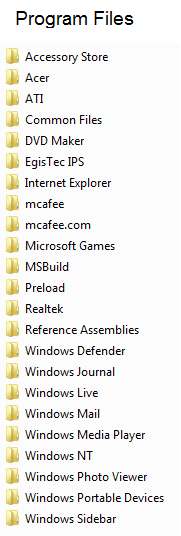
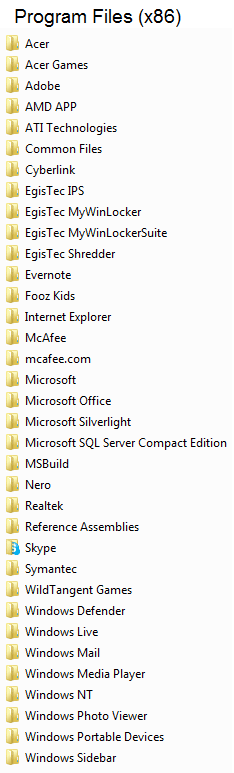
Is there a list or image somewhere of the subdirectories that are created under Program Files and Program Files (x86) of a clean Windows 7 installation? I just installed Windows 7 using my computer's recovery disks, which installs a lot of manufacturer bloatware as well, and I would like to see which subfolders in my Program Files directory belong to the bloatware and which are subdirectories that are normally installed in a fresh Windows installation. I might decide later to do a fresh generic installation of Windows anyway, but for now I'd like to determine just how bloated the bloat installation really is.
Attached to this post are screenshots of the two program files directories of my freshly installed Windows 7, which was installed from the manufacturer's recovery disks. I would like to determine which of these subdirectories normally come with Windows and which don't. For example, I can see that EverNote, Skype, McAfee and Adobe gets installed, and those will probably be removed by me pretty soon (or rather: I'll make sure they don't run and update by themselves). However, I also see e.g. an ATI subfolder, and I know that that is likely not bloatware. Still, being able to see what subdirectories Windows usually installs can help me see what bloatware is installed on the computer.
Thanks in advance for your help.
Samuel
Is there a list or image somewhere of the subdirectories that are created under Program Files and Program Files (x86) of a clean Windows 7 installation? I just installed Windows 7 using my computer's recovery disks, which installs a lot of manufacturer bloatware as well, and I would like to see which subfolders in my Program Files directory belong to the bloatware and which are subdirectories that are normally installed in a fresh Windows installation. I might decide later to do a fresh generic installation of Windows anyway, but for now I'd like to determine just how bloated the bloat installation really is.
Attached to this post are screenshots of the two program files directories of my freshly installed Windows 7, which was installed from the manufacturer's recovery disks. I would like to determine which of these subdirectories normally come with Windows and which don't. For example, I can see that EverNote, Skype, McAfee and Adobe gets installed, and those will probably be removed by me pretty soon (or rather: I'll make sure they don't run and update by themselves). However, I also see e.g. an ATI subfolder, and I know that that is likely not bloatware. Still, being able to see what subdirectories Windows usually installs can help me see what bloatware is installed on the computer.
Thanks in advance for your help.
Samuel
Attachments
My Computer
At a glance
Windows 7 Home Premium 64 bitAMD A6 36204 x 4 GBAMD Radeon HD 6530D
- Computer type
- PC/Desktop
- Computer Manufacturer/Model Number
- Acer Aspire X3470
- OS
- Windows 7 Home Premium 64 bit
- CPU
- AMD A6 3620
- Memory
- 4 x 4 GB
- Graphics Card(s)
- AMD Radeon HD 6530D
- Sound Card
- AMD, Realtek
- Monitor(s) Displays
- iiyama ProLite B2209HDS full HD in portrait mode
- Screen Resolution
- 1920x1080 or 1080x1920
- Hard Drives
- SSD 250 GB
WD Green 2 TB 5400 rpm
- Antivirus
- Avast
- Browser
- Opera (Blink)

