
what are these processes?

feyzaguirre

New member
Local time
6:14 AM
Messages
4
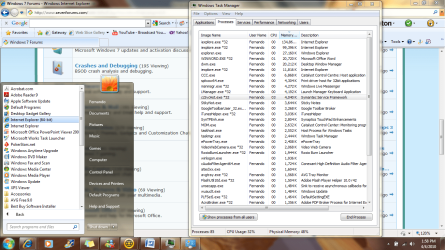
My pc has some processes i do not recognize. most of them have a *32 next to them. this has happened i the last two days. what should i do i also have a new option in the start-programs menu internet explorer (64 bit). for some reason in all other pcs ive had, this always shows these symptoms when a trojan or virus is present. how do i fix this before its too late? the picture give u a graphic look at this problem.
 

Attachments
  • Untitled.png
    Untitled.png
    126.8 KB · Views: 57
Last edited:

My Computer

Computer Manufacturer/Model Number
gateway nv 57
OS
windows 7
Welcome,

Scan with your Anti Virus and then download and run malwarebytes.

http://www.malwarebytes.org/mbam.php

Then post back with the results

Edit I did not have benefit of the Screen shot when I posted. I do not think there is a problem.
 

My Computer

Computer type
PC/Desktop
Computer Manufacturer/Model Number
Dell XPS 420
OS
Windows 10, Home Clean Install
CPU
Intel Core2 processsor Q8200(2.33Ghz 1333FSB) Quad Core Tech
Motherboard
Dell
Memory
6 gb
Graphics Card(s)
ATI Radeon 256MB HD3650
Sound Card
Intergrated 7.1 Channel Audio
Monitor(s) Displays
Dell SP2009W 20"
Hard Drives
640 GB Serial ATA Hard drive
Cooling
Fan
Keyboard
Dell USB Keyboard
Mouse
Dell Premium Optical USB
Internet Speed
DSL 2.85
You should do nothing. * 32 in the process list means the process is 32bit. There are usually two versions of application on your computer, 64 bit and 32 bit. This is normal for x64 versions of Windows.
 

My Computer

Computer type
PC/Desktop
Computer Manufacturer/Model Number
Alienware Aurora ALX R4
OS
Windows 10 Pro (x64)
CPU
Intel Core i7-3930K (3.2GHz - 4.5GHz)
Motherboard
Alienware Aurora-R4 x79
Memory
4x Samsung 4GB PC3-12800 DDR3 (16GB 1600MHz)
Graphics Card(s)
Nvidia Geforce GTX 690
Sound Card
SteelSeries Siberia Elite
Monitor(s) Displays
Dell UltraSharp U3011
Screen Resolution
2560x1600
Hard Drives
Samsung 850 Pro 256 GB, Seagate 1TB Desktop Hybrid HDD, 2x Western Digital 4TB Green HDD
PSU
875W Some Dell PSU <.<
Case
Alienware Aurora ALX
Cooling
Custom Liquid Cooling (EK CPU & GPU blocks) dual EK 480RAD
Keyboard
Logitech G710+ Mechanical
Mouse
Logitech G700s
Internet Speed
Verizon Fios (50 mbps average)
Other Info
Server: Intel NUC D54250WYK: i5-4250U, 16GB, 256 GB mSATA, Windows Server 2012 R2
The *32 just means the application is a 32 bit app.

Internet Explorer has 2 versions. a 32 & 64bit version. Both can be accessed through the start menu.
What makes you think theres a problem?
 

My Computer

Computer Manufacturer/Model Number
Custom (Self Build)
OS
Windows 7 Home Premium 64bit
CPU
Intel Core i7 2700k
Motherboard
eVGA P67 SLI
Memory
8GB Mushkin Redline Ridgebacks @1866
Graphics Card(s)
EVGA GTX570 SC
Sound Card
XiFi Titanium HD
Monitor(s) Displays
LG W2453V
Screen Resolution
1920x1080
Hard Drives
Intel 320 80GB -- Intel X25-V 40GB --WD Black 1TB x2 -- WD Blue 640GB
PSU
Seasonic x750
Case
Corsair 600T SE White
Cooling
eVGA Superclocked CPU Cooler
Keyboard
Saitek Cyborg
Antivirus
Kaspersky
Browser
IE
Other Info
LG BD/DVD
logicearth is correct with his analysis, but since you said it happend before and seem concerend. I wouild run the scan. You can then relax.
 

My Computer

Computer type
PC/Desktop
Computer Manufacturer/Model Number
Dell XPS 420
OS
Windows 10, Home Clean Install
CPU
Intel Core2 processsor Q8200(2.33Ghz 1333FSB) Quad Core Tech
Motherboard
Dell
Memory
6 gb
Graphics Card(s)
ATI Radeon 256MB HD3650
Sound Card
Intergrated 7.1 Channel Audio
Monitor(s) Displays
Dell SP2009W 20"
Hard Drives
640 GB Serial ATA Hard drive
Cooling
Fan
Keyboard
Dell USB Keyboard
Mouse
Dell Premium Optical USB
Internet Speed
DSL 2.85
it wasnt doing this before my computer perfomance is way up in the 80% to the 100%
 

My Computer

Computer Manufacturer/Model Number
gateway nv 57
OS
windows 7
Then run the scans as I suggested, to be sure.
 

My Computer

Computer type
PC/Desktop
Computer Manufacturer/Model Number
Dell XPS 420
OS
Windows 10, Home Clean Install
CPU
Intel Core2 processsor Q8200(2.33Ghz 1333FSB) Quad Core Tech
Motherboard
Dell
Memory
6 gb
Graphics Card(s)
ATI Radeon 256MB HD3650
Sound Card
Intergrated 7.1 Channel Audio
Monitor(s) Displays
Dell SP2009W 20"
Hard Drives
640 GB Serial ATA Hard drive
Cooling
Fan
Keyboard
Dell USB Keyboard
Mouse
Dell Premium Optical USB
Internet Speed
DSL 2.85
virus scans alway detect 1 threat and eliminates it. even if i ran it twice in a row
 

My Computer

Computer Manufacturer/Model Number
gateway nv 57
OS
windows 7
Run the scan as suggested.
It certainly will cause no harm, and is a very good idea.


You have 85 processes running. Depending on your system specs, there may simply be to much things running atm that just arent needed taking up resources.
 

My Computer

Computer Manufacturer/Model Number
Custom (Self Build)
OS
Windows 7 Home Premium 64bit
CPU
Intel Core i7 2700k
Motherboard
eVGA P67 SLI
Memory
8GB Mushkin Redline Ridgebacks @1866
Graphics Card(s)
EVGA GTX570 SC
Sound Card
XiFi Titanium HD
Monitor(s) Displays
LG W2453V
Screen Resolution
1920x1080
Hard Drives
Intel 320 80GB -- Intel X25-V 40GB --WD Black 1TB x2 -- WD Blue 640GB
PSU
Seasonic x750
Case
Corsair 600T SE White
Cooling
eVGA Superclocked CPU Cooler
Keyboard
Saitek Cyborg
Antivirus
Kaspersky
Browser
IE
Other Info
LG BD/DVD
Lets see what happens. Run the A/V and malwarebytes. If it always shows one, it can be a false positive. This time you may show many. YOu did not try malwarebytes.

Oher memember suggest that there is no problem. You seem concerned, so we have to try. When you get the results, at a minimum, we may be able to convice you.

Its your choice.
 

My Computer

Computer type
PC/Desktop
Computer Manufacturer/Model Number
Dell XPS 420
OS
Windows 10, Home Clean Install
CPU
Intel Core2 processsor Q8200(2.33Ghz 1333FSB) Quad Core Tech
Motherboard
Dell
Memory
6 gb
Graphics Card(s)
ATI Radeon 256MB HD3650
Sound Card
Intergrated 7.1 Channel Audio
Monitor(s) Displays
Dell SP2009W 20"
Hard Drives
640 GB Serial ATA Hard drive
Cooling
Fan
Keyboard
Dell USB Keyboard
Mouse
Dell Premium Optical USB
Internet Speed
DSL 2.85
My pc has some processes i do not recognize. most of them have a *32 next to them. this has happened i the last two days. what should i do i also have a new option in the start-programs menu internet explorer (64 bit). for some reason in all other pcs ive had, this always shows these symptoms when a trojan or virus is present. how do i fix this before its too late? the picture give u a graphic look at this problem.
If you have a 64-bit Windows, you also have IE8 64-bit on the Start Menu.

What symptoms? What problem? I just don't understand what's the issue here? All the processes visible in Task Manager are completely normal, as they should be when running a 64-bit Windows.

There's not a single mysterious process. There's Messenger, Winword, AVG, touchpad service, iTunes, Catalyst etc. All normal, not one suspicious.

It looks you just have all the possible programs and services running. You might consider cleaning your startup a little bit.

That tells only that you are running a 64-bit Windows, with loads of stuff running on the background. When you run a 32-bit application on a 64-bit Windows, Windows shows with *32 that it's a 32-bit process.

it wasnt doing this before my computer perfomance is way up in the 80% to the 100%
Your CPU and RAM usage are high because you have almost all possible software running at the same time.

One more time, short version: According to your screenshot, there's nothing suspicious running on your computer. Every visible process is OK.

Kari
 

My Computer

Computer type
Laptop
Computer Manufacturer/Model Number
HP ENVY 17-1150eg
OS
Windows 10 Pro x64 EN-GB
CPU
1.6 GHz Intel Core i7-720QM Processor
Memory
6 GB
Graphics Card(s)
ATI Mobility Radeon HD 5850 Graphics
Sound Card
Beats sound system with integrated subwoofer
Monitor(s) Displays
17" laptop display, 22" LED and 32" Full HD TV through HDMI
Screen Resolution
1600*900 (1), 1920*1080 (2&3)
Hard Drives
Internal: 2 x 500 GB SATA Hard Disk Drive 7200 rpm
External: 2TB for backups, 3TB USB3 network drive for media
Cooling
As Envy runs a bit warm, I have it on a Cooler Master pad
Keyboard
Logitech diNovo Media Desktop Laser (bluetooth)
Mouse
Logitech Performance Mouse MX
Internet Speed
50/10 Mbps VDSL
Antivirus
Windows Defender 4.3.9431.0
Browser
Maxthon 3.5.2., IE11
Malwarebytes' Anti-Malware 1.45
www.malwarebytes.org
Database version: 3954
Windows 6.1.7600
Internet Explorer 8.0.7600.16385
4/4/2010 7:31:07 PM
mbam-log-2010-04-04 (19-31-07).txt
Scan type: Full scan (C:\|)
Objects scanned: 194043
Time elapsed: 4 hour(s), 35 minute(s), 17 second(s)
Memory Processes Infected: 0
Memory Modules Infected: 0
Registry Keys Infected: 2
Registry Values Infected: 0
Registry Data Items Infected: 1
Folders Infected: 0
Files Infected: 0
Memory Processes Infected:
(No malicious items detected)
Memory Modules Infected:
(No malicious items detected)
Registry Keys Infected:
HKEY_CLASSES_ROOT\popcaploader.popcaploaderctrl2 (Adware.PopCap) -> Quarantined and deleted successfully.
HKEY_CLASSES_ROOT\popcaploader.popcaploaderctrl2.1 (Adware.PopCap) -> Quarantined and deleted successfully.
Registry Values Infected:
(No malicious items detected)
Registry Data Items Infected:
HKEY_LOCAL_MACHINE\SOFTWARE\Microsoft\Windows\CurrentVersion\Policies\Explorer\NoActiveDesktopChanges (Hijack.DisplayProperties) -> Bad: (1) Good: (0) -> Quarantined and deleted successfully.
Folders Infected:
(No malicious items detected)
Files Infected:
(No malicious items detected)
 

My Computer

Computer Manufacturer/Model Number
gateway nv 57
OS
windows 7
Hi Again,

I know this only because I use (and like) Malwarebytes. Usually there is one false positive for windows users. If your malware is this one, just set to ignore.

Malwarebytes false positive? - alt.privacy.spyware | Google Groups

Enjoy your computer and run a virus and malware scan at least once a week.

HKEY_LOCAL_MACHINE\SOFTWARE\Microsoft\Windows\CurrentVersion\Policies\Explo­rer\NoActiveDesktopChanges False Positive
 

My Computer

Computer type
PC/Desktop
Computer Manufacturer/Model Number
Dell XPS 420
OS
Windows 10, Home Clean Install
CPU
Intel Core2 processsor Q8200(2.33Ghz 1333FSB) Quad Core Tech
Motherboard
Dell
Memory
6 gb
Graphics Card(s)
ATI Radeon 256MB HD3650
Sound Card
Intergrated 7.1 Channel Audio
Monitor(s) Displays
Dell SP2009W 20"
Hard Drives
640 GB Serial ATA Hard drive
Cooling
Fan
Keyboard
Dell USB Keyboard
Mouse
Dell Premium Optical USB
Internet Speed
DSL 2.85
4.5 hours to scan your pc :shock::shock::shock::shock:


I know I know.
 

My Computer

Computer Manufacturer/Model Number
Myself
OS
Windows 7 Ultimate 64Bit
CPU
C2D E8200
Motherboard
XFX 750i
Memory
8GB PNY PC2-6400
Graphics Card(s)
BFG 9600GT x 2
Sound Card
Stock XFX Optical
Monitor(s) Displays
Gateway 22" HD Display
Hard Drives
C: 1 TB G: 500 GB H: 500 GB
PSU
Ultra LSP 550 Pro Lifetime Series
Case
Xion2
Cooling
ThermalTake
Back
Top