What could be causing wirless network to drop out?

darkdisturbed

Tick Tock on the drop
Hi guys, I have a Belkin 332F Basic router which serves as the hub to host my broadband connection as a wireless. Anyway last couple weeks I have been having trouble with the modem with drop outs and refusing to connect to the network.

I've also updated the drivers and that seemed to have failed to constrain the constant drop outs. I was wondering what network diagnostics I can perform so I can figure out what's going on? I also am thinking that it could possibly be a fault with the modem.

What steps can I do in order to try and solve this problem?

Do you guys require any other information? I'll be happy to get some for you.

Cheers!
darkdisturbed
 

My Computer

Computer Manufacturer/Model Number
HP Pavilion pc6000
OS
Windows 7 Ultimate
CPU
Intel Core Processor 2 Quad Processor Q9400 Series
Memory
2 GIG
Graphics Card(s)
NVIDIA Geforce GT230 3D
Sound Card
Integrated Intel HIgh Definition Audio 5.1 Surround Sound
Monitor(s) Displays
20 Inch 2009F 16:9 HP LCD Monitor
Hard Drives
Primary 320GIG
External 1 500G
External 2 640G
Keyboard
HP USB Keyboard
Mouse
HP USB Mouse

My Computer

Computer Manufacturer/Model Number
HP m8000n
OS
Windows 7 Ultimate x86
CPU
DualCore AMD Athlon 64 X2, 2600 MHz 5200+
Motherboard
Asus M2N68-LA (Narra)
Memory
Samsung 2GB DDR2
Graphics Card(s)
Onboard NVIDIA GeForce 6150SE nForce 430
Sound Card
Onboard nVIDIA nForce 6100-430 (MCP61P)
Monitor(s) Displays
Westinghouse 19" LED
Screen Resolution
1280x1024
Hard Drives
SATA II Seagate Barracuda 500GB
USB II WD Elements 500GB
USB II WD My Book 1TB
USB II WD My Book 2TB
PSU
Stock (HP)
Case
Stock (HP)
Cooling
Stock
Keyboard
Logitech Classic KB 200
Mouse
Standard HP opticle USB mouse
Oh thanks :)About 30% of the document I have tried, will give the rest a shot as soon as I get home. Thanks for pinpointing me in a starting direction.

I still think it could be a hardware problem and a fault with the modem, luckly I still have the reciept just in case if I do have to take it back.
 

My Computer

Computer Manufacturer/Model Number
HP Pavilion pc6000
OS
Windows 7 Ultimate
CPU
Intel Core Processor 2 Quad Processor Q9400 Series
Memory
2 GIG
Graphics Card(s)
NVIDIA Geforce GT230 3D
Sound Card
Integrated Intel HIgh Definition Audio 5.1 Surround Sound
Monitor(s) Displays
20 Inch 2009F 16:9 HP LCD Monitor
Hard Drives
Primary 320GIG
External 1 500G
External 2 640G
Keyboard
HP USB Keyboard
Mouse
HP USB Mouse
Hi guys, I have a Belkin 332F Basic router which serves as the hub to host my broadband connection as a wireless. Anyway last couple weeks I have been having trouble with the modem with drop outs and refusing to connect to the network.

I've also updated the drivers and that seemed to have failed to constrain the constant drop outs. I was wondering what network diagnostics I can perform so I can figure out what's going on? I also am thinking that it could possibly be a fault with the modem.

What steps can I do in order to try and solve this problem?

Do you guys require any other information? I'll be happy to get some for you.

Cheers!
darkdisturbed

The first thing I would look at is if the wireless channel you are using is clear from interference from other wireless networks. You can use the Xirrus wifi inpector for this, link below.

Just open up the program and it will show you which channels are being used in your area, then go into your routers wireless setting and choose a channel that isn't being used.

Xirrus: The Leader in High Performance Wi-Fi - Advanced IT Wi-Fi Networking Tools
 

My Computer

Computer type
PC/Desktop
Computer Manufacturer/Model Number
Home built
OS
Windows 7 Ult, Windows 8.1 Pro,
CPU
Q9650-4.275GHz, E8600 4.5GHz, E6750-3.8GHz
Motherboard
Evga 780i FTW
Memory
G.Skill PC2 9600 1200Mhz 5 5 5 15 2T
Graphics Card(s)
GTX480
Sound Card
Asus Xonar D2
Monitor(s) Displays
HannsG
Screen Resolution
1680X1050
Hard Drives
GSkill Phoenix Pro 120GB SSD
PSU
ThermalTake Toughpower 1000Watt modular
Case
ThermalTake XaserV
Cooling
Xigmatek S1283
Keyboard
Logitech G15
Mouse
Logitech G9
Internet Speed
T1
Can't get into the wireless router settings because the connection doesn't exist.
 

My Computer

Computer Manufacturer/Model Number
HP Pavilion pc6000
OS
Windows 7 Ultimate
CPU
Intel Core Processor 2 Quad Processor Q9400 Series
Memory
2 GIG
Graphics Card(s)
NVIDIA Geforce GT230 3D
Sound Card
Integrated Intel HIgh Definition Audio 5.1 Surround Sound
Monitor(s) Displays
20 Inch 2009F 16:9 HP LCD Monitor
Hard Drives
Primary 320GIG
External 1 500G
External 2 640G
Keyboard
HP USB Keyboard
Mouse
HP USB Mouse
Then you need to use a computer that's connected via cable ;)
 

My Computer

Computer Manufacturer/Model Number
HP m8000n
OS
Windows 7 Ultimate x86
CPU
DualCore AMD Athlon 64 X2, 2600 MHz 5200+
Motherboard
Asus M2N68-LA (Narra)
Memory
Samsung 2GB DDR2
Graphics Card(s)
Onboard NVIDIA GeForce 6150SE nForce 430
Sound Card
Onboard nVIDIA nForce 6100-430 (MCP61P)
Monitor(s) Displays
Westinghouse 19" LED
Screen Resolution
1280x1024
Hard Drives
SATA II Seagate Barracuda 500GB
USB II WD Elements 500GB
USB II WD My Book 1TB
USB II WD My Book 2TB
PSU
Stock (HP)
Case
Stock (HP)
Cooling
Stock
Keyboard
Logitech Classic KB 200
Mouse
Standard HP opticle USB mouse
connect via cable like Sledge suggested, connect to the web page of said router, change channel that way.

Did you add any new devices to the network/house before this became an issue?
 

My Computer

OS
7 Pro
Can't get into the wireless router settings because the connection doesn't exist.

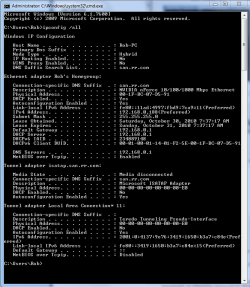
I'm not familor with that particular router but if you can post your ipconfig /all here we can get the default gateway which will get you into your routers settings so you can try another channel. Picture below shows you ipconfig /all from my machine.

Just type ipconfig /all into your command prompt. It will also show us any other potential problems with your connection.

Cable or wireless shouldn't matter, you should be able to access your routers set up page either way.
 

Attachments

  • My ipconfig all.PNG
    My ipconfig all.PNG
    85.7 KB · Views: 9

My Computer

Computer type
PC/Desktop
Computer Manufacturer/Model Number
Home built
OS
Windows 7 Ult, Windows 8.1 Pro,
CPU
Q9650-4.275GHz, E8600 4.5GHz, E6750-3.8GHz
Motherboard
Evga 780i FTW
Memory
G.Skill PC2 9600 1200Mhz 5 5 5 15 2T
Graphics Card(s)
GTX480
Sound Card
Asus Xonar D2
Monitor(s) Displays
HannsG
Screen Resolution
1680X1050
Hard Drives
GSkill Phoenix Pro 120GB SSD
PSU
ThermalTake Toughpower 1000Watt modular
Case
ThermalTake XaserV
Cooling
Xigmatek S1283
Keyboard
Logitech G15
Mouse
Logitech G9
Internet Speed
T1
wireless interference can come from many things. For example, more often than not...when my microwave is running my internet connection over wireless craps out. This is why i use Wi-Fi...only for convenience. For my PS3, computer, Xbox360 and such it's all hard wired.
 

My Computer

Computer Manufacturer/Model Number
Self-Built in July 2009
OS
Windows 7 Ultimate x64
CPU
Intel Q9550 2.83Ghz OC'd to 3.40Ghz
Motherboard
Gigabyte GA-EP45-UD3R rev. 1.1, F12 BIOS
Memory
8GB G.Skill PI DDR2-800, 4-4-4-12 timings
Graphics Card(s)
EVGA 1280MB Nvidia GeForce GTX570
Sound Card
Realtek ALC899A 8 channel onboard audio
Monitor(s) Displays
23" Acer x233H
Screen Resolution
1920x1080
Hard Drives
Intel X25-M 80GB Gen 2 SSD
Western Digital 1TB Caviar Black, 32MB cache. WD1001FALS
PSU
Corsair 620HX modular
Case
Antec P182
Cooling
stock
Keyboard
ABS M1 Mechanical
Mouse
Logitech G9 Laser Mouse
Internet Speed
15/2 cable modem
Other Info
Windows and Linux enthusiast. Logitech G35 Headset.
Well the wireless works fine on my computer in the office room, obviously. However because the necessary software isn't installed for the Belkin Router on this computer, I can access the router settings at the address specified (for the Wireless router) in the IPCOnfig all listing, but I can't use the default password (which I never changed).

Update - Just did a factory reset on the wireless modem and all is working so far. :) Haven't tried to see if I can get the wireless to work in my room on my laptop. Probably best to use the cable for that. Does work in the kitchen and living room, but not in the room though, odd.
 
Last edited:

My Computer

Computer Manufacturer/Model Number
HP Pavilion pc6000
OS
Windows 7 Ultimate
CPU
Intel Core Processor 2 Quad Processor Q9400 Series
Memory
2 GIG
Graphics Card(s)
NVIDIA Geforce GT230 3D
Sound Card
Integrated Intel HIgh Definition Audio 5.1 Surround Sound
Monitor(s) Displays
20 Inch 2009F 16:9 HP LCD Monitor
Hard Drives
Primary 320GIG
External 1 500G
External 2 640G
Keyboard
HP USB Keyboard
Mouse
HP USB Mouse
Back
Top