Solved What do Active, Primary and Logical mean when applied to Hard drives?

Caramelo

New member
Member
Local time
9:25 PM
Messages
81
macriumdrives.JPG

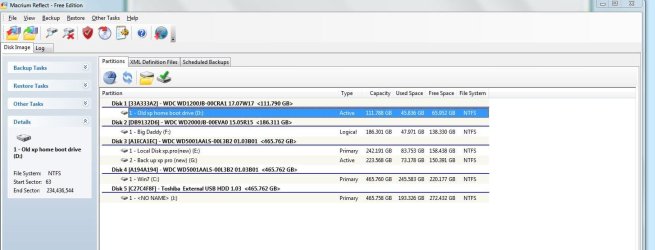
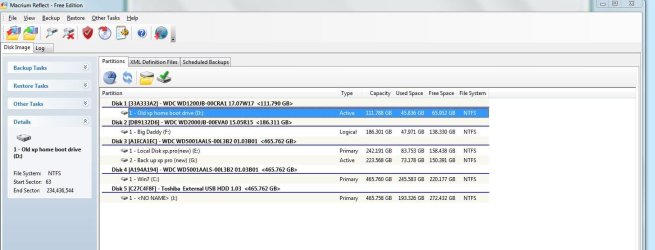
This screen shot shows what Macrium Reflect imaging program sees my drives as.

It shows D: on Disk 1 as active and G: on Disk 3 as active. What does this mean?

I assumed that I was booting from C:, which is my Win 7 drive.
Am I really booting from D:?

I believe D: is going bad physically. Norton Ghost says there are too many errors on it to make an image. If it goes bad, does it mean that I won't be able to boot my pc?
 

My Computer My Computer

At a glance

Windows Home Premium 64- bit(6.1,Build 7600) SP1AMD PhenomIIx4 945 3.0Ghz8GB (Mushkin DDR3 2gb x 4)ASUS VH232H (1920x1080@60Hz) 2048MB ATI AMD R...
Computer type
PC/Desktop
Computer Manufacturer/Model Number
Home built
OS
Windows Home Premium 64- bit(6.1,Build 7600) SP1
CPU
AMD PhenomIIx4 945 3.0Ghz
Motherboard
MS-7577
Memory
8GB (Mushkin DDR3 2gb x 4)
Graphics Card(s)
ASUS VH232H (1920x1080@60Hz) 2048MB ATI AMD Radeon HD 7800 S
Sound Card
On board
Monitor(s) Displays
Asus 22"
Screen Resolution
1920x1080
Hard Drives
2 WD 500gb SATA
1 WD 200gb ATA
1 WD 120gb ATA
PSU
Corsair TX 850w
Case
Antec tower
Cooling
Multiple fan.
Keyboard
Logitech USB
Mouse
Logitech G9 laser mouse
Internet Speed
Cable
Antivirus
AVG free
Browser
Firefox, Chrome, IE
Other Info
CH Joystick, Nostromo N50 game pad, USB headset, Canon Printer

My Computer My Computer

At a glance

Windows 10 Education 64 bitAMD Phenom II X4 980 Black Edition Deneb 3.7GHz8GB 4GBx2 Kingston PC10600 DDR3 1333 MemoryZotac NVIDIA Geforce GT640 2 Gig DDR3 PCIe
Computer type
PC/Desktop
Computer Manufacturer/Model Number
Home Built
OS
Windows 10 Education 64 bit
CPU
AMD Phenom II X4 980 Black Edition Deneb 3.7GHz
Motherboard
Asus M4N68T-M V2 µATX Motherboard
Memory
8GB 4GBx2 Kingston PC10600 DDR3 1333 Memory
Graphics Card(s)
Zotac NVIDIA Geforce GT640 2 Gig DDR3 PCIe
Sound Card
VIA VT1708s High Definition Audio 8-channel Onboard
Monitor(s) Displays
22" LG E2242 1080p and 2 19" I-INC AG191D
Screen Resolution
1280x1024 - 1920x1080 - 1280x1024
Hard Drives
Crucial M100 256 GB SSD and 500 GB WD Blue SATA
PSU
Thermaltake TR 620
Case
Power Up Black ATX Mid-Tower Case
Cooling
Stock heatsink and fan
Keyboard
Logitech Wireless K350 Wave
Mouse
Logitech Wireless M570 Trackman Wheel
Internet Speed
80 Mbps Down 30 Mbps Up
Antivirus
Windows Defender
Browser
Internet Explorer 11
Other Info
HP DVD1040e Lightscribe - External USB2
View attachment 174571

This screen shot shows what Macrium Reflect imaging program sees my drives as.

It shows D: on Disk 1 as active and G: on Disk 3 as active. What does this mean?

I assumed that I was booting from C:, which is my Win 7 drive.
Am I really booting from D:?

I believe D: is going bad physically. Norton Ghost says there are too many errors on it to make an image. If it goes bad, does it mean that I won't be able to boot my pc?

One thing you need to be aware of concering Macrium is that the drive letters and the drive names do not match as a rule. If your C: drive is called Main, when restoring from Macrium it might show D: as Main. You need to disregard the letters and go strickly by the name you have assigned to your drives.
 

My Computer My Computer

At a glance

Windows 7 Home Premium 32-Bit - Build 7600 SP1Intel Core i3-2120 3.30GhzKingston 4 GB DDR3 1333 mhzAMD Radeon HD6670
Computer type
PC/Desktop
Computer Manufacturer/Model Number
Custom Build
OS
Windows 7 Home Premium 32-Bit - Build 7600 SP1
CPU
Intel Core i3-2120 3.30Ghz
Motherboard
Asus P8Z68-V LX Intel Z68 Socket H2 ATX
Memory
Kingston 4 GB DDR3 1333 mhz
Graphics Card(s)
AMD Radeon HD6670
Sound Card
Sound Blaster Audigy SE 24-Bit
Monitor(s) Displays
Asus VE228
Screen Resolution
1440 X 900
Hard Drives
OCZ Vertex 3 120 GB Sata 3 SSD ==
Kingston SH103/S3 120 G Hyper X 120 GB SSD ==
Western Digital 500 GB Caviar Green 7200 RPM ==
PSU
Corsair CX600M == 600 Watt
Case
NZXT Apollo - Silver with Clear Side Panel
Cooling
Three 120 mm Fans
Keyboard
Microsoft Natural 4000
Mouse
Microsoft Custom Optical 3000
Internet Speed
AT&T Fiber Optic Wireless Network
Antivirus
Microsoft Security Essentials
Browser
Chrome
Other Info
120 mm Blue LED Fan -- Three Blue LED Lazer Light Sticks
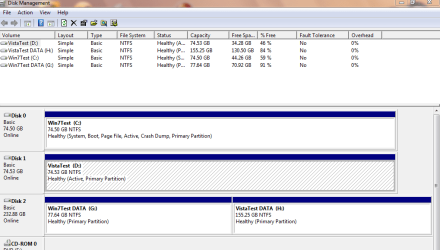
Can you give us a screenshot of Windows 7's expanded disk management window?

We need to know your disk layout i.e. which are physical hard drives and which are partitions on a hard drive.

You should no more than one active partition on each hard drive as Windows looks for it when it boots up. Generally speaking the active partition is normlly the one that holds the boot information at the start of the drive, but some people prefer to dispense with the system boot partition and use the Windows partition instead i.e. the Windows partition is the active one.

You can have three primary partitions plus one simple extended partition on each hard drive. The extended partition can be used to create further logical partitions should you need them.
 
Last edited:

My Computer My Computer

At a glance

Windows 7 Ultimate SP1 64-BitIntel Core i7 870 @ 2.93GHz8Gb Dual-Channel DDR3 @ 664MHznVidia GeForce GTX 460 1024MB dedicated RAM
Computer Manufacturer/Model Number
HP Pavilion Elite 495UK
OS
Windows 7 Ultimate SP1 64-Bit
CPU
Intel Core i7 870 @ 2.93GHz
Motherboard
MSI 2A9C (CPU1)
Memory
8Gb Dual-Channel DDR3 @ 664MHz
Graphics Card(s)
nVidia GeForce GTX 460 1024MB dedicated RAM
Sound Card
Realtek HD Audio
Monitor(s) Displays
HP2310i
Screen Resolution
1920 x 1080
Hard Drives
1x1954GB Hitachi HDS22020ALA 330 (RAID), 1x1954GB Hitachi External for backup and storage
PSU
460W
Case
HP Elite
Cooling
Air cooled
Keyboard
Logitech K750 solar-powered keyboard
Mouse
Logitech Wireless M180 mouse
Internet Speed
2Mb
Other Info
Pure Avanti Flow Internet Radio with iPod Dock, 64Gb iPod, HP USB Speakers, Sony MDR-V500 Headphones, Sony Vaio F-Series Laptop
Seavixen, can you give me the steps to get to the windows expanded disk management window please?
 

My Computer My Computer

At a glance

Windows Home Premium 64- bit(6.1,Build 7600) SP1AMD PhenomIIx4 945 3.0Ghz8GB (Mushkin DDR3 2gb x 4)ASUS VH232H (1920x1080@60Hz) 2048MB ATI AMD R...
Computer type
PC/Desktop
Computer Manufacturer/Model Number
Home built
OS
Windows Home Premium 64- bit(6.1,Build 7600) SP1
CPU
AMD PhenomIIx4 945 3.0Ghz
Motherboard
MS-7577
Memory
8GB (Mushkin DDR3 2gb x 4)
Graphics Card(s)
ASUS VH232H (1920x1080@60Hz) 2048MB ATI AMD Radeon HD 7800 S
Sound Card
On board
Monitor(s) Displays
Asus 22"
Screen Resolution
1920x1080
Hard Drives
2 WD 500gb SATA
1 WD 200gb ATA
1 WD 120gb ATA
PSU
Corsair TX 850w
Case
Antec tower
Cooling
Multiple fan.
Keyboard
Logitech USB
Mouse
Logitech G9 laser mouse
Internet Speed
Cable
Antivirus
AVG free
Browser
Firefox, Chrome, IE
Other Info
CH Joystick, Nostromo N50 game pad, USB headset, Canon Printer
Looks like your bootmgr ended up on D - that is what "active" means. That is not really a problem as long as you do not reformat D. But if you do, you will not be able to boot any more.

This kind of funny configuration happens very often. The Win7 installer grabs the first partition of the first drive it can find to place the bootmgr (and if none is present, it creates the little 100MB partition). That is why we always recommend to disconnect all drives except the one where you wish to install Win7. Once done with the installation, you reconnect them.
 

My Computer My Computer

At a glance

Vista, Windows7, Mint Mate, Zorin, Windows 8from 1.6GHz Duo to i7
Computer Manufacturer/Model Number
HP, Dell, Gateway, Toshiba - 4 laptops and 2 desktops
OS
Vista, Windows7, Mint Mate, Zorin, Windows 8
CPU
from 1.6GHz Duo to i7
Monitor(s) Displays
2x HP w2207
Hard Drives
5x HDD, 7x SSD, 12x Externals
Keyboard
with trackball - no mices
Mouse
Trackball mice
Internet Speed
DSL 6000
Seavixen, can you give me the steps to get to the windows expanded disk management window please?

Navigate to Start>Control Panel>System & Security>Create and format hard disk partitions.

See screenshot below:

DM.PNG
 

My Computer My Computer

At a glance

Windows 7 Ultimate SP1 64-BitIntel Core i7 870 @ 2.93GHz8Gb Dual-Channel DDR3 @ 664MHznVidia GeForce GTX 460 1024MB dedicated RAM
Computer Manufacturer/Model Number
HP Pavilion Elite 495UK
OS
Windows 7 Ultimate SP1 64-Bit
CPU
Intel Core i7 870 @ 2.93GHz
Motherboard
MSI 2A9C (CPU1)
Memory
8Gb Dual-Channel DDR3 @ 664MHz
Graphics Card(s)
nVidia GeForce GTX 460 1024MB dedicated RAM
Sound Card
Realtek HD Audio
Monitor(s) Displays
HP2310i
Screen Resolution
1920 x 1080
Hard Drives
1x1954GB Hitachi HDS22020ALA 330 (RAID), 1x1954GB Hitachi External for backup and storage
PSU
460W
Case
HP Elite
Cooling
Air cooled
Keyboard
Logitech K750 solar-powered keyboard
Mouse
Logitech Wireless M180 mouse
Internet Speed
2Mb
Other Info
Pure Avanti Flow Internet Radio with iPod Dock, 64Gb iPod, HP USB Speakers, Sony MDR-V500 Headphones, Sony Vaio F-Series Laptop
Diskmanagement.JPG
As you can see Disk 1 (Drive D) is not showing now in disk management. It has done this before and it may have failed for the last time. I can still boot up to win 7 however.

@whs, yes I got this configuration when I built the computer. Out of lack of knowledge I just threw in two drives from my previous pc and two new ones, wired them all up and booted up. I installed win 7 at a later point.

How can I make the Win 7 hd the active or boot one?
 

My Computer My Computer

At a glance

Windows Home Premium 64- bit(6.1,Build 7600) SP1AMD PhenomIIx4 945 3.0Ghz8GB (Mushkin DDR3 2gb x 4)ASUS VH232H (1920x1080@60Hz) 2048MB ATI AMD R...
Computer type
PC/Desktop
Computer Manufacturer/Model Number
Home built
OS
Windows Home Premium 64- bit(6.1,Build 7600) SP1
CPU
AMD PhenomIIx4 945 3.0Ghz
Motherboard
MS-7577
Memory
8GB (Mushkin DDR3 2gb x 4)
Graphics Card(s)
ASUS VH232H (1920x1080@60Hz) 2048MB ATI AMD Radeon HD 7800 S
Sound Card
On board
Monitor(s) Displays
Asus 22"
Screen Resolution
1920x1080
Hard Drives
2 WD 500gb SATA
1 WD 200gb ATA
1 WD 120gb ATA
PSU
Corsair TX 850w
Case
Antec tower
Cooling
Multiple fan.
Keyboard
Logitech USB
Mouse
Logitech G9 laser mouse
Internet Speed
Cable
Antivirus
AVG free
Browser
Firefox, Chrome, IE
Other Info
CH Joystick, Nostromo N50 game pad, USB headset, Canon Printer
"How can I make the Win 7 hd the active or boot one?"

Just right-click the partition and choose Mark partition as active.
 

My Computer My Computer

At a glance

Windows 7 Ultimate SP1 64-BitIntel Core i7 870 @ 2.93GHz8Gb Dual-Channel DDR3 @ 664MHznVidia GeForce GTX 460 1024MB dedicated RAM
Computer Manufacturer/Model Number
HP Pavilion Elite 495UK
OS
Windows 7 Ultimate SP1 64-Bit
CPU
Intel Core i7 870 @ 2.93GHz
Motherboard
MSI 2A9C (CPU1)
Memory
8Gb Dual-Channel DDR3 @ 664MHz
Graphics Card(s)
nVidia GeForce GTX 460 1024MB dedicated RAM
Sound Card
Realtek HD Audio
Monitor(s) Displays
HP2310i
Screen Resolution
1920 x 1080
Hard Drives
1x1954GB Hitachi HDS22020ALA 330 (RAID), 1x1954GB Hitachi External for backup and storage
PSU
460W
Case
HP Elite
Cooling
Air cooled
Keyboard
Logitech K750 solar-powered keyboard
Mouse
Logitech Wireless M180 mouse
Internet Speed
2Mb
Other Info
Pure Avanti Flow Internet Radio with iPod Dock, 64Gb iPod, HP USB Speakers, Sony MDR-V500 Headphones, Sony Vaio F-Series Laptop
No wonder disk0 and disk1 do not show.

Correction: You have to move this guy "UP" - not "DOWN".
 

Attachments

  • 2011-09-10_0028.png
    2011-09-10_0028.png
    75.2 KB · Views: 65

My Computer My Computer

At a glance

Vista, Windows7, Mint Mate, Zorin, Windows 8from 1.6GHz Duo to i7
Computer Manufacturer/Model Number
HP, Dell, Gateway, Toshiba - 4 laptops and 2 desktops
OS
Vista, Windows7, Mint Mate, Zorin, Windows 8
CPU
from 1.6GHz Duo to i7
Monitor(s) Displays
2x HP w2207
Hard Drives
5x HDD, 7x SSD, 12x Externals
Keyboard
with trackball - no mices
Mouse
Trackball mice
Internet Speed
DSL 6000
Disk0 & Disk1 should still show on top view.

Capture0000033.PNG
 

My Computer My Computer

At a glance

ME/XP/Vista/Win7
OS
ME/XP/Vista/Win7
"How can I make the Win 7 hd the active or boot one?"

Just right-click the partition and choose Mark partition as active.

Will that allow me to boot from the win 7 hd? I'm concerned that if D dies I will not be able to boot up.
 

My Computer My Computer

At a glance

Windows Home Premium 64- bit(6.1,Build 7600) SP1AMD PhenomIIx4 945 3.0Ghz8GB (Mushkin DDR3 2gb x 4)ASUS VH232H (1920x1080@60Hz) 2048MB ATI AMD R...
Computer type
PC/Desktop
Computer Manufacturer/Model Number
Home built
OS
Windows Home Premium 64- bit(6.1,Build 7600) SP1
CPU
AMD PhenomIIx4 945 3.0Ghz
Motherboard
MS-7577
Memory
8GB (Mushkin DDR3 2gb x 4)
Graphics Card(s)
ASUS VH232H (1920x1080@60Hz) 2048MB ATI AMD Radeon HD 7800 S
Sound Card
On board
Monitor(s) Displays
Asus 22"
Screen Resolution
1920x1080
Hard Drives
2 WD 500gb SATA
1 WD 200gb ATA
1 WD 120gb ATA
PSU
Corsair TX 850w
Case
Antec tower
Cooling
Multiple fan.
Keyboard
Logitech USB
Mouse
Logitech G9 laser mouse
Internet Speed
Cable
Antivirus
AVG free
Browser
Firefox, Chrome, IE
Other Info
CH Joystick, Nostromo N50 game pad, USB headset, Canon Printer

My Computer My Computer

At a glance

Windows 7 Ultimate SP1 64-BitIntel Core i7 870 @ 2.93GHz8Gb Dual-Channel DDR3 @ 664MHznVidia GeForce GTX 460 1024MB dedicated RAM
Computer Manufacturer/Model Number
HP Pavilion Elite 495UK
OS
Windows 7 Ultimate SP1 64-Bit
CPU
Intel Core i7 870 @ 2.93GHz
Motherboard
MSI 2A9C (CPU1)
Memory
8Gb Dual-Channel DDR3 @ 664MHz
Graphics Card(s)
nVidia GeForce GTX 460 1024MB dedicated RAM
Sound Card
Realtek HD Audio
Monitor(s) Displays
HP2310i
Screen Resolution
1920 x 1080
Hard Drives
1x1954GB Hitachi HDS22020ALA 330 (RAID), 1x1954GB Hitachi External for backup and storage
PSU
460W
Case
HP Elite
Cooling
Air cooled
Keyboard
Logitech K750 solar-powered keyboard
Mouse
Logitech Wireless M180 mouse
Internet Speed
2Mb
Other Info
Pure Avanti Flow Internet Radio with iPod Dock, 64Gb iPod, HP USB Speakers, Sony MDR-V500 Headphones, Sony Vaio F-Series Laptop
No wonder disk0 and disk1 do not show.

Correction: You have to move this guy "UP" - not "DOWN".

diskmanage.JPG

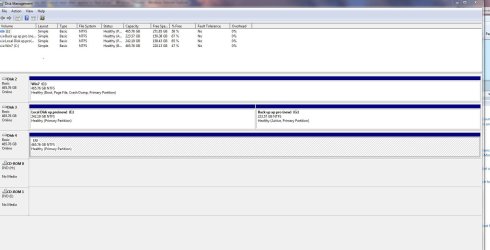
This is all I get when I go to the expanded disk management screen. I used to have a disk 1 showing. I do have 4 physical disks in my pc plus the external hd (J). D or 1 is no longer showing up because it is failing. You can see D (labeled Old XP) in my first ss at the top of the page.

You can see disk 1 displayed in this ss

macriumdrives.JPG

Unfortunately I don't think I can access it any longer.
 

My Computer My Computer

At a glance

Windows Home Premium 64- bit(6.1,Build 7600) SP1AMD PhenomIIx4 945 3.0Ghz8GB (Mushkin DDR3 2gb x 4)ASUS VH232H (1920x1080@60Hz) 2048MB ATI AMD R...
Computer type
PC/Desktop
Computer Manufacturer/Model Number
Home built
OS
Windows Home Premium 64- bit(6.1,Build 7600) SP1
CPU
AMD PhenomIIx4 945 3.0Ghz
Motherboard
MS-7577
Memory
8GB (Mushkin DDR3 2gb x 4)
Graphics Card(s)
ASUS VH232H (1920x1080@60Hz) 2048MB ATI AMD Radeon HD 7800 S
Sound Card
On board
Monitor(s) Displays
Asus 22"
Screen Resolution
1920x1080
Hard Drives
2 WD 500gb SATA
1 WD 200gb ATA
1 WD 120gb ATA
PSU
Corsair TX 850w
Case
Antec tower
Cooling
Multiple fan.
Keyboard
Logitech USB
Mouse
Logitech G9 laser mouse
Internet Speed
Cable
Antivirus
AVG free
Browser
Firefox, Chrome, IE
Other Info
CH Joystick, Nostromo N50 game pad, USB headset, Canon Printer
What do you have connected to the first two Sata Ports?
 

My Computer My Computer

At a glance

ME/XP/Vista/Win7
OS
ME/XP/Vista/Win7
"How can I make the Win 7 hd the active or boot one?"

Just right-click the partition and choose Mark partition as active.

Will that allow me to boot from the win 7 hd? I'm concerned that if D dies I will not be able to boot up.

If that happens you can always run a startup repair to fix the master boot record.

http://www.sevenforums.com/tutorials/681-startup-repair.html

You would need to run it three times.

I've noticed that if I unplug the power from D to stop it from making noise, I can't boot the pc. I did use a utility to save a copy of the MBR from the win 7 hd but your method sounds more thorough.
 

My Computer My Computer

At a glance

Windows Home Premium 64- bit(6.1,Build 7600) SP1AMD PhenomIIx4 945 3.0Ghz8GB (Mushkin DDR3 2gb x 4)ASUS VH232H (1920x1080@60Hz) 2048MB ATI AMD R...
Computer type
PC/Desktop
Computer Manufacturer/Model Number
Home built
OS
Windows Home Premium 64- bit(6.1,Build 7600) SP1
CPU
AMD PhenomIIx4 945 3.0Ghz
Motherboard
MS-7577
Memory
8GB (Mushkin DDR3 2gb x 4)
Graphics Card(s)
ASUS VH232H (1920x1080@60Hz) 2048MB ATI AMD Radeon HD 7800 S
Sound Card
On board
Monitor(s) Displays
Asus 22"
Screen Resolution
1920x1080
Hard Drives
2 WD 500gb SATA
1 WD 200gb ATA
1 WD 120gb ATA
PSU
Corsair TX 850w
Case
Antec tower
Cooling
Multiple fan.
Keyboard
Logitech USB
Mouse
Logitech G9 laser mouse
Internet Speed
Cable
Antivirus
AVG free
Browser
Firefox, Chrome, IE
Other Info
CH Joystick, Nostromo N50 game pad, USB headset, Canon Printer
What do you have connected to the first two Sata Ports?

Disk 2 and 3 are connect to sata the other 2 drives are ata I believe. They are not sata drives.
 

My Computer My Computer

At a glance

Windows Home Premium 64- bit(6.1,Build 7600) SP1AMD PhenomIIx4 945 3.0Ghz8GB (Mushkin DDR3 2gb x 4)ASUS VH232H (1920x1080@60Hz) 2048MB ATI AMD R...
Computer type
PC/Desktop
Computer Manufacturer/Model Number
Home built
OS
Windows Home Premium 64- bit(6.1,Build 7600) SP1
CPU
AMD PhenomIIx4 945 3.0Ghz
Motherboard
MS-7577
Memory
8GB (Mushkin DDR3 2gb x 4)
Graphics Card(s)
ASUS VH232H (1920x1080@60Hz) 2048MB ATI AMD Radeon HD 7800 S
Sound Card
On board
Monitor(s) Displays
Asus 22"
Screen Resolution
1920x1080
Hard Drives
2 WD 500gb SATA
1 WD 200gb ATA
1 WD 120gb ATA
PSU
Corsair TX 850w
Case
Antec tower
Cooling
Multiple fan.
Keyboard
Logitech USB
Mouse
Logitech G9 laser mouse
Internet Speed
Cable
Antivirus
AVG free
Browser
Firefox, Chrome, IE
Other Info
CH Joystick, Nostromo N50 game pad, USB headset, Canon Printer
Physically disconnect the ALL the HD.
Make the Win dows 7 HD, disk0 & first HD boot in BIOS. & frist Sata port on the MOBO.

Follow this base tutorial:
http://www.sevenforums.com/general-...-me-get-windows-7-boot-again.html#post1518114

How do I tell which physical disk in the machine is the one containing the win 7 so that I can make sure it's connected to the first sata port?

When you say physically disconnect the drives, do you mean all cables, power as well as data cables?
 

My Computer My Computer

At a glance

Windows Home Premium 64- bit(6.1,Build 7600) SP1AMD PhenomIIx4 945 3.0Ghz8GB (Mushkin DDR3 2gb x 4)ASUS VH232H (1920x1080@60Hz) 2048MB ATI AMD R...
Computer type
PC/Desktop
Computer Manufacturer/Model Number
Home built
OS
Windows Home Premium 64- bit(6.1,Build 7600) SP1
CPU
AMD PhenomIIx4 945 3.0Ghz
Motherboard
MS-7577
Memory
8GB (Mushkin DDR3 2gb x 4)
Graphics Card(s)
ASUS VH232H (1920x1080@60Hz) 2048MB ATI AMD Radeon HD 7800 S
Sound Card
On board
Monitor(s) Displays
Asus 22"
Screen Resolution
1920x1080
Hard Drives
2 WD 500gb SATA
1 WD 200gb ATA
1 WD 120gb ATA
PSU
Corsair TX 850w
Case
Antec tower
Cooling
Multiple fan.
Keyboard
Logitech USB
Mouse
Logitech G9 laser mouse
Internet Speed
Cable
Antivirus
AVG free
Browser
Firefox, Chrome, IE
Other Info
CH Joystick, Nostromo N50 game pad, USB headset, Canon Printer
What do you have connected to the first two Sata Ports?

Disk 2 and 3 are connect to sata the other 2 drives are ata I believe. They are not sata drives.

Physically disconnect the ALL the HD.
Make the Win dows 7 HD, disk0 & first HD boot in BIOS. (& frist Sata port on the MOBO.)
Make sure C: is master.

Follow this base tutorial:
http://www.sevenforums.com/general-...-me-get-windows-7-boot-again.html#post1518114

You say, your C: Drive is IDE. (PATA)

EDIT: Miss read.

C: HD is SATA, the MOBO SATA port are marked 1,2,3,4. Some MOBO start with a SATA port 0.
 

My Computer My Computer

At a glance

ME/XP/Vista/Win7
OS
ME/XP/Vista/Win7
Back
Top