What don't you like about Windows 7?

Status
Not open for further replies.
Wow

Wow, didnt expect so many posts in here LOL. Couldnt read all of them, but will add my list! I also I have likes I will have to put in another thread.

Only issues I have with it are...

1. The same I have with Macs. Dont take this wrong I dont want this to be read wrong. IMVHO Vista was trying to over simplify things *like Macs, good for the everyday user, family, business owner etc. Not as good for us Gear heads. The thing I liked most about XP is it not much was hidden or hard to find. If you want to disable something or add something click click done. Like start CMD prompt, ok not everyone needs it but some do. Now I know Start type CMD, well I like to roll with the mouse and keep my keyboard in the drawer until I am typing or gaming. So I like to pin CMD to start menu. Now it isnt too hard, start run type cmd then right click pin to start menu! Should have expertise levels when you install "Advanced" "Beginner" etc.

2. Has a little bit of the Vista issues lingering around (especially if you do the upgrade install!).

3. This just started in the forums, I got a windows defender needs to close and IE needs to close! This is a fresh install, never saw this when running the RC version! Hopefully not a problem!

Also disliked the leaked versions being around the net while waiting for my 3 pre orders, I know I had RC free, but I wanted to re install and get it over with!! Could have done the time hacks or something, but thats not why I bought it so this was annoying.
 

My Computer My Computer

At a glance

Windows 7 ProQ9650 @ 4.05ghzKingston DDR3 @1800mhz 8GBBFG GTX 285SC
Computer Manufacturer/Model Number
Custom
OS
Windows 7 Pro
CPU
Q9650 @ 4.05ghz
Motherboard
Asus Striker II Extreme
Memory
Kingston DDR3 @1800mhz 8GB
Graphics Card(s)
BFG GTX 285SC
Sound Card
Audigy Fatal1ty
Monitor(s) Displays
Dell 24" 1920x 1200
Hard Drives
Raid 0 1TB Windows 7-64
Raid 0 800GB XP-32
PSU
Zalman 950-HP
Case
Cooler Master 690
Cooling
Zalman Pure Copper
Sonixmon, for #1: You'd be surprised what you can find if you just type it into the search bar of the start menu. Disk Management, Run, CMD, Administrative Tools, Device Manager, all manner of "gear head" related stuff can be found just by typing it in.

Nothing is hidden from someone who knows where to look.
 

My Computer My Computer

At a glance

Windows 7 Ultimate/XP SP3Pentium 4 HT 3.0 Ghz2048MB DDR ECC RAM @ 200Mhz (4x512mb)Nvidia Quadro FX 1100
Computer Manufacturer/Model Number
HP Workstation Xw4100
OS
Windows 7 Ultimate/XP SP3
CPU
Pentium 4 HT 3.0 Ghz
Memory
2048MB DDR ECC RAM @ 200Mhz (4x512mb)
Graphics Card(s)
Nvidia Quadro FX 1100
Sound Card
Max Blaster
Monitor(s) Displays
17" MAG
Screen Resolution
1280*1024
Hard Drives
160GB IDE (WinXP Installation)
13GB IDE
250GB SATA (Win 7 installation & Storage)
PSU
280w
2. Has a little bit of the Vista issues lingering around (especially if you do the upgrade install!).

Could you be a bit more specific? I never had too many issues with Vista (SP1 and later), but the ones I did have aren't present in 7, at least not for me.
 

My Computer My Computer

At a glance

Windows 7 Professional x64 SP1Intel Core i5-2500K8 GB Corsair Vengeance Blue DDR3-1600Sapphire Radeon HD 6870 1 GB GDDR5
OS
Windows 7 Professional x64 SP1
CPU
Intel Core i5-2500K
Motherboard
Gigabyte P67X-UD3-B3
Memory
8 GB Corsair Vengeance Blue DDR3-1600
Graphics Card(s)
Sapphire Radeon HD 6870 1 GB GDDR5
Monitor(s) Displays
Samsung SyncMaster T220HD
Screen Resolution
1680x1050
Hard Drives
120 GB Corsair Force SSD + 320 GB Seagate Barracuda SATA2 + 2 TB My Book Elite
PSU
Corsair 650W
Internet Speed
50 Mbps
The only way I know to actually get Explorer to show something other then Libraries is to pin it to the taskbar and edit the target box. In order to do this you have to hold the shift key while right clicking on the Windows Explorer Properties. Once you do you enter:
%SystemRoot%\explorer.exe /e,::{20D04FE0-3AEA-1069-A2D8-08002B30309D}
in the target box and save it. That should allow you a view similar to Computer.
You can read more about it in http://www.sevenforums.com/tutorials/2863-windows-explorer-taskbar-icon-change-open-target-2.html

I have found no information as to how you can edit the Windows Explorer Properties directly from the Start Button.
 
Last edited by a moderator:

My Computer My Computer

At a glance

Win7
OS
Win7
Sonixmon, for #1: You'd be surprised what you can find if you just type it into the search bar of the start menu. Disk Management, Run, CMD, Administrative Tools, Device Manager, all manner of "gear head" related stuff can be found just by typing it in.

Nothing is hidden from someone who knows where to look.

Yeah well like I said it was nice to be able to click click click your way around. Keyboard shortcuts are nice, but for me KB is for typing, mouse is for driving! Google will help find where some of these things are, like today I was adjusting my folder options, not under windows explorer tools folder anymore, but in control panel, why not have it in both places?
 

My Computer My Computer

At a glance

Windows 7 ProQ9650 @ 4.05ghzKingston DDR3 @1800mhz 8GBBFG GTX 285SC
Computer Manufacturer/Model Number
Custom
OS
Windows 7 Pro
CPU
Q9650 @ 4.05ghz
Motherboard
Asus Striker II Extreme
Memory
Kingston DDR3 @1800mhz 8GB
Graphics Card(s)
BFG GTX 285SC
Sound Card
Audigy Fatal1ty
Monitor(s) Displays
Dell 24" 1920x 1200
Hard Drives
Raid 0 1TB Windows 7-64
Raid 0 800GB XP-32
PSU
Zalman 950-HP
Case
Cooler Master 690
Cooling
Zalman Pure Copper
2. Has a little bit of the Vista issues lingering around (especially if you do the upgrade install!).

Could you be a bit more specific? I never had too many issues with Vista (SP1 and later), but the ones I did have aren't present in 7, at least not for me.


For me every Vista machine I ever used including my personal ones and clients were dog slow! Always had issues and errors etc, major compatibility. A bit better after Service pack 1, but not fixed.

I have a dual raid 0 config in my pc, I tested XP-32 against Vista-32 and Vista-64, XP was twice as fast. All the hardware was obviously the same even the two raid arrays (one slightly larger).


When I replaced with win 7 it was night and day noticeable to me! Win7-64 is about 20% faster than my XP-32 on this same pc.
 

My Computer My Computer

At a glance

Windows 7 ProQ9650 @ 4.05ghzKingston DDR3 @1800mhz 8GBBFG GTX 285SC
Computer Manufacturer/Model Number
Custom
OS
Windows 7 Pro
CPU
Q9650 @ 4.05ghz
Motherboard
Asus Striker II Extreme
Memory
Kingston DDR3 @1800mhz 8GB
Graphics Card(s)
BFG GTX 285SC
Sound Card
Audigy Fatal1ty
Monitor(s) Displays
Dell 24" 1920x 1200
Hard Drives
Raid 0 1TB Windows 7-64
Raid 0 800GB XP-32
PSU
Zalman 950-HP
Case
Cooler Master 690
Cooling
Zalman Pure Copper
The ONLY complaint I have is loosing copy paste in IE-Love Win 7! HATE IE8! Using Firefox for the first time EVER.
One of the things I don't like about IE8, is it needs a one click option to turn off all of those annoying context adds. hehehe.
 

My Computer My Computer

At a glance

XP Media Edition / Vista /Win 7 Home PremiumWin 7 Machine: Intel Core 2 Duo T5850 @ 2.16G...4GB Dual Channel DDR2 @ 333MHz 5-5-5-15Nvidia Defaul 1920X1200 256MB GeForce 9300M
Computer Manufacturer/Model Number
HP Touchsmart
OS
XP Media Edition / Vista /Win 7 Home Premium
CPU
Win 7 Machine: Intel Core 2 Duo T5850 @ 2.16GHz Merom 65nm
Motherboard
Pegatron Corp. EVE Model
Memory
4GB Dual Channel DDR2 @ 333MHz 5-5-5-15
Graphics Card(s)
Nvidia Defaul 1920X1200 256MB GeForce 9300M
Sound Card
SoundMAX Integrated Digital HD Audio
Monitor(s) Displays
HP 25" Flat Panel Touch Screen
Screen Resolution
1900X1200
Hard Drives
500 GB Seagate ST3500620as (Sata) 1.5 TB Seagate External
Keyboard
HP Model RK713A
Internet Speed
3.0Gb
Thumbnail view

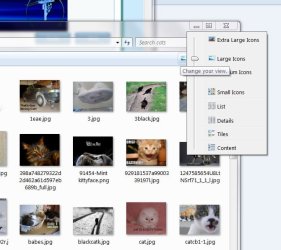
I avoided Vista and have just leapt from XP to W7. Generally I have to say I am very impressed. One real bug-bear however is the seeming inability to set the preferences for individual folders to 'view- thumbnail'.

I realise that I can set globally to thumbnail view but I dont want this both for performance reasons, and as in most folders I recognise files by name and application icon alone, so thumbnails are unnecessary and make it harder to spot the file I need.

In folders with lots of photos however the file names are typically meaningless numbers generated by the camera. Here it would be very useful to eb able to view files by thumbnail. This was easily achieved with 2 clicks in XP - those were the days!

Nick
 

My Computer My Computer

At a glance

Windows 7 Professional
OS
Windows 7 Professional
hi n1ck300, welcome to sevenforums, stick around,

what's the problem? simply click the button under the search bar :)

...and each folder should remember it's own setting for next time you visit.
 

Attachments

  • thumbs.jpg
    thumbs.jpg
    50.3 KB · Views: 15

My Computer My Computer

At a glance

ultimate 64 sp1i5 2500K [email protected]8 gigs GSkill Ripjaws 1600amd hd6950
Computer Manufacturer/Model Number
mickey megabyte 1234
OS
ultimate 64 sp1
CPU
i5 2500K [email protected]
Motherboard
MSI P67A-GD53
Memory
8 gigs GSkill Ripjaws 1600
Graphics Card(s)
amd hd6950
Sound Card
creative x-fi gamer
Monitor(s) Displays
samsung 24"
Screen Resolution
1920x1080
Hard Drives
ocz vertex 2e 60 gig, samsung f3 1tb, buffalo 2tb ext
PSU
antec 550
Case
antec three hundred
Cooling
i'm a cooling fan
Keyboard
saitek eclipse ii
Mouse
logitech g3
Internet Speed
about 4 Mbps
Other Info
i love win7
Thanks Mickey, I guess I'm just set in my ways, but will give that a go.

The only niggle with that is that I have to unclick the global setting to "always show icons, never thumbnails". Any files that I have on the desktop because I'm working with them then annoyingly show as thumbnails rather than as application icon and I can't seem to change that.

I'll just have to get used to it I suspect!

Nick
 

My Computer My Computer

At a glance

Windows 7 Professional
OS
Windows 7 Professional
...

I'll just have to get used to it I suspect!...

very philisophically said :)

it's a new os, some things are different - some better, some less so..:huh:
 

My Computer My Computer

At a glance

ultimate 64 sp1i5 2500K [email protected]8 gigs GSkill Ripjaws 1600amd hd6950
Computer Manufacturer/Model Number
mickey megabyte 1234
OS
ultimate 64 sp1
CPU
i5 2500K [email protected]
Motherboard
MSI P67A-GD53
Memory
8 gigs GSkill Ripjaws 1600
Graphics Card(s)
amd hd6950
Sound Card
creative x-fi gamer
Monitor(s) Displays
samsung 24"
Screen Resolution
1920x1080
Hard Drives
ocz vertex 2e 60 gig, samsung f3 1tb, buffalo 2tb ext
PSU
antec 550
Case
antec three hundred
Cooling
i'm a cooling fan
Keyboard
saitek eclipse ii
Mouse
logitech g3
Internet Speed
about 4 Mbps
Other Info
i love win7
Windows 7 look nice features but there some problems: 1) WEI seem didnt working prefect 2) Explorer.exe kept crashing 3) no 4-colour MS logo during Bootup screen I think there some bugs in Windows 7 so i havent decide to stay or go back to Vista - I havent problems with Vista as I have some problems in Windows 7 so maybe I go back to Vista and wait for Win 7 fix the problem or new Windows 8. Windows 7 suppose to be working and suppose all hardwares but seem MS change some in OS system that softwares still sturggle to work with it (some software still not support until next version is release)
 
My biggest issue with Windows 7 is that it's harder to customize your theme than in earlier versions. I had to go to 3 different control panels to finally get everything I wanted. I have no idea why they changed that.

A minor issue is that there is no toolbar in the right-click menu to get back the Quick Launch toolbar. I had to manually add it as a toolbar. I don't like the new "pin" feature.
 

My Computer My Computer

At a glance

Windows 7 Pro 64-bitAMD Phenom(tm) II X4 9208 GB DDR2-1033ATI Radeon 1650
Computer Manufacturer/Model Number
Custom Built
OS
Windows 7 Pro 64-bit
CPU
AMD Phenom(tm) II X4 920
Motherboard
GA-MA78G-DS3H
Memory
8 GB DDR2-1033
Graphics Card(s)
ATI Radeon 1650
Sound Card
built-in
Monitor(s) Displays
Asus 19-inch 1680x1050, IBM 19-inch 1280x1024
Hard Drives
WD5000AAJS 500gb Boot
2x Samsung 1.5TB Data drives
Windows 7 look nice features but there some problems: 1) WEI seem didnt working prefect 2) Explorer.exe kept crashing 3) no 4-colour MS logo during Bootup screen I think there some bugs in Windows 7 so i havent decide to stay or go back to Vista - I havent problems with Vista as I have some problems in Windows 7 so maybe I go back to Vista and wait for Win 7 fix the problem or new Windows 8. Windows 7 suppose to be working and suppose all hardwares but seem MS change some in OS system that softwares still sturggle to work with it (some software still not support until next version is release)


I dont know how you installed it, but I noticed installing it over Vista doesnt work as well as a fresh install! Otherwise you might have had a driver issue or something.

I have had Both 90% less BSOD and 20% speed increase over Vista!
 

My Computer My Computer

At a glance

Windows 7 ProQ9650 @ 4.05ghzKingston DDR3 @1800mhz 8GBBFG GTX 285SC
Computer Manufacturer/Model Number
Custom
OS
Windows 7 Pro
CPU
Q9650 @ 4.05ghz
Motherboard
Asus Striker II Extreme
Memory
Kingston DDR3 @1800mhz 8GB
Graphics Card(s)
BFG GTX 285SC
Sound Card
Audigy Fatal1ty
Monitor(s) Displays
Dell 24" 1920x 1200
Hard Drives
Raid 0 1TB Windows 7-64
Raid 0 800GB XP-32
PSU
Zalman 950-HP
Case
Cooler Master 690
Cooling
Zalman Pure Copper
I don't like how there are still bugs with HOMEGROUP.
I set it to share everything (docs, music, printer, etc). Save. Come back to the screen, only printer is checked.

Also, can not join homegroup I made on PC, with my laptop via wireless.
 

My Computer My Computer

At a glance

Windows 7i54gb8800GTS 512
OS
Windows 7
CPU
i5
Motherboard
Gigabyte P55-UD3R
Memory
4gb
Graphics Card(s)
8800GTS 512
Sound Card
Auzentech Prelude 7.1
Monitor(s) Displays
HP w2207
Keyboard
G15
Mouse
G5
When you have Firefox open and you are downloading something with Firefox's download manager, then when you are window switching and you want to switch back to Firefox when you are in another program, you first have to click on Firefox, then you have to choose whether you want to browse the web or look at my downloads...
 

My Computer My Computer

At a glance

Windows 7Intel P4 3.0 GHz @ 3.4 GHz1GBATI RADEON X850XT PE
OS
Windows 7
CPU
Intel P4 3.0 GHz @ 3.4 GHz
Memory
1GB
Graphics Card(s)
ATI RADEON X850XT PE
Monitor(s) Displays
17 BENQ LCD
Hard Drives
300 GB IDE (For Main OS)
500 GB SATA (For Extra Space)
PSU
400 Watt
Cooling
Stock
....I do not like the new look, and it does not function as a media player.. Replace with Kmplayer and be done with it..

Put control panel into large icons mode, and it is quite useful.. imo..
...
I thought I was the only one who still feels gutted about this control panel thing, I mean why create 256x256 icons only to show them as 32x32... GOD!! Windows 7 is great but I get sick every time I need to go to the control panel and be reminded of that....

  • Iv got control panel in large icon view but in my opinion it still sucks
How did you manage to do that?
 

My Computer My Computer

At a glance

Windows 7 Ultimate x64, 7600.20647 RTMIntel Core2Quad Q9505 @ 4.0Ghz6GB Transcend DDR3-1333 Dual ChannelASUS GTX285 1GB GDDR3
Computer Manufacturer/Model Number
It's a Custom Build.....
OS
Windows 7 Ultimate x64, 7600.20647 RTM
CPU
Intel Core2Quad Q9505 @ 4.0Ghz
Motherboard
Intel Skyburg DP45SG
Memory
6GB Transcend DDR3-1333 Dual Channel
Graphics Card(s)
ASUS GTX285 1GB GDDR3
Sound Card
OnBoard Intel IDT HD Audio
Monitor(s) Displays
HP w2207h 22" WideScreen LCD, VGA & HDMI
Screen Resolution
1680x1050, 60Hz
Hard Drives
1TB WD Caviar Black, Green Power...
1TB Dell, 32Mb/s, Internal SATA
320GB Seagate Internal SATA (3 Partitions)
PSU
Omega 600W ATX2.0 Dual Rail, 2x Fans
Case
Cooler Master HAF 922
Cooling
Corsair Hydro H50 in Push-Pull mode, 4 Case Fans with LED
Keyboard
White aigo keyboard with blue LED on the keys....
Mouse
Genius Mini Tracer
Internet Speed
I'm ashamed to say...
Other Info
Aigo wireless keyboard(black) and a 2.1 Speaker System(white)
Microsofts inability to publish all the FAQs. upon launch. They hold back to much basic information. You are supposed to buy thier product and then spend 10 hours gathering information on the Web-- Why do you play this game Steve???
 

My Computer My Computer

At a glance

Win 7 DemoQuad i74 gig9000 nvidia
Computer Manufacturer/Model Number
Self Built Custom IBM Clone
OS
Win 7 Demo
CPU
Quad i7
Motherboard
1333
Memory
4 gig
Graphics Card(s)
9000 nvidia
Monitor(s) Displays
dell 24"
Screen Resolution
1920 x 1200
Hard Drives
10,000 RPM Raptorvelocity
Case
Antec 1200
Cooling
lots
Keyboard
Logitech G15
Mouse
Logitech Evolution
Internet Speed
10,000 Cable
my experience hasn't been great. after installing this Fri night, I had to get a tech to fix it. I still don't have my pst reinstalled. blocked out even after the Take Ownership. My cursor is jumping all over the place and takes 4x as long to type something, I don't know how do find files - I can see it mapped to a certain path - ie Local\appdata\microsoft... but if I try and find it myself, i can't find it. search doens't pull up anything. I am a frequent computer user but not a techie and I figure for the average suer, this is definitely going to be a change.
 

My Computer My Computer

At a glance

Windows 7
OS
Windows 7
Overall I'm happy with Win7 except for 2 things.

1. They removed the frickin pinned favorites from windows explorer. I NEED THAT MS!!!!

2. EAC will no longer retrieve CD titles from freedb for me.

Other than that, quite happy with it.
 

My Computer My Computer

At a glance

Windows 7 Ultimate x64Intel i7-3770K16 GB (4x4GB) Corsair Vengeance DDR3 PC-1600BFG Tech - GeForce GTX 295
OS
Windows 7 Ultimate x64
CPU
Intel i7-3770K
Motherboard
Intel DZ77RE-75K
Memory
16 GB (4x4GB) Corsair Vengeance DDR3 PC-1600
Graphics Card(s)
BFG Tech - GeForce GTX 295
Sound Card
Auzentech X-Fi Prelude
Monitor(s) Displays
Dell 2407WFP LCD
Screen Resolution
1920x1200
Hard Drives
Boot Drive: Intel 520 Series SSD - 180GB
1TB Seagate Barracuda 7200 SATA
3 x 2TB Western Digital Caviar Black SATA
NAS: WD Sentinel DX4000 8TB
PSU
Seasonic Platinum 1000 (1000w)
Case
SilverStone TJ09
Cooling
Intel RTS2011LC Liquid Cooling Solution
Keyboard
Logitech K750 Solar
Mouse
Wacom Intuos4 Medium Tablet
Internet Speed
AT&T U-Verse 18Mbps
Status
Not open for further replies.
Back
Top