S
Sir John
Guest
I once was installing a Game and I got the Blue Screen of Death but I ran System Recovery and Rebooted it to Yesterday >_>.


The fact that I can' manually rearrange folders or files in Windows Explorer.
and being forced to use Windows Media Player 12, which is very glitchy. Given the choice, I'd switch back to WMP 11.
I have not been able to find a WMP 11 downgrade yet that is fully functional on Windows 7 64-bit.
Yea, coming from XP this was a real pain in the @$$ for me too. Here's a handy little hack that will add "Take Ownership" to the right-click context menu, thereby saving you from having to delve into properties:
Add "Take Ownership" to Explorer Right-Click Menu in Win 7 or Vista :: the How-To Geek
Oh yea, just thought of another annoyance: the network icon in the system tray had a red X through it even though the network was active. Updated ethernet driver and now it's only an intermittent problem.
Thanks.
I was a die hard windows user for nearly all my life, grant it that windows 7 has fixed a lot of issues that previous version came with. It still lacks a lot of productivity software built into the OS. I mean if you are going to pay the price for this OS why doesn't Microsoft included some extra stuff that you don't have to install.


..The othervthing is the
regestry. When you delete something unless you
wipe your drive, it leaves straggler files. There should be a program that snapshots the registy and when you delete, it's really gone. No more hidden files...
Off Topic -..The othervthing is the
regestry. When you delete something unless you
wipe your drive, it leaves straggler files. There should be a program that snapshots the registy and when you delete, it's really gone. No more hidden files...
Ehh....the Registry doesn't have anything to do with files. The file system maintains files. Now if you are referring to keys, and entries in the Registry, well that is the fault of the application (un)installers for not cleaning themselves up. (They do the same with files too.) But honestly, it really doesn't matter, those extra entries in the Registry have no effect on performance.
Allow me however, to disagree on the performance issues. To many dangling pointers and entries in the registry, CAN affect performance. The computer still goes over every line.
Thank you. I was told, during the boot, every line is evaluated, and either acted upon or discarded, and pointers to programs that no longer exist, or have rem's left, take longer. I was also told pointers to programs that have not been properly/completely uninstalled can slow the computer. This information were it correct, would at the least, slow the boot. It made sense at the time. I guess that was misiformation.Allow me however, to disagree on the performance issues. To many dangling pointers and entries in the registry, CAN affect performance. The computer still goes over every line.
Actually no, the computer doesn't still go over those entries that are left behind. Windows does not constantly scan and go over the entire Registry. The Registry is a highly optimized hierarchical database, very fast to pull data from. Only entries that are in used are ever called upon. Those left behind do not slow down that process.
I CANNOt stand libraries. Stop telling me how to organize. I want to have links to the real folders, not a general label to it.

Actually, it is not. Pictures Library is, as the name says, a library with a collection of folders:I CANNOt stand libraries. Stop telling me how to organize. I want to have links to the real folders, not a general label to it.
They are links to the real folders? 'Pictures' is a link to 'C:/Users/...../Pictures'. What advantage would having to dig through a file tree to get to the same folder have?
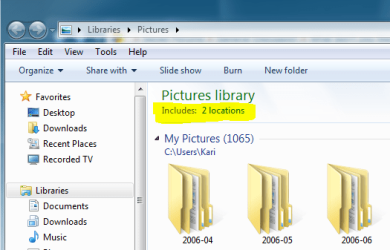
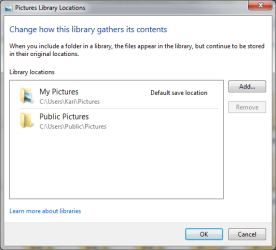
Actually, it is not. Pictures Library is, as the name says, a library with a collection of folders:I CANNOt stand libraries. Stop telling me how to organize. I want to have links to the real folders, not a general label to it.
They are links to the real folders? 'Pictures' is a link to 'C:/Users/...../Pictures'. What advantage would having to dig through a file tree to get to the same folder have?
You can add as many locations (folders) as you want to this library.
Kari
Actually, it is not. Pictures Library is, as the name says, a library with a collection of folders:They are links to the real folders? 'Pictures' is a link to 'C:/Users/...../Pictures'. What advantage would having to dig through a file tree to get to the same folder have?
You can add as many locations (folders) as you want to this library.
Kari
Yes, but you can set the default save location. So for all intensive purposes, they function like links to the pictures folder. Only difference is that you can see other folders in the same library. Much better than a folder tree, and having to juggle multiple locations.
Two things. I use mac and PC and while I am more of a pro user as in audio picture, I can't figure out why Microsoft with it's millions can't figure out an iLife competitor....


