What don't you like about Windows 7?

Status
Not open for further replies.
Let's say you have three Word documents open. You're using Firefox and want to switch back to Word. You click on the Word icon on the taskbar and up pops the thumbnails, WTF? That's the same behavior as when you hover over taskbar icons. Clicking the icon should switch back to the last used Word document.
 

My Computer My Computer

At a glance

Windows 7 x64Intel Core i7 2600K8 GB ADATA DDR3 1600HIS Hightech Radeon 4670 (fanless)
OS
Windows 7 x64
CPU
Intel Core i7 2600K
Motherboard
Asus P8P67 Deluxe
Memory
8 GB ADATA DDR3 1600
Graphics Card(s)
HIS Hightech Radeon 4670 (fanless)
Sound Card
Creative X-Fi XtremeGamer
Monitor(s) Displays
Samsung 213T
Screen Resolution
1600 x 1200
Hard Drives
Western Digital Black 640GB (boot), Western Digital Black 2TB x 2 (data and scratch), Western Digital Green 2TB (backup)
PSU
Corsair TX650W
Case
Antec P182
Cooling
Prolimatech Megahalems Rev.B
Keyboard
HP Elite wireless
Mouse
Logitech Performance MX
I see what you're saying but I would have never thought of that as a problem. When I hover or click Word, I get choices of which docs I want to open. That is what I would expect to see.
 

My Computer My Computer

At a glance

Windows 7 x64
OS
Windows 7 x64
"folder up" button

The only thing I was hoping they did is to bring back that "folder up" button in the explorer. they took that out in Vista and everyone complained. Sometimes I just link to a folder and when I'm there is is difficult to find the "upper" folder. If you know what I mean. Is there some tool or trick to bring that back? I never heard that someone could enable that in Vista. :cry:

someone mentioned it is hard to go to the task manager. I just pinned the taskmanager to the task bar, along with some other system windows I often use (resource monitor etc.)

I'm using the RC and I'm happy and sure the RTM will be a bit better even if I don't know what to improve. Driver and software probably will be better in October. you can't expect official support now since MS just released the RTM. Kaspersky disables me the PC to automatically connect to my wired-router and I need to repair that manually. But that they said will be till Kaspersky fully supports the final version in October.
 

My Computer My Computer

At a glance

W7 Pro 64Intel i3 3220 @ 3.3 GHz2x8GB DDR 3 1600 Kingstononboard
Computer Manufacturer/Model Number
homemade
OS
W7 Pro 64
CPU
Intel i3 3220 @ 3.3 GHz
Motherboard
ASRock H77M
Memory
2x8GB DDR 3 1600 Kingston
Graphics Card(s)
onboard
Sound Card
onboard
Monitor(s) Displays
two 21" LCD
Hard Drives
128 GB Samsung 830
PSU
OCZ400MXSP
Cooling
Stock
Internet Speed
DSL
My only complain is that there are to many services started for no reason...i mean it will be good a list or a guide on every service or which services to disable because it eats a lot of resources.

~500 RAM at startup with 40 proceses. - Windows 7
~150 RAM at startup with 40 proceses. - Windows XP SP 3.
 

My Computer My Computer

At a glance

Windows 7 build 7600 RTM x86
OS
Windows 7 build 7600 RTM x86
so far now... drivers over wifi devices
 

My Computer My Computer

At a glance

7 Ultimate x64 RTM 7600.16385AMD Phenom 9550 @ 2.20ghz4x2GB DDR2 Patriot Viper 800mhzGeForce 9400 GT 512MB
Computer Manufacturer/Model Number
HP a6720f
OS
7 Ultimate x64 RTM 7600.16385
CPU
AMD Phenom 9550 @ 2.20ghz
Motherboard
Asus M2N78-LA
Memory
4x2GB DDR2 Patriot Viper 800mhz
Graphics Card(s)
GeForce 9400 GT 512MB
Sound Card
Onboard Realtek Hi-Definition ALC 888S chipset
Monitor(s) Displays
Samsung P2370HD 23" 1080P HDTV
Screen Resolution
1920x1080
Hard Drives
Western Digital 640GB; Samsung 1 TB; WD 500GB; Seagate Portable 250gb;
Keyboard
Logitech LX310 Wireless Internet Keyboard
Mouse
Logitech LX310 Wireless Laser Mouse
Internet Speed
7Mbps/384Kbps
Let's say you have three Word documents open. You're using Firefox and want to switch back to Word. You click on the Word icon on the taskbar and up pops the thumbnails, WTF? That's the same behavior as when you hover over taskbar icons. Clicking the icon should switch back to the last used Word document.

Holding CTRL while you click on the Word icon will bring the last used window back up. The taskbar icons have alot of hidden features when used in conjuction with keys.

The breadcrumbs bar will let you go up a folder by clicking on the name of the folder above it. It is very useful for jumping up a number of folders in the folder hierarchy. But if you google there are a number of third party programs that will restore the 'up' button functionality.
 

My Computer My Computer

At a glance

Windows 7 build 7100 x86Intel Core 2 Duo 2.1GHz3GBIntel(TM) Graphics Media Accelerator X4500HD
Computer Manufacturer/Model Number
Dell Inspiron 1545
OS
Windows 7 build 7100 x86
CPU
Intel Core 2 Duo 2.1GHz
Motherboard
GM45 chipset
Memory
3GB
Graphics Card(s)
Intel(TM) Graphics Media Accelerator X4500HD
Sound Card
Realtek HD
Monitor(s) Displays
15.6" WLED 720p
Screen Resolution
1366x768
Hard Drives
320GB 5400rpm hard drive
My only complain is that there are to many services started for no reason...i mean it will be good a list or a guide on every service or which services to disable because it eats a lot of resources.

~500 RAM at startup with 40 proceses. - Windows 7
~150 RAM at startup with 40 proceses. - Windows XP SP 3.

I agree with this. I seem to be using more RAM with the RTM than previous builds and when I look at Task Manager I only have a couple of apps running but tons of services.
It would be good to have a list of the unnecesary ones as I'm sure they can't all be relevant to a single user, no network, no other connections kind of guy.

Chhers, John:)
 

My Computer My Computer

At a glance

Windows 7 Home Premium 64 biti7 [email protected]2x4GB Corsair Vegeance DDR3XFX GTX 260 Black Edition
Computer Manufacturer/Model Number
The Monolith. 3.1
OS
Windows 7 Home Premium 64 bit
CPU
i7 [email protected]
Motherboard
Gigabyte Z77-D3H
Memory
2x4GB Corsair Vegeance DDR3
Graphics Card(s)
XFX GTX 260 Black Edition
Sound Card
none-through large stereo hi fi
Monitor(s) Displays
Croosover 27MDP LED IPS Dell 2408 WFP
Screen Resolution
2560x1440 1920x1200
Hard Drives
1x Samsung 840Pro 128GB SSD
1x Samsung Spinpoint F1 1TB
PSU
Corsair AX 850 Watt
Case
Cooler Master ACTS 840
Cooling
Be Quiet! Dark Rock Pro
Keyboard
Enermax Aurora
Mouse
Logitech Ballmouse
Internet Speed
20MBPS
Two things pop in my head:
1. The lack of a "pin" feature on the small task-bar previews.

I've had many situations where I would have loved this, it would be like a Picture-In-Picture. There's the close (X) button already so a pin button wouldn't be weird at all.

-----

2.The lack of an Advanced Search form.

The search field at the top is nice but it's very small and feels very "manual" or command-line-ish.

There should be a "Start" -> Search with all the different options in fields instead of having to input them yourself.

For example now if I want to search a file thats between 3 an 4MB I have to get in that little corner, choose one of the very few pre-configured sizes (as I don't know the syntax by heart) and then change the numbers manually...
 

My Computer My Computer

At a glance

7137
OS
7137
Let's say you have three Word documents open. You're using Firefox and want to switch back to Word. You click on the Word icon on the taskbar and up pops the thumbnails, WTF? That's the same behavior as when you hover over taskbar icons. Clicking the icon should switch back to the last used Word document.
This thread is about dislikes, but to comment your post I have to tell you that one thing about W7 I like very much is that I don´t have to use all the new features.

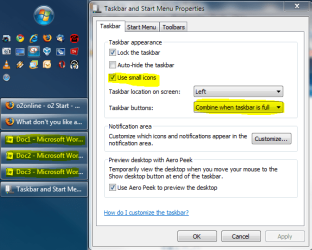
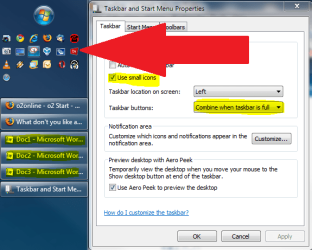
I am more used to smaller icons and symbols, to get more working place. I´m also used to a leftside taskbar; I need often that vertical space that bottom taskbar takes.

When you combine these two things, you get this:
Taskbar.PNG
I just click the window I want to open. No hovering and choosing for me.

Kari
 

My Computer My Computer

At a glance

Windows 10 Pro x64 EN-GB1.6 GHz Intel Core i7-720QM Processor6 GBATI Mobility Radeon HD 5850 Graphics
Computer type
Laptop
Computer Manufacturer/Model Number
HP ENVY 17-1150eg
OS
Windows 10 Pro x64 EN-GB
CPU
1.6 GHz Intel Core i7-720QM Processor
Memory
6 GB
Graphics Card(s)
ATI Mobility Radeon HD 5850 Graphics
Sound Card
Beats sound system with integrated subwoofer
Monitor(s) Displays
17" laptop display, 22" LED and 32" Full HD TV through HDMI
Screen Resolution
1600*900 (1), 1920*1080 (2&3)
Hard Drives
Internal: 2 x 500 GB SATA Hard Disk Drive 7200 rpm
External: 2TB for backups, 3TB USB3 network drive for media
Cooling
As Envy runs a bit warm, I have it on a Cooler Master pad
Keyboard
Logitech diNovo Media Desktop Laser (bluetooth)
Mouse
Logitech Performance Mouse MX
Internet Speed
50/10 Mbps VDSL
Antivirus
Windows Defender 4.3.9431.0
Browser
Maxthon 3.5.2., IE11
I agree with this. I seem to be using more RAM with the RTM than previous builds and when I look at Task Manager I only have a couple of apps running but tons of services.
It would be good to have a list of the unnecesary ones as I'm sure they can't all be relevant to a single user, no network, no other connections kind of guy.

Chhers, John:)

have you checked out blackviper?

it's not a perfect list yet, but you may learn a bit more about services to disable, or better yet, switch to manual so they only start if an app requests it.
 

My Computer My Computer

At a glance

ultimate 64 sp1i5 2500K [email protected]8 gigs GSkill Ripjaws 1600amd hd6950
Computer Manufacturer/Model Number
mickey megabyte 1234
OS
ultimate 64 sp1
CPU
i5 2500K [email protected]
Motherboard
MSI P67A-GD53
Memory
8 gigs GSkill Ripjaws 1600
Graphics Card(s)
amd hd6950
Sound Card
creative x-fi gamer
Monitor(s) Displays
samsung 24"
Screen Resolution
1920x1080
Hard Drives
ocz vertex 2e 60 gig, samsung f3 1tb, buffalo 2tb ext
PSU
antec 550
Case
antec three hundred
Cooling
i'm a cooling fan
Keyboard
saitek eclipse ii
Mouse
logitech g3
Internet Speed
about 4 Mbps
Other Info
i love win7
The only thing I was hoping they did is to bring back that "folder up" button in the explorer. they took that out in Vista and everyone complained. Sometimes I just link to a folder and when I'm there is is difficult to find the "upper" folder. If you know what I mean. Is there some tool or trick to bring that back?:cry:
well, is not exactly a button, but alt+up will do exactly what the up button used to do.

now my complain...
no .MKV native support! I mean, C'MON! it's the most used video container nowadays and microsoft ignored that. the same thing happened with .MP3 back in the Win98 era. :shock:

and I know that playback can be easily accomplished using third-party codecs, but thumbnails it's not so easy with x64.
 

My Computer My Computer

At a glance

Windows 7 x64Intel Core 2 Duo E67504GB G.Skill PC2-8500eVGA GTX 460
Computer Manufacturer/Model Number
DIY
OS
Windows 7 x64
CPU
Intel Core 2 Duo E6750
Motherboard
Gigabyte GA-P35-DS3-L V2.0
Memory
4GB G.Skill PC2-8500
Graphics Card(s)
eVGA GTX 460
Sound Card
Auzentech X-Fi Prelude 7.1
Monitor(s) Displays
Envision 2219S-1 (22")
Screen Resolution
1680x1050
Hard Drives
Samsung 750GB [SATA 2] //
Seagate FreeAgent Go 500GB
PSU
Corsair CX400
Case
Raidmax Sagitta
Cooling
Stock
Keyboard
HP Wireless Elite
Mouse
Logitech G7 Gaming Mouse
Internet Speed
1Mbit
Other Info
*Gaming Input: xBox 360 Controller + Logitech Rumblepad 2 Cordless
*Speakers: Logitech Z5500
*Headphones: Sennheiser HD555
now my complain...
no .MKV native support! I mean, C'MON! it's the most used video container nowadays and microsoft ignored that. the same thing happened with .MP3 back in the Win98 era. :shock:

good point - but at least wmp can play divx/xvid now!

not that i ever go near wmp! i use kmplayer - great app with good mkv support and no need for pesky external codecs, now i prefer it to vlc, coz vlc does not like aero with me!
 

My Computer My Computer

At a glance

ultimate 64 sp1i5 2500K [email protected]8 gigs GSkill Ripjaws 1600amd hd6950
Computer Manufacturer/Model Number
mickey megabyte 1234
OS
ultimate 64 sp1
CPU
i5 2500K [email protected]
Motherboard
MSI P67A-GD53
Memory
8 gigs GSkill Ripjaws 1600
Graphics Card(s)
amd hd6950
Sound Card
creative x-fi gamer
Monitor(s) Displays
samsung 24"
Screen Resolution
1920x1080
Hard Drives
ocz vertex 2e 60 gig, samsung f3 1tb, buffalo 2tb ext
PSU
antec 550
Case
antec three hundred
Cooling
i'm a cooling fan
Keyboard
saitek eclipse ii
Mouse
logitech g3
Internet Speed
about 4 Mbps
Other Info
i love win7
kmplayer all the way...plays wav and dts as well.
 

My Computer My Computer

At a glance

7600x64 RTMIntel® Q6700, 2.66 GHz stock clock (upgraded)4g (upgraded)Sapphire Radeon Toxic HD 3870 512MB GDDR4 (up...
Computer Manufacturer/Model Number
Dell E520
OS
7600x64 RTM
CPU
Intel® Q6700, 2.66 GHz stock clock (upgraded)
Motherboard
Dell
Memory
4g (upgraded)
Graphics Card(s)
Sapphire Radeon Toxic HD 3870 512MB GDDR4 (upgraded)
Sound Card
HT Omega Claro Plus (upgraded)
Monitor(s) Displays
22' , 40"
Screen Resolution
1050, 1080p
Hard Drives
1.5tb (upgraded)
PSU
Zalman 600w (upgraded)
Case
Dell
Cooling
stock Dell
Keyboard
dell
Mouse
dell
Internet Speed
100m Fiber optical
Other Info
Bought the Dell secondhand for cheap and upgraded cpu, vga, ram, soundcard, psu and HDD's.
I just click the window I want to open. No hovering and choosing for me.
Is this QuickLaunch? If not, please ID. I am going to try this approach for a while.
 

Attachments

  • Taskbar.PNG
    Taskbar.PNG
    32.9 KB · Views: 49
kmplayer all the way...plays wav and dts as well.

dvd's too! although i have to admit i use winamp for music - i love the milkdrop visualisations!
 

My Computer My Computer

At a glance

ultimate 64 sp1i5 2500K [email protected]8 gigs GSkill Ripjaws 1600amd hd6950
Computer Manufacturer/Model Number
mickey megabyte 1234
OS
ultimate 64 sp1
CPU
i5 2500K [email protected]
Motherboard
MSI P67A-GD53
Memory
8 gigs GSkill Ripjaws 1600
Graphics Card(s)
amd hd6950
Sound Card
creative x-fi gamer
Monitor(s) Displays
samsung 24"
Screen Resolution
1920x1080
Hard Drives
ocz vertex 2e 60 gig, samsung f3 1tb, buffalo 2tb ext
PSU
antec 550
Case
antec three hundred
Cooling
i'm a cooling fan
Keyboard
saitek eclipse ii
Mouse
logitech g3
Internet Speed
about 4 Mbps
Other Info
i love win7
I use kmplayer cause it's the only app I've found that can play my DTS music files. Movies i usually use GOM or media center.
 

My Computer My Computer

At a glance

7600x64 RTMIntel® Q6700, 2.66 GHz stock clock (upgraded)4g (upgraded)Sapphire Radeon Toxic HD 3870 512MB GDDR4 (up...
Computer Manufacturer/Model Number
Dell E520
OS
7600x64 RTM
CPU
Intel® Q6700, 2.66 GHz stock clock (upgraded)
Motherboard
Dell
Memory
4g (upgraded)
Graphics Card(s)
Sapphire Radeon Toxic HD 3870 512MB GDDR4 (upgraded)
Sound Card
HT Omega Claro Plus (upgraded)
Monitor(s) Displays
22' , 40"
Screen Resolution
1050, 1080p
Hard Drives
1.5tb (upgraded)
PSU
Zalman 600w (upgraded)
Case
Dell
Cooling
stock Dell
Keyboard
dell
Mouse
dell
Internet Speed
100m Fiber optical
Other Info
Bought the Dell secondhand for cheap and upgraded cpu, vga, ram, soundcard, psu and HDD's.
Is this QuickLaunch? If not, please ID. I am going to try this approach for a while.
Yes it is. I just love to use Quick Launch. I have a system where I put programs and applications I use most often to Quick Launch and remove corresponding icons from desktop, so I get more place in desktop for "second class" icons, programs and applications I use often but not so often as these selected to Quick Launch.

I have two user accounts for me on my computer, one for private use and one for work. It helps me to organize my work and files. This picture is from my private account.

I like simple and informative desktop & taskbar. For me it is more important to get the job done and easily find what I need, than to have a customized nice-looking desktop. I remember reading somewhere in this forum you have a similar approach?
 
Last edited:

My Computer My Computer

At a glance

Windows 10 Pro x64 EN-GB1.6 GHz Intel Core i7-720QM Processor6 GBATI Mobility Radeon HD 5850 Graphics
Computer type
Laptop
Computer Manufacturer/Model Number
HP ENVY 17-1150eg
OS
Windows 10 Pro x64 EN-GB
CPU
1.6 GHz Intel Core i7-720QM Processor
Memory
6 GB
Graphics Card(s)
ATI Mobility Radeon HD 5850 Graphics
Sound Card
Beats sound system with integrated subwoofer
Monitor(s) Displays
17" laptop display, 22" LED and 32" Full HD TV through HDMI
Screen Resolution
1600*900 (1), 1920*1080 (2&3)
Hard Drives
Internal: 2 x 500 GB SATA Hard Disk Drive 7200 rpm
External: 2TB for backups, 3TB USB3 network drive for media
Cooling
As Envy runs a bit warm, I have it on a Cooler Master pad
Keyboard
Logitech diNovo Media Desktop Laser (bluetooth)
Mouse
Logitech Performance Mouse MX
Internet Speed
50/10 Mbps VDSL
Antivirus
Windows Defender 4.3.9431.0
Browser
Maxthon 3.5.2., IE11
fair enough, spliff - but let's get this thread back on track!

what i don't like about windows 7 is that i'm going to have to pay for it soon! ;)

i like your approach kari, and i'm gonna try it for a while to make efficient use of my wide-screen - now if only i could find a way to get the 'start button' at the bottom of the screen. i've become so conditioned to having it bottom-left - and it's hard for us old dogs to learn new tricks sometimes - grr...:sa:
 

Attachments

  • 560.jpg
    560.jpg
    29.5 KB · Views: 111

My Computer My Computer

At a glance

ultimate 64 sp1i5 2500K [email protected]8 gigs GSkill Ripjaws 1600amd hd6950
Computer Manufacturer/Model Number
mickey megabyte 1234
OS
ultimate 64 sp1
CPU
i5 2500K [email protected]
Motherboard
MSI P67A-GD53
Memory
8 gigs GSkill Ripjaws 1600
Graphics Card(s)
amd hd6950
Sound Card
creative x-fi gamer
Monitor(s) Displays
samsung 24"
Screen Resolution
1920x1080
Hard Drives
ocz vertex 2e 60 gig, samsung f3 1tb, buffalo 2tb ext
PSU
antec 550
Case
antec three hundred
Cooling
i'm a cooling fan
Keyboard
saitek eclipse ii
Mouse
logitech g3
Internet Speed
about 4 Mbps
Other Info
i love win7
...I remember reading somewhere in this forum you have a similar approach?
I like chocolate, and when I put it in my eyes, I cannot see well. So, no eye-candy for me.

As a general principle (GP), the greatest amount of information available in a single glance.
 
... if only i could find a way to get the 'start button' at the bottom of the screen. i've become so conditioned to having it bottom-left - and it's hard for us old dogs to learn new tricks sometimes - grr...
What? Invert taskbar? Are you playing with me? Please provide a link - Win7 will be that much closer to "not sucking". :sarc:
 
Status
Not open for further replies.
Back
Top