What don't you like about Windows 7?

Status
Not open for further replies.
defrag_working.gif
I MISS YOU DEFRAG OF OLD!!!! COME BACK! LOL!

I know there are alternative defrag apps that look more like this, but I feel that i only need 1!
You are just hypnotized by it...

COME BACK TO THE LIGHT BEFORE IT IS TOO LATE!!!!
 

My Computer My Computer

At a glance

Windows 7 Home Premium x64 - Mac OS X 10.6.4 x64Intel Core 2 Duo T9300 2.5 GHz4GB Kingston DDR2-800NVIDIA Geforce 8600M GT (512MB Model)
Computer Manufacturer/Model Number
Compal JFT02 (Custom Build Laptop)
OS
Windows 7 Home Premium x64 - Mac OS X 10.6.4 x64
CPU
Intel Core 2 Duo T9300 2.5 GHz
Motherboard
JFT02
Memory
4GB Kingston DDR2-800
Graphics Card(s)
NVIDIA Geforce 8600M GT (512MB Model)
Sound Card
Realtek HD Audio
Monitor(s) Displays
WUXGA Standard Laptop Display
Screen Resolution
1680*1050
Hard Drives
Toshiba 320GB 5400RPM Laptop HD
PSU
Standard Laptop Power Supply
Case
Standard Laptop Case
Cooling
Standard Laptop Cooling
Keyboard
Standard Laptop 105 Key-Keyboard
Mouse
Synaptics Touchpad
Internet Speed
Verizion Online DSL 3360/864 kbs (dl/up)
My only complaint is the removal of the classic start menu... small potatoes when compared to the windows 7 experience overall.

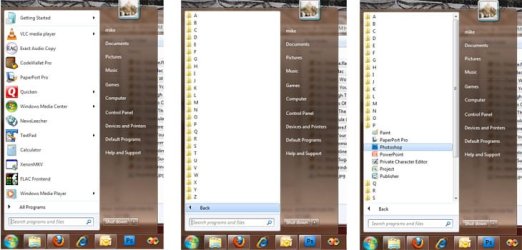
I can't believe how many people still like those classic menus. Of course I've never been one to stay with the default way MS does things. Since Win95 days I've alphabetized my start menu and removed anything that isn't a program. My 'Programs' menu is just 26 folders A - Z, that way everything is a click away - Programs -> P -> Photoshop :D

good idea

i use folders such as games, graphics, multimedia, net etc...

I almost did that but there are programs that fall into different categories. When I want to launch something I don't want to have to remember where I put something, like is Photoshop under Multimedia or Graphics or Art - I know ... it's under P! :party:

This is what it looks like if you're interested.

mymenu.jpg
 

My Computer My Computer

At a glance

Windows 7 Ultimate x64Intel i7-3770K16 GB (4x4GB) Corsair Vengeance DDR3 PC-1600BFG Tech - GeForce GTX 295
OS
Windows 7 Ultimate x64
CPU
Intel i7-3770K
Motherboard
Intel DZ77RE-75K
Memory
16 GB (4x4GB) Corsair Vengeance DDR3 PC-1600
Graphics Card(s)
BFG Tech - GeForce GTX 295
Sound Card
Auzentech X-Fi Prelude
Monitor(s) Displays
Dell 2407WFP LCD
Screen Resolution
1920x1200
Hard Drives
Boot Drive: Intel 520 Series SSD - 180GB
1TB Seagate Barracuda 7200 SATA
3 x 2TB Western Digital Caviar Black SATA
NAS: WD Sentinel DX4000 8TB
PSU
Seasonic Platinum 1000 (1000w)
Case
SilverStone TJ09
Cooling
Intel RTS2011LC Liquid Cooling Solution
Keyboard
Logitech K750 Solar
Mouse
Wacom Intuos4 Medium Tablet
Internet Speed
AT&T U-Verse 18Mbps
I can't believe how many people still like those classic menus. Of course I've never been one to stay with the default way MS does things. Since Win95 days I've alphabetized my start menu and removed anything that isn't a program. My 'Programs' menu is just 26 folders A - Z, that way everything is a click away - Programs -> P -> Photoshop :D

good idea

i use folders such as games, graphics, multimedia, net etc...

I almost did that but there are programs that fall into different categories. When I want to launch something I don't want to have to remember where I put something, like is Photoshop under Multimedia or Graphics or Art - I know ... it's under P! :party:

This is what it looks like if you're interested.

View attachment 33977
In the process...you are also working on your Spelling/Organization skills
 

My Computer My Computer

At a glance

Windows 7 Home Premium x64 - Mac OS X 10.6.4 x64Intel Core 2 Duo T9300 2.5 GHz4GB Kingston DDR2-800NVIDIA Geforce 8600M GT (512MB Model)
Computer Manufacturer/Model Number
Compal JFT02 (Custom Build Laptop)
OS
Windows 7 Home Premium x64 - Mac OS X 10.6.4 x64
CPU
Intel Core 2 Duo T9300 2.5 GHz
Motherboard
JFT02
Memory
4GB Kingston DDR2-800
Graphics Card(s)
NVIDIA Geforce 8600M GT (512MB Model)
Sound Card
Realtek HD Audio
Monitor(s) Displays
WUXGA Standard Laptop Display
Screen Resolution
1680*1050
Hard Drives
Toshiba 320GB 5400RPM Laptop HD
PSU
Standard Laptop Power Supply
Case
Standard Laptop Case
Cooling
Standard Laptop Cooling
Keyboard
Standard Laptop 105 Key-Keyboard
Mouse
Synaptics Touchpad
Internet Speed
Verizion Online DSL 3360/864 kbs (dl/up)
good idea

i use folders such as games, graphics, multimedia, net etc...

I almost did that but there are programs that fall into different categories. When I want to launch something I don't want to have to remember where I put something, like is Photoshop under Multimedia or Graphics or Art - I know ... it's under P! :party:

This is what it looks like if you're interested.

View attachment 33977
In the process...you are also working on your Spelling/Organization skills

Sesame Street taught me well. :geek:
 

My Computer My Computer

At a glance

Windows 7 Ultimate x64Intel i7-3770K16 GB (4x4GB) Corsair Vengeance DDR3 PC-1600BFG Tech - GeForce GTX 295
OS
Windows 7 Ultimate x64
CPU
Intel i7-3770K
Motherboard
Intel DZ77RE-75K
Memory
16 GB (4x4GB) Corsair Vengeance DDR3 PC-1600
Graphics Card(s)
BFG Tech - GeForce GTX 295
Sound Card
Auzentech X-Fi Prelude
Monitor(s) Displays
Dell 2407WFP LCD
Screen Resolution
1920x1200
Hard Drives
Boot Drive: Intel 520 Series SSD - 180GB
1TB Seagate Barracuda 7200 SATA
3 x 2TB Western Digital Caviar Black SATA
NAS: WD Sentinel DX4000 8TB
PSU
Seasonic Platinum 1000 (1000w)
Case
SilverStone TJ09
Cooling
Intel RTS2011LC Liquid Cooling Solution
Keyboard
Logitech K750 Solar
Mouse
Wacom Intuos4 Medium Tablet
Internet Speed
AT&T U-Verse 18Mbps
I never use the start menu for programs unless it's a rare, weird program that I hardly use. Otherwise I put everything on the desktop. Usually I use a floating toolbar but since that's gone (WHY? WHYYYYYYYYY?!) I just put my super-essential programs on the new taskbar.

If I didn't have 36 essential programs they could all fit but I just don't like the way it looks. Who would ever want to scroll up and down for icons or have a huge taskbar? (This has always been a problem, it's not new to windows 7.)
 

My Computer My Computer

At a glance

Windows 7 Ultimate/XP SP3Pentium 4 HT 3.0 Ghz2048MB DDR ECC RAM @ 200Mhz (4x512mb)Nvidia Quadro FX 1100
Computer Manufacturer/Model Number
HP Workstation Xw4100
OS
Windows 7 Ultimate/XP SP3
CPU
Pentium 4 HT 3.0 Ghz
Memory
2048MB DDR ECC RAM @ 200Mhz (4x512mb)
Graphics Card(s)
Nvidia Quadro FX 1100
Sound Card
Max Blaster
Monitor(s) Displays
17" MAG
Screen Resolution
1280*1024
Hard Drives
160GB IDE (WinXP Installation)
13GB IDE
250GB SATA (Win 7 installation & Storage)
PSU
280w
I never use the start menu for programs unless it's a rare, weird program that I hardly use. Otherwise I put everything on the desktop. Usually I use a floating toolbar but since that's gone (WHY? WHYYYYYYYYY?!) I just put my super-essential programs on the new taskbar.

If I didn't have 36 essential programs they could all fit but I just don't like the way it looks. Who would ever want to scroll up and down for icons or have a huge taskbar? (This has always been a problem, it's not new to windows 7.)

No offense, but I feel like "essential" is a little less than 36.
 

My Computer My Computer

At a glance

7 Ultimate, Debian Squeeze, #! StatlerAMD 4450e 2.4GHz, Intel P4 3.0GHz, PowerPC 40...
Computer Manufacturer/Model Number
Dell Dimension 3100, iMac G3, Custom built
OS
7 Ultimate, Debian Squeeze, #! Statler
CPU
AMD 4450e 2.4GHz, Intel P4 3.0GHz, PowerPC 400MHz
I tend to work from an object oriented model - by that I mean If I'm dealing with an image I will use whatever application I need for the actual work at hand. This means i tend to start an app by right clicking on a file and using open with

I have a couple of apps on the taskbar and the start menu has 5 fixed and 18 floating apps that covers my essential apps which of course adjust to what I'm using most

Only fault is the order on the start menu I would prefer that the pinned items were at the bottom and then the most used in order from bottom to top :(.

If I do need to go to the All Programs menu I use the search feature or my pre-set structure

My all programs menu is sorted by task in a structure that has been identical for years, (windows 2000 if I recall :huh:),

This is regularly backed up to external so when I re-install I can restore the shortcuts and then re-populate the programs as needed, (the fact that the shortcuts are there acts as a reminder of what programs need to be loaded :))

As for the programs that fit into two categories I just have a duplicate shortcut in all applicable locations :cool::geek:
 

My Computers My Computers

  • At a glance

    Windows 11 Pro x64 [Latest Release and Releas...Ryzen 9 5950X, 3.8 - 5.2 MHz64GB [2 x 32GB] DDR4 3200MHz4GB NVIDIA GEFORCE GTX 1650 Ti
    Computer type
    PC/Desktop
    Computer Manufacturer/Model Number
    ChillBlast - Custom to my design
    OS
    Windows 11 Pro x64 [Latest Release and Release Preview]
    CPU
    Ryzen 9 5950X, 3.8 - 5.2 MHz
    Motherboard
    Asus Prime X570-Pro
    Memory
    64GB [2 x 32GB] DDR4 3200MHz
    Graphics Card(s)
    4GB NVIDIA GEFORCE GTX 1650 Ti
    Sound Card
    On-board SPDIF to 5.1 System + HDMI [5.1 system]
    Monitor(s) Displays
    32" UHD 32 Bit HDR Monitor + 43" UHD 4K 32Bit HDR TV
    Screen Resolution
    2 x 3840 x 2160 @60Hz
    Hard Drives
    1TB M2 SSD OS, 500GB Fast Access SSD, 2 x 8TB Data + Various Externals from 1TB to 4TB, 10TB NAS
    PSU
    NZXT C750 80 PLUS Gold 750W Modular PSU
    Case
    Workstation Case [Matt Black]
    Cooling
    NZXT Kraken X63 280mm CPU Cooler +2x Quiet Case fans
    Keyboard
    Logitech Wireless MX Keys & K400 + others
    Mouse
    Logitech Wireless MX Master 3S
    Internet Speed
    920 MB Down 50 MB Up
    Antivirus
    BitDefender Total Security Pro
    Browser
    Chrome (always run latest Non-Beta)
    Other Info
    Also run ...
    Laptop - Quad 8GB - Windows 10 Pro x64
    Nexus 7 Android tablet x2
    Samsung 10.2" tablet
    Blackview TAB 8 4G Android Tablet c/w Keyboard
    Wacom Intuos Pro Medium Pen Pad
    Wacom Intuos Pro Small Pen Pad
    Wacom Expresskeys Remote
    Loopdeck+ Graphics Controller
    Shuttle Pro v2 Control
  • At a glance

    Windows 11 Pro x64 Latest RPIntel I7 10750H 5.0GHz32GB [2x16GB] DDR4 2933 MHznVidia GTX1650Ti 4 GB GDDR6
    Computer type
    Laptop
    System Manufacturer/Model Number
    Dell XPS 17 10750H
    OS
    Windows 11 Pro x64 Latest RP
    CPU
    Intel I7 10750H 5.0GHz
    Motherboard
    Dell XPS
    Memory
    32GB [2x16GB] DDR4 2933 MHz
    Graphics Card(s)
    nVidia GTX1650Ti 4 GB GDDR6
    Sound Card
    Stock [Realtek] 4 Speaker
    Monitor(s) Displays
    17" IPS UHD+ Infinity Edge Touchscreen
    Screen Resolution
    3840 x 2400
    Hard Drives
    2TB M2 NVMe, 4TB External + various 500GB & 1TB External NVMe (also have access to spinner HDD from
    PSU
    Stock
    Case
    Stock XPS Aluminium & Carbon Fibre
    Cooling
    Stock - Active Fan Control
    Keyboard
    Backlit + Various Logitech
    Mouse
    Stock Track Pad + Logitech MX Trackball
    Internet Speed
    72 MB Down 18MB Up
    Browser
    Chrome
    Other Info
    Also run ...
    Laptop - Quad 8GB - Windows 10 Pro x64
    Nexus 7 Android tablet x2
    10.2" tablet
    Sony Z3 Android Smartphone
    Wacom Intuos Pro Medium Pen Pad
    Wacom Intuos Pro Small Pen Pad
    Wacom Expresskeys Remote
    Loopdeck+ Graphics Controller
    Shuttle Pro v2 Control Pad
    10TB NAS
I never use the start menu for programs unless it's a rare, weird program that I hardly use. Otherwise I put everything on the desktop. Usually I use a floating toolbar but since that's gone (WHY? WHYYYYYYYYY?!) I just put my super-essential programs on the new taskbar.

If I didn't have 36 essential programs they could all fit but I just don't like the way it looks. Who would ever want to scroll up and down for icons or have a huge taskbar? (This has always been a problem, it's not new to windows 7.)

That's something I hate. I have 0 items on my desktop. I've never liked it. It's not handy for me to have to minimize something just to start a program behind it. When I see people who have every space of their desktop filled with icons it makes me question their sanity ;)
 

My Computer My Computer

At a glance

Windows 7 Ultimate x64Intel i7-3770K16 GB (4x4GB) Corsair Vengeance DDR3 PC-1600BFG Tech - GeForce GTX 295
OS
Windows 7 Ultimate x64
CPU
Intel i7-3770K
Motherboard
Intel DZ77RE-75K
Memory
16 GB (4x4GB) Corsair Vengeance DDR3 PC-1600
Graphics Card(s)
BFG Tech - GeForce GTX 295
Sound Card
Auzentech X-Fi Prelude
Monitor(s) Displays
Dell 2407WFP LCD
Screen Resolution
1920x1200
Hard Drives
Boot Drive: Intel 520 Series SSD - 180GB
1TB Seagate Barracuda 7200 SATA
3 x 2TB Western Digital Caviar Black SATA
NAS: WD Sentinel DX4000 8TB
PSU
Seasonic Platinum 1000 (1000w)
Case
SilverStone TJ09
Cooling
Intel RTS2011LC Liquid Cooling Solution
Keyboard
Logitech K750 Solar
Mouse
Wacom Intuos4 Medium Tablet
Internet Speed
AT&T U-Verse 18Mbps
Windows 7 doesn't need any driver update after upgrading from vista.
Why is this a problem? I spent a lot time finding all the drivers I might need once I upgrade, but found out I didn't need them at all..........
:mad:
 

My Computer My Computer

At a glance

Windows 7Intel E84008GBGeforce GTX285
OS
Windows 7
CPU
Intel E8400
Motherboard
Gigabyte
Memory
8GB
Graphics Card(s)
Geforce GTX285
Just performance...

I simply don't like that Windows 7 Ultimate performs worth than Windows 7 RC. I have both on the same hardware with the same drivers and besides Windows Experience (which I don't trust much, if all) being better on RC, the same game, ArmA2 runs smooth on RC and choppy on final release. There is a possibility that I missed something, but I don't think so. There are other things that I don't like (they have been mentioned numerous times here), but I can learn to use them in a different way.
 

My Computer My Computer

At a glance

Window 7 Ultimate 64 bitCore i7 920 @ 3.6DDR3 6Gb @1550GeForce 275 GTX
Computer Manufacturer/Model Number
home made
OS
Window 7 Ultimate 64 bit
CPU
Core i7 920 @ 3.6
Motherboard
ASUS P6T
Memory
DDR3 6Gb @1550
Graphics Card(s)
GeForce 275 GTX
Sound Card
don't care
Monitor(s) Displays
24" Viewsonic
Screen Resolution
1900x1080
Hard Drives
WDC Black 1TB
WDC 500 GB
Seagate 500GB
PSU
Corsair TX750W
Case
CoCM690 modified
Cooling
CoolerMaster V8
I've never seen a lisp manifest in writing before . . .

I haven't noticed a big difference in RC/Ultimate. My hardware isn't that great though so there isn't much I can test on.


I never use the start menu for programs unless it's a rare, weird program that I hardly use. Otherwise I put everything on the desktop. Usually I use a floating toolbar but since that's gone (WHY? WHYYYYYYYYY?!) I just put my super-essential programs on the new taskbar.

If I didn't have 36 essential programs they could all fit but I just don't like the way it looks. Who would ever want to scroll up and down for icons or have a huge taskbar? (This has always been a problem, it's not new to windows 7.)

That's something I hate. I have 0 items on my desktop. I've never liked it. It's not handy for me to have to minimize something just to start a program behind it. When I see people who have every space of their desktop filled with icons it makes me question their sanity ;)

I don't like having any icons on my desktop either. I want to see the picture I stuck there. Sometimes I'll have the picture 16:9 and use the black bars to stick folders that I don't know where to put.

I just miss having a toolbar I could stick at the bottom of the screen like a dock alternative. Pressing the view desktop button and finding your program on a toolbar is about as effective as searching for it in the start menu (I doubt either is faster than the other).

One thing they could have done is make it so that the show-desktop button brings back all windows when you push it a second time instead of just the very last one you minimized. (It could be an option in the taskbar properties.)
 

My Computer My Computer

At a glance

Windows 7 Ultimate/XP SP3Pentium 4 HT 3.0 Ghz2048MB DDR ECC RAM @ 200Mhz (4x512mb)Nvidia Quadro FX 1100
Computer Manufacturer/Model Number
HP Workstation Xw4100
OS
Windows 7 Ultimate/XP SP3
CPU
Pentium 4 HT 3.0 Ghz
Memory
2048MB DDR ECC RAM @ 200Mhz (4x512mb)
Graphics Card(s)
Nvidia Quadro FX 1100
Sound Card
Max Blaster
Monitor(s) Displays
17" MAG
Screen Resolution
1280*1024
Hard Drives
160GB IDE (WinXP Installation)
13GB IDE
250GB SATA (Win 7 installation & Storage)
PSU
280w
I simply don't like that Windows 7 Ultimate performs worth than Windows 7 RC. I have both on the same hardware with the same drivers and besides Windows Experience (which I don't trust much, if all) being better on RC, the same game, ArmA2 runs smooth on RC and choppy on final release. There is a possibility that I missed something, but I don't think so. There are other things that I don't like (they have been mentioned numerous times here), but I can learn to use them in a different way.


Interesting thing, I noticed this a bit too. On my Laptop I went from the W7 RC to the W7 Business 64-bit. It seems to run ok, but when I use programs for my business (which require compiling) the process takes 300% longer than my XP boot! I spoke with the company that writes the software and they said they havent heard of this issue with W7 and recommend Reinstalling (Again). I havent done this yet but may try. Since I compile 10-20 times a day when working this would add 30-45 mins of compile time!

On my Home PC (gaming Rig) It seems to run about the same as the RC was.
 

My Computer My Computer

At a glance

Windows 7 ProQ9650 @ 4.05ghzKingston DDR3 @1800mhz 8GBBFG GTX 285SC
Computer Manufacturer/Model Number
Custom
OS
Windows 7 Pro
CPU
Q9650 @ 4.05ghz
Motherboard
Asus Striker II Extreme
Memory
Kingston DDR3 @1800mhz 8GB
Graphics Card(s)
BFG GTX 285SC
Sound Card
Audigy Fatal1ty
Monitor(s) Displays
Dell 24" 1920x 1200
Hard Drives
Raid 0 1TB Windows 7-64
Raid 0 800GB XP-32
PSU
Zalman 950-HP
Case
Cooler Master 690
Cooling
Zalman Pure Copper
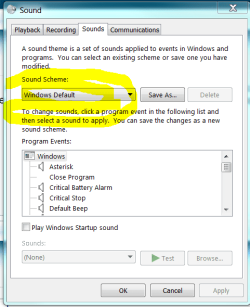
I don't like some of the new sounds in Win7 particularly the CHIMES.wav . I use this sound for 'open program' in sounds scheme so it does play fairly often. I went ahead and copied XP's chime sound and use it instead.
 

My Computer My Computer

At a glance

Windows 7 32bitAMD Athlon™ 64 X2 dual core 4000+ processor2048 MB DDR2, 667 MHz, (PC2-5300)Pny NVIDIA GeForce gt610 1024mb ddr3
Computer type
PC/Desktop
Computer Manufacturer/Model Number
Gateway GM5470E Desktop Computer
OS
Windows 7 32bit
CPU
AMD Athlon™ 64 X2 dual core 4000+ processor
Motherboard
ECS MCP61P-AM motherboard(micro_atx)
Memory
2048 MB DDR2, 667 MHz, (PC2-5300)
Graphics Card(s)
Pny NVIDIA GeForce gt610 1024mb ddr3
Sound Card
on-board integrated
Monitor(s) Displays
Vizio 24 inch 1920x1080 hd Tv
Screen Resolution
1920x1080
Hard Drives
Intel 3500 series 120gb
PSU
Corsair 430
Keyboard
Gateway wireless
Mouse
Gateway wireless
Internet Speed
2.2 .868
Browser
Seamonkey
I don't like some of the new sounds in Win7 particularly the CHIMES.wav . I use this sound for 'open program' in sounds scheme so it does play fairly often. I went ahead and copied XP's chime sound and use it instead.
Control Panel
Sounds

13 or so different schemes to choose from.

.
 

Attachments

  • Capture.PNG
    Capture.PNG
    19.2 KB · Views: 4
I don't like some of the new sounds in Win7 particularly the CHIMES.wav . I use this sound for 'open program' in sounds scheme so it does play fairly often. I went ahead and copied XP's chime sound and use it instead.
Control Panel
Sounds

13 or so different schemes to choose from.

.
Compare the Windows7 chime sound to XP's and you will here the difference. The Win7 chime is stident sounding compared to XP's melodious quality.
 

My Computer My Computer

At a glance

Windows 7 32bitAMD Athlon™ 64 X2 dual core 4000+ processor2048 MB DDR2, 667 MHz, (PC2-5300)Pny NVIDIA GeForce gt610 1024mb ddr3
Computer type
PC/Desktop
Computer Manufacturer/Model Number
Gateway GM5470E Desktop Computer
OS
Windows 7 32bit
CPU
AMD Athlon™ 64 X2 dual core 4000+ processor
Motherboard
ECS MCP61P-AM motherboard(micro_atx)
Memory
2048 MB DDR2, 667 MHz, (PC2-5300)
Graphics Card(s)
Pny NVIDIA GeForce gt610 1024mb ddr3
Sound Card
on-board integrated
Monitor(s) Displays
Vizio 24 inch 1920x1080 hd Tv
Screen Resolution
1920x1080
Hard Drives
Intel 3500 series 120gb
PSU
Corsair 430
Keyboard
Gateway wireless
Mouse
Gateway wireless
Internet Speed
2.2 .868
Browser
Seamonkey
:mad: Maybe it's just me but the fact that only windows Live Mail is offered in W-7 is a real bummer. If you want to ck or alter the source like change any of the html you can't do that any more.. No Source, Edit, View.... I had to jump hoops to correct that problem, The other thing was it is real faded and tuff on the eyes.. It was bad enough that ya have to download it as it isn't included any more.. :cry: If anyone else feels that way about WLM It can be fixed.. Bill
 

My Computer My Computer

At a glance

windows-7Intel300UNK
Computer Manufacturer/Model Number
toshiba
OS
windows-7
CPU
Intel
Motherboard
Intel
Memory
300
Graphics Card(s)
UNK
Sound Card
unk
Monitor(s) Displays
MAG
Hard Drives
Unk
Not necessarily Windows 7's fault but I would like to see more features from the "pinned" programs....example, with pinned MS Word, you can right click and open previously opened files. I WANT MORE OF THAT WITH ALL MY PROGRAMS!

Also, I love the way windows are maximized, minimized, "resume sized," and horizontally stacked but they left out verticle stacking...unless I'm missing something?

I would love to see "7 Stack" (software to make any folder pinnable) as default...and such that it would be highlighted when open, rather than havign to resort back to the windows explorer tab.

There was somethign else but that's all I can think of right now. Overall, I'm loving this new OS...can't wait to see how much further they can take it for us.
 

My Computer My Computer

At a glance

7 Pro x64Intel Core i7-640M8GBGT330M
Computer Manufacturer/Model Number
Sony VPCZ1390X CTO
OS
7 Pro x64
CPU
Intel Core i7-640M
Motherboard
Sony/Intel
Memory
8GB
Graphics Card(s)
GT330M
Monitor(s) Displays
Built-in 13" + 24" LG Flatron
Screen Resolution
1920x1080, 1920x1080
Hard Drives
Internal-2x128GB SSD (Raid 0), 500GB WD Caviar Green
External- 3TB WD
Keyboard
Logitech Illuminated
Mouse
Logitech Performance MX
Internet Speed
7 MB -- Sprint Overdrive on 4G
Other Info
Sprint EVO 3D (Synergy 2.3.4)
I've never seen a lisp manifest in writing before . . .

I haven't noticed a big difference in RC/Ultimate. My hardware isn't that great though so there isn't much I can test on.


I never use the start menu for programs unless it's a rare, weird program that I hardly use. Otherwise I put everything on the desktop. Usually I use a floating toolbar but since that's gone (WHY? WHYYYYYYYYY?!) I just put my super-essential programs on the new taskbar.

If I didn't have 36 essential programs they could all fit but I just don't like the way it looks. Who would ever want to scroll up and down for icons or have a huge taskbar? (This has always been a problem, it's not new to windows 7.)

That's something I hate. I have 0 items on my desktop. I've never liked it. It's not handy for me to have to minimize something just to start a program behind it. When I see people who have every space of their desktop filled with icons it makes me question their sanity ;)

I don't like having any icons on my desktop either. I want to see the picture I stuck there. Sometimes I'll have the picture 16:9 and use the black bars to stick folders that I don't know where to put.

I just miss having a toolbar I could stick at the bottom of the screen like a dock alternative. Pressing the view desktop button and finding your program on a toolbar is about as effective as searching for it in the start menu (I doubt either is faster than the other).

One thing they could have done is make it so that the show-desktop button brings back all windows when you push it a second time instead of just the very last one you minimized. (It could be an option in the taskbar properties.)

I've never understood that either...wouldn't it be just as easy to use the Start Menu or open the folder the files are in?...Rather than digging through all those desktop icons?

I have "My Name" folder, My Computer, and the Recycle Bin on my desktop...I don't see what more I could need?
 

My Computer My Computer

At a glance

7 Pro x64Intel Core i7-640M8GBGT330M
Computer Manufacturer/Model Number
Sony VPCZ1390X CTO
OS
7 Pro x64
CPU
Intel Core i7-640M
Motherboard
Sony/Intel
Memory
8GB
Graphics Card(s)
GT330M
Monitor(s) Displays
Built-in 13" + 24" LG Flatron
Screen Resolution
1920x1080, 1920x1080
Hard Drives
Internal-2x128GB SSD (Raid 0), 500GB WD Caviar Green
External- 3TB WD
Keyboard
Logitech Illuminated
Mouse
Logitech Performance MX
Internet Speed
7 MB -- Sprint Overdrive on 4G
Other Info
Sprint EVO 3D (Synergy 2.3.4)
The event viewer error messages still leave a lot to be desired. For many errors the Microsoft web page has no explanation of the error. For some errors it takes you to a Vista page. But in gerneral the error message are very difficult to understand.
 

My Computer My Computer

At a glance

Windows 10 (64 bit)AMD FX832016 GBAMD 7870
Computer type
PC/Desktop
Computer Manufacturer/Model Number
Custom Build
OS
Windows 10 (64 bit)
CPU
AMD FX8320
Motherboard
Asus M5A99X EVO
Memory
16 GB
Graphics Card(s)
AMD 7870
:mad: Maybe it's just me but the fact that only windows Live Mail is offered in W-7 is a real bummer. If you want to ck or alter the source like change any of the html you can't do that any more.. No Source, Edit, View.... I had to jump hoops to correct that problem, The other thing was it is real faded and tuff on the eyes.. It was bad enough that ya have to download it as it isn't included any more.. :cry: If anyone else feels that way about WLM It can be fixed.. Bill

MS has done numerous polls on this, and nowadays the majority of email users use web-based mail or uses a smartphone, so many no longer need a mail client on their PC.

Remember that one of the goals for Win7 was to "lose some weight" AKA: get rid of uneeded apps!
 

My Computer My Computer

At a glance

Windows 7 Ultimate 64 bit Steve Ballmer Signa...Intel Core 2 Quad - Q9550 - 2.83GHz stock - O...4GB DDR2 800MHz (PC6400) OCZ ReaperNvidia GE Force 8800 GTS
Computer Manufacturer/Model Number
Homebrew PC - "Alpha_Dawg"
OS
Windows 7 Ultimate 64 bit Steve Ballmer Signature Edition
CPU
Intel Core 2 Quad - Q9550 - 2.83GHz stock - OC'd to 3.6GHz
Motherboard
Gigabyte EP45-UD3P
Memory
4GB DDR2 800MHz (PC6400) OCZ Reaper
Graphics Card(s)
Nvidia GE Force 8800 GTS
Sound Card
Asus Xonar DX
Monitor(s) Displays
Samsung SyncMaster 2333HD
Screen Resolution
1920 x 1080
Hard Drives
WD Caviar Black 750GB - 7200RPM - 32MB cache
WD Caviar Green 1.5TB - 5400RPM - 64MB cache
WD Caviar Green 2.0TB - 5400RPM - 64MB cache
PSU
PC Power & Cooling Silencer 750
Case
Gigabyte 3D Aurora
Cooling
Case is Air - 5ea. 120mm fans (mix of Arctic and Xigmatec)
Keyboard
MS Natural Wireless KB
Mouse
MS Wireless Mouse
Internet Speed
50 mbps down/5 mbps up
Other Info
AVerMedia - AVerTVHD G2 Dual Tuner Card
Status
Not open for further replies.
Back
Top