What don't you like about Windows 7?

Status
Not open for further replies.
It seems the pc has gone from being keyboard based to having to use a mouse. I prefer to use a keyboard and in 7 I get so confused with everything. Especially when some keys dont do anything anymore.
 

My Computer My Computer

At a glance

Vista Home Premium 64-bit SP2AMD TurionX2 64 @ 2.1GHz4GB DDR2 400MHz256 MB Dedicated ATI Radeon HD 3200
Computer Manufacturer/Model Number
HP DV7-1129wm Laptop
OS
Vista Home Premium 64-bit SP2
CPU
AMD TurionX2 64 @ 2.1GHz
Memory
4GB DDR2 400MHz
Graphics Card(s)
256 MB Dedicated ATI Radeon HD 3200
Sound Card
IDT High Definition Audio/HDMI
Monitor(s) Displays
17" Laptop Screen
Screen Resolution
1440x900
Hard Drives
250GB SATA Hitachi
Keyboard
Full Keyboard with Full NumPad
Mouse
Microsoft Wireless Mobile Mouse 3000 / Touchpad
Internet Speed
Comact 12-20 Mbps
Other Info
Used Primarily for CAD Design/Engineering
Another thing: taht it takes sooo long to recognize that you connected a device again.
sure, the first time that you plug something in it needs to find the drivers, bet the next time that you plug it in it should be like "Oh! you again" and reapply the driver settings. Comparitively, when i ran linux on this computer it recognized the mouse again instantly and i could use it right away.
This is the same for wired and wireless, with wireless being a touch more difficult because I had to kludge up a driver for my Apple magic mouse. If I'm just waking up the computer after a minute it works, but if i had turned off bluetooth to save power i have to reset the driver.
 

My Computer My Computer

At a glance

Windows 8 Pro (32-bit)1.83GHz Intel Core Duo2GB 667MHz DDR2 SDRAM (PC2-5300) (upgrade)ATI Radeon X1600 with 128MB GDDR3 memory
Computer type
PC/Desktop
Computer Manufacturer/Model Number
Apple 17" iMac MA199LL (Early 2006)
OS
Windows 8 Pro (32-bit)
CPU
1.83GHz Intel Core Duo
Memory
2GB 667MHz DDR2 SDRAM (PC2-5300) (upgrade)
Graphics Card(s)
ATI Radeon X1600 with 128MB GDDR3 memory
Monitor(s) Displays
17-inch TFT active-matrix LCD, millions of colors
Screen Resolution
1440 x 900
Hard Drives
Hitachi 320GB HDT721032SLA360 7200RPM SATA II (upgrade)
Keyboard
Microsoft Wired Keyboard 600
Mouse
Microsoft Basic Optical Mouse v2.0
Internet Speed
4 Mbps
Antivirus
Microsoft Security Essentials
Browser
Google Chrome
Other Info
WEI:
Base Score: 3.9 Processor: 4.4 Memory 4.7
Graphics: 3.9 Gaming Graphics: 4.1 Primary HD: 5.9

My Computer My Computer

At a glance

Windows 7 build 7100 x86Intel Core 2 Duo 2.1GHz3GBIntel(TM) Graphics Media Accelerator X4500HD
Computer Manufacturer/Model Number
Dell Inspiron 1545
OS
Windows 7 build 7100 x86
CPU
Intel Core 2 Duo 2.1GHz
Motherboard
GM45 chipset
Memory
3GB
Graphics Card(s)
Intel(TM) Graphics Media Accelerator X4500HD
Sound Card
Realtek HD
Monitor(s) Displays
15.6" WLED 720p
Screen Resolution
1366x768
Hard Drives
320GB 5400rpm hard drive

My Computer My Computer

At a glance

Windows 7 Professional x64 SP1Intel Core i5-2500K8 GB Corsair Vengeance Blue DDR3-1600Sapphire Radeon HD 6870 1 GB GDDR5
OS
Windows 7 Professional x64 SP1
CPU
Intel Core i5-2500K
Motherboard
Gigabyte P67X-UD3-B3
Memory
8 GB Corsair Vengeance Blue DDR3-1600
Graphics Card(s)
Sapphire Radeon HD 6870 1 GB GDDR5
Monitor(s) Displays
Samsung SyncMaster T220HD
Screen Resolution
1680x1050
Hard Drives
120 GB Corsair Force SSD + 320 GB Seagate Barracuda SATA2 + 2 TB My Book Elite
PSU
Corsair 650W
Internet Speed
50 Mbps
1)It's not XP:confused:
2)Big icons on the desktop, compared to XP.
3)Compabality Issue.
4)No Quick Launch, the show desktop button is on the bottom right.
After using XP for such a long time, I guess it's the little things that make a difference:)
That's pretty much it...I thought there would be A LOT more when I was installing Win7.
 

My Computer My Computer

At a glance

Win7(x64)[email protected]Samsung Originals 2x2Gb4870
OS
Win7(x64)
CPU
[email protected]
Motherboard
P5Q
Memory
Samsung Originals 2x2Gb
Graphics Card(s)
4870
1)It's not XP:confused:
2)Big icons on the desktop, compared to XP.
3)Compabality Issue.
4)No Quick Launch, the show desktop button is on the bottom right.
After using XP for such a long time, I guess it's the little things that make a difference:)
That's pretty much it...I thought there would be A LOT more when I was installing Win7.

#4 "No Quick Launch"

Heh that one go tme too till I realized that the ENTIRE task bar IS a quick launch bar :D Just pin your use every day icons to it and they sit there and when launched they do not take up any more space.
 

My Computer My Computer

At a glance

Windows 7 x64 Ultimatei7 96012 Gig Corsair DominatorNvidia 480
Computer Manufacturer/Model Number
Scratch built
OS
Windows 7 x64 Ultimate
CPU
i7 960
Motherboard
Asus P6X58D
Memory
12 Gig Corsair Dominator
Graphics Card(s)
Nvidia 480
Sound Card
Maudio Delta 44 + breakout box
Monitor(s) Displays
Dell UltraSharp U2410 24in and Samsung 21 dual monitors
Screen Resolution
1920x1200 and 1280x1024
Hard Drives
Primary: Intel X-25M G2 160G SSD
Secondary: Segate baracuda 1.0 TB
HDs in AHCI mode.
PSU
Corasair TX850
Case
Cooler Master HAF
Cooling
Corsair H50
Keyboard
Logitech G15 + N52 game pad
Mouse
Logitech MX518
Internet Speed
15kbs down 4.5kbps up
Other Info
WEI 7.6
CPU & RAM 7.6
Graphics 7.9
Hard disk 7.7
#4 "No Quick Launch"

Heh that one go tme too till I realized that the ENTIRE task bar IS a quick launch bar :D Just pin your use every day icons to it and they sit there and when launched they do not take up any more space.

You also get full history by rightclicking icon.
 
organizing pictures

Hi everyone, I'm the new kid on the block, actually 67, but I just noticed that you cannot drag and rearrange photos in a folder anymore in W7. What gives?
 

My Computer My Computer

At a glance

w 7
OS
w 7
Have you tried the rearranging options on top of the menu bar - organize by Type, Details, Tiles?
 

My Computer My Computer

At a glance

Windows 7 Ultimate x86-64[email protected] 1066MHz FSB6GB DDR3 1066MHz9300M GS 256MB Dedicated (Speed) + Intel4500M...
Computer Manufacturer/Model Number
Sony Vaio Z46GDU
OS
Windows 7 Ultimate x86-64
CPU
[email protected] 1066MHz FSB
Motherboard
Sony branded
Memory
6GB DDR3 1066MHz
Graphics Card(s)
9300M GS 256MB Dedicated (Speed) + Intel4500MHD (Stamina)
Sound Card
Realtek HD Audio
Monitor(s) Displays
13.1' WXGA
Screen Resolution
1600x900
Hard Drives
320GB 7200RPM w/ 16MB cache
Internet Speed
1MB/s
i hate that when your using a prog like movie maker and you are converting it wont let you minimise it and it gets in the way espesially when your trying to do 100 other things..

love this new style online keyboard
 

My Computer My Computer

At a glance

Microsoft windows 7 Ultimate x64AMD Turion(tm) X2 dual-Core Mobile RM-72,2100...4GB
Computer Manufacturer/Model Number
HP pavilion DV5 notebook PC
OS
Microsoft windows 7 Ultimate x64
CPU
AMD Turion(tm) X2 dual-Core Mobile RM-72,2100 Mhz, 2 Core(s)
Memory
4GB
Screen Resolution
1280x800
Hard Drives
250GB
Internet Speed
2mbit

My Computer My Computer

At a glance

8 Pro x64i7 3770K 4.6GHz16GB G.Skill Trident X 2666mhzx2 EVGA 780 Ti Superclocked SLI
Computer type
PC/Desktop
Computer Manufacturer/Model Number
Systems by SmartEyeball
OS
8 Pro x64
CPU
i7 3770K 4.6GHz
Motherboard
ASUS P8Z77 WS
Memory
16GB G.Skill Trident X 2666mhz
Graphics Card(s)
x2 EVGA 780 Ti Superclocked SLI
Sound Card
SB X-FI Surround 5.1 PRO USB / ATH-AD900 Headphones
Monitor(s) Displays
x3 Dell U2410 / 58" Samsung
Screen Resolution
5760*1200/ 1920*1200
Hard Drives
2x Intel 520 240GB (RAID 0) * 2x WD Caviar Blacks 2TB (RAID 0) * 2TB WD Caviar Black * Sony Optirac DVD
PSU
Silverstone Strider Evolution 1200W
Case
Thermaltake Level 10 GT Snow Edition
Cooling
Noctua NH-D14
Keyboard
Topre Realforce // Ducky Shine MX Black // Filco Ninja TKL
Mouse
Thermaltake Theron (Highly Recommended) + Razer Imperator
Antivirus
MSE
Browser
IE, FF, WaterFox
Other Info
GT Extreme V2 Sim Racing Cockpit + 40" LCD and K/B Mouse stand ▼
Fanatec CSR Elite Wheel + Clubsport V1 Pedals + CSR shifter/7G-H ▼Saitek X52 Pro ▼ TrackIR 5 Pro
Buttkicker v2 Seat Rumbler with Dedicated 5.1 and Sub Woofer attached to frame ▼
=
Bloody Big Grin
xp sucks compared to win7 even vista was better then xp..leaving old crap installed.. maybe ill re install 98
 

My Computer My Computer

At a glance

Microsoft windows 7 Ultimate x64AMD Turion(tm) X2 dual-Core Mobile RM-72,2100...4GB
Computer Manufacturer/Model Number
HP pavilion DV5 notebook PC
OS
Microsoft windows 7 Ultimate x64
CPU
AMD Turion(tm) X2 dual-Core Mobile RM-72,2100 Mhz, 2 Core(s)
Memory
4GB
Screen Resolution
1280x800
Hard Drives
250GB
Internet Speed
2mbit

My Computer My Computer

At a glance

Windows 7 Ultimate
OS
Windows 7 Ultimate
If you want "Quick Launch" back, see here:
Windows 7: Restore Quick Launch Toolbar | Desktop Wallpaper | Windows Tools, Help & Guides

I also miss the "Up" arrow in Explorer, but have adopted using mouse gestures instead since most of the time an "Up" is the same as a "Back":
StrokeIt - Mouse Gestures for Windows

Alternatively you can assign a gesture to "Alt + Up Arrow" which takes you up one level in file hierarchy.

Or, you can use the new breadcrumb bar. Take, for example, the following folder paths:

D:\Documents\Work\Dynax\Advertisements\December
D:\Documents\Work\Dzomlija

In XP (when the folder tree is not visible on the left), if I wanted to go to the "Work" folder, I'd have to click the "Up" arrow 3 times! In Windows Vista and Windows 7, I can do the same with just a single click by clicking on "Work"

Or, if I wanted to go directly from the "December" folder to "Dzomlija", I can click the triangle arrow between "Work" and "Dynax" to show a list of folders, from which I can just click "Dzomlija" to get there. In XP, this will take 3 clicks of "Up" and a double-click to achieve the same result.

The "Up" arrow command is old and antiquated, and I for one am happy that it has been removed from Explorer...
 

My Computer My Computer

At a glance

Windows 7 Professional 32-bit SP1AMD A4/A63.00GB EDOVMware SVGA 3D
Computer type
PC/Desktop
Computer Manufacturer/Model Number
Virtual Machine
OS
Windows 7 Professional 32-bit SP1
CPU
AMD A4/A6
Motherboard
Intel Corporation 440BX Desktop Reference Platform
Memory
3.00GB EDO
Graphics Card(s)
VMware SVGA 3D
Sound Card
High Definition Audio Device
Monitor(s) Displays
Generic Non-PnP Monitor on VMware SVGA 3D
Screen Resolution
1440x900
Hard Drives
1 x 60GB VMware Virtual SATA Hard Drive ATA Device
Antivirus
Kaspersky Total Security
1)It's not XP:confused:
2)Big icons on the desktop, compared to XP.
3)Compabality Issue.
4)No Quick Launch, the show desktop button is on the bottom right.
After using XP for such a long time, I guess it's the little things that make a difference:)
That's pretty much it...I thought there would be A LOT more when I was installing Win7.

#4 "No Quick Launch"

Heh that one go tme too till I realized that the ENTIRE task bar IS a quick launch bar :D Just pin your use every day icons to it and they sit there and when launched they do not take up any more space.

You can't drop shortcuts to folders on the new taskbar, you CAN put them in QL. They sort of 'belong' to Explorer in 7, which isn't what I want. Having the new way and the old XP way combined is best, luckily it's easy enough to fix up so it does this. I have QL as a very short entry on the taskbar, most of it runs vertically from the double arrows, so it doesn't take up hardly any room on the taskbar.
 

My Computer My Computer

At a glance

Windows 7
OS
Windows 7
there is another way to do it just right click on the desktop and show icons smaller size.. both are good ways.. i did nto know about the second.. ty
 

My Computer My Computer

At a glance

Microsoft windows 7 Ultimate x64AMD Turion(tm) X2 dual-Core Mobile RM-72,2100...4GB
Computer Manufacturer/Model Number
HP pavilion DV5 notebook PC
OS
Microsoft windows 7 Ultimate x64
CPU
AMD Turion(tm) X2 dual-Core Mobile RM-72,2100 Mhz, 2 Core(s)
Memory
4GB
Screen Resolution
1280x800
Hard Drives
250GB
Internet Speed
2mbit
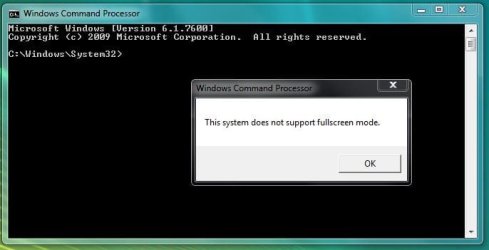
I completely DESPISE this:

Capture.JPG

When using CLI encoders in XP, I'd always make it fullscreen and go to sleep/go out, so when my mom wanted to turn off the PC to "teach me a lesson about saving power" she'd just see tons of numbers, rows and rows of weird text and simply give up thinking that she'd screw up something XD
 

My Computer My Computer

At a glance

Windows 7 Home Premium x64Intel Core i5 2500K8GB DDR3nVidia GeForce GTX650 Ti BOOST
Computer type
Laptop
Computer Manufacturer/Model Number
Custom
OS
Windows 7 Home Premium x64
CPU
Intel Core i5 2500K
Motherboard
MSI MS-7750
Memory
8GB DDR3
Graphics Card(s)
nVidia GeForce GTX650 Ti BOOST
Sound Card
Realtek
Monitor(s) Displays
21' Philips
Screen Resolution
Full HD
Hard Drives
1TB
PSU
500W
Status
Not open for further replies.
Back
Top