It says in device manager "Intel(R) HD Graphics" With device ID 0F31 (Exact hardware device ID)
What graphics driver is compatible with 0F31 on windows 7 64-bit? Can not find any info on this Intel HD Graphics driver other than it being "Bay Trail" architecture. And i don't know what driver to install because i have a fairly old driver (About a year old) and would like to update it to the ABSOLUTE latest possible driver (beta alpha or release as long as it's the latest thing out there)
My Computer
Computer type
PC/Desktop
Computer Manufacturer/Model Number
HP Elite 8300 compaq SFF
OS
Windows 7 Pro x64
CPU
i7 3770k 3.5ghz up to 3.9ghz turbo boost 4 core 8 thread CPU
IE11 + firefox + Google Chrome randomly switches between
Other Info
Info updated
power supply doesnt fit but still works with adapter its just sitting on the desk behind the computer wires going into the case where the old power supply was.
Is that driver compatible with device ID "0F31" ? if it's not then it will say my computer fails to meet the requirement and not let it install
edit: i looked through the installer driver.inf file in the setup folder and 0F31 was not listed in the windows 7 64-bit section of the installer only a couple other ones that are similar closest one was 161E but would still not let me install. Can you help me find a compatible driver?
My Computer
Computer type
PC/Desktop
Computer Manufacturer/Model Number
HP Elite 8300 compaq SFF
OS
Windows 7 Pro x64
CPU
i7 3770k 3.5ghz up to 3.9ghz turbo boost 4 core 8 thread CPU
IE11 + firefox + Google Chrome randomly switches between
Other Info
Info updated
power supply doesnt fit but still works with adapter its just sitting on the desk behind the computer wires going into the case where the old power supply was.
IE11 + firefox + Google Chrome randomly switches between
Other Info
Info updated
power supply doesnt fit but still works with adapter its just sitting on the desk behind the computer wires going into the case where the old power supply was.
Those are the drivers i used. Of course. but still says my computer does not meet the minimum requirements for installing this software in error message when trying to run setup
My Computer
Computer type
PC/Desktop
Computer Manufacturer/Model Number
HP Elite 8300 compaq SFF
OS
Windows 7 Pro x64
CPU
i7 3770k 3.5ghz up to 3.9ghz turbo boost 4 core 8 thread CPU
IE11 + firefox + Google Chrome randomly switches between
Other Info
Info updated
power supply doesnt fit but still works with adapter its just sitting on the desk behind the computer wires going into the case where the old power supply was.
No .exe and .zip were setup files. My computer originally came preinstalled with windows 8.1 64-bit pro and i downgraded to windows 7 64-bit ultimate and installed the drivers from intel when they were available. Now looking for updated drivers as these seem to be old and not very stable anymore (random screen cutting out and coming back when switching from youtube video to youtube video but gaming is mostly fine with no problems (After many HOURS of playing and computer being on sometimes openGL games will cause a temporary black screen for a second or two making the game silently exit and i just have to start it up again) Says "The display driver stopped responding and has recovered successfully.
I do not have intel Core processor
I have intel celeron j1900 quad core at 2.42ghz processor
My Computer
Computer type
PC/Desktop
Computer Manufacturer/Model Number
HP Elite 8300 compaq SFF
OS
Windows 7 Pro x64
CPU
i7 3770k 3.5ghz up to 3.9ghz turbo boost 4 core 8 thread CPU
IE11 + firefox + Google Chrome randomly switches between
Other Info
Info updated
power supply doesnt fit but still works with adapter its just sitting on the desk behind the computer wires going into the case where the old power supply was.
Yes i know you had Windows 8 ... We are on a different track here the Drivers i was referring to some one had Posted them on the Acer Website they had the same Model as you but the Link was an ISO File ...
IE11 + firefox + Google Chrome randomly switches between
Other Info
Info updated
power supply doesnt fit but still works with adapter its just sitting on the desk behind the computer wires going into the case where the old power supply was.
IE11 + firefox + Google Chrome randomly switches between
Other Info
Info updated
power supply doesnt fit but still works with adapter its just sitting on the desk behind the computer wires going into the case where the old power supply was.
IE11 + firefox + Google Chrome randomly switches between
Other Info
Info updated
power supply doesnt fit but still works with adapter its just sitting on the desk behind the computer wires going into the case where the old power supply was.
IE11 + firefox + Google Chrome randomly switches between
Other Info
Info updated
power supply doesnt fit but still works with adapter its just sitting on the desk behind the computer wires going into the case where the old power supply was.
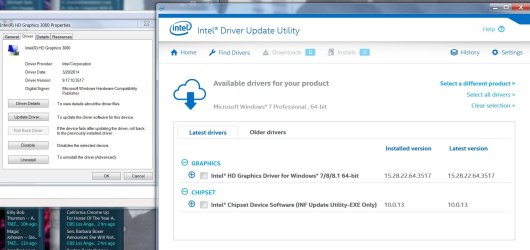
I used your link for Update Utility and let it find drivers.
I downloaded what it said was the latest drivers.
The HD Graphics driver now says I have the latest, but Dev Mgr says I have old one.
And says it is the latest.
Paul
Attachments
INTEL PIC 1.jpg
125.4 KB
· Views: 1
My Computer
Computer type
PC/Desktop
Computer Manufacturer/Model Number
Self-Built
OS
Windows 7 Professional X64
CPU
Core i7 (2nd gen) i7-2600K / 3.40GHz
Motherboard
ASUS P8Z77-V Intel 7 Series Motherboard
Memory
DDR3 2400MHz (OC) 16gb
Graphics Card(s)
Intel(R) HD Graphics 3000, -1988 Mb
Sound Card
8 ChannelsAudio Chipset Realtek ALC892
Monitor(s) Displays
LG 29UM65 Black 29"
Screen Resolution
2560 x 1080
Hard Drives
840 EVO 250 GB SSD ;2tb (2);Seagate;1tb Seagate; 750 gb Seagate; wd ext (2) 750 gb,WD 2tb X 2;WD 3TB Black
PSU
750 watt
Case
Thermaltake RX -1
Cooling
2120mm Fans Included 1Other Fan Ports 5x 200mm Fan Ports
Keyboard
Microsoft Digital Media Pro
Mouse
Microsoft Wireless 6000
Internet Speed
U-verse 18 mbps
Antivirus
MSE
Browser
Firefox, Chrome and my favorite: Pale Moon
Other Info
HdHomerun Dual Tuner.
SRS Audio Lab,
Pioneer BDR 208-DBK
PS3-What a difference in my Surround Sound Receiver!
HP 4540s - My new Toy.
Epson R280 Printer- To personalize my Dvds.
Canon MP 560 - For scanning.


 ... We are on a different track here the Drivers i was referring to some one had Posted them on the Acer Website they had the same Model as you but the Link was an ISO File ...