what exactly happens when you boot with two bootable drives?

johnhoh

New member
Guru
VIP
Local time
10:27 PM
Messages
1,363
Here is what has been my experience.

If you clone a disk then immediately restart with both disks still connected, whichever disk is NOT booted from usually loses its ability to boot from then on, presumably because the booting disk messes with the other disk's boot sector (?).

However, if after cloning you immediately shut down and disconnect the original drive and then reboot from only the new drive, then shut down and disconnect it and reconnect the original boot drive and boot from only it, and THEN connect both drives, both drives will remain bootable and you have a poor-man's multiboot system, i.e. one where there is no windows multi-boot menu however you can simply select which drive to boot from by using the bios boot menu.

This post is a question as to exactly what is happening in the above scenarios. Feel free to correct anything wrong in the above as well.
 

My Computer My Computer

At a glance

Win7 pro x64stock i7 7700kCorsair Vengeance LPX 16GB (2x8GB) DDR4 @ 320...integrated Intel HD 630
Computer type
PC/Desktop
Computer Manufacturer/Model Number
diy
OS
Win7 pro x64
CPU
stock i7 7700k
Motherboard
Gigabyte Z270N-WIFI mini-ITX
Memory
Corsair Vengeance LPX 16GB (2x8GB) DDR4 @ 3200MHz
Graphics Card(s)
integrated Intel HD 630
Sound Card
onboard Realtek ALC1220
Monitor(s) Displays
two vertically mounted samsung 55" 4k un55mu8000
Screen Resolution
1920x1280
Hard Drives
256GB Samsung EVO 960 M.2 pci-e NVMe SSD
PSU
SilverStone Nightjar ST45NF 450Watt Fanless
Case
No case. Motherboard is mounted directly onto power supply
Cooling
Evercool low profile 815EP with Panaflow 12L fan at 7v
Keyboard
Ortek MCK-86 mini
Mouse
Belkin 5-button USB
Internet Speed
spectrum 400mbps
if after cloning you immediately shut down and disconnect the original drive and then reboot from only the new drive, then shut down and disconnect it and reconnect the original boot drive and boot from only it, and THEN connect both drives, both drives will remain bootable and you have a poor-man's multiboot system

Have you done that often?
 

My Computers My Computers

  • At a glance

    7 X64i5 84002x8gb 3200mhz
    Computer type
    PC/Desktop
    OS
    7 X64
    CPU
    i5 8400
    Motherboard
    gigabyte b365m ds3h
    Memory
    2x8gb 3200mhz
    Hard Drives
    various
    PSU
    pure power 11 400w cm
    Case
    Coolermaster
    Cooling
    cryorig m9i
  • At a glance

    7x64g54008gb ddr4 2400
    Computer type
    PC/Desktop
    OS
    7x64
    CPU
    g5400
    Motherboard
    ga b365m ds3h
    Memory
    8gb ddr4 2400
    PSU
    xfx pro 450w
Results depend to an extent on how complete the "clone" is. Most utilities don't actually make *exact* clones because of the below issues, so they make close enough copies with a few tweaks based on guesses as to what your ultimate goal is.

Windows differentiates logical volumes by assigning a unique "signature" to each partition, derived from a disk identifier and a partition identifier.* Those signatures are what you'll see recorded in the [HKLM\System\MountedDevices] registry key, and which has been a focus of discussion in another thread.

Partitions can be easily differentiated simply by their location on disk, so the starting byte location is used as the partition identifier.

Disks are differentiated by writing a 4-byte "DiskID" in the first sector of the hard drive.** It's important to note this is not part of the firmware and is not put there by the disk's manufacturer. It's just a pseudo-random string of bytes written by the OS in order to differentiate otherwise similar hard disks. This means a system should not have two disks with the same DiskID. If that condition is encountered, Windows will rewrite a new DiskID on the second disk. (It's a random string, so if you were to do it manually, you're free to use any byte values you want.)

I've covered further details on my webpage, which may help you resolve the circumstances under which you'd encounter the symptoms you describe. My page was written during the Win2000-XP era, but parts of it are still relevant because the same methodology is still used in Windows 10.

"... whichever disk is NOT booted from usually loses its ability to boot from then on ..."​
When you encounter that situation, you should be able to repair it by removing the [MountedDevices] entries, removing the second disk, and booting it as a single-disk system. Windows should regenerate the partition sigs and commit them to its registry, after which the second disk can be reintroduced into the system.

In a nutshell, the key is whether the OS being booted has had a chance to establish valid registry entries for its own System and Boot partitions.


* This part-sig method predates the rise in popularity of the GUID system, but I have on occasion noticed a few recent systems that use GUIDs in the registry's DosDevices entries. I haven't investigated when or why that occurs, but it's worth noting that the part-sig identifiers may no longer be the only game in town.

** The DiskID dates back to Windows NT and was originally called the "NT Serial Number". There are actually 6 bytes reserved for its use, but in all cases I've seen, only 4 bytes are used. These 6 bytes are at location 0x1B80 in the disk's first sector -- aka, the MBR boot sector.
 

My Computer My Computer

At a glance

Windows 7/8.1/10 multibootIntel Core i7-770048GB (2x16GB Crucial DDR4-3200 + 2x8GB Hynix ...Intel HD630 + AMD Radeon R7 450 PCIe
Computer type
PC/Desktop
Computer Manufacturer/Model Number
Dell Optiplex 7050
OS
Windows 7/8.1/10 multiboot
CPU
Intel Core i7-7700
Motherboard
Dell, Intel Q270 chipset
Memory
48GB (2x16GB Crucial DDR4-3200 + 2x8GB Hynix DDR4-2400)
Graphics Card(s)
Intel HD630 + AMD Radeon R7 450 PCIe
Monitor(s) Displays
Asus VC279 (27")
Screen Resolution
1920x1080
Hard Drives
Toshiba M.2 NVMe (256GB),
Samsung 960 Evo (500GB),
WD Red Plus 80EFBX (8TB)
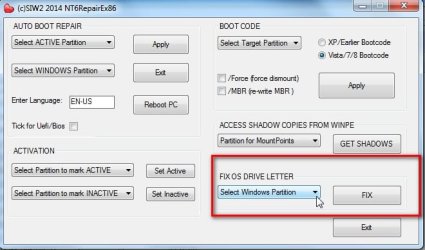
I have a module on the little thing I made. It was intended for PE , however, most modules work fine in windows too.

You can fix the problem by pointing this at the non booting windows partition

View attachment NT6REPAIRx86.zip

nt6rep-fix-driveletter.jpg
 

My Computers My Computers

  • At a glance

    7 X64i5 84002x8gb 3200mhz
    Computer type
    PC/Desktop
    OS
    7 X64
    CPU
    i5 8400
    Motherboard
    gigabyte b365m ds3h
    Memory
    2x8gb 3200mhz
    Hard Drives
    various
    PSU
    pure power 11 400w cm
    Case
    Coolermaster
    Cooling
    cryorig m9i
  • At a glance

    7x64g54008gb ddr4 2400
    Computer type
    PC/Desktop
    OS
    7x64
    CPU
    g5400
    Motherboard
    ga b365m ds3h
    Memory
    8gb ddr4 2400
    PSU
    xfx pro 450w
Thanks for that thorough explanation. Let me know if I am describing the issue correctly, in the situation of the unbootable clone.

You have two disks, A and B. Each are one partition. Disk B is blank. You clone A onto B. If you then remove A and boot from B, it boots no problem. But if you do not remove A, and instead reboot from A (with B still connected), B may become unbootable. Is this because upon that post-clone reboot, windows overwrites B's Disk ID with a new one? Because windows must be writing something onto B that makes it unbootable
 

My Computer My Computer

At a glance

Win7 pro x64stock i7 7700kCorsair Vengeance LPX 16GB (2x8GB) DDR4 @ 320...integrated Intel HD 630
Computer type
PC/Desktop
Computer Manufacturer/Model Number
diy
OS
Win7 pro x64
CPU
stock i7 7700k
Motherboard
Gigabyte Z270N-WIFI mini-ITX
Memory
Corsair Vengeance LPX 16GB (2x8GB) DDR4 @ 3200MHz
Graphics Card(s)
integrated Intel HD 630
Sound Card
onboard Realtek ALC1220
Monitor(s) Displays
two vertically mounted samsung 55" 4k un55mu8000
Screen Resolution
1920x1280
Hard Drives
256GB Samsung EVO 960 M.2 pci-e NVMe SSD
PSU
SilverStone Nightjar ST45NF 450Watt Fanless
Case
No case. Motherboard is mounted directly onto power supply
Cooling
Evercool low profile 815EP with Panaflow 12L fan at 7v
Keyboard
Ortek MCK-86 mini
Mouse
Belkin 5-button USB
Internet Speed
spectrum 400mbps
It will if there is clash of disk signatures.
 

My Computers My Computers

  • At a glance

    7 X64i5 84002x8gb 3200mhz
    Computer type
    PC/Desktop
    OS
    7 X64
    CPU
    i5 8400
    Motherboard
    gigabyte b365m ds3h
    Memory
    2x8gb 3200mhz
    Hard Drives
    various
    PSU
    pure power 11 400w cm
    Case
    Coolermaster
    Cooling
    cryorig m9i
  • At a glance

    7x64g54008gb ddr4 2400
    Computer type
    PC/Desktop
    OS
    7x64
    CPU
    g5400
    Motherboard
    ga b365m ds3h
    Memory
    8gb ddr4 2400
    PSU
    xfx pro 450w

My Computer My Computer

At a glance

Win7 pro x64stock i7 7700kCorsair Vengeance LPX 16GB (2x8GB) DDR4 @ 320...integrated Intel HD 630
Computer type
PC/Desktop
Computer Manufacturer/Model Number
diy
OS
Win7 pro x64
CPU
stock i7 7700k
Motherboard
Gigabyte Z270N-WIFI mini-ITX
Memory
Corsair Vengeance LPX 16GB (2x8GB) DDR4 @ 3200MHz
Graphics Card(s)
integrated Intel HD 630
Sound Card
onboard Realtek ALC1220
Monitor(s) Displays
two vertically mounted samsung 55" 4k un55mu8000
Screen Resolution
1920x1280
Hard Drives
256GB Samsung EVO 960 M.2 pci-e NVMe SSD
PSU
SilverStone Nightjar ST45NF 450Watt Fanless
Case
No case. Motherboard is mounted directly onto power supply
Cooling
Evercool low profile 815EP with Panaflow 12L fan at 7v
Keyboard
Ortek MCK-86 mini
Mouse
Belkin 5-button USB
Internet Speed
spectrum 400mbps
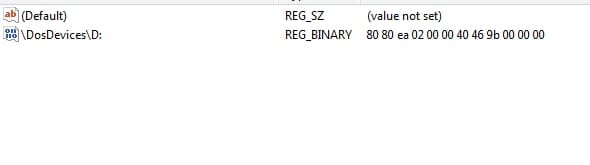
It changes the registry.

dosdevs.jpg
 
Last edited:

My Computers My Computers

  • At a glance

    7 X64i5 84002x8gb 3200mhz
    Computer type
    PC/Desktop
    OS
    7 X64
    CPU
    i5 8400
    Motherboard
    gigabyte b365m ds3h
    Memory
    2x8gb 3200mhz
    Hard Drives
    various
    PSU
    pure power 11 400w cm
    Case
    Coolermaster
    Cooling
    cryorig m9i
  • At a glance

    7x64g54008gb ddr4 2400
    Computer type
    PC/Desktop
    OS
    7x64
    CPU
    g5400
    Motherboard
    ga b365m ds3h
    Memory
    8gb ddr4 2400
    PSU
    xfx pro 450w
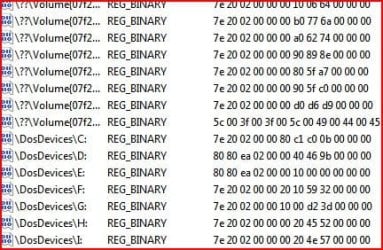
Just booted into the target OS and the entries are there:

Capture-dosdevs-repopulated.JPG
 

My Computers My Computers

  • At a glance

    7 X64i5 84002x8gb 3200mhz
    Computer type
    PC/Desktop
    OS
    7 X64
    CPU
    i5 8400
    Motherboard
    gigabyte b365m ds3h
    Memory
    2x8gb 3200mhz
    Hard Drives
    various
    PSU
    pure power 11 400w cm
    Case
    Coolermaster
    Cooling
    cryorig m9i
  • At a glance

    7x64g54008gb ddr4 2400
    Computer type
    PC/Desktop
    OS
    7x64
    CPU
    g5400
    Motherboard
    ga b365m ds3h
    Memory
    8gb ddr4 2400
    PSU
    xfx pro 450w
You have two disks, A and B. Each are one partition. Disk B is blank. You clone A onto B. If you then remove A and boot from B, it boots no problem. But if you do not remove A, and instead reboot from A (with B still connected), B may become unbootable. Is this because upon that post-clone reboot, windows overwrites B's Disk ID with a new one? Because windows must be writing something onto B that makes it unbootable
It's hard to say precisely because different tools tweak things differently, so it's hard to know how your tool is doing it.

For instance, some tools will duplicate the DiskID on the assumption you're going to remove the source disk and immediately replace it with the original and thus there won't be a DiskID conflict. In such an instance, yes, rebooting from the source disk will force a DiskID change, and in effect subvert the tool's carefully laid plans.

Other tools will perform the same task by using a new DiskID for the target disk, and make up for that difference by tweaking the registry entry so it uses the new DiskID in place of the old -- in which case, note the registry entries won't be an exact clone of the source.

If you're curious exactly how your tool does it, you might try comparing the DiskIDs and registry entries on disk B in the three scenarios: right after the clone is made but no reboots yet; after cloning and rebooting from A; and after cloning/removing A/booting B.
 

My Computer My Computer

At a glance

Windows 7/8.1/10 multibootIntel Core i7-770048GB (2x16GB Crucial DDR4-3200 + 2x8GB Hynix ...Intel HD630 + AMD Radeon R7 450 PCIe
Computer type
PC/Desktop
Computer Manufacturer/Model Number
Dell Optiplex 7050
OS
Windows 7/8.1/10 multiboot
CPU
Intel Core i7-7700
Motherboard
Dell, Intel Q270 chipset
Memory
48GB (2x16GB Crucial DDR4-3200 + 2x8GB Hynix DDR4-2400)
Graphics Card(s)
Intel HD630 + AMD Radeon R7 450 PCIe
Monitor(s) Displays
Asus VC279 (27")
Screen Resolution
1920x1080
Hard Drives
Toshiba M.2 NVMe (256GB),
Samsung 960 Evo (500GB),
WD Red Plus 80EFBX (8TB)
IIf you're curious exactly how your tool does it, you might try comparing the DiskIDs and registry entries on disk B in the three scenarios: right after the clone is made but no reboots yet; after cloning and rebooting from A; and after cloning/removing A/booting B.

I am curious about Macrium however my main boot drive is an M.2 NVMe mounted under the motherboard that is a pain to de-install. So instead I searched on the macrium website and found this, that explains their methodology

Understanding Disk IDs
 

My Computer My Computer

At a glance

Win7 pro x64stock i7 7700kCorsair Vengeance LPX 16GB (2x8GB) DDR4 @ 320...integrated Intel HD 630
Computer type
PC/Desktop
Computer Manufacturer/Model Number
diy
OS
Win7 pro x64
CPU
stock i7 7700k
Motherboard
Gigabyte Z270N-WIFI mini-ITX
Memory
Corsair Vengeance LPX 16GB (2x8GB) DDR4 @ 3200MHz
Graphics Card(s)
integrated Intel HD 630
Sound Card
onboard Realtek ALC1220
Monitor(s) Displays
two vertically mounted samsung 55" 4k un55mu8000
Screen Resolution
1920x1280
Hard Drives
256GB Samsung EVO 960 M.2 pci-e NVMe SSD
PSU
SilverStone Nightjar ST45NF 450Watt Fanless
Case
No case. Motherboard is mounted directly onto power supply
Cooling
Evercool low profile 815EP with Panaflow 12L fan at 7v
Keyboard
Ortek MCK-86 mini
Mouse
Belkin 5-button USB
Internet Speed
spectrum 400mbps
Back
Top