Solved What Fan System Should I Use?

Graysull

New member
Local time
8:28 AM
Messages
49
Hi,

I am building a custom PC for the first time, and I need some help with fan quantity and placement. I'm not really sure how many I need for where to put them. Here is some info so you can get an idea of spacing:

Case: Apevia X-Sniper 2 (Blue)

Motherboard: ASRock Z97M Anniversary (11" x 11")

Graphics Card: Sapphire Radeon R9 280X (11.1" Long)

Power Supply: Corsair CX750W

I have looked into some fans already, and I have found one called Cooler Mast Sickleflow 120. Is this a good fan for the price, or should I go with a cheaper one (I am on a budget).
 

My Computer My Computer

Computer type
PC/Desktop
Computer Manufacturer/Model Number
Modified Dell
OS
Windows 7 Home Premium 64 Bit
CPU
Intel i5
Memory
16 GB
Graphics Card(s)
Radeon R7 260x
Monitor(s) Displays
2 ASUS 19", 1 Vizio 27~"
Screen Resolution
1440 x 900 (2), 1920 x 1080
Hard Drives
1 TB Hard Drive
Keyboard
Razer DeathStalker Expert
Mouse
Razer Naga 2014
Internet Speed
Decent
Antivirus
McAfee
Browser
Chrome
Here's a copy and paste from Apevia about the fans on that case. Peculiar that it includes only 1 fan, a 120 mm intake on the front. Most cases ship with an exhaust fan.

I thought that might be wrong, but Newegg's spec page for the product says the same thing.

Up to 8 x case fans:

1 x 200mm fan - side (optional) OR 2 x 120mm fan - side (optional)
1 x 120mm fan - front (included) AND 1 x 120mm fan - front (optional) OR 2 x 80mm fan - front (optional)
1 x 80mm fan - rear (optional) OR 1 x 120mm fan - rear (optional)
2 x 120mm fan - top (optional) OR 2 x 140mm fan - top (optional)
1 x 120mm fan - bottom (optional)
2 x Water Cooling Holes on Back Plate

We don't know much about your PC---what processor, your overclocking intentions if any, etc.

So we don't know much about your cooling needs or the airflow of that case in stock condition.

We know nothing at all about your tolerance for noise or your desire to build a relatively quiet machine.

Case fans can be added after the build is complete and you've done an evaluation of the heat situation.

That's probably what I'd do. Just build it, fire it up, and see what temps you get with your hardware.

You could most likely move that front intake fan to the rear if needed.

But---

Some people are fanaholics and like to see 5 things spinning rather than 2.

Some people think it's useful to have temps of say 33 rather than say 38.

Some people like to tinker.

Some people are indifferent to the law of diminishing returns.

I have no idea if you fit in any of those categories.

Just build the thing. You can buy fans a week or two later after you evaluate it.

Good high quality brands include Scythe, Noctua, certain Antec models, BeQuiet, and Nexus. Yate Loons are usually cheap and quieter than most.

I'd try to stick with 120 mm or larger fans if possible.
 

My Computer My Computer

Computer type
PC/Desktop
Computer Manufacturer/Model Number
Ignatz Special; 4 speed manual gearbox; factory air conditioning; one of one
OS
Windows 7 Home Premium SP1, 64-bit
CPU
Intel Skylake i5-6600K, not overclocked
Motherboard
AsRock Z170M Extreme 4, micro ATX
Memory
8 GB HyperX DDR4-2666 (2 x 4 GB)
Graphics Card(s)
none; graphics are integrated on CPU
Sound Card
onboard: Realtek ALC1150; external: USB Behringer UF0-202
Monitor(s) Displays
Dell S2340M 23 inch IPS
Screen Resolution
1600 x 900
Hard Drives
System: Crucial MX100 series SSD, 128 GB;
Data: Samsung Spinpoint 103SJ, 1 TB;
Backup: WD Caviar Green WD30EZRX-00D8PB0, 3 TB
PSU
Rosewill SilentNight 500 watt fanless, semi-modular
Case
Antec Solo II
Cooling
Noctua NH-U12S; Noctua F12 intake, Noctua S12A exhaust
Keyboard
Microsoft 200 6JH-00001 USB
Mouse
Dell or Microsoft optical wired; USB
Antivirus
Microsoft Security Essentials and Malwarebytes Premium
Browser
Pale Moon
Other Info
All fans PWM; speeds at idle: CPU circa 500 rpm; intake circa 600 rpm; exhaust circa 600 rpm; CPU temps 27 idle and 47 C load in a warm room (27 C/81 F) when running Intel Extreme Tuning Utility stress test.
This might be helpful.


My Computer My Computer

Computer type
PC/Desktop
Computer Manufacturer/Model Number
Home made Desktop
OS
Windows 10 Pro. 64/ version 1709 Windows 7 Pro/64
CPU
Intel i7-6800K @ 4.3
Motherboard
ASUS X-99 Deluxe II
Memory
Corsair Platinum 16 gig @2400
Graphics Card(s)
EVGA GTX 1070 OC
Monitor(s) Displays
Asus 27" LED LCD/VE278Q
Screen Resolution
1920-1080 or 1280-720 HDMI
Hard Drives
INTEL SSD 730-240 Gb Sata 3.0/
PSU
EVGA Platium 1200W
Case
Phanteks Luxe Tempered Glass 8 fans/ one radiator
Cooling
XSPC/ Water Cooled CPU
Keyboard
Das 4 Professional
Mouse
Logitech M705/MX Anywhere 2-S
Internet Speed
100 mbits
Antivirus
Microsoft Security Essentials/ Malwarebytes Premium 3.0/ SAS
Browser
I.E. 11 default/Firefox/ ISP Time Warner Cable/Spectrum
Other Info
LG BluRay Burner/
Sound system-KLipsch-THX/
Icy Dock ssd Hot Swap bays.
...I'd try to stick with 120 mm or larger fans if possible.
I second that. I always go with the biggest fan I can fit in the thing, even if smaller fans would work and are cheaper. The big fans move more air and are quieter.
 

My Computer My Computer

Computer Manufacturer/Model Number
Self
OS
Main - Windows 7 Pro SP1 64-Bit; 2nd - Windows Server 2008 R2
CPU
Main - Core i7 2600K; 2nd - Core i7 920
Motherboard
Main - Asus P8Z68-V Pro/Gen3; 2nd - Gigabyte GA-EX58-UDR3
Memory
Main - 16GB Corsair Vengeance; 2nd - 12GB Corsair Vengeance
Graphics Card(s)
Main - XFX Radeon 6870 1GB; 2nd - XFX Radeon 4870 1GB
Sound Card
Both: Onboard Realtek Azalia
Monitor(s) Displays
Main - Hann 25" + I-INC 25" + Acer 23"; 2nd - Upgrading Soon
Screen Resolution
Main - 1920x1080 (All Three Monitors); 2nd - Upgrading Soon
Hard Drives
Main - (1) Crucial M4 128GB (Boot)
Main - (1) Seagate 2TB 64MB Cache (Data)
Main - (1) Seagate 2TB 64MB Cache (Data Backup)
2nd - (1) Intel X25-M SSD 80GB (Boot)
2nd - (3) Seagate 1TB 32MB Cache (Data Backup)
2nd - (1) Seagate 320GB (Because)
PSU
Main - OCZ 600W Modular; 2nd - OCZ 600W
Case
Main - Thermaltake Element G; 2nd - NZXT something or other
Cooling
Main - Corsair H80; 2nd - Prolimatech Megahalems
Keyboard
Main - Razer Reclusa; 2nd - Old MS Keyboard
Mouse
Main - Logitech MX Revolution; 2nd - Old MS Mouse
Internet Speed
20Mbps Time-Warner Cable
If you're custom building a machine and you're worried about air flow and internal temps, that is probably not the best case choice. I personally prefer the Define R4 (and now R5) case for a mid-tower, but there are other very good cases for ventilation and cable management out there (like the Corsair 450D, NZXT H440, and the Antec P100 as examples). If I were building a new PC today on a budget (and I will be shortly), I'd go with the Define R5, one extra Fractal 1000RPM case fan (they're exceptionally quiet and push air almost as well as replacement Noctuas I've also used), and a slightly different and fully modular digital PSU (Corsair AX760i). There's nothing wrong with the CX series, per se, but if you really need that wattage you will not want to skimp on the PSU. Add a Noctua NH-D15 CPU cooler (as good as most liquid cooled devices without some of the hassle of mounting radiators and maintenance, and just as quiet) for good measure and you're good to go. Slightly more expensive, but in all the places that you wouldn't want to skimp if you're going to dump a heat pipe like an R290 in a case.

More fans aren't always better, and in the R4 (and the R5, given it's basically the same design if air cooling is used) 3 seems to be the sweet spot - 2 in front, one at the rear.
 

My Computer My Computer

Computer type
PC/Desktop
Computer Manufacturer/Model Number
Custom
OS
Windows 10 Pro x64
CPU
Intel Core i7 4790K @ 4.5GHz
Motherboard
Asus Maximus Hero VII
Memory
32GB DDR3
Graphics Card(s)
Nvidia GeForce GTX970
Sound Card
Realtek HD Audio
Screen Resolution
1920x1200
Hard Drives
1x Samsung 250GB SSD
4x WD RE 2TB (RAIDZ)
PSU
Corsair AX760i
Case
Fractal Design Define R4
Cooling
Noctua NH-D15
I am going to have an Intel I7 4790K Processor, and I will most likely not be overclocking anything. I like my PC to be silent. I read around and it seems that 2 or 3 is enough for most PC's, and this case comes with one built in. I will purchase 2 fans, install them, and see how it goes.

Thanks
 

My Computer My Computer

Computer type
PC/Desktop
Computer Manufacturer/Model Number
Modified Dell
OS
Windows 7 Home Premium 64 Bit
CPU
Intel i5
Memory
16 GB
Graphics Card(s)
Radeon R7 260x
Monitor(s) Displays
2 ASUS 19", 1 Vizio 27~"
Screen Resolution
1440 x 900 (2), 1920 x 1080
Hard Drives
1 TB Hard Drive
Keyboard
Razer DeathStalker Expert
Mouse
Razer Naga 2014
Internet Speed
Decent
Antivirus
McAfee
Browser
Chrome
I am going to have an Intel I7 4790K Processor, and I will most likely not be overclocking anything. I like my PC to be silent. I read around and it seems that 2 or 3 is enough for most PC's, and this case comes with one built in. I will purchase 2 fans, install them, and see how it goes.

Thanks
Good plan. If you're not satisfied you can always add more fans later like ignatzatsonic suggested. :D
 

My Computer My Computer

Computer Manufacturer/Model Number
Self
OS
Main - Windows 7 Pro SP1 64-Bit; 2nd - Windows Server 2008 R2
CPU
Main - Core i7 2600K; 2nd - Core i7 920
Motherboard
Main - Asus P8Z68-V Pro/Gen3; 2nd - Gigabyte GA-EX58-UDR3
Memory
Main - 16GB Corsair Vengeance; 2nd - 12GB Corsair Vengeance
Graphics Card(s)
Main - XFX Radeon 6870 1GB; 2nd - XFX Radeon 4870 1GB
Sound Card
Both: Onboard Realtek Azalia
Monitor(s) Displays
Main - Hann 25" + I-INC 25" + Acer 23"; 2nd - Upgrading Soon
Screen Resolution
Main - 1920x1080 (All Three Monitors); 2nd - Upgrading Soon
Hard Drives
Main - (1) Crucial M4 128GB (Boot)
Main - (1) Seagate 2TB 64MB Cache (Data)
Main - (1) Seagate 2TB 64MB Cache (Data Backup)
2nd - (1) Intel X25-M SSD 80GB (Boot)
2nd - (3) Seagate 1TB 32MB Cache (Data Backup)
2nd - (1) Seagate 320GB (Because)
PSU
Main - OCZ 600W Modular; 2nd - OCZ 600W
Case
Main - Thermaltake Element G; 2nd - NZXT something or other
Cooling
Main - Corsair H80; 2nd - Prolimatech Megahalems
Keyboard
Main - Razer Reclusa; 2nd - Old MS Keyboard
Mouse
Main - Logitech MX Revolution; 2nd - Old MS Mouse
Internet Speed
20Mbps Time-Warner Cable
I like my PC to be silent.

Hmmmm......................

I'm guessing you don't mean that literally. If you do, you'll almost certainly be disappointed.

If you instead mean "relatively quiet" or something like that, you might want to reconsider your case and take particular care with case fan and CPU cooler choices.

Cases with lots of fan openings are quite likely to be no better than average in terms of noise level. There's too many open areas for noise to escape. Your case can accommodate 6 case fans. That's a lot of openings to the exterior.

The best way to achieve a "relatively quiet" PC is to start with components that are noticeably quieter than average to begin with----rather than trying to quiet a not-so-quiet system after the fact.

It's a trade-off. You're the only one who knows what level of noise you can live with.

Any fan that is spinning above 1000 rpm is probably going to be noticeable, even for a 120 mm fan. They may sound quiet at 2 feet away outside the case, but they have a way of becoming audible when installed due to turbulence.

Some fan noise profiles are more annoying than others, even though they are "quieter" on a sound level meter. Maybe a whine or a ticking.

Some motherboard brands offer a greater degree of fan control through the BIOS than others. With some brands/models, you can force the fans down to 500 or less rpm when your PC is loafing.

There's a pretty good chance the stock Intel cooler fan will annoy you whenever your PC is under a moderate to heavy load.

There's really no accurate way of judging all of this without actually assembling the components. Most likely, you won't be able to exchange them without incurring penalties in either dollars, time, or aggravation. So it's all the more important to begin with stuff (cases, CPU coolers, fans, and power supplies) that has a reputation for being quiet.
 

My Computer My Computer

Computer type
PC/Desktop
Computer Manufacturer/Model Number
Ignatz Special; 4 speed manual gearbox; factory air conditioning; one of one
OS
Windows 7 Home Premium SP1, 64-bit
CPU
Intel Skylake i5-6600K, not overclocked
Motherboard
AsRock Z170M Extreme 4, micro ATX
Memory
8 GB HyperX DDR4-2666 (2 x 4 GB)
Graphics Card(s)
none; graphics are integrated on CPU
Sound Card
onboard: Realtek ALC1150; external: USB Behringer UF0-202
Monitor(s) Displays
Dell S2340M 23 inch IPS
Screen Resolution
1600 x 900
Hard Drives
System: Crucial MX100 series SSD, 128 GB;
Data: Samsung Spinpoint 103SJ, 1 TB;
Backup: WD Caviar Green WD30EZRX-00D8PB0, 3 TB
PSU
Rosewill SilentNight 500 watt fanless, semi-modular
Case
Antec Solo II
Cooling
Noctua NH-U12S; Noctua F12 intake, Noctua S12A exhaust
Keyboard
Microsoft 200 6JH-00001 USB
Mouse
Dell or Microsoft optical wired; USB
Antivirus
Microsoft Security Essentials and Malwarebytes Premium
Browser
Pale Moon
Other Info
All fans PWM; speeds at idle: CPU circa 500 rpm; intake circa 600 rpm; exhaust circa 600 rpm; CPU temps 27 idle and 47 C load in a warm room (27 C/81 F) when running Intel Extreme Tuning Utility stress test.
ignatzatsonic is correct, especially about the Intel stock fan. They're loud and cool poorly compared to even mid-range aftermarket coolers. As an example of what you want to look for if you want cool *and* (relatively) quiet, consider this build done last year for what a relatively quiet PC will look like:

CPU: Intel Core i7-4790K 4.0GHz Quad-Core Processor
CPU Cooler: Noctua NH-D15 82.5 CFM CPU Cooler
Motherboard: Asus MAXIMUS VII HERO ATX LGA1150 Motherboard
Storage: Samsung 840 EVO 250GB 2.5" Solid State Drive
Video Card: Asus GeForce GTX 970 4GB STRIX Video Card
Case: Fractal Design Define R4 Blackout ATX Mid Tower Case
Power Supply: Corsair 760W 80+ Platinum Certified Fully-Modular ATX Power Supply
Case Fan: Fractal Design FD-FAN-SSR2-140-BK 66.0 CFM 140mm Fan


It's basically silent from about 2ft away with LNR adapters and running the fans at 7V, and is still very powerful. However, the trade-off for components that are "silent" (meaning, in actuality, just "very quiet from a distance") is that there's an associated cost to not lose certain aspects compared to "mainline" parts, whether that be performance, cooling ability, etc. Good luck in your endeavors.
 

My Computer My Computer

Computer type
PC/Desktop
Computer Manufacturer/Model Number
Custom
OS
Windows 10 Pro x64
CPU
Intel Core i7 4790K @ 4.5GHz
Motherboard
Asus Maximus Hero VII
Memory
32GB DDR3
Graphics Card(s)
Nvidia GeForce GTX970
Sound Card
Realtek HD Audio
Screen Resolution
1920x1200
Hard Drives
1x Samsung 250GB SSD
4x WD RE 2TB (RAIDZ)
PSU
Corsair AX760i
Case
Fractal Design Define R4
Cooling
Noctua NH-D15
We all have a different definition of noise according to our hearing range and ability.

Choosing the proper fans, how fast they run, cooling ability and noise level is time consuming and can be costly. Not counting the power supply fan which seldom comes on I have 14 fans in this system and they all run 12V, 100% of the time the computer is on.

If I wasn't careful on choosing fans according to air flow and noise my computer would sound like the local air port during a air show. All openings in my case either have a fan in them or they are blocked. All 5 1/4 front bays are used or blocked.
I control exactly where the air comes into the case and exactly where the air goes out. All this air flow control takes time and testing and every computer will be different. Their is no one plan meets every bodies desire and needs.

The proper mounting of fans can also make them quieter. Removing the webbing the fan has to move air through also helps at times with certain fans. It's a lot of trial and error to get to the happy land for fans.

The only sure thing that I know of is cheap fans are not cheap because you will just have to buy different fans again to get things right.

The cpu air cooler by Noctua mentioned by cluberit is a excellent choice.
Every thing made by Noctua is excellent and now they have a choice of colors.

I have never used anything by Fractal so I really can't give a opinion.

I use Noctua, Phanteks, and XSPC fans (on the radiators)

Now the question is, are their cheaper fans on the market that will work as well as the ones I mentioned. Well I really don't know because I didn't want to spend all my money and time testing several hundred fans. I chose to use fans that have a reputation for quality, low noise and great air flow.

Graysull you have been given some great suggestions by fellow members now you have to do your homework and choose.

Choose sounds simple but it isn't. You will have to watch/read hours of reviews just on cases and fans alone to make a informed decision. That is part of the fun of building your own system.

I'm gathering hardware for a new system now and it could take a long time before I decide on everything. I have been reviewing cases for weeks and still can't decide. Choosing fans will be easy because I know what works for me.

Thanks to everybody that has read this long ass post. I just don't know how to make a post on cooling and noise short.

Layback Bear
 

My Computer My Computer

Computer type
PC/Desktop
Computer Manufacturer/Model Number
Home made Desktop
OS
Windows 10 Pro. 64/ version 1709 Windows 7 Pro/64
CPU
Intel i7-6800K @ 4.3
Motherboard
ASUS X-99 Deluxe II
Memory
Corsair Platinum 16 gig @2400
Graphics Card(s)
EVGA GTX 1070 OC
Monitor(s) Displays
Asus 27" LED LCD/VE278Q
Screen Resolution
1920-1080 or 1280-720 HDMI
Hard Drives
INTEL SSD 730-240 Gb Sata 3.0/
PSU
EVGA Platium 1200W
Case
Phanteks Luxe Tempered Glass 8 fans/ one radiator
Cooling
XSPC/ Water Cooled CPU
Keyboard
Das 4 Professional
Mouse
Logitech M705/MX Anywhere 2-S
Internet Speed
100 mbits
Antivirus
Microsoft Security Essentials/ Malwarebytes Premium 3.0/ SAS
Browser
I.E. 11 default/Firefox/ ISP Time Warner Cable/Spectrum
Other Info
LG BluRay Burner/
Sound system-KLipsch-THX/
Icy Dock ssd Hot Swap bays.
...my computer would sound like the local air port during a air show.
My keyboard thanks you for the cleaning it just got as I spit water all over it reading that ;).
 

My Computer My Computer

Computer type
PC/Desktop
Computer Manufacturer/Model Number
Custom
OS
Windows 10 Pro x64
CPU
Intel Core i7 4790K @ 4.5GHz
Motherboard
Asus Maximus Hero VII
Memory
32GB DDR3
Graphics Card(s)
Nvidia GeForce GTX970
Sound Card
Realtek HD Audio
Screen Resolution
1920x1200
Hard Drives
1x Samsung 250GB SSD
4x WD RE 2TB (RAIDZ)
PSU
Corsair AX760i
Case
Fractal Design Define R4
Cooling
Noctua NH-D15
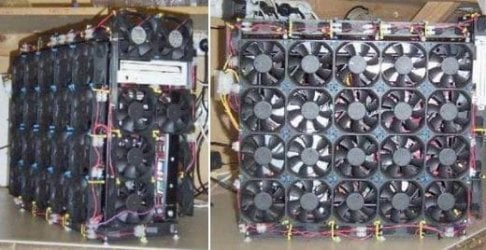
Just stay on the conservative side of this guy:
 

Attachments

  • fan_casemod.jpg
    fan_casemod.jpg
    36.2 KB · Views: 13

My Computer My Computer

Computer Manufacturer/Model Number
Self
OS
Main - Windows 7 Pro SP1 64-Bit; 2nd - Windows Server 2008 R2
CPU
Main - Core i7 2600K; 2nd - Core i7 920
Motherboard
Main - Asus P8Z68-V Pro/Gen3; 2nd - Gigabyte GA-EX58-UDR3
Memory
Main - 16GB Corsair Vengeance; 2nd - 12GB Corsair Vengeance
Graphics Card(s)
Main - XFX Radeon 6870 1GB; 2nd - XFX Radeon 4870 1GB
Sound Card
Both: Onboard Realtek Azalia
Monitor(s) Displays
Main - Hann 25" + I-INC 25" + Acer 23"; 2nd - Upgrading Soon
Screen Resolution
Main - 1920x1080 (All Three Monitors); 2nd - Upgrading Soon
Hard Drives
Main - (1) Crucial M4 128GB (Boot)
Main - (1) Seagate 2TB 64MB Cache (Data)
Main - (1) Seagate 2TB 64MB Cache (Data Backup)
2nd - (1) Intel X25-M SSD 80GB (Boot)
2nd - (3) Seagate 1TB 32MB Cache (Data Backup)
2nd - (1) Seagate 320GB (Because)
PSU
Main - OCZ 600W Modular; 2nd - OCZ 600W
Case
Main - Thermaltake Element G; 2nd - NZXT something or other
Cooling
Main - Corsair H80; 2nd - Prolimatech Megahalems
Keyboard
Main - Razer Reclusa; 2nd - Old MS Keyboard
Mouse
Main - Logitech MX Revolution; 2nd - Old MS Mouse
Internet Speed
20Mbps Time-Warner Cable
A few weeks ago I replace the Corsair H50 with a H80 on my other computer and made my neighbors angry with all the noise the Corsair fans made. They said it would keep the cat up at night.
The fans did move a lot of air and things were cooler but the noise was unbearable. Replaced the two Corsair fans with two Noctua and the temps are great and you can't hear the fans run.

The neighbors cat came over and thanked me. I also noticed the other neighbors dog quite howling all night.
 

My Computer My Computer

Computer type
PC/Desktop
Computer Manufacturer/Model Number
Home made Desktop
OS
Windows 10 Pro. 64/ version 1709 Windows 7 Pro/64
CPU
Intel i7-6800K @ 4.3
Motherboard
ASUS X-99 Deluxe II
Memory
Corsair Platinum 16 gig @2400
Graphics Card(s)
EVGA GTX 1070 OC
Monitor(s) Displays
Asus 27" LED LCD/VE278Q
Screen Resolution
1920-1080 or 1280-720 HDMI
Hard Drives
INTEL SSD 730-240 Gb Sata 3.0/
PSU
EVGA Platium 1200W
Case
Phanteks Luxe Tempered Glass 8 fans/ one radiator
Cooling
XSPC/ Water Cooled CPU
Keyboard
Das 4 Professional
Mouse
Logitech M705/MX Anywhere 2-S
Internet Speed
100 mbits
Antivirus
Microsoft Security Essentials/ Malwarebytes Premium 3.0/ SAS
Browser
I.E. 11 default/Firefox/ ISP Time Warner Cable/Spectrum
Other Info
LG BluRay Burner/
Sound system-KLipsch-THX/
Icy Dock ssd Hot Swap bays.
I went from the H80 to the H100i a while back and have used Noctua's on both of them. The H80 is now in my secondary rig. Those Corsair fans sound like their namesake:


My Computer My Computer

Computer Manufacturer/Model Number
Self
OS
Main - Windows 7 Pro SP1 64-Bit; 2nd - Windows Server 2008 R2
CPU
Main - Core i7 2600K; 2nd - Core i7 920
Motherboard
Main - Asus P8Z68-V Pro/Gen3; 2nd - Gigabyte GA-EX58-UDR3
Memory
Main - 16GB Corsair Vengeance; 2nd - 12GB Corsair Vengeance
Graphics Card(s)
Main - XFX Radeon 6870 1GB; 2nd - XFX Radeon 4870 1GB
Sound Card
Both: Onboard Realtek Azalia
Monitor(s) Displays
Main - Hann 25" + I-INC 25" + Acer 23"; 2nd - Upgrading Soon
Screen Resolution
Main - 1920x1080 (All Three Monitors); 2nd - Upgrading Soon
Hard Drives
Main - (1) Crucial M4 128GB (Boot)
Main - (1) Seagate 2TB 64MB Cache (Data)
Main - (1) Seagate 2TB 64MB Cache (Data Backup)
2nd - (1) Intel X25-M SSD 80GB (Boot)
2nd - (3) Seagate 1TB 32MB Cache (Data Backup)
2nd - (1) Seagate 320GB (Because)
PSU
Main - OCZ 600W Modular; 2nd - OCZ 600W
Case
Main - Thermaltake Element G; 2nd - NZXT something or other
Cooling
Main - Corsair H80; 2nd - Prolimatech Megahalems
Keyboard
Main - Razer Reclusa; 2nd - Old MS Keyboard
Mouse
Main - Logitech MX Revolution; 2nd - Old MS Mouse
Internet Speed
20Mbps Time-Warner Cable
Yep that is the same sound.
By the way half way through the video the neighbors cat was pounding on my front door.
Poor thing. I woke it up again.
 

My Computer My Computer

Computer type
PC/Desktop
Computer Manufacturer/Model Number
Home made Desktop
OS
Windows 10 Pro. 64/ version 1709 Windows 7 Pro/64
CPU
Intel i7-6800K @ 4.3
Motherboard
ASUS X-99 Deluxe II
Memory
Corsair Platinum 16 gig @2400
Graphics Card(s)
EVGA GTX 1070 OC
Monitor(s) Displays
Asus 27" LED LCD/VE278Q
Screen Resolution
1920-1080 or 1280-720 HDMI
Hard Drives
INTEL SSD 730-240 Gb Sata 3.0/
PSU
EVGA Platium 1200W
Case
Phanteks Luxe Tempered Glass 8 fans/ one radiator
Cooling
XSPC/ Water Cooled CPU
Keyboard
Das 4 Professional
Mouse
Logitech M705/MX Anywhere 2-S
Internet Speed
100 mbits
Antivirus
Microsoft Security Essentials/ Malwarebytes Premium 3.0/ SAS
Browser
I.E. 11 default/Firefox/ ISP Time Warner Cable/Spectrum
Other Info
LG BluRay Burner/
Sound system-KLipsch-THX/
Icy Dock ssd Hot Swap bays.
I went from the H80 to the H100i a while back and have used Noctua's on both of them. The H80 is now in my secondary rig. Those Corsair fans sound like their namesake:

THE stud airplane of all time. Se habla Pratt and Whitney. You can hear the whistle of air going through the oil coolers at a couple of points in that clip. It wasn't nicknamed "Whistling Death" for nothing.

OP: if you decide to get Noctua fans, be sure to note that some of them are designed to force air into dense radiator fins as on a CPU cooler, while others are specifically intended to be used as case fans. The latter would be quieter than the former, all else being equal.

I'd try to get a motherboard with a couple of PWM fan ports.

Scythe 120 MM "Slipstream" and "Gentle Typhoon" models are very quiet and come in various speeds. I'd probably try a 800 rpm model as a starting point if you decide to get into the fan game. I'm not sure if they are available in PWM form or if they are fixed RPM only and must be controlled through the BIOS. Mine are just ordinary 3 pin fixed RPM models.
 

My Computer My Computer

Computer type
PC/Desktop
Computer Manufacturer/Model Number
Ignatz Special; 4 speed manual gearbox; factory air conditioning; one of one
OS
Windows 7 Home Premium SP1, 64-bit
CPU
Intel Skylake i5-6600K, not overclocked
Motherboard
AsRock Z170M Extreme 4, micro ATX
Memory
8 GB HyperX DDR4-2666 (2 x 4 GB)
Graphics Card(s)
none; graphics are integrated on CPU
Sound Card
onboard: Realtek ALC1150; external: USB Behringer UF0-202
Monitor(s) Displays
Dell S2340M 23 inch IPS
Screen Resolution
1600 x 900
Hard Drives
System: Crucial MX100 series SSD, 128 GB;
Data: Samsung Spinpoint 103SJ, 1 TB;
Backup: WD Caviar Green WD30EZRX-00D8PB0, 3 TB
PSU
Rosewill SilentNight 500 watt fanless, semi-modular
Case
Antec Solo II
Cooling
Noctua NH-U12S; Noctua F12 intake, Noctua S12A exhaust
Keyboard
Microsoft 200 6JH-00001 USB
Mouse
Dell or Microsoft optical wired; USB
Antivirus
Microsoft Security Essentials and Malwarebytes Premium
Browser
Pale Moon
Other Info
All fans PWM; speeds at idle: CPU circa 500 rpm; intake circa 600 rpm; exhaust circa 600 rpm; CPU temps 27 idle and 47 C load in a warm room (27 C/81 F) when running Intel Extreme Tuning Utility stress test.
Back
Top