What happened to Ctrl|Click in Win7?

MikeyChris

New member
Local time
4:20 PM
Messages
19
In previous versions (at least up to XP) if I was in an explorer window, if I held the Ctrl key down while clicking on a folder, file, up or back arrow, etc. a new window would open, displaying whatever I clicked on. This made it very easy to show two windows of the same folder, or a folder and it's parent to move files around. This does not work in Win 7. Is there some secret key combination to do this in Win 7 or do I simply have to open two instances of the same folder?
Thanx,
Mike
 

My Computer My Computer

At a glance

Win 7 Pro 64 bitCore 2 Duo E8400 3Ghz4 GBNvidea GE FORCE 310 512MB
Computer type
PC/Desktop
Computer Manufacturer/Model Number
Lenovo M70e
OS
Win 7 Pro 64 bit
CPU
Core 2 Duo E8400 3Ghz
Motherboard
Unknown
Memory
4 GB
Graphics Card(s)
Nvidea GE FORCE 310 512MB
Sound Card
mother board
Monitor(s) Displays
HP vs17
Hard Drives
500GB maker unknown
PSU
unknown
Case
Lenovo
Cooling
several fans (PSU, CPU, Graphics, Case)
Keyboard
Lenovo KU-0225
Mouse
Lenovo
Internet Speed
20MB/sec
Antivirus
MSSE
Browser
Chrome
Welcome to Seven Forums MikeyChris. You know, I see all the time that it should still work in Windows 7, but it has never worked for me no matter what folder options I choose. I don't use it very often, so it's just an annoyance for me. You can press Ctrl + n to open a new explorer window, but that's about as close as I've come. maybe someone else will have a different experience, or answer. A Guy
 

My Computer My Computer

At a glance

Windows 10 Home x64INTEL Core i5-750 Quad-Core 3.37GHzHyperX Fury Black Series 8GB (2 x 4GB) 1866MhzEVGA GeForce GTX 750 Superclocked 1GB 128-Bit...
Computer type
PC/Desktop
OS
Windows 10 Home x64
CPU
INTEL Core i5-750 Quad-Core 3.37GHz
Motherboard
ASUS P7P55D
Memory
HyperX Fury Black Series 8GB (2 x 4GB) 1866Mhz
Graphics Card(s)
EVGA GeForce GTX 750 Superclocked 1GB 128-Bit GDDR5
Monitor(s) Displays
LG 32MA68HY 32" IPS
Screen Resolution
1920 x 1080
Hard Drives
Samsung 840 Evo 120GB, SEAGATE 500GB Barracuda® 7200.12, SATA 3 Gb/s, 7200 RPM, 16MB cache
PSU
ANTEC TruePower New TP-550, 80 PLUS, 550W
Case
ANTEC Three Hundred Illusion
Cooling
COOLER MASTER Hyper 212 Plus, 4 x 120mm 1 x 140mm Noctua's
Internet Speed
85 + Mbps
Antivirus
Avast
Browser
Vivaldi
Hi MikeyChris,

Have you tried Ctrl+Right-Click and then choosing the Open in new window option?

Regards,
Golden
 

My Computer My Computer

At a glance

Windows 10 Pro x64 ; Xubuntu x64Intel i7 860 @ 2.80 GHz O/C'ed to 4.0GHz16GB Corsair Vengance DDR3 @ 661 MHz Dual Cha...EVGA NVidia GTX 560 1024MB
Computer type
PC/Desktop
Computer Manufacturer/Model Number
Golden Mk. I.4
OS
Windows 10 Pro x64 ; Xubuntu x64
CPU
Intel i7 860 @ 2.80 GHz O/C'ed to 4.0GHz
Motherboard
Gigabyte P55A-UD3R Rev.1. Award BIOS F13
Memory
16GB Corsair Vengance DDR3 @ 661 MHz Dual Channel (9-9-9-24)
Graphics Card(s)
EVGA NVidia GTX 560 1024MB
Sound Card
Realtek Integrated
Monitor(s) Displays
Dual Samsung SyncMaster 2494HS
Screen Resolution
1920*1080 and 1920*1080
Hard Drives
1*Samsung 840 EVO 120GB SSD;
1*OCZ Vertex 2 60GB SSD;
2*Samsung F3 SpinPoint 1TB in RAID0;
1*Samsung F1 SpinPoint 1TB;
2*Western Digital 1TB External USB 3.0
1*Western Digital 500GB External USB 3.0
1*Seagate 500GB External USB 2.0
PSU
Thermaltake ToughPower QFan 750W
Case
Thermaltake Element S VK60001W2Z
Cooling
Corsair H60 Water Cooling, 2*230mm and 2*80mm case fans
Keyboard
Logitech G110
Mouse
Logitech MX518
Have you tried Ctrl+Right-Click and then choosing the Open in new window option?
Or, just do a simple select (left-click, no need to also hold CTRL) on the folder, then right-click on the now selected item to get the popup menu, and select "open in new window" to produce the desired result.
 

My Computer My Computer

At a glance

Windows 7 Pro x64 (1), Win7 Pro X64 (2)i5-3350p 3.1Ghz/6MB-cache (1); E8400 3.0Ghz/6...8GB PC3-12800 DDR3 (1); 4GB PC3-10600 DDR3 (2)ATI HD7750 (1), (see TV cards); ATI R7 250 (2)
Computer type
PC/Desktop
Computer Manufacturer/Model Number
Home-built, two systems (1) and (2)
OS
Windows 7 Pro x64 (1), Win7 Pro X64 (2)
CPU
i5-3350p 3.1Ghz/6MB-cache (1); E8400 3.0Ghz/6MB-cache (2)
Motherboard
ASUS P8Z77-V Pro (1); ASUS P5Q3 (2)
Memory
8GB PC3-12800 DDR3 (1); 4GB PC3-10600 DDR3 (2)
Graphics Card(s)
ATI HD7750 (1), (see TV cards); ATI R7 250 (2)
Sound Card
Realtek ALC892 HD Audio (1); Realtek ALC1200 HD Audio (2)
Monitor(s) Displays
Eizo HD2441W LCD, Eizo S2433W (1); Eizo 24" S2433W (2)
Screen Resolution
1920x1200, 1920x1200 (1); 1920x1200 (2)
Hard Drives
(1) 1TB SATA-II (7200RPM), 2x2TB SATA-III (7200RPM), 250GB SATA-III (10000RPM) for OS; 2x2TB external USB 3.0

(2) 320GB SATA-II (7200RPM), 750GB SATA-II (7200RPM), 150GB SATA-II (10000RPM) for OS; 2TB external USB 3.0
PSU
Nesteq ECS-6001 600W (1); Nesteq ECS-5001 500W (2)
Case
Acousti-Case 360 (1) and (2)
Cooling
Noctua NH-U12P SE2 for CPU, 2x120mm case fans (1) and (2)
Keyboard
IBM PS/2 (1) and (2)
Mouse
Logitech MX Revolution wireless (1); Microsoft wired (2)
Internet Speed
100mbps down / 10mbps up
Antivirus
Microsoft Security Essentials; Malwarebyte Anti-Malware Pro
Browser
Firefox
Other Info
Ceton InfiniTV 4-tuner cablecard-enabled TV card as well as Hauppauge HVR-2250 OTA/ATSC 2-tuner TV card in (1), running under Win7 WMC
In previous versions (at least up to XP) if I was in an explorer window, if I held the Ctrl key down while clicking on a folder, file, up or back arrow, etc. a new window would open, displaying whatever I clicked on. This made it very easy to show two windows of the same folder, or a folder and it's parent to move files around. This does not work in Win 7. Is there some secret key combination to do this in Win 7 or do I simply have to open two instances of the same folder?
For a far superior and convenient Explorer-like but single-pane or multi-pane file manager experience, you might look into Free Commander. It's wonderful for copying/moving files around from folder to folder, etc. Very customizable tool/button bar and presentation. You'll rarely use true Explorer again. (actually, you can have up to four panes open, but I just use two, split vertically... i.e. top and bottom panes, though you can set it up for left/right if you prefer)

Also, you might investigate Beyond Compare. This program isn't free, but it's fantastic... and also multi-pane (left and right) which makes for a very intuitive A-to-B compare interface. Folder compares, file compares (at the line, text, binary, etc. level) so that you can keep folders and files in sync, indentify differences, synchronize folders and files (to left side or to right side or sophisticated criteria, etc.). You can also use this as another Explorer substitute when moving/copying things between folders.

Multi-pane presentation in a single window. Tha
 

My Computer My Computer

At a glance

Windows 7 Pro x64 (1), Win7 Pro X64 (2)i5-3350p 3.1Ghz/6MB-cache (1); E8400 3.0Ghz/6...8GB PC3-12800 DDR3 (1); 4GB PC3-10600 DDR3 (2)ATI HD7750 (1), (see TV cards); ATI R7 250 (2)
Computer type
PC/Desktop
Computer Manufacturer/Model Number
Home-built, two systems (1) and (2)
OS
Windows 7 Pro x64 (1), Win7 Pro X64 (2)
CPU
i5-3350p 3.1Ghz/6MB-cache (1); E8400 3.0Ghz/6MB-cache (2)
Motherboard
ASUS P8Z77-V Pro (1); ASUS P5Q3 (2)
Memory
8GB PC3-12800 DDR3 (1); 4GB PC3-10600 DDR3 (2)
Graphics Card(s)
ATI HD7750 (1), (see TV cards); ATI R7 250 (2)
Sound Card
Realtek ALC892 HD Audio (1); Realtek ALC1200 HD Audio (2)
Monitor(s) Displays
Eizo HD2441W LCD, Eizo S2433W (1); Eizo 24" S2433W (2)
Screen Resolution
1920x1200, 1920x1200 (1); 1920x1200 (2)
Hard Drives
(1) 1TB SATA-II (7200RPM), 2x2TB SATA-III (7200RPM), 250GB SATA-III (10000RPM) for OS; 2x2TB external USB 3.0

(2) 320GB SATA-II (7200RPM), 750GB SATA-II (7200RPM), 150GB SATA-II (10000RPM) for OS; 2TB external USB 3.0
PSU
Nesteq ECS-6001 600W (1); Nesteq ECS-5001 500W (2)
Case
Acousti-Case 360 (1) and (2)
Cooling
Noctua NH-U12P SE2 for CPU, 2x120mm case fans (1) and (2)
Keyboard
IBM PS/2 (1) and (2)
Mouse
Logitech MX Revolution wireless (1); Microsoft wired (2)
Internet Speed
100mbps down / 10mbps up
Antivirus
Microsoft Security Essentials; Malwarebyte Anti-Malware Pro
Browser
Firefox
Other Info
Ceton InfiniTV 4-tuner cablecard-enabled TV card as well as Hauppauge HVR-2250 OTA/ATSC 2-tuner TV card in (1), running under Win7 WMC
Hi MikeyChris,

Have you tried Ctrl+Right-Click and then choosing the Open in new window option?

Regards,
Golden

Golden, just right clicking will give that option as well ;)

A Guy
 

My Computer My Computer

At a glance

Windows 10 Home x64INTEL Core i5-750 Quad-Core 3.37GHzHyperX Fury Black Series 8GB (2 x 4GB) 1866MhzEVGA GeForce GTX 750 Superclocked 1GB 128-Bit...
Computer type
PC/Desktop
OS
Windows 10 Home x64
CPU
INTEL Core i5-750 Quad-Core 3.37GHz
Motherboard
ASUS P7P55D
Memory
HyperX Fury Black Series 8GB (2 x 4GB) 1866Mhz
Graphics Card(s)
EVGA GeForce GTX 750 Superclocked 1GB 128-Bit GDDR5
Monitor(s) Displays
LG 32MA68HY 32" IPS
Screen Resolution
1920 x 1080
Hard Drives
Samsung 840 Evo 120GB, SEAGATE 500GB Barracuda® 7200.12, SATA 3 Gb/s, 7200 RPM, 16MB cache
PSU
ANTEC TruePower New TP-550, 80 PLUS, 550W
Case
ANTEC Three Hundred Illusion
Cooling
COOLER MASTER Hyper 212 Plus, 4 x 120mm 1 x 140mm Noctua's
Internet Speed
85 + Mbps
Antivirus
Avast
Browser
Vivaldi

My Computer My Computer

At a glance

Windows 10 Pro x64 ; Xubuntu x64Intel i7 860 @ 2.80 GHz O/C'ed to 4.0GHz16GB Corsair Vengance DDR3 @ 661 MHz Dual Cha...EVGA NVidia GTX 560 1024MB
Computer type
PC/Desktop
Computer Manufacturer/Model Number
Golden Mk. I.4
OS
Windows 10 Pro x64 ; Xubuntu x64
CPU
Intel i7 860 @ 2.80 GHz O/C'ed to 4.0GHz
Motherboard
Gigabyte P55A-UD3R Rev.1. Award BIOS F13
Memory
16GB Corsair Vengance DDR3 @ 661 MHz Dual Channel (9-9-9-24)
Graphics Card(s)
EVGA NVidia GTX 560 1024MB
Sound Card
Realtek Integrated
Monitor(s) Displays
Dual Samsung SyncMaster 2494HS
Screen Resolution
1920*1080 and 1920*1080
Hard Drives
1*Samsung 840 EVO 120GB SSD;
1*OCZ Vertex 2 60GB SSD;
2*Samsung F3 SpinPoint 1TB in RAID0;
1*Samsung F1 SpinPoint 1TB;
2*Western Digital 1TB External USB 3.0
1*Western Digital 500GB External USB 3.0
1*Seagate 500GB External USB 2.0
PSU
Thermaltake ToughPower QFan 750W
Case
Thermaltake Element S VK60001W2Z
Cooling
Corsair H60 Water Cooling, 2*230mm and 2*80mm case fans
Keyboard
Logitech G110
Mouse
Logitech MX518
In previous versions (at least up to XP) if I was in an explorer window, if I held the Ctrl key down while clicking on a folder, file, up or back arrow, etc. a new window would open, displaying whatever I clicked on. This made it very easy to show two windows of the same folder, or a folder and it's parent to move files around. This does not work in Win 7. Is there some secret key combination to do this in Win 7 or do I simply have to open two instances of the same folder?
For a far superior and convenient Explorer-like but single-pane or multi-pane file manager experience, you might look into Free Commander. It's wonderful for copying/moving files around from folder to folder, etc. Very customizable tool/button bar and presentation. You'll rarely use true Explorer again. (actually, you can have up to four panes open, but I just use two, split vertically... i.e. top and bottom panes, though you can set it up for left/right if you prefer)

Also, you might investigate Beyond Compare. This program isn't free, but it's fantastic... and also multi-pane (left and right) which makes for a very intuitive A-to-B compare interface. Folder compares, file compares (at the line, text, binary, etc. level) so that you can keep folders and files in sync, indentify differences, synchronize folders and files (to left side or to right side or sophisticated criteria, etc.). You can also use this as another Explorer substitute when moving/copying things between folders.

Multi-pane presentation in a single window. Tha

Why are these "superior"?
 

My Computer My Computer

At a glance

Windows 7 Ultimate RTM (Technet)3.00 gigahertz Intel Core2 Duo E84004GBATI Radeon X1950 Pro
Computer Manufacturer/Model Number
Custom
OS
Windows 7 Ultimate RTM (Technet)
CPU
3.00 gigahertz Intel Core2 Duo E8400
Motherboard
ASUSTeK Computer INC. P5K/EPU Rev 1.xx
Memory
4GB
Graphics Card(s)
ATI Radeon X1950 Pro
Sound Card
Built in HD Audio
Monitor(s) Displays
22" Gateway LCD
Screen Resolution
1920 x 1200
Hard Drives
ST3160023A [Hard drive] (160.04 GB) -- drive 0, rev 8.01, ST3500630AS [Hard drive] (500.11 GB) -- drive 2, rev 3.AAK
ST3500630AS [Hard drive] (500.11 GB) -- drive 1, rev 3.AAK
Keyboard
Logitech G11
Mouse
Microsoft Wireless Laser Mouse 5000
Internet Speed
13.44 Mbps
Why are these "superior"?
I consider any multi-pane presentation (either left/right or over/under, but within a single window) to be superior for me to the alternative, which is to either (a) drag/drop from one window to a second window, both of which must be open and visible to some degree on possibly very limited screen real estate if only a single monitor is in use, or (b) navigate the source on the right side Explorer pane and then scroll the left side Explorer tree view to bring the target destination for the drag/drop into view, in order to facilitate a drag/drop action, while simultaneously avoiding clicking on the left side which would lose the currently selected pointer on the right (source) side... something that may be unavaoidable.

Obviously have a totally independent source and target pane visible at one time, with navigation in either completely unaffected by navigation in the other, is far more convenient.

Furthermore, instead of really just having two panes (source and target, or just two independent views of two unrelated things at the same time onscreen), it's really FOUR panes... Explorer tree on the left and contents on the right, in two separate sub-panes within each of the major split-screen two halves (which can be left/right or top/bottom, whichever you prefer).

Also, these products are really sophisticated file managers, with extensive icon/button functions that can be customized on a toolbar, features and capabilities that go beyond those of Explorer, and one-click (or keyboard equivalent) actions that are not necessarily tied to the mouse and RMB popup context functions.

Also, their presentations are concise and intuitive and very user-friendly (after many years of user-requested evolution and refinement), and navigation is much easier and more direct than with Explorer and its scrolling... not to mention Win7's annoying unwanted folder opening when you scroll, or not not opening if you've turned that off when you really did want it to open.

Look, I'm not trying to say Explorer isn't useful or doesn't work, or that I can't do something that I want to. I'm simply saying that these 3rd-party file manager products are worlds better than Windows Explorer, for file management functions... and that's why I've been using them since Win 3.1.

And in particular, Free Commander is my now current product of choice under WinXP and Win7, after having used Canyon Software's very similar Power File Gold for the past 12 years under Win98 and WinXP. It was abandoned by its author many years ago (and consequently isn't very compatible with Win7, and also had some unfixed bugs with WinXP) but I loved it and lived with it since I was used to it. But Free Commander is plain and simple a much better product, doing everything PFGold could do plus more... and more reliably, and under win7.

Plus, personally I couldn't live without Beyond Compare. Just as I couldn't run my personal finances any longer without Quicken (which I've been using for about 17 years now), I can't see life without it. Impossible. Even though all banks provide "online banking and bill paying", and brokerages provide online trading and reporting services, and credit card banks offer online account management, they just aren't the same as Quicken... which can DO IT ALL, IN ONE PLACE, WITH ONE SINGLE COMMON INTERFACE. Well, Beyond Compare does that same thing for me on the PC... I use it for countless tasks, that no other product can do as well or as easily or as intuitively or as powerfully. For example, Beyond Compare is the tool I use to keep my MP3 portable music player's storage loaded and current, based on my PC's music and album art collection.

That's just my opinion, of course.

 

My Computer My Computer

At a glance

Windows 7 Pro x64 (1), Win7 Pro X64 (2)i5-3350p 3.1Ghz/6MB-cache (1); E8400 3.0Ghz/6...8GB PC3-12800 DDR3 (1); 4GB PC3-10600 DDR3 (2)ATI HD7750 (1), (see TV cards); ATI R7 250 (2)
Computer type
PC/Desktop
Computer Manufacturer/Model Number
Home-built, two systems (1) and (2)
OS
Windows 7 Pro x64 (1), Win7 Pro X64 (2)
CPU
i5-3350p 3.1Ghz/6MB-cache (1); E8400 3.0Ghz/6MB-cache (2)
Motherboard
ASUS P8Z77-V Pro (1); ASUS P5Q3 (2)
Memory
8GB PC3-12800 DDR3 (1); 4GB PC3-10600 DDR3 (2)
Graphics Card(s)
ATI HD7750 (1), (see TV cards); ATI R7 250 (2)
Sound Card
Realtek ALC892 HD Audio (1); Realtek ALC1200 HD Audio (2)
Monitor(s) Displays
Eizo HD2441W LCD, Eizo S2433W (1); Eizo 24" S2433W (2)
Screen Resolution
1920x1200, 1920x1200 (1); 1920x1200 (2)
Hard Drives
(1) 1TB SATA-II (7200RPM), 2x2TB SATA-III (7200RPM), 250GB SATA-III (10000RPM) for OS; 2x2TB external USB 3.0

(2) 320GB SATA-II (7200RPM), 750GB SATA-II (7200RPM), 150GB SATA-II (10000RPM) for OS; 2TB external USB 3.0
PSU
Nesteq ECS-6001 600W (1); Nesteq ECS-5001 500W (2)
Case
Acousti-Case 360 (1) and (2)
Cooling
Noctua NH-U12P SE2 for CPU, 2x120mm case fans (1) and (2)
Keyboard
IBM PS/2 (1) and (2)
Mouse
Logitech MX Revolution wireless (1); Microsoft wired (2)
Internet Speed
100mbps down / 10mbps up
Antivirus
Microsoft Security Essentials; Malwarebyte Anti-Malware Pro
Browser
Firefox
Other Info
Ceton InfiniTV 4-tuner cablecard-enabled TV card as well as Hauppauge HVR-2250 OTA/ATSC 2-tuner TV card in (1), running under Win7 WMC
I don't use Windows explorer so extensively as, I can see, other users in this thread. Gor me, if I (rarely)want a double pane, selecting another Win explorer with the middle mouse key and aligning side by side does it.
 

My Computer My Computer

At a glance

Vista and now 7 in 32 and 64 bit.
Computer Manufacturer/Model Number
Three desktops and one laptop with good specs..
OS
Vista and now 7 in 32 and 64 bit.
Thanx for all the ideas

I learned a couple new tricks, thanx to all who responded.

I also use Ztree and PowerDesk as file managers, butusually use Windows' native file management for simple stuff. That's why I miss the Ctl|click option.

Thanx again for the alternatives.:)
 

My Computer My Computer

At a glance

Win 7 Pro 64 bitCore 2 Duo E8400 3Ghz4 GBNvidea GE FORCE 310 512MB
Computer type
PC/Desktop
Computer Manufacturer/Model Number
Lenovo M70e
OS
Win 7 Pro 64 bit
CPU
Core 2 Duo E8400 3Ghz
Motherboard
Unknown
Memory
4 GB
Graphics Card(s)
Nvidea GE FORCE 310 512MB
Sound Card
mother board
Monitor(s) Displays
HP vs17
Hard Drives
500GB maker unknown
PSU
unknown
Case
Lenovo
Cooling
several fans (PSU, CPU, Graphics, Case)
Keyboard
Lenovo KU-0225
Mouse
Lenovo
Internet Speed
20MB/sec
Antivirus
MSSE
Browser
Chrome
Obviously I am missing something here. I just open both windows, right click on the taskbar and select 'show windows side by side'. Are we talking about something else?
 

My Computers My Computers

  • At a glance

    Windows 11 ProRyzen 9 5900X32GB G Skill DDR4-3600EVGA RTX 3080 FTW 3 Ultra
    Computer type
    PC/Desktop
    Computer Manufacturer/Model Number
    ALWAYS UNDER CONSTRUCTION
    OS
    Windows 11 Pro
    CPU
    Ryzen 9 5900X
    Motherboard
    Asus X570 Crosshair Viii Hero
    Memory
    32GB G Skill DDR4-3600
    Graphics Card(s)
    EVGA RTX 3080 FTW 3 Ultra
    Sound Card
    On Board/Sennheiser PC37X Headset
    Monitor(s) Displays
    3 X Asus 27"
    Screen Resolution
    2560x1440
    Hard Drives
    2 X 1 TB NVME drives
    PSU
    EVGA 850
    Case
    Phanteks Eclipse P400A
    Cooling
    EVGA 280 AIO
    Keyboard
    Logitech G510s/ Logitech G13
    Mouse
    Logitech G502
    Internet Speed
    24/1
    Antivirus
    ESET/MBAM Pro/SAS Pro
    Browser
    Chrome/ Firefox/ Edge
  • At a glance

    Windows 11 ProIntel Ultra 9 288V32 GB LPDDR5X 8533
    Computer type
    Laptop
    System Manufacturer/Model Number
    Dell 16 Plus
    OS
    Windows 11 Pro
    CPU
    Intel Ultra 9 288V
    Memory
    32 GB LPDDR5X 8533
    Monitor(s) Displays
    16" Mini-LED HDR600 Touch 90 Hz
    Screen Resolution
    2560X1600
    Hard Drives
    1 TB NVME
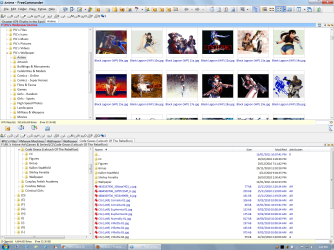
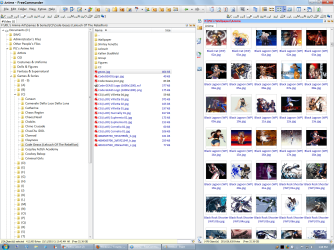
FreeCommander

Why are these "superior"?

Windows Explorer is OK for ordinary file work.
IMO, it is superior to Nautilus in Ubuntu (even though that has tabs).

Why can't MS include tabs in Windows Explorer?
They have tabs in IE.

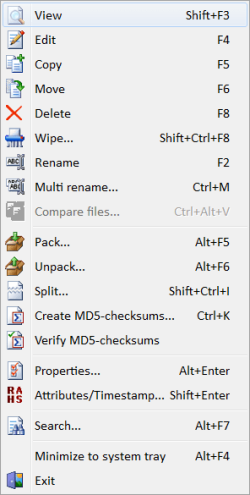
I use "FreeCommander" when I want to do special tasks (Mass Renaming).

It has:

  • A compare function.
  • An excellent mass rename tool.
  • Multi-pane and Multi-tab/pane abilities.
  • A display folder size option.

It doesn't have as many column options as Windows Explorer (Details view) though.

Here are some screenshots:

FreeCommander 01.png FreeCommander 02.png

FreeCommander 03aa.png
 
Last edited:

My Computer My Computer

At a glance

W7 Ultimate SP1, LM19.2 MATE, W10 Home 1703, ...AMD Phenom II x6 1100T, 3.3 GHz12GB DDR3 1333 G-Skill (4GB x 2), G-Skill (2G...NVIDIA GeForce GTX 660
Computer type
PC/Desktop
Computer Manufacturer/Model Number
n/a
OS
W7 Ultimate SP1, LM19.2 MATE, W10 Home 1703, W10 Pro 1703 VM, #All 64 bit
CPU
AMD Phenom II x6 1100T, 3.3 GHz
Motherboard
ASUS M4A88T-M/USB3 (AM3)
Memory
12GB DDR3 1333 G-Skill (4GB x 2), G-Skill (2GB x 2)
Graphics Card(s)
NVIDIA GeForce GTX 660
Sound Card
Realtek?
Monitor(s) Displays
Samsung S23B350
Screen Resolution
1920x1080
Hard Drives
WD Green 2TB (SATA), WD Green 3TB (SATA), WD Blue 4TB (SATA), WD Blue 6TB (SATA)
PSU
Cooler Master
Case
Antec GX300 Tower
Cooling
3x Antec TRICOOL 120mm Fans
Mouse
Wired Optical
Internet Speed
DSL
Antivirus
Avast
Browser
Pale Moon (64 bit)
Other Info
2018-12-27 Upgraded HDDs
2015-12-10 Upgraded case, graphics card, storage
2015-08-15 Upgraded motherboard & RAM
2015-07-15 Upgraded LM17.1 to LM17.2
Back
Top