
You are using an out of date browser. It may not display this or other websites correctly.
You should upgrade or use an alternative browser.
You should upgrade or use an alternative browser.
What information is on the new partitians after install
- Thread starter SKUDRIVER
- Start date

Hello SKUDRIVER Welcome to the Se7en Forums!
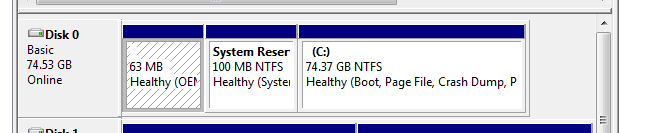
The small 63mb seen at the start of the drive sometimes even smaller is reserved for the Master Boot Record(mbr) and seen on just about drive. As part of partitioning any drive with a primary type partition that space will be reserved automatically.
For the 100mb section now reserved by the Windows 7 installer that contains the files and repair tools also seen on the 7 dvd's repair tools section there as well like the automatic startup repair tool making that available as an option when 7 is first starting to load at startup. When pressing the F8 boot menu key this will be seen along with the safe mode, safe mode with command prompt only, Last configuration that worked, and Start Windows normally options.
The small 63mb seen at the start of the drive sometimes even smaller is reserved for the Master Boot Record(mbr) and seen on just about drive. As part of partitioning any drive with a primary type partition that space will be reserved automatically.
For the 100mb section now reserved by the Windows 7 installer that contains the files and repair tools also seen on the 7 dvd's repair tools section there as well like the automatic startup repair tool making that available as an option when 7 is first starting to load at startup. When pressing the F8 boot menu key this will be seen along with the safe mode, safe mode with command prompt only, Last configuration that worked, and Start Windows normally options.
My Computers
-
At a glance
W7 Ultimate x64/W10 Pro x64/W11 Pro Triple Bo...AMD Phenom II X4 975 Deneb 3.6ghz - 965 2nd r...Kingston Hyper X DDR3 1600 1.5v 16gb - Hyper ...MSI HD Radeon 5750 1gb - MSI HD Radeon 6450 o...- Computer type
- PC/Desktop
- Computer Manufacturer/Model Number
- Custom builds = 2
- OS
- W7 Ultimate x64/W10 Pro x64/W11 Pro Triple Boot - Main PC W7 Remote PC Micro ATX W7 Pro x64/W11 Pro
- CPU
- AMD Phenom II X4 975 Deneb 3.6ghz - 965 2nd remote pc
- Motherboard
- Gigabyte GA-790XTA-UD4-Gigabyte GA-880GM-D2H remote pc
- Memory
- Kingston Hyper X DDR3 1600 1.5v 16gb - Hyper X Fury 8gb 2nd
- Graphics Card(s)
- MSI HD Radeon 5750 1gb - MSI HD Radeon 6450 on mini tower
- Sound Card
- Creative Labs X-Fi Xtreme Audio P - Realtek onooard 2nd case
- Monitor(s) Displays
- ASUS VW199T-P 19" HP 2082a Main-HP 2082a 20" remote pc
- Screen Resolution
- Asus 1440x900 - HP 1600x900
- Hard Drives
- WD Black 1TB HD per OS W7, W10, and pending W11 presently on 500gb OS Drive - Pending Triple 1TB HDs for Spanned Storage/backup volume
Single 2TB external USB enclosure, single 1TB System 7 Host/Boot drive, Pending 8TB external HD for system image b
- PSU
- Corsair 750TX - primary / Corsair CX600 - second
- Case
- Antec 900-2 - SSD compatible / NZXT Vulcan mini tower
- Cooling
- Zalman CNPS9900A
- Keyboard
- AZIO L70 Backlit Letters Gaming - ONN Cordless/USB
- Mouse
- MSI DS200 Programmable, Logitech Cordless
- Internet Speed
- 30mbps upgrade - primary hard wired - mini tower usb WiFi
- Antivirus
- GFI VIPRE Internet Security 2014 on W7 2016 beta on W10,
- Browser
- Cyberfox, WaterFox 64bit FF variants, FireFox x64, Pale Moon
- Other Info
- Accomdata fan cooled usb 2.0 PIDE/Sata II, III external enclosure.
Sambient usb/eSata PATA/Sata II, III external enclosure.
-
At a glance
W7 Pro x64/W11 ProAMD Deneb 3.6ghz - 965Kingston Hyper X Fury 8gbMSI HD Radeon 6450 DVI Output- Computer type
- PC/Desktop
- System Manufacturer/Model Number
- CUSTOM ASSEMBLY
- OS
- W7 Pro x64/W11 Pro
- CPU
- AMD Deneb 3.6ghz - 965
- Motherboard
- Gigabyte GA-880GM-D2H remote pc
- Memory
- Kingston Hyper X Fury 8gb
- Graphics Card(s)
- MSI HD Radeon 6450 DVI Output
- Sound Card
- Realtek onooard Creative or Other separate PENDING
- Monitor(s) Displays
- VIZIO 32" LCD TV Separate LCD Pending
- Screen Resolution
- 1600x1080
- Hard Drives
- WD 500GB OS Host/Boot WD Green 1TB Storage/Backup
- PSU
- Corsair 600W - THERMALTAKE 600W spare case
- Case
- NZXT Vulcan mini tower
- Cooling
- Twin 120mm Top Fans - 240mm Side Cover
- Keyboard
- ONN Cordless/USB Logitech Cordless
- Mouse
- ONN USB/Cordless - Logitech Cordless
- Internet Speed
- DSL 5G
- Browser
- MS Edge, FireFox, WaterFox x64, FireFox Nightly
- Other Info
- OS Testing-Remote Access to Main TeamViewer

Hmm, I don't have that OEM partition on either of my windows 7 PC's? My boot loader is in the 100mb System reserved partition. The System Reserved Partition is the windows 7 recovery environment. It's something like the windows 7 equivalent of the windows XP recovery console. My guess is that OEM partition is for launching the factory installed recovery utility that restores your PC back to the way it was when you opened the box. It kind of small though so it must prompt for disks or something. Like I said though, I'm just guessing.
My Computer
At a glance
Windows 10 Education 64 bitAMD Phenom II X4 980 Black Edition Deneb 3.7GHz8GB 4GBx2 Kingston PC10600 DDR3 1333 MemoryZotac NVIDIA Geforce GT640 2 Gig DDR3 PCIe
- Computer type
- PC/Desktop
- Computer Manufacturer/Model Number
- Home Built
- OS
- Windows 10 Education 64 bit
- CPU
- AMD Phenom II X4 980 Black Edition Deneb 3.7GHz
- Motherboard
- Asus M4N68T-M V2 µATX Motherboard
- Memory
- 8GB 4GBx2 Kingston PC10600 DDR3 1333 Memory
- Graphics Card(s)
- Zotac NVIDIA Geforce GT640 2 Gig DDR3 PCIe
- Sound Card
- VIA VT1708s High Definition Audio 8-channel Onboard
- Monitor(s) Displays
- 22" LG E2242 1080p and 2 19" I-INC AG191D
- Screen Resolution
- 1280x1024 - 1920x1080 - 1280x1024
- Hard Drives
- Crucial M100 256 GB SSD and 500 GB WD Blue SATA
- PSU
- Thermaltake TR 620
- Case
- Power Up Black ATX Mid-Tower Case
- Cooling
- Stock heatsink and fan
- Keyboard
- Logitech Wireless K350 Wave
- Mouse
- Logitech Wireless M570 Trackman Wheel
- Internet Speed
- 80 Mbps Down 30 Mbps Up
- Antivirus
- Windows Defender
- Browser
- Internet Explorer 11
- Other Info
- HP DVD1040e Lightscribe - External USB2
The factory recovery partitions typically start off at about 5-7gb or larger in size depending on how is included as far as branded softwares and 3rd apps tossed into the mix. Often that will even be seen at the back end of the drive rather then at the front.
With any drive however a small actually kilobytes not megs in size will contain the mbr itself while the boot loader is at the start of the primary. The prepackaged preinstalled OSs however will often be a bit different explaining the larger 63mb is size for that.
The one question here however to ask is whether this is being seen on a desktop or laptop?
With any drive however a small actually kilobytes not megs in size will contain the mbr itself while the boot loader is at the start of the primary. The prepackaged preinstalled OSs however will often be a bit different explaining the larger 63mb is size for that.
The one question here however to ask is whether this is being seen on a desktop or laptop?
My Computers
-
At a glance
W7 Ultimate x64/W10 Pro x64/W11 Pro Triple Bo...AMD Phenom II X4 975 Deneb 3.6ghz - 965 2nd r...Kingston Hyper X DDR3 1600 1.5v 16gb - Hyper ...MSI HD Radeon 5750 1gb - MSI HD Radeon 6450 o...- Computer type
- PC/Desktop
- Computer Manufacturer/Model Number
- Custom builds = 2
- OS
- W7 Ultimate x64/W10 Pro x64/W11 Pro Triple Boot - Main PC W7 Remote PC Micro ATX W7 Pro x64/W11 Pro
- CPU
- AMD Phenom II X4 975 Deneb 3.6ghz - 965 2nd remote pc
- Motherboard
- Gigabyte GA-790XTA-UD4-Gigabyte GA-880GM-D2H remote pc
- Memory
- Kingston Hyper X DDR3 1600 1.5v 16gb - Hyper X Fury 8gb 2nd
- Graphics Card(s)
- MSI HD Radeon 5750 1gb - MSI HD Radeon 6450 on mini tower
- Sound Card
- Creative Labs X-Fi Xtreme Audio P - Realtek onooard 2nd case
- Monitor(s) Displays
- ASUS VW199T-P 19" HP 2082a Main-HP 2082a 20" remote pc
- Screen Resolution
- Asus 1440x900 - HP 1600x900
- Hard Drives
- WD Black 1TB HD per OS W7, W10, and pending W11 presently on 500gb OS Drive - Pending Triple 1TB HDs for Spanned Storage/backup volume
Single 2TB external USB enclosure, single 1TB System 7 Host/Boot drive, Pending 8TB external HD for system image b
- PSU
- Corsair 750TX - primary / Corsair CX600 - second
- Case
- Antec 900-2 - SSD compatible / NZXT Vulcan mini tower
- Cooling
- Zalman CNPS9900A
- Keyboard
- AZIO L70 Backlit Letters Gaming - ONN Cordless/USB
- Mouse
- MSI DS200 Programmable, Logitech Cordless
- Internet Speed
- 30mbps upgrade - primary hard wired - mini tower usb WiFi
- Antivirus
- GFI VIPRE Internet Security 2014 on W7 2016 beta on W10,
- Browser
- Cyberfox, WaterFox 64bit FF variants, FireFox x64, Pale Moon
- Other Info
- Accomdata fan cooled usb 2.0 PIDE/Sata II, III external enclosure.
Sambient usb/eSata PATA/Sata II, III external enclosure.
-
At a glance
W7 Pro x64/W11 ProAMD Deneb 3.6ghz - 965Kingston Hyper X Fury 8gbMSI HD Radeon 6450 DVI Output- Computer type
- PC/Desktop
- System Manufacturer/Model Number
- CUSTOM ASSEMBLY
- OS
- W7 Pro x64/W11 Pro
- CPU
- AMD Deneb 3.6ghz - 965
- Motherboard
- Gigabyte GA-880GM-D2H remote pc
- Memory
- Kingston Hyper X Fury 8gb
- Graphics Card(s)
- MSI HD Radeon 6450 DVI Output
- Sound Card
- Realtek onooard Creative or Other separate PENDING
- Monitor(s) Displays
- VIZIO 32" LCD TV Separate LCD Pending
- Screen Resolution
- 1600x1080
- Hard Drives
- WD 500GB OS Host/Boot WD Green 1TB Storage/Backup
- PSU
- Corsair 600W - THERMALTAKE 600W spare case
- Case
- NZXT Vulcan mini tower
- Cooling
- Twin 120mm Top Fans - 240mm Side Cover
- Keyboard
- ONN Cordless/USB Logitech Cordless
- Mouse
- ONN USB/Cordless - Logitech Cordless
- Internet Speed
- DSL 5G
- Browser
- MS Edge, FireFox, WaterFox x64, FireFox Nightly
- Other Info
- OS Testing-Remote Access to Main TeamViewer
Its the size and position of that partition that confuses me. Like you said Night Hawk the recovery partition is usually a lot larger and the last partition on the drive not the first. I would think for performance reasons you would want it on the end of the platter not the beginning. I've seen XP reserve 8 megs of space for the option of creating dynamic disks and that is always at the end. Now I know the MBR is on the first sector of the drive. Its actually before the primary partition. Correct me if I'm wrong but it shouldn't show up as a partition in disk management right? Its not actually a partition its a pointer to the partition(s). If this OEM partition is never used or going to be used I think I get ride of it. If the boot loader is in there though windows won't load after you format it or delete it so caution is advised. More detective work is needed.
My Computer
At a glance
Windows 10 Education 64 bitAMD Phenom II X4 980 Black Edition Deneb 3.7GHz8GB 4GBx2 Kingston PC10600 DDR3 1333 MemoryZotac NVIDIA Geforce GT640 2 Gig DDR3 PCIe
- Computer type
- PC/Desktop
- Computer Manufacturer/Model Number
- Home Built
- OS
- Windows 10 Education 64 bit
- CPU
- AMD Phenom II X4 980 Black Edition Deneb 3.7GHz
- Motherboard
- Asus M4N68T-M V2 µATX Motherboard
- Memory
- 8GB 4GBx2 Kingston PC10600 DDR3 1333 Memory
- Graphics Card(s)
- Zotac NVIDIA Geforce GT640 2 Gig DDR3 PCIe
- Sound Card
- VIA VT1708s High Definition Audio 8-channel Onboard
- Monitor(s) Displays
- 22" LG E2242 1080p and 2 19" I-INC AG191D
- Screen Resolution
- 1280x1024 - 1920x1080 - 1280x1024
- Hard Drives
- Crucial M100 256 GB SSD and 500 GB WD Blue SATA
- PSU
- Thermaltake TR 620
- Case
- Power Up Black ATX Mid-Tower Case
- Cooling
- Stock heatsink and fan
- Keyboard
- Logitech Wireless K350 Wave
- Mouse
- Logitech Wireless M570 Trackman Wheel
- Internet Speed
- 80 Mbps Down 30 Mbps Up
- Antivirus
- Windows Defender
- Browser
- Internet Explorer 11
- Other Info
- HP DVD1040e Lightscribe - External USB2
Thanks for the responses. This is installed on a Dell Inspiron 6000 laptop. It came with XP. Since then I have ran W7 Beta, RC & now Ultimate. When I right click on that partitian I get just a Help option, not the full list. I took a snip of the descriptions. It doesn't show a file system associated with it. What does that mean?
Thanks again.
Thanks again.
Attachments

My Computer
At a glance
Windows 7
- OS
- Windows 7
I googled OEM Partition and got lots of hits on how to delete it but nothing really telling me what it was other than its something Dell and Leveno do. I don't know what it is or weather you need it. Maybe is has something to do with the Dell Media Direct thing. Thats supposed to work from a super hidden partition, that maybe isn't so super hidden under windows 7?
My Computer
At a glance
Windows 10 Education 64 bitAMD Phenom II X4 980 Black Edition Deneb 3.7GHz8GB 4GBx2 Kingston PC10600 DDR3 1333 MemoryZotac NVIDIA Geforce GT640 2 Gig DDR3 PCIe
- Computer type
- PC/Desktop
- Computer Manufacturer/Model Number
- Home Built
- OS
- Windows 10 Education 64 bit
- CPU
- AMD Phenom II X4 980 Black Edition Deneb 3.7GHz
- Motherboard
- Asus M4N68T-M V2 µATX Motherboard
- Memory
- 8GB 4GBx2 Kingston PC10600 DDR3 1333 Memory
- Graphics Card(s)
- Zotac NVIDIA Geforce GT640 2 Gig DDR3 PCIe
- Sound Card
- VIA VT1708s High Definition Audio 8-channel Onboard
- Monitor(s) Displays
- 22" LG E2242 1080p and 2 19" I-INC AG191D
- Screen Resolution
- 1280x1024 - 1920x1080 - 1280x1024
- Hard Drives
- Crucial M100 256 GB SSD and 500 GB WD Blue SATA
- PSU
- Thermaltake TR 620
- Case
- Power Up Black ATX Mid-Tower Case
- Cooling
- Stock heatsink and fan
- Keyboard
- Logitech Wireless K350 Wave
- Mouse
- Logitech Wireless M570 Trackman Wheel
- Internet Speed
- 80 Mbps Down 30 Mbps Up
- Antivirus
- Windows Defender
- Browser
- Internet Explorer 11
- Other Info
- HP DVD1040e Lightscribe - External USB2

I think it's what Dell calls Resource tools for Dell pc's only, they are helpful if ever needed. Like if you call Dell tech support they will access that partition
My Computer
At a glance
Windows 7 Home Premium 64 bitIntel Core 2 quad Extreme Q9770 @ 3.2 GHz4x2 GB Muskin 1600 MHz ramNVidia GTX 250
- Computer Manufacturer/Model Number
- Dell XPS 730
- OS
- Windows 7 Home Premium 64 bit
- CPU
- Intel Core 2 quad Extreme Q9770 @ 3.2 GHz
- Memory
- 4x2 GB Muskin 1600 MHz ram
- Graphics Card(s)
- NVidia GTX 250
- Sound Card
- Soundblaster X-Fi Fatality Champion
- Monitor(s) Displays
- 2 Dell 2007WFP Ultrascans
- Screen Resolution
- 3360 x 1050
- Hard Drives
- WD Black 1TB sata, 2-WD Black 500 sata, 2-Seagate 500 Go external
- PSU
- 1000 Watt
- Cooling
- air
- Keyboard
- MS Natrual Keyboard Pro
- Mouse
- Logitech Wireless Trackball
- Internet Speed
- DSL Elite
Premade systems like Dell have their own reasons for reserving small chunks of drive space for their own wares. Not all preinstalls see the recovery at the end of the drive however. That was simply an example of what Toshiba does on their own laptops.
Dell is definitely a bit different with their stuff. I have a feeling 1Bowtie nailed that one good with the Dell resource tools or whatever else they originally placed on the drive. For strictly 7 at this time since any archived drivers still tucked away there are for XP would be looking up.
When you use the drive tools on the 7 dvd to partition and format as opposed to a 3rd party program even GParted the Windows installer will reserve the 100mb of drive space for the repair tools option seen at startup when you hit the F8 key. When using another 3rd party program you often won't see the 100mb taken up. But you simply end up with some additional drive space you can use for other things.
The MS drive tools of course always reserve 1-8mb front and back of the primary you create for the change to a Dynamic volume from Basic. But 99.99% of desktops and laptops as well will simply be found running a Basic volume as a rule. A 3rd party partitioning program can tighten that up if needed while minor.
As for the extra 63mb taken you can opt to use a 3rd party tool to remove that and simply move the 7 primary 63mb closer to the front of the drive by that much and then expand the C primary into the new space created(63mb again) at the rear of the drive once everything is moved. How large is the hard drive in it? about 60gb or so?
It won't hurt anything the way it is compared to the small gain of drive space you would see with the extra effort for that. At some point you buy a new larger drive or a new laptop even you will solve that entirely.
Dell is definitely a bit different with their stuff. I have a feeling 1Bowtie nailed that one good with the Dell resource tools or whatever else they originally placed on the drive. For strictly 7 at this time since any archived drivers still tucked away there are for XP would be looking up.
When you use the drive tools on the 7 dvd to partition and format as opposed to a 3rd party program even GParted the Windows installer will reserve the 100mb of drive space for the repair tools option seen at startup when you hit the F8 key. When using another 3rd party program you often won't see the 100mb taken up. But you simply end up with some additional drive space you can use for other things.
The MS drive tools of course always reserve 1-8mb front and back of the primary you create for the change to a Dynamic volume from Basic. But 99.99% of desktops and laptops as well will simply be found running a Basic volume as a rule. A 3rd party partitioning program can tighten that up if needed while minor.
As for the extra 63mb taken you can opt to use a 3rd party tool to remove that and simply move the 7 primary 63mb closer to the front of the drive by that much and then expand the C primary into the new space created(63mb again) at the rear of the drive once everything is moved. How large is the hard drive in it? about 60gb or so?
It won't hurt anything the way it is compared to the small gain of drive space you would see with the extra effort for that. At some point you buy a new larger drive or a new laptop even you will solve that entirely.
My Computers
-
At a glance
W7 Ultimate x64/W10 Pro x64/W11 Pro Triple Bo...AMD Phenom II X4 975 Deneb 3.6ghz - 965 2nd r...Kingston Hyper X DDR3 1600 1.5v 16gb - Hyper ...MSI HD Radeon 5750 1gb - MSI HD Radeon 6450 o...- Computer type
- PC/Desktop
- Computer Manufacturer/Model Number
- Custom builds = 2
- OS
- W7 Ultimate x64/W10 Pro x64/W11 Pro Triple Boot - Main PC W7 Remote PC Micro ATX W7 Pro x64/W11 Pro
- CPU
- AMD Phenom II X4 975 Deneb 3.6ghz - 965 2nd remote pc
- Motherboard
- Gigabyte GA-790XTA-UD4-Gigabyte GA-880GM-D2H remote pc
- Memory
- Kingston Hyper X DDR3 1600 1.5v 16gb - Hyper X Fury 8gb 2nd
- Graphics Card(s)
- MSI HD Radeon 5750 1gb - MSI HD Radeon 6450 on mini tower
- Sound Card
- Creative Labs X-Fi Xtreme Audio P - Realtek onooard 2nd case
- Monitor(s) Displays
- ASUS VW199T-P 19" HP 2082a Main-HP 2082a 20" remote pc
- Screen Resolution
- Asus 1440x900 - HP 1600x900
- Hard Drives
- WD Black 1TB HD per OS W7, W10, and pending W11 presently on 500gb OS Drive - Pending Triple 1TB HDs for Spanned Storage/backup volume
Single 2TB external USB enclosure, single 1TB System 7 Host/Boot drive, Pending 8TB external HD for system image b
- PSU
- Corsair 750TX - primary / Corsair CX600 - second
- Case
- Antec 900-2 - SSD compatible / NZXT Vulcan mini tower
- Cooling
- Zalman CNPS9900A
- Keyboard
- AZIO L70 Backlit Letters Gaming - ONN Cordless/USB
- Mouse
- MSI DS200 Programmable, Logitech Cordless
- Internet Speed
- 30mbps upgrade - primary hard wired - mini tower usb WiFi
- Antivirus
- GFI VIPRE Internet Security 2014 on W7 2016 beta on W10,
- Browser
- Cyberfox, WaterFox 64bit FF variants, FireFox x64, Pale Moon
- Other Info
- Accomdata fan cooled usb 2.0 PIDE/Sata II, III external enclosure.
Sambient usb/eSata PATA/Sata II, III external enclosure.
-
At a glance
W7 Pro x64/W11 ProAMD Deneb 3.6ghz - 965Kingston Hyper X Fury 8gbMSI HD Radeon 6450 DVI Output- Computer type
- PC/Desktop
- System Manufacturer/Model Number
- CUSTOM ASSEMBLY
- OS
- W7 Pro x64/W11 Pro
- CPU
- AMD Deneb 3.6ghz - 965
- Motherboard
- Gigabyte GA-880GM-D2H remote pc
- Memory
- Kingston Hyper X Fury 8gb
- Graphics Card(s)
- MSI HD Radeon 6450 DVI Output
- Sound Card
- Realtek onooard Creative or Other separate PENDING
- Monitor(s) Displays
- VIZIO 32" LCD TV Separate LCD Pending
- Screen Resolution
- 1600x1080
- Hard Drives
- WD 500GB OS Host/Boot WD Green 1TB Storage/Backup
- PSU
- Corsair 600W - THERMALTAKE 600W spare case
- Case
- NZXT Vulcan mini tower
- Cooling
- Twin 120mm Top Fans - 240mm Side Cover
- Keyboard
- ONN Cordless/USB Logitech Cordless
- Mouse
- ONN USB/Cordless - Logitech Cordless
- Internet Speed
- DSL 5G
- Browser
- MS Edge, FireFox, WaterFox x64, FireFox Nightly
- Other Info
- OS Testing-Remote Access to Main TeamViewer
Similar threads
- Replies
- 3
- Views
- 2K


- Replies
- 6
- Views
- 2K

- Replies
- 0
- Views
- 3K
- Replies
- 4
- Views
- 1K

- Replies
- 2
- Views
- 2K