Solved What is AOMEI Information Code:4140?

XP VM User

New member
Member
VIP
Local time
9:56 PM
Messages
279
Hi Everyone!

1. Downloaded and VirusTotal & Norton etc checked AOMEI installation file.

2. Closed all programs. (Restarted computer too just for good measure of the Memory resetting)

3. Installed AOMEI Program.

4. Launched from Desktop Icon.

5. Went to web/got instruction manual. Remembered to go to settings FIRST and chose "Don't use VSS" as my VSS is broken!

6. (I see it needed the AIK file to do a Windows PE Recovery disk, I know its somewhere in all the Opera History, unfortunately I could not find it on the Forum, so I went and skipped step for now, I'll catch up with the .iso one someone said they had a link to) Its ok, I assume I have 2 CD's Windows PE system from the Forum discussion link I was given about Macrium.

7. Chose to do my 25MB System Reserved Backup first (reading the manual good small easy suggestion to do it first)

8. Set up new folder in Drive H: (New WD Drive) Easy to see like Norton where it was coming from and where it was going so no fears!)

9. Pressed the button-----and got this:

Backup is initializing...
Backing up the information of storage device...
Backing up of the volume 0...
Backing up data...
Backing up of the volume 0 done.
Backing up of the volume 1 (C: )...
Information Code:4140
The backup driver works improperly, you could restart the computer to solve the problem.

10. CONFIRMED the Backup failed...... Folder in Drive H: says when I open it "This folder is empty"

11. Ok, now what do I do?

Thanks!


P.S.: I will post this first while I have everything open anyway for the help section on the web, then restart computer (again!) and see if that fixed whatever was wrong and will report back, meanwhile someone can check what Information Code 4140 is..... and where I can find out more about it.

Thanks!
 
Last edited:

My Computer

Computer type
Laptop
Computer Manufacturer/Model Number
SONY VAIO VPCS111FM
OS
Windows7 Professional 64bit
CPU
Intel(R) Core (TM) i5 CPU M 430 @2.27 Ghz
Memory
8.0 GB
Hard Drives
Seagate 500GB Momentus
Cooling
Internal fan
Mouse
Logitech bluetooth trackball
Browser
Pale Moon Browser for x64
Can you create a system restore point succesfully?
 

My Computer

Computer type
Laptop
Computer Manufacturer/Model Number
ACER ASPIRE 5742G
OS
Microsoft Windows 7 Home Premium 64-bits 7601 Multiprocessor Free Service Pack 1
CPU
Intel(R) Core(TM) i3 CPU M 370 @ 2.40GHz
Motherboard
Acer Aspire 5742G
Memory
4,00 GB
Graphics Card(s)
ATI Mobility Radeon HD 5400 Series
Sound Card
(1) AMD High Definition Audio Device (2) Realtek High Defi
Screen Resolution
1366 x 768 x 32 bits (4294967296 colors) @ 60 Hz
Hard Drives
WDC WD5000BEVT-22ZAT0
You tried to make the backup while booted from DVD (WINPE)?
 

My Computer

Computer type
Laptop
Computer Manufacturer/Model Number
ACER ASPIRE 5742G
OS
Microsoft Windows 7 Home Premium 64-bits 7601 Multiprocessor Free Service Pack 1
CPU
Intel(R) Core(TM) i3 CPU M 370 @ 2.40GHz
Motherboard
Acer Aspire 5742G
Memory
4,00 GB
Graphics Card(s)
ATI Mobility Radeon HD 5400 Series
Sound Card
(1) AMD High Definition Audio Device (2) Realtek High Defi
Screen Resolution
1366 x 768 x 32 bits (4294967296 colors) @ 60 Hz
Hard Drives
WDC WD5000BEVT-22ZAT0
In menu select "Settings"--"VSS", then try use VSS or don't use VSS. Remember what the default setting was!
 

My Computer

Computer type
Laptop
Computer Manufacturer/Model Number
ACER ASPIRE 5742G
OS
Microsoft Windows 7 Home Premium 64-bits 7601 Multiprocessor Free Service Pack 1
CPU
Intel(R) Core(TM) i3 CPU M 370 @ 2.40GHz
Motherboard
Acer Aspire 5742G
Memory
4,00 GB
Graphics Card(s)
ATI Mobility Radeon HD 5400 Series
Sound Card
(1) AMD High Definition Audio Device (2) Realtek High Defi
Screen Resolution
1366 x 768 x 32 bits (4294967296 colors) @ 60 Hz
Hard Drives
WDC WD5000BEVT-22ZAT0
Hi there

Hi Kakussoft:

Thanks for your three messages.......

In menu select "Settings"--"VSS", then try use VSS or don't use VSS. Remember what the default setting was!

I've been working on this problem----see this link: http://www.sevenforums.com/backup-r...t-backup-aborted-error-code-0x8004230f-3.html

My Word Pad just failed, erasing all word pads I saved with information----so trying to answer you from "memory" which is not as good... sorry.
I had tried Macrium (paid version) and it FAILED too!

Because VSS is gone, vanished! from this computer (VSS.dll Windows System 32 folder when I checked said "this folder is empty!"

So on recommendation I got the AOMEI version which has a "Don't use VSS" button as you mentioned above.....

Yes I checked the button (as I don't have a working VSS)

That is not the problem now...

I don't know what was doing it...

Its making a copy right now---I think????

But I lost Word Pad and of course this is typing r e a l s l o w (as its doing the copying process)---so I'm going to post this with errors, and get back to you when I see in 45 minutes if its done with just the System Reserved File...

Thanks for reading my post and replying!

Oh, almost forgot:

You asked: Can you create a system restore point succesfully? Yes I did it before downloading program.

You asked: You tried to make the backup while booted from DVD (WINPE)? No, while full windows OS is operating, from the desktop Icon they installed.
 

My Computer

Computer type
Laptop
Computer Manufacturer/Model Number
SONY VAIO VPCS111FM
OS
Windows7 Professional 64bit
CPU
Intel(R) Core (TM) i5 CPU M 430 @2.27 Ghz
Memory
8.0 GB
Hard Drives
Seagate 500GB Momentus
Cooling
Internal fan
Mouse
Logitech bluetooth trackball
Browser
Pale Moon Browser for x64
You can't create a system restore point without a working VSS!!!

Windows System 32 folder is totally empty? Or only a few files missing such as VSS.DLL?
 

My Computer

Computer type
Laptop
Computer Manufacturer/Model Number
ACER ASPIRE 5742G
OS
Microsoft Windows 7 Home Premium 64-bits 7601 Multiprocessor Free Service Pack 1
CPU
Intel(R) Core(TM) i3 CPU M 370 @ 2.40GHz
Motherboard
Acer Aspire 5742G
Memory
4,00 GB
Graphics Card(s)
ATI Mobility Radeon HD 5400 Series
Sound Card
(1) AMD High Definition Audio Device (2) Realtek High Defi
Screen Resolution
1366 x 768 x 32 bits (4294967296 colors) @ 60 Hz
Hard Drives
WDC WD5000BEVT-22ZAT0
In Elevated Command Prompt do:
Code:
reg  query  HKLM\SYSTEM\CurrentControlSet\Services\VSS\Providers  /s

Post output
 

My Computer

Computer type
Laptop
Computer Manufacturer/Model Number
ACER ASPIRE 5742G
OS
Microsoft Windows 7 Home Premium 64-bits 7601 Multiprocessor Free Service Pack 1
CPU
Intel(R) Core(TM) i3 CPU M 370 @ 2.40GHz
Motherboard
Acer Aspire 5742G
Memory
4,00 GB
Graphics Card(s)
ATI Mobility Radeon HD 5400 Series
Sound Card
(1) AMD High Definition Audio Device (2) Realtek High Defi
Screen Resolution
1366 x 768 x 32 bits (4294967296 colors) @ 60 Hz
Hard Drives
WDC WD5000BEVT-22ZAT0
Interesting......

Hi Kaktussoft:

You wrote back:

You can't create a system restore point without a working VSS!!!

Windows System 32 folder is totally empty? Or only a few files missing such as VSS.DLL?

See my prior Thread here:

Saved you the trouble of looking at each posting: http://www.sevenforums.com/backup-r...t-backup-aborted-error-code-0x8004230f-2.html

I wrote the following :

Someday I'll learn how to write "computer books" and all my spaces and tabs vanished below...so it does not look like a computer file tree anymore......

Until then, Guess this is my shorthand for posting a lot of useless photos here.......
so I think I did the right thing when you posted

Go to C:\Windows]\system32 and check there - one by one.

I went to "computer"


+ Windows
+ System32
+Vss
+ Writers
+ 2 sub folders= + Application = This Folder is Empty
+ System has just three 2009!! Items from SAFARI (yes PC Laptop runs lots of Apple items......so not unexpected, just why so OLD??? computer is 2010 birth date!!)

Did I do it right?

I've only just found out about the existence of "VSS" shadow copies, etc...

I had no idea they also regulated the creation of Restore Points...

So Since I've made restore points often (now I know how), but never actually USED one, does that mean they are all bad?? Useless??

Thanks for reading this!
 

My Computer

Computer type
Laptop
Computer Manufacturer/Model Number
SONY VAIO VPCS111FM
OS
Windows7 Professional 64bit
CPU
Intel(R) Core (TM) i5 CPU M 430 @2.27 Ghz
Memory
8.0 GB
Hard Drives
Seagate 500GB Momentus
Cooling
Internal fan
Mouse
Logitech bluetooth trackball
Browser
Pale Moon Browser for x64
Command Prompt window Question

Hallo Kaktussoft! :

You wrote back (before I could reply!) so messages crossed in Internet, sorry!


In Elevated Command Prompt do:
Code:
reg  query  HKLM\SYSTEM\CurrentControlSet\Services\VSS\Providers  /s

Post output

Ok, But I'm doing AOMEI backup of "System Reserved" area......

Is it ok to run a "Command Prompt" command, while that process is going one?

Otherwise, I ran the following two commands (from whs in Post #8) in my other thread:

It is not a Macrium problem. As you have seen, it is your VSS service that is defunct. Run the two commands below in an elevated command prompt and post the result here: (right click > Select All > right click > paste here)

vssadmin list providers

vssadmin list writers


are they similar? If so see Post # 10 http://www.sevenforums.com/backup-r...ect-backup-aborted-error-code-0x8004230f.html

for the results:

Thanks!
Bedankt!
 

My Computer

Computer type
Laptop
Computer Manufacturer/Model Number
SONY VAIO VPCS111FM
OS
Windows7 Professional 64bit
CPU
Intel(R) Core (TM) i5 CPU M 430 @2.27 Ghz
Memory
8.0 GB
Hard Drives
Seagate 500GB Momentus
Cooling
Internal fan
Mouse
Logitech bluetooth trackball
Browser
Pale Moon Browser for x64
I just noticed

Hallo Kaktussoft!

You have this posted on your signature:
Always look on the bright side of life

Nice to meet another Eric Idle/Monty Python fan!
 
Last edited:

My Computer

Computer type
Laptop
Computer Manufacturer/Model Number
SONY VAIO VPCS111FM
OS
Windows7 Professional 64bit
CPU
Intel(R) Core (TM) i5 CPU M 430 @2.27 Ghz
Memory
8.0 GB
Hard Drives
Seagate 500GB Momentus
Cooling
Internal fan
Mouse
Logitech bluetooth trackball
Browser
Pale Moon Browser for x64
If you selected Don't use VSS , Aomei will use it's own snapshot driver. It is there in case vss has problems.

Not sure what is wrong with your system, but it seems aomei drivers were unable to install properly.

You can check in the registry, you should have this:

Code:
Windows Registry Editor Version 5.00

[HKEY_LOCAL_MACHINE\SYSTEM]

[HKEY_LOCAL_MACHINE\SYSTEM\CurrentControlSet]

[HKEY_LOCAL_MACHINE\SYSTEM\CurrentControlSet\services]

[HKEY_LOCAL_MACHINE\SYSTEM\CurrentControlSet\services\ambakdrv]
"DisplayName"="ambakdrv"
"Type"=dword:00000001
"Start"=dword:00000000
"ErrorControl"=dword:00000000
"ImagePath"=hex(2):73,00,79,00,73,00,74,00,65,00,6d,00,33,00,32,00,5c,00,61,00,\
  6d,00,62,00,61,00,6b,00,64,00,72,00,76,00,2e,00,73,00,79,00,73,00,00,00

[HKEY_LOCAL_MACHINE\SYSTEM\CurrentControlSet\Control]

[HKEY_LOCAL_MACHINE\SYSTEM\CurrentControlSet\Control\Class]

[HKEY_LOCAL_MACHINE\SYSTEM\CurrentControlSet\Control\Class\{71A27CDD-812A-11D0-BEC7-08002BE2092F}]
"UpperFilters"=hex(7):61,00,6d,00,62,00,61,00,6b,00,64,00,72,00,76,00,00,00,00,\
  00

If you view your registry with regedit, or similar, it will look like this:

ambakdrv1.jpg

ambakdrv2.jpg
 

My Computers

System One System Two

  • Computer type
    PC/Desktop
    OS
    7 X64
    CPU
    i5 8400
    Motherboard
    gigabyte b365m ds3h
    Memory
    2x8gb 3200mhz
    Hard Drives
    various
    PSU
    pure power 11 400w cm
    Case
    Coolermaster
    Cooling
    cryorig m9i
  • Computer type
    PC/Desktop
    OS
    7x64
    CPU
    g5400
    Motherboard
    ga b365m ds3h
    Memory
    8gb ddr4 2400
    PSU
    xfx pro 450w
Hallo Kaktussoft! :

You wrote back (before I could reply!) so messages crossed in Internet, sorry!


In Elevated Command Prompt do:
Code:
reg  query  HKLM\SYSTEM\CurrentControlSet\Services\VSS\Providers  /s

Post output

Ok, But I'm doing AOMEI backup of "System Reserved" area......

Is it ok to run a "Command Prompt" command, while that process is going one?

Otherwise, I ran the following two commands (from whs in Post #8) in my other thread:

It is not a Macrium problem. As you have seen, it is your VSS service that is defunct. Run the two commands below in an elevated command prompt and post the result here: (right click > Select All > right click > paste here)

vssadmin list providers

vssadmin list writers


are they similar? If so see Post # 10 http://www.sevenforums.com/backup-r...ect-backup-aborted-error-code-0x8004230f.html

for the results:

Thanks!
Bedankt!
Just post the output of the reg query command please. It's just the display of a registry key.... it doesn't change anything!

Are you Dutch?
 

My Computer

Computer type
Laptop
Computer Manufacturer/Model Number
ACER ASPIRE 5742G
OS
Microsoft Windows 7 Home Premium 64-bits 7601 Multiprocessor Free Service Pack 1
CPU
Intel(R) Core(TM) i3 CPU M 370 @ 2.40GHz
Motherboard
Acer Aspire 5742G
Memory
4,00 GB
Graphics Card(s)
ATI Mobility Radeon HD 5400 Series
Sound Card
(1) AMD High Definition Audio Device (2) Realtek High Defi
Screen Resolution
1366 x 768 x 32 bits (4294967296 colors) @ 60 Hz
Hard Drives
WDC WD5000BEVT-22ZAT0
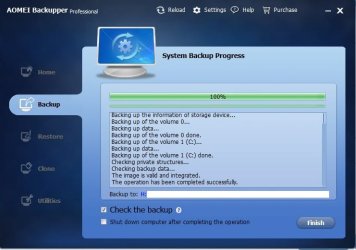
AOMEI Backup was Successful!

Hi Everyone!

Thanks go to everyone who helped me! (Reps will go around as soon as I give 10 others--up to 8 now).
Also here is a final Screenshot for anyone who is considering purchasing/using AOMEI (just trying to be complete in my threads!)

AOMEI First Backup Successful pic PS17599.jpg

Now one question is left... difficult one!

How do I make certain the copy is 100%???

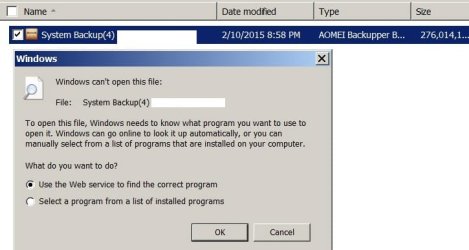
Norton Ghost let me SEE inside the copy... using Ghost or Windows Explorer!

Of course I can't do it with modern Backup programs like AOMEI

See result below:

AOMEI Windows Explorer cant use it PS17605.jpg

So now how do I make certain this is a RECOVERABLE/RESTORABILITY of this copy.... without actually doing the restoration? I don't have a lose drive to try it as I don't know if Windows 7 allows for external booting tests while hooked up to a laptop (On a desktop I go into the BIOS and use settings there to allow this external boot.....as a test for Norton stuff.... I've NEVER found or seen (probably I should not) the "bios" on a laptop anywhere.... they just "work" without showing that Bios Step that all my Desktops always ask me to "press F1 to continue or Press F2 to enter Set up" (at least the DELL ones do that).......

Thanks for figuring out next steps for me to take to test this.

The reason I ask, is that I want to test AOMEI somehow....... BEFORE I make the second backup copy that will erase all my OLD NORTON copies on the other external Hard Drive.
 
Last edited:

My Computer

Computer type
Laptop
Computer Manufacturer/Model Number
SONY VAIO VPCS111FM
OS
Windows7 Professional 64bit
CPU
Intel(R) Core (TM) i5 CPU M 430 @2.27 Ghz
Memory
8.0 GB
Hard Drives
Seagate 500GB Momentus
Cooling
Internal fan
Mouse
Logitech bluetooth trackball
Browser
Pale Moon Browser for x64
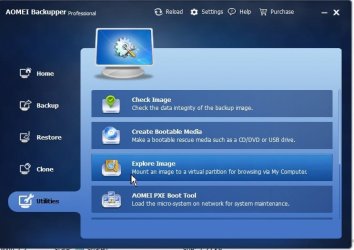
You can click on AMEI utilities there. You can mount the image and assign a drive letter to it to restore individual files. And a check for integrity of the backup image.

Did you reenable VSS again in AOMEI backupper?
 

My Computer

Computer type
Laptop
Computer Manufacturer/Model Number
ACER ASPIRE 5742G
OS
Microsoft Windows 7 Home Premium 64-bits 7601 Multiprocessor Free Service Pack 1
CPU
Intel(R) Core(TM) i3 CPU M 370 @ 2.40GHz
Motherboard
Acer Aspire 5742G
Memory
4,00 GB
Graphics Card(s)
ATI Mobility Radeon HD 5400 Series
Sound Card
(1) AMD High Definition Audio Device (2) Realtek High Defi
Screen Resolution
1366 x 768 x 32 bits (4294967296 colors) @ 60 Hz
Hard Drives
WDC WD5000BEVT-22ZAT0
GREAT replies from everyone!

Hi SIW2, and Kaktussoft!

Great replies! I'll try to get to everyone in turn.... need to copy quotes so everyone else knows who I'm referring to in my copies (and I'll know a week or month from now if I need to consult how to do this again --poor memory)

Will do it one by one... for those online "live" now.. be patient I'll get to everyone!!
 

My Computer

Computer type
Laptop
Computer Manufacturer/Model Number
SONY VAIO VPCS111FM
OS
Windows7 Professional 64bit
CPU
Intel(R) Core (TM) i5 CPU M 430 @2.27 Ghz
Memory
8.0 GB
Hard Drives
Seagate 500GB Momentus
Cooling
Internal fan
Mouse
Logitech bluetooth trackball
Browser
Pale Moon Browser for x64
Ok got the results of the command

Hallo Kaktussoft!

Just post the output of the reg query command please. It's just the display of a registry key.... it doesn't change anything!

Are you Dutch?

Here is the result:;;

Microsoft Windows [Version 6.1.7601]
Copyright (c) 2009 Microsoft Corporation. All rights reserved.

C:\Windows\system32> reg query HKLM\SYSTEM\CurrentControlSet\Services\VSS\Provi
ders /s

HKEY_LOCAL_MACHINE\SYSTEM\CurrentControlSet\Services\VSS\Providers\{262b716e-bb2
3-41b5-aaef-e2c15e767167}
(Default) REG_SZ Symantec Software VSS Provider
Type REG_DWORD 0x2
Version REG_SZ 1.0
VersionId REG_SZ {312524e0-c869-46ce-849b-7d99a24257cd}

HKEY_LOCAL_MACHINE\SYSTEM\CurrentControlSet\Services\VSS\Providers\{262b716e-bb2
3-41b5-aaef-e2c15e767167}\CLSID
(Default) REG_SZ {790f2886-9889-4c99-8ef5-531add05d044}

HKEY_LOCAL_MACHINE\SYSTEM\CurrentControlSet\Services\VSS\Providers\{b5946137-7b9
f-4925-af80-51abd60b20d5}
(Default) REG_SZ Microsoft Software Shadow Copy provider 1.0
Type REG_DWORD 0x1
Version REG_SZ 1.0.0.7
VersionId REG_SZ {00000001-0000-0000-0007-000000000001}

HKEY_LOCAL_MACHINE\SYSTEM\CurrentControlSet\Services\VSS\Providers\{b5946137-7b9
f-4925-af80-51abd60b20d5}\CLSID
(Default) REG_SZ {65EE1DBA-8FF4-4a58-AC1C-3470EE2F376A}


C:\Windows\system32>

And I've had friends here in US from Netherlands, and part of my heritage is said to be from there.... but not finished genealogical research (speak read a few words of Dutch that's all, trying to make posts friendlier when I can!)

Thanks!
Bedankt!
 

My Computer

Computer type
Laptop
Computer Manufacturer/Model Number
SONY VAIO VPCS111FM
OS
Windows7 Professional 64bit
CPU
Intel(R) Core (TM) i5 CPU M 430 @2.27 Ghz
Memory
8.0 GB
Hard Drives
Seagate 500GB Momentus
Cooling
Internal fan
Mouse
Logitech bluetooth trackball
Browser
Pale Moon Browser for x64
Lots of information here!

Hallo Kaktussoft!

You said (you know it just repeating for those who get lost in thread):

You can click on AMEI utilities there. You can mount the image and assign a drive letter to it to restore individual files. And a check for integrity of the backup image.

Did you reenable VSS again in AOMEI backupper?

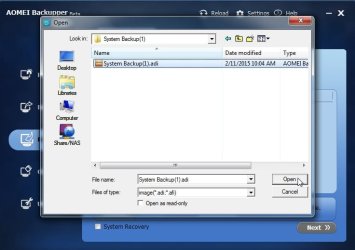
1. See the two screenshots below...

AOMEI Utilities 1 PS17606.jpg

AOMEI Utilities 2 PS17607.jpg

I'm trying to find info how to do this ...... How to devise a "path" for the mounted drive...

Clicking on the button just sent me off into my computer's directory tree file.. lots of help there when I am at a loss what I should do "next".....

I know "some" stuff...enough to know I don't want it to "conflict" against my operating Windows system.... while searching I've had programs do things automatically and erroneously select the windows system file in the other mounted drive.... so have to be careful to mount it as a drive letter different so that its not anywhere near operating (in background) programs---who knows how many? I know I can see in "task" under "processes" but so what? I am always afraid to mess with settings or turn them off in fear they won't turn back on when rebooting computer etc..

Just too careful with these items that I can't get help with in case I do something wrong! Hope you understand...

But would like to know how to mount and check the saved items (quick check will do for now.... I want to get to use Macrium which is the better system soon!)

2. Turn the VSS back on?? I thought if I turn off AOMEI, all settings go with the program... you mean that "don't use VSS" turns it off PERMANENTLY for the laptop, no matter if I restart laptop?

3. By the way, remember my VSS is "broken" and I need to follow instructions from whs in Reg Edit mode to fix it (later on once I have two confirmed copies of my Hard Drives....)

Thanks!

Bedankt!
 

My Computer

Computer type
Laptop
Computer Manufacturer/Model Number
SONY VAIO VPCS111FM
OS
Windows7 Professional 64bit
CPU
Intel(R) Core (TM) i5 CPU M 430 @2.27 Ghz
Memory
8.0 GB
Hard Drives
Seagate 500GB Momentus
Cooling
Internal fan
Mouse
Logitech bluetooth trackball
Browser
Pale Moon Browser for x64
A few answers more questions

Hi SIW2:

Thanks for your detailed instructions!

Would follow them, but its been a year or more without using Reg Edit, (I've forgotten how to get to that screen) and usually never did it alone, had someone working next to me so I don't mess up things.. but your instructions seem clear:

You wrote:

If you selected Don't use VSS , Aomei will use it's own snapshot driver. It is there in case vss has problems.

Yes, as my other thread shows.... I seem NOT to have a working VSS system on this laptop...
See: http://www.sevenforums.com/backup-r...ect-backup-aborted-error-code-0x8004230f.html

Not sure what is wrong with your system, but it seems aomei drivers were unable to install properly.

See my post above, as I got AOMEI (somehow!!!!) to work once to make a full backup....

Would like to KNOW what is wrong so I don't mess it up next time I do the second or third or fourth, etc copies (incrementals I assume I'll be doing after the first basic saves)---I always update the basic every few months so its full copy and leave the incrementals, which are more subject to interruption for the chance that I'd catch something early and more easily repair it.. has not happened, but that was the idea.....


You can check in the registry, you should have this:

(remember, I've forgotten how to get to that screen) and usually never did it alone, had someone working next to me so I don't mess up things.. but your instructions seem clear: )

Thanks for reading all of this! (Sorry for any confusion as I'm going back and forth between the two threads!)
 

My Computer

Computer type
Laptop
Computer Manufacturer/Model Number
SONY VAIO VPCS111FM
OS
Windows7 Professional 64bit
CPU
Intel(R) Core (TM) i5 CPU M 430 @2.27 Ghz
Memory
8.0 GB
Hard Drives
Seagate 500GB Momentus
Cooling
Internal fan
Mouse
Logitech bluetooth trackball
Browser
Pale Moon Browser for x64
I see this in your output:
HKEY_LOCAL_MACHINE\SYSTEM\CurrentControlSet\Services\VSS\Providers\{262b716e-bb2
3-41b5-aaef-e2c15e767167}
(Default) REG_SZ Symantec Software VSS Provider
Type REG_DWORD 0x2
Version REG_SZ 1.0
VersionId REG_SZ {312524e0-c869-46ce-849b-7d99a24257cd}

And you have activated "disable VSS" (or something alike) in AOMEI. AOMEI now uses his own VSS-routines.
 

My Computer

Computer type
Laptop
Computer Manufacturer/Model Number
ACER ASPIRE 5742G
OS
Microsoft Windows 7 Home Premium 64-bits 7601 Multiprocessor Free Service Pack 1
CPU
Intel(R) Core(TM) i3 CPU M 370 @ 2.40GHz
Motherboard
Acer Aspire 5742G
Memory
4,00 GB
Graphics Card(s)
ATI Mobility Radeon HD 5400 Series
Sound Card
(1) AMD High Definition Audio Device (2) Realtek High Defi
Screen Resolution
1366 x 768 x 32 bits (4294967296 colors) @ 60 Hz
Hard Drives
WDC WD5000BEVT-22ZAT0
Just type regedit in start search box.

If Aomei is working, it seems the drivers have installed properly now. Maybe you did a reboot ?


Not sure what you mean by "devise a path".

Aomei will usually show image files if it can find them. If it already listed, just click it to slect.

If not already listed, then sometimes you have to browse to the image.

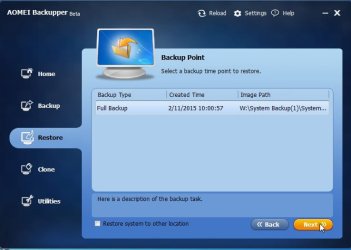
Click the box that says "path" and browse to the backup location you selected when you created the image. There should be a folder called MyBackup or SystemBackup. Inside there is the image file.

a1.jpg

a2.jpg

a3.jpg

a4.jpg
 

My Computers

System One System Two

  • Computer type
    PC/Desktop
    OS
    7 X64
    CPU
    i5 8400
    Motherboard
    gigabyte b365m ds3h
    Memory
    2x8gb 3200mhz
    Hard Drives
    various
    PSU
    pure power 11 400w cm
    Case
    Coolermaster
    Cooling
    cryorig m9i
  • Computer type
    PC/Desktop
    OS
    7x64
    CPU
    g5400
    Motherboard
    ga b365m ds3h
    Memory
    8gb ddr4 2400
    PSU
    xfx pro 450w
Back
Top