
Solved What is conime.exe and what (if anything) should I do with it please?

MadMudMob

New member
Member
VIP
Local time
1:37 AM
Messages
143
I try to keep my pc lean'n'clean so was checking the list of Start Up programs with my CCleaner earlier today and found a new entry ....

Key .... HKLM:Run
Program .... conime
Publisher ... this is empty
File .... %windir%/system32/conime.exe

I have no idea how recently this has appeared as I last checked the Start Ups several months ago.

Could some kind person please tell me ...
~ if I should keep this as it is?
~ delete or uninstall (don't know how to)?
~ and/or if I should allow it to start with Windows or disable it?

Many thanks for all and any help :)
 
Last edited:

My Computer My Computer

At a glance

Windows 7 Pro 64bitIntel (R) Core(TM) i3-3320 CPU @ 3.30ghz4GBIntel(R) HT Graphics
Computer type
PC/Desktop
Computer Manufacturer/Model Number
Dell
OS
Windows 7 Pro 64bit
CPU
Intel (R) Core(TM) i3-3320 CPU @ 3.30ghz
Motherboard
Dell Inc OT 10XY version A01
Memory
4GB
Graphics Card(s)
Intel(R) HT Graphics
Sound Card
ATI HDMI Audio
Monitor(s) Displays
Acer AL1714
Screen Resolution
1280 - 1024
Hard Drives
KC 45
SATA 3.0, 6.0Gb/s (Current 3.0Gb/s)
ATA8-ACS T 13/1699-D revision 4
RMP(R/s) 7200
PSU
Not known
Case
Not known
Cooling
Not known
Keyboard
Standard Keyboard
Mouse
Konig
Internet Speed
Ping:12ms Down:37.44 Mb/s Up:9.51 Mb/s
Antivirus
Avast Internet Security
Browser
Firefox (and occasionally Internet Explorer)
Other Info
Regularly use ...
~ Super AntiSpyware
~ Malwarebytes Anti-Malware
~ Wise Care365
~ CCleaner
~ Dropbox (for backups)
and defrag once a month

My Computer My Computer

At a glance

windows 7 home 64bitINTEL-CORE I716GB
Computer Manufacturer/Model Number
W530-3630QM1
OS
windows 7 home 64bit
CPU
INTEL-CORE I7
Memory
16GB
Hard Drives
750GB
Browser
Chrome
Thankyou for answering so soon.

I now use AVG Free instead of Avast. (Should I update that somewhere on here?).

I have scanned with MalwareBytes, Super AntiSpyware, AVG, Microsoft Malicious Removal Tool and AdwCleaner but nothing was flagged.

Off to read the link right now :)
 
Last edited:

My Computer My Computer

At a glance

Windows 7 Pro 64bitIntel (R) Core(TM) i3-3320 CPU @ 3.30ghz4GBIntel(R) HT Graphics
Computer type
PC/Desktop
Computer Manufacturer/Model Number
Dell
OS
Windows 7 Pro 64bit
CPU
Intel (R) Core(TM) i3-3320 CPU @ 3.30ghz
Motherboard
Dell Inc OT 10XY version A01
Memory
4GB
Graphics Card(s)
Intel(R) HT Graphics
Sound Card
ATI HDMI Audio
Monitor(s) Displays
Acer AL1714
Screen Resolution
1280 - 1024
Hard Drives
KC 45
SATA 3.0, 6.0Gb/s (Current 3.0Gb/s)
ATA8-ACS T 13/1699-D revision 4
RMP(R/s) 7200
PSU
Not known
Case
Not known
Cooling
Not known
Keyboard
Standard Keyboard
Mouse
Konig
Internet Speed
Ping:12ms Down:37.44 Mb/s Up:9.51 Mb/s
Antivirus
Avast Internet Security
Browser
Firefox (and occasionally Internet Explorer)
Other Info
Regularly use ...
~ Super AntiSpyware
~ Malwarebytes Anti-Malware
~ Wise Care365
~ CCleaner
~ Dropbox (for backups)
and defrag once a month
I try to keep my pc lean'n'clean so was checking the list of Start Up programs with my CCleaner earlier today and found a new entry ....

Key .... HKLM:Run
Program .... conime
Publisher ... this is empty
File .... %windir%/system32/conime.exe

I have no idea how recently this has appeared as I last checked the Start Ups several months ago.

Could some kind person please tell me ...
~ if I should keep this as it is?
~ delete or uninstall (don't know how to)?
~ and/or if I should allow it to start with Windows or disable it?

Many thanks for all and any help :)

You know, if you just type 'conime.exe' into your favorite search engine, you will have an instant answer.
 

My Computer My Computer

At a glance

Windows 7 Home Premium 64bitIntel Pentium Dual Core E2180 @2GHz4 GBNVIDIA GeForce 8500 GT
Computer Manufacturer/Model Number
Compaq Presario SR5518F (desktop)
OS
Windows 7 Home Premium 64bit
CPU
Intel Pentium Dual Core E2180 @2GHz
Motherboard
MSI "Boston"
Memory
4 GB
Graphics Card(s)
NVIDIA GeForce 8500 GT
Sound Card
Integrated - Realtek High Definition Audio
Monitor(s) Displays
Acer
Hard Drives
Hitachi HDP725025GLA380 ATA Device
Optiarc DVD RW AD-7201S5 ATA Device
Internet Speed
5 Mbps
I have done that and spent hours reading but am utterly confused. It seems there is such conflicting opinion about it and so many varieties of ways to get rid of it - even warnings not to.

That's why I came here to the people I trust, to learn for sure what it is and what if anything I should do.
 

My Computer My Computer

At a glance

Windows 7 Pro 64bitIntel (R) Core(TM) i3-3320 CPU @ 3.30ghz4GBIntel(R) HT Graphics
Computer type
PC/Desktop
Computer Manufacturer/Model Number
Dell
OS
Windows 7 Pro 64bit
CPU
Intel (R) Core(TM) i3-3320 CPU @ 3.30ghz
Motherboard
Dell Inc OT 10XY version A01
Memory
4GB
Graphics Card(s)
Intel(R) HT Graphics
Sound Card
ATI HDMI Audio
Monitor(s) Displays
Acer AL1714
Screen Resolution
1280 - 1024
Hard Drives
KC 45
SATA 3.0, 6.0Gb/s (Current 3.0Gb/s)
ATA8-ACS T 13/1699-D revision 4
RMP(R/s) 7200
PSU
Not known
Case
Not known
Cooling
Not known
Keyboard
Standard Keyboard
Mouse
Konig
Internet Speed
Ping:12ms Down:37.44 Mb/s Up:9.51 Mb/s
Antivirus
Avast Internet Security
Browser
Firefox (and occasionally Internet Explorer)
Other Info
Regularly use ...
~ Super AntiSpyware
~ Malwarebytes Anti-Malware
~ Wise Care365
~ CCleaner
~ Dropbox (for backups)
and defrag once a month
I have done that and spent hours reading but am utterly confused. It seems there is such conflicting opinion about it and so many varieties of ways to get rid of it - even warnings not to.

That's why I came here to the people I trust, to learn for sure what it is and what if anything I should do.

I apologize - in fact, I have encountered the same thing in my travels. Sometims the answer is there loud and clear, and sometimes there are 40 opinions all over the map. I always do a search first to save the time of waiting on a reply in a forum, but you're right - sometimes it only adds to the confusion...

And this is a place we can trust. I don't know why, but I was just feeling a bit short tonight...
 

My Computer My Computer

At a glance

Windows 7 Home Premium 64bitIntel Pentium Dual Core E2180 @2GHz4 GBNVIDIA GeForce 8500 GT
Computer Manufacturer/Model Number
Compaq Presario SR5518F (desktop)
OS
Windows 7 Home Premium 64bit
CPU
Intel Pentium Dual Core E2180 @2GHz
Motherboard
MSI "Boston"
Memory
4 GB
Graphics Card(s)
NVIDIA GeForce 8500 GT
Sound Card
Integrated - Realtek High Definition Audio
Monitor(s) Displays
Acer
Hard Drives
Hitachi HDP725025GLA380 ATA Device
Optiarc DVD RW AD-7201S5 ATA Device
Internet Speed
5 Mbps
Not to worry, I wasn't offended - after all what you posted was perfectly valid and you weren't to know I had already done it to the best of my techy-know-nought abilities
thumbsupgif-1.gif
 

My Computer My Computer

At a glance

Windows 7 Pro 64bitIntel (R) Core(TM) i3-3320 CPU @ 3.30ghz4GBIntel(R) HT Graphics
Computer type
PC/Desktop
Computer Manufacturer/Model Number
Dell
OS
Windows 7 Pro 64bit
CPU
Intel (R) Core(TM) i3-3320 CPU @ 3.30ghz
Motherboard
Dell Inc OT 10XY version A01
Memory
4GB
Graphics Card(s)
Intel(R) HT Graphics
Sound Card
ATI HDMI Audio
Monitor(s) Displays
Acer AL1714
Screen Resolution
1280 - 1024
Hard Drives
KC 45
SATA 3.0, 6.0Gb/s (Current 3.0Gb/s)
ATA8-ACS T 13/1699-D revision 4
RMP(R/s) 7200
PSU
Not known
Case
Not known
Cooling
Not known
Keyboard
Standard Keyboard
Mouse
Konig
Internet Speed
Ping:12ms Down:37.44 Mb/s Up:9.51 Mb/s
Antivirus
Avast Internet Security
Browser
Firefox (and occasionally Internet Explorer)
Other Info
Regularly use ...
~ Super AntiSpyware
~ Malwarebytes Anti-Malware
~ Wise Care365
~ CCleaner
~ Dropbox (for backups)
and defrag once a month
Thankyou for answering so soon.

I now use AVG Free instead of Avast. (Should I update that somewhere on here?).

I have scanned with MalwareBytes, Super AntiSpyware, AVG, Microsoft Malicious Removal Tool and AdwCleaner but nothing was flagged.

Off to read the link right now :)

Yes in your System Specs ...


If in any doubt one can always upload files to Virus Total ...


https://www.virustotal.com/
 

My Computer My Computer

At a glance

windows 7 home 64bitINTEL-CORE I716GB
Computer Manufacturer/Model Number
W530-3630QM1
OS
windows 7 home 64bit
CPU
INTEL-CORE I7
Memory
16GB
Hard Drives
750GB
Browser
Chrome
Thankyou, have updated that.

I installed and ran Hitman Pro and that found nothing wrong.

I tried to use the Virus Tool but when I searched in Local Disk C then Computer they both came up with nothing for conime or conime.exe yet there it is in my Start Ups?
 
Last edited:

My Computer My Computer

At a glance

Windows 7 Pro 64bitIntel (R) Core(TM) i3-3320 CPU @ 3.30ghz4GBIntel(R) HT Graphics
Computer type
PC/Desktop
Computer Manufacturer/Model Number
Dell
OS
Windows 7 Pro 64bit
CPU
Intel (R) Core(TM) i3-3320 CPU @ 3.30ghz
Motherboard
Dell Inc OT 10XY version A01
Memory
4GB
Graphics Card(s)
Intel(R) HT Graphics
Sound Card
ATI HDMI Audio
Monitor(s) Displays
Acer AL1714
Screen Resolution
1280 - 1024
Hard Drives
KC 45
SATA 3.0, 6.0Gb/s (Current 3.0Gb/s)
ATA8-ACS T 13/1699-D revision 4
RMP(R/s) 7200
PSU
Not known
Case
Not known
Cooling
Not known
Keyboard
Standard Keyboard
Mouse
Konig
Internet Speed
Ping:12ms Down:37.44 Mb/s Up:9.51 Mb/s
Antivirus
Avast Internet Security
Browser
Firefox (and occasionally Internet Explorer)
Other Info
Regularly use ...
~ Super AntiSpyware
~ Malwarebytes Anti-Malware
~ Wise Care365
~ CCleaner
~ Dropbox (for backups)
and defrag once a month
Should be fine leave things as they are ...
 

My Computer My Computer

At a glance

windows 7 home 64bitINTEL-CORE I716GB
Computer Manufacturer/Model Number
W530-3630QM1
OS
windows 7 home 64bit
CPU
INTEL-CORE I7
Memory
16GB
Hard Drives
750GB
Browser
Chrome
I tried to use the Virus Tool but when I searched in Local Disk C then Computer they both came up with nothing for conime or conime.exe yet there it is in my Start Ups?
 

My Computer My Computer

At a glance

Windows 7 Pro 64bitIntel (R) Core(TM) i3-3320 CPU @ 3.30ghz4GBIntel(R) HT Graphics
Computer type
PC/Desktop
Computer Manufacturer/Model Number
Dell
OS
Windows 7 Pro 64bit
CPU
Intel (R) Core(TM) i3-3320 CPU @ 3.30ghz
Motherboard
Dell Inc OT 10XY version A01
Memory
4GB
Graphics Card(s)
Intel(R) HT Graphics
Sound Card
ATI HDMI Audio
Monitor(s) Displays
Acer AL1714
Screen Resolution
1280 - 1024
Hard Drives
KC 45
SATA 3.0, 6.0Gb/s (Current 3.0Gb/s)
ATA8-ACS T 13/1699-D revision 4
RMP(R/s) 7200
PSU
Not known
Case
Not known
Cooling
Not known
Keyboard
Standard Keyboard
Mouse
Konig
Internet Speed
Ping:12ms Down:37.44 Mb/s Up:9.51 Mb/s
Antivirus
Avast Internet Security
Browser
Firefox (and occasionally Internet Explorer)
Other Info
Regularly use ...
~ Super AntiSpyware
~ Malwarebytes Anti-Malware
~ Wise Care365
~ CCleaner
~ Dropbox (for backups)
and defrag once a month

My Computer My Computer

At a glance

windows 7 home 64bitINTEL-CORE I716GB
Computer Manufacturer/Model Number
W530-3630QM1
OS
windows 7 home 64bit
CPU
INTEL-CORE I7
Memory
16GB
Hard Drives
750GB
Browser
Chrome
I went ...
Computer/Local Disk C/Windows/System 32 and looked carefully all the way down through the alphabetical list but could not find it that way or by using the search box.

I do appreciate your help and am sorry I am not more techy-aware.

I read it could be to do with Asian language used by a program automatically although I would have had no use for it. Could it be left over from a program I uninstalled so you think?
 
Last edited:

My Computer My Computer

At a glance

Windows 7 Pro 64bitIntel (R) Core(TM) i3-3320 CPU @ 3.30ghz4GBIntel(R) HT Graphics
Computer type
PC/Desktop
Computer Manufacturer/Model Number
Dell
OS
Windows 7 Pro 64bit
CPU
Intel (R) Core(TM) i3-3320 CPU @ 3.30ghz
Motherboard
Dell Inc OT 10XY version A01
Memory
4GB
Graphics Card(s)
Intel(R) HT Graphics
Sound Card
ATI HDMI Audio
Monitor(s) Displays
Acer AL1714
Screen Resolution
1280 - 1024
Hard Drives
KC 45
SATA 3.0, 6.0Gb/s (Current 3.0Gb/s)
ATA8-ACS T 13/1699-D revision 4
RMP(R/s) 7200
PSU
Not known
Case
Not known
Cooling
Not known
Keyboard
Standard Keyboard
Mouse
Konig
Internet Speed
Ping:12ms Down:37.44 Mb/s Up:9.51 Mb/s
Antivirus
Avast Internet Security
Browser
Firefox (and occasionally Internet Explorer)
Other Info
Regularly use ...
~ Super AntiSpyware
~ Malwarebytes Anti-Malware
~ Wise Care365
~ CCleaner
~ Dropbox (for backups)
and defrag once a month
I think you would need to list show Hidden Files in order to see it ...


I have also asked s Security Expert to have a look at your Thread ...


I hope this should help with any concerns you have ...


I am sure it could be Deleted from the Registry ... But I would hold fire on any action to we see what the Security expert has to say ....


Here is another interesting read for you ...


Strange "conime.exe" Ghost File? - MajorGeeks Support Forums
 

My Computer My Computer

At a glance

windows 7 home 64bitINTEL-CORE I716GB
Computer Manufacturer/Model Number
W530-3630QM1
OS
windows 7 home 64bit
CPU
INTEL-CORE I7
Memory
16GB
Hard Drives
750GB
Browser
Chrome
Even more thanks .... that link seems to be exactly what I have. Looked in Task Scheduler and there is nothing there to do with it.

Looks as though I should "delete any registry entry that contained the word "conime" in regedit" perhaps but am more than happy to wait for further (hugely appreciated) advice.

If that is what I am to do is it as simple as typing regedit in the Search box in Start then right clicking any entry and selecting delete in the regedit results?
 

My Computer My Computer

At a glance

Windows 7 Pro 64bitIntel (R) Core(TM) i3-3320 CPU @ 3.30ghz4GBIntel(R) HT Graphics
Computer type
PC/Desktop
Computer Manufacturer/Model Number
Dell
OS
Windows 7 Pro 64bit
CPU
Intel (R) Core(TM) i3-3320 CPU @ 3.30ghz
Motherboard
Dell Inc OT 10XY version A01
Memory
4GB
Graphics Card(s)
Intel(R) HT Graphics
Sound Card
ATI HDMI Audio
Monitor(s) Displays
Acer AL1714
Screen Resolution
1280 - 1024
Hard Drives
KC 45
SATA 3.0, 6.0Gb/s (Current 3.0Gb/s)
ATA8-ACS T 13/1699-D revision 4
RMP(R/s) 7200
PSU
Not known
Case
Not known
Cooling
Not known
Keyboard
Standard Keyboard
Mouse
Konig
Internet Speed
Ping:12ms Down:37.44 Mb/s Up:9.51 Mb/s
Antivirus
Avast Internet Security
Browser
Firefox (and occasionally Internet Explorer)
Other Info
Regularly use ...
~ Super AntiSpyware
~ Malwarebytes Anti-Malware
~ Wise Care365
~ CCleaner
~ Dropbox (for backups)
and defrag once a month
It won't hurt to leave the registry entry that tries to start conime.exe. If the app is not there, then nothing will start. If the app shows up some day, then AVG Free should figure out if it is a clean app to run.

If you want to remove the registry entry, go ahead. If some update puts conime.exe back, then that same update should put the registry entry back.

You might want to use Process Explorer with settings to send info to Virus Total:
http://www.sevenforums.com/tutorial...er-virustotal-check-all-processes-50-avs.html

You might also want to use Autoruns. However, do not make changes via Autoruns without checking with others in this forum first.
 

My Computer My Computer

At a glance

W7 Pro SP1 64biti78GBIntel HD Graphics
Computer type
Laptop
Computer Manufacturer/Model Number
Employer provided Dell Latitude
OS
W7 Pro SP1 64bit
CPU
i7
Memory
8GB
Graphics Card(s)
Intel HD Graphics
Hard Drives
crappy SSD
Antivirus
Employer mandated Symantec Endpoint Protection
Browser
Pale Moon 64bit, IE11 64bit & Chrome 64bit
Even more thanks .... that link seems to be exactly what I have. Looked in Task Scheduler and there is nothing there to do with it.

Looks as though I should "delete any registry entry that contained the word "conime" in regedit" perhaps but am more than happy to wait for further (hugely appreciated) advice.

If that is what I am to do is it as simple as typing regedit in the Search box in Start then right clicking any entry and selecting delete in the regedit results?
No. Please - never do that.

There are plenty of valid registry entries for conime.
But, HKLM - RUN is probably not one of them.
That entry under the RUN key is the only entry that you could safely remove for now.
 

My Computer My Computer

At a glance

W7 Pro SP1 64biti78GBIntel HD Graphics
Computer type
Laptop
Computer Manufacturer/Model Number
Employer provided Dell Latitude
OS
W7 Pro SP1 64bit
CPU
i7
Memory
8GB
Graphics Card(s)
Intel HD Graphics
Hard Drives
crappy SSD
Antivirus
Employer mandated Symantec Endpoint Protection
Browser
Pale Moon 64bit, IE11 64bit & Chrome 64bit
Thankyou UsernameIssues :)

Can I just ask you to explain a little more about "That entry under the RUN key is the only entry that you could safely remove for now" ... would that be something I'd find in the regedit?

I have experimentally typed regedit in the Start search and was instantly out of my depth as to what to choose or where to next :(
 

My Computer My Computer

At a glance

Windows 7 Pro 64bitIntel (R) Core(TM) i3-3320 CPU @ 3.30ghz4GBIntel(R) HT Graphics
Computer type
PC/Desktop
Computer Manufacturer/Model Number
Dell
OS
Windows 7 Pro 64bit
CPU
Intel (R) Core(TM) i3-3320 CPU @ 3.30ghz
Motherboard
Dell Inc OT 10XY version A01
Memory
4GB
Graphics Card(s)
Intel(R) HT Graphics
Sound Card
ATI HDMI Audio
Monitor(s) Displays
Acer AL1714
Screen Resolution
1280 - 1024
Hard Drives
KC 45
SATA 3.0, 6.0Gb/s (Current 3.0Gb/s)
ATA8-ACS T 13/1699-D revision 4
RMP(R/s) 7200
PSU
Not known
Case
Not known
Cooling
Not known
Keyboard
Standard Keyboard
Mouse
Konig
Internet Speed
Ping:12ms Down:37.44 Mb/s Up:9.51 Mb/s
Antivirus
Avast Internet Security
Browser
Firefox (and occasionally Internet Explorer)
Other Info
Regularly use ...
~ Super AntiSpyware
~ Malwarebytes Anti-Malware
~ Wise Care365
~ CCleaner
~ Dropbox (for backups)
and defrag once a month
You can use regedit, but there is no need. Since you already have CCleaner, just use that to remove* that RUN entry for conime.exe.

*CCleaner moves the entry to another location in the registry.
You can use CCleaner to put the entry back - if need be.

CCleaner > Tools > Startup
Double click on the row of interest.
That should disable that RUN entry.

If you ever want it back, double click on it again.


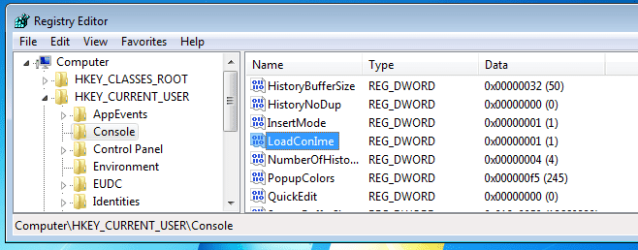
Here is one example of an entry that you would have found if you searched the registry for (and removed any occurrence of) conime.

reg-conime.PNG

That entry should be there for all Windows 7 installations. If you ever install something that needs conime, then the conime.exe file will be installed and Windows 7 can make use of it. I just don't see any reason for conime.exe to be starting every time that Windows 7 starts. XP and Vista might have needed that, but Windows 7 can start conime when it starts a command prompt window.
 

My Computer My Computer

At a glance

W7 Pro SP1 64biti78GBIntel HD Graphics
Computer type
Laptop
Computer Manufacturer/Model Number
Employer provided Dell Latitude
OS
W7 Pro SP1 64bit
CPU
i7
Memory
8GB
Graphics Card(s)
Intel HD Graphics
Hard Drives
crappy SSD
Antivirus
Employer mandated Symantec Endpoint Protection
Browser
Pale Moon 64bit, IE11 64bit & Chrome 64bit
Perfect ... this great forum has once again patiently guided me through an issue. At the risk of repeating myself --- thankyou all :)
 

My Computer My Computer

At a glance

Windows 7 Pro 64bitIntel (R) Core(TM) i3-3320 CPU @ 3.30ghz4GBIntel(R) HT Graphics
Computer type
PC/Desktop
Computer Manufacturer/Model Number
Dell
OS
Windows 7 Pro 64bit
CPU
Intel (R) Core(TM) i3-3320 CPU @ 3.30ghz
Motherboard
Dell Inc OT 10XY version A01
Memory
4GB
Graphics Card(s)
Intel(R) HT Graphics
Sound Card
ATI HDMI Audio
Monitor(s) Displays
Acer AL1714
Screen Resolution
1280 - 1024
Hard Drives
KC 45
SATA 3.0, 6.0Gb/s (Current 3.0Gb/s)
ATA8-ACS T 13/1699-D revision 4
RMP(R/s) 7200
PSU
Not known
Case
Not known
Cooling
Not known
Keyboard
Standard Keyboard
Mouse
Konig
Internet Speed
Ping:12ms Down:37.44 Mb/s Up:9.51 Mb/s
Antivirus
Avast Internet Security
Browser
Firefox (and occasionally Internet Explorer)
Other Info
Regularly use ...
~ Super AntiSpyware
~ Malwarebytes Anti-Malware
~ Wise Care365
~ CCleaner
~ Dropbox (for backups)
and defrag once a month
Back
Top