Questions about Windows.old and what to do with it.

Newmaven

New member
Local time
10:02 PM
Messages
49
View attachment Windows.old.big.pdf
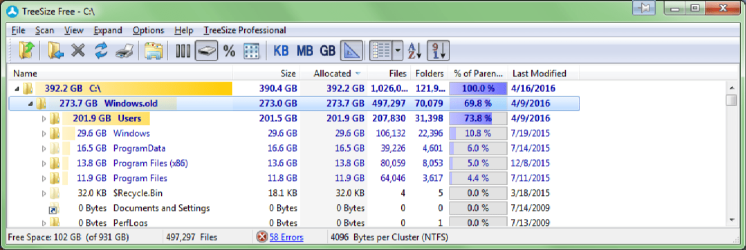
I have a huge windows.old file. I don't know why I have it, as Windows was a clean install on this drive, and much of it seems to be duplicates of content files on my program and data drives. I presume that if I make a backup disk image ofC:\ on another drive I can get rid of it. But is there anything here I should be saving?
 

My Computer My Computer

At a glance

win7 Pro x64Intel Core 2 QUAD q6700 @ 2.6 GHz8 GB, DDR2nVidia Quadro NVS 290
Computer type
PC/Desktop
Computer Manufacturer/Model Number
Dell T3400 Workstation
OS
win7 Pro x64
CPU
Intel Core 2 QUAD q6700 @ 2.6 GHz
Motherboard
Dell 0TP412.A02
Memory
8 GB, DDR2
Graphics Card(s)
nVidia Quadro NVS 290
Sound Card
motherboard
Monitor(s) Displays
Samsung T260HD and ViewSonic VA2702w
Screen Resolution
1920*1200, 1920x1080
Hard Drives
Seagate hybrid C:, two WD data drives. 5TB total
PSU
375W
Case
Stock
Cooling
air
Keyboard
Dell
Mouse
Logitech Performance MX
Antivirus
Malwarebytes, Norton 360
Browser
IE 11, Seamonkey, Firefox, Opera
Hi,
I can't see it surviving a clean install unless it's on another partition on the disk
Since you posted a pdf for some reason instead of uploading a picture image like png or jpeg we might have to wait to see what is up.
 

My Computer My Computer

At a glance

Win-7-Pro64bit 7-H-Prem-64biti7-5930K 2nd i9-9940x both water blocked VRM'...Trident-z 3200C14 2nd Trident-z 3600C16EVGA 1080ti ftw3 2nd Titan Xp both water blocked
Computer type
PC/Desktop
Computer Manufacturer/Model Number
Custom assembled by me :}
OS
Win-7-Pro64bit 7-H-Prem-64bit
CPU
i7-5930K 2nd i9-9940x both water blocked VRM's too
Motherboard
ASUS SABERTOOTH X99 2nd ASUS x299 Apex
Memory
Trident-z 3200C14 2nd Trident-z 3600C16
Graphics Card(s)
EVGA 1080ti ftw3 2nd Titan Xp both water blocked
Sound Card
Built-in Realtek
Monitor(s) Displays
1-AOC G2460PG 24"G-Sync 144Hz/ 2nd 1-ASUS VG248QE 24" 144Hz
Screen Resolution
1920 x 1080 144Hz
Hard Drives
2-Samsung M.2 Evo & Evo Plus
2-Samsung 850 EVO 500GB SSD's/ 3-2.5 W.D. Black 1tb-&3-1tb/3-3.5 WD Black 1tb hdd's
PSU
EVGA SuperNOVA 1000-P2 2nd 1200-P2
Case
2-Corsair Obsidian Series 450D Black ATX Mid Tower
Cooling
Custom water loops
Keyboard
Logitech G710+/ 2nd Logitech G910
Mouse
2-RedDragon M901 Perdition 16400 dpi Gaming mouse = wired
Internet Speed
Comcast Ping 19ms 89.31mbps download speed 6.12mbps upload
Antivirus
Malwarebytes Pro/ Superantispyware Pro
Browser
FireFox & Pale moon
Other Info
2nd ASUS X299 Apex/Intel i9-9940x with Custom water loop/7H-Prem-x64/Corsair 450D case/Ram Trident-z 3600C16 4x8gb / Samsung970Evo plus 500gb SSD/Dual ssd EZ swap evo/PSU EVGA SuperNova 1200w-P2 80+Platinum/GPU Titan Xp /8-ML-140 on push-pull on 2-280GTX rads
Windows.old.big.png

By the way, that clean install was onto a virgin drive.
 

My Computer My Computer

At a glance

win7 Pro x64Intel Core 2 QUAD q6700 @ 2.6 GHz8 GB, DDR2nVidia Quadro NVS 290
Computer type
PC/Desktop
Computer Manufacturer/Model Number
Dell T3400 Workstation
OS
win7 Pro x64
CPU
Intel Core 2 QUAD q6700 @ 2.6 GHz
Motherboard
Dell 0TP412.A02
Memory
8 GB, DDR2
Graphics Card(s)
nVidia Quadro NVS 290
Sound Card
motherboard
Monitor(s) Displays
Samsung T260HD and ViewSonic VA2702w
Screen Resolution
1920*1200, 1920x1080
Hard Drives
Seagate hybrid C:, two WD data drives. 5TB total
PSU
375W
Case
Stock
Cooling
air
Keyboard
Dell
Mouse
Logitech Performance MX
Antivirus
Malwarebytes, Norton 360
Browser
IE 11, Seamonkey, Firefox, Opera
Was this virgin drive the only drive connected at the time of the install. If you had another drive connected at the same time, some files may have been copied from it during the install process.

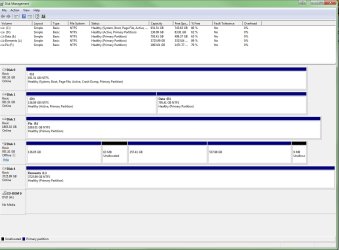
Could you please supply a screen shot of Disc Management. This tutorial tells you how to do that & make sure all the information gets covered by the screen shot.

http://www.sevenforums.com/tutorials/274797-disk-management-post-screen-capture-image.html

Please have all hard drives that you normally use connected as well.
 
Last edited:

My Computer My Computer

At a glance

Windows 7 Home Premium 64 bit sp1Intel i5 3570 3.4Ghz Ivy Bridge SKT 1155 quad...G-Skill Rip Jaws 16Gb (8x2) DDR3 -1600 PC3 12...Gigabyte NVIDIA GT610 1Gb DDR3 810/1200 PCI-E...
Computer type
PC/Desktop
Computer Manufacturer/Model Number
Self built using existing case
OS
Windows 7 Home Premium 64 bit sp1
CPU
Intel i5 3570 3.4Ghz Ivy Bridge SKT 1155 quad core
Motherboard
Gigabyte Z77-HD3 SKT 1155 2xSata 3, 4x USB 3.0
Memory
G-Skill Rip Jaws 16Gb (8x2) DDR3 -1600 PC3 12800 CL 10 red
Graphics Card(s)
Gigabyte NVIDIA GT610 1Gb DDR3 810/1200 PCI-E 2.0 Silent
Sound Card
NVIDIA High Definition & Realtech High Definition Audio
Monitor(s) Displays
2 x Philips 226V4L 16:9 aspect ratio
Screen Resolution
1920 x 1080 HD
Hard Drives
Samsung 840 Pro 256gb SSD, SATA 3.
Hitachi Touro Portable 1tb, USB 3.0 HDD used for image b/ups.
PSU
Corsair VS450
Case
Codeng
Cooling
PSU fan & CPU fan
Keyboard
Logitech
Mouse
Logitech Wireless trackball M570
Internet Speed
Wireless 3G. 3mg down & 550kb up.
Antivirus
Bitdefender Internet Security 2020
Browser
Opera (Current Version) & Firefox
Other Info
MS Office 2013 Pro. Davis weather station software. MGE Nova 600 avr UPS.
Hi,
What is the Brand/ model and where was this tainted virgin drive bought from EBay ?
 

My Computer My Computer

At a glance

Win-7-Pro64bit 7-H-Prem-64biti7-5930K 2nd i9-9940x both water blocked VRM'...Trident-z 3200C14 2nd Trident-z 3600C16EVGA 1080ti ftw3 2nd Titan Xp both water blocked
Computer type
PC/Desktop
Computer Manufacturer/Model Number
Custom assembled by me :}
OS
Win-7-Pro64bit 7-H-Prem-64bit
CPU
i7-5930K 2nd i9-9940x both water blocked VRM's too
Motherboard
ASUS SABERTOOTH X99 2nd ASUS x299 Apex
Memory
Trident-z 3200C14 2nd Trident-z 3600C16
Graphics Card(s)
EVGA 1080ti ftw3 2nd Titan Xp both water blocked
Sound Card
Built-in Realtek
Monitor(s) Displays
1-AOC G2460PG 24"G-Sync 144Hz/ 2nd 1-ASUS VG248QE 24" 144Hz
Screen Resolution
1920 x 1080 144Hz
Hard Drives
2-Samsung M.2 Evo & Evo Plus
2-Samsung 850 EVO 500GB SSD's/ 3-2.5 W.D. Black 1tb-&3-1tb/3-3.5 WD Black 1tb hdd's
PSU
EVGA SuperNOVA 1000-P2 2nd 1200-P2
Case
2-Corsair Obsidian Series 450D Black ATX Mid Tower
Cooling
Custom water loops
Keyboard
Logitech G710+/ 2nd Logitech G910
Mouse
2-RedDragon M901 Perdition 16400 dpi Gaming mouse = wired
Internet Speed
Comcast Ping 19ms 89.31mbps download speed 6.12mbps upload
Antivirus
Malwarebytes Pro/ Superantispyware Pro
Browser
FireFox & Pale moon
Other Info
2nd ASUS X299 Apex/Intel i9-9940x with Custom water loop/7H-Prem-x64/Corsair 450D case/Ram Trident-z 3600C16 4x8gb / Samsung970Evo plus 500gb SSD/Dual ssd EZ swap evo/PSU EVGA SuperNova 1200w-P2 80+Platinum/GPU Titan Xp /8-ML-140 on push-pull on 2-280GTX rads
View attachment 385390
I have a huge windows.old file. I don't know why I have it, as Windows was a clean install on this drive, and much of it seems to be duplicates of content files on my program and data drives. I presume that if I make a backup disk image ofC:\ on another drive I can get rid of it. But is there anything here I should be saving?

My suspicion - and it's just that - is that Win 10 wanted to get itself installed and in the process had created the Windows.old file. If all else is working fine for you, you can safely delete the entire file.
 

My Computer My Computer

At a glance

Windows 7 Ultimate 64 biti7 Intel8 GBnVidia GeForce
Computer type
PC/Desktop
Computer Manufacturer/Model Number
Dell
OS
Windows 7 Ultimate 64 bit
CPU
i7 Intel
Memory
8 GB
Graphics Card(s)
nVidia GeForce
Hard Drives
Seagate; WesternDigital
Antivirus
Panda
Browser
Firefox
The Windows.old folder is a clone of your old Windows Installation, which includes the WINDOWS Folder,Programs Folder where all the Installed programs are, Documents and Settings Folder which includes your Entire Users and Documents, Music, and other files.

One thing you can do is Take the files you don't want to lose from the your old Users/documents Folder into the new one, and when you are done, you can delete the whole Windows.old folder, which will Free Lots of storage.
 

My Computer My Computer

At a glance

Windows Vista Business 32bitIntel(R) Pentium(R) Daul CPU E2220 @ 2.40GHz2.00GBIntel Pentium
Computer type
PC/Desktop
Computer Manufacturer/Model Number
HP
OS
Windows Vista Business 32bit
CPU
Intel(R) Pentium(R) Daul CPU E2220 @ 2.40GHz
Memory
2.00GB
Graphics Card(s)
Intel Pentium
Sound Card
AudioESP SoundMAX
Monitor(s) Displays
Dell
Hard Drives
ST380815AS ATA Device 80 GB
Keyboard
Logitech Keyboard
Mouse
Logitech Mouse
Internet Speed
44 Mbps
Antivirus
AVG Free
Diskmgmt.jpg
Disk 3 is in an external drive dock--i plan to use it to back up data from my E: drive.
Disk 4 is an external desktop drive. Both drives are via USB 3.0

I don't recall if the virgin drive was connected at the time of install, but I am pretty sure that my old C:\ drive was not connected at the time.

Computer is a Dell T3400. Drive may have been bought from eBay--I've bought drives from several places, eBay included.
 

My Computer My Computer

At a glance

win7 Pro x64Intel Core 2 QUAD q6700 @ 2.6 GHz8 GB, DDR2nVidia Quadro NVS 290
Computer type
PC/Desktop
Computer Manufacturer/Model Number
Dell T3400 Workstation
OS
win7 Pro x64
CPU
Intel Core 2 QUAD q6700 @ 2.6 GHz
Motherboard
Dell 0TP412.A02
Memory
8 GB, DDR2
Graphics Card(s)
nVidia Quadro NVS 290
Sound Card
motherboard
Monitor(s) Displays
Samsung T260HD and ViewSonic VA2702w
Screen Resolution
1920*1200, 1920x1080
Hard Drives
Seagate hybrid C:, two WD data drives. 5TB total
PSU
375W
Case
Stock
Cooling
air
Keyboard
Dell
Mouse
Logitech Performance MX
Antivirus
Malwarebytes, Norton 360
Browser
IE 11, Seamonkey, Firefox, Opera
@Newmaven. You state that you are not sure if the virgin drive was connected at the time of the install of Windows. But wasn't that the drive that you installed Windows on & it ended up with Windows old on it as well. So it must have been installed.

As you are unsure of what drives you had connected at the install time, it will be very hard to workout what has happened.

Have a look through your Windows old folder & see if there is anything that you wish to keep, if there is nothing you can delete it.
 

My Computer My Computer

At a glance

Windows 7 Home Premium 64 bit sp1Intel i5 3570 3.4Ghz Ivy Bridge SKT 1155 quad...G-Skill Rip Jaws 16Gb (8x2) DDR3 -1600 PC3 12...Gigabyte NVIDIA GT610 1Gb DDR3 810/1200 PCI-E...
Computer type
PC/Desktop
Computer Manufacturer/Model Number
Self built using existing case
OS
Windows 7 Home Premium 64 bit sp1
CPU
Intel i5 3570 3.4Ghz Ivy Bridge SKT 1155 quad core
Motherboard
Gigabyte Z77-HD3 SKT 1155 2xSata 3, 4x USB 3.0
Memory
G-Skill Rip Jaws 16Gb (8x2) DDR3 -1600 PC3 12800 CL 10 red
Graphics Card(s)
Gigabyte NVIDIA GT610 1Gb DDR3 810/1200 PCI-E 2.0 Silent
Sound Card
NVIDIA High Definition & Realtech High Definition Audio
Monitor(s) Displays
2 x Philips 226V4L 16:9 aspect ratio
Screen Resolution
1920 x 1080 HD
Hard Drives
Samsung 840 Pro 256gb SSD, SATA 3.
Hitachi Touro Portable 1tb, USB 3.0 HDD used for image b/ups.
PSU
Corsair VS450
Case
Codeng
Cooling
PSU fan & CPU fan
Keyboard
Logitech
Mouse
Logitech Wireless trackball M570
Internet Speed
Wireless 3G. 3mg down & 550kb up.
Antivirus
Bitdefender Internet Security 2020
Browser
Opera (Current Version) & Firefox
Other Info
MS Office 2013 Pro. Davis weather station software. MGE Nova 600 avr UPS.
Windows.old and what to do with it.

I have been pruning away at windows.old--but some files seem to be more recent than those on the C: drive. Should I stop deleting, simply move all those files to the Windows directory, or what?
 

My Computer My Computer

At a glance

win7 Pro x64Intel Core 2 QUAD q6700 @ 2.6 GHz8 GB, DDR2nVidia Quadro NVS 290
Computer type
PC/Desktop
Computer Manufacturer/Model Number
Dell T3400 Workstation
OS
win7 Pro x64
CPU
Intel Core 2 QUAD q6700 @ 2.6 GHz
Motherboard
Dell 0TP412.A02
Memory
8 GB, DDR2
Graphics Card(s)
nVidia Quadro NVS 290
Sound Card
motherboard
Monitor(s) Displays
Samsung T260HD and ViewSonic VA2702w
Screen Resolution
1920*1200, 1920x1080
Hard Drives
Seagate hybrid C:, two WD data drives. 5TB total
PSU
375W
Case
Stock
Cooling
air
Keyboard
Dell
Mouse
Logitech Performance MX
Antivirus
Malwarebytes, Norton 360
Browser
IE 11, Seamonkey, Firefox, Opera
A windows.old folder is carried over when you do an upgrade install, or when you want to keep files and what not, not a true clean install, if you don``t need, it delete it, using disk cleanup.
 

My Computer My Computer

At a glance

Windows 10 Pro x64Intel Core i7 6700KGSkill TridentZ RGB 16GB 3600 16-16-16-36EVGA GTX 980 Ti SC x2
Computer type
PC/Desktop
Computer Manufacturer/Model Number
Skylake Special #666
OS
Windows 10 Pro x64
CPU
Intel Core i7 6700K
Motherboard
Asus Sabertooth Z170 Mark 1
Memory
GSkill TridentZ RGB 16GB 3600 16-16-16-36
Graphics Card(s)
EVGA GTX 980 Ti SC x2
Sound Card
Realtek High Definition
Monitor(s) Displays
AOC G2460PG
Screen Resolution
1920 x 1080 144Hz
Hard Drives
Samsung 860 Pro 256GB, Seagate Barracuda 4TB x2
PSU
EVGA 1000 P2, EVGA White Custom Braided Cables
Case
Corsair Vengeance C70 Gunmetal Black
Cooling
Corsair H100i v2, Corsair ML120 x2, Thermal Grizzly Kryonaut
Keyboard
Logitech G910 Orion Spectrum
Mouse
Logitech G700s
Internet Speed
Verizon Fios Quantum Gateway 75/75
Antivirus
Windows Defender, Malwarebytes Free 3.8.3
Browser
Chrome
Other Info
Corsair SP120 x4, LG Blu-ray Drive, Durabrand HT-395 100 Watt Dolby Digital Amp, Corsair H2100 Wireless 7.1 Headset
Back
Top