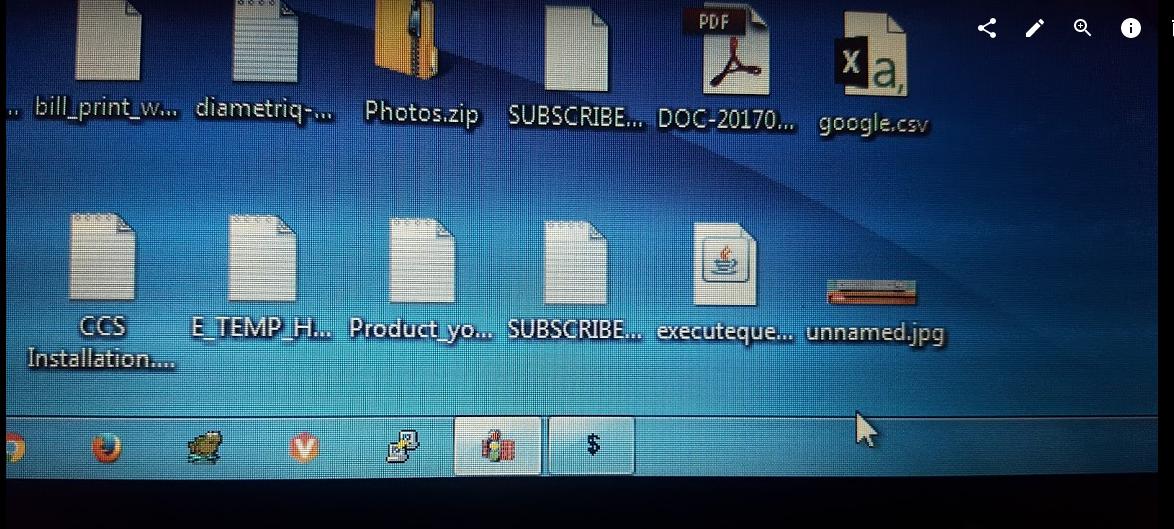
What is icon with "$" sign that comes up temporarily during startup

blacksky200

New member
Local time
6:40 PM
Messages
4
What is icon with "$" sign that comes up temporarily during startup

I am currently trying to figure out why some of the times my laptop takes ~20 mins to boot up, when I start my laptop (generally after a gap of a few hours). Other times or after a restart it is fine.

Question here is though about an icon that appear in the taskbar when the windows starts up and starts all the services. The icon appears for a bit and disappears and clicking on it did nothing (as far as I could tell).

GAvTaBq.jpg


Now, it could be something malicious or it could be a normal process that temporarily starts up and I am only seeing it because every process was very slow. So slow that I even saw a status of Windows "playing logging off sound" when i tried to shut the computer down.

Any help on the app with "$" sign would be helpful
 

My Computer My Computer

At a glance

Windows 7 Professional 64 biti5-4200U 1.6GHz 2.30GHz8GB-
Computer type
PC/Desktop
Computer Manufacturer/Model Number
HP Elitebook G1
OS
Windows 7 Professional 64 bit
CPU
i5-4200U 1.6GHz 2.30GHz
Memory
8GB
Graphics Card(s)
-
Hard Drives
500GB 7200rpm
Antivirus
MalwareBytes Anti-Malware, McAfee
Browser
Chrome/Firefox/IE
Hold down the Windows Key and Tap the "R" key

In the box that appears type "msconfig.exe" (no Quotes)

The MSConfig Applet will start - on the start-up tab you should see a list of all the programs that start automatically, (actually most not all due to some technical items being started by alternate means), investigate these items, Use google or upload a screenshot of the app here and we'll see what we can advise, and disable those you do not "need" - Think to yourself " do I really want to start "X program" every time to save the 10 seconds it takes to manually open it.

Have a look for anything that may be producing the $ icon especially If we cannot tie this down we can move this thread to our security section and let the pros have a go at solving any possible malware infection
 

My Computers My Computers

  • At a glance

    Windows 11 Pro x64 [Latest Release and Releas...Ryzen 9 5950X, 3.8 - 5.2 MHz64GB [2 x 32GB] DDR4 3200MHz4GB NVIDIA GEFORCE GTX 1650 Ti
    Computer type
    PC/Desktop
    Computer Manufacturer/Model Number
    ChillBlast - Custom to my design
    OS
    Windows 11 Pro x64 [Latest Release and Release Preview]
    CPU
    Ryzen 9 5950X, 3.8 - 5.2 MHz
    Motherboard
    Asus Prime X570-Pro
    Memory
    64GB [2 x 32GB] DDR4 3200MHz
    Graphics Card(s)
    4GB NVIDIA GEFORCE GTX 1650 Ti
    Sound Card
    On-board SPDIF to 5.1 System + HDMI [5.1 system]
    Monitor(s) Displays
    32" UHD 32 Bit HDR Monitor + 43" UHD 4K 32Bit HDR TV
    Screen Resolution
    2 x 3840 x 2160 @60Hz
    Hard Drives
    1TB M2 SSD OS, 500GB Fast Access SSD, 2 x 8TB Data + Various Externals from 1TB to 4TB, 10TB NAS
    PSU
    NZXT C750 80 PLUS Gold 750W Modular PSU
    Case
    Workstation Case [Matt Black]
    Cooling
    NZXT Kraken X63 280mm CPU Cooler +2x Quiet Case fans
    Keyboard
    Logitech Wireless MX Keys & K400 + others
    Mouse
    Logitech Wireless MX Master 3S
    Internet Speed
    920 MB Down 50 MB Up
    Antivirus
    BitDefender Total Security Pro
    Browser
    Chrome (always run latest Non-Beta)
    Other Info
    Also run ...
    Laptop - Quad 8GB - Windows 10 Pro x64
    Nexus 7 Android tablet x2
    Samsung 10.2" tablet
    Blackview TAB 8 4G Android Tablet c/w Keyboard
    Wacom Intuos Pro Medium Pen Pad
    Wacom Intuos Pro Small Pen Pad
    Wacom Expresskeys Remote
    Loopdeck+ Graphics Controller
    Shuttle Pro v2 Control
  • At a glance

    Windows 11 Pro x64 Latest RPIntel I7 10750H 5.0GHz32GB [2x16GB] DDR4 2933 MHznVidia GTX1650Ti 4 GB GDDR6
    Computer type
    Laptop
    System Manufacturer/Model Number
    Dell XPS 17 10750H
    OS
    Windows 11 Pro x64 Latest RP
    CPU
    Intel I7 10750H 5.0GHz
    Motherboard
    Dell XPS
    Memory
    32GB [2x16GB] DDR4 2933 MHz
    Graphics Card(s)
    nVidia GTX1650Ti 4 GB GDDR6
    Sound Card
    Stock [Realtek] 4 Speaker
    Monitor(s) Displays
    17" IPS UHD+ Infinity Edge Touchscreen
    Screen Resolution
    3840 x 2400
    Hard Drives
    2TB M2 NVMe, 4TB External + various 500GB & 1TB External NVMe (also have access to spinner HDD from
    PSU
    Stock
    Case
    Stock XPS Aluminium & Carbon Fibre
    Cooling
    Stock - Active Fan Control
    Keyboard
    Backlit + Various Logitech
    Mouse
    Stock Track Pad + Logitech MX Trackball
    Internet Speed
    72 MB Down 18MB Up
    Browser
    Chrome
    Other Info
    Also run ...
    Laptop - Quad 8GB - Windows 10 Pro x64
    Nexus 7 Android tablet x2
    10.2" tablet
    Sony Z3 Android Smartphone
    Wacom Intuos Pro Medium Pen Pad
    Wacom Intuos Pro Small Pen Pad
    Wacom Expresskeys Remote
    Loopdeck+ Graphics Controller
    Shuttle Pro v2 Control Pad
    10TB NAS
Hey Barman58

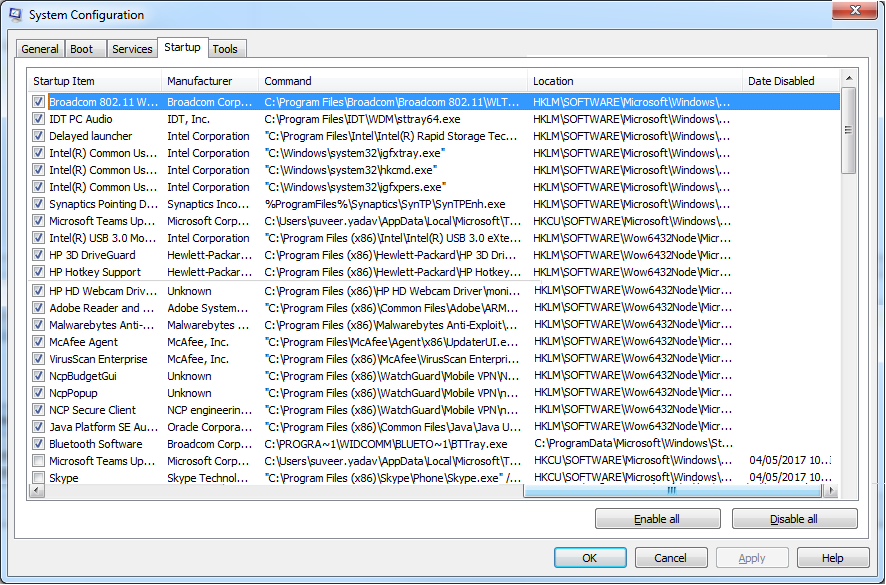
Thanks mate. Hope this tells something:
exjerYS.png
 

My Computer My Computer

At a glance

Windows 7 Professional 64 biti5-4200U 1.6GHz 2.30GHz8GB-
Computer type
PC/Desktop
Computer Manufacturer/Model Number
HP Elitebook G1
OS
Windows 7 Professional 64 bit
CPU
i5-4200U 1.6GHz 2.30GHz
Memory
8GB
Graphics Card(s)
-
Hard Drives
500GB 7200rpm
Antivirus
MalwareBytes Anti-Malware, McAfee
Browser
Chrome/Firefox/IE
That looks to be about 20% of the complete list, (based on the size of the scroll bar), and I can see multiple anti-malware programs, although you may assume that more is better this does not often if anytime apply with anti-malware, it possible that one AM will scan another's files which is in the process of scanning the first AM's files and by the time that loop ends a long time has passed without any productive outcome.

Take a look at the system security section here and you will see a few ideas of the most efficient way to set-up your anti-malware protection, and I have to say it does not often include McAfee products ;)

With the other items keep just the essentials - Eg Adobe Reader running all the time will use a number of resources and save very little time for anyone who is not using PDF files most of the day, especially these days where most of the internet browsers have built in support for PDF.

Not sure what if anything is actually active on the other pages that are not shown - but what I can see it does look a lot like the start-up overload that is normal with OEM laptop installs - It is "fondly" known in the industry and the enthusiasts as Bloatware and causes a lot of systems to underperform significantly to what they should do
 

My Computers My Computers

  • At a glance

    Windows 11 Pro x64 [Latest Release and Releas...Ryzen 9 5950X, 3.8 - 5.2 MHz64GB [2 x 32GB] DDR4 3200MHz4GB NVIDIA GEFORCE GTX 1650 Ti
    Computer type
    PC/Desktop
    Computer Manufacturer/Model Number
    ChillBlast - Custom to my design
    OS
    Windows 11 Pro x64 [Latest Release and Release Preview]
    CPU
    Ryzen 9 5950X, 3.8 - 5.2 MHz
    Motherboard
    Asus Prime X570-Pro
    Memory
    64GB [2 x 32GB] DDR4 3200MHz
    Graphics Card(s)
    4GB NVIDIA GEFORCE GTX 1650 Ti
    Sound Card
    On-board SPDIF to 5.1 System + HDMI [5.1 system]
    Monitor(s) Displays
    32" UHD 32 Bit HDR Monitor + 43" UHD 4K 32Bit HDR TV
    Screen Resolution
    2 x 3840 x 2160 @60Hz
    Hard Drives
    1TB M2 SSD OS, 500GB Fast Access SSD, 2 x 8TB Data + Various Externals from 1TB to 4TB, 10TB NAS
    PSU
    NZXT C750 80 PLUS Gold 750W Modular PSU
    Case
    Workstation Case [Matt Black]
    Cooling
    NZXT Kraken X63 280mm CPU Cooler +2x Quiet Case fans
    Keyboard
    Logitech Wireless MX Keys & K400 + others
    Mouse
    Logitech Wireless MX Master 3S
    Internet Speed
    920 MB Down 50 MB Up
    Antivirus
    BitDefender Total Security Pro
    Browser
    Chrome (always run latest Non-Beta)
    Other Info
    Also run ...
    Laptop - Quad 8GB - Windows 10 Pro x64
    Nexus 7 Android tablet x2
    Samsung 10.2" tablet
    Blackview TAB 8 4G Android Tablet c/w Keyboard
    Wacom Intuos Pro Medium Pen Pad
    Wacom Intuos Pro Small Pen Pad
    Wacom Expresskeys Remote
    Loopdeck+ Graphics Controller
    Shuttle Pro v2 Control
  • At a glance

    Windows 11 Pro x64 Latest RPIntel I7 10750H 5.0GHz32GB [2x16GB] DDR4 2933 MHznVidia GTX1650Ti 4 GB GDDR6
    Computer type
    Laptop
    System Manufacturer/Model Number
    Dell XPS 17 10750H
    OS
    Windows 11 Pro x64 Latest RP
    CPU
    Intel I7 10750H 5.0GHz
    Motherboard
    Dell XPS
    Memory
    32GB [2x16GB] DDR4 2933 MHz
    Graphics Card(s)
    nVidia GTX1650Ti 4 GB GDDR6
    Sound Card
    Stock [Realtek] 4 Speaker
    Monitor(s) Displays
    17" IPS UHD+ Infinity Edge Touchscreen
    Screen Resolution
    3840 x 2400
    Hard Drives
    2TB M2 NVMe, 4TB External + various 500GB & 1TB External NVMe (also have access to spinner HDD from
    PSU
    Stock
    Case
    Stock XPS Aluminium & Carbon Fibre
    Cooling
    Stock - Active Fan Control
    Keyboard
    Backlit + Various Logitech
    Mouse
    Stock Track Pad + Logitech MX Trackball
    Internet Speed
    72 MB Down 18MB Up
    Browser
    Chrome
    Other Info
    Also run ...
    Laptop - Quad 8GB - Windows 10 Pro x64
    Nexus 7 Android tablet x2
    10.2" tablet
    Sony Z3 Android Smartphone
    Wacom Intuos Pro Medium Pen Pad
    Wacom Intuos Pro Small Pen Pad
    Wacom Expresskeys Remote
    Loopdeck+ Graphics Controller
    Shuttle Pro v2 Control Pad
    10TB NAS
Hey

Sorry should have said...... The image was put together on Paint to show all the processes as I couldn't resize the window to show them all. Hence the scroll bar still appears despite showing the full list.

- I am in the process of unticking all the unnecessary programs, so that will help to speed up the loading.
- The McAfee and Malwarebytes combination is enforced by the powers that be at our company and seem to be working without issues for most people.

Thanks for the advice on these.

Any idea on what application brought up the "$" taskbar icon in the OP?
 

My Computer My Computer

At a glance

Windows 7 Professional 64 biti5-4200U 1.6GHz 2.30GHz8GB-
Computer type
PC/Desktop
Computer Manufacturer/Model Number
HP Elitebook G1
OS
Windows 7 Professional 64 bit
CPU
i5-4200U 1.6GHz 2.30GHz
Memory
8GB
Graphics Card(s)
-
Hard Drives
500GB 7200rpm
Antivirus
MalwareBytes Anti-Malware, McAfee
Browser
Chrome/Firefox/IE
I cannot see anything specific to produce the "$", except you have three entries there for NCP... startup items one of which also included Budget in the title NcpbudgetGui that is one I would not be surprised to be the culprit :)
 

My Computers My Computers

  • At a glance

    Windows 11 Pro x64 [Latest Release and Releas...Ryzen 9 5950X, 3.8 - 5.2 MHz64GB [2 x 32GB] DDR4 3200MHz4GB NVIDIA GEFORCE GTX 1650 Ti
    Computer type
    PC/Desktop
    Computer Manufacturer/Model Number
    ChillBlast - Custom to my design
    OS
    Windows 11 Pro x64 [Latest Release and Release Preview]
    CPU
    Ryzen 9 5950X, 3.8 - 5.2 MHz
    Motherboard
    Asus Prime X570-Pro
    Memory
    64GB [2 x 32GB] DDR4 3200MHz
    Graphics Card(s)
    4GB NVIDIA GEFORCE GTX 1650 Ti
    Sound Card
    On-board SPDIF to 5.1 System + HDMI [5.1 system]
    Monitor(s) Displays
    32" UHD 32 Bit HDR Monitor + 43" UHD 4K 32Bit HDR TV
    Screen Resolution
    2 x 3840 x 2160 @60Hz
    Hard Drives
    1TB M2 SSD OS, 500GB Fast Access SSD, 2 x 8TB Data + Various Externals from 1TB to 4TB, 10TB NAS
    PSU
    NZXT C750 80 PLUS Gold 750W Modular PSU
    Case
    Workstation Case [Matt Black]
    Cooling
    NZXT Kraken X63 280mm CPU Cooler +2x Quiet Case fans
    Keyboard
    Logitech Wireless MX Keys & K400 + others
    Mouse
    Logitech Wireless MX Master 3S
    Internet Speed
    920 MB Down 50 MB Up
    Antivirus
    BitDefender Total Security Pro
    Browser
    Chrome (always run latest Non-Beta)
    Other Info
    Also run ...
    Laptop - Quad 8GB - Windows 10 Pro x64
    Nexus 7 Android tablet x2
    Samsung 10.2" tablet
    Blackview TAB 8 4G Android Tablet c/w Keyboard
    Wacom Intuos Pro Medium Pen Pad
    Wacom Intuos Pro Small Pen Pad
    Wacom Expresskeys Remote
    Loopdeck+ Graphics Controller
    Shuttle Pro v2 Control
  • At a glance

    Windows 11 Pro x64 Latest RPIntel I7 10750H 5.0GHz32GB [2x16GB] DDR4 2933 MHznVidia GTX1650Ti 4 GB GDDR6
    Computer type
    Laptop
    System Manufacturer/Model Number
    Dell XPS 17 10750H
    OS
    Windows 11 Pro x64 Latest RP
    CPU
    Intel I7 10750H 5.0GHz
    Motherboard
    Dell XPS
    Memory
    32GB [2x16GB] DDR4 2933 MHz
    Graphics Card(s)
    nVidia GTX1650Ti 4 GB GDDR6
    Sound Card
    Stock [Realtek] 4 Speaker
    Monitor(s) Displays
    17" IPS UHD+ Infinity Edge Touchscreen
    Screen Resolution
    3840 x 2400
    Hard Drives
    2TB M2 NVMe, 4TB External + various 500GB & 1TB External NVMe (also have access to spinner HDD from
    PSU
    Stock
    Case
    Stock XPS Aluminium & Carbon Fibre
    Cooling
    Stock - Active Fan Control
    Keyboard
    Backlit + Various Logitech
    Mouse
    Stock Track Pad + Logitech MX Trackball
    Internet Speed
    72 MB Down 18MB Up
    Browser
    Chrome
    Other Info
    Also run ...
    Laptop - Quad 8GB - Windows 10 Pro x64
    Nexus 7 Android tablet x2
    10.2" tablet
    Sony Z3 Android Smartphone
    Wacom Intuos Pro Medium Pen Pad
    Wacom Intuos Pro Small Pen Pad
    Wacom Expresskeys Remote
    Loopdeck+ Graphics Controller
    Shuttle Pro v2 Control Pad
    10TB NAS
Good spot.

Turns out it is one of the processes that is run by our VPN client (WatchGuard Mobile VPN).

oM774KF.png


It obviously has been running every time system is started, but only noticeable now as the system is sooooo slow ... so slow that...
.....that I even saw a status of Windows "playing logging off sound" when i tried to shut the computer down.


Thanks for looking into this Barman58
 

My Computer My Computer

At a glance

Windows 7 Professional 64 biti5-4200U 1.6GHz 2.30GHz8GB-
Computer type
PC/Desktop
Computer Manufacturer/Model Number
HP Elitebook G1
OS
Windows 7 Professional 64 bit
CPU
i5-4200U 1.6GHz 2.30GHz
Memory
8GB
Graphics Card(s)
-
Hard Drives
500GB 7200rpm
Antivirus
MalwareBytes Anti-Malware, McAfee
Browser
Chrome/Firefox/IE
Back
Top