Solved What is level in Sound Properties?

K1an

New member
Local time
4:44 PM
Messages
6
Location
London
Hay,

Thank you for taking the time to read this post.

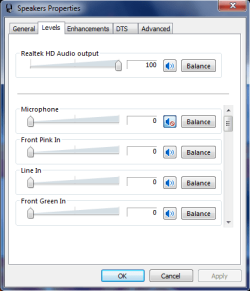
I was playing around with my computer in the audio tab when i came across Sound properties, then i found something called "Level" I was wondering what is this tab for and what are the setting for:

Thank you,

Kian
 

My Computer My Computer

Computer Manufacturer/Model Number
Made By me (Not amazing but it does the job)
OS
Windows 7 Ultimate x64
CPU
Phenom(tm) II X4 965 Processor
Motherboard
Asus M5A99X EVO AMD 990X ATX Motherboard
Memory
16GB Vengeance 1600MHz
Sound Card
On MotherBoard
Monitor(s) Displays
Dell 1905FP
Screen Resolution
1280x1024
Hard Drives
2x 500GB External HDD (Files, Music, Videos, Photos) 1x 2TB internal
PSU
950W Powercool
Case
Power Avenger
Cooling
CollerMaster V8 (For CPU)
Internet Speed
Virgin Media/20MB
Can you post a snip of this please?
 

My Computer My Computer

Computer type
PC/Desktop
Computer Manufacturer/Model Number
Home Built Desktop By DataTech
OS
Windows 7 Ultimate X64 SP1
CPU
Intel i5-2550K, Differing ~4.4-4.8GHz No built in GPU
Motherboard
ASUS P8Z68-V PRO/GEN3
Memory
16GB G.Skill Sniper 1866MHz @ 2133MHz 2x8GB
Graphics Card(s)
ASUS GTX650TIB-DC2OC-2GD5, (650TI Boost)
Sound Card
Onboard Realtek 5-1
Monitor(s) Displays
Samsung P2570HD
Screen Resolution
1920x1080
Hard Drives
Samsung 840 Pro 256GB SSD for OS, 500GB Seagate Constellation (Enterprise drive) for Data
PSU
Corsair HX650W
Case
Inwin Dragon Rider
Cooling
Hyper 212 EVO w/two Noctua fans, push-pull, @1300 RPM
Keyboard
E-Z Eyes, bright yellow keys with large characters
Mouse
steelseries SENSEI Laser Pro Gaming
Internet Speed
48-51Mbs Mbs down, 11 Mbs up Xfinity Cable
Antivirus
Norton Internet Security 2013
Browser
IE 10, Opera, Pale Moon if needed
Other Info
4 case fans, LG BluRay-RE, ASUS DVD-RW, Mr. Fusion power supply, 1.21 gigawatts.

Attachments

  • levels.png
    levels.png
    12.5 KB · Views: 8

My Computer My Computer

Computer Manufacturer/Model Number
Made By me (Not amazing but it does the job)
OS
Windows 7 Ultimate x64
CPU
Phenom(tm) II X4 965 Processor
Motherboard
Asus M5A99X EVO AMD 990X ATX Motherboard
Memory
16GB Vengeance 1600MHz
Sound Card
On MotherBoard
Monitor(s) Displays
Dell 1905FP
Screen Resolution
1280x1024
Hard Drives
2x 500GB External HDD (Files, Music, Videos, Photos) 1x 2TB internal
PSU
950W Powercool
Case
Power Avenger
Cooling
CollerMaster V8 (For CPU)
Internet Speed
Virgin Media/20MB
These are known as line levels or basically input levels. Think of them as in bound volume.
 

My Computer My Computer

Computer type
PC/Desktop
Computer Manufacturer/Model Number
A blend of brains, brawn and dumb luck.
OS
Windows 7 Ultimate 64
CPU
i7 3770k OC'd 4.6 @ 1.17v, also FX 8120 & i5 miniITX
Motherboard
MSI P67A-GD80 b3
Memory
32 gb G.Skill Sniper DDR3 10-12-12-31 @ 2133
Graphics Card(s)
XFX Radeon 7870 2GB DDR5
Sound Card
Sound Blaster Z Series Card
Monitor(s) Displays
(2) LG LED 23" 1920 x 1080 2ms Monitors via mini d-port
Screen Resolution
1680 X 1050 p
Hard Drives
Samsung 256 gb 830 SSD sata III
(1) 1 tb WD Black
(2) 1 tb Hitachi deskmates/sata II
(2) 1 tb WD green/sata II
(2) 3 tb Seagate Barracuda
(1) 120 gb OCZ Vertex SS
(1) Drobo 5N w/5 Seagate 3tb
PSU
EVGA modular 1000G2 80% gold rating & APC 1200 RS
Case
CoolerMaster Storm Styker
Cooling
7 case fans 140mm & 120mm, NZXT Kraken X60
Keyboard
(2) Logitech Illuminated Keyboards (1) usb (1) wireless
Mouse
Logitech G700 & T-BC21 - nano nx for the laptop
Internet Speed
Basic 120mbps down
Antivirus
Trend Micro Titanium Max Security & Malwarebytes Premium
Browser
Chrome and IE 10
Other Info
5 Noctua case fans + 3 Noctua in p/p on NZXT cooler
Integrated hot swap drive bays for 2.5" Drives
(2) Lite-on dvd/cd/Blu Ray optical 22X
Integrated fan controller and led on/off
HP Officejet Pro 8630 all-n-one
Hot-swappable 3.5" hard drive bay
Netgear Nighthawk router
Asus USB 3 & sata 6 PCIe card
Vantec IDE to sata adptr./Ultra sata adptr
Lenovo L420 i5 lappy with m sata
Drobo 5N advanced NAS
So what are they actually there for,
 

My Computer My Computer

Computer Manufacturer/Model Number
Made By me (Not amazing but it does the job)
OS
Windows 7 Ultimate x64
CPU
Phenom(tm) II X4 965 Processor
Motherboard
Asus M5A99X EVO AMD 990X ATX Motherboard
Memory
16GB Vengeance 1600MHz
Sound Card
On MotherBoard
Monitor(s) Displays
Dell 1905FP
Screen Resolution
1280x1024
Hard Drives
2x 500GB External HDD (Files, Music, Videos, Photos) 1x 2TB internal
PSU
950W Powercool
Case
Power Avenger
Cooling
CollerMaster V8 (For CPU)
Internet Speed
Virgin Media/20MB
They control the amount signal for each item. There so you can adjust them to suit different scenarios. Sometimes a signal to a speaker will be too high distorted or a mic will be real sensitive so you lower the level.

Think of levels as water pressure, and volume as a faucet or valve. Higher pressure can give you more fidelity and the volume the decibel level, or loudness.
 

My Computer My Computer

Computer type
PC/Desktop
Computer Manufacturer/Model Number
Home Built Desktop By DataTech
OS
Windows 7 Ultimate X64 SP1
CPU
Intel i5-2550K, Differing ~4.4-4.8GHz No built in GPU
Motherboard
ASUS P8Z68-V PRO/GEN3
Memory
16GB G.Skill Sniper 1866MHz @ 2133MHz 2x8GB
Graphics Card(s)
ASUS GTX650TIB-DC2OC-2GD5, (650TI Boost)
Sound Card
Onboard Realtek 5-1
Monitor(s) Displays
Samsung P2570HD
Screen Resolution
1920x1080
Hard Drives
Samsung 840 Pro 256GB SSD for OS, 500GB Seagate Constellation (Enterprise drive) for Data
PSU
Corsair HX650W
Case
Inwin Dragon Rider
Cooling
Hyper 212 EVO w/two Noctua fans, push-pull, @1300 RPM
Keyboard
E-Z Eyes, bright yellow keys with large characters
Mouse
steelseries SENSEI Laser Pro Gaming
Internet Speed
48-51Mbs Mbs down, 11 Mbs up Xfinity Cable
Antivirus
Norton Internet Security 2013
Browser
IE 10, Opera, Pale Moon if needed
Other Info
4 case fans, LG BluRay-RE, ASUS DVD-RW, Mr. Fusion power supply, 1.21 gigawatts.
Basically they are there so you don't overdrive the amps ahead of them. A good rule of thumb is the 3/4 rule. When in doubt set it at 70% but if you hear distortions in the recording or through the speakers then back down, if not then raise until you hear distortions or less clarity then back them off. Very doubtful anything in line will heavily distort but I would stick with the 3/4 rule.
 

My Computer My Computer

Computer type
PC/Desktop
Computer Manufacturer/Model Number
A blend of brains, brawn and dumb luck.
OS
Windows 7 Ultimate 64
CPU
i7 3770k OC'd 4.6 @ 1.17v, also FX 8120 & i5 miniITX
Motherboard
MSI P67A-GD80 b3
Memory
32 gb G.Skill Sniper DDR3 10-12-12-31 @ 2133
Graphics Card(s)
XFX Radeon 7870 2GB DDR5
Sound Card
Sound Blaster Z Series Card
Monitor(s) Displays
(2) LG LED 23" 1920 x 1080 2ms Monitors via mini d-port
Screen Resolution
1680 X 1050 p
Hard Drives
Samsung 256 gb 830 SSD sata III
(1) 1 tb WD Black
(2) 1 tb Hitachi deskmates/sata II
(2) 1 tb WD green/sata II
(2) 3 tb Seagate Barracuda
(1) 120 gb OCZ Vertex SS
(1) Drobo 5N w/5 Seagate 3tb
PSU
EVGA modular 1000G2 80% gold rating & APC 1200 RS
Case
CoolerMaster Storm Styker
Cooling
7 case fans 140mm & 120mm, NZXT Kraken X60
Keyboard
(2) Logitech Illuminated Keyboards (1) usb (1) wireless
Mouse
Logitech G700 & T-BC21 - nano nx for the laptop
Internet Speed
Basic 120mbps down
Antivirus
Trend Micro Titanium Max Security & Malwarebytes Premium
Browser
Chrome and IE 10
Other Info
5 Noctua case fans + 3 Noctua in p/p on NZXT cooler
Integrated hot swap drive bays for 2.5" Drives
(2) Lite-on dvd/cd/Blu Ray optical 22X
Integrated fan controller and led on/off
HP Officejet Pro 8630 all-n-one
Hot-swappable 3.5" hard drive bay
Netgear Nighthawk router
Asus USB 3 & sata 6 PCIe card
Vantec IDE to sata adptr./Ultra sata adptr
Lenovo L420 i5 lappy with m sata
Drobo 5N advanced NAS
Back
Top