

- Local time
- 10:46 PM
- Messages
- 111
Play Back Devices on Screen
Hi Gang,
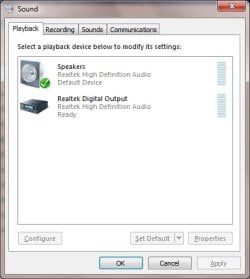
When a customer starts Windows 7, Play Back Devices appears on the desktop. It shows default speakers for a USB device (Skype Mobile) and the laptop's speakers as default as well. The image below is from my own computer, but his would have the two speakes showing. I can open Task Manager and end the process, but each time he starts his computer the box appears again.
I don't see launch Play Back Devices in Startup and it's not a service. It's also not in Programs/Startup.
What might automatically launch Play Back Devices?
Any ideas?
Hi Gang,
When a customer starts Windows 7, Play Back Devices appears on the desktop. It shows default speakers for a USB device (Skype Mobile) and the laptop's speakers as default as well. The image below is from my own computer, but his would have the two speakes showing. I can open Task Manager and end the process, but each time he starts his computer the box appears again.
I don't see launch Play Back Devices in Startup and it's not a service. It's also not in Programs/Startup.
What might automatically launch Play Back Devices?
Any ideas?
Attachments
Last edited:
My Computer
At a glance
W7 64 BitAMD Phenom x4 4000Mhz8 GB DDR-2PNY-NVIDIA GeForce GTX 460 1GB GDDR5 PCI-e
- Computer Manufacturer/Model Number
- My own Custom Build: Asus, Corsair, Transcend, AMD, PNY, Ultra
- OS
- W7 64 Bit
- CPU
- AMD Phenom x4 4000Mhz
- Memory
- 8 GB DDR-2
- Graphics Card(s)
- PNY-NVIDIA GeForce GTX 460 1GB GDDR5 PCI-e
- Monitor(s) Displays
- Dual: Flatron L1942T
- Hard Drives
- C: Drive (Agility 2 Solid State Drive 60 GB)
D: Drive (HDD Internal Western Digital 640 GB)
- PSU
- 650 Watt
- Cooling
- Corsair Hydro H6 Liquid Cooler
- Internet Speed
- 25 mbps down - 3 mbps up

