Solved what is the best dragon ball Z/GT pc game that supports a usb joystick

labibsharar

New member
Member
Local time
10:14 AM
Messages
73
what is the best dragon ball Z/GT pc game that supports a usb joystick?
 
Last edited:

My Computer My Computer

At a glance

Windows 7 Ultimate x648gbnvidia geforce gt 335m and intel r hd graphics
Computer type
Laptop
Computer Manufacturer/Model Number
alienware m11x r2
OS
Windows 7 Ultimate x64
Memory
8gb
Graphics Card(s)
nvidia geforce gt 335m and intel r hd graphics
Browser
google chrome
There aren't any.

There hasn't been a DBZ game released on PC since 1994.

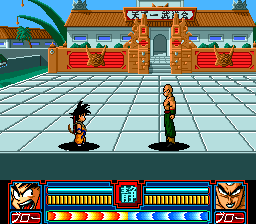
It was called Dragon Ball: Idainaru Son Goku Densetsu. That translates to 'Wonderful Legends of Son Goku'. You could only play as Goku and fought through the major battles throughout the manga. Technically there were a whopping two playable characters as you played as both old and young Goku. It had no multiplayer, and played about as bad as it looks here:

6138.jpg


Good luck finding it, it's extremely obscure, you'd have to buy an import version, and it's not very good. So, unless you've got access to one of those classic game stores on Akihabara and can speak and read Japanese, you're out of luck. Not to mention, it doesn't support a USB joystick or multiplayer.

DBZ licensed games are exclusive to consoles and have been for the last 9 years. Even before that they were few and far between and usually not very good.
 
Last edited:

My Computer My Computer

At a glance

Windows 7 Home premiumI7 3770 3.4Corsair Vengance ddr3 8gb x2 1600 [@ 2400]AMD 7970 6GB x3 [currently x2 until x3 is act...
Computer type
PC/Desktop
Computer Manufacturer/Model Number
Home built
OS
Windows 7 Home premium
CPU
I7 3770 3.4
Motherboard
Republic of Gamers Maximus V
Memory
Corsair Vengance ddr3 8gb x2 1600 [@ 2400]
Graphics Card(s)
AMD 7970 6GB x3 [currently x2 until x3 is actually useful]
Sound Card
N/A
Monitor(s) Displays
Visio 47" 3D/Acer 27" 3D
Screen Resolution
1920x1080 120mhz Passive 3D
Hard Drives
Samsung 830 series SSD 512gb x2
Seagate 2tb x2
Segate 750 Gb
PSU
1500w
Case
Coolermaster
Cooling
Noctua D14
Keyboard
Logitech g10
Mouse
Naga Razer
Internet Speed
30mb Cable
Antivirus
Like I'd tell.
Browser
Waterfox mostly.
thanks for the great reply!!
but, can i use a ps2 emulator and then play it with a usb joystick?
 

My Computer My Computer

At a glance

Windows 7 Ultimate x648gbnvidia geforce gt 335m and intel r hd graphics
Computer type
Laptop
Computer Manufacturer/Model Number
alienware m11x r2
OS
Windows 7 Ultimate x64
Memory
8gb
Graphics Card(s)
nvidia geforce gt 335m and intel r hd graphics
Browser
google chrome
thanks for the great reply!!
but, can i use a ps2 emulator and then play it with a usb joystick?

Well, games this old have their own sets of problems on modern Windows systems, not to mention foreign import games from Asia, Japan in particular can also be a pain to run.

Like I said, it's kind of a hard game to find, and everything is Japanese. There are no options for any other languages. You'll have to set up your computer to accept Japanese input as well if you haven't already or it won't run properly. It's also considered a classic game and a collectible item so expect to pay qute a bit if you do manage to dig it up.

You'll also probably have to have a software emulator or run it in compatibility mode because it's so old and the fact that it's in a foreign language will make it even more difficult to run on a modern Windows PC.

However, if you're able to find yourself a copy and you can manage to get it to run on your computer, both of which will take quite a bit of work, you'll be able to use any keyboard emulator like Joy2pad or Xpadder to make it work with any gamepad or joystick. So, as long as the emulator allows you to assign keyboard commands to the gamepad, then yes. If not, you'll still be able to do it, but you'll need 3rd party software like one of the programs I mentioned above.

Like I said, it's kind of hard to find, and everything is Japanese. There are no options for any other languages. You'll have to set up your computer to accept Japanese input as well if you haven't already or it won't run properly.

You'll also probably have to have a software emulator or run it in compatibility mode because it's so old and the fact that it's in a foreign language will make it even more difficult to run on a modern Windows PC.

Honestly, it would actually be easier to just pick up a PS2 and grab some of the Bandai Dragon Ball titles. It wouldn't cost you nearly as much money. Honestly, buying a used 360 and some of the newest Dragon Ball games would probably still be cheaper.

I suggest just buying a used PS2 or 360 and grabbing a few DB games that way. Dragon Ball console titles are much better, and won't need software emulation or compatibility settings to play them.

It's not worth the effort or expense to play a game that old on PC when there are better and much newer console games available that are both cheaper and easier to find and run.

 

My Computer My Computer

At a glance

Windows 7 Home premiumI7 3770 3.4Corsair Vengance ddr3 8gb x2 1600 [@ 2400]AMD 7970 6GB x3 [currently x2 until x3 is act...
Computer type
PC/Desktop
Computer Manufacturer/Model Number
Home built
OS
Windows 7 Home premium
CPU
I7 3770 3.4
Motherboard
Republic of Gamers Maximus V
Memory
Corsair Vengance ddr3 8gb x2 1600 [@ 2400]
Graphics Card(s)
AMD 7970 6GB x3 [currently x2 until x3 is actually useful]
Sound Card
N/A
Monitor(s) Displays
Visio 47" 3D/Acer 27" 3D
Screen Resolution
1920x1080 120mhz Passive 3D
Hard Drives
Samsung 830 series SSD 512gb x2
Seagate 2tb x2
Segate 750 Gb
PSU
1500w
Case
Coolermaster
Cooling
Noctua D14
Keyboard
Logitech g10
Mouse
Naga Razer
Internet Speed
30mb Cable
Antivirus
Like I'd tell.
Browser
Waterfox mostly.
thanks,oh and how can i use my ps3 controller in these games(connect it to my laptop)?
 

My Computer My Computer

At a glance

Windows 7 Ultimate x648gbnvidia geforce gt 335m and intel r hd graphics
Computer type
Laptop
Computer Manufacturer/Model Number
alienware m11x r2
OS
Windows 7 Ultimate x64
Memory
8gb
Graphics Card(s)
nvidia geforce gt 335m and intel r hd graphics
Browser
google chrome

My Computer My Computer

At a glance

Windows 7 Home premiumI7 3770 3.4Corsair Vengance ddr3 8gb x2 1600 [@ 2400]AMD 7970 6GB x3 [currently x2 until x3 is act...
Computer type
PC/Desktop
Computer Manufacturer/Model Number
Home built
OS
Windows 7 Home premium
CPU
I7 3770 3.4
Motherboard
Republic of Gamers Maximus V
Memory
Corsair Vengance ddr3 8gb x2 1600 [@ 2400]
Graphics Card(s)
AMD 7970 6GB x3 [currently x2 until x3 is actually useful]
Sound Card
N/A
Monitor(s) Displays
Visio 47" 3D/Acer 27" 3D
Screen Resolution
1920x1080 120mhz Passive 3D
Hard Drives
Samsung 830 series SSD 512gb x2
Seagate 2tb x2
Segate 750 Gb
PSU
1500w
Case
Coolermaster
Cooling
Noctua D14
Keyboard
Logitech g10
Mouse
Naga Razer
Internet Speed
30mb Cable
Antivirus
Like I'd tell.
Browser
Waterfox mostly.
Thanks for all the help!!!
 

My Computer My Computer

At a glance

Windows 7 Ultimate x648gbnvidia geforce gt 335m and intel r hd graphics
Computer type
Laptop
Computer Manufacturer/Model Number
alienware m11x r2
OS
Windows 7 Ultimate x64
Memory
8gb
Graphics Card(s)
nvidia geforce gt 335m and intel r hd graphics
Browser
google chrome
Yea you can use a emulator I ripped my hard copy into a iso on my pc of tenchachi 3 and use a ps3 controller with it and works great once you get it set up right. Just use a ps2 emulator, much better experience then using my ps2 since my computer can put aa and up the resloution and runs great for me at 60fps always capped. hehe
 

My Computer My Computer

At a glance

Windows 10 64bitAMD Phenom II X4 925 (Deneb)(2.8GHz) OC 3.4GHzCorsair Vengeance DDR3 4GBX2 (8192MB)XFX HD 6870 1GB (OC)- 940MHz core, mem 1150MHz
Computer type
PC/Desktop
Computer Manufacturer/Model Number
custom build
OS
Windows 10 64bit
CPU
AMD Phenom II X4 925 (Deneb)(2.8GHz) OC 3.4GHz
Motherboard
M5A78L-MLX Plus
Memory
Corsair Vengeance DDR3 4GBX2 (8192MB)
Graphics Card(s)
XFX HD 6870 1GB (OC)- 940MHz core, mem 1150MHz
Monitor(s) Displays
Vizio 26' 1920x1080 / Acer 1336x768
Screen Resolution
1920x1080 60Hz /1336x768
Hard Drives
Kingston Digital 60GB SSDNow V300/500gb HDD Western Digital 7200rpm (/WD 160GB HDD 7200rpm
PSU
CORSAIR CX600 600w
Case
AZZA Orion 202 EVO
Cooling
cooler master hyper TX3 cpu cooler
Keyboard
Razer DeathStalker
Mouse
Logitech Optical Gaming Mouse G400
Antivirus
Defualt on win 10
Browser
Firefox
Other Info
cpu is overclocked in bios
Back
Top