What is the best free defragger?

After a reboot, the Icon Image is gone, bummer. The program still works though.
 

My Computer My Computer

At a glance

Windows 7Intel Core i7 960 Bloomfield6.00 GB Triple-Channel DDR3 @ 533MHz (8-8-8-20)FHD2401 (1920x1200@59Hz) NVIDIA GeForce GTX 480
OS
Windows 7
CPU
Intel Core i7 960 Bloomfield
Motherboard
ASUSTeK Computer INC. Rampage III Formula (LGA1366)
Memory
6.00 GB Triple-Channel DDR3 @ 533MHz (8-8-8-20)
Graphics Card(s)
FHD2401 (1920x1200@59Hz) NVIDIA GeForce GTX 480
Sound Card
Realtek High Definition Audio
Monitor(s) Displays
Gateway 24" HD UltraReponse 2MS UltraColor 92% Glossy
Screen Resolution
1920x1200
Hard Drives
977GB Western Digital WDC WD10 01FALS-00E8B0 SCSI Disk Device (SATA)

USB Storage: Seagate FreeAgent USB Device

USB Storage: Seagate FreeAgentDesktop USB Device

USB Storage: STECH Simple Drive USB Device
PSU
CyberPower 1350AVR Batter Backup
Case
Cooler Master HAF Full Tower
Cooling
Cooler Master V8 RR-UV8-XBU1-GP 120mm
Keyboard
LogiTech Wave Wireless
Mouse
Logitech HID-compliant G5 Laser Mouse
Internet Speed
22.32MB
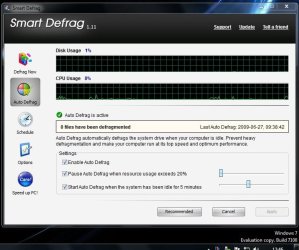
I'm using Smart Defrag by iobit. Works well. Has all the options you could want, schedule, work all the time in the background etc.

The main advantage that can be offered by Defraggers is if they move most frequently used files and directories into the fastest area of the disk. Smart defrag does that (as does PerfectDisk mentioned above).That can noticeably improve speed on your rig (when you first do it at least).

Defragmentation itself really isn't a big deal. Forking out money for a Defragger is almost certainly a complete waste, and the built in Defragmentation routine in Win 7 is probably plenty good enough!

Defragging the registry is IMO complete snake oil and absolutely unneccesary. Much more dangerous than any claimed benifits you might get. But really there are no benefits, just as there are no benefits from a registry cleanup tool. Removing a few hundred lines from a Registry Hive will have absolutely NO effect on speed or efficiency. None has ever been reported because it doesn't work.

I agree with this guy.
I also use smart Defrag
 

My Computer My Computer

At a glance

Windows 7 Ultimate 32bit, Mac OS Snow Leopard...P4 2.4ghz @ 2.56Ghz1gb DDR7600GT AGP 4X
OS
Windows 7 Ultimate 32bit, Mac OS Snow Leopard 10.6
CPU
P4 2.4ghz @ 2.56Ghz
Memory
1gb DDR
Graphics Card(s)
7600GT AGP 4X
Sound Card
Onboard
Monitor(s) Displays
19LG
Screen Resolution
1280x1024
Hard Drives
120GB WD Caviar
80 Seagate Barracuda
PSU
430W Thermaltake
Keyboard
Logitech Media Keyboard
Internet Speed
1.5MB
defraggler for me here
 

My Computer My Computer

At a glance

Win 7 64bitQ6600Corsair 4GB8800 GTS & 7900GTX 512's
Computer Manufacturer/Model Number
Custom Built
OS
Win 7 64bit
CPU
Q6600
Motherboard
Abit IP35 Pro
Memory
Corsair 4GB
Graphics Card(s)
8800 GTS & 7900GTX 512's
Monitor(s) Displays
Samsung
Screen Resolution
1680x1050
Hard Drives
quite a few, total size 3TB
Case
Coolermaster CM stacker 01
Keyboard
Eclipse 2
Mouse
MX518
Internet Speed
16Mb
I've been using AusLogics, downloaded and just used 'Quicksys DiskDefrag'... it kind of reminds me of O&O (in a way), slow, but I'll try it with Vista and XP just to make sure I like it.
 

My Computer My Computer

At a glance

Windows 7 Ultimate 32bit SP1Intel(R) Core(TM)2 Quad CPU @ 2.40GHz, 2400 MHz4 GBATI Radeon HD 2600 Pro
Computer type
PC/Desktop
Computer Manufacturer/Model Number
Bruce ... somewhere in his 40's
OS
Windows 7 Ultimate 32bit SP1
CPU
Intel(R) Core(TM)2 Quad CPU @ 2.40GHz, 2400 MHz
Motherboard
INTEL/D975XBX2
Memory
4 GB
Graphics Card(s)
ATI Radeon HD 2600 Pro
Monitor(s) Displays
Samsung SyncMaster 914v
Screen Resolution
1280 x 1024
Hard Drives
2/500GB each ... ST3500630AS ATA Device.
One is not connected
PSU
Rocketfish 700 W
Case
G.Skill Gigabyte Chassis
Keyboard
Standard PS/2 Keyboard
Mouse
Microsoft PS/2 Mouse
Internet Speed
DSL
Antivirus
Avira Internet Security
Browser
IE 11
Other Info
ATI HDMI Audio
Windows Defragger only consolidate the Hard Driver, in other words just put the files all together. (Don't no really about Windows 7 Defragger)

The difference in Windows Defragger and others third part defraggers it is because the other defraggers can do another methods like Volatility, Recency, by folder or file name, etc..

There are many many horrible and useless defraggers out there so be careful..

And about defragger the registry, that is a little bit stupid, don't do that.

Bye bye. :p
 

My Computer My Computer

At a glance

Windows 7 Ultimate x64Intel Core i7 2600KG.Skill RipJawsX 8GB (2x4GB) DDR3 PC3-12800AMD/ATI XFX Radeon HD 6970
Computer Manufacturer/Model Number
Desktop
OS
Windows 7 Ultimate x64
CPU
Intel Core i7 2600K
Motherboard
ASRock Fatal1ty P67 Professional
Memory
G.Skill RipJawsX 8GB (2x4GB) DDR3 PC3-12800
Graphics Card(s)
AMD/ATI XFX Radeon HD 6970
Screen Resolution
1920x1080
Hard Drives
WD Caviar Black 1TB
WD Caviar Blue 500GB
Crucial C300 64GB (SSD)
PSU
CM Silent Pro Gold 1000W
Case
CM HAF X
Cooling
Corsair A70
Keyboard
Thermaltake Tt eSPORTS Challenger Pro
Mouse
Thermaltake Tt eSPORTS Black
I prefer to stick with Microsoft programs for this department... I use one called Contig which has done me well for many years...

Contig

A bit of a contradiction there....


Windows Defrag FTW!, it's designed by MS for their very own Win 7... Who knows their own OS better?
Don't forget it's still a beta, and the rest of the world is mainly still guessing what might work (or even 'seem to')...

As far as system tools go, as long as 7 is Beta, everything else claiming to be Win7 compatible is still just a guess (or 'Beta' if you prefer lol!). Nothings set in concrete 'till the final arrives.

EDIT: and +1 to the above post. :)
 

My Computer My Computer

At a glance

XP Pro SP3 x86/Vista SP2 x64/Win7 x64 Triple-...AMD64 X2 AM2 5000+Corsair TWX 2Gb (2x1Gb) DDR2 800MhzPCI-X 2.0 Inno3D (NVidia) 9500GT 1Gb DDR2
Computer Manufacturer/Model Number
Self Built
OS
XP Pro SP3 x86/Vista SP2 x64/Win7 x64 Triple-boot
CPU
AMD64 X2 AM2 5000+
Motherboard
Asus MSN-X Plus
Memory
Corsair TWX 2Gb (2x1Gb) DDR2 800Mhz
Graphics Card(s)
PCI-X 2.0 Inno3D (NVidia) 9500GT 1Gb DDR2
Sound Card
Onboard Realtec ALC662-GR
Monitor(s) Displays
Relisys 17' CRT (model unknown)
Screen Resolution
1024x768
Hard Drives
750Gb Samsung 7200-3Gb/s 32Mb Cache SATA
PSU
500W
Cooling
Standard AMD CPU Fan, One side, front and rear case fan.
Keyboard
Microsoft Multimedia Keyboard
Mouse
Samsung Optical
Internet Speed
10M
I have been using only windows defragger for sometime and today I installed auslogics defragger program and its showing a lot of spaces. So whats the best?
windows has its own ms-dos command to defrag the drives
it is "defrag c: -w"
it will defrag the c drive....you can replace it with the location you want....believe me..it is the best :)
rep. me if you find it helpful :)
thanks,
 

My Computer My Computer

At a glance

Windows 7 ultimate 7260 x32
OS
Windows 7 ultimate 7260 x32
yes MS does have their own built in Defrag programs which do work well in and of itself... but the Contig I mentioned is one that not only just moves files together... but it actually looks at individual files to see if they are split into more than one place on the hard drive, then places them together, then moves everything back together.... excellent program!
There is also a front side GUI that uses the contig for the defragmentation called Power Defragmenter GUI...
but it does help after installing/unzipping this program, that you go to my previous link at Microsoft and download the latest contig program and replace the contig that comes with the Power Defragmenter program.... especially with W7
 

My Computer My Computer

At a glance

Win7, XP, Vista x64, Ubuntu 9.04Desktops: E6600, E2140, XP3000+; Laptop: Cele...Desktops: 4GB, 3GB, 1GB; Laptop: 2GBDesktops: 320MB 8800GTS, 128MB 7300GTS, 128MB...
Computer Manufacturer/Model Number
Custom built desktops and a Compaq CQ60-211DX laptop
OS
Win7, XP, Vista x64, Ubuntu 9.04
CPU
Desktops: E6600, E2140, XP3000+; Laptop: Celeron 585
Motherboard
Desktops: GA-EP35-DS3P, GA-P965-DS3, A7N8X
Memory
Desktops: 4GB, 3GB, 1GB; Laptop: 2GB
Graphics Card(s)
Desktops: 320MB 8800GTS, 128MB 7300GTS, 128MB 9600XT
Sound Card
Creative or onboard
Monitor(s) Displays
19" widescreen, 17" CRT, 19" CRT, and 15.6" LCD on laptop.
Screen Resolution
1440x900, 1280x1024.... 1366x768
Hard Drives
Desktop 1: 320GB Seagate main, 500GB WD backup, 120GB WD testing
Desktop 2: 80GB server
Desktop 3: 160GB main, 250GB backup
Laptop: 160GB
PSU
varies, 350W to 550W
Internet Speed
8Mb+ cable
is there freeby that defrags the MFT files on boot up? like Perfect Disk does? my "trial" of that has expired. i've been using Defragler (i like it). but it cant get to those stubborn system files.
 

My Computer My Computer

At a glance

Windows 7 Ultimate x32Intel Celeron D 3.2 Ghz 533 fsb (LGA 775)1 GB (2x512MB) PC-3200 DDR @ 200MhzNvidia GeForce 9400GT- 1GB
Computer Manufacturer/Model Number
eMachines W3502
OS
Windows 7 Ultimate x32
CPU
Intel Celeron D 3.2 Ghz 533 fsb (LGA 775)
Motherboard
Intel D101GGC
Memory
1 GB (2x512MB) PC-3200 DDR @ 200Mhz
Graphics Card(s)
Nvidia GeForce 9400GT- 1GB
Sound Card
Sound Blaster X-Fi Xtreame Gamer
Monitor(s) Displays
19" LCD HDtv
Screen Resolution
1360x768 @ 60Htz
Hard Drives
SeaGate Barracuda 750GB
SeaGate Barracuda 100GB
Toshiba CD/DVDW/ TS-H552D [DVD+R, DL]
PSU
stock (idk)
Case
The busted remains of the stock case
Cooling
Dust cooled, waitwut?
Keyboard
Stock. Missing a few keys.
Mouse
Logitech LX8 5-btn mouse (wireless)
Internet Speed
TWC 10Mb
Other Info
Keeps going, and going, and going.......
Thanks to screwball for drawing attention to Mark Russinovich's Contig file defragmenter which seems to play a very particular role in Defragmentation - in a word to make particular files contiguous on disk.

Wikipedia describes what it does as follows
Contig is designed to defragment individual files and does not attempt to move files to the beginning of the partition. Contig has advantages over the Windows built in defragementor tool in that it can target individual files, individual directories, and subsets of the file system using wildcards.


Contig does not move any data except that belonging to the file in the question, so the amount it can defrag a file is limited to the largest contiguous block of free space on a system. Use of contig exchanges decreased file fragmentation for increased free space fragmentation.


Given that Russinovich is the SysInternals guy at Technet and one of the leading public faces as an MS systems engineer and architect you gotta give respect there. BTW pretty well all SysInternal tools, including Contig can be run online now! (Still, i have, Process Explorer and Autoruns installed, excellent programs)

I'm wondering whether using Contig first, then a defragmenter (like SmartDefrag or Perfect Disk) which moves frequently used files to the front of the disk - would give the best of both worlds?

As I originally said, all this is probably overkill but ....
 

My Computer My Computer

At a glance

Windows 7 Ultimate, UbuntuDDR 2Gb (!)6600GT
Computer Manufacturer/Model Number
AMD Athlon 64 3200+, Lenovo G560 i3
OS
Windows 7 Ultimate, Ubuntu
Motherboard
Gigabyte K8T8000
Memory
DDR 2Gb (!)
Graphics Card(s)
6600GT
Monitor(s) Displays
MultiMonitor (2) LCD
Hard Drives
Old Seagate 75
Big Western Digital
Samsung 500Gb pulled out of an external drive and installed
Ext: Maxtor (Firewire), 1Gb Lacie (Samsung)
Mouse
Logitech MX620 Cordless

My Computers My Computers

  • At a glance

    7 X64i5 84002x8gb 3200mhz
    Computer type
    PC/Desktop
    OS
    7 X64
    CPU
    i5 8400
    Motherboard
    gigabyte b365m ds3h
    Memory
    2x8gb 3200mhz
    Hard Drives
    various
    PSU
    pure power 11 400w cm
    Case
    Coolermaster
    Cooling
    cryorig m9i
  • At a glance

    7x64g54008gb ddr4 2400
    Computer type
    PC/Desktop
    OS
    7x64
    CPU
    g5400
    Motherboard
    ga b365m ds3h
    Memory
    8gb ddr4 2400
    PSU
    xfx pro 450w
I'm surprised no one has mentioned Diskeeper '09, im using that, it does the job for me :D
 

My Computer My Computer

At a glance

W7 RTM Ultimate x64Intel Q8400 @ 2.66GHZ4GB DDR2-800Gainward GTS 450 GLH 1GB Edition
Computer Manufacturer/Model Number
Custom Build
OS
W7 RTM Ultimate x64
CPU
Intel Q8400 @ 2.66GHZ
Motherboard
Gigabyte GA-EG45M-UD2H
Memory
4GB DDR2-800
Graphics Card(s)
Gainward GTS 450 GLH 1GB Edition
Sound Card
Integrated 8 Channel
Monitor(s) Displays
AOC 23.6 Inch Widescreen LCD
Screen Resolution
1920x1080
Hard Drives
Seagate 500GB Internal
Western Digital 1TB Internal

Hitachi 1TB External
PSU
Apevia Java Power 500W
Case
Cooler Master HAF 922 Black
Cooling
Stock Intel CPU Fan
Keyboard
HP SK-2960 Multimedia Keyboard
Mouse
Logitech M350 Wireless Gaming Mouse
Internet Speed
1.5MB

My Computer My Computer

At a glance

Windows 7 Ultimate, UbuntuDDR 2Gb (!)6600GT
Computer Manufacturer/Model Number
AMD Athlon 64 3200+, Lenovo G560 i3
OS
Windows 7 Ultimate, Ubuntu
Motherboard
Gigabyte K8T8000
Memory
DDR 2Gb (!)
Graphics Card(s)
6600GT
Monitor(s) Displays
MultiMonitor (2) LCD
Hard Drives
Old Seagate 75
Big Western Digital
Samsung 500Gb pulled out of an external drive and installed
Ext: Maxtor (Firewire), 1Gb Lacie (Samsung)
Mouse
Logitech MX620 Cordless
LOL. You're welcome.
 

My Computers My Computers

  • At a glance

    7 X64i5 84002x8gb 3200mhz
    Computer type
    PC/Desktop
    OS
    7 X64
    CPU
    i5 8400
    Motherboard
    gigabyte b365m ds3h
    Memory
    2x8gb 3200mhz
    Hard Drives
    various
    PSU
    pure power 11 400w cm
    Case
    Coolermaster
    Cooling
    cryorig m9i
  • At a glance

    7x64g54008gb ddr4 2400
    Computer type
    PC/Desktop
    OS
    7x64
    CPU
    g5400
    Motherboard
    ga b365m ds3h
    Memory
    8gb ddr4 2400
    PSU
    xfx pro 450w
I'm surprised no one has mentioned Diskeeper '09, im using that, it does the job for me :D

Yeah, Diskeeper 2009 is a fantastic utility -fast, thorough and automatic :)
Although it's not free (since the OP specifically asked for a free app), it's a great investment for long term use...well worth the price.
 

My Computer My Computer

At a glance

XP Pro SP3, Windows 7 Pro x64i25008GB 1333 MHzGTX260
OS
XP Pro SP3, Windows 7 Pro x64
CPU
i2500
Motherboard
Asus P8P67
Memory
8GB 1333 MHz
Graphics Card(s)
GTX260
Sound Card
Asus Xonar DG
Monitor(s) Displays
Dell 2407WFP-HC
Screen Resolution
1920x1200
Hard Drives
Several; total 4TB
PSU
Silverstone Zeus 750W
Case
Gigabyte Full Tower
Cooling
Stock
Keyboard
Logitech G15
Mouse
Razer Deathadder
Internet Speed
10Mbps
I'm using Smart Defrag by iobit. Works well. Has all the options you could want, schedule, work all the time in the background etc.

The main advantage that can be offered by Defraggers is if they move most frequently used files and directories into the fastest area of the disk. Smart defrag does that (as does PerfectDisk mentioned above).That can noticeably improve speed on your rig (when you first do it at least).

Defragmentation itself really isn't a big deal. Forking out money for a Defragger is almost certainly a complete waste, and the built in Defragmentation routine in Win 7 is probably plenty good enough!

Defragging the registry is IMO complete snake oil and absolutely unneccesary. Much more dangerous than any claimed benifits you might get. But really there are no benefits, just as there are no benefits from a registry cleanup tool. Removing a few hundred lines from a Registry Hive will have absolutely NO effect on speed or efficiency. None has ever been reported because it doesn't work.


smart defrag is my recommendation!
 

My Computer My Computer

At a glance

Windows 7 -x6Intel Core 2 Extreme QX9650 Processor- (Quad)OCZ Platnum 8gb(2gbx4) PC 6400 DDR2 800MHzEVGA 01G-P3-1145-TR GeForce GTS 250 Video Card
Computer Manufacturer/Model Number
Custom Built - TheTeZ
OS
Windows 7 -x6
CPU
Intel Core 2 Extreme QX9650 Processor- (Quad)
Motherboard
Asus P5N-D Motherboard
Memory
OCZ Platnum 8gb(2gbx4) PC 6400 DDR2 800MHz
Graphics Card(s)
EVGA 01G-P3-1145-TR GeForce GTS 250 Video Card
Sound Card
Realtek ALC883
Monitor(s) Displays
19" WideScreen Mag Innovision & Acer X203H Vertical Mount
Screen Resolution
1440x900 & 1600x900
Hard Drives
Western Digital WD7500AADS Caviar Green Hard Drive - 750GB
Western Digital WD500
Hitachi 1TB Serial ATA HD
PSU
Kingwin Mach 1 Modular Power Supply
Case
NZXT Tempest ATX Mid-Tower Case -- AKA Flow Master
Cooling
Thermaltake SpinQ CPU Cooler - Aerocool Touch 1000 LCD Panel
Very true, but back when all the different releases were dished out, this was great with the trial, you wouldn't have our release any longer then 30days, hence the trial being very very handy :D
 

My Computer My Computer

At a glance

W7 RTM Ultimate x64Intel Q8400 @ 2.66GHZ4GB DDR2-800Gainward GTS 450 GLH 1GB Edition
Computer Manufacturer/Model Number
Custom Build
OS
W7 RTM Ultimate x64
CPU
Intel Q8400 @ 2.66GHZ
Motherboard
Gigabyte GA-EG45M-UD2H
Memory
4GB DDR2-800
Graphics Card(s)
Gainward GTS 450 GLH 1GB Edition
Sound Card
Integrated 8 Channel
Monitor(s) Displays
AOC 23.6 Inch Widescreen LCD
Screen Resolution
1920x1080
Hard Drives
Seagate 500GB Internal
Western Digital 1TB Internal

Hitachi 1TB External
PSU
Apevia Java Power 500W
Case
Cooler Master HAF 922 Black
Cooling
Stock Intel CPU Fan
Keyboard
HP SK-2960 Multimedia Keyboard
Mouse
Logitech M350 Wireless Gaming Mouse
Internet Speed
1.5MB

Attachments

  • ScreenHunter_03Jun271247.jpg
    ScreenHunter_03Jun271247.jpg
    60.8 KB · Views: 22
Last edited:

My Computer My Computer

At a glance

Windows 7 Ultimate RC1 / XP Black 2009Core2Duo E84003GBATI Radeon HD 3850
Computer Manufacturer/Model Number
Home Build
OS
Windows 7 Ultimate RC1 / XP Black 2009
CPU
Core2Duo E8400
Motherboard
MSI
Memory
3GB
Graphics Card(s)
ATI Radeon HD 3850
Hard Drives
W/D 250GB x2
Case
Thermaltake Tsunami Dream
Keyboard
Logitech G15
Mouse
Razer Death Adder
Internet Speed
6.5 - 7 MB
My understanding is that a standalone defragmentation utility is not desired, and that the best thing you can do is nothing:

Engineering Windows 7 : Disk Defragmentation – Background and Engineering the Windows 7 Improvements

Best practices for using defragmentation in Windows 7 are simple – you do not need to do anything! Defragmentation is scheduled to automatically run periodically and in the background with minimal impact to foreground activity. This ensures that data on your hard disk drives is efficiently placed so the system can provide optimal responsiveness
 

My Computer My Computer

At a glance

Windows 7 (x64)Intel Core i7 960 @ 3.8GHz (3.2GHz stock)6GB OCZ DDR3 1600Powercolor AX5870 (ATI 5870 w/improved cooling)
Computer Manufacturer/Model Number
Home Built
OS
Windows 7 (x64)
CPU
Intel Core i7 960 @ 3.8GHz (3.2GHz stock)
Motherboard
EVGA E758 X-58
Memory
6GB OCZ DDR3 1600
Graphics Card(s)
Powercolor AX5870 (ATI 5870 w/improved cooling)
Sound Card
Omega Claro+
Monitor(s) Displays
1. Acer P243W (24") 2. Samsung T260 HD HDMI HDTV/Monitor
Screen Resolution
1920 x 1200 x 2
Hard Drives
(1) 128GB Kingston SNVP325-S2 SSD for OS/Games
(2) 500GB WD Caviar Black - Storage
PSU
Corsair CMPSU-850HX
Case
Lian Li PC-K60WB
Cooling
Thermalright Venemous-X
Keyboard
Microsoft Natural keyboard 4000
Mouse
Microsoft Sidewinder
Internet Speed
Cable
Other Info
165 bclk, 23 Multi
  • Like
Reactions: t41
My understanding is that a standalone defragmentation utility is not desired, and that the best thing you can do is nothing:

Engineering Windows 7 : Disk Defragmentation – Background and Engineering the Windows 7 Improvements
.
I read the article linked above, and then I tried the Windows 7 defragger. Although I would agree that it is somewhat improved compared with Vista I don't think that adding "percentage complete" status constitutes "listening" to all the feedback given about Vista defrag. The disk map implemented in XP has an important function - it is not simply entertainment. For instance I recently ran defrag on an XP machine which only had 25% free space. Although the process completed without error and did not give a low disk space warning, the disk map showed that fragmentation was still very bad. I then installed PerfectDisk and did both a boot-time defrag and a couple of passes in Windows. When it was done the data was fully defragged and moved to front edge of the drive. Without the disk map there would be no way to determine this. Ideally you want to not only defrag the files, you also want to defrag the free space by consolidating the data, which slows the process of fragmentation going forward.
 

My Computer My Computer

At a glance

Windows 7 x64Intel Core2 Extreme Q6850 3.00GHz8 GBRadeon R7 260X
Computer type
PC/Desktop
OS
Windows 7 x64
CPU
Intel Core2 Extreme Q6850 3.00GHz
Motherboard
EVGA 132-CK-NF79
Memory
8 GB
Graphics Card(s)
Radeon R7 260X
Sound Card
Xonar DS
Hard Drives
Hitachi Deskstar 1 tb
Back
Top