What is the normal RAM usage?

pascal

New member
Local time
11:36 AM
Messages
3
Hello,

I used windows7 gadget CPU Meter.

Is there a normal RAM usage??

Actuelly my RAM usage is between 30% and 51%, sometimes the memory usage is 28%.

My computer runs well but it just for my own information.

Thank you very much.

Pascal
 

My Computer

OS
windows 7
CPU
Intel COre i7 CPU 3.93GHZ
Motherboard
MSI
Memory
4.00GB
Hard Drives
4.65 GB
Welcome

The percentage depends on 2 factors

How much RAM do you have?
How much is required

I have 6GB, I run about 25%, and have very little running

You have 4, so I say your numbers are within normal limits
 

My Computer

Computer type
PC/Desktop
Computer Manufacturer/Model Number
Dell XPS 420
OS
Windows 10, Home Clean Install
CPU
Intel Core2 processsor Q8200(2.33Ghz 1333FSB) Quad Core Tech
Motherboard
Dell
Memory
6 gb
Graphics Card(s)
ATI Radeon 256MB HD3650
Sound Card
Intergrated 7.1 Channel Audio
Monitor(s) Displays
Dell SP2009W 20"
Hard Drives
640 GB Serial ATA Hard drive
Cooling
Fan
Keyboard
Dell USB Keyboard
Mouse
Dell Premium Optical USB
Internet Speed
DSL 2.85
hello :D

check this out its a ram meter

RAMMap
 

My Computer

Computer Manufacturer/Model Number
packard bell IXTREME M5722
OS
Operating System : Windows 7 Home Premium Edition 6.01.7600 SP1 (x64)
CPU
Processor : Intel Core 2 Quad Q8300 @ 2500 MHz
Motherboard
Mainboard : Packard Bell (Acer EG43M )
Memory
Physical Memory :8GB Corsair4x 2GB 800MHz C5 DDR2
Graphics Card(s)
Video Card : XFX 6700 AMD
Monitor(s) Displays
Maestro 234DL - BenQ V2220 - BenQ VW2420H
Screen Resolution
Current Display :1920x1080p pixels at 60 Hz in HD LED
Hard Drives
Hard Disks : WDC (1000 GB)
Drive C: (Hard Disk) : 428 GB available on 491 GB
Drive D: (Hard Disk) : 426 GB available on 492 GB
SAMSUNG spinpoint HD103SJ 1000.2 GB
(X 2) KINGSTON SSD NOW V 30GB
PSU
XFX ProSeries 550W PSU
Case
PACKARD BELL IXTREME
Cooling
System Blower Current: 150mA Air Flow16CFM ;Akasa 90mm rear
Keyboard
Gigabyte Aivia K8100
Mouse
TRUST-Wireless Laser Mouse - Carbon edition MI-7770C
Internet Speed
TP-LINK > TL-WN951N / AV500 Gigabit Powerline Adapters
Browser
chrome dev
Other Info
EXTRA COOLING>(FAN CONTROLLER) PC Bay Cooler 3 x 40mm fans; Akasa AK-HD-BL Blue hard drive cooler 2 x 40 mm fan 4500 rpm 29.7 dBA
Bios> American Megatrends Inc.
Version : P01-A1
Date : 08/31/2009
AS richc46 said, it depends and how much you have and whats needed.

Win7s RAM footprint will be a bit different on each machine depending how much you have installed.
If you leave Superfetch untouched and running, after about a week use it will take advantage of, and use even more of, any free RAM you have.

I would not worry in the least about it. Win7 does an excellent job at managing memory, and will make space if more is needed for your current project all on its own.

My machine, with 8GB of RAM, uses 2 - 2.4GB of RAM at idle.
30% of 4GB is Approx 1.3GB (or little less) in use. I would say this is completley normal for idle w/4gigs.

Unused RAM is wasted RAM IMHO. Let it use at much as it wants :)
 

My Computer

Computer Manufacturer/Model Number
Custom (Self Build)
OS
Windows 7 Home Premium 64bit
CPU
Intel Core i7 2700k
Motherboard
eVGA P67 SLI
Memory
8GB Mushkin Redline Ridgebacks @1866
Graphics Card(s)
EVGA GTX570 SC
Sound Card
XiFi Titanium HD
Monitor(s) Displays
LG W2453V
Screen Resolution
1920x1080
Hard Drives
Intel 320 80GB -- Intel X25-V 40GB --WD Black 1TB x2 -- WD Blue 640GB
PSU
Seasonic x750
Case
Corsair 600T SE White
Cooling
eVGA Superclocked CPU Cooler
Keyboard
Saitek Cyborg
Antivirus
Kaspersky
Browser
IE
Other Info
LG BD/DVD
Thank's

Ok alright!!

Thank you very much for your answer.

Have a good day

Pascal
 

My Computer

OS
windows 7
CPU
Intel COre i7 CPU 3.93GHZ
Motherboard
MSI
Memory
4.00GB
Hard Drives
4.65 GB
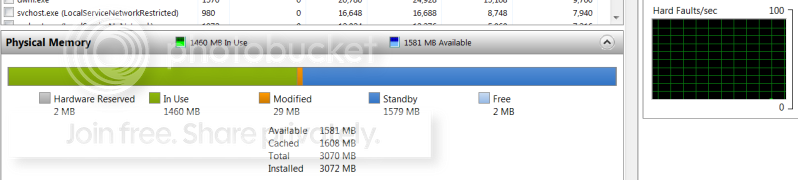
The best situation is if all the RAM is being used - either for active programs or for caching. You can easily verify that in Resource Monitor > Memory tab. The colored bar will tell you.
You will notice that it changes over time. The more windows you open during the day, the more will be cached and the usage for active programs usually increases too.
Here is a picture of what I consider a good case:

2010-05-02_194339.png
 

My Computer

Computer Manufacturer/Model Number
HP, Dell, Gateway, Toshiba - 4 laptops and 2 desktops
OS
Vista, Windows7, Mint Mate, Zorin, Windows 8
CPU
from 1.6GHz Duo to i7
Monitor(s) Displays
2x HP w2207
Hard Drives
5x HDD, 7x SSD, 12x Externals
Keyboard
with trackball - no mices
Mouse
Trackball mice
Internet Speed
DSL 6000
The best situation is if all the RAM is being used - either for active programs or for caching. You can easily verify that in Resource Monitor > Memory tab. The colored bar will tell you.
You will notice that it changes over time. The more windows you open during the day, the more will be cached and the usage for active programs usually increases too.
Here is a picture of what I consider a good case:

Question: Why is that good? (I am truly inquiring, not being a nuisance)

(If you feel that replying will make this thread go way too long and off topic, please PM me. -Marvin)
 

My Computer

Computer Manufacturer/Model Number
Rig 1
OS
Windows 7 Ultimate x64
CPU
AMD Phenom II X4 940 Black Edition @ 3.4GHz (AM2+)
Motherboard
Gigabyte GA-MA790X-UD4P (AM2+)
Memory
Corsair CM2X4096-8500C5 (4 X 2GB)
Graphics Card(s)
XFX Radeon HD 5770 / Diamond Radeon HD 5770 CrossFireX
Sound Card
Asus Xonar DS (PCI)
Monitor(s) Displays
Samsung SyncMaster 932bw+ (3)
Screen Resolution
4320x900
Hard Drives
OCZ Vertex 2 80 GB - Windows 7 System --
WD Caviar Black 1TB - Music, Movies, Vids, Pics --
WD Caviar Black 640GB - User Profiles & Games --
WD My Book 320GB external
PSU
Corsair CMPSU-750TX
Case
Cooler Master HAF 932
Cooling
Corsair Hydro Series H50
Keyboard
Logitech Desktop Wave
Mouse
Logitech LX8 Laser
Internet Speed
20 down / 2 up
Other Info
LG GGC-H20L Blu-Ray / HDDVD combo --
Hauppauge HVR-1250 --
Silverstone MFP-51 --
Logitech Webcam C600
Because even though theres only 1460MB in use in that screen, the rest is still being used ( 0 free space) only its marked as standby.

In Use is just what it says, whats activley being used right at this moment.
Standby is everything you used earlier, or 7 thinks you will use soon loaded into memory. (just not currently active)

So when you call on a program in standby mode,it is already loaded into memory. It instantly changes to In Use status.

So you truly are using 100% of available RAM at all times, although it doesnt look like if you just look at whats currently in use. :)

I hope this was what you were meaning as to why its a good thing.
 

My Computer

Computer Manufacturer/Model Number
Custom (Self Build)
OS
Windows 7 Home Premium 64bit
CPU
Intel Core i7 2700k
Motherboard
eVGA P67 SLI
Memory
8GB Mushkin Redline Ridgebacks @1866
Graphics Card(s)
EVGA GTX570 SC
Sound Card
XiFi Titanium HD
Monitor(s) Displays
LG W2453V
Screen Resolution
1920x1080
Hard Drives
Intel 320 80GB -- Intel X25-V 40GB --WD Black 1TB x2 -- WD Blue 640GB
PSU
Seasonic x750
Case
Corsair 600T SE White
Cooling
eVGA Superclocked CPU Cooler
Keyboard
Saitek Cyborg
Antivirus
Kaspersky
Browser
IE
Other Info
LG BD/DVD
Because even though theres only 1460MB in use in that screen, the rest is still being used ( 0 free space) only its marked as standby.

In Use is just what it says, whats activley being used right at this moment.
Standby is everything you used earlier, or 7 thinks you will use soon loaded into memory. (just not currently active)

So when you call on a program in standby mode,it is already loaded into memory. It instantly changes to In Use status.

So you truly are using 100% of available RAM at all times, although it doesnt look like if you just look at whats currently in use. :)

I hope this was what you were meaning as to why its a good thing.

So, an application that does not have its memory cached from a previous use, will start a little slower than one(s) that are cached?
 

My Computer

Computer Manufacturer/Model Number
Rig 1
OS
Windows 7 Ultimate x64
CPU
AMD Phenom II X4 940 Black Edition @ 3.4GHz (AM2+)
Motherboard
Gigabyte GA-MA790X-UD4P (AM2+)
Memory
Corsair CM2X4096-8500C5 (4 X 2GB)
Graphics Card(s)
XFX Radeon HD 5770 / Diamond Radeon HD 5770 CrossFireX
Sound Card
Asus Xonar DS (PCI)
Monitor(s) Displays
Samsung SyncMaster 932bw+ (3)
Screen Resolution
4320x900
Hard Drives
OCZ Vertex 2 80 GB - Windows 7 System --
WD Caviar Black 1TB - Music, Movies, Vids, Pics --
WD Caviar Black 640GB - User Profiles & Games --
WD My Book 320GB external
PSU
Corsair CMPSU-750TX
Case
Cooler Master HAF 932
Cooling
Corsair Hydro Series H50
Keyboard
Logitech Desktop Wave
Mouse
Logitech LX8 Laser
Internet Speed
20 down / 2 up
Other Info
LG GGC-H20L Blu-Ray / HDDVD combo --
Hauppauge HVR-1250 --
Silverstone MFP-51 --
Logitech Webcam C600
Wishmaster gave the right explanation of my logic. Anything that is in RAM is instantly available. If it has to be fetched from disk, it takes a few thousand times longer. Just compare the HDD (or even SSD) access times to RAM access times. And that is not a "little" slower.
 

My Computer

Computer Manufacturer/Model Number
HP, Dell, Gateway, Toshiba - 4 laptops and 2 desktops
OS
Vista, Windows7, Mint Mate, Zorin, Windows 8
CPU
from 1.6GHz Duo to i7
Monitor(s) Displays
2x HP w2207
Hard Drives
5x HDD, 7x SSD, 12x Externals
Keyboard
with trackball - no mices
Mouse
Trackball mice
Internet Speed
DSL 6000
Not only that but Windows 7 also has the ablity to flush out old Ram memory to be used for things that require more memory like video editing and rendering. You can test this out by running an instance of Memtest for Windows. If you run a couple instances and stop them you will see that the memory has been purged down to a much lower percentage than before.
 

My Computer

Computer type
PC/Desktop
Computer Manufacturer/Model Number
Home built
OS
Windows 7 Ult, Windows 8.1 Pro,
CPU
Q9650-4.275GHz, E8600 4.5GHz, E6750-3.8GHz
Motherboard
Evga 780i FTW
Memory
G.Skill PC2 9600 1200Mhz 5 5 5 15 2T
Graphics Card(s)
GTX480
Sound Card
Asus Xonar D2
Monitor(s) Displays
HannsG
Screen Resolution
1680X1050
Hard Drives
GSkill Phoenix Pro 120GB SSD
PSU
ThermalTake Toughpower 1000Watt modular
Case
ThermalTake XaserV
Cooling
Xigmatek S1283
Keyboard
Logitech G15
Mouse
Logitech G9
Internet Speed
T1
Because even though theres only 1460MB in use in that screen, the rest is still being used ( 0 free space) only its marked as standby.

In Use is just what it says, whats activley being used right at this moment.
Standby is everything you used earlier, or 7 thinks you will use soon loaded into memory. (just not currently active)

So when you call on a program in standby mode,it is already loaded into memory. It instantly changes to In Use status.

So you truly are using 100% of available RAM at all times, although it doesnt look like if you just look at whats currently in use. :)

I hope this was what you were meaning as to why its a good thing.

Wishmaster gave the right explanation of my logic. Anything that is in RAM is instantly available. If it has to be fetched from disk, it takes a few thousand times longer. Just compare the HDD (or even SSD) access times to RAM access times. And that is not a "little" slower.

Understood.

Thanks for the explanation. :)
 

My Computer

Computer Manufacturer/Model Number
Rig 1
OS
Windows 7 Ultimate x64
CPU
AMD Phenom II X4 940 Black Edition @ 3.4GHz (AM2+)
Motherboard
Gigabyte GA-MA790X-UD4P (AM2+)
Memory
Corsair CM2X4096-8500C5 (4 X 2GB)
Graphics Card(s)
XFX Radeon HD 5770 / Diamond Radeon HD 5770 CrossFireX
Sound Card
Asus Xonar DS (PCI)
Monitor(s) Displays
Samsung SyncMaster 932bw+ (3)
Screen Resolution
4320x900
Hard Drives
OCZ Vertex 2 80 GB - Windows 7 System --
WD Caviar Black 1TB - Music, Movies, Vids, Pics --
WD Caviar Black 640GB - User Profiles & Games --
WD My Book 320GB external
PSU
Corsair CMPSU-750TX
Case
Cooler Master HAF 932
Cooling
Corsair Hydro Series H50
Keyboard
Logitech Desktop Wave
Mouse
Logitech LX8 Laser
Internet Speed
20 down / 2 up
Other Info
LG GGC-H20L Blu-Ray / HDDVD combo --
Hauppauge HVR-1250 --
Silverstone MFP-51 --
Logitech Webcam C600
Back
Top