

I recently got a new HP laptop that came with W7 preloaded. The main hard drive that contains the OS came divided into 4 partitions: System (199 MB), C: (containing the OS), E: (HP Tools), and G: (Recovery).
I understand what HP_Tools is for (more or less), Recovery partition is for, and what C: is for, but I don't understand what the 199 MB SYSTEM partition is for.
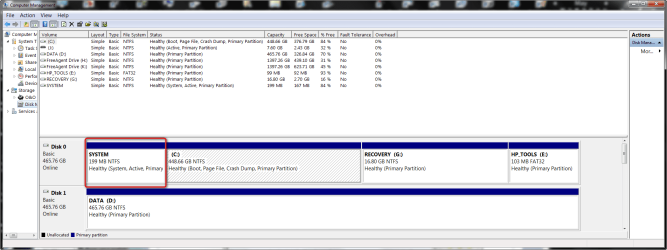
The SYSTEM partition in question is marked as "System, Active, Primary Partition", and C: is marked as "Boot, page file, crash dump, Primary Partition." I have attached a screenshot of the way the drive appears in Disk Management below.
Anyone know why HP would have created this tiny partition and what it is for?
Thanks in advance for any help with this.
I understand what HP_Tools is for (more or less), Recovery partition is for, and what C: is for, but I don't understand what the 199 MB SYSTEM partition is for.
The SYSTEM partition in question is marked as "System, Active, Primary Partition", and C: is marked as "Boot, page file, crash dump, Primary Partition." I have attached a screenshot of the way the drive appears in Disk Management below.
Anyone know why HP would have created this tiny partition and what it is for?
Thanks in advance for any help with this.
Attachments
My Computer
At a glance
Windows 7 Ultimate x64 (Retail)i7-Q 7206 GBnVidia GeForce GT 230M (1GB)
- Computer Manufacturer/Model Number
- HP DV8t quad
- OS
- Windows 7 Ultimate x64 (Retail)
- CPU
- i7-Q 720
- Motherboard
- Motherboard Chipset Intel Ibex Peak-M PM55, Intel Lynnfield
- Memory
- 6 GB
- Graphics Card(s)
- nVidia GeForce GT 230M (1GB)
- Sound Card
- IDT High Definition Audio CODEC
- Monitor(s) Displays
- 18.4 inch HP Infinity FHD (Samsung 184HT03-001)
- Screen Resolution
- 1920 x 1080
- Hard Drives
- Hitachi 500GB 7200 rpm (x2)
Seagate FreeAgent 1.5 TB External USB (x2)
Thermaltake BlacX eSATA/USB 2.0 3.5/2.5 HD dock
- Cooling
- Zalman NC-2000 notebook cooling pad
- Keyboard
- laptop
- Mouse
- Logitech VX Revolution
- Other Info
- Backup Unit: Lenovo T61p


