What is this and how do I fix it?

Piggy

Banned
Local time
7:12 AM
Messages
8
Location
UK
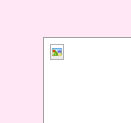
Ever since I made a new account on my laptop, I keep missing some pictures and games etc. because it doesn't show, all I'm getting are these little box thingies in the corner of an outline. What are they? How can I fix it?
Dumbed down explanations please >.<
 

Attachments
  • miniiconthing.PNG
    miniiconthing.PNG
    386 bytes · Views: 146
  • miniiconthing2.PNG
    miniiconthing2.PNG
    6.5 KB · Views: 144

My Computer My Computer

Computer Manufacturer/Model Number
Dell Inspiron 1545
OS
Windows 7 Home Premium
Hello Piggy and welcome to the forums :party:

What are you trying to do when you see these little icons? i.e. are you looking at photos on the internet or in windows?

Tom
 

My Computer My Computer

Computer type
PC/Desktop
Computer Manufacturer/Model Number
Build #1
OS
Windows 8.1 Pro x64
CPU
Intel i7 3770K @4.5GHz
Motherboard
ASUS P8Z77-V PRO
Memory
Corsair Vengeance 2x4GB DDR3 1600MHz Low Profile (White)
Graphics Card(s)
Gigabyte Radeon HD 7850 (2GB GDDR5)
Sound Card
Integrated on motherboard
Monitor(s) Displays
23" LG LCD/LED IPS
Screen Resolution
1920*1080
Hard Drives
Samsung EVO 128GB SSD
Seagate Barracuda 2GB 7200rpm
2x Seagate FreeAgent [500gb]
PSU
Corsair TX650W V2 (80+ Bronze)
Case
NZXT Phantom 410 White
Cooling
Corsair H100 Water Cooler
Keyboard
Microsoft Desktop 2000 Wireless Keyboard
Mouse
Microsoft Desktop 2000 Wireless Mouse
Internet Speed
95 Mb/s Download 70 Mb/s Upload
Antivirus
MSE + MBAM Pro
Browser
Firefox
On the internet, sometimes games, sometimes links, eg. I tried to do o2 surprises and you have to click whether you want to play gold/silver, I tried to click gold but the link just wasn't there, and neither was the picture. It just came up as a transparent rectangle with that little picture in the corner.
 

My Computer My Computer

Computer Manufacturer/Model Number
Dell Inspiron 1545
OS
Windows 7 Home Premium
What browser are you using?

Tom
 

My Computer My Computer

Computer type
PC/Desktop
Computer Manufacturer/Model Number
Build #1
OS
Windows 8.1 Pro x64
CPU
Intel i7 3770K @4.5GHz
Motherboard
ASUS P8Z77-V PRO
Memory
Corsair Vengeance 2x4GB DDR3 1600MHz Low Profile (White)
Graphics Card(s)
Gigabyte Radeon HD 7850 (2GB GDDR5)
Sound Card
Integrated on motherboard
Monitor(s) Displays
23" LG LCD/LED IPS
Screen Resolution
1920*1080
Hard Drives
Samsung EVO 128GB SSD
Seagate Barracuda 2GB 7200rpm
2x Seagate FreeAgent [500gb]
PSU
Corsair TX650W V2 (80+ Bronze)
Case
NZXT Phantom 410 White
Cooling
Corsair H100 Water Cooler
Keyboard
Microsoft Desktop 2000 Wireless Keyboard
Mouse
Microsoft Desktop 2000 Wireless Mouse
Internet Speed
95 Mb/s Download 70 Mb/s Upload
Antivirus
MSE + MBAM Pro
Browser
Firefox
Internet explorer.
 

My Computer My Computer

Computer Manufacturer/Model Number
Dell Inspiron 1545
OS
Windows 7 Home Premium
If I identified the image miniiconthing2.png correctly it shows top right corner of Top-up Surprises website.

On that spot there is a “Play Gold” button. Normally, this button is a Flash button. If the website identifies that Adobe Flash Player is not installed, it shows a picture button there.

Here is two possible solutions:

Install/Update Flash Player Adobe - Install a different version of Adobe Flash Player
OR
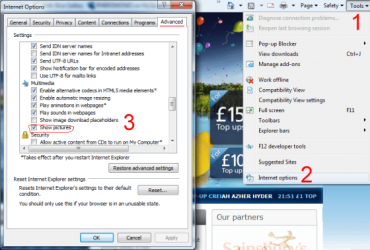
Make sure that in Internet Explorer - Tools – Internet Options – Advanced tab- Show pictures option is turned on.

Also, have you tried using alternative browsers? Do they have the same issue?
 

Attachments

  • IE_pic.png
    IE_pic.png
    50.7 KB · Views: 4

My Computer My Computer

Computer type
PC/Desktop
OS
Windows 8.1 ; Windows 7 x86 (Dec2008-Jan2013)
Other Info
"The scale icon at the top right of a post or tutorial is how you can give rep to the member."
Thankyou so much, yep you had it right that was the one from o2 topups, thankyou so much c:
 

My Computer My Computer

Computer Manufacturer/Model Number
Dell Inspiron 1545
OS
Windows 7 Home Premium
Back
Top