Solved What is this wierd icon on my notification?

Imrankhan

Enthusiast
Power User
VIP
Local time
11:45 PM
Messages
206
Location
Chennai, India
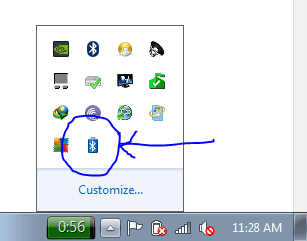
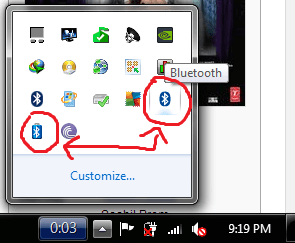
I have this wierd Battery icon in my notification bar and I am trying to figure out what is it.
This is the icon in the notification bar.bat wierd.PNG
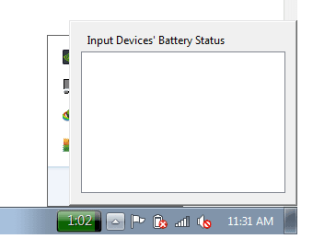
It shows blank popup window when clickedclick.png
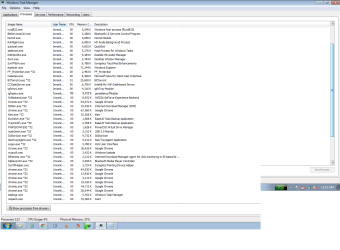
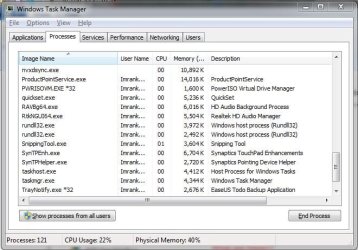
List of all my processes in TaskManagerprocess.png
I dont know how it came there.
 

My Computer My Computer

At a glance

Windows 7 Home Premium 64bitIntel Core i7 2670QMSamsung 8GB 1333MhznVidia Geforce 540M GT 2GB
Computer type
Laptop
Computer Manufacturer/Model Number
Dell XPS L502x
OS
Windows 7 Home Premium 64bit
CPU
Intel Core i7 2670QM
Motherboard
Intel HM67 Mobile Express Chipset
Memory
Samsung 8GB 1333Mhz
Graphics Card(s)
nVidia Geforce 540M GT 2GB
Sound Card
Realtek High Definition Audio
Monitor(s) Displays
15.6" Dell Standard RGB-LED Backlit Display
Screen Resolution
1366x768
Hard Drives
Seagate Momentus 2.5" 750GB HDD 5400rpm
Internet Speed
3.1 Mbits/s
Antivirus
AVG Free, Kaspersky
Browser
Google chrome

My Computer My Computer

At a glance

Multi-Boot W7_Pro_x64 W8.1_Pro_x64 W10_Pro_x6...AMD Athlon II x4 6206GB GSkill DDR2 800AMD 4670 GPU + AMD 4200 IGP
Computer type
PC/Desktop
Computer Manufacturer/Model Number
home built
OS
Multi-Boot W7_Pro_x64 W8.1_Pro_x64 W10_Pro_x64 +Linux_VMs +Chromium_VM
CPU
AMD Athlon II x4 620
Motherboard
Gigabyte GA-MA785G-UD3H
Memory
6GB GSkill DDR2 800
Graphics Card(s)
AMD 4670 GPU + AMD 4200 IGP
Sound Card
on board Realtek ALC889A
Monitor(s) Displays
RCA 40" LCD TV, Insignia 32" LCD TV, HP 15" LCD monitor
Screen Resolution
1680 x 1050
Hard Drives
OCZ Vertex 3 120GB,
Samsung F3 1TB (3),
Several others - WD, Seagate, Hitachi, ...
PSU
Corsair 500 W
Case
Rosewill mid tower
Cooling
CM 90mm rifle
Keyboard
Gyration wireless, Logitech wireless, Dell USB wired
Mouse
Gyration wireless, Logitech wireless, V7 USB wired
Internet Speed
Spectrum - 100Mbps D / 10Mbps U
Antivirus
Avast, MBAM3, EMET, WinPatrol
Browser
Pale Moon, Firefox, IE
Other Info
2 multi-boot PC's
Mainly HTPC/Office/Gen purpose (no gaming).
Trendnet USB KVM.
LG DVD burner/Blue Ray Player.
Tray system for removable SATA backup drives.

Not currently OCd, under-volted.
I use Hybrid sleep, rarely re-boot or shutdown.

Hauppauge HD-PVR, Avermedia PCIe TV Tuner, Hauppauge PCI TV Tuner.
Most likely your laptop battery is low or failing. Wireless keyboard and mice software will also show a low battery if you loaded the software. I don't particularly like all the extra monitoring stuff running on my machine so don't load it. My mouse or keyboard will just quit working and I know it's time to change the battery. :)
 

My Computer My Computer

At a glance

Windows 7 Pro-x64i7-2600 3.4GHz - 3.8GHz Turbo8Gb - 2x4GB, Muskin 991770 PC3-1333Integrated Intel HD 2000
Computer type
PC/Desktop
Computer Manufacturer/Model Number
Built 2/11/2011
OS
Windows 7 Pro-x64
CPU
i7-2600 3.4GHz - 3.8GHz Turbo
Motherboard
Intel DH67BL-B3
Memory
8Gb - 2x4GB, Muskin 991770 PC3-1333
Graphics Card(s)
Integrated Intel HD 2000
Sound Card
Integrated Intel 10.1 HD, RealTek ALC892
Monitor(s) Displays
Asus LCD VH222H, Haier HL24XSL2a
Screen Resolution
1920x1080, 1920x1080
Hard Drives
Crucial SSD C300-128Gb,
Western Digital WD5002AALX - 500Gb,
Western Digital WD7501AALS - 750Gb
PSU
Seasonic 650W 80+ Gold Modular
Case
Rosewill Defender
Cooling
Stock CPU, Four 120mm case fans, PCH fan added
Keyboard
Logitech EX100 Y-RBH94 Wireless
Mouse
Logitech EX100 M-RCE95 Wireless
Internet Speed
3.0/1.5 Mbs
Antivirus
Microsoft Security Essentials
Browser
Microsoft Internet Explorer 11
Other Info
Antec Veris Premier-Multimedia IR Station,
Cyber Accoustics-3602 Speakers,
AFT XM-5U Card Reader,
Hauppauge TV-HVR-2250,
Sony LX300 USB Turntable

My Computer My Computer

At a glance

Win 10 Pro x64Intel I5-2500K @3.3GHz16GB G.Skill Ripjaws X (4x4GB)EVGA GeForce 750 Ti SC 2GB
Computer type
PC/Desktop
Computer Manufacturer/Model Number
Self Built
OS
Win 10 Pro x64
CPU
Intel I5-2500K @3.3GHz
Motherboard
Asrock P67 Extreme4
Memory
16GB G.Skill Ripjaws X (4x4GB)
Graphics Card(s)
EVGA GeForce 750 Ti SC 2GB
Sound Card
ASUS Xonar DG 5.1 Channels 24-bit 96KHz PCI Interface Sound
Monitor(s) Displays
auria eq2367
Screen Resolution
1920 x 1080
Hard Drives
250GB Samsung 850 EVO SSD
1TB WD Blue
1TB Hitachi
PSU
SeaSonic X 650W 80 Plus Gold
Case
Corsair Obsidian 750D
Cooling
Corsair H60, Three 140mm case fans
Keyboard
Logitech Wireless Keyboard K520
Mouse
Logitech Wireless Mouse M310
Internet Speed
Wave Broadband ~ 100 dn 5 up
Antivirus
Windows Defender, Malwarebytes Premium
Browser
Edge, IE11, Chrome
Other Info
Laptop specs: HP g7-1365dx /
CPU: AMD A6-3420M APU with Radeon(tm) HD Graphics /
RAM: Crucial 8Gb (2x4Gb) /
SSD: Crucial M4-CT128M4SSD2 ATA Device/ FW 000F /
GFX: AMD Radeon HD 6520G /
OS: Windows 10 Pro x64
That is a Bluetooth (BT) symbol on the battery in the notification window and the battery icon on your Systray is X'd out.

The 2nd image title tells you a little more "Input Device's battery Status"

So here's my question.... do you have any BT devices paired to the machine? A mouse, KB, headphones....

Yes? Connect the BT device and re-open the BT battery icon - what does it tell you now about the BT battery?

edit: I found an instance where a BT Apple mouse caused conflicts with the system battery on Linux. How this relates to Windows is uncertain.

Another question: What picks are presented on the alternate menu when you right click that BT battery icon?

See if Maxi's Dell battery link provides any answers to the battery icon on your Systray being X'd out. I'll bet that it is the battery conflict (I've lost bets before to Maxie though).

A quick test would be to uninstall the BT input device, if there is one.
 
Last edited:

My Computer My Computer

At a glance

x64 (6.3.9600) Win8.1 Pro & soon dual boot x6...AMD A6-3420M APU with Radeon(tm) HD Graphics6.00 GBAMD Radeon(TM) HD 6520G
Computer type
Laptop
Computer Manufacturer/Model Number
HP Pavilion dv6-6c10us
OS
x64 (6.3.9600) Win8.1 Pro & soon dual boot x64 (6.1.7601) Win7_SP1 HomePrem
CPU
AMD A6-3420M APU with Radeon(tm) HD Graphics
Motherboard
Hewlett-Packard 1805
Memory
6.00 GB
Graphics Card(s)
AMD Radeon(TM) HD 6520G
Sound Card
(1) AMD High Definition Audio Device (2) IDT High Definiti
Monitor(s) Displays
HP W2072a 20" LCD (1600 x 900) @ 60 Hz
Screen Resolution
1366 x 768 x 32 bits (4294967296 colors) @ 60 Hz
Hard Drives
ST640LM0 00 HM641JI SATA Disk Device
Keyboard
Logitech k520 wireless KB
Mouse
Logitech m320 wireless mouse (bundled with KB)
Internet Speed
15/5 | 54 MB Wireless 'n'
Antivirus
Realtime: Defender or Avast | On-demand: Malwarebytes, ESET
Browser
IE 11 on Win8, IE 10 on win 7
Other Info
Media: [Gimp, Audacity, VLC] || Comm: [WEmail 2012, Skype] || Productivity: [OpenOffice,| Textpad] || Utils: [Sysinternals, cCleaner, Speccy, Defraggler]
Thanks a lot.
And Slartybart ,Thanks man. It was my phone connected via bluetooth and Its disconnected. The icon shows up whenever I connect my phone via bluetooth. But I cant figure out why its showed Input device.
 

My Computer My Computer

At a glance

Windows 7 Home Premium 64bitIntel Core i7 2670QMSamsung 8GB 1333MhznVidia Geforce 540M GT 2GB
Computer type
Laptop
Computer Manufacturer/Model Number
Dell XPS L502x
OS
Windows 7 Home Premium 64bit
CPU
Intel Core i7 2670QM
Motherboard
Intel HM67 Mobile Express Chipset
Memory
Samsung 8GB 1333Mhz
Graphics Card(s)
nVidia Geforce 540M GT 2GB
Sound Card
Realtek High Definition Audio
Monitor(s) Displays
15.6" Dell Standard RGB-LED Backlit Display
Screen Resolution
1366x768
Hard Drives
Seagate Momentus 2.5" 750GB HDD 5400rpm
Internet Speed
3.1 Mbits/s
Antivirus
AVG Free, Kaspersky
Browser
Google chrome
You're welcome, I'm glad the mystery was solved. I learned something too, I never knew there was a BT battery icon - thank you!

I don't know the answer to the "Why is it an input device" question. Although, I have a few guesses...
  1. There are some reports of devices being incorrectly categorized in Devices and Printers - maybe this is another instance of that. There is MS fix to correct this for certain devices (printers I think), but I don't know if that would affect any change for BT. Let me try and find the KB and read some more... I'm not sure I can find it again, but I will look.
    .
  2. As tech advances, phones are being used to control other devices (TV remote control)... so maybe it really is an input device.
There is still the question of why your Systray Battery icon is X'd out.

When you disconnect your phone, is the Systray Battery icon normal?
No? See if Maxie's Dell reference helps with that.

Bill
.
 

My Computer My Computer

At a glance

x64 (6.3.9600) Win8.1 Pro & soon dual boot x6...AMD A6-3420M APU with Radeon(tm) HD Graphics6.00 GBAMD Radeon(TM) HD 6520G
Computer type
Laptop
Computer Manufacturer/Model Number
HP Pavilion dv6-6c10us
OS
x64 (6.3.9600) Win8.1 Pro & soon dual boot x64 (6.1.7601) Win7_SP1 HomePrem
CPU
AMD A6-3420M APU with Radeon(tm) HD Graphics
Motherboard
Hewlett-Packard 1805
Memory
6.00 GB
Graphics Card(s)
AMD Radeon(TM) HD 6520G
Sound Card
(1) AMD High Definition Audio Device (2) IDT High Definiti
Monitor(s) Displays
HP W2072a 20" LCD (1600 x 900) @ 60 Hz
Screen Resolution
1366 x 768 x 32 bits (4294967296 colors) @ 60 Hz
Hard Drives
ST640LM0 00 HM641JI SATA Disk Device
Keyboard
Logitech k520 wireless KB
Mouse
Logitech m320 wireless mouse (bundled with KB)
Internet Speed
15/5 | 54 MB Wireless 'n'
Antivirus
Realtime: Defender or Avast | On-demand: Malwarebytes, ESET
Browser
IE 11 on Win8, IE 10 on win 7
Other Info
Media: [Gimp, Audacity, VLC] || Comm: [WEmail 2012, Skype] || Productivity: [OpenOffice,| Textpad] || Utils: [Sysinternals, cCleaner, Speccy, Defraggler]
Slartybart said:
There is still the question of why your Systray Battery icon is X'd out.

Mine does that when I have no battery plugged in, just using the power cord.
 

My Computer My Computer

At a glance

Win 10 Pro x64Intel I5-2500K @3.3GHz16GB G.Skill Ripjaws X (4x4GB)EVGA GeForce 750 Ti SC 2GB
Computer type
PC/Desktop
Computer Manufacturer/Model Number
Self Built
OS
Win 10 Pro x64
CPU
Intel I5-2500K @3.3GHz
Motherboard
Asrock P67 Extreme4
Memory
16GB G.Skill Ripjaws X (4x4GB)
Graphics Card(s)
EVGA GeForce 750 Ti SC 2GB
Sound Card
ASUS Xonar DG 5.1 Channels 24-bit 96KHz PCI Interface Sound
Monitor(s) Displays
auria eq2367
Screen Resolution
1920 x 1080
Hard Drives
250GB Samsung 850 EVO SSD
1TB WD Blue
1TB Hitachi
PSU
SeaSonic X 650W 80 Plus Gold
Case
Corsair Obsidian 750D
Cooling
Corsair H60, Three 140mm case fans
Keyboard
Logitech Wireless Keyboard K520
Mouse
Logitech Wireless Mouse M310
Internet Speed
Wave Broadband ~ 100 dn 5 up
Antivirus
Windows Defender, Malwarebytes Premium
Browser
Edge, IE11, Chrome
Other Info
Laptop specs: HP g7-1365dx /
CPU: AMD A6-3420M APU with Radeon(tm) HD Graphics /
RAM: Crucial 8Gb (2x4Gb) /
SSD: Crucial M4-CT128M4SSD2 ATA Device/ FW 000F /
GFX: AMD Radeon HD 6520G /
OS: Windows 10 Pro x64
Slartybart said:
There is still the question of why your Systray Battery icon is X'd out.

Mine does that when I have no battery plugged in, just using the power cord.

Thanks Derek,

:doh: I should have asked that question too! Is there a battery in the compartment?
Perhaps a moot point now - the thread is marked solved.

Bill
.
 

My Computer My Computer

At a glance

x64 (6.3.9600) Win8.1 Pro & soon dual boot x6...AMD A6-3420M APU with Radeon(tm) HD Graphics6.00 GBAMD Radeon(TM) HD 6520G
Computer type
Laptop
Computer Manufacturer/Model Number
HP Pavilion dv6-6c10us
OS
x64 (6.3.9600) Win8.1 Pro & soon dual boot x64 (6.1.7601) Win7_SP1 HomePrem
CPU
AMD A6-3420M APU with Radeon(tm) HD Graphics
Motherboard
Hewlett-Packard 1805
Memory
6.00 GB
Graphics Card(s)
AMD Radeon(TM) HD 6520G
Sound Card
(1) AMD High Definition Audio Device (2) IDT High Definiti
Monitor(s) Displays
HP W2072a 20" LCD (1600 x 900) @ 60 Hz
Screen Resolution
1366 x 768 x 32 bits (4294967296 colors) @ 60 Hz
Hard Drives
ST640LM0 00 HM641JI SATA Disk Device
Keyboard
Logitech k520 wireless KB
Mouse
Logitech m320 wireless mouse (bundled with KB)
Internet Speed
15/5 | 54 MB Wireless 'n'
Antivirus
Realtime: Defender or Avast | On-demand: Malwarebytes, ESET
Browser
IE 11 on Win8, IE 10 on win 7
Other Info
Media: [Gimp, Audacity, VLC] || Comm: [WEmail 2012, Skype] || Productivity: [OpenOffice,| Textpad] || Utils: [Sysinternals, cCleaner, Speccy, Defraggler]
Slartybart said:
There is still the question of why your Systray Battery icon is X'd out.

Mine does that when I have no battery plugged in, just using the power cord.

Thanks Derek,

:doh: I should have asked that question too! Is there a battery in the compartment?

Perhaps a moot point now - the thread is marked solved.

Bill
.

You're welcome Bill, I was just tossing that out there for info anyway. :)
 

My Computer My Computer

At a glance

Win 10 Pro x64Intel I5-2500K @3.3GHz16GB G.Skill Ripjaws X (4x4GB)EVGA GeForce 750 Ti SC 2GB
Computer type
PC/Desktop
Computer Manufacturer/Model Number
Self Built
OS
Win 10 Pro x64
CPU
Intel I5-2500K @3.3GHz
Motherboard
Asrock P67 Extreme4
Memory
16GB G.Skill Ripjaws X (4x4GB)
Graphics Card(s)
EVGA GeForce 750 Ti SC 2GB
Sound Card
ASUS Xonar DG 5.1 Channels 24-bit 96KHz PCI Interface Sound
Monitor(s) Displays
auria eq2367
Screen Resolution
1920 x 1080
Hard Drives
250GB Samsung 850 EVO SSD
1TB WD Blue
1TB Hitachi
PSU
SeaSonic X 650W 80 Plus Gold
Case
Corsair Obsidian 750D
Cooling
Corsair H60, Three 140mm case fans
Keyboard
Logitech Wireless Keyboard K520
Mouse
Logitech Wireless Mouse M310
Internet Speed
Wave Broadband ~ 100 dn 5 up
Antivirus
Windows Defender, Malwarebytes Premium
Browser
Edge, IE11, Chrome
Other Info
Laptop specs: HP g7-1365dx /
CPU: AMD A6-3420M APU with Radeon(tm) HD Graphics /
RAM: Crucial 8Gb (2x4Gb) /
SSD: Crucial M4-CT128M4SSD2 ATA Device/ FW 000F /
GFX: AMD Radeon HD 6520G /
OS: Windows 10 Pro x64
Mine does that when I have no battery plugged in, just using the power cord.

Thanks Derek,

:doh: I should have asked that question too! Is there a battery in the compartment?
Perhaps a moot point now - the thread is marked solved.

Bill
.

You're welcome Bill, I was just tossing that out there for info anyway. :)

Mine doesn't do that,
Even if it's not charging it shows solid green on my laptop,
On my desktop with backup battery it shows solid white :/
Yep so does my laptop shows solid white with a little cord next to as it's plugged in :)
Cheers.
 
Last edited:

My Computer My Computer

At a glance

Win-7-Pro64bit 7-H-Prem-64biti7-5930K 2nd i9-9940x both water blocked VRM'...Trident-z 3200C14 2nd Trident-z 3600C16EVGA 1080ti ftw3 2nd Titan Xp both water blocked
Computer type
PC/Desktop
Computer Manufacturer/Model Number
Custom assembled by me :}
OS
Win-7-Pro64bit 7-H-Prem-64bit
CPU
i7-5930K 2nd i9-9940x both water blocked VRM's too
Motherboard
ASUS SABERTOOTH X99 2nd ASUS x299 Apex
Memory
Trident-z 3200C14 2nd Trident-z 3600C16
Graphics Card(s)
EVGA 1080ti ftw3 2nd Titan Xp both water blocked
Sound Card
Built-in Realtek
Monitor(s) Displays
1-AOC G2460PG 24"G-Sync 144Hz/ 2nd 1-ASUS VG248QE 24" 144Hz
Screen Resolution
1920 x 1080 144Hz
Hard Drives
2-Samsung M.2 Evo & Evo Plus
2-Samsung 850 EVO 500GB SSD's/ 3-2.5 W.D. Black 1tb-&3-1tb/3-3.5 WD Black 1tb hdd's
PSU
EVGA SuperNOVA 1000-P2 2nd 1200-P2
Case
2-Corsair Obsidian Series 450D Black ATX Mid Tower
Cooling
Custom water loops
Keyboard
Logitech G710+/ 2nd Logitech G910
Mouse
2-RedDragon M901 Perdition 16400 dpi Gaming mouse = wired
Internet Speed
Comcast Ping 19ms 89.31mbps download speed 6.12mbps upload
Antivirus
Malwarebytes Pro/ Superantispyware Pro
Browser
FireFox & Pale moon
Other Info
2nd ASUS X299 Apex/Intel i9-9940x with Custom water loop/7H-Prem-x64/Corsair 450D case/Ram Trident-z 3600C16 4x8gb / Samsung970Evo plus 500gb SSD/Dual ssd EZ swap evo/PSU EVGA SuperNova 1200w-P2 80+Platinum/GPU Titan Xp /8-ML-140 on push-pull on 2-280GTX rads
Thanks Derek,

:doh: I should have asked that question too! Is there a battery in the compartment?
Perhaps a moot point now - the thread is marked solved.

Bill
.

You're welcome Bill, I was just tossing that out there for info anyway. :)

Mine doesn't do that,
Even if it's not charging it shows solid green on my laptop,
On my desktop with backup battery it shows solid white :/
Yep so does my laptop shows solid white with a little cord next to as it's plugged in :)
Cheers.

I'm talking about not having a battery in the compartment at all.

I'm sure it's possible different laptops will react differently to not having a battery.
 

My Computer My Computer

At a glance

Win 10 Pro x64Intel I5-2500K @3.3GHz16GB G.Skill Ripjaws X (4x4GB)EVGA GeForce 750 Ti SC 2GB
Computer type
PC/Desktop
Computer Manufacturer/Model Number
Self Built
OS
Win 10 Pro x64
CPU
Intel I5-2500K @3.3GHz
Motherboard
Asrock P67 Extreme4
Memory
16GB G.Skill Ripjaws X (4x4GB)
Graphics Card(s)
EVGA GeForce 750 Ti SC 2GB
Sound Card
ASUS Xonar DG 5.1 Channels 24-bit 96KHz PCI Interface Sound
Monitor(s) Displays
auria eq2367
Screen Resolution
1920 x 1080
Hard Drives
250GB Samsung 850 EVO SSD
1TB WD Blue
1TB Hitachi
PSU
SeaSonic X 650W 80 Plus Gold
Case
Corsair Obsidian 750D
Cooling
Corsair H60, Three 140mm case fans
Keyboard
Logitech Wireless Keyboard K520
Mouse
Logitech Wireless Mouse M310
Internet Speed
Wave Broadband ~ 100 dn 5 up
Antivirus
Windows Defender, Malwarebytes Premium
Browser
Edge, IE11, Chrome
Other Info
Laptop specs: HP g7-1365dx /
CPU: AMD A6-3420M APU with Radeon(tm) HD Graphics /
RAM: Crucial 8Gb (2x4Gb) /
SSD: Crucial M4-CT128M4SSD2 ATA Device/ FW 000F /
GFX: AMD Radeon HD 6520G /
OS: Windows 10 Pro x64
What is this Fake Bluetooth Icon in my notification bar?

Dell XPS 15 L502x Laptop Windows 7 Home Premium SP1 64bit.
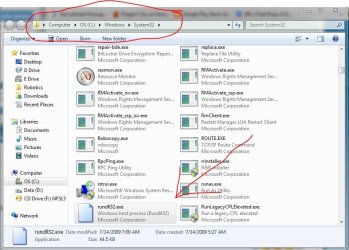
I have this Fake Bluetooth Icons in my notification bar. It says the location as rundll.exe in System32 folder.
How to get rid of this. I haven't connected any Bluetooth devices. Its there even after I turn off the Wireless.
My antiviruses, both AVG and MSE doesn't detect any viruses in my Laptop.
Screenshots:
Wierd.png
Wierd1.png
Wired2.JPG
Wierd4.JPG
 
Last edited by a moderator:

My Computer My Computer

At a glance

Windows 7 Home Premium 64bitIntel Core i7 2670QMSamsung 8GB 1333MhznVidia Geforce 540M GT 2GB
Computer type
Laptop
Computer Manufacturer/Model Number
Dell XPS L502x
OS
Windows 7 Home Premium 64bit
CPU
Intel Core i7 2670QM
Motherboard
Intel HM67 Mobile Express Chipset
Memory
Samsung 8GB 1333Mhz
Graphics Card(s)
nVidia Geforce 540M GT 2GB
Sound Card
Realtek High Definition Audio
Monitor(s) Displays
15.6" Dell Standard RGB-LED Backlit Display
Screen Resolution
1366x768
Hard Drives
Seagate Momentus 2.5" 750GB HDD 5400rpm
Internet Speed
3.1 Mbits/s
Antivirus
AVG Free, Kaspersky
Browser
Google chrome
Do you have any wireless peripherals connected like a wireless keyboard or mouse?
 

My Computer My Computer

At a glance

Windows 10 Education 64 bitAMD Phenom II X4 980 Black Edition Deneb 3.7GHz8GB 4GBx2 Kingston PC10600 DDR3 1333 MemoryZotac NVIDIA Geforce GT640 2 Gig DDR3 PCIe
Computer type
PC/Desktop
Computer Manufacturer/Model Number
Home Built
OS
Windows 10 Education 64 bit
CPU
AMD Phenom II X4 980 Black Edition Deneb 3.7GHz
Motherboard
Asus M4N68T-M V2 µATX Motherboard
Memory
8GB 4GBx2 Kingston PC10600 DDR3 1333 Memory
Graphics Card(s)
Zotac NVIDIA Geforce GT640 2 Gig DDR3 PCIe
Sound Card
VIA VT1708s High Definition Audio 8-channel Onboard
Monitor(s) Displays
22" LG E2242 1080p and 2 19" I-INC AG191D
Screen Resolution
1280x1024 - 1920x1080 - 1280x1024
Hard Drives
Crucial M100 256 GB SSD and 500 GB WD Blue SATA
PSU
Thermaltake TR 620
Case
Power Up Black ATX Mid-Tower Case
Cooling
Stock heatsink and fan
Keyboard
Logitech Wireless K350 Wave
Mouse
Logitech Wireless M570 Trackman Wheel
Internet Speed
80 Mbps Down 30 Mbps Up
Antivirus
Windows Defender
Browser
Internet Explorer 11
Other Info
HP DVD1040e Lightscribe - External USB2
No. I havent connected any bluetooth devices.
 

My Computer My Computer

At a glance

Windows 7 Home Premium 64bitIntel Core i7 2670QMSamsung 8GB 1333MhznVidia Geforce 540M GT 2GB
Computer type
Laptop
Computer Manufacturer/Model Number
Dell XPS L502x
OS
Windows 7 Home Premium 64bit
CPU
Intel Core i7 2670QM
Motherboard
Intel HM67 Mobile Express Chipset
Memory
Samsung 8GB 1333Mhz
Graphics Card(s)
nVidia Geforce 540M GT 2GB
Sound Card
Realtek High Definition Audio
Monitor(s) Displays
15.6" Dell Standard RGB-LED Backlit Display
Screen Resolution
1366x768
Hard Drives
Seagate Momentus 2.5" 750GB HDD 5400rpm
Internet Speed
3.1 Mbits/s
Antivirus
AVG Free, Kaspersky
Browser
Google chrome
In Control Panel, click Network Connections, then click Network and Sharing Center, then Change adapter settings (upper left corner). Do you see any bluetooth there? If so, right click on it and choose "disable".
 

My Computer My Computer

At a glance

Windows 10x64 Build 1709Intel i7 7700HQ Kaby Lake16 GB DDR4 @2400Nvidia Geforce GTX 1060
Computer type
Laptop
Computer Manufacturer/Model Number
MSI GE72VR Apache Pro-416
OS
Windows 10x64 Build 1709
CPU
Intel i7 7700HQ Kaby Lake
Motherboard
Micro-Star Intl. MS-179B (U3C1)
Memory
16 GB DDR4 @2400
Graphics Card(s)
Nvidia Geforce GTX 1060
Screen Resolution
1920x1080 120Hz
Hard Drives
256 GB Nvme M.2 SSD

1TB HDD@7200
Cooling
Cooler Blast 4
Keyboard
Steel Series
Antivirus
Bit Defender Free
Browser
Edge
Thanks for the tip IndianaCarnie. But it doesnt change anything. All remains the same. Except I can't send any files to my phone.
 

My Computer My Computer

At a glance

Windows 7 Home Premium 64bitIntel Core i7 2670QMSamsung 8GB 1333MhznVidia Geforce 540M GT 2GB
Computer type
Laptop
Computer Manufacturer/Model Number
Dell XPS L502x
OS
Windows 7 Home Premium 64bit
CPU
Intel Core i7 2670QM
Motherboard
Intel HM67 Mobile Express Chipset
Memory
Samsung 8GB 1333Mhz
Graphics Card(s)
nVidia Geforce 540M GT 2GB
Sound Card
Realtek High Definition Audio
Monitor(s) Displays
15.6" Dell Standard RGB-LED Backlit Display
Screen Resolution
1366x768
Hard Drives
Seagate Momentus 2.5" 750GB HDD 5400rpm
Internet Speed
3.1 Mbits/s
Antivirus
AVG Free, Kaspersky
Browser
Google chrome
Hmmmmmmmmmm ......... your phone is Bluetooth , right? Couldn't these "extra" bluetooth icons be associated with that? Are they "new"?
 

My Computer My Computer

At a glance

Windows 10x64 Build 1709Intel i7 7700HQ Kaby Lake16 GB DDR4 @2400Nvidia Geforce GTX 1060
Computer type
Laptop
Computer Manufacturer/Model Number
MSI GE72VR Apache Pro-416
OS
Windows 10x64 Build 1709
CPU
Intel i7 7700HQ Kaby Lake
Motherboard
Micro-Star Intl. MS-179B (U3C1)
Memory
16 GB DDR4 @2400
Graphics Card(s)
Nvidia Geforce GTX 1060
Screen Resolution
1920x1080 120Hz
Hard Drives
256 GB Nvme M.2 SSD

1TB HDD@7200
Cooling
Cooler Blast 4
Keyboard
Steel Series
Antivirus
Bit Defender Free
Browser
Edge
Thanks for the tip IndianaCarnie. But it doesnt change anything. All remains the same. Except I can't send any files to my phone.

Have you checked Device Manager;

1. Start Orb.
2. Type "Device Manager" in the caption box and select it from the ensuing list.
3. Is there something in the list that associates itself with the icon?

Also, the image you posted of the icon resembles a "Bluetooth Headset" icon;

Bluetooth Headset Icon.jpg

HTH
 
Last edited:

My Computer My Computer

At a glance

Windows 7 Professional x64Intel i5 quad processor16 GBRadeon HD 5770
Computer type
PC/Desktop
Computer Manufacturer/Model Number
Custom Built
OS
Windows 7 Professional x64
CPU
Intel i5 quad processor
Motherboard
DP67BG
Memory
16 GB
Graphics Card(s)
Radeon HD 5770
Sound Card
Realtek High Definition Audio
Monitor(s) Displays
Samsung SyncMaster
Screen Resolution
1920X1080
Hard Drives
WD 2TB (SATA Internal)
WD 1TB (USB External)
PSU
Corsair GS800
Case
Tower (Generic)
Cooling
3 Internal Fans
Keyboard
MS Wireless
Mouse
MS Optical Wired
Internet Speed
54 mbps
Antivirus
Emsisoft
Browser
IE-Version 9, Palemoon-Version 24.2.0
Back
Top