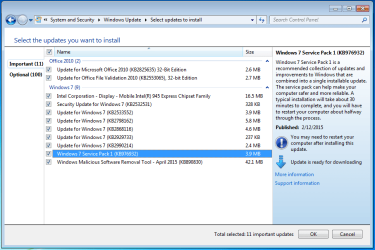
In control panel when I checked for updates. I'm not installing it until I find out why I need to install SP1 on an SP1 ISO image. Size of update appears to be only a few MB's...
I can't find any reference to a KB976932 that was published 2/12/15.All references I found are to the original SP1 release. Having said that, could you run a System File Checker scan from an elevated command prompt (Option Two, this tutorial.)
I'm just wondering if a system file got corrupted or damaged that might be prompting the 2/12/15 update. (Seems unlikely since it was allegedly released 2 months ago. I'm guessing you weren't offered this "update" during the March 2015 patch Tuesday.) If SFC shows no integrity violations I'd be tempted to hide the 2/12/15 update and not worry about it.
My Computer
At a glance
Win 7 Pro 64-bitIntel i5 2.4 Ghz8GB DDR3Intel HD 3000
This is normal - it ensures that the base SP1 install has the latest mod applied to minimise side-effects. the actual download is less than 5MB, if I remember right.
My Computer
At a glance
Win 7 x64 Home Premium (and x86 VirtualBox VM...i3 370M/i7 6500U8GB - finally :)/8GBit's an i3, dude!/dual Intel&nVidia
Computer type
Laptop
Computer Manufacturer/Model Number
Asus K52F or Lenovo B51-80
OS
Win 7 x64 Home Premium (and x86 VirtualBox VM)/Win10
CPU
i3 370M/i7 6500U
Motherboard
Asus/Lenovo
Memory
8GB - finally :)/8GB
Graphics Card(s)
it's an i3, dude!/dual Intel&nVidia
Sound Card
onboard
Monitor(s) Displays
15.6" built-in
Screen Resolution
1366x768/1920x1080
Hard Drives
750GB Seagate internal
Sundry external drives attached to other computers on the local network
1TB SSD on the Lenovo
PSU
n/a
Internet Speed
as much as I can get - usually on a dongle/phone, so <1MB/s