What Kind of External Back up hard drive should I get?

Josh7

New member
Member
Local time
4:52 PM
Messages
81
I want something thats encrypted if you want to and 1TB. Easy to use.

I got questions about back up hard drives:

1. If you have schedule back up on does it overwrite the previous backup?

2. I heard if you want the whole system on the back up you have to image software how does that work exactly?

3. Can you take that image the image software takes and store it on the back up drive?

4. What happens if you have the OS on the hard-drive and you connect it to a new computer? Would it overwrite?

5. When you go to back up does it seriously back up everything from the drive? Cause I have Itunes library I don't feel like using 600 disc to back that up...

Thanks :D
 

My Computer My Computer

At a glance

Windows 7 Home Premium x64Quadcore4GBNvidea Gefore 9200
Computer Manufacturer/Model Number
Acer
OS
Windows 7 Home Premium x64
CPU
Quadcore
Motherboard
Nvidea Chipset 9200
Memory
4GB
Graphics Card(s)
Nvidea Gefore 9200
Monitor(s) Displays
Dell LCD Monitor
Screen Resolution
1280 x 1024
Hard Drives
1TB
Keyboard
Hp
Mouse
Acer Wired
Internet Speed
100.0 Mbps
Other Info
Got the Acer keyboard to lazy to plug it in.
A personal view.

  1. Look for sales. Everyone has their favourite brand. I prefer WD (Elements) for this.
  2. For 1TB get one with a mains power supply unit.
  3. Check that it spins at 7200 rpm (not 5400)
  4. A bare bones unit - no built in backup software
  5. Don't keep it power up all the time. Temperature will decrease their life.
  6. Accept the beast can die on you

Download
CrystalDiskInfo
It can keep an eye on the health of the drive.
 

My Computer My Computer

At a glance

Windows 7x64 Home Premium SP1Intel i7 2600kG.Skill Ripjaws (DDR3-1600) 2x4GBNvidia GeForce GTS 450; Intel HD Graphics 300...
Computer type
PC/Desktop
Computer Manufacturer/Model Number
Own build
OS
Windows 7x64 Home Premium SP1
CPU
Intel i7 2600k
Motherboard
ASUS P8Z68 Deluxe
Memory
G.Skill Ripjaws (DDR3-1600) 2x4GB
Graphics Card(s)
Nvidia GeForce GTS 450; Intel HD Graphics 3000(GT2+)
Monitor(s) Displays
Dell Ultrasharp IPS panel U2311H, Samsung SyncMaster P2350
Screen Resolution
1920x1080
Hard Drives
Samsung 850 Pro SSD 256GB, Samsung SSD 840 120GB, Seagates 1TB Barracuda ST31000528AS x2
PSU
Seasonic M12II 520W
Case
Lian Li Lancool PC-K60
Cooling
Case: 1x120mm, 3x140mm CPU: Hyper 212+
Keyboard
Logitech MK520 (wireless)
Mouse
Logitech MK520
Internet Speed
6-7 Mbps
Antivirus
Norton Security Premium, Malwarebytes on 2 (MSE on 3rd PC)
Browser
FireFox
Other Info
Audio: Logitech Z523 2.1
  1. Check that it spins at 7200 rpm (not 5400)
For a backup drive, I don't think it matters if it spins slower. My drive that I use is a Sansung SpinPoint 2TB model, it spins at 5400PRM and benches out around 90MB/sec via eSATA which is pretty much the fastest interface you are going to find.

I use this drive: http://www.newegg.com/Product/Product.aspx?Item=N82E16822152245&Tpk=spinpoint 2tb
In this dock: http://www.newegg.com/Product/Product.aspx?Item=N82E16817153071&cm_re=blacX-_-17-153-071-_-Product
With this software: http://www.newegg.com/Product/Produ...cronis_True_Image_2011-_-32-200-022-_-Product ( I use 2010 version however)
 

My Computer My Computer

At a glance

Windows 7 Ultimate x64Intel Q9550 2.83Ghz OC'd to 3.40Ghz8GB G.Skill PI DDR2-800, 4-4-4-12 timingsEVGA 1280MB Nvidia GeForce GTX570
Computer Manufacturer/Model Number
Self-Built in July 2009
OS
Windows 7 Ultimate x64
CPU
Intel Q9550 2.83Ghz OC'd to 3.40Ghz
Motherboard
Gigabyte GA-EP45-UD3R rev. 1.1, F12 BIOS
Memory
8GB G.Skill PI DDR2-800, 4-4-4-12 timings
Graphics Card(s)
EVGA 1280MB Nvidia GeForce GTX570
Sound Card
Realtek ALC899A 8 channel onboard audio
Monitor(s) Displays
23" Acer x233H
Screen Resolution
1920x1080
Hard Drives
Intel X25-M 80GB Gen 2 SSD
Western Digital 1TB Caviar Black, 32MB cache. WD1001FALS
PSU
Corsair 620HX modular
Case
Antec P182
Cooling
stock
Keyboard
ABS M1 Mechanical
Mouse
Logitech G9 Laser Mouse
Internet Speed
15/2 cable modem
Other Info
Windows and Linux enthusiast. Logitech G35 Headset.
I've got a 500gb Seagate Freeagent like Joules mentioned. Right now I'm running on the normal Seven BU with the Image, but I'm also backing up more partitions using the Seagate software. I am going to be transitioning to Acronis in the very near future (have it already, just haven't set it up).
 

My Computer My Computer

At a glance

Windows 7 Ultimate x64 SP1AMD Phenom II X4, 945, Quad Core, 3.0 GHz8GB G.Skill PI Black PC2 6400 * 4-4-4-12 @1.9vNVIDIA 512MB 9600GT
Computer Manufacturer/Model Number
"WartHog Wonder"
OS
Windows 7 Ultimate x64 SP1
CPU
AMD Phenom II X4, 945, Quad Core, 3.0 GHz
Motherboard
Gigabyte MA785GM-US2H
Memory
8GB G.Skill PI Black PC2 6400 * 4-4-4-12 @1.9v
Graphics Card(s)
NVIDIA 512MB 9600GT
Sound Card
Realtek ALC889A Chipset (onboard)
Monitor(s) Displays
2 x 22" Hans-G LCD
Screen Resolution
1680x1050
Hard Drives
650GB 7200RPM WD Caviar Black
PSU
OCZ 700w GameXstream
Case
Cooler Master CM 690 Midtower
Cooling
Xigmatek Gaia SD1283 CPU Cooler, Assorted 120mm case fans
Keyboard
Dell SK-8115
Mouse
Microsoft Comfort Optical Mouse 3000
Other Info
Liteon iHAS 424-98B 24x DVD/CD Writer
For a backup drive, I don't think it matters if it spins slower. My drive that I use is a Sansung SpinPoint 2TB model, it spins at 5400PRM and benches out around 90MB/sec via eSATA which is pretty much the fastest interface you are going to find.
I didn't clarify, I was talking USB and I notice a speed difference between my WD 5400rpms and WD7200 rpm. For esata I'd be expecting sata sequential transfer speeds of 120MB/s which I get for my Seagate. Is esata slower?
 

My Computer My Computer

At a glance

Windows 7x64 Home Premium SP1Intel i7 2600kG.Skill Ripjaws (DDR3-1600) 2x4GBNvidia GeForce GTS 450; Intel HD Graphics 300...
Computer type
PC/Desktop
Computer Manufacturer/Model Number
Own build
OS
Windows 7x64 Home Premium SP1
CPU
Intel i7 2600k
Motherboard
ASUS P8Z68 Deluxe
Memory
G.Skill Ripjaws (DDR3-1600) 2x4GB
Graphics Card(s)
Nvidia GeForce GTS 450; Intel HD Graphics 3000(GT2+)
Monitor(s) Displays
Dell Ultrasharp IPS panel U2311H, Samsung SyncMaster P2350
Screen Resolution
1920x1080
Hard Drives
Samsung 850 Pro SSD 256GB, Samsung SSD 840 120GB, Seagates 1TB Barracuda ST31000528AS x2
PSU
Seasonic M12II 520W
Case
Lian Li Lancool PC-K60
Cooling
Case: 1x120mm, 3x140mm CPU: Hyper 212+
Keyboard
Logitech MK520 (wireless)
Mouse
Logitech MK520
Internet Speed
6-7 Mbps
Antivirus
Norton Security Premium, Malwarebytes on 2 (MSE on 3rd PC)
Browser
FireFox
Other Info
Audio: Logitech Z523 2.1
For a backup drive, I don't think it matters if it spins slower. My drive that I use is a Sansung SpinPoint 2TB model, it spins at 5400PRM and benches out around 90MB/sec via eSATA which is pretty much the fastest interface you are going to find.
I didn't clarify, I was talking USB and I notice a speed difference between my WD 5400rpms and WD7200 rpm. For esata I'd be expecting sata sequential transfer speeds of 120MB/s which I get for my Seagate. Is esata slower?

Most standard mechanical hard drives cannot supply data sequentially at 120MB/s. Even my WD Caviar Black cannot hit that. It can burst there and can start out in an HDTune test there...but overall is well under 120MB/sec

My eSATA speeds are pretty much spot on with having the drive internally in the computer.
 

My Computer My Computer

At a glance

Windows 7 Ultimate x64Intel Q9550 2.83Ghz OC'd to 3.40Ghz8GB G.Skill PI DDR2-800, 4-4-4-12 timingsEVGA 1280MB Nvidia GeForce GTX570
Computer Manufacturer/Model Number
Self-Built in July 2009
OS
Windows 7 Ultimate x64
CPU
Intel Q9550 2.83Ghz OC'd to 3.40Ghz
Motherboard
Gigabyte GA-EP45-UD3R rev. 1.1, F12 BIOS
Memory
8GB G.Skill PI DDR2-800, 4-4-4-12 timings
Graphics Card(s)
EVGA 1280MB Nvidia GeForce GTX570
Sound Card
Realtek ALC899A 8 channel onboard audio
Monitor(s) Displays
23" Acer x233H
Screen Resolution
1920x1080
Hard Drives
Intel X25-M 80GB Gen 2 SSD
Western Digital 1TB Caviar Black, 32MB cache. WD1001FALS
PSU
Corsair 620HX modular
Case
Antec P182
Cooling
stock
Keyboard
ABS M1 Mechanical
Mouse
Logitech G9 Laser Mouse
Internet Speed
15/2 cable modem
Other Info
Windows and Linux enthusiast. Logitech G35 Headset.
Most standard mechanical hard drives cannot supply data sequentially at 120MB/s. Even my WD Caviar Black cannot hit that. It can burst there and can start out in an HDTune test there...but overall is well under 120MB/sec
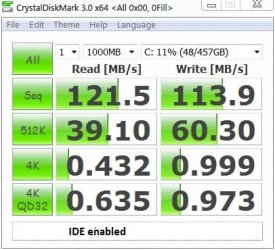
So how do I interpret this 1GB sequential test for my Seagate Barracuda 7200.12
(ST31000528AS).
ide speed.JPG


Add: The 512k and 2x 4k tests are random data tests.
 
Last edited:

My Computer My Computer

At a glance

Windows 7x64 Home Premium SP1Intel i7 2600kG.Skill Ripjaws (DDR3-1600) 2x4GBNvidia GeForce GTS 450; Intel HD Graphics 300...
Computer type
PC/Desktop
Computer Manufacturer/Model Number
Own build
OS
Windows 7x64 Home Premium SP1
CPU
Intel i7 2600k
Motherboard
ASUS P8Z68 Deluxe
Memory
G.Skill Ripjaws (DDR3-1600) 2x4GB
Graphics Card(s)
Nvidia GeForce GTS 450; Intel HD Graphics 3000(GT2+)
Monitor(s) Displays
Dell Ultrasharp IPS panel U2311H, Samsung SyncMaster P2350
Screen Resolution
1920x1080
Hard Drives
Samsung 850 Pro SSD 256GB, Samsung SSD 840 120GB, Seagates 1TB Barracuda ST31000528AS x2
PSU
Seasonic M12II 520W
Case
Lian Li Lancool PC-K60
Cooling
Case: 1x120mm, 3x140mm CPU: Hyper 212+
Keyboard
Logitech MK520 (wireless)
Mouse
Logitech MK520
Internet Speed
6-7 Mbps
Antivirus
Norton Security Premium, Malwarebytes on 2 (MSE on 3rd PC)
Browser
FireFox
Other Info
Audio: Logitech Z523 2.1
Most standard mechanical hard drives cannot supply data sequentially at 120MB/s. Even my WD Caviar Black cannot hit that. It can burst there and can start out in an HDTune test there...but overall is well under 120MB/sec
So how do I interpret this 1GB sequential test for my Seagate Barracuda 7200.12
(ST31000528AS).
View attachment 135092


Add: The 512k and 2x 4k tests are random data tests.

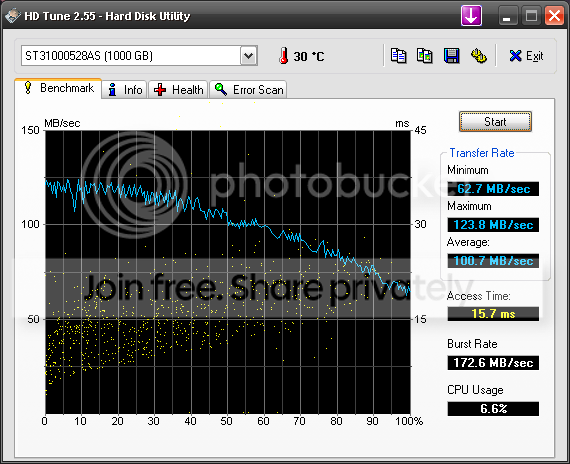
It seems that with that test and your mobo that your 7200.12 indeed hits 120MB. I've got a 7200.12 in one of my machines and this is how it tests with HDTUne;
HDTuneTestSeagateinAMD.png


Either way, I don't think that most standard hard drives are pushing 120MB+ consistently....so I still don't think that I would insist upon a 7200RPM if it's external for backups. If you need all out speed, then by all means buy the 7200RPM and be happy. But if you can get a great deal on a 2TB drive, but find out that it's only 5400 RPM it doesn't mean it has to be a showstopper. It might only be the difference between 98MB/sec and 107MB/sec. And usually with a backup application, it's going to have a bit of processing time anyway..so your drive won't be running at it's max throughput most likely.

I'll have to give that other benchmark a run on my machine and see how my 7200.12 does.
 

My Computer My Computer

At a glance

Windows 7 Ultimate x64Intel Q9550 2.83Ghz OC'd to 3.40Ghz8GB G.Skill PI DDR2-800, 4-4-4-12 timingsEVGA 1280MB Nvidia GeForce GTX570
Computer Manufacturer/Model Number
Self-Built in July 2009
OS
Windows 7 Ultimate x64
CPU
Intel Q9550 2.83Ghz OC'd to 3.40Ghz
Motherboard
Gigabyte GA-EP45-UD3R rev. 1.1, F12 BIOS
Memory
8GB G.Skill PI DDR2-800, 4-4-4-12 timings
Graphics Card(s)
EVGA 1280MB Nvidia GeForce GTX570
Sound Card
Realtek ALC899A 8 channel onboard audio
Monitor(s) Displays
23" Acer x233H
Screen Resolution
1920x1080
Hard Drives
Intel X25-M 80GB Gen 2 SSD
Western Digital 1TB Caviar Black, 32MB cache. WD1001FALS
PSU
Corsair 620HX modular
Case
Antec P182
Cooling
stock
Keyboard
ABS M1 Mechanical
Mouse
Logitech G9 Laser Mouse
Internet Speed
15/2 cable modem
Other Info
Windows and Linux enthusiast. Logitech G35 Headset.
Personally, instead of a dedicated ext. drive, I prefer to use internal drives placed in an external case, with slide-out trays. This offers the flexibility of switching drives around in seconds...particularly if that case has multiple slots.
 

My Computer My Computer

At a glance

W7x64 Pro, SuSe 12.1/** W7 x64 Pro, XP MCEPhenom II 1090T w/Noctua NH-D14 /**4400+ X2 w...2 x 2GB Patriot PGS34g1600LLKA/**4x1GB Corsai...EVGA GTX460 SC/**EVGA 8800GTS
Computer Manufacturer/Model Number
DIY
OS
W7x64 Pro, SuSe 12.1/** W7 x64 Pro, XP MCE
CPU
Phenom II 1090T w/Noctua NH-D14 /**4400+ X2 w/CM Hyper TX 3
Motherboard
ASRock 890FX Deluxe 4/**A8N-SLI
Memory
2 x 2GB Patriot PGS34g1600LLKA/**4x1GB Corsair VS
Graphics Card(s)
EVGA GTX460 SC/**EVGA 8800GTS
Sound Card
Asus Xonar D2X/**Xonar D1
Monitor(s) Displays
Acer X233H, Dell E152FPc /**LG M237-WD
Screen Resolution
1920x1080 & 1024x768/**1980x1080
Hard Drives
WDC 2TB, 1.5TB, 1TB, 500GB,Seagate 500GB , Maxtor 80GB /**500GB Seagate & WDC 1TB Black
PSU
CM RS600 w/ APC BX1000G/**Antec 500 TP w/ APC BX1000
Case
HAF922/**Antec 1040IIB
Cooling
3x200mm, 1x140 and 1x120mm/**5x80mm fans
Keyboard
Logitech Media USB/**Saitek Eclipse
Mouse
Cordless Trackman Wheel/**Ditto
Internet Speed
3.3Mbps
Other Info
SB 560 5.1 w/ Sennheiser RS140/**Creative T20 speakers, Dvico FusionHDTV7 Gold RT, Cisco E3000, HP 5510V AIO, Linksys E3000, Belkin F5U237 hub and **F5D8055 adapter
(** = 2nd rig)
Personally, instead of a dedicated ext. drive, I prefer to use internal drives placed in an external case, with slide-out trays. This offers the flexibility of switching drives around in seconds...particularly if that case has multiple slots.
And it is cheaper in the long run.

For switching it off when not in use, get a remote light switch from Home Depot and plug the power supply into that. Then you can switch it on and off from your desk. Heath Zenith Indoor Remote Kit - SL-6135 at The Home Depot
 

My Computer My Computer

At a glance

Vista, Windows7, Mint Mate, Zorin, Windows 8from 1.6GHz Duo to i7
Computer Manufacturer/Model Number
HP, Dell, Gateway, Toshiba - 4 laptops and 2 desktops
OS
Vista, Windows7, Mint Mate, Zorin, Windows 8
CPU
from 1.6GHz Duo to i7
Monitor(s) Displays
2x HP w2207
Hard Drives
5x HDD, 7x SSD, 12x Externals
Keyboard
with trackball - no mices
Mouse
Trackball mice
Internet Speed
DSL 6000

My Computer My Computer

At a glance

W7x64 Pro, SuSe 12.1/** W7 x64 Pro, XP MCEPhenom II 1090T w/Noctua NH-D14 /**4400+ X2 w...2 x 2GB Patriot PGS34g1600LLKA/**4x1GB Corsai...EVGA GTX460 SC/**EVGA 8800GTS
Computer Manufacturer/Model Number
DIY
OS
W7x64 Pro, SuSe 12.1/** W7 x64 Pro, XP MCE
CPU
Phenom II 1090T w/Noctua NH-D14 /**4400+ X2 w/CM Hyper TX 3
Motherboard
ASRock 890FX Deluxe 4/**A8N-SLI
Memory
2 x 2GB Patriot PGS34g1600LLKA/**4x1GB Corsair VS
Graphics Card(s)
EVGA GTX460 SC/**EVGA 8800GTS
Sound Card
Asus Xonar D2X/**Xonar D1
Monitor(s) Displays
Acer X233H, Dell E152FPc /**LG M237-WD
Screen Resolution
1920x1080 & 1024x768/**1980x1080
Hard Drives
WDC 2TB, 1.5TB, 1TB, 500GB,Seagate 500GB , Maxtor 80GB /**500GB Seagate & WDC 1TB Black
PSU
CM RS600 w/ APC BX1000G/**Antec 500 TP w/ APC BX1000
Case
HAF922/**Antec 1040IIB
Cooling
3x200mm, 1x140 and 1x120mm/**5x80mm fans
Keyboard
Logitech Media USB/**Saitek Eclipse
Mouse
Cordless Trackman Wheel/**Ditto
Internet Speed
3.3Mbps
Other Info
SB 560 5.1 w/ Sennheiser RS140/**Creative T20 speakers, Dvico FusionHDTV7 Gold RT, Cisco E3000, HP 5510V AIO, Linksys E3000, Belkin F5U237 hub and **F5D8055 adapter
(** = 2nd rig)
Yeah, in Germany I also use one of those 3 way switches - it works on 3 seperate frequencies and the control has 3 seperate buttons. Since I always keep the disks below the desk, that is handy - also for the router. I have one Hitachi external disk that has an own switch. That one I keep on the desk. But the thing makes a lot of racket.
 

My Computer My Computer

At a glance

Vista, Windows7, Mint Mate, Zorin, Windows 8from 1.6GHz Duo to i7
Computer Manufacturer/Model Number
HP, Dell, Gateway, Toshiba - 4 laptops and 2 desktops
OS
Vista, Windows7, Mint Mate, Zorin, Windows 8
CPU
from 1.6GHz Duo to i7
Monitor(s) Displays
2x HP w2207
Hard Drives
5x HDD, 7x SSD, 12x Externals
Keyboard
with trackball - no mices
Mouse
Trackball mice
Internet Speed
DSL 6000

My Computer My Computer

At a glance

Windows 7 Professional x64, SP1i5-520M8GB DDR3ATI HD 4570, 512K
Computer Manufacturer/Model Number
Dell Studio 15 1558 Laptop
OS
Windows 7 Professional x64, SP1
CPU
i5-520M
Memory
8GB DDR3
Graphics Card(s)
ATI HD 4570, 512K
Hard Drives
Intel 320, 120GB
Other Info
Back-lit KB, web cam, 9 cell battery.
Has anyone tried an eSATA/USB docking station? Reminds me of a toaster, but supports 2.5"-3.5" drives and is hot swappable. It would be nice to pop my 3.5 back up disk in it using eSATA port on my laptop.

Newegg.com - Thermaltake BlacX ST0005U External Hard Drive SATA Enclosure Docking Station 2.5” & 3.5” USB 2.0 & eSATA

Yes, that is exactly what I am using and I posted earlier in this thread. I have 1 of these docks at home and I have one at work. And I am getting ready to buy another dock for home as I moved my first one from my computer to my cable box and it's acting as a DVR Expander now for my cable TV system...so I need another for my computer.

I use them on some boxes as eSata and other boxes as USB and they work great in both environments. I highly recommend going this route.
 

My Computer My Computer

At a glance

Windows 7 Ultimate x64Intel Q9550 2.83Ghz OC'd to 3.40Ghz8GB G.Skill PI DDR2-800, 4-4-4-12 timingsEVGA 1280MB Nvidia GeForce GTX570
Computer Manufacturer/Model Number
Self-Built in July 2009
OS
Windows 7 Ultimate x64
CPU
Intel Q9550 2.83Ghz OC'd to 3.40Ghz
Motherboard
Gigabyte GA-EP45-UD3R rev. 1.1, F12 BIOS
Memory
8GB G.Skill PI DDR2-800, 4-4-4-12 timings
Graphics Card(s)
EVGA 1280MB Nvidia GeForce GTX570
Sound Card
Realtek ALC899A 8 channel onboard audio
Monitor(s) Displays
23" Acer x233H
Screen Resolution
1920x1080
Hard Drives
Intel X25-M 80GB Gen 2 SSD
Western Digital 1TB Caviar Black, 32MB cache. WD1001FALS
PSU
Corsair 620HX modular
Case
Antec P182
Cooling
stock
Keyboard
ABS M1 Mechanical
Mouse
Logitech G9 Laser Mouse
Internet Speed
15/2 cable modem
Other Info
Windows and Linux enthusiast. Logitech G35 Headset.
Most standard mechanical hard drives cannot supply data sequentially at 120MB/s. Even my WD Caviar Black cannot hit that. It can burst there and can start out in an HDTune test there...but overall is well under 120MB/sec
So how do I interpret this 1GB sequential test for my Seagate Barracuda 7200.12
(ST31000528AS).
View attachment 135092


Add: The 512k and 2x 4k tests are random data tests.

It seems that with that test and your mobo that your 7200.12 indeed hits 120MB. I've got a 7200.12 in one of my machines and this is how it tests with HDTUne;
HDTuneTestSeagateinAMD.png


Either way, I don't think that most standard hard drives are pushing 120MB+ consistently....so I still don't think that I would insist upon a 7200RPM if it's external for backups. If you need all out speed, then by all means buy the 7200RPM and be happy. But if you can get a great deal on a 2TB drive, but find out that it's only 5400 RPM it doesn't mean it has to be a showstopper. It might only be the difference between 98MB/sec and 107MB/sec. And usually with a backup application, it's going to have a bit of processing time anyway..so your drive won't be running at it's max throughput most likely.

I'll have to give that other benchmark a run on my machine and see how my 7200.12 does.
I found HDTune & CrystalDiskInfo give similar results.
Your actually getting ~120 MB/s on the outer tracks (first 25% of your HDD).
The amount of data you can feed to your heads is proportional to radial velocity. This equals radius x angular velocity.
This accounts, in part, for the drop off curve and
- 7200 rpm gives greater transfer rate than 5400
- fuller disk = slower disk.
 

My Computer My Computer

At a glance

Windows 7x64 Home Premium SP1Intel i7 2600kG.Skill Ripjaws (DDR3-1600) 2x4GBNvidia GeForce GTS 450; Intel HD Graphics 300...
Computer type
PC/Desktop
Computer Manufacturer/Model Number
Own build
OS
Windows 7x64 Home Premium SP1
CPU
Intel i7 2600k
Motherboard
ASUS P8Z68 Deluxe
Memory
G.Skill Ripjaws (DDR3-1600) 2x4GB
Graphics Card(s)
Nvidia GeForce GTS 450; Intel HD Graphics 3000(GT2+)
Monitor(s) Displays
Dell Ultrasharp IPS panel U2311H, Samsung SyncMaster P2350
Screen Resolution
1920x1080
Hard Drives
Samsung 850 Pro SSD 256GB, Samsung SSD 840 120GB, Seagates 1TB Barracuda ST31000528AS x2
PSU
Seasonic M12II 520W
Case
Lian Li Lancool PC-K60
Cooling
Case: 1x120mm, 3x140mm CPU: Hyper 212+
Keyboard
Logitech MK520 (wireless)
Mouse
Logitech MK520
Internet Speed
6-7 Mbps
Antivirus
Norton Security Premium, Malwarebytes on 2 (MSE on 3rd PC)
Browser
FireFox
Other Info
Audio: Logitech Z523 2.1
Hi there
for backup speed isn't the most important parameter -- just get the LARGEST CHEAPEST external drive you can -- backup can run at ANY time -- at night etc etc.

After Backup don't keep the disk online.

Incidentally have 2 Disks -- so if one fails you've got another. Disks DO fail (fortunately not often) but you don't want to lose say 2 TB of data.

Cheers
jimbo
 

My Computer My Computer

At a glance

Linux CENTOS 7 / various Windows OS'es and se...Intel i7 Intel i58GB, 16GBOn Motherboard
Computer type
PC/Desktop
Computer Manufacturer/Model Number
Custom built, several laptops HP/ASUS
OS
Linux CENTOS 7 / various Windows OS'es and servers
CPU
Intel i7 Intel i5
Memory
8GB, 16GB
Graphics Card(s)
On Motherboard
Sound Card
Realtek HD audio
Monitor(s) Displays
Apple Cinema display, Samsung LCD
Screen Resolution
1920 X 1080
Hard Drives
4 X 1TB SATA
Mouse
Toshiba wireless laser
Internet Speed
> 20MB up
I think all of the suggestions given here are good options. I have 4 externals. Redundancy is important. I have 2 Seagate Free Agent drives which I like. You can buy different cables for whatever interface you prefer and they are also good for portability. I have 2 Rosewill enclosures with 1TB Samsung spinpoints in them. They both have eSATA and USB 2.0 interfaces and work very well. The good point about them is you can swap drives out.
The Thermaltake option mentioned by pparks is a good option and much easier to swap drives. I have been considering one of those also.
Acronis and free Macrium are good choices for imaging. As far as user files and folders, I have just started using Microsoft's Sync Toy. So far it has worked perfect.
 

My Computers My Computers

  • At a glance

    Windows 11 ProRyzen 9 5900X32GB G Skill DDR4-3600EVGA RTX 3080 FTW 3 Ultra
    Computer type
    PC/Desktop
    Computer Manufacturer/Model Number
    ALWAYS UNDER CONSTRUCTION
    OS
    Windows 11 Pro
    CPU
    Ryzen 9 5900X
    Motherboard
    Asus X570 Crosshair Viii Hero
    Memory
    32GB G Skill DDR4-3600
    Graphics Card(s)
    EVGA RTX 3080 FTW 3 Ultra
    Sound Card
    On Board/Sennheiser PC37X Headset
    Monitor(s) Displays
    3 X Asus 27"
    Screen Resolution
    2560x1440
    Hard Drives
    2 X 1 TB NVME drives
    PSU
    EVGA 850
    Case
    Phanteks Eclipse P400A
    Cooling
    EVGA 280 AIO
    Keyboard
    Logitech G510s/ Logitech G13
    Mouse
    Logitech G502
    Internet Speed
    24/1
    Antivirus
    ESET/MBAM Pro/SAS Pro
    Browser
    Chrome/ Firefox/ Edge
  • At a glance

    Windows 11 ProIntel Ultra 9 288V32 GB LPDDR5X 8533
    Computer type
    Laptop
    System Manufacturer/Model Number
    Dell 16 Plus
    OS
    Windows 11 Pro
    CPU
    Intel Ultra 9 288V
    Memory
    32 GB LPDDR5X 8533
    Monitor(s) Displays
    16" Mini-LED HDR600 Touch 90 Hz
    Screen Resolution
    2560X1600
    Hard Drives
    1 TB NVME
Has anyone tried an eSATA/USB docking station? Reminds me of a toaster, but supports 2.5"-3.5" drives and is hot swappable. It would be nice to pop my 3.5 back up disk in it using eSATA port on my laptop.

Yes, that is exactly what I am using and I posted earlier in this thread. I have 1 of these docks at home and I have one at work. And I am getting ready to buy another dock for home as I moved my first one from my computer to my cable box and it's acting as a DVR Expander now for my cable TV system...so I need another for my computer.

I use them on some boxes as eSata and other boxes as USB and they work great in both environments. I highly recommend going this route.

Ah, I didn't click on all of your links. That's good to know as I have considered one for awhile. I have an old WD external and USB transfer of Acronis images is too slow.
 

My Computer My Computer

At a glance

Windows 7 Professional x64, SP1i5-520M8GB DDR3ATI HD 4570, 512K
Computer Manufacturer/Model Number
Dell Studio 15 1558 Laptop
OS
Windows 7 Professional x64, SP1
CPU
i5-520M
Memory
8GB DDR3
Graphics Card(s)
ATI HD 4570, 512K
Hard Drives
Intel 320, 120GB
Other Info
Back-lit KB, web cam, 9 cell battery.
Go for a 5400 RPM just because they run cooler. Heat is the enemy in an external drive enclosure and there are 5400 rpm that are plenty fast. I get 120 MB/s from 2TB WD Green external (eSATA). Try to get an enclosure with a fan. Some without fans are OK for short periods of activities, but backups take a long time so you want a lower rpm drive with a fan.

You can build your own eSATA - it is fairly easy and their are several good external enclosures you can buy.

Docking stations expose the sensitive electronic components of the drive to static electricity. This is not a good plan IMO for a permanent external - only for the odd need to duplicate a drive.
 

My Computer My Computer

At a glance

Windows 10 Pro. EFI boot partition, full EFI ...i7 4770k 4.4GHz (44-44-43-43 turbo) @ 1.248V16GB (8GBx2) @2200 MHz G.skill Sniper 10-11-1...MSI GTX 970 Gaming 4G
Computer type
PC/Desktop
Computer Manufacturer/Model Number
Home built (GeneO industries)/Model 4
OS
Windows 10 Pro. EFI boot partition, full EFI boot
CPU
i7 4770k 4.4GHz (44-44-43-43 turbo) @ 1.248V
Motherboard
ASUS Maximus VI Hero
Memory
16GB (8GBx2) @2200 MHz G.skill Sniper 10-11-10-30-1, 1.6V
Graphics Card(s)
MSI GTX 970 Gaming 4G
Sound Card
Onboard SupremeFX Audio
Monitor(s) Displays
NEC Spectraview 2490WUXi-SV
Screen Resolution
1920 x 1200
Hard Drives
Samsung 850 Pro 256GB (OS), Samsung 2x 128GB 840 Pro SSD in RAID0, 3x WD Blue 6Gb/s 1TB RAID0, WD 2TB Black external USB 3.0, 2TB WD20EARS Green external USB 3.0, 2x 500GB Seagate and 1 750 GB external USB, 1x 350GB external USB3
PSU
Seasonic X-850 (2012 KM3 model)
Case
Fractal Design Define R4
Cooling
NH-D14, NF-F12, NF-A15; NF-P14, NF-P12,NF-A14, S12A PWM
Keyboard
Cooler Master Storm Quickfire Rapid - Brown
Mouse
Logitech G602
Internet Speed
126.4 Mb/s down, 24.3 Mb/s up
Other Info
USB 3.0 x8 , SATA III x8, eSATA, USB 2.0 x6. Samsung DVD R/W drive.

WEI: CPU 7.8, Memory 7.9, Graphics 7.9, Disk 7.9
I get 120 MB/s from 2TB WD Green external (eSATA).
Hmm Interesting.

For the average person browsing the forum with say a notebook if you get a usb drive drive at a good price - go for it. Yes definitely have at least 2. Keep a reasonably uptodate image on both ideally with 2 imaging packages and your set.

I have 2.5 inch 5400/5200 rpm portables and 3.5 inch 7200 rpm. There is a noticeable difference in speed but not a major factor for me. If I'm not using the externals I turn them off. I try to keep my regular images to around 50GB.

My experience as well is that the 3.5 in 7200 rpm can get much hotter than the 5400 portables. I use a $10 fan to keep the temp down on a hot day.
 

My Computer My Computer

At a glance

Windows 7x64 Home Premium SP1Intel i7 2600kG.Skill Ripjaws (DDR3-1600) 2x4GBNvidia GeForce GTS 450; Intel HD Graphics 300...
Computer type
PC/Desktop
Computer Manufacturer/Model Number
Own build
OS
Windows 7x64 Home Premium SP1
CPU
Intel i7 2600k
Motherboard
ASUS P8Z68 Deluxe
Memory
G.Skill Ripjaws (DDR3-1600) 2x4GB
Graphics Card(s)
Nvidia GeForce GTS 450; Intel HD Graphics 3000(GT2+)
Monitor(s) Displays
Dell Ultrasharp IPS panel U2311H, Samsung SyncMaster P2350
Screen Resolution
1920x1080
Hard Drives
Samsung 850 Pro SSD 256GB, Samsung SSD 840 120GB, Seagates 1TB Barracuda ST31000528AS x2
PSU
Seasonic M12II 520W
Case
Lian Li Lancool PC-K60
Cooling
Case: 1x120mm, 3x140mm CPU: Hyper 212+
Keyboard
Logitech MK520 (wireless)
Mouse
Logitech MK520
Internet Speed
6-7 Mbps
Antivirus
Norton Security Premium, Malwarebytes on 2 (MSE on 3rd PC)
Browser
FireFox
Other Info
Audio: Logitech Z523 2.1
Back
Top