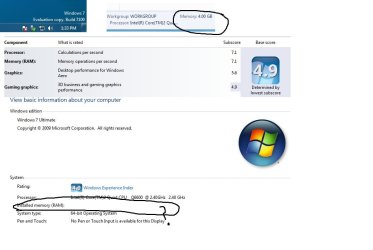
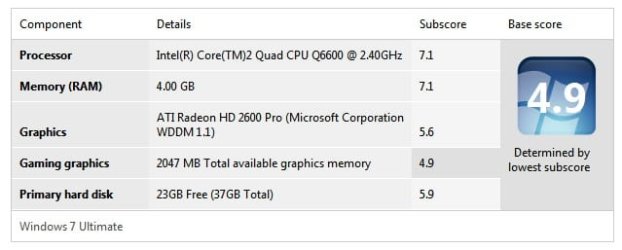
What on earth, bet you never seen anything like this!

ben07

New member
Power User
Local time
9:41 PM
Messages
111
Windows 7 is simply excellent and don't know why it's NOT showing my ram under "System Properties" but it's showing my 4GB ram everywhere?

I'm using W7 x64 RC 7100 downloaded directly from MS!
 

Attachments

  • Ram.jpg
    Ram.jpg
    49.1 KB · Views: 246
  • 1.jpg
    1.jpg
    21.2 KB · Views: 99

My Computer My Computer

At a glance

Windows 7 Pro x64 RTMIntel
OS
Windows 7 Pro x64 RTM
CPU
Intel
updated bios at all recently? may want to with the x64 install... or atleast before updating, check your settings as there may be an option already there for this.
 

My Computer My Computer

At a glance

XP/win7 x86 build 7127Athlon64 X2 DUAL 4200+ 2.21ghz2GB Dual Chan DDR2 CorsairNvidia 6800GT
Computer Manufacturer/Model Number
CUSTOM
OS
XP/win7 x86 build 7127
CPU
Athlon64 X2 DUAL 4200+ 2.21ghz
Motherboard
ASUS K8 PRO SLI
Memory
2GB Dual Chan DDR2 Corsair
Graphics Card(s)
Nvidia 6800GT
Sound Card
nvidia
Monitor(s) Displays
19' LCD
Screen Resolution
1280x1024
Hard Drives
WD 250, 2x500, 2x1TB IDE/USB
WD 250 SATA (system)
SEAGATE 120 Sata
PSU
coolermaster 450
Case
SUPERFLOWER
Cooling
1 HDD bay fan, 5x80mm Case Fans, AEROGATE II Fan/Temp
Keyboard
MS wireless
Mouse
MS Wireless
Internet Speed
fassssssssst
updated bios at all recently? may want to with the x64 install... or atleast before updating, check your settings as there may be an option already there for this.

Thanks Digger, how likely is the bios?

I have the GA-P35-DS3R rev 2.0 Gigabyte MB which I bought back in Dec 07 (F5 bios) and the latest bios = F11.

When I 1st installed W7 Beta 7000 x86, my ram was displayed correctly under System Properties, it's only x64 W7 not displaying the ram under System Properties!

Thanks again for your help.
 

My Computer My Computer

At a glance

Windows 7 Pro x64 RTMIntel
OS
Windows 7 Pro x64 RTM
CPU
Intel
not real sure to tell you. I have an old GA KV8 SLI PRO board and i dont recall seeing any options there, and I just did a flash but 2 weeks ago.

Fear not, as i havent loaded x64 yet, and there are lots of helpful ppl here that are and can probly point you in a better direction than i
 

My Computer My Computer

At a glance

XP/win7 x86 build 7127Athlon64 X2 DUAL 4200+ 2.21ghz2GB Dual Chan DDR2 CorsairNvidia 6800GT
Computer Manufacturer/Model Number
CUSTOM
OS
XP/win7 x86 build 7127
CPU
Athlon64 X2 DUAL 4200+ 2.21ghz
Motherboard
ASUS K8 PRO SLI
Memory
2GB Dual Chan DDR2 Corsair
Graphics Card(s)
Nvidia 6800GT
Sound Card
nvidia
Monitor(s) Displays
19' LCD
Screen Resolution
1280x1024
Hard Drives
WD 250, 2x500, 2x1TB IDE/USB
WD 250 SATA (system)
SEAGATE 120 Sata
PSU
coolermaster 450
Case
SUPERFLOWER
Cooling
1 HDD bay fan, 5x80mm Case Fans, AEROGATE II Fan/Temp
Keyboard
MS wireless
Mouse
MS Wireless
Internet Speed
fassssssssst
Hey Digger, it's Windows 7 RC, not our MB/bios!

I'm happy to report that W7 (7127 x64) is finally displaying my ram under System Properties:D.

To my surprise, upgrading to 7127 from 7100 (instead of doing a fresh install, as I normally do) my C drive has gone down a bit by 1.5GB!

W7 7100 x64 19.9GB free of 37.2GB
W7 7127 x64 21.4GB free of 37.2GB
 

My Computer My Computer

At a glance

Windows 7 Pro x64 RTMIntel
OS
Windows 7 Pro x64 RTM
CPU
Intel
Back
Top
