What Partition are Migrate to SSD

jsquareg

New member
Power User
Local time
11:39 AM
Messages
400
When I first looked at my HDD on my new Dell 8500 I found four partitions preceding the Win 8 System Partition as shown by Minitools Partition Wizard.

They are:

1. ESP(FAT32) 500Mb
2. Diags (FAT32) 40Mb
3. Other - GPT partition marked Reserved 128MB
4. WinReTools - The Recovery Partition 500Mb

Then came the system partition.

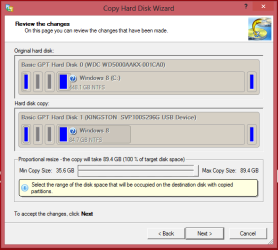
I migrated the system to an SSD using Paragon's Disk Mangement's Migrate to SSD feature and it went flawlessly and the SSD system works the same.

However, only the ESP partition and System partition got migrated. The 128Mb 'Other' reserved partition was left behind. It doesn't seem to be needed on the SSD. I would like to know why it was on the HDD if it is not needed to run Win 8.

This whole GPT/UEFI thing has me totally confused and after reading several links to the subject on the web I think I am more confused than when I started.

Will really appreciate any help anyone can give me in understanding why the 'Other reserved partition did no get migrated.

Than you very much.
 

My Computer My Computer

Computer type
PC/Desktop
Computer Manufacturer/Model Number
Dell XPS-8500
OS
Windows 7 Home Premium (Retail) Full version - With SP1
CPU
3.10 Gig Intel Core i5-3350P
Motherboard
Dell 0NW73C A00
Memory
8192 Megabytes Usable Installed Memory
Monitor(s) Displays
Samsung SyncMaster [Monitor] (19.1"vis, s/n HVELA10194, Octo
Screen Resolution
1024 X 768
Hard Drives
INTEL SSDSA2CW120G3 ATA Device [Hard drive] (120.03 GB)
INTEL SSDSA2CW080G3 ATA Device [Hard drive] (80.02 GB)
Keyboard
HID Keyboard Device (HP)
Mouse
Dell (came with computer)
Internet Speed
cox high speed
Other Info
The above taken with Bel Arc Advisor
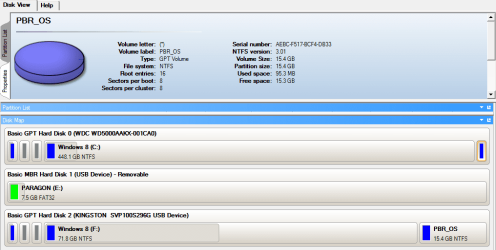
Please post back a screenshot of your Disk Management - Post a Screen Capture Image - Windows 7 Help Forums and we'll try to figure out what got transferred and left behind.

Since Recovery wasn't transferred anyway you may want to at some point consider doing the preferred Clean Reinstall - Factory OEM Windows 7 without the Dell preinstalled bloatware. Here are special steps to install to UEFI (Unified Extensible Firmware Interface) - Install Windows 7 with - Windows 7 Forums

To understand better about UEFI BIOS watch this video: Technical Note: UEFI BIOS vs. Legacy BIOS - YouTube .

Some users decide to Bypass UEFI to Install WIn7 and most report no performance difference.
 
Thank you.

I guess I didn't make my question clear. I know what was transferred and probably know why. :)
I was wondering why the 'Other' system reserved partition did not get transferred.

BTW, the link to the UEFI BIOs vs. Legacy BIOS was very helpful. I appreciate it.

Thanks again.

Please post back a screenshot of your Disk Management - Post a Screen Capture Image - Windows 7 Help Forums and we'll try to figure out what got transferred and left behind.

Since Recovery wasn't transferred anyway you may want to at some point consider doing the preferred Clean Reinstall - Factory OEM Windows 7 without the Dell preinstalled bloatware. Here are special steps to install to UEFI (Unified Extensible Firmware Interface) - Install Windows 7 with - Windows 7 Forums

To understand better about UEFI BIOS watch this video: Technical Note: UEFI BIOS vs. Legacy BIOS - YouTube .

Some users decide to Bypass UEFI to Install WIn7 and most report no performance difference.
 

My Computer My Computer

Computer type
PC/Desktop
Computer Manufacturer/Model Number
Dell XPS-8500
OS
Windows 7 Home Premium (Retail) Full version - With SP1
CPU
3.10 Gig Intel Core i5-3350P
Motherboard
Dell 0NW73C A00
Memory
8192 Megabytes Usable Installed Memory
Monitor(s) Displays
Samsung SyncMaster [Monitor] (19.1"vis, s/n HVELA10194, Octo
Screen Resolution
1024 X 768
Hard Drives
INTEL SSDSA2CW120G3 ATA Device [Hard drive] (120.03 GB)
INTEL SSDSA2CW080G3 ATA Device [Hard drive] (80.02 GB)
Keyboard
HID Keyboard Device (HP)
Mouse
Dell (came with computer)
Internet Speed
cox high speed
Other Info
The above taken with Bel Arc Advisor
The Paragon tool only migrates the OS partition and the system partition that contains the bootmgr. The other partitions are for OEM tools, recovery to original out of the box state, etc. They are not needed for running the system.

What I would recommend is to make images now. In case something happens, you can then easily recover.
 

My Computer My Computer

Computer Manufacturer/Model Number
HP, Dell, Gateway, Toshiba - 4 laptops and 2 desktops
OS
Vista, Windows7, Mint Mate, Zorin, Windows 8
CPU
from 1.6GHz Duo to i7
Monitor(s) Displays
2x HP w2207
Hard Drives
5x HDD, 7x SSD, 12x Externals
Keyboard
with trackball - no mices
Mouse
Trackball mice
Internet Speed
DSL 6000
Thank you.

I guess I didn't make my question clear. I know what was transferred and probably know why. :)
I was wondering why the 'Other' system reserved partition did not get transferred.

BTW, the link to the UEFI BIOs vs. Legacy BIOS was very helpful. I appreciate it.

Thanks again.

Yes I understand. This is why I asked you to reply with screenshot of your Disk Mgmt, so we could see which partition is holding the System files since that and C are what are copied.

What makes you think the System Reserved partition was not copied? Did it hold the System Active flags? This is what tells you which partition is booting Win7. In some cases due to repairs the System Active flag is moved to another partition and System Reserved partition is not even functional.
 
Back
Top