Solved What software to use with SSD clone and for backup too? Many Choices!!

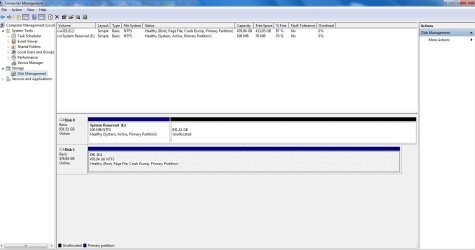
When booted to SSD
In elevated command prompt:
Code:
diskpart
sel vol  c
inactive
exit
reboot. Of course without dvd
Now SSD is inactive and system reserved is active.
System boots fine.

Do you only get "DRIVER_POWER_STATE_FAILURE." on cold boot. Or also after reboot?
 

My Computer My Computer

At a glance

Microsoft Windows 7 Home Premium 64-bits 7601...Intel(R) Core(TM) i3 CPU M 370 @ 2.40GHz4,00 GBATI Mobility Radeon HD 5400 Series
Computer type
Laptop
Computer Manufacturer/Model Number
ACER ASPIRE 5742G
OS
Microsoft Windows 7 Home Premium 64-bits 7601 Multiprocessor Free Service Pack 1
CPU
Intel(R) Core(TM) i3 CPU M 370 @ 2.40GHz
Motherboard
Acer Aspire 5742G
Memory
4,00 GB
Graphics Card(s)
ATI Mobility Radeon HD 5400 Series
Sound Card
(1) AMD High Definition Audio Device (2) Realtek High Defi
Screen Resolution
1366 x 768 x 32 bits (4294967296 colors) @ 60 Hz
Hard Drives
WDC WD5000BEVT-22ZAT0
BTW I don't know why bios only tries to boot from old disk only.
Also I don't understand why startup repair only looks at SSD and repairs boot menu on SSD only.
Forget that issue. Shit happens.
 

My Computer My Computer

At a glance

Microsoft Windows 7 Home Premium 64-bits 7601...Intel(R) Core(TM) i3 CPU M 370 @ 2.40GHz4,00 GBATI Mobility Radeon HD 5400 Series
Computer type
Laptop
Computer Manufacturer/Model Number
ACER ASPIRE 5742G
OS
Microsoft Windows 7 Home Premium 64-bits 7601 Multiprocessor Free Service Pack 1
CPU
Intel(R) Core(TM) i3 CPU M 370 @ 2.40GHz
Motherboard
Acer Aspire 5742G
Memory
4,00 GB
Graphics Card(s)
ATI Mobility Radeon HD 5400 Series
Sound Card
(1) AMD High Definition Audio Device (2) Realtek High Defi
Screen Resolution
1366 x 768 x 32 bits (4294967296 colors) @ 60 Hz
Hard Drives
WDC WD5000BEVT-22ZAT0
When booted to SSD
In elevated command prompt:
Code:
diskpart
sel vol  c
inactive
exit
reboot. Of course without dvd
Now SSD is inactive and system reserved is active.
System boots fine.

Do you only get "DRIVER_POWER_STATE_FAILURE." on cold boot. Or also after reboot?
I get "DRIVER_POWER_STATE_FAILURE" when I shut down the computer. It hangs on shut down and after several minutes I get the blue screen message. While ago was the last time that it happened.

I did the above in elevated command prompt. See snips.

I'm going to reboot after this post and see what happens. I'll report back what happens.
 

Attachments

  • Capture acp 01 2_7_13.JPG
    Capture acp 01 2_7_13.JPG
    33.9 KB · Views: 3
  • Capture dm 2_7_13 03.JPG
    Capture dm 2_7_13 03.JPG
    102.8 KB · Views: 4

My Computer My Computer

At a glance

Windows 7 Ultimate (x64) Service Pack 1 (buil...Intel(R) Core(TM) i5-2450M CPU @ 2.50GHz8 GBIntel HD Graphics 3000 with up to 1.6GB dynam...
Computer Manufacturer/Model Number
Dell 17R N7110 Inspiron laptop
OS
Windows 7 Ultimate (x64) Service Pack 1 (build 7601)
CPU
Intel(R) Core(TM) i5-2450M CPU @ 2.50GHz
Motherboard
Dell Inc. 0YH79Y A00
Memory
8 GB
Graphics Card(s)
Intel HD Graphics 3000 with up to 1.6GB dynamic video memory
Sound Card
SRS Premium Sound - (1) Realtek High Definition Audio
Monitor(s) Displays
17.3" diagonal HD+ TrueLife LED display
Screen Resolution
1600x900 resolution
Hard Drives
1 TB HD #ST1000LM024 HN-M101MBB,

512 GB Samsung 840 Pro SSD
PSU
stock
Case
stock
Cooling
stock
Keyboard
stock
Mouse
stock
Internet Speed
WiFi
Other Info
Printer: HP Photosmart C3180
So you get it on shutdown only (I get "DRIVER_POWER_STATE_FAILURE" )?
Always? You did have it before...please explain....

But systen boots fine now?
 

My Computer My Computer

At a glance

Microsoft Windows 7 Home Premium 64-bits 7601...Intel(R) Core(TM) i3 CPU M 370 @ 2.40GHz4,00 GBATI Mobility Radeon HD 5400 Series
Computer type
Laptop
Computer Manufacturer/Model Number
ACER ASPIRE 5742G
OS
Microsoft Windows 7 Home Premium 64-bits 7601 Multiprocessor Free Service Pack 1
CPU
Intel(R) Core(TM) i3 CPU M 370 @ 2.40GHz
Motherboard
Acer Aspire 5742G
Memory
4,00 GB
Graphics Card(s)
ATI Mobility Radeon HD 5400 Series
Sound Card
(1) AMD High Definition Audio Device (2) Realtek High Defi
Screen Resolution
1366 x 768 x 32 bits (4294967296 colors) @ 60 Hz
Hard Drives
WDC WD5000BEVT-22ZAT0
So you get it on shutdown only (I get "DRIVER_POWER_STATE_FAILURE" )?
Always? You did have it before...please explain....

But systen boots fine now?
Then only appeared a day before when I told you about a blue screen error that I couldn't see. Then you had me change the automatic restart feature.

I just restarted this computer twice and it started OK. Maybe it is OK now??

BTW, a reboot takes 45 seconds. This is a fast SSD!
 

My Computer My Computer

At a glance

Windows 7 Ultimate (x64) Service Pack 1 (buil...Intel(R) Core(TM) i5-2450M CPU @ 2.50GHz8 GBIntel HD Graphics 3000 with up to 1.6GB dynam...
Computer Manufacturer/Model Number
Dell 17R N7110 Inspiron laptop
OS
Windows 7 Ultimate (x64) Service Pack 1 (build 7601)
CPU
Intel(R) Core(TM) i5-2450M CPU @ 2.50GHz
Motherboard
Dell Inc. 0YH79Y A00
Memory
8 GB
Graphics Card(s)
Intel HD Graphics 3000 with up to 1.6GB dynamic video memory
Sound Card
SRS Premium Sound - (1) Realtek High Definition Audio
Monitor(s) Displays
17.3" diagonal HD+ TrueLife LED display
Screen Resolution
1600x900 resolution
Hard Drives
1 TB HD #ST1000LM024 HN-M101MBB,

512 GB Samsung 840 Pro SSD
PSU
stock
Case
stock
Cooling
stock
Keyboard
stock
Mouse
stock
Internet Speed
WiFi
Other Info
Printer: HP Photosmart C3180
BTW I don't know why bios only tries to boot from old disk only.
Also I don't understand why startup repair only looks at SSD and repairs boot menu on SSD only.
Forget that issue. Shit happens.
It surely does! :)
 

My Computer My Computer

At a glance

Windows 7 Ultimate (x64) Service Pack 1 (buil...Intel(R) Core(TM) i5-2450M CPU @ 2.50GHz8 GBIntel HD Graphics 3000 with up to 1.6GB dynam...
Computer Manufacturer/Model Number
Dell 17R N7110 Inspiron laptop
OS
Windows 7 Ultimate (x64) Service Pack 1 (build 7601)
CPU
Intel(R) Core(TM) i5-2450M CPU @ 2.50GHz
Motherboard
Dell Inc. 0YH79Y A00
Memory
8 GB
Graphics Card(s)
Intel HD Graphics 3000 with up to 1.6GB dynamic video memory
Sound Card
SRS Premium Sound - (1) Realtek High Definition Audio
Monitor(s) Displays
17.3" diagonal HD+ TrueLife LED display
Screen Resolution
1600x900 resolution
Hard Drives
1 TB HD #ST1000LM024 HN-M101MBB,

512 GB Samsung 840 Pro SSD
PSU
stock
Case
stock
Cooling
stock
Keyboard
stock
Mouse
stock
Internet Speed
WiFi
Other Info
Printer: HP Photosmart C3180
I don't know how fast your SSD is. But it only reads bootmenu from old disk now. Main startup part comes form SSD. Do some benchmarking.

I did advise you to "not automatic restart on crash". So you can see bsos and it doesn't restart automatically. I did not CAUSE the crash

https://www.google.nl/#q=DRIVER_POWER_STATE_FAILURE

Make a new thread if driver_power_failure_state_failure comes back.

You succesfully transfered to SSD. Mark thread as SOLVED. I can't help you with speed!
 

My Computer My Computer

At a glance

Microsoft Windows 7 Home Premium 64-bits 7601...Intel(R) Core(TM) i3 CPU M 370 @ 2.40GHz4,00 GBATI Mobility Radeon HD 5400 Series
Computer type
Laptop
Computer Manufacturer/Model Number
ACER ASPIRE 5742G
OS
Microsoft Windows 7 Home Premium 64-bits 7601 Multiprocessor Free Service Pack 1
CPU
Intel(R) Core(TM) i3 CPU M 370 @ 2.40GHz
Motherboard
Acer Aspire 5742G
Memory
4,00 GB
Graphics Card(s)
ATI Mobility Radeon HD 5400 Series
Sound Card
(1) AMD High Definition Audio Device (2) Realtek High Defi
Screen Resolution
1366 x 768 x 32 bits (4294967296 colors) @ 60 Hz
Hard Drives
WDC WD5000BEVT-22ZAT0
I don't know how fast your SSD is. But it only reads bootmenu from old disk now. Main startup part comes form SSD. Do some benchmarking.

I did advise you to "not automatic restart on crash". So you can see bsos and it doesn't restart automatically. I did not CAUSE the crash

https://www.google.nl/#q=DRIVER_POWER_STATE_FAILURE

Make a new thread if driver_power_failure_state_failure comes back.

You succesfully transfered to SSD. Mark thread as SOLVED. I can't help you with speed!
When I just rebooted I got a black screen that said "Operating System not found" when it tried to start up. I was getting this a day or two back.

I know that you helped me to see the blue screen. Maybe I said it wrong earlier. I certainly wasn't complaining. I had googled D_P_S_F yesterday. I was wondering if you knew a way for me to view my drivers? I don't know how to do this. I read that the problem may be out of date driver(s).

I'm not complaining about the speed either. I am happy with its speed. I posted its benchmark speed in the SSD speed thread and also a few posts back.

Anyway, back to a black screen that said "Operating System not found." I had to use a Win 7 install disk to get going again. Any ideas on how to fix it?
 

My Computer My Computer

At a glance

Windows 7 Ultimate (x64) Service Pack 1 (buil...Intel(R) Core(TM) i5-2450M CPU @ 2.50GHz8 GBIntel HD Graphics 3000 with up to 1.6GB dynam...
Computer Manufacturer/Model Number
Dell 17R N7110 Inspiron laptop
OS
Windows 7 Ultimate (x64) Service Pack 1 (build 7601)
CPU
Intel(R) Core(TM) i5-2450M CPU @ 2.50GHz
Motherboard
Dell Inc. 0YH79Y A00
Memory
8 GB
Graphics Card(s)
Intel HD Graphics 3000 with up to 1.6GB dynamic video memory
Sound Card
SRS Premium Sound - (1) Realtek High Definition Audio
Monitor(s) Displays
17.3" diagonal HD+ TrueLife LED display
Screen Resolution
1600x900 resolution
Hard Drives
1 TB HD #ST1000LM024 HN-M101MBB,

512 GB Samsung 840 Pro SSD
PSU
stock
Case
stock
Cooling
stock
Keyboard
stock
Mouse
stock
Internet Speed
WiFi
Other Info
Printer: HP Photosmart C3180
you told me it did startup with only E active and no dvd inserted. Now it doesn't boot? only black screen?
 

My Computer My Computer

At a glance

Microsoft Windows 7 Home Premium 64-bits 7601...Intel(R) Core(TM) i3 CPU M 370 @ 2.40GHz4,00 GBATI Mobility Radeon HD 5400 Series
Computer type
Laptop
Computer Manufacturer/Model Number
ACER ASPIRE 5742G
OS
Microsoft Windows 7 Home Premium 64-bits 7601 Multiprocessor Free Service Pack 1
CPU
Intel(R) Core(TM) i3 CPU M 370 @ 2.40GHz
Motherboard
Acer Aspire 5742G
Memory
4,00 GB
Graphics Card(s)
ATI Mobility Radeon HD 5400 Series
Sound Card
(1) AMD High Definition Audio Device (2) Realtek High Defi
Screen Resolution
1366 x 768 x 32 bits (4294967296 colors) @ 60 Hz
Hard Drives
WDC WD5000BEVT-22ZAT0
you told me it did startup with only E active and no dvd inserted. Now it doesn't boot? only black screen?
It booted up twice just fine. The third time, I got the black screen with the message.

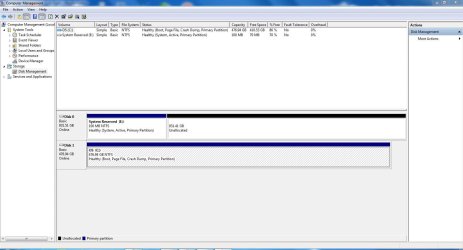
I checked disk management and only E was active. See snip. Any ideas for a fix?
 

Attachments

  • Capture dm 2_7_13 04.JPG
    Capture dm 2_7_13 04.JPG
    108.4 KB · Views: 3

My Computer My Computer

At a glance

Windows 7 Ultimate (x64) Service Pack 1 (buil...Intel(R) Core(TM) i5-2450M CPU @ 2.50GHz8 GBIntel HD Graphics 3000 with up to 1.6GB dynam...
Computer Manufacturer/Model Number
Dell 17R N7110 Inspiron laptop
OS
Windows 7 Ultimate (x64) Service Pack 1 (build 7601)
CPU
Intel(R) Core(TM) i5-2450M CPU @ 2.50GHz
Motherboard
Dell Inc. 0YH79Y A00
Memory
8 GB
Graphics Card(s)
Intel HD Graphics 3000 with up to 1.6GB dynamic video memory
Sound Card
SRS Premium Sound - (1) Realtek High Definition Audio
Monitor(s) Displays
17.3" diagonal HD+ TrueLife LED display
Screen Resolution
1600x900 resolution
Hard Drives
1 TB HD #ST1000LM024 HN-M101MBB,

512 GB Samsung 840 Pro SSD
PSU
stock
Case
stock
Cooling
stock
Keyboard
stock
Mouse
stock
Internet Speed
WiFi
Other Info
Printer: HP Photosmart C3180
Is there anything to check? Sometimes it starts up and shuts off correctly and sometimes it doesn't. When it doesn't start up OK, I get the black screen with white letters saying "Operation system not found." If is running about 50/50. Half of the time it starts OK and half of the time it doesn't.
 

My Computer My Computer

At a glance

Windows 7 Ultimate (x64) Service Pack 1 (buil...Intel(R) Core(TM) i5-2450M CPU @ 2.50GHz8 GBIntel HD Graphics 3000 with up to 1.6GB dynam...
Computer Manufacturer/Model Number
Dell 17R N7110 Inspiron laptop
OS
Windows 7 Ultimate (x64) Service Pack 1 (build 7601)
CPU
Intel(R) Core(TM) i5-2450M CPU @ 2.50GHz
Motherboard
Dell Inc. 0YH79Y A00
Memory
8 GB
Graphics Card(s)
Intel HD Graphics 3000 with up to 1.6GB dynamic video memory
Sound Card
SRS Premium Sound - (1) Realtek High Definition Audio
Monitor(s) Displays
17.3" diagonal HD+ TrueLife LED display
Screen Resolution
1600x900 resolution
Hard Drives
1 TB HD #ST1000LM024 HN-M101MBB,

512 GB Samsung 840 Pro SSD
PSU
stock
Case
stock
Cooling
stock
Keyboard
stock
Mouse
stock
Internet Speed
WiFi
Other Info
Printer: HP Photosmart C3180
you told me it did startup with only E active and no dvd inserted. Now it doesn't boot? only black screen?
It booted up twice just fine. The third time, I got the black screen with the message.

I checked disk management and only E was active. See snip. Any ideas for a fix?
Disk management is fine now. You actually did fix boot menu. And cloned old C to SSD. We didn't change anything more!

You get the BSOD on shutdown only (so not on boot and not while working)?
And you don't get it always on shutdown?
 

My Computer My Computer

At a glance

Microsoft Windows 7 Home Premium 64-bits 7601...Intel(R) Core(TM) i3 CPU M 370 @ 2.40GHz4,00 GBATI Mobility Radeon HD 5400 Series
Computer type
Laptop
Computer Manufacturer/Model Number
ACER ASPIRE 5742G
OS
Microsoft Windows 7 Home Premium 64-bits 7601 Multiprocessor Free Service Pack 1
CPU
Intel(R) Core(TM) i3 CPU M 370 @ 2.40GHz
Motherboard
Acer Aspire 5742G
Memory
4,00 GB
Graphics Card(s)
ATI Mobility Radeon HD 5400 Series
Sound Card
(1) AMD High Definition Audio Device (2) Realtek High Defi
Screen Resolution
1366 x 768 x 32 bits (4294967296 colors) @ 60 Hz
Hard Drives
WDC WD5000BEVT-22ZAT0
Is there anything to check? Sometimes it starts up and shuts off correctly and sometimes it doesn't. When it doesn't start up OK, I get the black screen with white letters saying "Operation system not found." If is running about 50/50. Half of the time it starts OK and half of the time it doesn't.
"Operation system not found." is that the exact message? Or do you get "missing operating system"?

http://support.microsoft.com/kb/321626/en-us

Most like because "The basic input/output system (BIOS) does not detect the hard disk."

Try this:
  1. Power on PC and enter BIOS. Wait a few seconds and exit bios without saving
  2. Now system boots successfully without "Operation system not found." ?
Do it few times to prove it's a timing issue
 

My Computer My Computer

At a glance

Microsoft Windows 7 Home Premium 64-bits 7601...Intel(R) Core(TM) i3 CPU M 370 @ 2.40GHz4,00 GBATI Mobility Radeon HD 5400 Series
Computer type
Laptop
Computer Manufacturer/Model Number
ACER ASPIRE 5742G
OS
Microsoft Windows 7 Home Premium 64-bits 7601 Multiprocessor Free Service Pack 1
CPU
Intel(R) Core(TM) i3 CPU M 370 @ 2.40GHz
Motherboard
Acer Aspire 5742G
Memory
4,00 GB
Graphics Card(s)
ATI Mobility Radeon HD 5400 Series
Sound Card
(1) AMD High Definition Audio Device (2) Realtek High Defi
Screen Resolution
1366 x 768 x 32 bits (4294967296 colors) @ 60 Hz
Hard Drives
WDC WD5000BEVT-22ZAT0
Is there anything to check? Sometimes it starts up and shuts off correctly and sometimes it doesn't. When it doesn't start up OK, I get the black screen with white letters saying "Operation system not found." If is running about 50/50. Half of the time it starts OK and half of the time it doesn't.
"Operation system not found." is that the exact message? Or do you get "missing operating system"?
This is a typo. Should be "Operating System not found."

This one is for XP. I read the one for Windows 7. Is some part of the boot info missing? Over the night, I had Mini Tool Partition Wizard restore the info on the hard drive that I deleted. There were somethings relating to something about startup and some Dell programs that I deleted.

Dell's DataSafe recovery pops up a screen telling me that it cannot find any recovery info and for me to make a recovery disk or recovery flash drive. I did this back on 6/29 right after I got this laptop. It cannot find the link telling it that I've done this already. It isn't connected to my backup program.

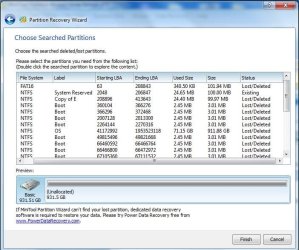
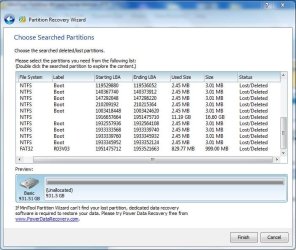
Are there anything on the original hard drive that I need to save? Why are there so many 2.45MB/3.01MB entries? Are those my back ups? See snips.

Most likely because "The basic input/output system (BIOS) does not detect the hard disk."
Correct. I don't understand why the following is:

  • The SSD shows up on the first page of the BIOS info. It says that it is the second drive.
  • But the SSD doesn't show up on the boot priority screen. The original hard drive is the only drive that shows up.

Try this:
  1. Power on PC and enter BIOS. Wait a few seconds and exit bios without saving
  2. Now system boots successfully without "Operation system not found." ?
Do it few times to prove it's a timing issue
I'll try this after we take a look at what was recovered on the hard drive by Mini Tool Partition Recovery Wizard. I don't want to loose this info.

Thank you again for helping me with this project. You have taught me a few things too. I thank you for that too.
 

Attachments

  • Capture prw  01 2_8_13.JPG
    Capture prw 01 2_8_13.JPG
    76.7 KB · Views: 5
  • Capture prw  02 2_8_13.JPG
    Capture prw 02 2_8_13.JPG
    75.9 KB · Views: 4

My Computer My Computer

At a glance

Windows 7 Ultimate (x64) Service Pack 1 (buil...Intel(R) Core(TM) i5-2450M CPU @ 2.50GHz8 GBIntel HD Graphics 3000 with up to 1.6GB dynam...
Computer Manufacturer/Model Number
Dell 17R N7110 Inspiron laptop
OS
Windows 7 Ultimate (x64) Service Pack 1 (build 7601)
CPU
Intel(R) Core(TM) i5-2450M CPU @ 2.50GHz
Motherboard
Dell Inc. 0YH79Y A00
Memory
8 GB
Graphics Card(s)
Intel HD Graphics 3000 with up to 1.6GB dynamic video memory
Sound Card
SRS Premium Sound - (1) Realtek High Definition Audio
Monitor(s) Displays
17.3" diagonal HD+ TrueLife LED display
Screen Resolution
1600x900 resolution
Hard Drives
1 TB HD #ST1000LM024 HN-M101MBB,

512 GB Samsung 840 Pro SSD
PSU
stock
Case
stock
Cooling
stock
Keyboard
stock
Mouse
stock
Internet Speed
WiFi
Other Info
Printer: HP Photosmart C3180
you told me it did startup with only E active and no dvd inserted. Now it doesn't boot? only black screen?
It booted up twice just fine. The third time, I got the black screen with the message.

I checked disk management and only E was active. See snip. Any ideas for a fix?
Disk management is fine now. You actually did fix boot menu. And cloned old C to SSD. We didn't change anything more!

You get the BSOD on shutdown only (so not on boot and not while working)?
And you don't get it always on shutdown?
This is correct. I get it on shutdown only. And, I don't always get it.
 

My Computer My Computer

At a glance

Windows 7 Ultimate (x64) Service Pack 1 (buil...Intel(R) Core(TM) i5-2450M CPU @ 2.50GHz8 GBIntel HD Graphics 3000 with up to 1.6GB dynam...
Computer Manufacturer/Model Number
Dell 17R N7110 Inspiron laptop
OS
Windows 7 Ultimate (x64) Service Pack 1 (build 7601)
CPU
Intel(R) Core(TM) i5-2450M CPU @ 2.50GHz
Motherboard
Dell Inc. 0YH79Y A00
Memory
8 GB
Graphics Card(s)
Intel HD Graphics 3000 with up to 1.6GB dynamic video memory
Sound Card
SRS Premium Sound - (1) Realtek High Definition Audio
Monitor(s) Displays
17.3" diagonal HD+ TrueLife LED display
Screen Resolution
1600x900 resolution
Hard Drives
1 TB HD #ST1000LM024 HN-M101MBB,

512 GB Samsung 840 Pro SSD
PSU
stock
Case
stock
Cooling
stock
Keyboard
stock
Mouse
stock
Internet Speed
WiFi
Other Info
Printer: HP Photosmart C3180
system is booting fine! Don't try to recover any DELTETED partitions. Why should you?
 
Last edited:

My Computer My Computer

At a glance

Microsoft Windows 7 Home Premium 64-bits 7601...Intel(R) Core(TM) i3 CPU M 370 @ 2.40GHz4,00 GBATI Mobility Radeon HD 5400 Series
Computer type
Laptop
Computer Manufacturer/Model Number
ACER ASPIRE 5742G
OS
Microsoft Windows 7 Home Premium 64-bits 7601 Multiprocessor Free Service Pack 1
CPU
Intel(R) Core(TM) i3 CPU M 370 @ 2.40GHz
Motherboard
Acer Aspire 5742G
Memory
4,00 GB
Graphics Card(s)
ATI Mobility Radeon HD 5400 Series
Sound Card
(1) AMD High Definition Audio Device (2) Realtek High Defi
Screen Resolution
1366 x 768 x 32 bits (4294967296 colors) @ 60 Hz
Hard Drives
WDC WD5000BEVT-22ZAT0
system is booting fine! Don't try to recover any DELTETED partitions. Why should you?
I thought about recovering that little FAT16 partition. It is linked to my Dell DataSafe backup.

I've restarted this thing 6 times today and so far it is booting up just fine. I guess we can make this solved.

Thank you so much for the help with this project. I couldn't of done it without you. I really appreciate it. I am glad that you had the patience to work with a dummy like me. Thank you very much!
 

My Computer My Computer

At a glance

Windows 7 Ultimate (x64) Service Pack 1 (buil...Intel(R) Core(TM) i5-2450M CPU @ 2.50GHz8 GBIntel HD Graphics 3000 with up to 1.6GB dynam...
Computer Manufacturer/Model Number
Dell 17R N7110 Inspiron laptop
OS
Windows 7 Ultimate (x64) Service Pack 1 (build 7601)
CPU
Intel(R) Core(TM) i5-2450M CPU @ 2.50GHz
Motherboard
Dell Inc. 0YH79Y A00
Memory
8 GB
Graphics Card(s)
Intel HD Graphics 3000 with up to 1.6GB dynamic video memory
Sound Card
SRS Premium Sound - (1) Realtek High Definition Audio
Monitor(s) Displays
17.3" diagonal HD+ TrueLife LED display
Screen Resolution
1600x900 resolution
Hard Drives
1 TB HD #ST1000LM024 HN-M101MBB,

512 GB Samsung 840 Pro SSD
PSU
stock
Case
stock
Cooling
stock
Keyboard
stock
Mouse
stock
Internet Speed
WiFi
Other Info
Printer: HP Photosmart C3180
system is booting fine! Don't try to recover any DELTETED partitions. Why should you?
I thought about recovering that little FAT16 partition. It is linked to my Dell DataSafe backup.

I've restarted this thing 6 times today and so far it is booting up just fine. I guess we can make this solved.

Thank you so much for the help with this project. I couldn't of done it without you. I really appreciate it. I am glad that you had the patience to work with a dummy like me. Thank you very much!
Glad problem has been solved. Did you backup things with Dell DataSafe backup and you can't run the program?
 

My Computer My Computer

At a glance

Microsoft Windows 7 Home Premium 64-bits 7601...Intel(R) Core(TM) i3 CPU M 370 @ 2.40GHz4,00 GBATI Mobility Radeon HD 5400 Series
Computer type
Laptop
Computer Manufacturer/Model Number
ACER ASPIRE 5742G
OS
Microsoft Windows 7 Home Premium 64-bits 7601 Multiprocessor Free Service Pack 1
CPU
Intel(R) Core(TM) i3 CPU M 370 @ 2.40GHz
Motherboard
Acer Aspire 5742G
Memory
4,00 GB
Graphics Card(s)
ATI Mobility Radeon HD 5400 Series
Sound Card
(1) AMD High Definition Audio Device (2) Realtek High Defi
Screen Resolution
1366 x 768 x 32 bits (4294967296 colors) @ 60 Hz
Hard Drives
WDC WD5000BEVT-22ZAT0
system is booting fine! Don't try to recover any DELTETED partitions. Why should you?
I thought about recovering that little FAT16 partition. It is linked to my Dell DataSafe backup.

I've restarted this thing 6 times today and so far it is booting up just fine. I guess we can make this solved.

Thank you so much for the help with this project. I couldn't of done it without you. I really appreciate it. I am glad that you had the patience to work with a dummy like me. Thank you very much!
Glad problem has been solved. Did you backup things with Dell DataSafe backup and you can't run the program?
The Dell DataSafe backup is working now. It does its backup as soon as the computer starts up. I don't know why it is working now, but it is. I didn't save anything from the hard drive when Mini Partition Wizard pulled it back up. I deleted it all.

The computer started up just fine. It only takes a few seconds and the computer is ready to use. I really like this! It used to take over 2 minutes to start up. Having the CD/DVD as an axillary piece of equipment isn't a problem. I rarely use it anyway. The NewModeUS.com caddy kit is nicely made. It is made out of metal and not like a cheapo plastic part.

I can't thank you enough for helping me with this project. It is a really sweet computer now. Thank you very much. I really, really appreciate it!!!!
 

My Computer My Computer

At a glance

Windows 7 Ultimate (x64) Service Pack 1 (buil...Intel(R) Core(TM) i5-2450M CPU @ 2.50GHz8 GBIntel HD Graphics 3000 with up to 1.6GB dynam...
Computer Manufacturer/Model Number
Dell 17R N7110 Inspiron laptop
OS
Windows 7 Ultimate (x64) Service Pack 1 (build 7601)
CPU
Intel(R) Core(TM) i5-2450M CPU @ 2.50GHz
Motherboard
Dell Inc. 0YH79Y A00
Memory
8 GB
Graphics Card(s)
Intel HD Graphics 3000 with up to 1.6GB dynamic video memory
Sound Card
SRS Premium Sound - (1) Realtek High Definition Audio
Monitor(s) Displays
17.3" diagonal HD+ TrueLife LED display
Screen Resolution
1600x900 resolution
Hard Drives
1 TB HD #ST1000LM024 HN-M101MBB,

512 GB Samsung 840 Pro SSD
PSU
stock
Case
stock
Cooling
stock
Keyboard
stock
Mouse
stock
Internet Speed
WiFi
Other Info
Printer: HP Photosmart C3180
Back
Top