What will you do when Windows 7 ends?

Good post Jack,

I would split the enterprise category into two, the enterprise which would include large multinationals, National Governments, (education, Health Etc), National armed services Etc, and the second group would be what the UK know as SME (Small to Medium Enterprises), which are the small 1 to 100 employee companies,

The first group Microsoft will treat like everyone else does, just like The phone company, the electric and gas company, and indeed parts of the government, they will fawn over them adjust the workings of the OS for them - Why do they do this, simply because they are the majority market for everything, they certainly are for Microsoft, Even though they get great deals to keep cost down and support they are the market that does not run pirate software and orders not in tens or hundreds but thousands of units. The Software as a Service ideology actually appeals to them, they prefer a number of small developmental changes that can be integrated into their systems, rather than the major change every few years - The way they look at software is that as they lease the hardware why not the software.

The second group are valuable to Microsoft and the reason there is a pro version of each windows, they purchase software at a slight discount over the man in the street, and some use networks, with or without servers, but are normally not cash rich. Some even still share computers - especially if they are running a shift system for employees.

The Poke and Go, ( or Peek and Peck), consumer market is large but has never been a great cash cow for any Tech company, as most of this group purchase a computer with OS from one of the big Box Shifting OEMs, and these OS copies are heavily discounted almost down to cost level - the Home versions of windows are designed for this market - simple to use, automatic everything, a consumer product similar to a washing machine or TV, Can anyone remember Starter versions, with less settings to change than a TV ;)

The last group the Betweeners as you call them the hobbyist/IT pro/enthusiast users make up a tiny proportion of Microsoft's customer base, OK they upgrade often, are willing to beta Test software, so they are not ignored - of course they should not really be using a home version of software and expect any real ability to control settings, They are very vocal, and Microsoft does listen, but they have to produce a saleable product for their main markets.

I've not mentioned Phones as this is a completely different horse, One that I think was long out of the gate before Microsoft even arrived at the track. They were similar when XP was King and this new fangled Interweb's came along, but they eventually realised that it was real and jumped on board and are now up with the leaders.

The Phone market is another Long distance race and you never know, but I think they have a long way to go to even see the rest of the field
 

My Computers My Computers

System One System Two

  • Computer type
    PC/Desktop
    Computer Manufacturer/Model Number
    ChillBlast - Custom to my design
    OS
    Windows 11 Pro x64 [Latest Release and Release Preview]
    CPU
    Ryzen 9 5950X, 3.8 - 5.2 MHz
    Motherboard
    Asus Prime X570-Pro
    Memory
    64GB [2 x 32GB] DDR4 3200MHz
    Graphics Card(s)
    4GB NVIDIA GEFORCE GTX 1650 Ti
    Sound Card
    On-board SPDIF to 5.1 System + HDMI [5.1 system]
    Monitor(s) Displays
    32" UHD 32 Bit HDR Monitor + 43" UHD 4K 32Bit HDR TV
    Screen Resolution
    2 x 3840 x 2160 @60Hz
    Hard Drives
    1TB M2 SSD OS, 500GB Fast Access SSD, 2 x 8TB Data + Various Externals from 1TB to 4TB, 10TB NAS
    PSU
    NZXT C750 80 PLUS Gold 750W Modular PSU
    Case
    Workstation Case [Matt Black]
    Cooling
    NZXT Kraken X63 280mm CPU Cooler +2x Quiet Case fans
    Keyboard
    Logitech Wireless MX Keys & K400 + others
    Mouse
    Logitech Wireless MX Master 3S
    Internet Speed
    920 MB Down 50 MB Up
    Antivirus
    BitDefender Total Security Pro
    Browser
    Chrome (always run latest Non-Beta)
    Other Info
    Also run ...
    Laptop - Quad 8GB - Windows 10 Pro x64
    Nexus 7 Android tablet x2
    Samsung 10.2" tablet
    Blackview TAB 8 4G Android Tablet c/w Keyboard
    Wacom Intuos Pro Medium Pen Pad
    Wacom Intuos Pro Small Pen Pad
    Wacom Expresskeys Remote
    Loopdeck+ Graphics Controller
    Shuttle Pro v2 Control
  • Computer type
    Laptop
    System Manufacturer/Model Number
    Dell XPS 17 10750H
    OS
    Windows 11 Pro x64 Latest RP
    CPU
    Intel I7 10750H 5.0GHz
    Motherboard
    Dell XPS
    Memory
    32GB [2x16GB] DDR4 2933 MHz
    Graphics Card(s)
    nVidia GTX1650Ti 4 GB GDDR6
    Sound Card
    Stock [Realtek] 4 Speaker
    Monitor(s) Displays
    17" IPS UHD+ Infinity Edge Touchscreen
    Screen Resolution
    3840 x 2400
    Hard Drives
    2TB M2 NVMe, 4TB External + various 500GB & 1TB External NVMe (also have access to spinner HDD from
    PSU
    Stock
    Case
    Stock XPS Aluminium & Carbon Fibre
    Cooling
    Stock - Active Fan Control
    Keyboard
    Backlit + Various Logitech
    Mouse
    Stock Track Pad + Logitech MX Trackball
    Internet Speed
    72 MB Down 18MB Up
    Browser
    Chrome
    Other Info
    Also run ...
    Laptop - Quad 8GB - Windows 10 Pro x64
    Nexus 7 Android tablet x2
    10.2" tablet
    Sony Z3 Android Smartphone
    Wacom Intuos Pro Medium Pen Pad
    Wacom Intuos Pro Small Pen Pad
    Wacom Expresskeys Remote
    Loopdeck+ Graphics Controller
    Shuttle Pro v2 Control Pad
    10TB NAS
I would call myself a hobbyist/enthusiast and have used Windows 7 Home Premium on all 4 PCs (3 built, 1 recased Acer) not pro. This was because of the non US price gouging cost MS applied to the pro version. Some possible networking advantages were offered by the pro version I think but not much more.
When I eventually build using Windows 10 I may consider the extra $ for the pro version because of the extra control.
 

My Computer My Computer

Computer type
PC/Desktop
Computer Manufacturer/Model Number
Own build
OS
Windows 7x64 Home Premium SP1
CPU
Intel i7 2600k
Motherboard
ASUS P8Z68 Deluxe
Memory
G.Skill Ripjaws (DDR3-1600) 2x4GB
Graphics Card(s)
Nvidia GeForce GTS 450; Intel HD Graphics 3000(GT2+)
Monitor(s) Displays
Dell Ultrasharp IPS panel U2311H, Samsung SyncMaster P2350
Screen Resolution
1920x1080
Hard Drives
Samsung 850 Pro SSD 256GB, Samsung SSD 840 120GB, Seagates 1TB Barracuda ST31000528AS x2
PSU
Seasonic M12II 520W
Case
Lian Li Lancool PC-K60
Cooling
Case: 1x120mm, 3x140mm CPU: Hyper 212+
Keyboard
Logitech MK520 (wireless)
Mouse
Logitech MK520
Internet Speed
6-7 Mbps
Antivirus
Norton Security Premium, Malwarebytes on 2 (MSE on 3rd PC)
Browser
FireFox
Other Info
Audio: Logitech Z523 2.1
Yea I couldn't use 10 without group policy :)
 
Last edited:

My Computer My Computer

Computer type
PC/Desktop
Computer Manufacturer/Model Number
Custom assembled by me :}
OS
Win-7-Pro64bit 7-H-Prem-64bit
CPU
i7-5930K 2nd i9-9940x both water blocked VRM's too
Motherboard
ASUS SABERTOOTH X99 2nd ASUS x299 Apex
Memory
Trident-z 3200C14 2nd Trident-z 3600C16
Graphics Card(s)
EVGA 1080ti ftw3 2nd Titan Xp both water blocked
Sound Card
Built-in Realtek
Monitor(s) Displays
1-AOC G2460PG 24"G-Sync 144Hz/ 2nd 1-ASUS VG248QE 24" 144Hz
Screen Resolution
1920 x 1080 144Hz
Hard Drives
2-Samsung M.2 Evo & Evo Plus
2-Samsung 850 EVO 500GB SSD's/ 3-2.5 W.D. Black 1tb-&3-1tb/3-3.5 WD Black 1tb hdd's
PSU
EVGA SuperNOVA 1000-P2 2nd 1200-P2
Case
2-Corsair Obsidian Series 450D Black ATX Mid Tower
Cooling
Custom water loops
Keyboard
Logitech G710+/ 2nd Logitech G910
Mouse
2-RedDragon M901 Perdition 16400 dpi Gaming mouse = wired
Internet Speed
Comcast Ping 19ms 89.31mbps download speed 6.12mbps upload
Antivirus
Malwarebytes Pro/ Superantispyware Pro
Browser
FireFox & Pale moon
Other Info
2nd ASUS X299 Apex/Intel i9-9940x with Custom water loop/7H-Prem-x64/Corsair 450D case/Ram Trident-z 3600C16 4x8gb / Samsung970Evo plus 500gb SSD/Dual ssd EZ swap evo/PSU EVGA SuperNova 1200w-P2 80+Platinum/GPU Titan Xp /8-ML-140 on push-pull on 2-280GTX rads
....And using Sandboxie with it (as I have stated in these forums upteen times before) negates the need for a real-time AV, protecting the OS from any online threats by keeping all online activity within the sandbox which can be configured to be deleted after each session, or persist if one prefers, which is still perfectly safe.

I would love to know more about this... My AV subscription runs out fairly soon and I'm not planning on renewing. Any info/further reading you could suggest?


w/regards to the OP, for me it's difficult to say.... 2020 is a ways off. If my MS experience continues along the same path as it has over this past year, OS X will be used for the majority of my computing needs. It's that simple.
 

My Computer My Computer

Computer type
Laptop
Computer Manufacturer/Model Number
Fujitsu LifeBook AH550
OS
Windows 7 Home Premium x64 SP1
Yea I couldn't use 10 without group policy :)
Your initial post puzzled me but not the edited one. I'd like access to gpedit as well. There some claimed fiddles to get gpedit working on the Home version but I don't trust them at this stage to try on Windows 7 or 10 if/when I install it.
 

My Computer My Computer

Computer type
PC/Desktop
Computer Manufacturer/Model Number
Own build
OS
Windows 7x64 Home Premium SP1
CPU
Intel i7 2600k
Motherboard
ASUS P8Z68 Deluxe
Memory
G.Skill Ripjaws (DDR3-1600) 2x4GB
Graphics Card(s)
Nvidia GeForce GTS 450; Intel HD Graphics 3000(GT2+)
Monitor(s) Displays
Dell Ultrasharp IPS panel U2311H, Samsung SyncMaster P2350
Screen Resolution
1920x1080
Hard Drives
Samsung 850 Pro SSD 256GB, Samsung SSD 840 120GB, Seagates 1TB Barracuda ST31000528AS x2
PSU
Seasonic M12II 520W
Case
Lian Li Lancool PC-K60
Cooling
Case: 1x120mm, 3x140mm CPU: Hyper 212+
Keyboard
Logitech MK520 (wireless)
Mouse
Logitech MK520
Internet Speed
6-7 Mbps
Antivirus
Norton Security Premium, Malwarebytes on 2 (MSE on 3rd PC)
Browser
FireFox
Other Info
Audio: Logitech Z523 2.1
There some claimed fiddles to get gpedit working on the Home version but I don't trust them at this stage to try on Windows 7 or 10 if/when I install it.

Some settings stick and some don't. See Posts #12, #14 & #15 here:

http://www.sevenforums.com/software...l-gpedit-msc-my-windows-7-home-premium-2.html

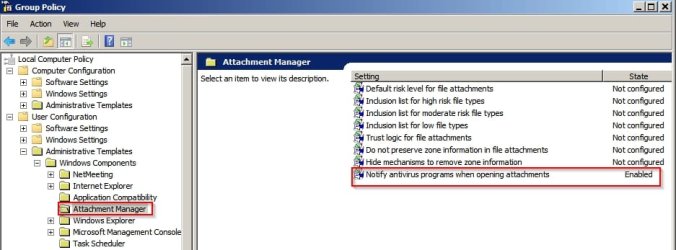
I added gpedit.msc mainly to configure the following the Notify AV when opening attachments setting which is not enabled in Windows 7 by default. (Shocking)

   Note

This policy setting allows you to manage the behavior for notifying registered antivirus programs. If multiple programs are registered, they will all be notified. If the registered antivirus program already performs on-access checks or scans files as they arrive on the computer’s e-mail server because further calls would be redundant.

If you enable this policy Windows tells the registered antivirus program to scan the file when a user opens a file attachment. If the antivirus program fails, the attachment is blocked from being opened. - In other words if the AV doesn't scan the attachment for any reason it cannot be opened.

If you disable this policy Windows does not call the registered antivirus programs when file attachments are opened.

If you do not configure this policy Windows does not call the registered antivirus programs when file attachments are opened.


In other words unsafe attachments can be opened if the AV doesn't scan them.


Group Policy.jpg

Example of a Group Policy setting that doesn't stick in Home Premium:

http://www.sevenforums.com/windows-...b3035583-reappeared-after-being-hidden-6.html

As Shawn says it's better to find the appropriate registry setting.
 

My Computer My Computer

Computer type
Laptop
Computer Manufacturer/Model Number
ASUS
OS
Microsoft Windows 7 Home Premium 64-bit 7601 Multiprocessor Free Service Pack 1
CPU
AMD C-60 APU with Radeon(tm) HD Graphics
Motherboard
ASUSTeK COMPUTER INC. X501U
Memory
4.00 GB
Graphics Card(s)
AMD Radeon HD 6290 Graphics
Sound Card
(1) AMD High Definition Audio Device (2) Realtek High Defi
Screen Resolution
1366 x 768 x 32 bits (4294967296 colors) @ 60 Hz
Hard Drives
Hitachi HTS545050A7E380 SATA Disk Device
Antivirus
Comodo CIS & FW, SecureAplus App Whitelisting, Threatfire
Browser
Cyberfox 64bit, Opera 64bit, Airfox
Other Info
Spy-The-Spy, HitmanPro.Alert, Norton Connect Safe, MJRegWatcher, BitDefender TrafficLight, Voodoo Shield, Zemana AntiMalware
....And using Sandboxie with it (as I have stated in these forums upteen times before) negates the need for a real-time AV, protecting the OS from any online threats by keeping all online activity within the sandbox which can be configured to be deleted after each session, or persist if one prefers, which is still perfectly safe.

I would love to know more about this... My AV subscription runs out fairly soon and I'm not planning on renewing. Any info/further reading you could suggest?

Can read about Sandboxie here, and can Google "what is a sandbox" for general info to read about the concept which is not new, and not specific to Sandboxie. Sandboxes have been used for many, many years to study sftw viruses among other things. Sandboxie just packages one for easy use.
 

My Computer My Computer

OS
Win 7 Ultimate 64-bit
I bought a copy of Windows 8 on ebay recently and thought I'd try it on a 10" netbook that had Windows on but was a bit slow. Found the resolution wasn't compatible and it couldn't upgrade to 8.1 so I clean installed Windows 10 on it, using the Windows 8 product key. Windows 10 worked perfectly on it, with all the drivers downloaded (which is weird when it isn't compatible with our 3 newer laptops). So I've had a good fiddle around with Windows 10 now. Set it up how I wanted it - to be more like Windows 7. I can't see any advantages at all. It doesn't seem any faster really - the menu layouts aren't as good and I absolutely hate the apps. With adverts in them! Of course you don't have to use them. Maybe it is slightly quicker on the netbook than Windows 7. But after playing around with it for a few days, there is no way I am giving up Windows 7, even if it means not connecting to the internet after it is no longer supported - because then I can still play chess titans and solitaire. If I can't actually have non internet programs I like then I don't consider it an upgrade. Windows updates seemed slicker and faster, that's about all.

It may sound like a small thing - not having Chess Titans and Solitaire, but I use them a lot when chilling, and as far as I can see there is no comparable alternative - without connecting to the internet and having adverts on the games. Particularly for the chess. Apparently the links to install Windows 7 games on Windows 10 don't work any more - Windows updates removed them again I believe.

The changes in look and functions on Windows 10 reminded me a lot of the newer Xubuntu Linux, and if my favourite programs aren't there I think the only reason I would not go with Linux instead of Windows 10 would be video editing software.
 

My Computer My Computer

Computer type
Laptop
Computer Manufacturer/Model Number
Sony Vaio VPCCW2S1E
OS
W7 HP 64 bit
CPU
Core i3 1st gen
Memory
8gb
Graphics Card(s)
Nvidia 330M
Internet Speed
8 mbps
Browser
Firefox
Yea I couldn't use 10 without group policy :)
Your initial post puzzled me but not the edited one. I'd like access to gpedit as well. There some claimed fiddles to get gpedit working on the Home version but I don't trust them at this stage to try on Windows 7 or 10 if/when I install it.
Yep that was a boo-boo :o
 

My Computer My Computer

Computer type
PC/Desktop
Computer Manufacturer/Model Number
Custom assembled by me :}
OS
Win-7-Pro64bit 7-H-Prem-64bit
CPU
i7-5930K 2nd i9-9940x both water blocked VRM's too
Motherboard
ASUS SABERTOOTH X99 2nd ASUS x299 Apex
Memory
Trident-z 3200C14 2nd Trident-z 3600C16
Graphics Card(s)
EVGA 1080ti ftw3 2nd Titan Xp both water blocked
Sound Card
Built-in Realtek
Monitor(s) Displays
1-AOC G2460PG 24"G-Sync 144Hz/ 2nd 1-ASUS VG248QE 24" 144Hz
Screen Resolution
1920 x 1080 144Hz
Hard Drives
2-Samsung M.2 Evo & Evo Plus
2-Samsung 850 EVO 500GB SSD's/ 3-2.5 W.D. Black 1tb-&3-1tb/3-3.5 WD Black 1tb hdd's
PSU
EVGA SuperNOVA 1000-P2 2nd 1200-P2
Case
2-Corsair Obsidian Series 450D Black ATX Mid Tower
Cooling
Custom water loops
Keyboard
Logitech G710+/ 2nd Logitech G910
Mouse
2-RedDragon M901 Perdition 16400 dpi Gaming mouse = wired
Internet Speed
Comcast Ping 19ms 89.31mbps download speed 6.12mbps upload
Antivirus
Malwarebytes Pro/ Superantispyware Pro
Browser
FireFox & Pale moon
Other Info
2nd ASUS X299 Apex/Intel i9-9940x with Custom water loop/7H-Prem-x64/Corsair 450D case/Ram Trident-z 3600C16 4x8gb / Samsung970Evo plus 500gb SSD/Dual ssd EZ swap evo/PSU EVGA SuperNova 1200w-P2 80+Platinum/GPU Titan Xp /8-ML-140 on push-pull on 2-280GTX rads
I would of said, disable the network connection in windows 7 use Xubuntu 16.04 LTS but some issues have or will be a problem. Google Chrome no longer supports 32 bit in Linux. In 2017 adobe flash will not be supported on Linux at all regardless of architecture. Which means you might have trouble watching protected content in Linux unless something new pops up. When I was testing a daily build of Xubuntu 64 bit, I couldn't get the EPSON printer working with the deb file, hopefully this will be fixed by release time.

What I probably end up doing is dual booting with windows 10 and unfortunately getting rid of windows 7 :(
 

My Computer My Computer

Computer type
PC/Desktop
Computer Manufacturer/Model Number
Dell All in one Inspiron 2020
OS
W10 32 bit, XUbuntu 18.xx 64 bit
CPU
Intel(R) Celeron(R) CPU G1620T @ 2.40GHz, 2400 Mhz
Motherboard
Dell
Memory
4GB
Graphics Card(s)
Intel HD graphics
Sound Card
High Definition Audio Device
Monitor(s) Displays
20 inch Screen
Screen Resolution
W7=1280 x 720 & Linux Mint Xfce=1360 x 768
Hard Drives
500 GB hard drive
Keyboard
Usb
Mouse
Usb
Internet Speed
High-Speed
Antivirus
MSE
Browser
Main Browser Firefox
Other Info
I have done a clean install of Windows 7 using Dell re-installation disk (Dell sent me one). I also use Free Macrium reflect backup and restore.
What I probably end up doing is dual booting with windows 10 and unfortunately getting rid of windows 7 :(
You could just run W7 in a VM on Linux.

I run a W10IP VM using VMware Player on Linux Mint.
 

My Computer My Computer

Computer type
PC/Desktop
Computer Manufacturer/Model Number
n/a
OS
W7 Ultimate SP1, LM19.2 MATE, W10 Home 1703, W10 Pro 1703 VM, #All 64 bit
CPU
AMD Phenom II x6 1100T, 3.3 GHz
Motherboard
ASUS M4A88T-M/USB3 (AM3)
Memory
12GB DDR3 1333 G-Skill (4GB x 2), G-Skill (2GB x 2)
Graphics Card(s)
NVIDIA GeForce GTX 660
Sound Card
Realtek?
Monitor(s) Displays
Samsung S23B350
Screen Resolution
1920x1080
Hard Drives
WD Green 2TB (SATA), WD Green 3TB (SATA), WD Blue 4TB (SATA), WD Blue 6TB (SATA)
PSU
Cooler Master
Case
Antec GX300 Tower
Cooling
3x Antec TRICOOL 120mm Fans
Mouse
Wired Optical
Internet Speed
DSL
Antivirus
Avast
Browser
Pale Moon (64 bit)
Other Info
2018-12-27 Upgraded HDDs
2015-12-10 Upgraded case, graphics card, storage
2015-08-15 Upgraded motherboard & RAM
2015-07-15 Upgraded LM17.1 to LM17.2
I would of said, disable the network connection in windows 7 use Xubuntu 16.04 LTS but some issues have or will be a problem. Google Chrome no longer supports 32 bit in Linux. In 2017 adobe flash will not be supported on Linux at all regardless of architecture. Which means you might have trouble watching protected content in Linux unless something new pops up. When I was testing a daily build of Xubuntu 64 bit, I couldn't get the EPSON printer working with the deb file, hopefully this will be fixed by release time.

What I probably end up doing is dual booting with windows 10 and unfortunately getting rid of windows 7 :(

I was going to say, using Google Chrome gives you Flash in Linux - I didn't know it wasn't being supported in 32 bit any more. They had better get writing their own flash program or something.
 

My Computer My Computer

Computer type
Laptop
Computer Manufacturer/Model Number
Sony Vaio VPCCW2S1E
OS
W7 HP 64 bit
CPU
Core i3 1st gen
Memory
8gb
Graphics Card(s)
Nvidia 330M
Internet Speed
8 mbps
Browser
Firefox
Why html5 is getting more of a reality.
Most browsers give stern warnings to activate flash player
Only Microsoft has embraced flash player I kind of wondering if Microsoft plans on buying it from Adobe :confused:
 
Last edited by a moderator:

My Computer My Computer

Computer type
PC/Desktop
Computer Manufacturer/Model Number
Custom assembled by me :}
OS
Win-7-Pro64bit 7-H-Prem-64bit
CPU
i7-5930K 2nd i9-9940x both water blocked VRM's too
Motherboard
ASUS SABERTOOTH X99 2nd ASUS x299 Apex
Memory
Trident-z 3200C14 2nd Trident-z 3600C16
Graphics Card(s)
EVGA 1080ti ftw3 2nd Titan Xp both water blocked
Sound Card
Built-in Realtek
Monitor(s) Displays
1-AOC G2460PG 24"G-Sync 144Hz/ 2nd 1-ASUS VG248QE 24" 144Hz
Screen Resolution
1920 x 1080 144Hz
Hard Drives
2-Samsung M.2 Evo & Evo Plus
2-Samsung 850 EVO 500GB SSD's/ 3-2.5 W.D. Black 1tb-&3-1tb/3-3.5 WD Black 1tb hdd's
PSU
EVGA SuperNOVA 1000-P2 2nd 1200-P2
Case
2-Corsair Obsidian Series 450D Black ATX Mid Tower
Cooling
Custom water loops
Keyboard
Logitech G710+/ 2nd Logitech G910
Mouse
2-RedDragon M901 Perdition 16400 dpi Gaming mouse = wired
Internet Speed
Comcast Ping 19ms 89.31mbps download speed 6.12mbps upload
Antivirus
Malwarebytes Pro/ Superantispyware Pro
Browser
FireFox & Pale moon
Other Info
2nd ASUS X299 Apex/Intel i9-9940x with Custom water loop/7H-Prem-x64/Corsair 450D case/Ram Trident-z 3600C16 4x8gb / Samsung970Evo plus 500gb SSD/Dual ssd EZ swap evo/PSU EVGA SuperNova 1200w-P2 80+Platinum/GPU Titan Xp /8-ML-140 on push-pull on 2-280GTX rads
I would of said, disable the network connection in windows 7 use Xubuntu 16.04 LTS but some issues have or will be a problem. Google Chrome no longer supports 32 bit in Linux. In 2017 adobe flash will not be supported on Linux at all regardless of architecture. Which means you might have trouble watching protected content in Linux unless something new pops up. When I was testing a daily build of Xubuntu 64 bit, I couldn't get the EPSON printer working with the deb file, hopefully this will be fixed by release time.

What I probably end up doing is dual booting with windows 10 and unfortunately getting rid of windows 7 :(

I was going to say, using Google Chrome gives you Flash in Linux - I didn't know it wasn't being supported in 32 bit any more. They had better get writing their own flash program or something.

I use 64 bit system anyways but I do test out 32 bit system at times. They actually have replacements but they are in early development. Even if it worked, it still might not work in Firefox due to the new add-on signage requirement. When adobe flash support ends on Linux, it will take awhile before sites refuse to play on systems that have the old flash installed.

I would put the retail version of windows 7 in VM and use Linux as my main system but I couldn't get windows 7 sp1 activated in Virtual Machine. I will probably end up biting the bullet and upgrading to windows 10. My system already has digital entitlement.


Why html5 is getting more of a reality.
Most browsers give stern warnings to activate flash player
Only Microsoft has embraced flash player I kind of wondering if Microsoft plans on buying it from Adobe
confused.png


:what: Microsoft buying flash
eek.png


Comcast, Hulu, IMDB needs to get updated to html5. Note, IMDB free movie are not all flash based.
 
Last edited by a moderator:

My Computer My Computer

Computer type
PC/Desktop
Computer Manufacturer/Model Number
Dell All in one Inspiron 2020
OS
W10 32 bit, XUbuntu 18.xx 64 bit
CPU
Intel(R) Celeron(R) CPU G1620T @ 2.40GHz, 2400 Mhz
Motherboard
Dell
Memory
4GB
Graphics Card(s)
Intel HD graphics
Sound Card
High Definition Audio Device
Monitor(s) Displays
20 inch Screen
Screen Resolution
W7=1280 x 720 & Linux Mint Xfce=1360 x 768
Hard Drives
500 GB hard drive
Keyboard
Usb
Mouse
Usb
Internet Speed
High-Speed
Antivirus
MSE
Browser
Main Browser Firefox
Other Info
I have done a clean install of Windows 7 using Dell re-installation disk (Dell sent me one). I also use Free Macrium reflect backup and restore.
I'm going to Ubuntu (Linux) with a Windows 7 virtual machine (already using this setup on my secondary computer). I'll pass on MS telemetry in Windows 10 and their heavy handedness in general.

I think Windows market share (as the main OS; lots will use it for a virtual machine) is in for a serious and extended decline, and lots of people will have moved on to something else by 2020 - Mac, Linux, Chrome and whatever else sprouts up. And that means lots of developers will write for other operating systems.

By 2020, I'm hoping most of the apps I use will have been ported over to Linux or have good alternatives, and at that point, I can eliminate even the Windows virtual machine.

They may annoy a lot of people and lose some respect but they've got us over a barrel really! What alternative is there but to get the next version of Windows :-) They know that some people can't afford Macs and don't understand Linux. But it would be nice if they could 'sell' Windows 10 rather than push it.
Linux has come a long way. I looked and passed on it a decade ago. I revisited recently and now run Ubuntu and love it. And with the free virtualization software, it's inexpensive and easy to run a Windows virtual machine for those Windows-only apps that you need.
 

My Computer My Computer

Computer type
PC/Desktop
Computer Manufacturer/Model Number
Dell XPS 8700
OS
Windows 7 Pro 64-bit
CPU
Intel core i7-4770 cpu @ 3.40 GHz
Motherboard
Dell OEM
Memory
32GB
Graphics Card(s)
AMD Radeon R9 270
Sound Card
integrated
Monitor(s) Displays
multiple
Screen Resolution
1920x1080
My gut feeling was to get an Apple Mac, even though I'm not keen on them - but they're too expensive for us lol. I already use Linux on another computer but like to have Windows as well. I like that Windows 10 seems to have made laptops more popular again (rather than everyone going tablet crazy), but I don't like the uncertainty over user control and all the advertising thingies.

My advice, and it's just that, is to get a Linux distribution. Almost every version of Linux is now capable of reading, writing and using Windows programs of all kinds. The LibreOffice suite of programs is fully compatible with Microsoft Office; the browsers and the mail programs also are fully compatible. The only exception seems to be that of games - there, Windows is still incompatible.

I have 3 different Linux distros (basic and advanced) installed on my machine, alongside Windows. My preferred Linux is PCLinuxOS, which comes in various flavors. It is quite Windows-like, and if you want to use it on a laptop, an LXDE or XFCE version should be suitable.
 

My Computer My Computer

Computer type
PC/Desktop
Computer Manufacturer/Model Number
Dell
OS
Windows 7 Ultimate 64 bit
CPU
i7 Intel
Memory
8 GB
Graphics Card(s)
nVidia GeForce
Hard Drives
Seagate; WesternDigital
Antivirus
Panda
Browser
Firefox
My gut feeling was to get an Apple Mac, even though I'm not keen on them - but they're too expensive for us lol. I already use Linux on another computer but like to have Windows as well. I like that Windows 10 seems to have made laptops more popular again (rather than everyone going tablet crazy), but I don't like the uncertainty over user control and all the advertising thingies.

My advice, and it's just that, is to get a Linux distribution. Almost every version of Linux is now capable of reading, writing and using Windows programs of all kinds. The LibreOffice suite of programs is fully compatible with Microsoft Office; the browsers and the mail programs also are fully compatible. The only exception seems to be that of games - there, Windows is still incompatible.

I have 3 different Linux distros (basic and advanced) installed on my machine, alongside Windows. My preferred Linux is PCLinuxOS, which comes in various flavors. It is quite Windows-like, and if you want to use it on a laptop, an LXDE or XFCE version should be suitable.

I agree, getting a Linux will become a must...

I've been using Linux Mint KDE, no regrets here. I know what to do when Windows 7 support finally ends...
 

My Computer My Computer

Computer type
PC/Desktop
Computer Manufacturer/Model Number
Assembled Desktop PC
OS
Microsoft Windows 7 Home Premium SP1 64-bit Build 7600
CPU
AMD Athlon 64 X2 5200+ Dual Core CPU @ 2.7 Ghz (Brisbane)
Motherboard
PCChips A13G+ v3.0
Memory
2x2 GB DDR2 PC-5300 (667 Mhz) Kingston ValueRAM
Graphics Card(s)
XFX ATI Radeon HD 4350 GPU (512 MB + 512 MB HM)
Sound Card
Realtek High Definition Audio Driver ALC660 @ MCP61S
Monitor(s) Displays
HP S2031 20" LED HD Widescreen Display Monitor
Screen Resolution
1600 x 900 px
Hard Drives
Maxtor Diamond Max 10 (160 GB, 7200 RPM, SATA-II Hard Disk)
Western Digital Scorpion Blue (250 GB, 5400 RPM, SATA-II External Hard Disk - Personal Data)
Toshiba MQ01ABD050 (500 GB, 5400 RPM, SATA-II External Hard Disk - Software & ISOs)
PSU
Pixxo Transformer 850W 80+ Certification PSU
Case
Compaq 5BW353 Case
Cooling
Many solutions, see other info...
Keyboard
Green Leaf (Mitzu) Standard Keyboard
Mouse
Microsoft USB Lasser Pointing Device
Internet Speed
10 MB
Antivirus
Avast Antivirus Free
Browser
Firefox, Chrome, Internet Explorer
Other Info
Windows Experience Index Result: 3.8 of 7.9.

Cooling solutions:
- AVC @ 2000/5000 RPM Copper Heatpipes (For Athlon 64 X2 6000+ CPU used in an Athlon 64 X2 5200+)
- Rear Fan 80 mm @ 2700 RPM for heat extraction
- Manhatan Chipset Cooler @ 4700/7200 RPM (For nVidia Chipset in MoBo)
- Foxconn @ 2500 RPM (Old Pentium III heatsink fan) in XFX ATI Radeon HD 4350
I`m gonna have a party :)
 

My Computer My Computer

Computer type
PC/Desktop
Computer Manufacturer/Model Number
Skylake Special #666
OS
Windows 10 Pro x64
CPU
Intel Core i7 6700K
Motherboard
Asus Sabertooth Z170 Mark 1
Memory
GSkill TridentZ RGB 16GB 3600 16-16-16-36
Graphics Card(s)
EVGA GTX 980 Ti SC x2
Sound Card
Realtek High Definition
Monitor(s) Displays
AOC G2460PG
Screen Resolution
1920 x 1080 144Hz
Hard Drives
Samsung 860 Pro 256GB, Seagate Barracuda 4TB x2
PSU
EVGA 1000 P2, EVGA White Custom Braided Cables
Case
Corsair Vengeance C70 Gunmetal Black
Cooling
Corsair H100i v2, Corsair ML120 x2, Thermal Grizzly Kryonaut
Keyboard
Logitech G910 Orion Spectrum
Mouse
Logitech G700s
Internet Speed
Verizon Fios Quantum Gateway 75/75
Antivirus
Windows Defender, Malwarebytes Free 3.8.3
Browser
Chrome
Other Info
Corsair SP120 x4, LG Blu-ray Drive, Durabrand HT-395 100 Watt Dolby Digital Amp, Corsair H2100 Wireless 7.1 Headset
I`m gonna have a party :)

Me too because when Windows 7 ends, I'll be 86 and if I am still around I will be happy to install a new operating system.:dinesh::roflmao::thumbsup::thumbsup::thumbsup:
 

My Computer My Computer

Computer type
PC/Desktop
Computer Manufacturer/Model Number
Home Built
OS
Windows `10 Professional 64bit
CPU
Intel i5 [email protected]
Motherboard
MSI P67A-GD55 (MS7681)
Memory
Corsair Vengeance DDR3 1600 16G
Graphics Card(s)
NVIDIA GeForce GT520 1GHz
Sound Card
Realtek High Definition Audio
Monitor(s) Displays
Haans G 241
Screen Resolution
1600X1024
Hard Drives
Crucial MX100 256GB SSD
PSU
OCZ ModXStream Modular High Performance 500 Watt
Case
Rosewill Challenger-U3
Cooling
Just Fans
Keyboard
Kensington K64338B
Mouse
Microsoft wheel mouse 1.1A
Internet Speed
240.0 Mbps
Antivirus
ESET Internet Security
Browser
Firefox
Other Info
SuperAntiSpyware-Pro
Malwarebytes (Premium)
Kerish Doctor
I have already transitioned from sonar to reaper (music creation software). I'm currently running Ubuntu, but will return to Zorin when their next LTS comes out. The fact that reaper is working on a Linux version was part of my rationale. In fact, it's already in pre-release. Their software developer is tops. Reaper will definitely be running flawlessly on linux long before Windows dies it ignominious death.
 

My Computer My Computer

Computer type
PC/Desktop
Computer Manufacturer/Model Number
Gateway GT5656
OS
Windows 7 x64 SP1
CPU
AMD Athlon 64 X2 6000+ / 3.0 GHz
Motherboard
NVIDIA GeForce 6150 SE
Memory
6 GB
Monitor(s) Displays
Lenovo LED
Screen Resolution
1920 X 1080
Hard Drives
Windows on 500 GB spinner; Ubuntu 16 on Sandisk 250GB SSD; Bodhi5 on Samsung 250GB SSD; another old spinner for fooling around.
PSU
Original that came with computer
Keyboard
Logitech wireless
Mouse
Logitech wireless
Antivirus
Microsoft Sec Essentials
Browser
Vivaldi
Back
Top