Solved What's a Good Program For Uninstalling Applications/Programs on PC?

SickOfTheBSOD

New member
Local time
11:05 PM
Messages
67
Hello all.

I'm looking for a reliable program that can be used to uninstall programs that I no longer want. I've tried IOBit Uninstaller but the BSOD team advised me not to use it. So I'm now looking for a replacement. I've heard good things about Revo Uninstaller but I lack the knowledge of what I should look for in an uninstaller.

I'd like to know the following:

1) What's a good uninstaller program?
2) Does it allow registry deletion? (meaning does it clean up the registry entries as well?)
3) Is it compatible? (had a problem with this already)
4) Does it clean up a good amount of the residual files? (Does it leave files behind?)
 

My Computer My Computer

Computer type
PC/Desktop
Computer Manufacturer/Model Number
Dell, Alienware
OS
Windows 7 Home Premium x64
CPU
Intel i7 4770 3.40Ghz
Motherboard
Micro ATX
Memory
16 GB DDR3
Graphics Card(s)
Nvidia GeForce GTA 760 Ti OEM
Monitor(s) Displays
1
Screen Resolution
1920 x 1080
Antivirus
Microsoft Security Essentials
Browser
Google Chrome, Internet Explorer 11
Other Info
OS was recently reinstalled.
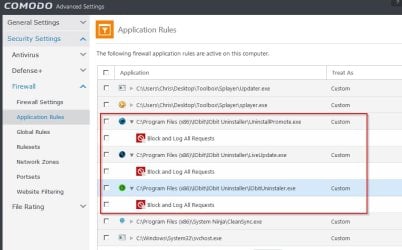
It's not recommened by many here to use anything IObit. Having said that I often use IObit uninstaller but it;s an older version that doesn't run on startup, is blocked from dialling home. Also:

UninstallExplorer64.dll - Uninstall for explorer is disabled

LiveUpdate.exe - Product Updater is disabled

UninstallPromote_1.exe - Advanced SystemCare is disabled

IObitDownloader.exe - Advanced SystemCare 8 (Action Center Downloader) is disabled

UninstallMenuRight32.dll is removed

Items listed here under "Behaviors exhibited" are removed or disabled.

IObit Uninstaller - Should I Remove It?

An alternative that I often use is Geek Uninstaller:

GeekUninstaller | GeekUninstaller

As for registry entries there are no uninstallers that remove all of them and I end up doing a manual search for leftovers.

I also have software that monitors software installs but I can't recommend it because it monitors all changes including those that do not relate to the program installation during install and it is neccessary to figure out which items to uncheck when removing a monitored install.
 

My Computer My Computer

Computer type
Laptop
Computer Manufacturer/Model Number
ASUS
OS
Microsoft Windows 7 Home Premium 64-bit 7601 Multiprocessor Free Service Pack 1
CPU
AMD C-60 APU with Radeon(tm) HD Graphics
Motherboard
ASUSTeK COMPUTER INC. X501U
Memory
4.00 GB
Graphics Card(s)
AMD Radeon HD 6290 Graphics
Sound Card
(1) AMD High Definition Audio Device (2) Realtek High Defi
Screen Resolution
1366 x 768 x 32 bits (4294967296 colors) @ 60 Hz
Hard Drives
Hitachi HTS545050A7E380 SATA Disk Device
Antivirus
Comodo CIS & FW, SecureAplus App Whitelisting, Threatfire
Browser
Cyberfox 64bit, Opera 64bit, Airfox
Other Info
Spy-The-Spy, HitmanPro.Alert, Norton Connect Safe, MJRegWatcher, BitDefender TrafficLight, Voodoo Shield, Zemana AntiMalware
Re: above post - see image:

COMODO Advanced Settings.jpg
 

My Computer My Computer

Computer type
Laptop
Computer Manufacturer/Model Number
ASUS
OS
Microsoft Windows 7 Home Premium 64-bit 7601 Multiprocessor Free Service Pack 1
CPU
AMD C-60 APU with Radeon(tm) HD Graphics
Motherboard
ASUSTeK COMPUTER INC. X501U
Memory
4.00 GB
Graphics Card(s)
AMD Radeon HD 6290 Graphics
Sound Card
(1) AMD High Definition Audio Device (2) Realtek High Defi
Screen Resolution
1366 x 768 x 32 bits (4294967296 colors) @ 60 Hz
Hard Drives
Hitachi HTS545050A7E380 SATA Disk Device
Antivirus
Comodo CIS & FW, SecureAplus App Whitelisting, Threatfire
Browser
Cyberfox 64bit, Opera 64bit, Airfox
Other Info
Spy-The-Spy, HitmanPro.Alert, Norton Connect Safe, MJRegWatcher, BitDefender TrafficLight, Voodoo Shield, Zemana AntiMalware

My Computer My Computer

Computer Manufacturer/Model Number
HP, Dell, Gateway, Toshiba - 4 laptops and 2 desktops
OS
Vista, Windows7, Mint Mate, Zorin, Windows 8
CPU
from 1.6GHz Duo to i7
Monitor(s) Displays
2x HP w2207
Hard Drives
5x HDD, 7x SSD, 12x Externals
Keyboard
with trackball - no mices
Mouse
Trackball mice
Internet Speed
DSL 6000
It's not recommened by many here to use anything IObit. Having said that I often use IObit uninstaller but it;s an older version that doesn't run on startup, is blocked from dialling home. Also:

UninstallExplorer64.dll - Uninstall for explorer is disabled

LiveUpdate.exe - Product Updater is disabled

UninstallPromote_1.exe - Advanced SystemCare is disabled

IObitDownloader.exe - Advanced SystemCare 8 (Action Center Downloader) is disabled

UninstallMenuRight32.dll is removed

Items listed here under "Behaviors exhibited" are removed or disabled.

IObit Uninstaller - Should I Remove It?

An alternative that I often use is Geek Uninstaller:

GeekUninstaller | GeekUninstaller

As for registry entries there are no uninstallers that remove all of them and I end up doing a manual search for leftovers.

I also have software that monitors software installs but I can't recommend it because it monitors all changes including those that do not relate to the program installation during install and it is neccessary to figure out which items to uncheck when removing a monitored install.

I've run IOBit Uninstaller on my VM and thought it was a good program. I was told by BSOD team to uninstall it. I still don't see why it's such a big deal but I'm guessing it "uses the Internet" or it connects to its own network? Anyways, I may just not use it altogether unless you can tell me how to stop certain parts of the program from working.

Re: above post - see image:


I see. I just want something other than the "Uninstall Programs" in Windows.


I'll try this next then.

I'll leave this open a little longer for more input.
 

My Computer My Computer

Computer type
PC/Desktop
Computer Manufacturer/Model Number
Dell, Alienware
OS
Windows 7 Home Premium x64
CPU
Intel i7 4770 3.40Ghz
Motherboard
Micro ATX
Memory
16 GB DDR3
Graphics Card(s)
Nvidia GeForce GTA 760 Ti OEM
Monitor(s) Displays
1
Screen Resolution
1920 x 1080
Antivirus
Microsoft Security Essentials
Browser
Google Chrome, Internet Explorer 11
Other Info
OS was recently reinstalled.
My Computer My Computer

Computer type
Laptop
Computer Manufacturer/Model Number
ASUS
OS
Microsoft Windows 7 Home Premium 64-bit 7601 Multiprocessor Free Service Pack 1
CPU
AMD C-60 APU with Radeon(tm) HD Graphics
Motherboard
ASUSTeK COMPUTER INC. X501U
Memory
4.00 GB
Graphics Card(s)
AMD Radeon HD 6290 Graphics
Sound Card
(1) AMD High Definition Audio Device (2) Realtek High Defi
Screen Resolution
1366 x 768 x 32 bits (4294967296 colors) @ 60 Hz
Hard Drives
Hitachi HTS545050A7E380 SATA Disk Device
Antivirus
Comodo CIS & FW, SecureAplus App Whitelisting, Threatfire
Browser
Cyberfox 64bit, Opera 64bit, Airfox
Other Info
Spy-The-Spy, HitmanPro.Alert, Norton Connect Safe, MJRegWatcher, BitDefender TrafficLight, Voodoo Shield, Zemana AntiMalware
Good point Callender. Thanks for adding.
 

My Computer My Computer

Computer Manufacturer/Model Number
HP, Dell, Gateway, Toshiba - 4 laptops and 2 desktops
OS
Vista, Windows7, Mint Mate, Zorin, Windows 8
CPU
from 1.6GHz Duo to i7
Monitor(s) Displays
2x HP w2207
Hard Drives
5x HDD, 7x SSD, 12x Externals
Keyboard
with trackball - no mices
Mouse
Trackball mice
Internet Speed
DSL 6000

My Computer My Computer

Computer type
PC/Desktop
Computer Manufacturer/Model Number
home built
OS
Multi-Boot W7_Pro_x64 W8.1_Pro_x64 W10_Pro_x64 +Linux_VMs +Chromium_VM
CPU
AMD Athlon II x4 620
Motherboard
Gigabyte GA-MA785G-UD3H
Memory
6GB GSkill DDR2 800
Graphics Card(s)
AMD 4670 GPU + AMD 4200 IGP
Sound Card
on board Realtek ALC889A
Monitor(s) Displays
RCA 40" LCD TV, Insignia 32" LCD TV, HP 15" LCD monitor
Screen Resolution
1680 x 1050
Hard Drives
OCZ Vertex 3 120GB,
Samsung F3 1TB (3),
Several others - WD, Seagate, Hitachi, ...
PSU
Corsair 500 W
Case
Rosewill mid tower
Cooling
CM 90mm rifle
Keyboard
Gyration wireless, Logitech wireless, Dell USB wired
Mouse
Gyration wireless, Logitech wireless, V7 USB wired
Internet Speed
Spectrum - 100Mbps D / 10Mbps U
Antivirus
Avast, MBAM3, EMET, WinPatrol
Browser
Pale Moon, Firefox, IE
Other Info
2 multi-boot PC's
Mainly HTPC/Office/Gen purpose (no gaming).
Trendnet USB KVM.
LG DVD burner/Blue Ray Player.
Tray system for removable SATA backup drives.

Not currently OCd, under-volted.
I use Hybrid sleep, rarely re-boot or shutdown.

Hauppauge HD-PVR, Avermedia PCIe TV Tuner, Hauppauge PCI TV Tuner.
I don't know anything about Ashampoo UnInstaller 5, but you can get it for free right now at windowsdeal

Ashampoo UnInstaller 5 (100% Discount)
In the past I found that Ashampoo likes to spam your email account. After using one of their products, I was bombarded with email. This may have changed since, but I would use caution in what email address I gave them.
 

My Computer My Computer

Computer type
PC/Desktop
Computer Manufacturer/Model Number
Mellon Labs (custom build)
OS
Win 7 Pro x64/Win 10 Pro x64 dual boot
CPU
AMD FX 8350 Vishera @ 4200
Motherboard
ASUS M5A97 R2.0
Memory
16 GB Mushkin Blackline DDR3-2400 @ 1866 (9-10-10-10-31)
Graphics Card(s)
XFX Radeon R9 280 Double D Black Edition
Sound Card
Realtek HD Audio on MB. Sounds great.
Monitor(s) Displays
Acer 24", Acer 22"
Screen Resolution
3840 x 1080
Hard Drives
1 x Mushkin Chronos 120 GB SSD (Win 10)
1 x Samsung 850 EVO 250 GB SSD (Win 7)
1 x WD 1TB SATA Blue
1 x WD 1TB SATA Green
PSU
Corsair TX-750
Case
CoolerMaster HAF 912+
Cooling
Coolermaster Seidon 240M Liquid AIO. 6 case fans
Keyboard
Logitech G710+
Mouse
Logitech G500s
Internet Speed
Much better since I got fiber, but still way overpriced.
Antivirus
MSE, Malware Bytes for scanning
Browser
Firefox
Other Info
Corsair VOID USB headphones.

A Mellon Labs X-1 - LCD Smartie driven system status display.

Brought to you by the letter E
I just want something other than the "Uninstall Programs" in Windows.


I'll try this next then.

I'll leave this open a little longer for more input.
Virtually all "after the fact" uninstallers are limited in that they can only take "educated guesses" at what a certain program did to your hard drive and registry, and will themselves leave stuff behind. Then you need a different tool, one that looks for outdated files and registry entries. All such tools are hit-and-miss; I've used jv16 Powertools for years, and CCleaner has widespread usage and thus its registry cleaner is probably safe to use.

GeekUninstaller was one I looked hard at and installed a while back and still run occasionally to see what it finds.

As for tools that won't help you (!) I bought Ashampoo years ago (much older than v5) and as Callender says these programs are a bit dangerous to use because they monitor changes that are made to the system as the monitored Installer proceeds, and sometimes those changes have nothing to do with the installed program itself. At least the versions of Ashampoo I used caused problems and I gave-up on it. But I do continue to use an abandoned program called Comodo Programs Manager (v1.3) which actually still does a fine job and I'm disappointed Comodo discontinued it (though they did so probably for good reasons!).

Point being there is no perfect solution and in the end if your PC works you should try not to obsess about leftover junk still in it.
 

My Computer My Computer

Computer type
Laptop
Computer Manufacturer/Model Number
Dell Latitude E6540 Laptop
OS
Windows 7 Professional 64bit
CPU
Intel Core i7 4600M @ 2.90GHz
Motherboard
Dell Inc. 0CYT5F (SOCKET 0)
Memory
16.0GB Dual-Channel DDR3 @ 797MHz (11-11-11-28)
Graphics Card(s)
Intel HD Graphics 4600 (Dell) 2048MB ATI AMD Radeon HD 8790M
Sound Card
Realtek High Definition Audio
Monitor(s) Displays
HP ZR30w (2560x1600@60Hz)
Hard Drives
256GB LITEONIT LMT-256M6M-41 mm SATA (SSD)
1TB Samsung SSD 860 EVO mSATA SATA (SSD)
2TB USB 3.0 USB Device
115GB SanDisk Ultra Fit USB
Other Info
Multiple Dell E-Port Plus II Port Replicator/Docking Stations 0Y72NH USB 3.0 + 130W AC Adapters
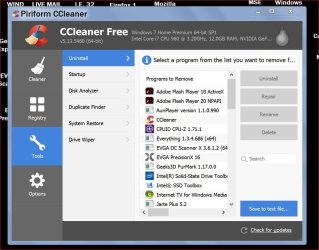
I have use the option to remove programs using Ccleaner.
It has worked well for me.

Ccleaner Uninstall.JPG
 

My Computer My Computer

Computer type
PC/Desktop
Computer Manufacturer/Model Number
Home made Desktop
OS
Windows 10 Pro. 64/ version 1709 Windows 7 Pro/64
CPU
Intel i7-6800K @ 4.3
Motherboard
ASUS X-99 Deluxe II
Memory
Corsair Platinum 16 gig @2400
Graphics Card(s)
EVGA GTX 1070 OC
Monitor(s) Displays
Asus 27" LED LCD/VE278Q
Screen Resolution
1920-1080 or 1280-720 HDMI
Hard Drives
INTEL SSD 730-240 Gb Sata 3.0/
PSU
EVGA Platium 1200W
Case
Phanteks Luxe Tempered Glass 8 fans/ one radiator
Cooling
XSPC/ Water Cooled CPU
Keyboard
Das 4 Professional
Mouse
Logitech M705/MX Anywhere 2-S
Internet Speed
100 mbits
Antivirus
Microsoft Security Essentials/ Malwarebytes Premium 3.0/ SAS
Browser
I.E. 11 default/Firefox/ ISP Time Warner Cable/Spectrum
Other Info
LG BluRay Burner/
Sound system-KLipsch-THX/
Icy Dock ssd Hot Swap bays.
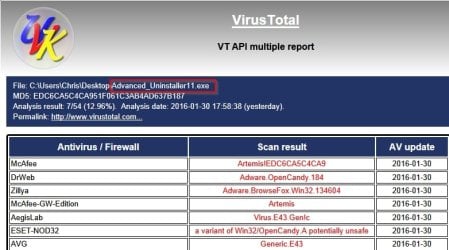
Well on the advice of a couple other experienced members I installed Advanced Uninstaller Pro (free)

NOTE: There were no warnings given by those members that the application is adware supported and comes bundled with Open Candy.

Report.jpg

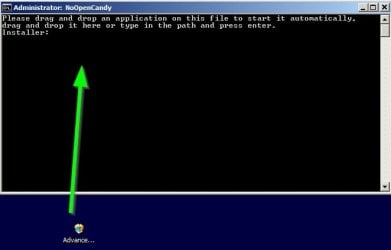
So I ran the setup file using a batch file that clean installs the app:

Install1.jpg

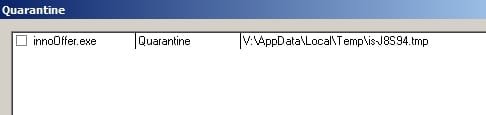
Even then it was necessary to block a file and quarantine it when running setup:

Install3.jpg

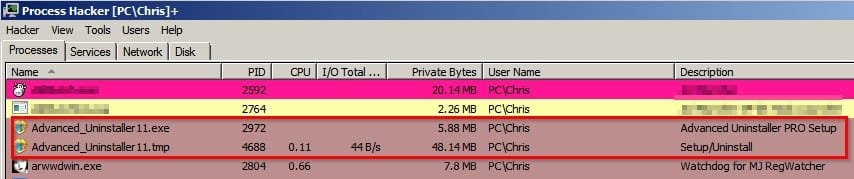
That resulted in a couple of processes that had to be manually stopped once the installation completed as there was a window left open that could not be closed.

Install2.jpg

Once installed there were scheduled tasks set up that I didn't need.

Code:
=======================================================
** Sunday 31/01/2016 02:15:24 **
Launched healthcheck.exe[3868]
taskhost.exe[2920] « services.exe[620] « wininit.exe[524]
cis.exe[3664] « cistray.exe[1172] « explorer.exe[1640]
Important Executables and Driver Files
File Details Changed from
c:\windows\tasks\Health-Check-auto.job -  Size=300  Date=Sun Jan 31 02:12:10 2016  Attributes=---A-
to
c:\windows\tasks\Health-Check-auto.job -  Size=300  Date=Sun Jan 31 02:15:02 2016  Attributes=---A-
=======================================================
** Sunday 31/01/2016 02:18:00 **
Important Executables and Driver Files
File Details Changed from
c:\windows\tasks\Health-Check-auto.job -  Size=300  Date=Sun Jan 31 02:15:02 2016  Attributes=---A-
to
c:\windows\tasks\Health-Check-auto.job -  Size=300  Date=Sun Jan 31 02:17:50 2016  Attributes=---A-
File Details Changed from
c:\windows\tasks\Health-Check-deep.job -  Size=302  Date=Sun Jan 31 02:12:04 2016  Attributes=---A-
to
c:\windows\tasks\Health-Check-deep.job -  Size=302  Date=Sun Jan 31 02:17:54 2016  Attributes=---A-
File Details Changed from
c:\windows\tasks\Health-Check.job -  Size=294  Date=Sun Jan 31 02:12:04 2016  Attributes=---A-
to
c:\windows\tasks\Health-Check.job -  Size=294  Date=Sun Jan 31 02:17:46 2016  Attributes=---A-
=======================================================
** Sunday 31/01/2016 02:18:14 **
Important Executables and Driver Files
Files Deleted :-
c:\windows\tasks\Health-Check.job -  Size=294  Date=Sun Jan 31 02:17:46 2016  Attributes=---A-
=======================================================
** Sunday 31/01/2016 02:18:29 **
Important Executables and Driver Files
Files Deleted :-
c:\windows\tasks\Health-Check-auto.job -  Size=300  Date=Sun Jan 31 02:17:50 2016  Attributes=---A-
=======================================================

So I deleted them:

Code:
=======================================================
** Sunday 31/01/2016 02:18:14 **
Important Executables and Driver Files
Files Deleted :-
c:\windows\tasks\Health-Check.job -  Size=294  Date=Sun Jan 31 02:17:46 2016  Attributes=---A-
=======================================================
** Sunday 31/01/2016 02:18:29 **
Important Executables and Driver Files
Files Deleted :-
c:\windows\tasks\Health-Check-auto.job -  Size=300  Date=Sun Jan 31 02:17:50 2016  Attributes=---A-
=======================================================
** Sunday 31/01/2016 02:19:00 **
Important Executables and Driver Files
Files Deleted :-
c:\windows\tasks\Health-Check-deep.job -  Size=302  Date=Sun Jan 31 02:17:54 2016  Attributes=---A-
=======================================================

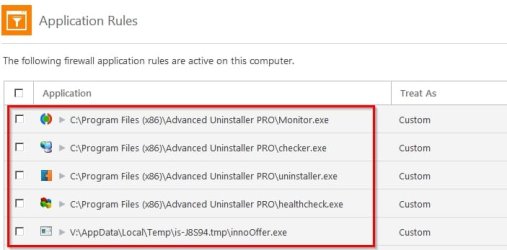
The following had to be blocked from dialling out:

Uninstaller 3.jpg

I have to say that the program works well when it comes to uninstalling software. It also uses a background process that runs at all times (checker.exe) to monitor software changes. This is not the same as "Monitored Installation"

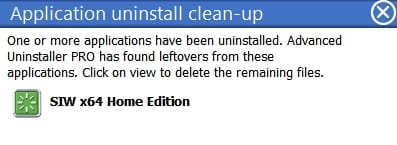
Example: Ran Ccleaner 64bit and used it to uninstall SIW x64

It missed a folder that got picked up by the background process which displayed the following above the system tray once Ccleaner had done it's uninstall:

Uninstaller 2.jpg

So it works well but there are a few things to watch out for when installing.

Plus it has extra features that will screw up your system if not used correctly including a "Daily health check" with a "One click fix" button that is best avoided. See deleted scheduled tasks above.

There is the ability to fully monitor an installation but it's really only suitable for advanced users as it monitors all changes including those that do not directly relate to the software installation.

On the plus side it does detect "Partial installs" just like Comodo Programs Manager that has been mentioned in this thread. I used to use Comodo Programs Manager but it stopped working for me and the program has been discontinued. Some users report that it still works for them.
 
Last edited:

My Computer My Computer

Computer type
Laptop
Computer Manufacturer/Model Number
ASUS
OS
Microsoft Windows 7 Home Premium 64-bit 7601 Multiprocessor Free Service Pack 1
CPU
AMD C-60 APU with Radeon(tm) HD Graphics
Motherboard
ASUSTeK COMPUTER INC. X501U
Memory
4.00 GB
Graphics Card(s)
AMD Radeon HD 6290 Graphics
Sound Card
(1) AMD High Definition Audio Device (2) Realtek High Defi
Screen Resolution
1366 x 768 x 32 bits (4294967296 colors) @ 60 Hz
Hard Drives
Hitachi HTS545050A7E380 SATA Disk Device
Antivirus
Comodo CIS & FW, SecureAplus App Whitelisting, Threatfire
Browser
Cyberfox 64bit, Opera 64bit, Airfox
Other Info
Spy-The-Spy, HitmanPro.Alert, Norton Connect Safe, MJRegWatcher, BitDefender TrafficLight, Voodoo Shield, Zemana AntiMalware
Isn't that awful that you have to go thru all those steps just to get a clean installation of a program.
 

My Computer My Computer

Computer Manufacturer/Model Number
HP, Dell, Gateway, Toshiba - 4 laptops and 2 desktops
OS
Vista, Windows7, Mint Mate, Zorin, Windows 8
CPU
from 1.6GHz Duo to i7
Monitor(s) Displays
2x HP w2207
Hard Drives
5x HDD, 7x SSD, 12x Externals
Keyboard
with trackball - no mices
Mouse
Trackball mice
Internet Speed
DSL 6000
Isn't that awful that you have to go thru all those steps just to get a clean installation of a program.

Yes it is awful. I suppose that they want to make money somehow from their "free" software. The unwary will get caught out!
 

My Computer My Computer

Computer type
Laptop
Computer Manufacturer/Model Number
ASUS
OS
Microsoft Windows 7 Home Premium 64-bit 7601 Multiprocessor Free Service Pack 1
CPU
AMD C-60 APU with Radeon(tm) HD Graphics
Motherboard
ASUSTeK COMPUTER INC. X501U
Memory
4.00 GB
Graphics Card(s)
AMD Radeon HD 6290 Graphics
Sound Card
(1) AMD High Definition Audio Device (2) Realtek High Defi
Screen Resolution
1366 x 768 x 32 bits (4294967296 colors) @ 60 Hz
Hard Drives
Hitachi HTS545050A7E380 SATA Disk Device
Antivirus
Comodo CIS & FW, SecureAplus App Whitelisting, Threatfire
Browser
Cyberfox 64bit, Opera 64bit, Airfox
Other Info
Spy-The-Spy, HitmanPro.Alert, Norton Connect Safe, MJRegWatcher, BitDefender TrafficLight, Voodoo Shield, Zemana AntiMalware
Ho Hum

Ive used IObit for ages.
Never actually had any probs with it, and its latest incarnation ASCU9, AV + tools uses the bitdefender database under licence, using it on my w10tp.

I find that its Uninstaller is better than Revo.

BUT to stop any/all extra's i select custom install and REMOVE the live updater file.

Roy
 

My Computer My Computer

Computer type
PC/Desktop
Computer Manufacturer/Model Number
medionl/Aspire 6930G/acer x55a
OS
W7 home premium 32bit/W7HP 64bit/w10 tp insider ring
CPU
E5300 dual core
Motherboard
medion MS7366
Memory
3gb
Graphics Card(s)
Nvidia Geforce 7100 Nforce 630i
Monitor(s) Displays
avixc
Internet Speed
n (isp resticted to 72)
Antivirus
mse/pands
Browser
palemoon
Other Info
Belkin Fd7050 n USB using Railink RT2870 drivers, more upto date
Well on the advice of a couple other experienced members I installed Advanced Uninstaller Pro (free)...

There is the ability to fully monitor an installation but it's really only suitable for advanced users as it monitors all changes including those that do not directly relate to the software installation.

On the plus side it does detect "Partial installs" just like Comodo Programs Manager that has been mentioned in this thread. I used to use Comodo Programs Manager but it stopped working for me and the program has been discontinued. Some users report that it still works for them.
I'm one of those for whom Comodo Programs Manager continues to work, and I have it installed on an old XP, and several new W7HP and Pro x64 machines as well. I found that the newer betas became problematic, but fwiw the last non-beta v1.3.2.30 is the version that works. It doesn't always monitor EVERY installation, as if that capability was thwarted by some particular installer methods, but I've found that on any PC that I haven't installed it to, I miss it. In fact I'm addicted to it such that I right-click every installer (by muscle-memory now) and select "Install and monitor setup using CPM" and that results in a fully-monitored installation most times, as opposed to an unmonitored or should I say "standard" installation which relies solely on the proggie's Uninstaller to uninstall later. The joy of Monitored is that when you want to uninstall a program using CPM, the uninstaller runs, then CPM displays what *it* will/would uninstall if you continue, incl showing all files/folders/registry entries, and you can continue (or not) as you see fit.

Thanks for telling about AIP and let us know if you like it.
 

My Computer My Computer

Computer type
Laptop
Computer Manufacturer/Model Number
Dell Latitude E6540 Laptop
OS
Windows 7 Professional 64bit
CPU
Intel Core i7 4600M @ 2.90GHz
Motherboard
Dell Inc. 0CYT5F (SOCKET 0)
Memory
16.0GB Dual-Channel DDR3 @ 797MHz (11-11-11-28)
Graphics Card(s)
Intel HD Graphics 4600 (Dell) 2048MB ATI AMD Radeon HD 8790M
Sound Card
Realtek High Definition Audio
Monitor(s) Displays
HP ZR30w (2560x1600@60Hz)
Hard Drives
256GB LITEONIT LMT-256M6M-41 mm SATA (SSD)
1TB Samsung SSD 860 EVO mSATA SATA (SSD)
2TB USB 3.0 USB Device
115GB SanDisk Ultra Fit USB
Other Info
Multiple Dell E-Port Plus II Port Replicator/Docking Stations 0Y72NH USB 3.0 + 130W AC Adapters
[
Thanks for telling about AIP and let us know if you like it.

Yes I do like it but I don't think much of the effort needed to clean install it.

It does monitor installations on demand. It also scans for software changes in real time so if you uninstall software using another program it still notifies on leftovers.

It's possible to leave "installation monitor" running at all times but I prefer not to.
 

My Computer My Computer

Computer type
Laptop
Computer Manufacturer/Model Number
ASUS
OS
Microsoft Windows 7 Home Premium 64-bit 7601 Multiprocessor Free Service Pack 1
CPU
AMD C-60 APU with Radeon(tm) HD Graphics
Motherboard
ASUSTeK COMPUTER INC. X501U
Memory
4.00 GB
Graphics Card(s)
AMD Radeon HD 6290 Graphics
Sound Card
(1) AMD High Definition Audio Device (2) Realtek High Defi
Screen Resolution
1366 x 768 x 32 bits (4294967296 colors) @ 60 Hz
Hard Drives
Hitachi HTS545050A7E380 SATA Disk Device
Antivirus
Comodo CIS & FW, SecureAplus App Whitelisting, Threatfire
Browser
Cyberfox 64bit, Opera 64bit, Airfox
Other Info
Spy-The-Spy, HitmanPro.Alert, Norton Connect Safe, MJRegWatcher, BitDefender TrafficLight, Voodoo Shield, Zemana AntiMalware
Chris, thank you for all the work checking out those programs.

I personally don't have a problem with a company offering free programs with added goodies. As long as the added goodies are shown as a option in a plain understandable fashion.
When one accepts the added goodies that is all they get.
I have downloaded programs and selected (NO) to all the added goodies and I still got them.
So what I do is wright down all the goodies I indicated (NO) to and do a search through my system looking for them.
 

My Computer My Computer

Computer type
PC/Desktop
Computer Manufacturer/Model Number
Home made Desktop
OS
Windows 10 Pro. 64/ version 1709 Windows 7 Pro/64
CPU
Intel i7-6800K @ 4.3
Motherboard
ASUS X-99 Deluxe II
Memory
Corsair Platinum 16 gig @2400
Graphics Card(s)
EVGA GTX 1070 OC
Monitor(s) Displays
Asus 27" LED LCD/VE278Q
Screen Resolution
1920-1080 or 1280-720 HDMI
Hard Drives
INTEL SSD 730-240 Gb Sata 3.0/
PSU
EVGA Platium 1200W
Case
Phanteks Luxe Tempered Glass 8 fans/ one radiator
Cooling
XSPC/ Water Cooled CPU
Keyboard
Das 4 Professional
Mouse
Logitech M705/MX Anywhere 2-S
Internet Speed
100 mbits
Antivirus
Microsoft Security Essentials/ Malwarebytes Premium 3.0/ SAS
Browser
I.E. 11 default/Firefox/ ISP Time Warner Cable/Spectrum
Other Info
LG BluRay Burner/
Sound system-KLipsch-THX/
Icy Dock ssd Hot Swap bays.
Chris, thank you for all the work checking out those programs.

I personally don't have a problem with a company offering free programs with added goodies. As long as the added goodies are shown as a option in a plain understandable fashion.
When one accepts the added goodies that is all they get.
I have downloaded programs and selected (NO) to all the added goodies and I still got them.
So what I do is wright down all the goodies I indicated (NO) to and do a search through my system looking for them.
It does seem that AUPro is (maybe far) worse than most. I do wonder if, when it updates, the other junk will have to be protected-against installing again. I also wonder if the program clean-uninstalls ITSELF or if when you uninstall it, the other junk is left behind.

Anyway now that I've looked at it again I think I will pass on that one. :eek:
 

My Computer My Computer

Computer type
Laptop
Computer Manufacturer/Model Number
Dell Latitude E6540 Laptop
OS
Windows 7 Professional 64bit
CPU
Intel Core i7 4600M @ 2.90GHz
Motherboard
Dell Inc. 0CYT5F (SOCKET 0)
Memory
16.0GB Dual-Channel DDR3 @ 797MHz (11-11-11-28)
Graphics Card(s)
Intel HD Graphics 4600 (Dell) 2048MB ATI AMD Radeon HD 8790M
Sound Card
Realtek High Definition Audio
Monitor(s) Displays
HP ZR30w (2560x1600@60Hz)
Hard Drives
256GB LITEONIT LMT-256M6M-41 mm SATA (SSD)
1TB Samsung SSD 860 EVO mSATA SATA (SSD)
2TB USB 3.0 USB Device
115GB SanDisk Ultra Fit USB
Other Info
Multiple Dell E-Port Plus II Port Replicator/Docking Stations 0Y72NH USB 3.0 + 130W AC Adapters
If a program has it's own uninstaller you can bet your bottom dollar it will leave junk behind.
 

My Computer My Computer

Computer type
PC/Desktop
Computer Manufacturer/Model Number
Home made Desktop
OS
Windows 10 Pro. 64/ version 1709 Windows 7 Pro/64
CPU
Intel i7-6800K @ 4.3
Motherboard
ASUS X-99 Deluxe II
Memory
Corsair Platinum 16 gig @2400
Graphics Card(s)
EVGA GTX 1070 OC
Monitor(s) Displays
Asus 27" LED LCD/VE278Q
Screen Resolution
1920-1080 or 1280-720 HDMI
Hard Drives
INTEL SSD 730-240 Gb Sata 3.0/
PSU
EVGA Platium 1200W
Case
Phanteks Luxe Tempered Glass 8 fans/ one radiator
Cooling
XSPC/ Water Cooled CPU
Keyboard
Das 4 Professional
Mouse
Logitech M705/MX Anywhere 2-S
Internet Speed
100 mbits
Antivirus
Microsoft Security Essentials/ Malwarebytes Premium 3.0/ SAS
Browser
I.E. 11 default/Firefox/ ISP Time Warner Cable/Spectrum
Other Info
LG BluRay Burner/
Sound system-KLipsch-THX/
Icy Dock ssd Hot Swap bays.
Back
Top