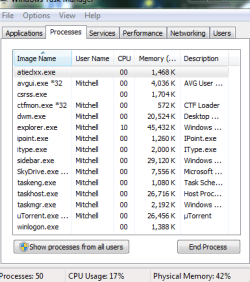
Adding up the memory usage items in the list will never equal total usage. There are 3 primary reasons for this.
1. By default Task Manager will only show processes running under your own user account and a few others. The screenshot shows that there are 50 processes running but only 15 are shown. You need to click the "Show processes from all users" button to see then all.
2. The "Memory (Private Working Set)" column which is shown by default does not account for the full memory usage of the process. It was never meant to. Typically the full usage of a process will be significantly or in some cases much higher. You need the "Working Set (Memory)" column for that. But even then there are complications.
3. There are major users of memory that are not processes. They include the Non paged pool, the resident portion of the Paged pool, and the file cache. Task Manager will tell you nothing of most of this.
Fulling accounting for memory usage in a modern OS is very difficult.
The initial memory usage of individual processes as shown at bootup is by no means a constant value. Depending on a variety of factors this can vary by a factor of 100 or even more. This usage may seem high but that is only because there is currently no better use for the memory. If memory is needed for other processes this will automatically be trimmed back, drastically if necessary.
Memory management in a modern OS is VERY complex. To reach even my level of understanding has required much study. And I make no claims of being an expert.
I see nothing unusual in the screenshot.