Whats slowing up my startup? Event Viewer shows lots of problems!

Ok, per PBCopter: if the cable is unplugged.... it won't change the error. so let's just mark that as done.

Your bother's machine also does not show IPv6 then?
>> To hallucinate properly, you need stronger tablets, not weaker ones. :)

Not hopelessly wrong, there's always hope!
>> IPv4 is an older version of IP - any connection regardless of wired or wireless can support both versions. That is if the devices and software support IPv6. You would have to have some pretty old equipment to have IPv6 not be supported.

Good, I guess - no issues found/resolved with the troubleshooter. would have been nice if it found something and fixed it. Sometimes a magic wand is good to have hanging on your tool belt.
>> I'm not clear on the Broken start Menu links though. It seems to have found them, it's not clear if it fixed them.

Performance troubleshooter:
Mark all of them to NOT run. You can always return them to run in msconfig.
There are two Bitdefender 2014 entries. This might be two AV different services
TomTom is your GPS updater I'm guessing - these are known pigs with huge data downloads.
AMD hydra - not needed
Akamai NetSession client - not needed. It came from the Asus Global (DLM). You can and should uninstall it in Control Panel \ Programs and Features

I've almost caught up on my reading.
I'll wait until the
driver is updated and
you've run the Performance troubleshooter (marking everything NOT to run) again.
>> Note that this will turn off Bitdefender in startup. The AV program should launch for normal operations, it just won't run an early check.

After you make the two changes above and note the startup speed (performance event logs after the changes) you should add Bitdefender back to startup using msconfig in NORMAL boot mode (not safe mode) Bitdefender is really the only thing you want in startup.

I'm looking at Kies - hmmm it's a Samsung phone helper and it will reset itself to startup even if you tell it not to. Persistent little bugger.

In your tray notification drop down list, find Kies or Kies Air Message (you might have to select customize if the notification icon is hidden)
Right click Kies or Kies Air Message
Select settings from the alternate (alt) menu
Untick [..] Run automatically when windows starts

I just caught a note re: slow startup with Kies - but I closed the window already - nope no history... it was in a search result.

Supplemental Samsung Kies reading - no action required, information only.

I do not have knowledge of My Phone Explorer, but a few people on forums for Samsung devices (not Samsung itself, mind you) suggest it as a replacement for Kies
https://play.google.com/store/apps/details?id=com.fjsoft.myphoneexplorer.client

Believe it or not... I think we're close to the end. We'll see after the driver is installed and the startup is clean.

Bill
.
 

My Computer My Computer

At a glance

x64 (6.3.9600) Win8.1 Pro & soon dual boot x6...AMD A6-3420M APU with Radeon(tm) HD Graphics6.00 GBAMD Radeon(TM) HD 6520G
Computer type
Laptop
Computer Manufacturer/Model Number
HP Pavilion dv6-6c10us
OS
x64 (6.3.9600) Win8.1 Pro & soon dual boot x64 (6.1.7601) Win7_SP1 HomePrem
CPU
AMD A6-3420M APU with Radeon(tm) HD Graphics
Motherboard
Hewlett-Packard 1805
Memory
6.00 GB
Graphics Card(s)
AMD Radeon(TM) HD 6520G
Sound Card
(1) AMD High Definition Audio Device (2) IDT High Definiti
Monitor(s) Displays
HP W2072a 20" LCD (1600 x 900) @ 60 Hz
Screen Resolution
1366 x 768 x 32 bits (4294967296 colors) @ 60 Hz
Hard Drives
ST640LM0 00 HM641JI SATA Disk Device
Keyboard
Logitech k520 wireless KB
Mouse
Logitech m320 wireless mouse (bundled with KB)
Internet Speed
15/5 | 54 MB Wireless 'n'
Antivirus
Realtime: Defender or Avast | On-demand: Malwarebytes, ESET
Browser
IE 11 on Win8, IE 10 on win 7
Other Info
Media: [Gimp, Audacity, VLC] || Comm: [WEmail 2012, Skype] || Productivity: [OpenOffice,| Textpad] || Utils: [Sysinternals, cCleaner, Speccy, Defraggler]
Success, well sort of :confused:

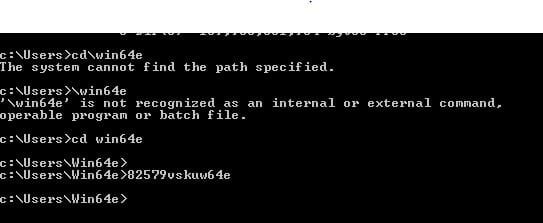
Managed to overcome the Command Prompt Box as below, and ran Win64e.

DOS box win64e.JPG

I then used the Global Link to downolad a new driver file.

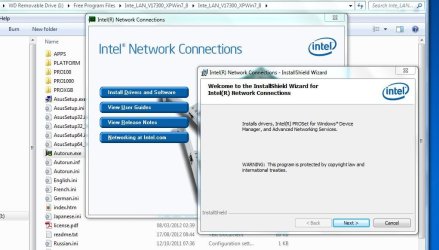
I extracted the files and ran Asussetup.exe then installed with Autorun.exe, there were no instructions so I took the logical route and found myself here:

Intel installation.JPG

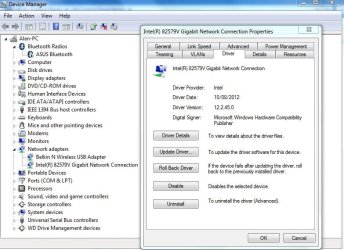
After this completed I checked in Device Manager and found the driver updated, but not to 17.3.0.0 as expected :cry:

gigabit driver 12.2.45.0.JPG

I will restart now and hope I will still be here afterwards so I can complete my tasks

Regards

Alan.
 

My Computer My Computer

At a glance

Windows 7 Professional 64biti5-2500K 3.30Hz 6MB Cache16GB DDR3ASUSGeforce GTX1050Ti 4GB
Computer type
PC/Desktop
Computer Manufacturer/Model Number
Home Build
OS
Windows 7 Professional 64bit
CPU
i5-2500K 3.30Hz 6MB Cache
Motherboard
ASUS P8P67 Pro B3 Revision
Memory
16GB DDR3
Graphics Card(s)
ASUSGeforce GTX1050Ti 4GB
Sound Card
On-Board
Monitor(s) Displays
LG23MP65HQ-P
Hard Drives
WD Caviar Green 500gb
Maxtor 300gb
WD External USB 120gb
WD My Passport USB 2TB
LUX3 External USB 1TB
PSU
Corsair 800W
Case
Antec
Cooling
Arctic 13 Cooler
Antivirus
Bitdefender Total Security 2017
Browser
FireFox
Well done Alan .. Has that improved your start time ?
 

My Computer My Computer

At a glance

windows 7 home 64bitINTEL-CORE I716GB
Computer Manufacturer/Model Number
W530-3630QM1
OS
windows 7 home 64bit
CPU
INTEL-CORE I7
Memory
16GB
Hard Drives
750GB
Browser
Chrome
Hi Maxie.

I have yet to restart this PC but after the driver update it still took mote than it used to.

Hi Bill.
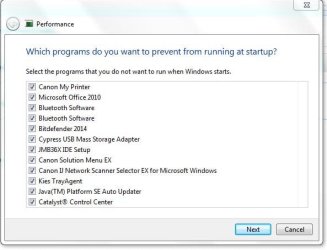
I have unchecked the startup programs in Performance Troubleshooter as below:
Performance programs ticked.JPG

Apple Product Update, Bonjour and Akamai Netsession Interface have all been uninstalled.

The 82579V driver has been updated but not to that expected.

I have attached below a new Event Log, still not good to look at.
View attachment Warnings 20 02 14 .docx

Not sure where to find the tray notification drop down list, where is it :o:o ?

Nearly there.........

Regards
Alan.
 

My Computer My Computer

At a glance

Windows 7 Professional 64biti5-2500K 3.30Hz 6MB Cache16GB DDR3ASUSGeforce GTX1050Ti 4GB
Computer type
PC/Desktop
Computer Manufacturer/Model Number
Home Build
OS
Windows 7 Professional 64bit
CPU
i5-2500K 3.30Hz 6MB Cache
Motherboard
ASUS P8P67 Pro B3 Revision
Memory
16GB DDR3
Graphics Card(s)
ASUSGeforce GTX1050Ti 4GB
Sound Card
On-Board
Monitor(s) Displays
LG23MP65HQ-P
Hard Drives
WD Caviar Green 500gb
Maxtor 300gb
WD External USB 120gb
WD My Passport USB 2TB
LUX3 External USB 1TB
PSU
Corsair 800W
Case
Antec
Cooling
Arctic 13 Cooler
Antivirus
Bitdefender Total Security 2017
Browser
FireFox

My Computer My Computer

At a glance

Windows 10 Pro x64, Windows 8.1 Pro x64, Wind...INTEL i9-7920X LGA 206664 GB (4 X 16 GB) G-Skill V Series DDR4 3200 ...EVGA GTX 1060 SC 3 GB
Computer type
PC/Desktop
Computer Manufacturer/Model Number
Custom Built
OS
Windows 10 Pro x64, Windows 8.1 Pro x64, Windows 7 Ultimate x64 SP1,
CPU
INTEL i9-7920X LGA 2066
Motherboard
Gigabyte X299-WU8 F3
Memory
64 GB (4 X 16 GB) G-Skill V Series DDR4 3200 Quad Channel
Graphics Card(s)
EVGA GTX 1060 SC 3 GB
Sound Card
Realtek Onboard ALC1220
Monitor(s) Displays
2 x Samsung S27E310
Screen Resolution
1920x1080
Hard Drives
Samsung 2 x 970 EVO Plus 500 GB NVMe
1 x 6TB WD 6003FZBX SATA
1 x 6TB WD 60EFRX SATA
12 x 3TB WD 30EFRX SATA
PSU
Seasonic X-1050
Case
Thermaltake Armor+
Cooling
Corsair H80i V2 Liquid AOI Cooler
Keyboard
Logitech G510s
Mouse
Logitech MX Master 2S
Internet Speed
200 Mb/s
Antivirus
ESET NOD32 13.1
Browser
EDGE (Dev, Canary, Beta), Chrome
Other Info
ASUS RT-AC68U router
Malwarebytes 4.0.4
Hi Maxie & Bill

Okay shut down and restarted. On my stopwatch it took 1 min 10 seconds to get to the Windows logon screen from the 'Starting Windows' screen, much faster than it has been recently! That's good result Gentlemen :D:D

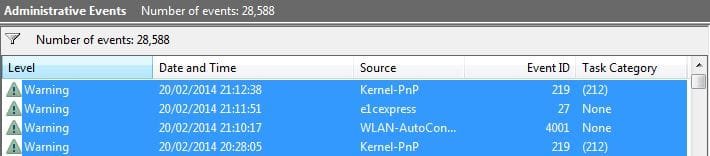
I have attached below the Event log for the last startup (Top 3 lines)

latest startup event log..JPG

Any ideas why the driver is not what I expected? It is later and seems to be working though.

One thing I forgot to ask, I have Itunes installed, not sure how but I don't use it but am not sure if it is safe to just uninstall it in case it impacts on another program or function. I use Window Media Player and find this fine for my needs.

Also the reverting of pbcopter's suggestion on restarting the PC.

Regards

Alan.

EDIT.
Just seen pbcopter's post above.

The latest Intel driver for your adapter can be found here. it will load version 12.10.28.0
If thats the latest then mine 12.2.45.0 is probably not that old!
 

My Computer My Computer

At a glance

Windows 7 Professional 64biti5-2500K 3.30Hz 6MB Cache16GB DDR3ASUSGeforce GTX1050Ti 4GB
Computer type
PC/Desktop
Computer Manufacturer/Model Number
Home Build
OS
Windows 7 Professional 64bit
CPU
i5-2500K 3.30Hz 6MB Cache
Motherboard
ASUS P8P67 Pro B3 Revision
Memory
16GB DDR3
Graphics Card(s)
ASUSGeforce GTX1050Ti 4GB
Sound Card
On-Board
Monitor(s) Displays
LG23MP65HQ-P
Hard Drives
WD Caviar Green 500gb
Maxtor 300gb
WD External USB 120gb
WD My Passport USB 2TB
LUX3 External USB 1TB
PSU
Corsair 800W
Case
Antec
Cooling
Arctic 13 Cooler
Antivirus
Bitdefender Total Security 2017
Browser
FireFox
Hi Alan .. You can not really complain about the start time .. As for the Driver it does not really matter .. I am sure it would work .. But even so you are not going to use it ..
 

My Computer My Computer

At a glance

windows 7 home 64bitINTEL-CORE I716GB
Computer Manufacturer/Model Number
W530-3630QM1
OS
windows 7 home 64bit
CPU
INTEL-CORE I7
Memory
16GB
Hard Drives
750GB
Browser
Chrome
Hi Maxie.

You can not really complain about the start time
I am most certainly not complaining, as said its much faster and a good result.

Both yours, pbcopters and Bills help has been outstanding, and shows how deserving is the reputation of the W7 Forum.

Regards

Alan.
 

My Computer My Computer

At a glance

Windows 7 Professional 64biti5-2500K 3.30Hz 6MB Cache16GB DDR3ASUSGeforce GTX1050Ti 4GB
Computer type
PC/Desktop
Computer Manufacturer/Model Number
Home Build
OS
Windows 7 Professional 64bit
CPU
i5-2500K 3.30Hz 6MB Cache
Motherboard
ASUS P8P67 Pro B3 Revision
Memory
16GB DDR3
Graphics Card(s)
ASUSGeforce GTX1050Ti 4GB
Sound Card
On-Board
Monitor(s) Displays
LG23MP65HQ-P
Hard Drives
WD Caviar Green 500gb
Maxtor 300gb
WD External USB 120gb
WD My Passport USB 2TB
LUX3 External USB 1TB
PSU
Corsair 800W
Case
Antec
Cooling
Arctic 13 Cooler
Antivirus
Bitdefender Total Security 2017
Browser
FireFox
Most welcome Alan .. As for the Driver Version we both know that is not the latest . We also know the latest Version would not have worked .. I did see the problems it can cause on some Systems ..
 

My Computer My Computer

At a glance

windows 7 home 64bitINTEL-CORE I716GB
Computer Manufacturer/Model Number
W530-3630QM1
OS
windows 7 home 64bit
CPU
INTEL-CORE I7
Memory
16GB
Hard Drives
750GB
Browser
Chrome
Most welcome Alan .. As for the Driver Version we both know that is not the latest . We also know the latest Version would not have worked .. I did see the problems it can cause on some Systems ..

Maxie,

Just out of curiosity, why do you say this? I have been using the latest driver on the same Intel NIC with no issues.
 

My Computer My Computer

At a glance

Windows 10 Pro x64, Windows 8.1 Pro x64, Wind...INTEL i9-7920X LGA 206664 GB (4 X 16 GB) G-Skill V Series DDR4 3200 ...EVGA GTX 1060 SC 3 GB
Computer type
PC/Desktop
Computer Manufacturer/Model Number
Custom Built
OS
Windows 10 Pro x64, Windows 8.1 Pro x64, Windows 7 Ultimate x64 SP1,
CPU
INTEL i9-7920X LGA 2066
Motherboard
Gigabyte X299-WU8 F3
Memory
64 GB (4 X 16 GB) G-Skill V Series DDR4 3200 Quad Channel
Graphics Card(s)
EVGA GTX 1060 SC 3 GB
Sound Card
Realtek Onboard ALC1220
Monitor(s) Displays
2 x Samsung S27E310
Screen Resolution
1920x1080
Hard Drives
Samsung 2 x 970 EVO Plus 500 GB NVMe
1 x 6TB WD 6003FZBX SATA
1 x 6TB WD 60EFRX SATA
12 x 3TB WD 30EFRX SATA
PSU
Seasonic X-1050
Case
Thermaltake Armor+
Cooling
Corsair H80i V2 Liquid AOI Cooler
Keyboard
Logitech G510s
Mouse
Logitech MX Master 2S
Internet Speed
200 Mb/s
Antivirus
ESET NOD32 13.1
Browser
EDGE (Dev, Canary, Beta), Chrome
Other Info
ASUS RT-AC68U router
Malwarebytes 4.0.4
Most welcome Alan .. As for the Driver Version we both know that is not the latest . We also know the latest Version would not have worked .. I did see the problems it can cause on some Systems ..

Maxie,

Just out of curiosity, why do you say this? I have been using the latest driver on the same Intel NIC with no issues.

I seen it had issues on some Forums .. Only on some Motherboards though as why i have no idea .. That is why I advised the OP not to try it esp as it would not be used ..
 

My Computer My Computer

At a glance

windows 7 home 64bitINTEL-CORE I716GB
Computer Manufacturer/Model Number
W530-3630QM1
OS
windows 7 home 64bit
CPU
INTEL-CORE I7
Memory
16GB
Hard Drives
750GB
Browser
Chrome
Fair enough.
 

My Computer My Computer

At a glance

Windows 10 Pro x64, Windows 8.1 Pro x64, Wind...INTEL i9-7920X LGA 206664 GB (4 X 16 GB) G-Skill V Series DDR4 3200 ...EVGA GTX 1060 SC 3 GB
Computer type
PC/Desktop
Computer Manufacturer/Model Number
Custom Built
OS
Windows 10 Pro x64, Windows 8.1 Pro x64, Windows 7 Ultimate x64 SP1,
CPU
INTEL i9-7920X LGA 2066
Motherboard
Gigabyte X299-WU8 F3
Memory
64 GB (4 X 16 GB) G-Skill V Series DDR4 3200 Quad Channel
Graphics Card(s)
EVGA GTX 1060 SC 3 GB
Sound Card
Realtek Onboard ALC1220
Monitor(s) Displays
2 x Samsung S27E310
Screen Resolution
1920x1080
Hard Drives
Samsung 2 x 970 EVO Plus 500 GB NVMe
1 x 6TB WD 6003FZBX SATA
1 x 6TB WD 60EFRX SATA
12 x 3TB WD 30EFRX SATA
PSU
Seasonic X-1050
Case
Thermaltake Armor+
Cooling
Corsair H80i V2 Liquid AOI Cooler
Keyboard
Logitech G510s
Mouse
Logitech MX Master 2S
Internet Speed
200 Mb/s
Antivirus
ESET NOD32 13.1
Browser
EDGE (Dev, Canary, Beta), Chrome
Other Info
ASUS RT-AC68U router
Malwarebytes 4.0.4
Trapper,

Did you try disabling the Network adapter? If it is not being used, then Windows will not go looking for a network during boot.
 

My Computer My Computer

At a glance

Windows 10 Pro x64, Windows 8.1 Pro x64, Wind...INTEL i9-7920X LGA 206664 GB (4 X 16 GB) G-Skill V Series DDR4 3200 ...EVGA GTX 1060 SC 3 GB
Computer type
PC/Desktop
Computer Manufacturer/Model Number
Custom Built
OS
Windows 10 Pro x64, Windows 8.1 Pro x64, Windows 7 Ultimate x64 SP1,
CPU
INTEL i9-7920X LGA 2066
Motherboard
Gigabyte X299-WU8 F3
Memory
64 GB (4 X 16 GB) G-Skill V Series DDR4 3200 Quad Channel
Graphics Card(s)
EVGA GTX 1060 SC 3 GB
Sound Card
Realtek Onboard ALC1220
Monitor(s) Displays
2 x Samsung S27E310
Screen Resolution
1920x1080
Hard Drives
Samsung 2 x 970 EVO Plus 500 GB NVMe
1 x 6TB WD 6003FZBX SATA
1 x 6TB WD 60EFRX SATA
12 x 3TB WD 30EFRX SATA
PSU
Seasonic X-1050
Case
Thermaltake Armor+
Cooling
Corsair H80i V2 Liquid AOI Cooler
Keyboard
Logitech G510s
Mouse
Logitech MX Master 2S
Internet Speed
200 Mb/s
Antivirus
ESET NOD32 13.1
Browser
EDGE (Dev, Canary, Beta), Chrome
Other Info
ASUS RT-AC68U router
Malwarebytes 4.0.4
Look at Post 40 Pbcopter .. Maybe you could shed some light on that ..
 

My Computer My Computer

At a glance

windows 7 home 64bitINTEL-CORE I716GB
Computer Manufacturer/Model Number
W530-3630QM1
OS
windows 7 home 64bit
CPU
INTEL-CORE I7
Memory
16GB
Hard Drives
750GB
Browser
Chrome
From the screen shot, he is not showing the last item in the list which is the Wait for Link entry and the one I suggest setting to on.

However, since he doesn't intend to use the LAN, I would suggest right clicking on the adapter and selecting disable.
This should save some boot time.
 

My Computer My Computer

At a glance

Windows 10 Pro x64, Windows 8.1 Pro x64, Wind...INTEL i9-7920X LGA 206664 GB (4 X 16 GB) G-Skill V Series DDR4 3200 ...EVGA GTX 1060 SC 3 GB
Computer type
PC/Desktop
Computer Manufacturer/Model Number
Custom Built
OS
Windows 10 Pro x64, Windows 8.1 Pro x64, Windows 7 Ultimate x64 SP1,
CPU
INTEL i9-7920X LGA 2066
Motherboard
Gigabyte X299-WU8 F3
Memory
64 GB (4 X 16 GB) G-Skill V Series DDR4 3200 Quad Channel
Graphics Card(s)
EVGA GTX 1060 SC 3 GB
Sound Card
Realtek Onboard ALC1220
Monitor(s) Displays
2 x Samsung S27E310
Screen Resolution
1920x1080
Hard Drives
Samsung 2 x 970 EVO Plus 500 GB NVMe
1 x 6TB WD 6003FZBX SATA
1 x 6TB WD 60EFRX SATA
12 x 3TB WD 30EFRX SATA
PSU
Seasonic X-1050
Case
Thermaltake Armor+
Cooling
Corsair H80i V2 Liquid AOI Cooler
Keyboard
Logitech G510s
Mouse
Logitech MX Master 2S
Internet Speed
200 Mb/s
Antivirus
ESET NOD32 13.1
Browser
EDGE (Dev, Canary, Beta), Chrome
Other Info
ASUS RT-AC68U router
Malwarebytes 4.0.4
From the screen shot, he is not showing the last item in the list which is the Wait for Link entry and the one I suggest setting to on.

However, since he doesn't intend to use the LAN, I would suggest right clicking on the adapter and selecting disable.
This should save some boot time.

He did Disable it but after a Reboot it was set back to Enable .. I thou maybe he should try through the BIOS ... Do not think it is that Important any how ..
 

My Computer My Computer

At a glance

windows 7 home 64bitINTEL-CORE I716GB
Computer Manufacturer/Model Number
W530-3630QM1
OS
windows 7 home 64bit
CPU
INTEL-CORE I7
Memory
16GB
Hard Drives
750GB
Browser
Chrome
The e1cexpress error is just a timing error when the Intel driver looks for the Network adapter.

This started with some of the last Intel driver updates. It is not a real problem with the Network adapter though.

Go to the Network and Sharing center

Select Change adapter settings

Right click on your Intel 82579V Network adapter

Then Adapter properties

Then configure

On the Advanced tab

at the bottom of the list

Change wait for link to on instead of auto detect

Reboot.

I think he was talking about this suggestion but your right it probably doesn't really matter.
I just thought he might cut down the boot time a little by disabling the adapter.
 

My Computer My Computer

At a glance

Windows 10 Pro x64, Windows 8.1 Pro x64, Wind...INTEL i9-7920X LGA 206664 GB (4 X 16 GB) G-Skill V Series DDR4 3200 ...EVGA GTX 1060 SC 3 GB
Computer type
PC/Desktop
Computer Manufacturer/Model Number
Custom Built
OS
Windows 10 Pro x64, Windows 8.1 Pro x64, Windows 7 Ultimate x64 SP1,
CPU
INTEL i9-7920X LGA 2066
Motherboard
Gigabyte X299-WU8 F3
Memory
64 GB (4 X 16 GB) G-Skill V Series DDR4 3200 Quad Channel
Graphics Card(s)
EVGA GTX 1060 SC 3 GB
Sound Card
Realtek Onboard ALC1220
Monitor(s) Displays
2 x Samsung S27E310
Screen Resolution
1920x1080
Hard Drives
Samsung 2 x 970 EVO Plus 500 GB NVMe
1 x 6TB WD 6003FZBX SATA
1 x 6TB WD 60EFRX SATA
12 x 3TB WD 30EFRX SATA
PSU
Seasonic X-1050
Case
Thermaltake Armor+
Cooling
Corsair H80i V2 Liquid AOI Cooler
Keyboard
Logitech G510s
Mouse
Logitech MX Master 2S
Internet Speed
200 Mb/s
Antivirus
ESET NOD32 13.1
Browser
EDGE (Dev, Canary, Beta), Chrome
Other Info
ASUS RT-AC68U router
Malwarebytes 4.0.4
Q: After this completed I checked in Device Manager and found the driver updated, but not to 17.3.0.0 as expected :cry:
>> A: PBCopter says "The driver version does not always change with every release since they also change the application software as well."
This makes sense - the package is version 17.3.0.0 which contains the driver version 12.2.45.0 - I looked through some of the reference material but could not locate specific release information. Note that the package install says "Install drivers and Software" implying more than just the driver. I'm sure you could have extracted the driver, but I didn't want to put you through that detail. Plus, I'd have to figure out what to tell you to do. :)

Sooo, the driver is updated - very good!

Disable the 82579V gigabyte Network in
Control Panel\Network and Internet\Network and Sharing Center
Change adapter setting
Select Local Area Connection
click Disable this network device on the action bar

Yeah.. I know... you went through all of that trouble just to disable it now? Yep, you discovered a hole in the system trying to fix the slow startup and rather than leave it as a possible gotcha later, you fixed it. Now you're back to trying to improve your startup time - so disabling the device that isn't being used should show some improvement.

In post# 44 you say you have unchecked the startup pgms, but they look checked to me. You wanted them checked to exclude them from startup - the screen looks correct, the words might have been lost in translation :). To double check - run the performance troubleshooter again and see what it suggests.

The notification tray is the up arrow in the lower right of your screen near the clock.

Go ahead and uninstall iTunes - it probably came along for the ride with Quicktime (as did Bonjour and Apple updater). If you don't use Quicktime - uninstall that too.


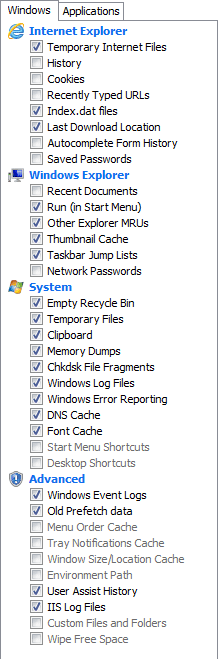
Run CCleaner: see attached for what to clean.


Restart your machine in case there are any system operations pending

Click here to download Old Timer-TFC.
>> save the application to your Desktop.
:info: Old Timer-TFC is a standalone application, there is no install.

:warn:Save your work and close all open windows.
TFC will close ALL open programs including your browser!

Right click, run as administrator TFC

Click the Start button to begin the cleaning up temporary files and folders.
:warn: Do not work on other things while TFC is running - most applications use some sort of temporary files. Just let TFC run by itself on the machine until it completes.

:busted: If TFC prompts you to reboot, do so immediately.
:busted: If TFC does NOT prompt you, then reboot your machine immediately after TFC has completed.


After Old Timer-TFC runs and you have restarted your machine you should defrag your C:\ drive. Depending on the fragmentation level you might want to run defrag a few times. I try to get mine down to four passes or less. You'll see what I mean if you watch it for a while (it's like watching paint dry though). It can take a while for each iteration - I've had disks that were running 12 passes, then 10 passes, then 8 passes, then 7 passes, then 7 passes, then 6 passes, then 7 passes, then 5 passes, then 5 passes, then 5 passes, then 4 passes - good enough for me! Hopefully you won't have to run that many iterations.

So what have you just done? You cleaned up your drive and hopefully that will improve startup time and prevent some of the optimization events (a prefetch issue that cCleaner clean up)

There's a lot more cleanup I saw in the SF report, but if you're satisfied with the startup times, well that's what this thread was all about.

After these final things, we should go over what was turned off in startup up and turn some things back on)

So see how she runs for a few days after this and keep an eye on the startup times. A minute ten is a bit long, but you say it's better than before.

You were a real trooper though all of this, it was a pleasure working with you. I'll be hanging around if you run into trouble, but I think you'll be fine.

PBCopter: The Asus site marked the latest driver as beta - I don't recommend beta software or drivers to other members so I suggested the previous version. Some members can manage a beta, others can't - so I eliminate that as a possible snag to finding a resolution.

Bill
.
 

Attachments

  • cCleaner ticks.png
    cCleaner ticks.png
    10.6 KB · Views: 19

My Computer My Computer

At a glance

x64 (6.3.9600) Win8.1 Pro & soon dual boot x6...AMD A6-3420M APU with Radeon(tm) HD Graphics6.00 GBAMD Radeon(TM) HD 6520G
Computer type
Laptop
Computer Manufacturer/Model Number
HP Pavilion dv6-6c10us
OS
x64 (6.3.9600) Win8.1 Pro & soon dual boot x64 (6.1.7601) Win7_SP1 HomePrem
CPU
AMD A6-3420M APU with Radeon(tm) HD Graphics
Motherboard
Hewlett-Packard 1805
Memory
6.00 GB
Graphics Card(s)
AMD Radeon(TM) HD 6520G
Sound Card
(1) AMD High Definition Audio Device (2) IDT High Definiti
Monitor(s) Displays
HP W2072a 20" LCD (1600 x 900) @ 60 Hz
Screen Resolution
1366 x 768 x 32 bits (4294967296 colors) @ 60 Hz
Hard Drives
ST640LM0 00 HM641JI SATA Disk Device
Keyboard
Logitech k520 wireless KB
Mouse
Logitech m320 wireless mouse (bundled with KB)
Internet Speed
15/5 | 54 MB Wireless 'n'
Antivirus
Realtime: Defender or Avast | On-demand: Malwarebytes, ESET
Browser
IE 11 on Win8, IE 10 on win 7
Other Info
Media: [Gimp, Audacity, VLC] || Comm: [WEmail 2012, Skype] || Productivity: [OpenOffice,| Textpad] || Utils: [Sysinternals, cCleaner, Speccy, Defraggler]
:cry::cry:

Made me smile that did, all that effort on your part to help me to update a driver, and my efforts to complete the task successfully in the end, only to then disable it. Oh well, so be it. I am still laughing though!! Is this all to do with the Network Cable unplugged problem? If so I assume I will be able to re-enable it if needed?

Okay, the startup time from Starting Windows' to the Windows logon screen yesterday was 1min 10 seconds, two startup's today were completed as above in 51 seconds, an Olympic record on this PC.

11 out of 10 to you all.

Just realized that you cannot find a post # if your replying here. So I opened another copy of this thread, you're right, I posted the wrong screenshot in #44 that one is the 'before' instead of the 'after I clicked them all to off' I have unchecked them and the troubleshooter report now shows no problems.

Tray notification drop down; I did know that one but Kies has never shown up, I thought perhaps I had missed another drop down somewhere!

I will uninstall iTunes and Quicktime later.

I have CCleaner so will run as you advise, but am not sure about Temp files, Not long ago I did clear these out and had the devils own job with a program looking for a file that was in the Temp, or Temp Internet folder, for the life of me I cannot remember what the program was which is annoying. If I copied the folders somewhere else then I guess that would be okay? I should then be able to retrieve any lost files.

I will reboot now and run Old Timer-TFC.

Back soon;)

Regards
Alan.
 

My Computer My Computer

At a glance

Windows 7 Professional 64biti5-2500K 3.30Hz 6MB Cache16GB DDR3ASUSGeforce GTX1050Ti 4GB
Computer type
PC/Desktop
Computer Manufacturer/Model Number
Home Build
OS
Windows 7 Professional 64bit
CPU
i5-2500K 3.30Hz 6MB Cache
Motherboard
ASUS P8P67 Pro B3 Revision
Memory
16GB DDR3
Graphics Card(s)
ASUSGeforce GTX1050Ti 4GB
Sound Card
On-Board
Monitor(s) Displays
LG23MP65HQ-P
Hard Drives
WD Caviar Green 500gb
Maxtor 300gb
WD External USB 120gb
WD My Passport USB 2TB
LUX3 External USB 1TB
PSU
Corsair 800W
Case
Antec
Cooling
Arctic 13 Cooler
Antivirus
Bitdefender Total Security 2017
Browser
FireFox
Hi Alan ... It was not all about the Driver .. Sure if you need to use the Lan connection again just enable it .. Just leave the temp files alone as you state your not long after deleting them .. I still think you should use the Lan Cable as you would probably get around the 40 Mb just my opinion ..
 

My Computer My Computer

At a glance

windows 7 home 64bitINTEL-CORE I716GB
Computer Manufacturer/Model Number
W530-3630QM1
OS
windows 7 home 64bit
CPU
INTEL-CORE I7
Memory
16GB
Hard Drives
750GB
Browser
Chrome
Back
Top