
Solved What's wrong with my computer?

garylegg

New member
Local time
4:44 PM
Messages
3
I click computer properties. I click system protection. The attached graphic shows the computer saying Drive C: is missing. Yet the computer works. I am using it to submit this post. Anyone have any idea what might be causing this.
 

Attachments
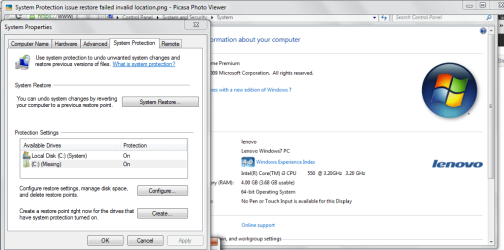
  • System Protection issue Drive C missing.png
    System Protection issue Drive C missing.png
    49 KB · Views: 45

My Computer

Computer Manufacturer/Model Number
Lenovo H320
OS
Windows 7 Home Premium 64bit
CPU
Intel Core 3i
Try turning off monitoring and then turn it back on. Seems to be fairly common...... Google is your friend :)
 
Last edited:

My Computer

Computer type
Laptop
Computer Manufacturer/Model Number
MSI GE72VR Apache Pro-416
OS
Windows 10x64 Build 1709
CPU
Intel i7 7700HQ Kaby Lake
Motherboard
Micro-Star Intl. MS-179B (U3C1)
Memory
16 GB DDR4 @2400
Graphics Card(s)
Nvidia Geforce GTX 1060
Screen Resolution
1920x1080 120Hz
Hard Drives
256 GB Nvme M.2 SSD

1TB HDD@7200
Cooling
Cooler Blast 4
Keyboard
Steel Series
Antivirus
Bit Defender Free
Browser
Edge
Turn off how?
 

My Computer

Computer Manufacturer/Model Number
Lenovo H320
OS
Windows 7 Home Premium 64bit
CPU
Intel Core 3i

My Computer

Computer type
Laptop
Computer Manufacturer/Model Number
MSI GE72VR Apache Pro-416
OS
Windows 10x64 Build 1709
CPU
Intel i7 7700HQ Kaby Lake
Motherboard
Micro-Star Intl. MS-179B (U3C1)
Memory
16 GB DDR4 @2400
Graphics Card(s)
Nvidia Geforce GTX 1060
Screen Resolution
1920x1080 120Hz
Hard Drives
256 GB Nvme M.2 SSD

1TB HDD@7200
Cooling
Cooler Blast 4
Keyboard
Steel Series
Antivirus
Bit Defender Free
Browser
Edge
The problem here is that if you turn it OFF, all your current restore points will be deleted.
I think that because the missing C:\ has a folder icon, it's a folder that was mounted as a NTFS drive letter and a restore point was created, but the folder is not unmounted.
 

My Computer

OS
N/A
Thanks for your help

I turned off monitoring. The missing C: folder disappeared. I don't know of any data loss. I don't know how the missing folder came to be but I'm glad to be rid of it for now. I will watch for problems. Here's hoping there are none. Thank you for helping.
 

My Computer

Computer Manufacturer/Model Number
Lenovo H320
OS
Windows 7 Home Premium 64bit
CPU
Intel Core 3i
Please mark this thread as SOLVED unless you have further problems.
Thanks.
 

My Computer

OS
N/A
This is caused when Repairs recover C but don't replace the old listing in System Protection which becomes Missing.

This also unfortunately results in all Restore points being lost, which is how most users discover it.

Indiana's solution to turn C:Missing off (causing it to disappear) and then turn remaining C listing on is the only one I've found. System Protection - Turn On or Off
 
Last edited:
You should turn protection on again (if you haven't already) if you want the ability to use System Restore in the future.
 

My Computer

OS
Windows 7 Ultimate x64
Back
Top