What's your Process Count?

JOSHSKORN

New member
Member
VIP
Local time
4:51 PM
Messages
121
I'm curious what the lowest process count for Windows 7 users is. That is, without really disabling anything of Windows 7 related to Aero, networking or any process that utilizes your hardware (for instance, I have a service for my sound card). My process count is 66 but I have a feeling that this is high.

If yours is lower, please post a screen shot. Thanks.
 

My Computer

Computer Manufacturer/Model Number
N/A
OS
Windows 7 Ultimate 64-bit
CPU
E6750 OC'd ~ 2.9 Mhz
Motherboard
P5N-E
Memory
DDR2 800 MHz 4GB
Graphics Card(s)
GTX 460 SE 1GB
Sound Card
Realtek Audio (Onboard sound)
Hard Drives
Seagate 500 GB HD
PSU
750 watt
My Win 7 x64 desktop runs with 35 services. It was 39 until I disabled the MS CEIP information gathering services run from Task Scheduler> Microsoft> Windows that are scheduled to keep running in Win 7 for years after the user has opted out of CEIP.

~Maxx~
.
da59fa57.png
 

My Computer

Computer Manufacturer/Model Number
HP HPE 270f
OS
Windows 7 x64 Home Premium
CPU
Intel Core i7 930 @ 2.8 Ghz Socket 1366 LGA
Motherboard
Pegatron Truckee v1.04E41
Memory
8 GB 1366 Mhz DDR3 (PC3-10700) RAM
Graphics Card(s)
ATI Radeon 5770 1 GB DDR5 RAM
Sound Card
Realtech High Definition
Monitor(s) Displays
32" Sony Bravia
Screen Resolution
1366 X 768
Hard Drives
Intel 25nm 120 GB Series 320 SSD HD Tune- 265 MBps Read/ 130 MBps Write

LaCie 1TB + 1TB RAID 0 eSATA Drive HD Tune- 160 MBps Read/ 90 MBps Write
Keyboard
Logitech Illuminated
Mouse
Logitech MX Revolution
Internet Speed
36.4 Mbps Maximum on a 37 Mbps Motorola SB501 Modem
My Win 7 x64 desktop runs with 35 services. It was 39 until I disabled the MS CEIP information gathering services run from Task Scheduler> Microsoft> Windows that are scheduled to keep running in Win 7 for years after the user has opted out of CEIP.

~Maxx~
.
da59fa57.png

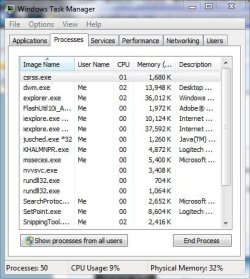
I meant processes, not services. You know how you go CTRL+ALT+DEL, click on processes and it tells you how many processes you're running at the bottom of the window? That value.

So how would I kill off a process from loading all the time? Disable the service?
 

My Computer

Computer Manufacturer/Model Number
N/A
OS
Windows 7 Ultimate 64-bit
CPU
E6750 OC'd ~ 2.9 Mhz
Motherboard
P5N-E
Memory
DDR2 800 MHz 4GB
Graphics Card(s)
GTX 460 SE 1GB
Sound Card
Realtek Audio (Onboard sound)
Hard Drives
Seagate 500 GB HD
PSU
750 watt
im running 64
 

Attachments

  • process.jpg
    process.jpg
    6.3 KB · Views: 11

My Computer

Computer type
PC/Desktop
Computer Manufacturer/Model Number
CoreI7-6700K MrFingerIII Special Builds
OS
Windows 10 Home Premium 64bit sp1
CPU
Intel I7-6700K @ 4.6 Ghz 1.344 volts everyday OC
Motherboard
Asrock Fatality K6 Z170 Socket 1151
Memory
32GB G-Skill TridentZ 3200mhz 16-18-18-38 DDR4
Graphics Card(s)
Sli Gigabyte Windforce GTX 980 G1
Sound Card
AC97 Creative Rage Tactic 3D Headphones Bluetooth
Monitor(s) Displays
27" Asus ROG Swift PG278Q G-Sync 48" Vizio Smart HD TV
Screen Resolution
2560x1440p 27"- 48" Currently Gaming at 2560x1440p Res 2K
Hard Drives
250GB Samsung Evo840SSD Seagate baracuda 500 GB WD Mybook 500Gb 1TB Seagate Barracuda
PSU
HX1050w Corsair Silver 80plus certified crosfire/sli
Case
Enthod Pro Full Tower
Cooling
Corsair H110i GT 280 mm High Performance WaterBlock
Keyboard
Logitech wireless keyboard
Mouse
Logitech wireless mouse
Internet Speed
Cox Cable 100+ mb
Antivirus
WebRoot Spysweeper with Antivirus
Browser
IE-10, Chrome, Opera
Other Info
My Other Rig is a AMD FX8320E @4.6Ghz 16GB Ballistic Sport Ram
Mobo Asrock Fatality 990FX 120GB OCZ SSD 1TB Seagate Barracuda Corsair H75 Cooling PSU Corsair CX750
GPU GTX Gigabyte 970G1
50 with the snipping tool.
 

Attachments

  • processes.JPG
    processes.JPG
    46.8 KB · Views: 16

My Computer

Computer type
PC/Desktop
Computer Manufacturer/Model Number
Self Built
OS
Win 10 Pro x64
CPU
Intel I5-2500K @3.3GHz
Motherboard
Asrock P67 Extreme4
Memory
16GB G.Skill Ripjaws X (4x4GB)
Graphics Card(s)
EVGA GeForce 750 Ti SC 2GB
Sound Card
ASUS Xonar DG 5.1 Channels 24-bit 96KHz PCI Interface Sound
Monitor(s) Displays
auria eq2367
Screen Resolution
1920 x 1080
Hard Drives
250GB Samsung 850 EVO SSD
1TB WD Blue
1TB Hitachi
PSU
SeaSonic X 650W 80 Plus Gold
Case
Corsair Obsidian 750D
Cooling
Corsair H60, Three 140mm case fans
Keyboard
Logitech Wireless Keyboard K520
Mouse
Logitech Wireless Mouse M310
Internet Speed
Wave Broadband ~ 100 dn 5 up
Antivirus
Windows Defender, Malwarebytes Premium
Browser
Edge, IE11, Chrome
Other Info
Laptop specs: HP g7-1365dx /
CPU: AMD A6-3420M APU with Radeon(tm) HD Graphics /
RAM: Crucial 8Gb (2x4Gb) /
SSD: Crucial M4-CT128M4SSD2 ATA Device/ FW 000F /
GFX: AMD Radeon HD 6520G /
OS: Windows 10 Pro x64
Great enthu guys but arent we making the no. of running processes/services running a bit of a fetish? Like size zero..lol.

E.g. I have around 50 processes running consuming 30% ram. I see no reason to panic if that no. jumps to 65 and 45 resp., a computer is meant to be used. Also, out of those 50 processes, about 40 use less than 10 mb ram each. What massive gain in performance would i get if I do kill of a few of them poor souls?

You can run a minimalist setup with say 25 processes but that would be a pretty stripped down windows. Win7 is a more complex system than say XP, thats why it runs smoother with better hardware but thats how you get the advantages of using it over XP.

Plus unless one knows what one is doing, killing off processes/ services will make the computer unstable and at worst unusable.
 

My Computer

Computer Manufacturer/Model Number
Too many to describe...
OS
Windows 7 x64 pro/ Windows 7 x86 Pro/ XP SP3 x86
Plus unless one knows what one is doing, killing off processes/ services will make the computer unstable and at worst unusable.

That is exactly why it is so important to use the scholarly advise at the BlackViper Website which includes a detailed description of each service including all of the services that are dependent upon it as well as the services that it is dependant upon. Win 7 has more than 2X the number of threads in the kernel than XP did and as a result there are many more services that can be run and Microsoft puts in all the services that everyone and anyone might need for however they might use their Win 7 computer.

The BlackViper website reveals whether or not you might need a service and after you carefully read the descriptions of the services you will find out that if you don't use a fax then you don't need the service and the same with the service needed for a printer let alone the dozen or so services that are so future forward that the technology to use them does not even exist yet!

If you're one of those people like I am who likes to run your computer with as little unneeded clutter as possible check out the BlackViper site for what many regard as the most detailed and knowledgeable advice on trimming unneeded services.

If you like your set of services the way it is then by all means keep it just the way it is.

~Maxx~
.
da59fa57.png
 

My Computer

Computer Manufacturer/Model Number
HP HPE 270f
OS
Windows 7 x64 Home Premium
CPU
Intel Core i7 930 @ 2.8 Ghz Socket 1366 LGA
Motherboard
Pegatron Truckee v1.04E41
Memory
8 GB 1366 Mhz DDR3 (PC3-10700) RAM
Graphics Card(s)
ATI Radeon 5770 1 GB DDR5 RAM
Sound Card
Realtech High Definition
Monitor(s) Displays
32" Sony Bravia
Screen Resolution
1366 X 768
Hard Drives
Intel 25nm 120 GB Series 320 SSD HD Tune- 265 MBps Read/ 130 MBps Write

LaCie 1TB + 1TB RAID 0 eSATA Drive HD Tune- 160 MBps Read/ 90 MBps Write
Keyboard
Logitech Illuminated
Mouse
Logitech MX Revolution
Internet Speed
36.4 Mbps Maximum on a 37 Mbps Motorola SB501 Modem
50 +/- 5
 

My Computer

OS
Windows 7 Enterprise
CPU
Intel S1155 Core i7 3770K 3.50Ghz Quad Core
Motherboard
Intel S1155 ATX DZ77RE-75K
Memory
Corsair 8GB CMD8GX3M2A1866C9 DDR3 1866MHz
Graphics Card(s)
Gigabyte GTX670 OC 2GB PN GV-N670OC-2GD
Sound Card
Creative SB X-Fi XG
PSU
Corsair TX 750W
Case
CoolerMaster HAF-922 Black
Great enthu guys but arent we making the no. of running processes/services running a bit of a fetish? Like size zero..lol.
Yes, I was thinking this is getting out of hand.

Plus unless one knows what one is doing, killing off processes/ services will make the computer unstable and at worst unusable.
Obviously a good point.

If you're one of those people like I am who likes to run your computer with as little unneeded clutter as possible check out the BlackViper site for what many regard as the most detailed and knowledgeable advice on trimming unneeded services.

Edit: BTW...i'm not singling you out. This is directed towards anybody that feels the way you do. I just assume since you put in the time and effort to make the changes, you must have an interest and a desire to know the overall outcome.

And my questions to you are as follows;
1). How much time did you spend reading and disabling of all of these services combined?
2). What proof do you have that the computer is indeed faster and more responsive with your changes?
3). Is it possible that you spent more time reading and making the changes then you have actually saved by implementing them?


It seems that so much of our energy is spent trying to achieve what we feel in principal is the best practice....but very little time is spent actually quantifying the results of those changes. Just because it makes sense and seems right, doesn't actually mean it will amount to a hill of beans.


To answer the OP question, I'm using a Win7 64-bit box at work. No tweaking, running some tests for work with a handful of apps installed and running a filezilla server at the moment, along with my web browser. Task manager shows 35 processes, 0% cpu usage and 14% of my physical memory in use (8GB).
 

My Computer

Computer Manufacturer/Model Number
Self-Built in July 2009
OS
Windows 7 Ultimate x64
CPU
Intel Q9550 2.83Ghz OC'd to 3.40Ghz
Motherboard
Gigabyte GA-EP45-UD3R rev. 1.1, F12 BIOS
Memory
8GB G.Skill PI DDR2-800, 4-4-4-12 timings
Graphics Card(s)
EVGA 1280MB Nvidia GeForce GTX570
Sound Card
Realtek ALC899A 8 channel onboard audio
Monitor(s) Displays
23" Acer x233H
Screen Resolution
1920x1080
Hard Drives
Intel X25-M 80GB Gen 2 SSD
Western Digital 1TB Caviar Black, 32MB cache. WD1001FALS
PSU
Corsair 620HX modular
Case
Antec P182
Cooling
stock
Keyboard
ABS M1 Mechanical
Mouse
Logitech G9 Laser Mouse
Internet Speed
15/2 cable modem
Other Info
Windows and Linux enthusiast. Logitech G35 Headset.
pparks1To answer the OP question said:
Now i have to ask this since i don't really think as the processes that important like was said early how much more you think killing a service off is going to give any type of gain

Performance comes from hardware and set up not from the programs that are installed in it Think of it like this you are the user The user determines what is neeeded for use and what not

If you have the correct set up for your needs you won't have issues unless it is time for upgrading

Now my personal question is my pc was running 64 pr cpu usage 1% mem usage20% im running 8 gigs of ram as well the above quote why can i run more with lower numbers then others ? im just curious as to everone else has really low one's with high usage

compared to me running more with lower usage ? can someone shine a light on this one thanks will also post new processes to show

Ok the first one is from last night and the Second one was just taken

By using the quote above im not trying to match his numbers im talking about others in this post have high numbers compared to mine
 

Attachments

  • process.jpg
    process.jpg
    6.3 KB · Views: 6
  • process002.jpg
    process002.jpg
    6.2 KB · Views: 6

My Computer

Computer type
PC/Desktop
Computer Manufacturer/Model Number
CoreI7-6700K MrFingerIII Special Builds
OS
Windows 10 Home Premium 64bit sp1
CPU
Intel I7-6700K @ 4.6 Ghz 1.344 volts everyday OC
Motherboard
Asrock Fatality K6 Z170 Socket 1151
Memory
32GB G-Skill TridentZ 3200mhz 16-18-18-38 DDR4
Graphics Card(s)
Sli Gigabyte Windforce GTX 980 G1
Sound Card
AC97 Creative Rage Tactic 3D Headphones Bluetooth
Monitor(s) Displays
27" Asus ROG Swift PG278Q G-Sync 48" Vizio Smart HD TV
Screen Resolution
2560x1440p 27"- 48" Currently Gaming at 2560x1440p Res 2K
Hard Drives
250GB Samsung Evo840SSD Seagate baracuda 500 GB WD Mybook 500Gb 1TB Seagate Barracuda
PSU
HX1050w Corsair Silver 80plus certified crosfire/sli
Case
Enthod Pro Full Tower
Cooling
Corsair H110i GT 280 mm High Performance WaterBlock
Keyboard
Logitech wireless keyboard
Mouse
Logitech wireless mouse
Internet Speed
Cox Cable 100+ mb
Antivirus
WebRoot Spysweeper with Antivirus
Browser
IE-10, Chrome, Opera
Other Info
My Other Rig is a AMD FX8320E @4.6Ghz 16GB Ballistic Sport Ram
Mobo Asrock Fatality 990FX 120GB OCZ SSD 1TB Seagate Barracuda Corsair H75 Cooling PSU Corsair CX750
GPU GTX Gigabyte 970G1
Edit: BTW...i'm not singling you out. This is directed towards anybody that feels the way you do. I just assume since you put in the time and effort to make the changes, you must have an interest and a desire to know the overall outcome.

And my questions to you are as follows;
1). How much time did you spend reading and disabling of all of these services combined?
2). What proof do you have that the computer is indeed faster and more responsive with your changes?
3). Is it possible that you spent more time reading and making the changes then you have actually saved by implementing them?

To answer the OP question, I'm using a Win7 64-bit box at work. No tweaking, running some tests for work with a handful of apps installed and running a filezilla server at the moment, along with my web browser. Task manager shows 35 processes, 0% cpu usage and 14% of my physical memory in use (8GB).

1) First let me point out that my Win 7 computer did not start out with the same number of services as your Win 7 computer did because I started at 56 services and ended up at 35 services and it took me 1 hour and 10 minutes to trim the services to the same level that you had all along.

2) Who ever claimed that trimming unneeded services would make a computer faster and more responsive? On the hardware challenged computers of yesterday with 200-400 Passmark Benchmark scores the amount of resources that every single running service consumed was critical, but not so with these modern machines with 1,500-2000 or higher Passmark Benchmark scores. Although you can trim some computer start time by disabling unneeded services that start at boot Other than that to me this is primarily a house keeping issue. Just because unneeded junk doesn't get in your way doesn't mean that its not there and it certainly doesn't mean its not junk you will never use. Like I said I took just over an hour of my time to clean up my computer's services to the same level that yours have always been at. Shouldn't everyone be able to exercise that option or should they be stuck forever with scores of totally unneeded services that Microsoft pre-enabled?

3) As far as the 1 hour and 10 minutes I spent trimming the unneeded services from my Win 7 computer which Microsoft programs into every Win 7 OS so that every user around the world can run whatever device they might have with their new Win 7 computer is concerned I waste far more than 1 hour of time on websites everyday reading subject matter that in the end is of absolutely no benefit to my computer at all at least after trimming unneeded services from starting my Win 7 computer now starts in 21 seconds according to the Task Manager uptime clock and that always puts a smile on my face and over just 1 year that averages out to be 0.19 seconds of labor per day on trimming the completely unneeded services that made it possible.

~Maxx~
.
da59fa57.png
 

My Computer

Computer Manufacturer/Model Number
HP HPE 270f
OS
Windows 7 x64 Home Premium
CPU
Intel Core i7 930 @ 2.8 Ghz Socket 1366 LGA
Motherboard
Pegatron Truckee v1.04E41
Memory
8 GB 1366 Mhz DDR3 (PC3-10700) RAM
Graphics Card(s)
ATI Radeon 5770 1 GB DDR5 RAM
Sound Card
Realtech High Definition
Monitor(s) Displays
32" Sony Bravia
Screen Resolution
1366 X 768
Hard Drives
Intel 25nm 120 GB Series 320 SSD HD Tune- 265 MBps Read/ 130 MBps Write

LaCie 1TB + 1TB RAID 0 eSATA Drive HD Tune- 160 MBps Read/ 90 MBps Write
Keyboard
Logitech Illuminated
Mouse
Logitech MX Revolution
Internet Speed
36.4 Mbps Maximum on a 37 Mbps Motorola SB501 Modem
2) Who ever claimed that trimming unneeded services would make a computer faster and more responsive?
Guess it would be my assumption. Why spend time shutting this stuff off if you didn't get some performance, time or disk space back? It's not like you are deleting annoying icons off the desktop...you are shutting down things behind the scenes that you never see.


Shouldn't everyone be able to exercise that option or should they be stuck forever with scores of totally unneeded services that Microsoft pre-enabled?
Absolutely should be able to do that...I just wonder why people do this. I was curious and asked and you answered.

3) at least after trimming unneeded services from starting my Win 7 computer now starts in 21 seconds according to the Task Manager uptime clock and that always puts a smile on my face
So, now you say that trimming unneeded services made your computer faster, but above you state that it's not about making the computer faster. I'm so confused.

The question I have is how long did it take your computer to start before you starting adjusting these services? Because I'll be honest, I went through the Black Viper guide once, shut off some unnecessary things and my boot time actually increased by 3 seconds. Perhaps before your adjustments, you booted in 19 seconds???? Would you know?
 

My Computer

Computer Manufacturer/Model Number
Self-Built in July 2009
OS
Windows 7 Ultimate x64
CPU
Intel Q9550 2.83Ghz OC'd to 3.40Ghz
Motherboard
Gigabyte GA-EP45-UD3R rev. 1.1, F12 BIOS
Memory
8GB G.Skill PI DDR2-800, 4-4-4-12 timings
Graphics Card(s)
EVGA 1280MB Nvidia GeForce GTX570
Sound Card
Realtek ALC899A 8 channel onboard audio
Monitor(s) Displays
23" Acer x233H
Screen Resolution
1920x1080
Hard Drives
Intel X25-M 80GB Gen 2 SSD
Western Digital 1TB Caviar Black, 32MB cache. WD1001FALS
PSU
Corsair 620HX modular
Case
Antec P182
Cooling
stock
Keyboard
ABS M1 Mechanical
Mouse
Logitech G9 Laser Mouse
Internet Speed
15/2 cable modem
Other Info
Windows and Linux enthusiast. Logitech G35 Headset.
3) at least after trimming unneeded services from starting my Win 7 computer now starts in 21 seconds according to the Task Manager uptime clock and that always puts a smile on my face
So, now you say that trimming unneeded services made your computer faster, but above you state that it's not about making the computer faster. I'm so confused.

What I said was that my Win 7 computer boots faster (by 4 seconds) than it did with all of the unneeded services Microsoft had burdened it with when I first got it.

Very simply put by becoming familiar with the 100+ services in their Win 7 computer using BlackViper's very well researched and detailed explanation of each service people can gain more insight as to how their computer operates. Controlling services is as easy as click of a mouse and every action is as easily reversed in that BlackViper has all of the default services settings for all versions of Win 7 clearly listed.

Controlling what services run on the computer is certainly not an undertaking for everyone. As with many other areas of computing if they don't have full confidence in what they are doing its best just to leave the services alone.

For those who choose to take control of their computer and decide for themselves what services will be allowed to run instead of running their computer with every extra unneeded service that Microsoft deided to pile on which they estimated every someone on the far flung reaches of the globe might possibly need someday are simply exercising their right to choose what they think is best for their Win 7 computer.

~Maxx~
.
da59fa57.png
 

My Computer

Computer Manufacturer/Model Number
HP HPE 270f
OS
Windows 7 x64 Home Premium
CPU
Intel Core i7 930 @ 2.8 Ghz Socket 1366 LGA
Motherboard
Pegatron Truckee v1.04E41
Memory
8 GB 1366 Mhz DDR3 (PC3-10700) RAM
Graphics Card(s)
ATI Radeon 5770 1 GB DDR5 RAM
Sound Card
Realtech High Definition
Monitor(s) Displays
32" Sony Bravia
Screen Resolution
1366 X 768
Hard Drives
Intel 25nm 120 GB Series 320 SSD HD Tune- 265 MBps Read/ 130 MBps Write

LaCie 1TB + 1TB RAID 0 eSATA Drive HD Tune- 160 MBps Read/ 90 MBps Write
Keyboard
Logitech Illuminated
Mouse
Logitech MX Revolution
Internet Speed
36.4 Mbps Maximum on a 37 Mbps Motorola SB501 Modem
I would love to know how many I can disable and maintain stability
 

Attachments

  • Capture.JPG
    Capture.JPG
    365.2 KB · Views: 45

My Computer

Computer Manufacturer/Model Number
Gateway/NV7923u & NV79C52u Laptops
OS
windows 7 professional & ultimate 64bit laptops
CPU
2.27 boost to 2.53 & 2.53 boost to 2.80
Motherboard
Mobile Intel® HM55 Express Chipset ???
Memory
4GB
Graphics Card(s)
Intel® Graphics Media Accelerator HD
Sound Card
realtek High-definition audio support
Monitor(s) Displays
17.3 " HD 1600 x 900
Hard Drives
hatachi Travelstar 5400 500GB & west digital 500GB
Internet Speed
35MB fios
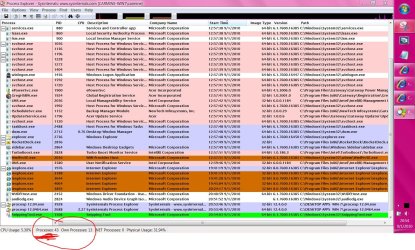
pacinitaly- Your screenshot of running processes look very well in order to me. I can't see where you should change a anything. I can see though that you use Process Explorer which I also like to use for the purpose of checking running programs.

The unneeded processes I mentioned before can be located under Control Panel> Administrative Tools> Services where all the started and unstarted services are listed. For example if you do not use a fax machine you could disable that service or the same with the several services for Media Center if you are not using that program. I have disabled Wi-Fi service on my deaktop for housekeeping reasons since I never use it because I use a wired router, but I keep it enabled on my laptop because I travel with it and I use its wireless modem.

There are also a host of other background services which may be scheduled to run from time to time which you feel you do not need that can be disabled if you choose to. Just remember that services can be restarted just as easily as they were disabled so there is little chance of harm to your computer as long as you keep good notes about which services you changed.

~Maxx~
.
da59fa57.png
 

My Computer

Computer Manufacturer/Model Number
HP HPE 270f
OS
Windows 7 x64 Home Premium
CPU
Intel Core i7 930 @ 2.8 Ghz Socket 1366 LGA
Motherboard
Pegatron Truckee v1.04E41
Memory
8 GB 1366 Mhz DDR3 (PC3-10700) RAM
Graphics Card(s)
ATI Radeon 5770 1 GB DDR5 RAM
Sound Card
Realtech High Definition
Monitor(s) Displays
32" Sony Bravia
Screen Resolution
1366 X 768
Hard Drives
Intel 25nm 120 GB Series 320 SSD HD Tune- 265 MBps Read/ 130 MBps Write

LaCie 1TB + 1TB RAID 0 eSATA Drive HD Tune- 160 MBps Read/ 90 MBps Write
Keyboard
Logitech Illuminated
Mouse
Logitech MX Revolution
Internet Speed
36.4 Mbps Maximum on a 37 Mbps Motorola SB501 Modem
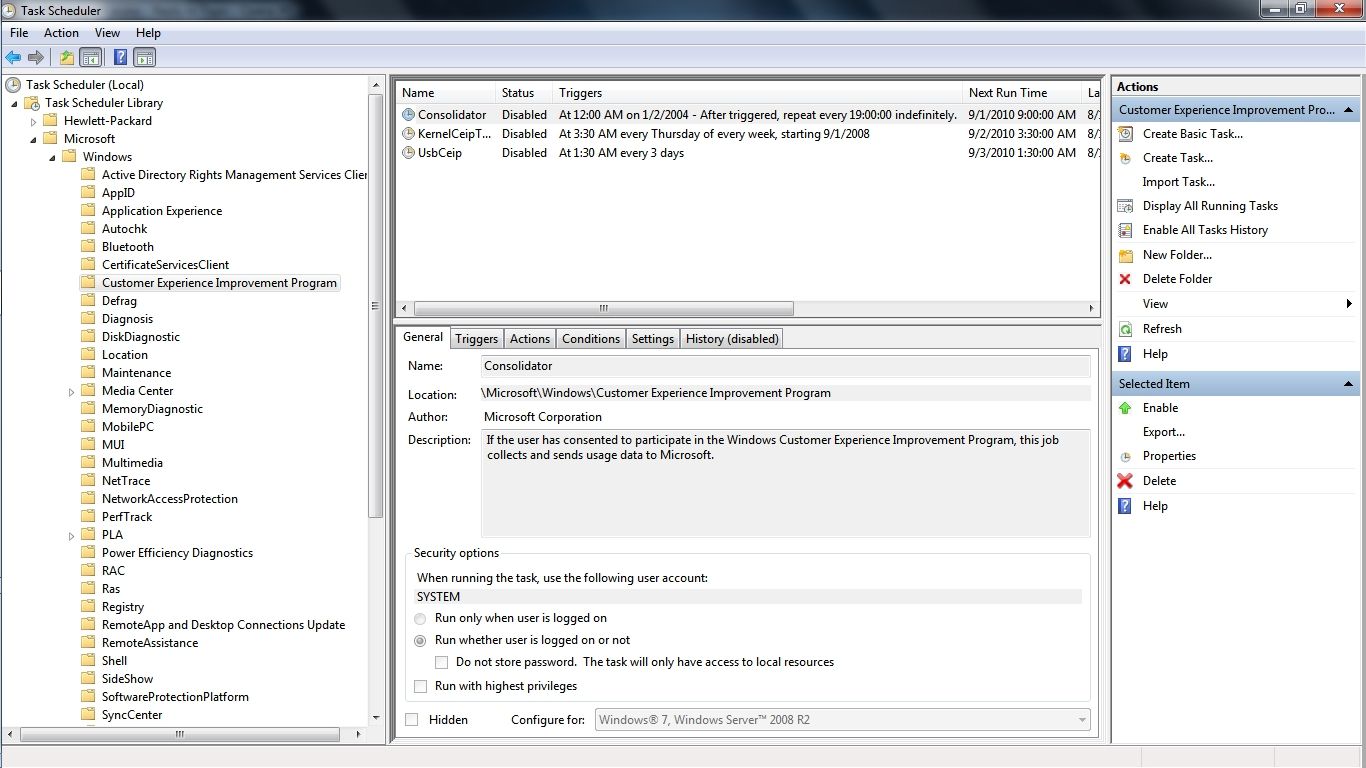
Here is the way that I managed to disable 4 services from 39 down to 35 that ran on my Win 7 computer every day and simultaneously rid my Win 7 cpmputer of daily Microsoft Customer Experience Improvement Program information gathering which continues on for years after the user has opted out of the CEIP program which is a policy which is new to Win 7...

4a5667d1.jpg


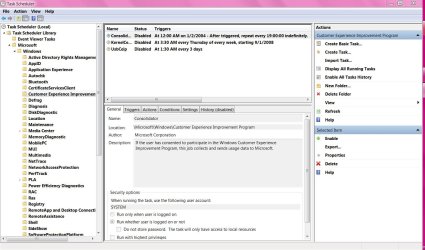
The simple method would be to click Start and type and then click on Task Scheduler. Next go into the file tree and click on Microsoft and all of the scheduled tasks will appear. Select the group of tasks by clicking on the title and by right clicking on any individual task you can select which action you want to take.

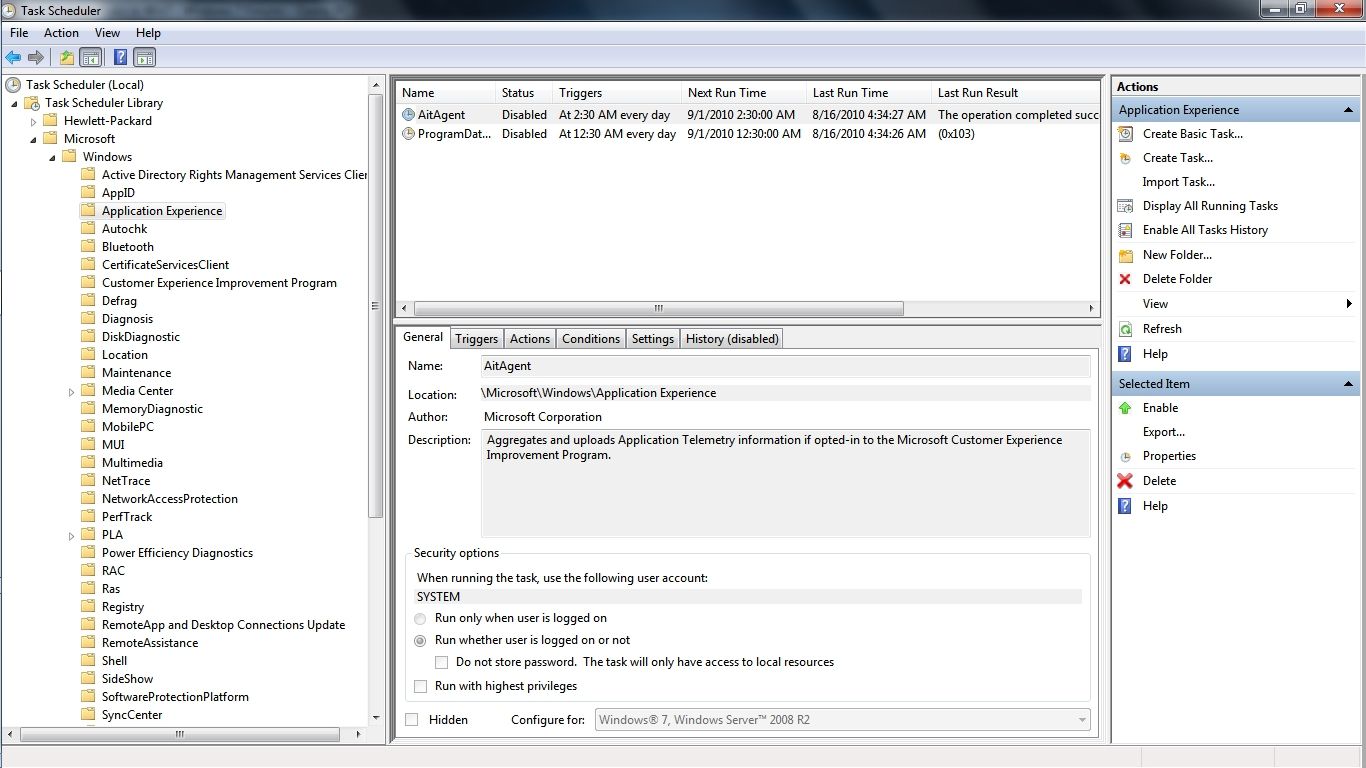
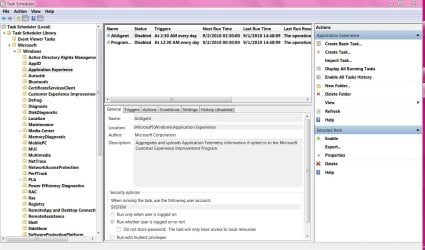
You may notice in the graphic that I have deleted 3 of the scheduled CEIP information gathering tasks under Customer Experience Improvement Program because even though oficially opted out of CEIP in Win 7 the scheduled task information gathering will continue. As I understand this is new to Win 7 and there are even more scheduled CEIP information gathering tasks under Application Experience...

64513911.jpg


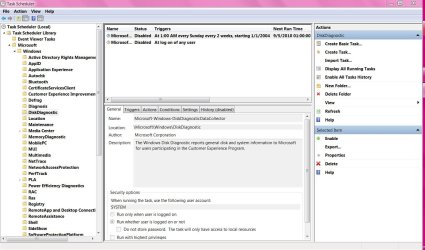
After Disabling these scheduled tasks along with 2 more under the heading DiskDiagnostic my Win 7 computer now boots with 4 less programs starting and running all day and that is my version of a genuine Customer Experience Improvement! I plan on deleting these CEIP information gathering tasks as soon as I am 100% sure that there have been no negative consequences to preventing this information gathering.

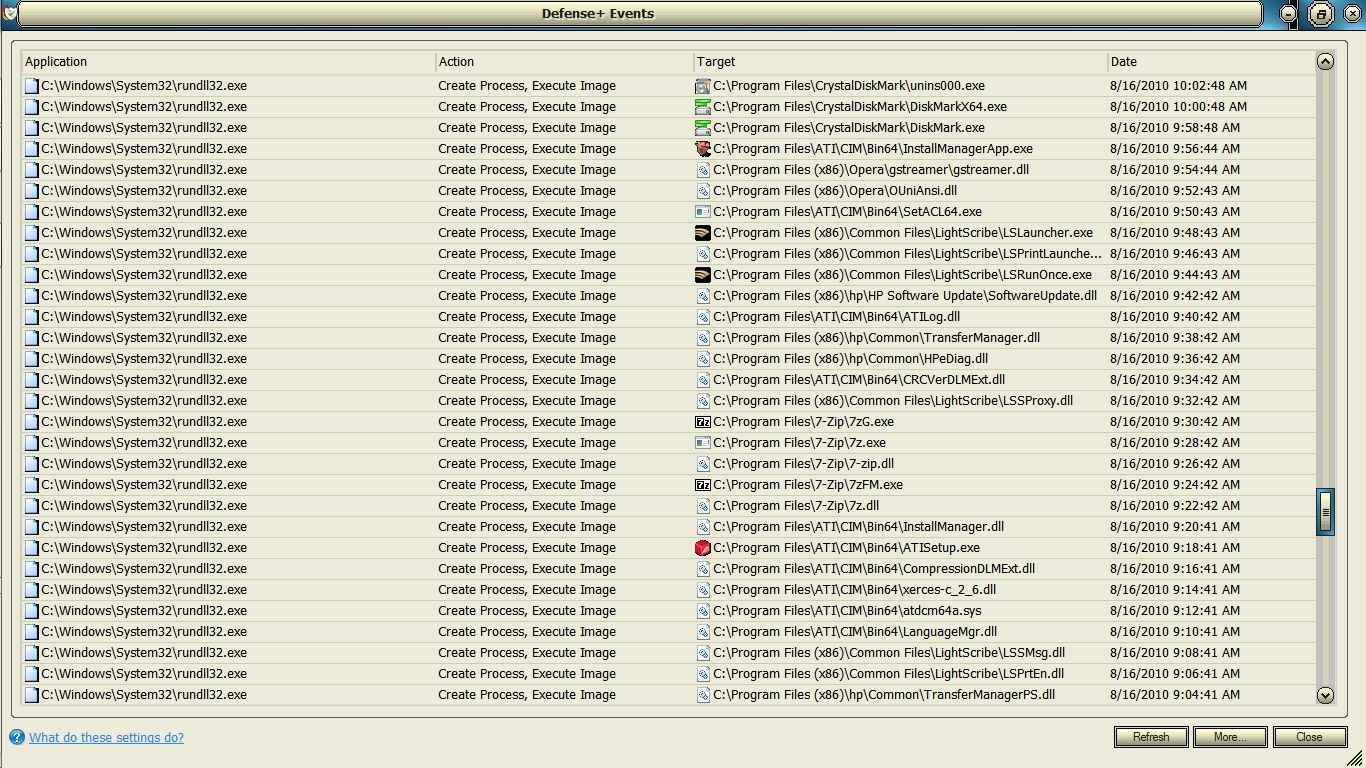
Speaking of which here is the Comodo Defense+ log that shows the scheduled Application Experience information gathering in progress as rundll32.exe silently opens each of the programs on my computer and spends a good 2 minutes examining each one until it starts the next which is what initially started my investigation into this matter. This is just a 1 hour excerpt out of an MS scheduled application information gathering process that went on for hours even though I had officially opted out of CEIP when I first set up the computer...

6f6efd29.jpg


~Maxx~
.
da59fa57.png
 

My Computer

Computer Manufacturer/Model Number
HP HPE 270f
OS
Windows 7 x64 Home Premium
CPU
Intel Core i7 930 @ 2.8 Ghz Socket 1366 LGA
Motherboard
Pegatron Truckee v1.04E41
Memory
8 GB 1366 Mhz DDR3 (PC3-10700) RAM
Graphics Card(s)
ATI Radeon 5770 1 GB DDR5 RAM
Sound Card
Realtech High Definition
Monitor(s) Displays
32" Sony Bravia
Screen Resolution
1366 X 768
Hard Drives
Intel 25nm 120 GB Series 320 SSD HD Tune- 265 MBps Read/ 130 MBps Write

LaCie 1TB + 1TB RAID 0 eSATA Drive HD Tune- 160 MBps Read/ 90 MBps Write
Keyboard
Logitech Illuminated
Mouse
Logitech MX Revolution
Internet Speed
36.4 Mbps Maximum on a 37 Mbps Motorola SB501 Modem

My Computer

Computer Manufacturer/Model Number
Dell and Custom
OS
Systems 1 and 2: Windows 7 Enterprise x64, Win 8 Developer
CPU
System 1: i7 [email protected], System 2: AMD FX-4100 Zambezi 3.6G
Motherboard
System 1:Dell 06NWYK System 2: ASUS M5A97 AM3+
Memory
System 1: 8GB System 2: 8GB
Graphics Card(s)
System 1: ATI FirePro V4800 System 2: Radeon HD 6850
Sound Card
System 1: onboard System 2: onboard
Monitor(s) Displays
System1: Viewsonic HDMI 24"
Screen Resolution
System 1: 1920x1080 System 2: 1920x1080
Hard Drives
System 1: Mirrored .5B drives System 2: Seagate Barracuda ST1000DM003 1TB 7200 RPM 64MB Cache SATA 6.0Gb/s
Case
System 1: Dell System 2: Cooler Master
Internet Speed
10 MBPS
Thanks for your input Lemur...

"I have a little confession. I am slightly obsessed with keeping Windows 7′s running process (when not in use, of course) number below 35. I honestly like to keep it at 30 if you want the truth. I know what your thinking – who cares and why on earth are you worried about how many processes are running on your computer? Well, I like to keep my windows rig running as fast as possible. With as little excess stuff running in the background.

One of the processes that I have permanently stopped is Windows Search. I see no need to have this 3 process feature running in the background scanning and indexing my computer whenever it wants. I know where everything on my computer is located at all times. Therefore I have zero use for these processes. I see no difference in the way my computer searches or acts. Except for, I can’t search for files from the start menu anymore. But that does not concern me at all. A few others that I keep off are Windows Defrag, Offline Files, and some others."

~Maxx~
.
da59fa57.png
 

My Computer

Computer Manufacturer/Model Number
HP HPE 270f
OS
Windows 7 x64 Home Premium
CPU
Intel Core i7 930 @ 2.8 Ghz Socket 1366 LGA
Motherboard
Pegatron Truckee v1.04E41
Memory
8 GB 1366 Mhz DDR3 (PC3-10700) RAM
Graphics Card(s)
ATI Radeon 5770 1 GB DDR5 RAM
Sound Card
Realtech High Definition
Monitor(s) Displays
32" Sony Bravia
Screen Resolution
1366 X 768
Hard Drives
Intel 25nm 120 GB Series 320 SSD HD Tune- 265 MBps Read/ 130 MBps Write

LaCie 1TB + 1TB RAID 0 eSATA Drive HD Tune- 160 MBps Read/ 90 MBps Write
Keyboard
Logitech Illuminated
Mouse
Logitech MX Revolution
Internet Speed
36.4 Mbps Maximum on a 37 Mbps Motorola SB501 Modem
Here ya go.
 

Attachments

  • Capture.JPG
    Capture.JPG
    13.2 KB · Views: 10

My Computer

Computer Manufacturer/Model Number
Toshiba L505
OS
Windows 7 64x
CPU
AMD Turion II Dual-Core Mobile M520 2.30 GHz
Memory
4GB
Graphics Card(s)
ATI Radeon HD 4200
thanks Max, I also disabled the experience and others


very kewl!!!!!!
 

Attachments

  • Capture.JPG
    Capture.JPG
    148 KB · Views: 26
  • Capture2.JPG
    Capture2.JPG
    145.8 KB · Views: 20
  • Capture3.JPG
    Capture3.JPG
    137.8 KB · Views: 18
  • Capture4.JPG
    Capture4.JPG
    142.6 KB · Views: 18
  • Capture5.JPG
    Capture5.JPG
    133.9 KB · Views: 17

My Computer

Computer Manufacturer/Model Number
Gateway/NV7923u & NV79C52u Laptops
OS
windows 7 professional & ultimate 64bit laptops
CPU
2.27 boost to 2.53 & 2.53 boost to 2.80
Motherboard
Mobile Intel® HM55 Express Chipset ???
Memory
4GB
Graphics Card(s)
Intel® Graphics Media Accelerator HD
Sound Card
realtek High-definition audio support
Monitor(s) Displays
17.3 " HD 1600 x 900
Hard Drives
hatachi Travelstar 5400 500GB & west digital 500GB
Internet Speed
35MB fios
Back
Top