When Backup Runs, Windows Reports Backup Target Disk Removed

DrDon995

New member
Local time
4:54 PM
Messages
4
Location
Metro Detroit
My Win 7 x64 machine (Dell) has three hard drives in it. The original 2TB Seagate with the operating system on it, C:, a 2TB WD used for data storage,F:, ..and a 1TB Seagate repurposed from the XP computer it replaced. That last drive contains only data as that was its purpose in the previous machine. There are no programs on it and it's formatted NTFS.

On boot-up, the computer sees the 1TB Seagate as drive E: and it functions just fine until it's time for a Windows Backup. About 30 seconds into the backup, I get the message that "Intel Rapid Storage Technology has detected a disk removed on Port 3." At this point, the backup fails and Windows no longer sees the E: drive until next cold boot. The backup's target is an external Seagate drive J: that is unaffected by any of this.

Yes, I've changed SATA cables. I've changed the Motherboard connection where the E: drive's SATA cable is attached. I've reversed and rerouted cables so there's no odd pressure on any one of them. I've disabled the power-saving settings so the disc spins all the time. Nothing helps.

The E: drive functions just fine until Windows Backup starts, then it acts as if I removed it.

Error code from Windows Backup dialog is 0x80070002 "The system cannot find the file specified."

Suggestions?
 

My Computer My Computer

At a glance

Windows 7 Home Premium x64
OS
Windows 7 Home Premium x64
Can you access the external target drive normally?

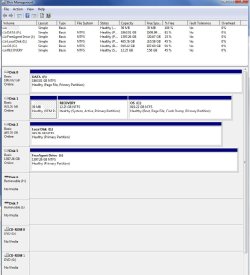
Also, could you post a screencap of Disk Management for us?
(Windows key + R to open Run, then type "diskmgmt.msc")
 

My Computer My Computer

At a glance

Windows 7 Pro x64 SP1AMD Phenom II x6 1090T Black Edition 3.2GHzPatriot G ‘Sector 5’ Edition 8GB (2 x 4GB) 16...
Computer type
PC/Desktop
OS
Windows 7 Pro x64 SP1
CPU
AMD Phenom II x6 1090T Black Edition 3.2GHz
Motherboard
ASUS M4A88TD-V EVO/USB3
Memory
Patriot G ‘Sector 5’ Edition 8GB (2 x 4GB) 1600MHz
Sound Card
(onboard) Realtek® ALC 892 8-Channel High Definition Audio
Monitor(s) Displays
ViewSonic VX2253 22"
Screen Resolution
1920x1080
Hard Drives
Transcend SSD720 2.5" SATAIII 64GB SSD; Western Digital Caviar Green WD20EARS 2TB 64MB 3.5" HDD
LG WH10LS30 10X Blu-ray Burner with LightScribe
PSU
CORSAIR TX Series 950W ATX12V 80 Plus Bronze
Case
Cooler Master HAF X NVidia Edition; 5 Green LED Fans!
Cooling
CORSAIR A70 120mm Dual-Fan
Keyboard
Verbatim 97472 Mini Wireless Slim
Mouse
bundled Verbatim 97472 Wireless
Antivirus
Avast
Browser
Chrome
Other Info
Ultraportable/Desktop Replacement Laptop:
circa Oct 2006,
Dell XPS M1210,
Windows 7 Professional 32-bit,
Intel Core 2 Duo T7200 2.0GHz,
3.25 (4) GB of RAM,
NVidia GeForce Go 7400,
500GB Seagate Momentus 7200RPM HDD
I misspoke on the title. The target drive for the backup is the external J: The drive that disappears when Win Backup runs is internal E:

I can access all directories on all drives.

Image attached.
 

Attachments

  • DiscMgt.jpg
    DiscMgt.jpg
    88 KB · Views: 33

My Computer My Computer

At a glance

Windows 7 Home Premium x64
OS
Windows 7 Home Premium x64
Have you tried starting a new backup from scratch?

I also wonder if, possibly the drives are in a different order than when the Backup was initially set up... I don't know, this is very puzzling. :confused:
 

My Computer My Computer

At a glance

Windows 7 Pro x64 SP1AMD Phenom II x6 1090T Black Edition 3.2GHzPatriot G ‘Sector 5’ Edition 8GB (2 x 4GB) 16...
Computer type
PC/Desktop
OS
Windows 7 Pro x64 SP1
CPU
AMD Phenom II x6 1090T Black Edition 3.2GHz
Motherboard
ASUS M4A88TD-V EVO/USB3
Memory
Patriot G ‘Sector 5’ Edition 8GB (2 x 4GB) 1600MHz
Sound Card
(onboard) Realtek® ALC 892 8-Channel High Definition Audio
Monitor(s) Displays
ViewSonic VX2253 22"
Screen Resolution
1920x1080
Hard Drives
Transcend SSD720 2.5" SATAIII 64GB SSD; Western Digital Caviar Green WD20EARS 2TB 64MB 3.5" HDD
LG WH10LS30 10X Blu-ray Burner with LightScribe
PSU
CORSAIR TX Series 950W ATX12V 80 Plus Bronze
Case
Cooler Master HAF X NVidia Edition; 5 Green LED Fans!
Cooling
CORSAIR A70 120mm Dual-Fan
Keyboard
Verbatim 97472 Mini Wireless Slim
Mouse
bundled Verbatim 97472 Wireless
Antivirus
Avast
Browser
Chrome
Other Info
Ultraportable/Desktop Replacement Laptop:
circa Oct 2006,
Dell XPS M1210,
Windows 7 Professional 32-bit,
Intel Core 2 Duo T7200 2.0GHz,
3.25 (4) GB of RAM,
NVidia GeForce Go 7400,
500GB Seagate Momentus 7200RPM HDD
Just as a suggestion. When you get the message 'could not find the file specified' you should have the option to view the error. I have had that happen to me. What I found out was that it was simply saying that a file referenced had been deleted and could not find 1 specific file to back up. The rest of the backup completed.
 

My Computers My Computers

  • At a glance

    Windows 11 ProRyzen 9 5900X32GB G Skill DDR4-3600EVGA RTX 3080 FTW 3 Ultra
    Computer type
    PC/Desktop
    Computer Manufacturer/Model Number
    ALWAYS UNDER CONSTRUCTION
    OS
    Windows 11 Pro
    CPU
    Ryzen 9 5900X
    Motherboard
    Asus X570 Crosshair Viii Hero
    Memory
    32GB G Skill DDR4-3600
    Graphics Card(s)
    EVGA RTX 3080 FTW 3 Ultra
    Sound Card
    On Board/Sennheiser PC37X Headset
    Monitor(s) Displays
    3 X Asus 27"
    Screen Resolution
    2560x1440
    Hard Drives
    2 X 1 TB NVME drives
    PSU
    EVGA 850
    Case
    Phanteks Eclipse P400A
    Cooling
    EVGA 280 AIO
    Keyboard
    Logitech G510s/ Logitech G13
    Mouse
    Logitech G502
    Internet Speed
    24/1
    Antivirus
    ESET/MBAM Pro/SAS Pro
    Browser
    Chrome/ Firefox/ Edge
  • At a glance

    Windows 11 ProIntel Ultra 9 288V32 GB LPDDR5X 8533
    Computer type
    Laptop
    System Manufacturer/Model Number
    Dell 16 Plus
    OS
    Windows 11 Pro
    CPU
    Intel Ultra 9 288V
    Memory
    32 GB LPDDR5X 8533
    Monitor(s) Displays
    16" Mini-LED HDR600 Touch 90 Hz
    Screen Resolution
    2560X1600
    Hard Drives
    1 TB NVME
Essenbe..

Not that I could find. Even Windows event viewer only shows the above error code.

Doc
 

My Computer My Computer

At a glance

Windows 7 Home Premium x64
OS
Windows 7 Home Premium x64
Though there was still plenty of room on the target drive, I deleted a number of older backups, forced a backup which completed successfully. E: is still available.

Go figure.

Still thinking about rearranging the drives so that the boot drive is on port 0, data drive on port 1 and so on. Or is there any advantage to that under Win 7?
 

My Computer My Computer

At a glance

Windows 7 Home Premium x64
OS
Windows 7 Home Premium x64
There is some debate on that. Conventional wisdom is that the OS should be on port 0. The other drives don't really matter.
 

My Computers My Computers

  • At a glance

    Windows 11 ProRyzen 9 5900X32GB G Skill DDR4-3600EVGA RTX 3080 FTW 3 Ultra
    Computer type
    PC/Desktop
    Computer Manufacturer/Model Number
    ALWAYS UNDER CONSTRUCTION
    OS
    Windows 11 Pro
    CPU
    Ryzen 9 5900X
    Motherboard
    Asus X570 Crosshair Viii Hero
    Memory
    32GB G Skill DDR4-3600
    Graphics Card(s)
    EVGA RTX 3080 FTW 3 Ultra
    Sound Card
    On Board/Sennheiser PC37X Headset
    Monitor(s) Displays
    3 X Asus 27"
    Screen Resolution
    2560x1440
    Hard Drives
    2 X 1 TB NVME drives
    PSU
    EVGA 850
    Case
    Phanteks Eclipse P400A
    Cooling
    EVGA 280 AIO
    Keyboard
    Logitech G510s/ Logitech G13
    Mouse
    Logitech G502
    Internet Speed
    24/1
    Antivirus
    ESET/MBAM Pro/SAS Pro
    Browser
    Chrome/ Firefox/ Edge
  • At a glance

    Windows 11 ProIntel Ultra 9 288V32 GB LPDDR5X 8533
    Computer type
    Laptop
    System Manufacturer/Model Number
    Dell 16 Plus
    OS
    Windows 11 Pro
    CPU
    Intel Ultra 9 288V
    Memory
    32 GB LPDDR5X 8533
    Monitor(s) Displays
    16" Mini-LED HDR600 Touch 90 Hz
    Screen Resolution
    2560X1600
    Hard Drives
    1 TB NVME
I also have the same problem. I am trying to do a backup of a BRAND NEW PC. This will be the first backup of this computer. I have tried 4 times now backing up to two different drives, one internal and one external. In each case I get the message that the last backup did not complete successfully. Troubleshooting only brings up a window to try again or change backup settings. The error code: 0x60070005. I also get an error from the Intel rapid storage technology program IastorUI.exe telling me that it has disconnected my target disk. The target disk will come back to life after a reboot. I then find a directory WindowsImageBackup, but it is empty. My computer keeps telling me to make a backup, but I can't.
 

My Computer My Computer

At a glance

Windows Professional 64 bit
OS
Windows Professional 64 bit
Are you running Raid? If not, hold down the windows key (one with the flag on it) and press R. type services.msc in the search blx press enter and go down the list and find Intel rapid storage. Right click it and select properties, in the box in the middle, click it and select either manual or disabled. That will stop it from disconnecting your drive. Let us know the results.
 

My Computers My Computers

  • At a glance

    Windows 11 ProRyzen 9 5900X32GB G Skill DDR4-3600EVGA RTX 3080 FTW 3 Ultra
    Computer type
    PC/Desktop
    Computer Manufacturer/Model Number
    ALWAYS UNDER CONSTRUCTION
    OS
    Windows 11 Pro
    CPU
    Ryzen 9 5900X
    Motherboard
    Asus X570 Crosshair Viii Hero
    Memory
    32GB G Skill DDR4-3600
    Graphics Card(s)
    EVGA RTX 3080 FTW 3 Ultra
    Sound Card
    On Board/Sennheiser PC37X Headset
    Monitor(s) Displays
    3 X Asus 27"
    Screen Resolution
    2560x1440
    Hard Drives
    2 X 1 TB NVME drives
    PSU
    EVGA 850
    Case
    Phanteks Eclipse P400A
    Cooling
    EVGA 280 AIO
    Keyboard
    Logitech G510s/ Logitech G13
    Mouse
    Logitech G502
    Internet Speed
    24/1
    Antivirus
    ESET/MBAM Pro/SAS Pro
    Browser
    Chrome/ Firefox/ Edge
  • At a glance

    Windows 11 ProIntel Ultra 9 288V32 GB LPDDR5X 8533
    Computer type
    Laptop
    System Manufacturer/Model Number
    Dell 16 Plus
    OS
    Windows 11 Pro
    CPU
    Intel Ultra 9 288V
    Memory
    32 GB LPDDR5X 8533
    Monitor(s) Displays
    16" Mini-LED HDR600 Touch 90 Hz
    Screen Resolution
    2560X1600
    Hard Drives
    1 TB NVME
No, I am not running raid. I am running three internal SATA drives, one is the system disk and the other is just a blank disk, which I am going to use for file storage, the third drive is an external SATA drive. I stopped the "Intel rapid storage service". Tried to do another backup. I got the same error code 0x8007005. Again the target drive was disconnected, but I did not receive the "Intel rapid storage" error. Windows did not complete the backup procedure.
 

My Computer My Computer

At a glance

Windows Professional 64 bit
OS
Windows Professional 64 bit
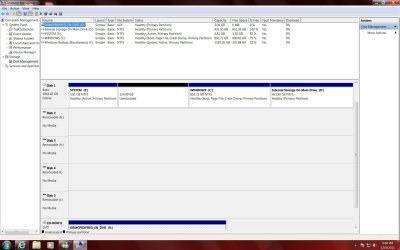
Go to disk management (right click computer, select manage, maximize the screen, in the left column click disk management. Post a screenshot showing the upper and lower sections. If your system reserved (100MB partition) has less than 40MB of free space, a backup will not work.

Also, in the lower left part of your last post, click on My system specs and fill it out as complete as possible. It will help us assist you if we know the hardware we are dealing with.
 

My Computers My Computers

  • At a glance

    Windows 11 ProRyzen 9 5900X32GB G Skill DDR4-3600EVGA RTX 3080 FTW 3 Ultra
    Computer type
    PC/Desktop
    Computer Manufacturer/Model Number
    ALWAYS UNDER CONSTRUCTION
    OS
    Windows 11 Pro
    CPU
    Ryzen 9 5900X
    Motherboard
    Asus X570 Crosshair Viii Hero
    Memory
    32GB G Skill DDR4-3600
    Graphics Card(s)
    EVGA RTX 3080 FTW 3 Ultra
    Sound Card
    On Board/Sennheiser PC37X Headset
    Monitor(s) Displays
    3 X Asus 27"
    Screen Resolution
    2560x1440
    Hard Drives
    2 X 1 TB NVME drives
    PSU
    EVGA 850
    Case
    Phanteks Eclipse P400A
    Cooling
    EVGA 280 AIO
    Keyboard
    Logitech G510s/ Logitech G13
    Mouse
    Logitech G502
    Internet Speed
    24/1
    Antivirus
    ESET/MBAM Pro/SAS Pro
    Browser
    Chrome/ Firefox/ Edge
  • At a glance

    Windows 11 ProIntel Ultra 9 288V32 GB LPDDR5X 8533
    Computer type
    Laptop
    System Manufacturer/Model Number
    Dell 16 Plus
    OS
    Windows 11 Pro
    CPU
    Intel Ultra 9 288V
    Memory
    32 GB LPDDR5X 8533
    Monitor(s) Displays
    16" Mini-LED HDR600 Touch 90 Hz
    Screen Resolution
    2560X1600
    Hard Drives
    1 TB NVME
Dufoe's DM

OK, here is a screen shot of my DM. Drives C: and D: are one drive partioned into two drives. I am not trying to backup Windows to drive D:, because it is on a system disk. I am using drive F: or another drive externally, which is not shown here.
 

Attachments

  • Dufoe's DM.jpg
    Dufoe's DM.jpg
    152.5 KB · Views: 18
Last edited:

My Computer My Computer

At a glance

Windows Professional 64 bit
OS
Windows Professional 64 bit
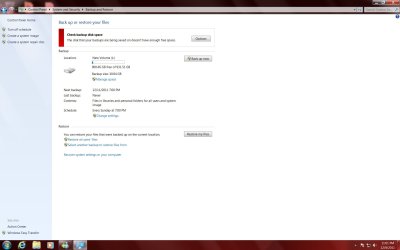
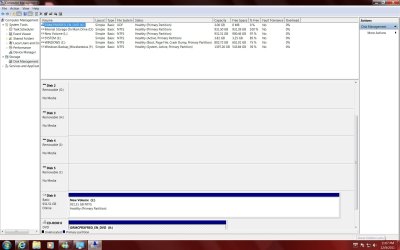
I just tried using a new 1tb external drive to do a backup. My system disk has 202gb of data on it. The backup ran and did not dissconect the target drive, but said that it could not complete the backup. It now tells me that the target disk does not contain enough disk space to do the backup. Are you kidding me? A 931.51 target drive does not have enough room to store 202 gb of data?
 

Attachments

  • Not enough space your kidding.jpg
    Not enough space your kidding.jpg
    81.6 KB · Views: 8
  • Dufoe's 2nd DM.jpg
    Dufoe's 2nd DM.jpg
    148.1 KB · Views: 12

My Computer My Computer

At a glance

Windows Professional 64 bit
OS
Windows Professional 64 bit
Dufoe, If you would, open an elevated command prompt (click start, in the search box type cmd, in the cmd entry that opens right click it and select run as administrator) in the window that opens, copy/paste this sfc /scannow. let that run and let us know the results. Again, please fill out your system specs and let us know what anti virus you are running and if you have or have ever had backup programs such as Acronis installed. The command is a system file checker and will scan system files and attempt to repair any corrupted ones. i am going to ask for some additional help. I am also going to assume you have installed all chipset and motherboard drivers. If not, please do so.
 

My Computers My Computers

  • At a glance

    Windows 11 ProRyzen 9 5900X32GB G Skill DDR4-3600EVGA RTX 3080 FTW 3 Ultra
    Computer type
    PC/Desktop
    Computer Manufacturer/Model Number
    ALWAYS UNDER CONSTRUCTION
    OS
    Windows 11 Pro
    CPU
    Ryzen 9 5900X
    Motherboard
    Asus X570 Crosshair Viii Hero
    Memory
    32GB G Skill DDR4-3600
    Graphics Card(s)
    EVGA RTX 3080 FTW 3 Ultra
    Sound Card
    On Board/Sennheiser PC37X Headset
    Monitor(s) Displays
    3 X Asus 27"
    Screen Resolution
    2560x1440
    Hard Drives
    2 X 1 TB NVME drives
    PSU
    EVGA 850
    Case
    Phanteks Eclipse P400A
    Cooling
    EVGA 280 AIO
    Keyboard
    Logitech G510s/ Logitech G13
    Mouse
    Logitech G502
    Internet Speed
    24/1
    Antivirus
    ESET/MBAM Pro/SAS Pro
    Browser
    Chrome/ Firefox/ Edge
  • At a glance

    Windows 11 ProIntel Ultra 9 288V32 GB LPDDR5X 8533
    Computer type
    Laptop
    System Manufacturer/Model Number
    Dell 16 Plus
    OS
    Windows 11 Pro
    CPU
    Intel Ultra 9 288V
    Memory
    32 GB LPDDR5X 8533
    Monitor(s) Displays
    16" Mini-LED HDR600 Touch 90 Hz
    Screen Resolution
    2560X1600
    Hard Drives
    1 TB NVME
I have done that before, because someone else told me to do that. All system files have integrity, no problems. I kept following the Windows backup error concerning not enough disk space on target drive. Found a message in it that says I need at least a 1.24TB backup drive. It looks like the backup is not only backing up the C: system disk, but also wants to backup the D: drive, which does not contain any data. As I said before the main disk in the computer has been partioned, a 2TB drive, into two drives C: and D:
Drive C: has a total disk space of 802gb, and only 202gb are used.
 
Last edited:

My Computer My Computer

At a glance

Windows Professional 64 bit
OS
Windows Professional 64 bit
I am using Microsoft Security Essentials. I do have Acronis backup program on here. I also did "Bootrec.exe /FixMbr" and hit Enter. This fixed the Windows Boot Loader, removing the Acronis Boot Loader. Attached is my computer system
 

Attachments

My Computer My Computer

At a glance

Windows Professional 64 bit
OS
Windows Professional 64 bit
The System boot files signified by the System flag have been moved from the System partition to F which I assume is your External backup and which we cannot even see on the drive map. This is incorrect and problematic.

You'll need to boot into Win7 DVD, press Shift + F10 at first screen to access a Command Line and use Diskpart to mark F Inactive: Partition - Mark as Inactive - Windows 7 Forums.

Then power down and unplug F so that it won't interfere as the System Boot files are rewritten to System partition, which is marked Active thus ready to receive them.

Boot into the Win7 DVD Repair console on second screen or System Repair Disk to run Startup Repair - Run 3 Separate Times until Win7 starts. Confirm System partition now holds the System flag.

Next plug back in F, move the data off to wipe it using Diskpart Clean Command from an Elevated Command Prompt so that all traces of the boot loader are removed from it.

There should never be any Active partitions except for System which should be in Disk0 position to avoid moving boot files during repairs.
 
Yes, why is F: marked (not labled) as "system" in disk management, thats wierd! Windows backup will try to include this location when backing up. I assume the screenshot was after a failed backup attempt where the F: disk became disconnected.
 

My Computer My Computer

At a glance

Windows 7 Ultimate x64Intel Core2 Quad Q8300 2.5GhzKingston HyperX 4x1GB DDR2 1066MhzAsus/Nvidia 9500GT 1GB
Computer type
PC/Desktop
Computer Manufacturer/Model Number
Self Build
OS
Windows 7 Ultimate x64
CPU
Intel Core2 Quad Q8300 2.5Ghz
Motherboard
Asus P5QD Turbo
Memory
Kingston HyperX 4x1GB DDR2 1066Mhz
Graphics Card(s)
Asus/Nvidia 9500GT 1GB
Sound Card
On-Board HD
Monitor(s) Displays
22" Widescreen TFT
Screen Resolution
1920x1080
Hard Drives
2x 320Gb Seagate SATAII RAID 0
2x 80Gb Seagate SATAII RAID 0
1x 1tb hybrid (8gb ssd)
PSU
650w
Case
ATX
Cooling
140mm front, 120mm Rear, 80mm Chipset + stock CPU and GPU
Keyboard
Plastic one
Mouse
Plastic one
Internet Speed
4Mbps
Other Info
Laptop: HP Elitebook 2560p
i5 @2.7Ghz 4GB DDR3
Drive F: is an internal drive

I am completely dumbfounded. I did the grueling instructions. Windows repair could not repair my Windows installation. I noticed that the Windows partition showed 0mg of space. Repair then suggested to repair by using a backup image. Ha! I can't make a backup image, so can't repair in that method. I then plugged in the F: drive and saw two boot choices Windows 7 pro and Windows 7 (Recovered). I booted using Windows 7 pro and system booted into a generic basic Windows. I then restarted computer and this time chose the Windows 7 (recovered) option. The computer booted up great with all my installed programs. It also reactivated drive F: It looks like the lettering of the C: drive and the F: drive are reversed. It also looks like there are 2 installs of Windows Pro 7 on two different drives. Where's the Aspirin? I am getting a f___king headache.
 

My Computer My Computer

At a glance

Windows Professional 64 bit
OS
Windows Professional 64 bit
Back
Top