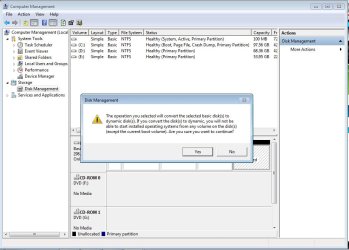
When making new volume from Unallocated disk I'm getting this

Mudasir

New member
Local time
8:12 AM
Messages
6
i was shrink 80 from 130 gb Partition but when iam going to make new volume from Unallocated disk iam getting this
errorvx.jpg


Please help me how can i fix this and what is the problem ?
 

Attachments

  • Error.jpg
    Error.jpg
    97 KB · Views: 38

My Computer My Computer

Computer Manufacturer/Model Number
Dell Inspiron n5010
OS
Windows 7 64bit
CPU
Cori3
Memory
4 gb
Graphics Card(s)
2 gb
Hard Drives
320 gb
Which partition are you trying to shrink ? D or E ? It looks as if you only have the 100 MB unallocated space there. Don`t mess with it.

Can you give us a shot of disk mgmt b4 you attempt anything ?
 

My Computer My Computer

Computer Manufacturer/Model Number
Myself
OS
Windows 7 Ultimate 64Bit
CPU
C2D E8200
Motherboard
XFX 750i
Memory
8GB PNY PC2-6400
Graphics Card(s)
BFG 9600GT x 2
Sound Card
Stock XFX Optical
Monitor(s) Displays
Gateway 22" HD Display
Hard Drives
C: 1 TB G: 500 GB H: 500 GB
PSU
Ultra LSP 550 Pro Lifetime Series
Case
Xion2
Cooling
ThermalTake
Which partition are you trying to shrink ? D or E ? It looks as if you only have the 100 MB unallocated space there. Don`t mess with it.

Can you give us a shot of disk mgmt b4 you attempt anything ?

i was Shrink from E drive and 100 mb drive i think this is recover partition ...
 

My Computer My Computer

Computer Manufacturer/Model Number
Dell Inspiron n5010
OS
Windows 7 64bit
CPU
Cori3
Memory
4 gb
Graphics Card(s)
2 gb
Hard Drives
320 gb
Hi Maudasir and welcome to W7 Forums :party:

You can only have a maximum of 4 primary partitions on a Basic disk. Trying to create another partition will take it over this limit. The only way to do this previously was to make a maximum of 3 primary and 1 extended partitions. The extended partition acts as a container for 1 or more logical partitions, subject to system constraints (drive letter availability).

In older OSes prior to Vista, the only way to achieve this was to convert one of the existing partitions (usually the last listed on the disk) from primary to extended, a procedure that involved making a back-up of all information in the old partition, deleting the old partition and then recreating it as extended, followed by creating as many logical partitions as required subject to the constraints mentioned above, and finally copying the backed-up data back to one of the newly created logical partitions.

Since Vista, things have become easier and, as well as Basic disks (which are the default), you can also have Dynamic disks. You can either allow the system to do the conversion automatically, in which case the volumes (aka partitions) on the disk are converted to the appropriate type without loss of data, or you can convert the disk manually http://www.sevenforums.com/tutorials/26823-convert-basic-disk-dynamic-disk.html.

I recommend that you allow the system to do the conversion automatically, as it will take care of everything for you. Should you have important data that you don't want to lose, back it up prior to converting the disk, whether you do it manually or allow it to be done automatically. We are not responsible for the loss of any data that may, or may not, occur during this procedure.
 

My Computer My Computer

Computer type
PC/Desktop
Computer Manufacturer/Model Number
Dwarf Dwf/11/2012 r09/2013
OS
Windows 8.1 Pro RTM x64
CPU
Intel Core-i5-3570K 4-core @ 3.4GHz (Ivy Bridge) (OC 4.4GHz)
Motherboard
ASRock Z77 Extreme4-M
Memory
4 x 4GB DDR3-1600 Corsair Vengeance CMZ8GX3M2A1600C9B (16GB)
Graphics Card(s)
MSI GeForce GTX770 Gaming OC 2GB
Sound Card
Realtek High Definition on board solution (ALC 898)
Monitor(s) Displays
ViewSonic VA1912w Widescreen (VGA)
Screen Resolution
1440x900
Hard Drives
OCZ Agility 3 SSD 120GB SATA III x2 (RAID 0)
Samsung HD501LJ 500GB SATA II x2
Hitachi HDS721010CLA332 1TB SATA II
Iomega 1.5TB Ext USB 2.0
WD 2.0TB Ext USB 3.0
PSU
XFX Pro Series 850W Semi-Modular
Case
Gigabyte IF233
Cooling
1 x 120mm Front Inlet 1 x 120mm Rear Exhaust
Keyboard
Microsoft Comfort Curve Keyboard 3000 (USB)
Mouse
Microsoft Comfort Mouse 3000 for Business (USB)
Internet Speed
NetGear DG834Gv3 ADSL Modem/Router (Ethernet) ~4.0 Mb/s (O2)
Antivirus
Avast! 8.0.1497
Browser
IE 11
Other Info
Optical Drive: HL-DT-ST BD-RE BH10LS30 SATA Bluray
Lexmark S305 Printer/Scanner/Copier (USB)
WEI Score: 8.1/8.1/8.5/8.5/8.25
Asus Eee PC 1011PX Netbook (Windows 7 x86 Starter)
if i delete the 100 MB partition then ? if yes please let me know how to delete 100 mb disk
 

My Computer My Computer

Computer Manufacturer/Model Number
Dell Inspiron n5010
OS
Windows 7 64bit
CPU
Cori3
Memory
4 gb
Graphics Card(s)
2 gb
Hard Drives
320 gb
Back
Top