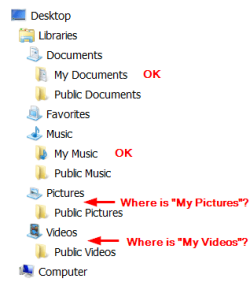
Where are "My Pictures" and "My Videos"?

OldGrantonian

New member
Member
Local time
5:19 PM
Messages
52
Location
Scotland
.
In Win Explorer, I can see the following folders. The drive letter refers to the physical partition where the actual files are located.

Libraries\Documents\My Documents (E)
Libraries\Documents\Public Documents (C)

Libraries\Music\My Music (E)
Libraries\Music\Public Music (C)

Libraries\Pictures\Public Pictures (C)

Libraries\Videos\Public Videos (C)

How do I create or find "My Pictures" and "My Videos", so that I can move them to the E partition?

Is it possible to move the Public files to E in order to release space on the C partition?

Thanks.
.
 

My Computer My Computer

At a glance

Win 7 64-bit Home Premium4 GB
Computer type
Laptop
Computer Manufacturer/Model Number
Dell Inspiron 17R
OS
Win 7 64-bit Home Premium
Memory
4 GB
They should be located in C:\Users\<your user name>\
 

My Computer My Computer

At a glance

Windows 10 Pro x64, Windows 8.1 Pro x64, Wind...INTEL i9-7920X LGA 206664 GB (4 X 16 GB) G-Skill V Series DDR4 3200 ...EVGA GTX 1060 SC 3 GB
Computer type
PC/Desktop
Computer Manufacturer/Model Number
Custom Built
OS
Windows 10 Pro x64, Windows 8.1 Pro x64, Windows 7 Ultimate x64 SP1,
CPU
INTEL i9-7920X LGA 2066
Motherboard
Gigabyte X299-WU8 F3
Memory
64 GB (4 X 16 GB) G-Skill V Series DDR4 3200 Quad Channel
Graphics Card(s)
EVGA GTX 1060 SC 3 GB
Sound Card
Realtek Onboard ALC1220
Monitor(s) Displays
2 x Samsung S27E310
Screen Resolution
1920x1080
Hard Drives
Samsung 2 x 970 EVO Plus 500 GB NVMe
1 x 6TB WD 6003FZBX SATA
1 x 6TB WD 60EFRX SATA
12 x 3TB WD 30EFRX SATA
PSU
Seasonic X-1050
Case
Thermaltake Armor+
Cooling
Corsair H80i V2 Liquid AOI Cooler
Keyboard
Logitech G510s
Mouse
Logitech MX Master 2S
Internet Speed
200 Mb/s
Antivirus
ESET NOD32 13.1
Browser
EDGE (Dev, Canary, Beta), Chrome
Other Info
ASUS RT-AC68U router
Malwarebytes 4.0.4
They should be located in C:\Users\<your user name>\

The only "My" folder at your suggested location is "My Documents".

This folder is "Access denied". Presumably because the actual files are on the E partition.
.
 

My Computer My Computer

At a glance

Win 7 64-bit Home Premium4 GB
Computer type
Laptop
Computer Manufacturer/Model Number
Dell Inspiron 17R
OS
Win 7 64-bit Home Premium
Memory
4 GB
Are you able to see all folders that are hidden too.

For "Access denied" you did not click the correct "My Documents".
One is yours, as the other is locked for system only, nothing to do with other partition.

C:\Users\<your user account name>

What is stated in the folders of your user account name, is using Windows system.
There are no relation to other partitions, unless your created before.


Looking at your 1st post, you did make changes to point My Documents and My Music to partition E:

Hence, you had already overwrite Windows system.

By Default, if you deleted any of your USER in the C:\Users you may damaged unknown issue to be happened.

If you want to SAVE any documents, music from the C:\Users\<your user account name> then do save to another location.
Just do not do anything to remove &or delete your user-account-name from C:\Users folders.

If you want to resolve your this issue, other will able to assist you further.
Then seek others to assist you on this matter, as i am not able to.
 

My Computer My Computer

At a glance

Windows 7 x64
Computer type
Laptop
Computer Manufacturer/Model Number
Toshiba L630 and L735
OS
Windows 7 x64
Hard Drives
240 GB SSD
Where are "My Pictures" and "My Videos"?

If you cannot locate in as stated, your user may be a problem.

Since you can see My Documents "Denied access" and cannot see the other "My Pictures" and "My Videos"

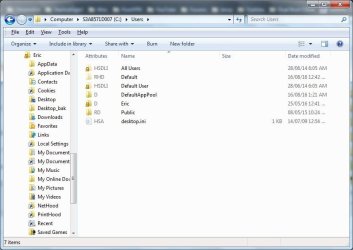
Do a screenshot on the C:\Users expanded, as there are others such as; Default, Default user, All Users

Then others would assist you.

As you can see, both "My Pictures" and "My Videos" are also available in my user.
 

Attachments

  • Users_list.jpg
    Users_list.jpg
    47.8 KB · Views: 1

My Computer My Computer

At a glance

Windows 7 x64
Computer type
Laptop
Computer Manufacturer/Model Number
Toshiba L630 and L735
OS
Windows 7 x64
Hard Drives
240 GB SSD
Are you able to see all folders that are hidden too.

All hidden folders are visible.

For "Access denied" you did not click the correct "My Documents".
One is yours, as the other is locked for system only, nothing to do with other partition.

C:\Users\<your user account name>

What is stated in the folders of your user account name, is using Windows system.
There are no relation to other partitions, unless your created before.


Looking at your 1st post, you did make changes to point My Documents and My Music to partition E:

Hence, you had already overwrite Windows system.

By Default, if you deleted any of your USER in the C:\Users you may damaged unknown issue to be happened.

If you want to SAVE any documents, music from the C:\Users\<your user account name> then do save to another location.
Just do not do anything to remove &or delete your user-account-name from C:\Users folders.

If you want to resolve your this issue, other will able to assist you further.
Then seek others to assist you on this matter, as i am not able to.

All movement of folders was done according to MS instructions, and using available MS dialog boxes, for example, here:

move the My Documents folder to another drive - Microsoft Community

It's all point-and-click. I can move the folders back to C at any time. Everything is done behind the scenes. I'm never aware that My Documents are actually on E. As far as I'm concerned, I have no E partition.

Have a try yourself, but without the final "OK" :-)
.
 

My Computer My Computer

At a glance

Win 7 64-bit Home Premium4 GB
Computer type
Laptop
Computer Manufacturer/Model Number
Dell Inspiron 17R
OS
Win 7 64-bit Home Premium
Memory
4 GB
Thanks for the info.

I did not know about this.
 

My Computer My Computer

At a glance

Windows 7 x64
Computer type
Laptop
Computer Manufacturer/Model Number
Toshiba L630 and L735
OS
Windows 7 x64
Hard Drives
240 GB SSD
I can move the folders back to C at any time.

And if I do, AFAIK, the "My Documents" folder in Users will no longer be "Access denied". The physical files will be then be in Users, not in E. Therefore, they will be using valuable space on my system partition. And, of course, they will disappear if I lose the system partition.
.


.
 

My Computer My Computer

At a glance

Win 7 64-bit Home Premium4 GB
Computer type
Laptop
Computer Manufacturer/Model Number
Dell Inspiron 17R
OS
Win 7 64-bit Home Premium
Memory
4 GB
Thanks for the info.

Glad to be of service :-)

I know from long experience that I'm one of the least techie users on this forum. So if I can do it - anyone can.

The user in my link above referred to XP. In those days, there were no symbolic links in Windows, so the physical files had actually to be moved by simple copy and paste. But after that, there were half a dozen registry changes to replace "C" by "E" (or whatever). As I said, If I can do it....... :-)
.
 

My Computer My Computer

At a glance

Win 7 64-bit Home Premium4 GB
Computer type
Laptop
Computer Manufacturer/Model Number
Dell Inspiron 17R
OS
Win 7 64-bit Home Premium
Memory
4 GB
Please follow the screen shot to find the path location-
 

Attachments

  • 1.png
    1.png
    38.7 KB · Views: 19

My Computer My Computer

At a glance

Windows 7 Home Premium x64SamsungSamsungNVIDIA
Computer type
Laptop
Computer Manufacturer/Model Number
Samsung
OS
Windows 7 Home Premium x64
CPU
Samsung
Motherboard
Samsung
Memory
Samsung
Graphics Card(s)
NVIDIA
Hard Drives
Samsung
Antivirus
ESET NOD32
Browser
Internet Explorer
I think some of the generous responders might be assuming that I have lost some FILES.

I have all the files that I should have. But I'm missing two library folders: "My Pictures" and "My Videos". I hardly ever use these library folders, therefore I have no idea how long they have been missing. The virtual files that would should be under those folders exist in "Users", as real files.

For completeness, and because I've started taking more photos, I would like to have at least "My Pictures" back to it's previous location. The files that should be under My Pictures are in Users, so that's not a problem.

The attached screenshot illustrates everything that's in my OP. In other words:

- I have a "My Documents" folder and a "My Music" folder.
- I don't have a "My Pictures" folder or a "My Videos" folder.

Question: How do I restore the missing folders that I used to have?
.
 

Attachments

  • WinLibraries.png
    WinLibraries.png
    6.6 KB · Views: 15

My Computer My Computer

At a glance

Win 7 64-bit Home Premium4 GB
Computer type
Laptop
Computer Manufacturer/Model Number
Dell Inspiron 17R
OS
Win 7 64-bit Home Premium
Memory
4 GB
Click on Pictures (in the library menu as shown in your screen shot)
Then click on the blue "includes one location"
Select Add
Then select the My Pictures folder. Select Include

Do the same for Videos
 

My Computer My Computer

At a glance

Windows 10 Pro x64, Windows 8.1 Pro x64, Wind...INTEL i9-7920X LGA 206664 GB (4 X 16 GB) G-Skill V Series DDR4 3200 ...EVGA GTX 1060 SC 3 GB
Computer type
PC/Desktop
Computer Manufacturer/Model Number
Custom Built
OS
Windows 10 Pro x64, Windows 8.1 Pro x64, Windows 7 Ultimate x64 SP1,
CPU
INTEL i9-7920X LGA 2066
Motherboard
Gigabyte X299-WU8 F3
Memory
64 GB (4 X 16 GB) G-Skill V Series DDR4 3200 Quad Channel
Graphics Card(s)
EVGA GTX 1060 SC 3 GB
Sound Card
Realtek Onboard ALC1220
Monitor(s) Displays
2 x Samsung S27E310
Screen Resolution
1920x1080
Hard Drives
Samsung 2 x 970 EVO Plus 500 GB NVMe
1 x 6TB WD 6003FZBX SATA
1 x 6TB WD 60EFRX SATA
12 x 3TB WD 30EFRX SATA
PSU
Seasonic X-1050
Case
Thermaltake Armor+
Cooling
Corsair H80i V2 Liquid AOI Cooler
Keyboard
Logitech G510s
Mouse
Logitech MX Master 2S
Internet Speed
200 Mb/s
Antivirus
ESET NOD32 13.1
Browser
EDGE (Dev, Canary, Beta), Chrome
Other Info
ASUS RT-AC68U router
Malwarebytes 4.0.4
You can try what pbcopter has suggested, or you can open your Users Folder. To do that, click on Computer, then click on Local Disc [C:] & select your Users Folder. Scroll down to find the Folder you want & Right Click on it & select Include in Library, selecting the appropriate Library to have it included in.

Libraries are a bit like short cuts in that the actual files are not actually stored in them, & they act as a convenient place to find them easily.
 

My Computer My Computer

At a glance

Windows 7 Home Premium 64 bit sp1Intel i5 3570 3.4Ghz Ivy Bridge SKT 1155 quad...G-Skill Rip Jaws 16Gb (8x2) DDR3 -1600 PC3 12...Gigabyte NVIDIA GT610 1Gb DDR3 810/1200 PCI-E...
Computer type
PC/Desktop
Computer Manufacturer/Model Number
Self built using existing case
OS
Windows 7 Home Premium 64 bit sp1
CPU
Intel i5 3570 3.4Ghz Ivy Bridge SKT 1155 quad core
Motherboard
Gigabyte Z77-HD3 SKT 1155 2xSata 3, 4x USB 3.0
Memory
G-Skill Rip Jaws 16Gb (8x2) DDR3 -1600 PC3 12800 CL 10 red
Graphics Card(s)
Gigabyte NVIDIA GT610 1Gb DDR3 810/1200 PCI-E 2.0 Silent
Sound Card
NVIDIA High Definition & Realtech High Definition Audio
Monitor(s) Displays
2 x Philips 226V4L 16:9 aspect ratio
Screen Resolution
1920 x 1080 HD
Hard Drives
Samsung 840 Pro 256gb SSD, SATA 3.
Hitachi Touro Portable 1tb, USB 3.0 HDD used for image b/ups.
PSU
Corsair VS450
Case
Codeng
Cooling
PSU fan & CPU fan
Keyboard
Logitech
Mouse
Logitech Wireless trackball M570
Internet Speed
Wireless 3G. 3mg down & 550kb up.
Antivirus
Bitdefender Internet Security 2020
Browser
Opera (Current Version) & Firefox
Other Info
MS Office 2013 Pro. Davis weather station software. MGE Nova 600 avr UPS.
Back
Top