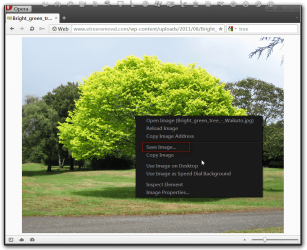
I dowloaded a wallpaper by right-clicking on the image and selecting use image on desktop. I want to download a few more, but I don't see them in Personalize.
The brower is Opera. I didn't notice the image in Desktop Backgrounds < Personalize because it is an icon and not a thumbnail. Why is it an icon? When I open the image from Pictures, I get:
Windows Photo Viewer can't open this picture because either Photo Viewer doesn't support this file format, or you don't have the latest updates to Photo Viewer.
The brower is Opera. I didn't notice the image in Desktop Backgrounds < Personalize because it is an icon and not a thumbnail. Why is it an icon? When I open the image from Pictures, I get:
Windows Photo Viewer can't open this picture because either Photo Viewer doesn't support this file format, or you don't have the latest updates to Photo Viewer.
You should do what koolkat77 said to do in post #2 and use the Save image then you will get a Save as window and make sure it is saving it as a .jpg and put it in a folder in a known location, I have mine in a wallpaper folder in my documents.
When you use the Use Image on Desktop in Opera it does not save it as a .jpg it saves it as a .bmp and corruptes it's and Opera also saved it in my C:\Users\Jerry\Pictures folder. That is why you did not see it in the photo viewer because Opera saved it as a .bmp and corrupted it.
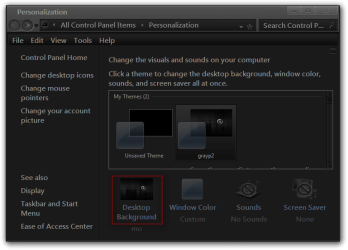
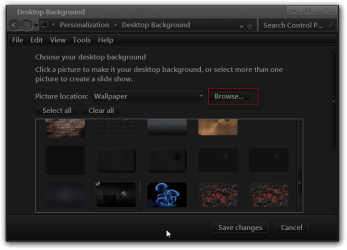
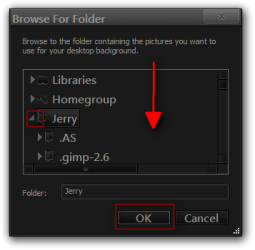
After you have saved all the pictures in the same folder in that known location, once you are in Personalization go to Desktop Wallpapers click on the Browse button and navigate using the little arrow buttons and drill down to the known folder location where you saved all the pictures and then click OK.
Jerry
My Computer
Computer type
Laptop
Computer Manufacturer/Model Number
Sager NP9170
OS
Win 7 Pro x64 / Win 10 Pro
CPU
Intel(R) Core(TM) i7-3630QM CPU @ 2.40GHz
Motherboard
CLEVO P170EM
Memory
12 GB
Graphics Card(s)
(1) Intel(R) HD Graphics 4000 (2) NVIDIA GeForce GTX 675M
Sound Card
(1) Realtek High Definition Audio (2) Intel(R) Display Aud
Monitor(s) Displays
17.3
Screen Resolution
1920x1080
Hard Drives
(1) Samsung 860 EVO 500GB(OS) (1) Samsung 860 EVO 500GB(Data)
Keyboard
Backlite
Antivirus
MSE, Malwarebytes Pro
Browser
Firefox
Other Info
DESKTOP: Custom-built.
OS: Win 10 Pro x64.
CASE: Rosewill R5.
CPU: Intel I5 4670K CPU @ 3.40GHz.
CPU COOLER: Cool Master Hyper 212 EVO.
MOTHERBOARD: Asus Z87-A.
MEMORY: Kingston HyperX 2x4 GB.
GPU: Nvidia Geforce 650 TI.
PSU: Corsair TX750.
DRIVES: (1) Samsung 840 120 GB SSD (2) Western Digital blue 500 GB 7200 RPM.
2.2GHz Intel Pentium dual-core B960 processor with 2MB L3 ca
Memory
8GB DDR3
Graphics Card(s)
Intel HD Graphics with 128MB of dedicated system memory
Monitor(s) Displays
17.3" Ultrabright HD widescreen LED-backlit LCD
Screen Resolution
1280 X 1024
Hard Drives
1TB hard drive-1000 GB HDD
DVD-Super Multi DL drive
PSU
Intel B960 processor
Case
XXXXX
Cooling
XXXXX
Keyboard
Multi Gesture Touchpad
Mouse
USB - portable mouse... I added this
Antivirus
Avast
Browser
I E 10
Other Info
I see nothing about Motherboard info.
I'm not sure about Sound Card
Ports :(3) USB 2.0, (1) HDMI, (1) VGA, (1) Headphone out, (1) Microphone in, (1) Ethernet LAN
•Fast Wi-Fi wireless and wired Gigabit Ethernet networking
•HDMI output
•Kensington lock slot
I have no idea what all this actually means